Visualização de leitura

Using functional AI to automate document workflows

A recent study conducted by Nitro found that 75-95% of the employees and executives surveyed use AI for document processing—including data extraction, PDF tasks, and contract summaries.

However, when these individuals don’t have access to the right kind of AI tools, they report turning to unapproved—or shadow IT—solutions to speed up workflows, which creates security and compliance risk.

Read the report

To reinforce the importance of providing teams with the right AI tool for the right job, let’s look at the difference between chatbots and functional AI in terms of automating document workflows.

Chatbots are great for ad hoc tasks that follow a pre-programmed set of actions, but they aren’t designed to enforce consistent rules for formatting, redaction, or compliance, or to extract data hidden deep in document tables, images, or free text.

Unlike chatbots, functional AI can physically execute redaction, conversion, and data extraction tasks directly within business processes and systems, rather than simply responding to prompts.

This guide explains why scaling document workflows requires both conversational AI to answer common questions and functional AI to perform repeatable tasks on a high volume of documents with consistency, control, and predictable cost.

Chatbots vs. functional AI: What’s the difference?

Chatbot AI and functional AI play distinct roles in document workflows: AI-assisted chatbots answer questions and help users understand documents through conversation. Functional AI performs tasks directly on documents, such as redaction, data extraction, and file conversion.

What chatbots and functional AI do best:

Chatbots:

  • Respond to prompts and questions
  • Help summarize or generate content
  • Improve individual productivity

Functional AI:

  • Execute document tasks automatically
  • Process files at scale
  • Integrate into workflows and systems

Benefits of using functional AI to automate document workflows at scale
Using Functional AI to Automate Document Workflows - image 2

Nitro

Functional AI tools autonomously execute editing, redaction, conversion, and data extraction tasks within workflows, not just through user prompts. This intelligent automation provides several benefits for teams that process a high volume of documents:

Improve redaction and compliance

AI can identify and remove sensitive information across large document sets, applying consistent rules without relying on manual review.

Simplify conversion and document handling

Users can reduce friction and save time using the same tool to convert files, edit PDFs, and standardize formats within a single workflow.

Extract structured and unstructured data

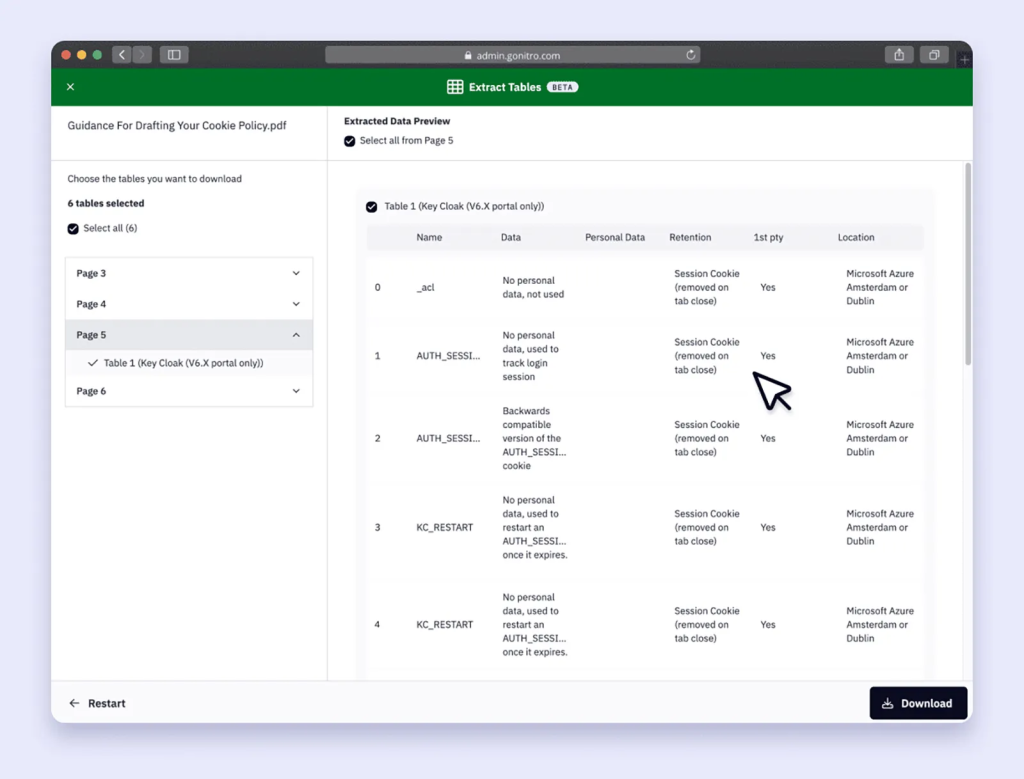
Functional AI can pull key data from contracts, forms, tables, handwritten notes, and PDFs, turning static documents into usable information.

Reduce tool sprawl and shadow IT

By consolidating document tasks into a single platform, functional AI reduces the need for multiple point solutions and unapproved tools.

Perfectly provision license utilization

Universal access to core document features allows organizations to align licenses with actual usage instead of over- or under-provisioning.

Create more predictable software costs

Replacing fragmented tools that incur usage-based overages with a functional AI solution that offers a controllable pricing structure makes costs easier to forecast and control.

How Nitro’s AI-powered tools fit into document workflows

Nitro understands the importance of giving your team the right AI tools at the right time. So, we offer both generative AI and functional AI solutions that support and simplify document workflow automation.

Nitro’s AI assistants improve how teams interact with documents

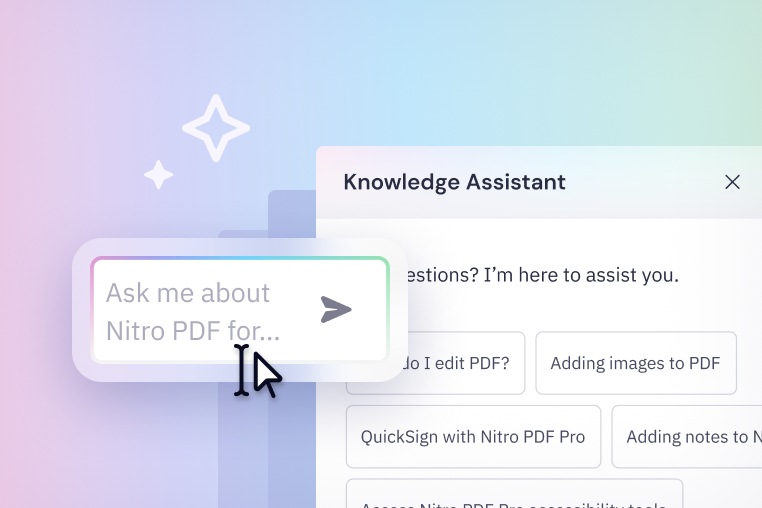
Nitro’s AI-assisted solutions, like Document Assistant and Knowledge Assistant, reduce time spent searching for information or learning how to use our solutions.

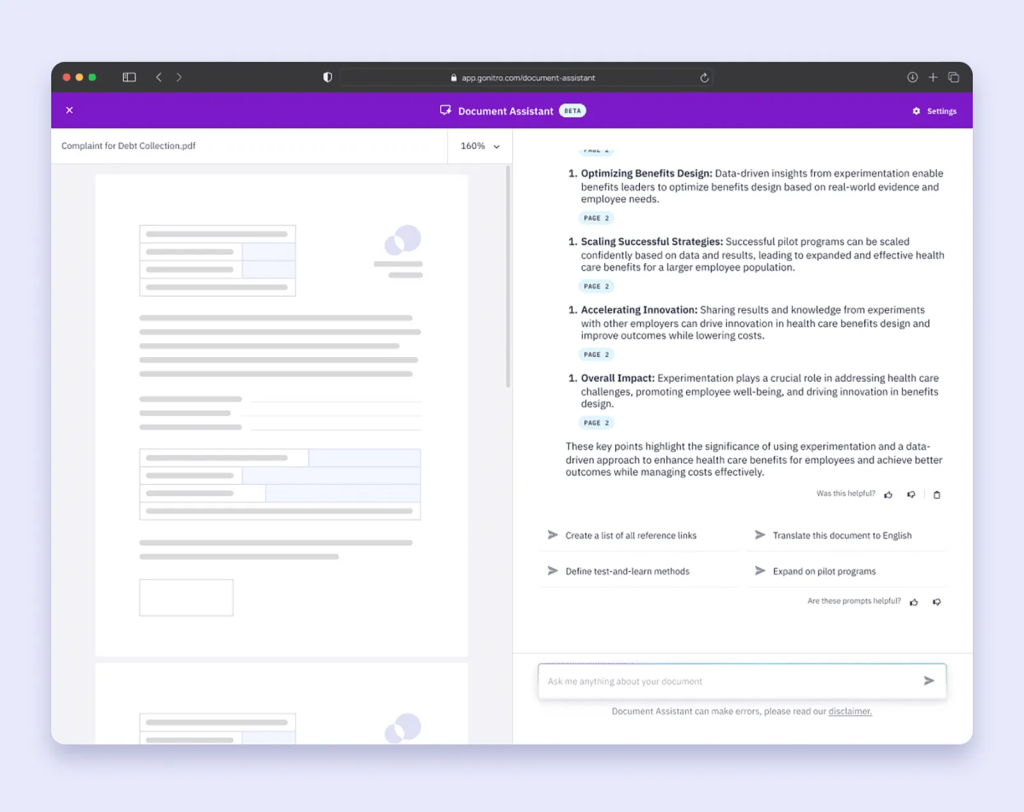
  • Document Assistant: Allows users to ask questions about a PDF, summarize content, or translate information
  • Knowledge Assistant: Provides real-time help with product features and workflows

Nitro’s functional AI tools automate document tasks at scale

Nitro’s functional AI tools reduce manual effort, improve accuracy, and allow teams to handle higher document volumes without increasing workload.

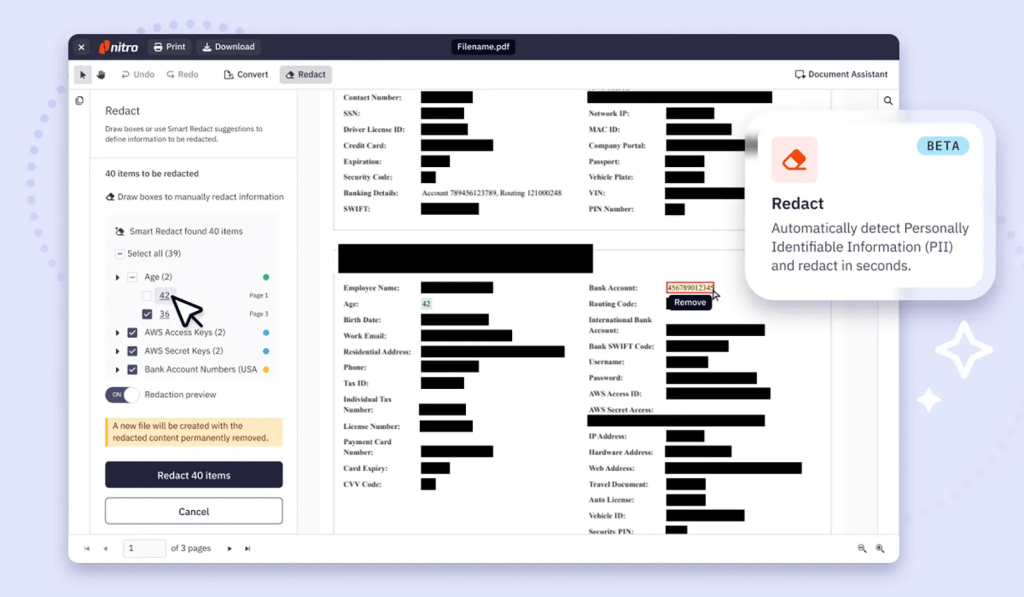
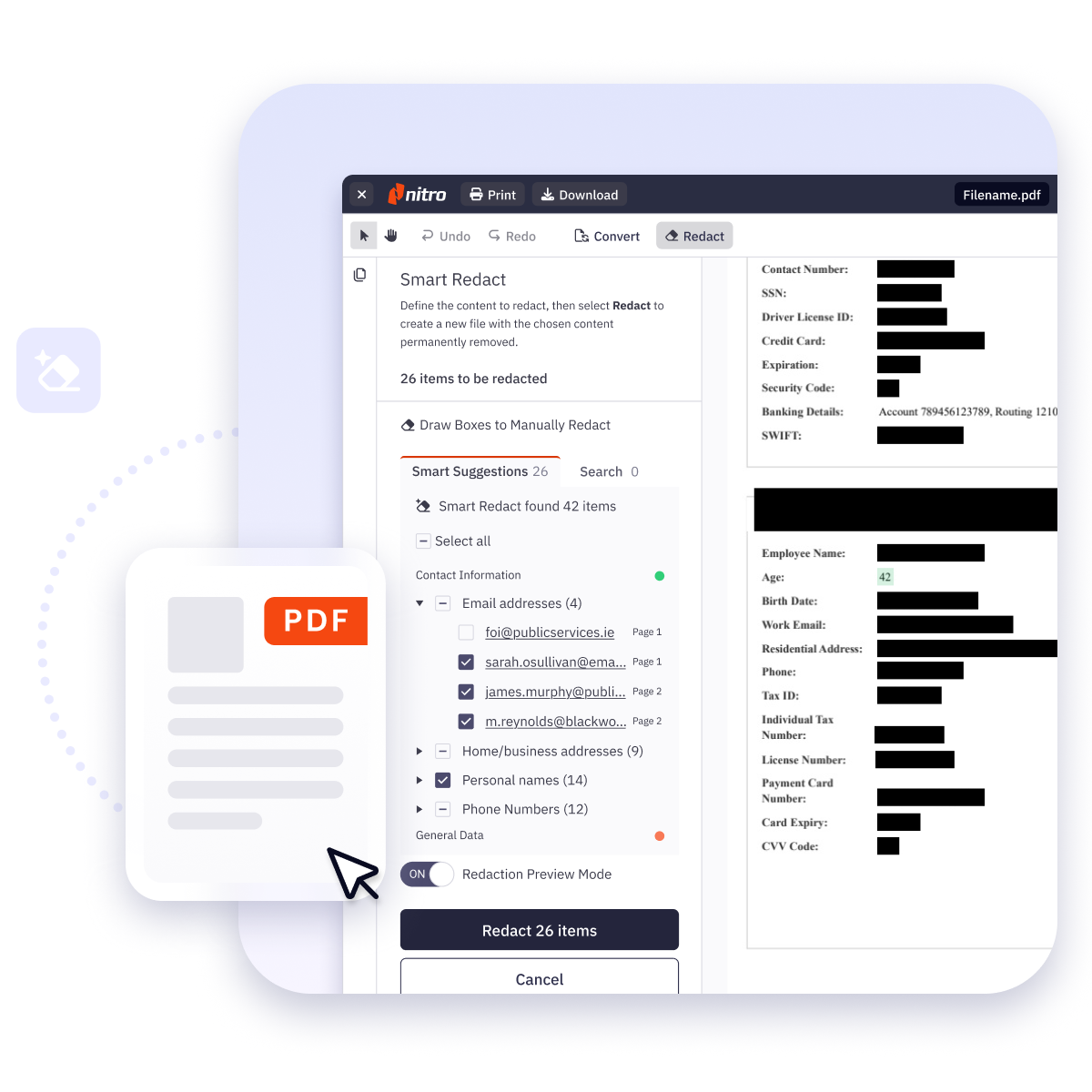
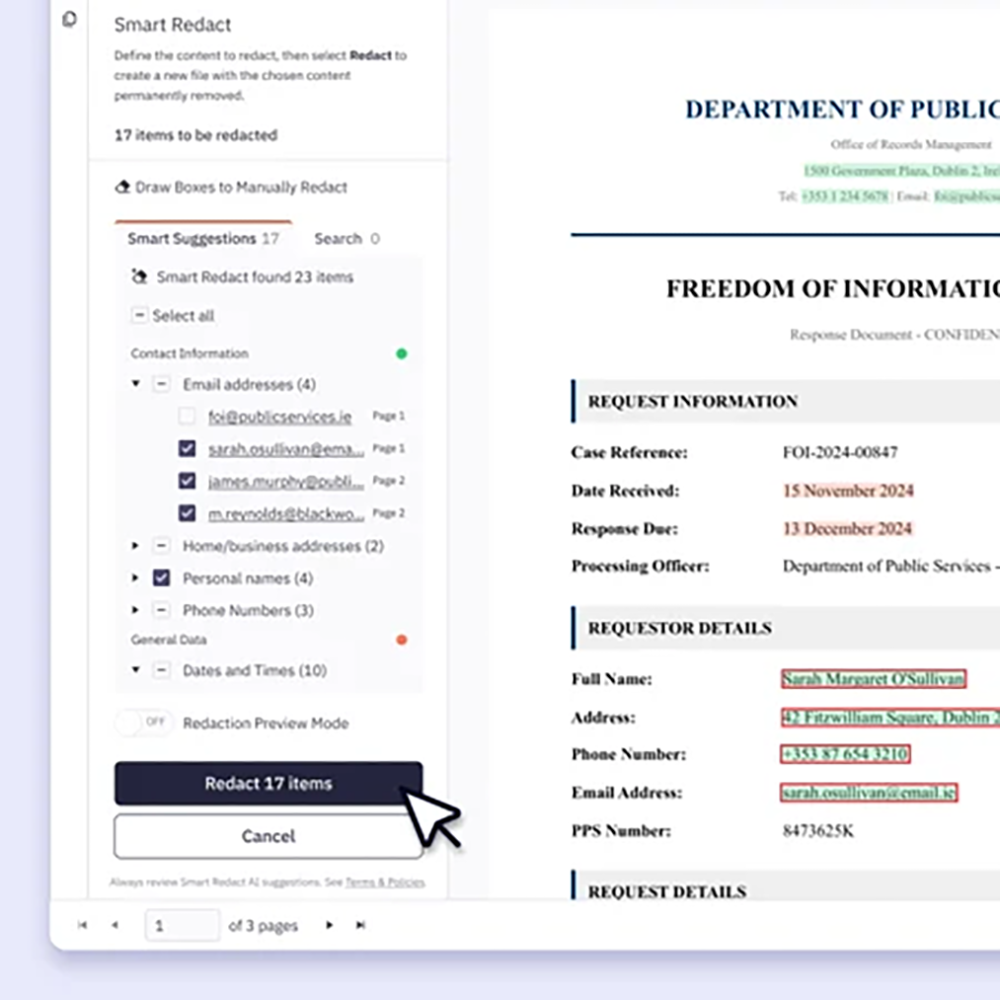
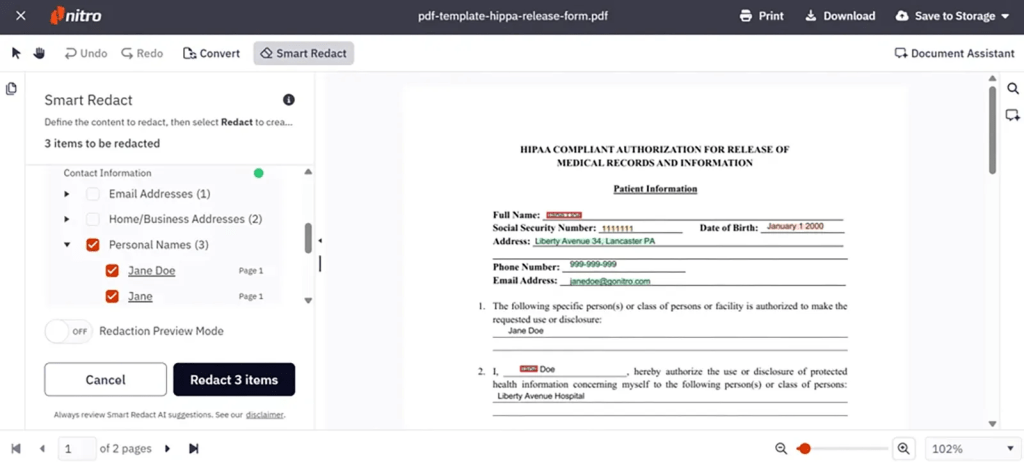
  • Nitro Smart Redact: Identifies sensitive information in documents and flags it for removal, reducing manual review time
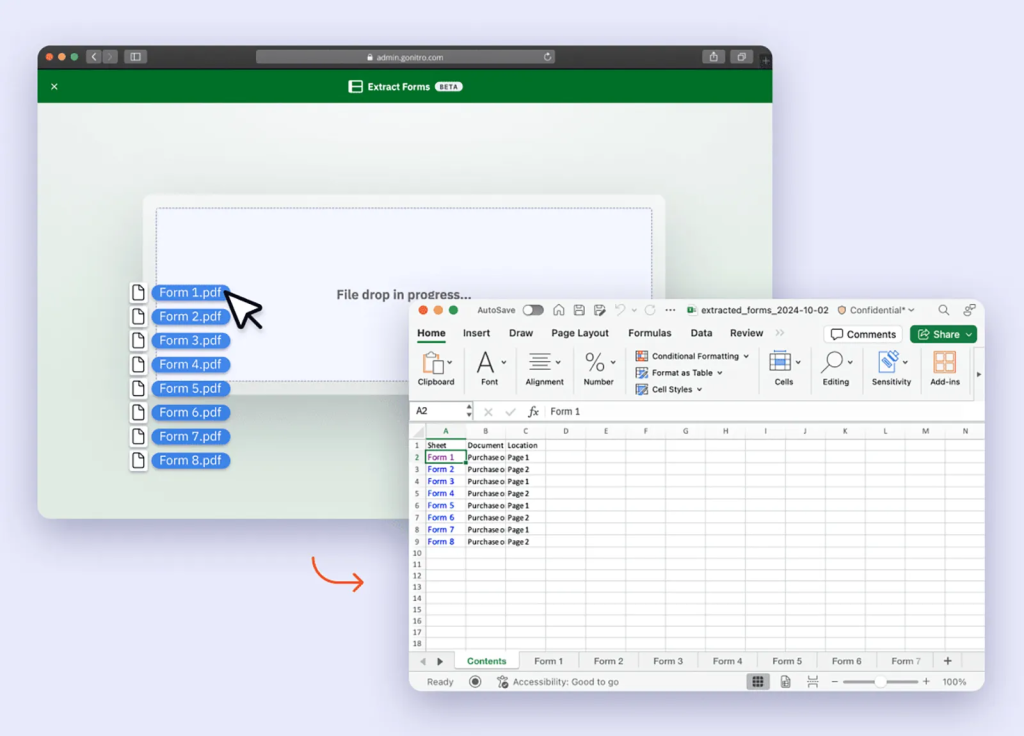
  • Form Extract: Pulls key information from PDFs and converts it into structured data
  • Table Extract: Transforms table data into clean, usable spreadsheets
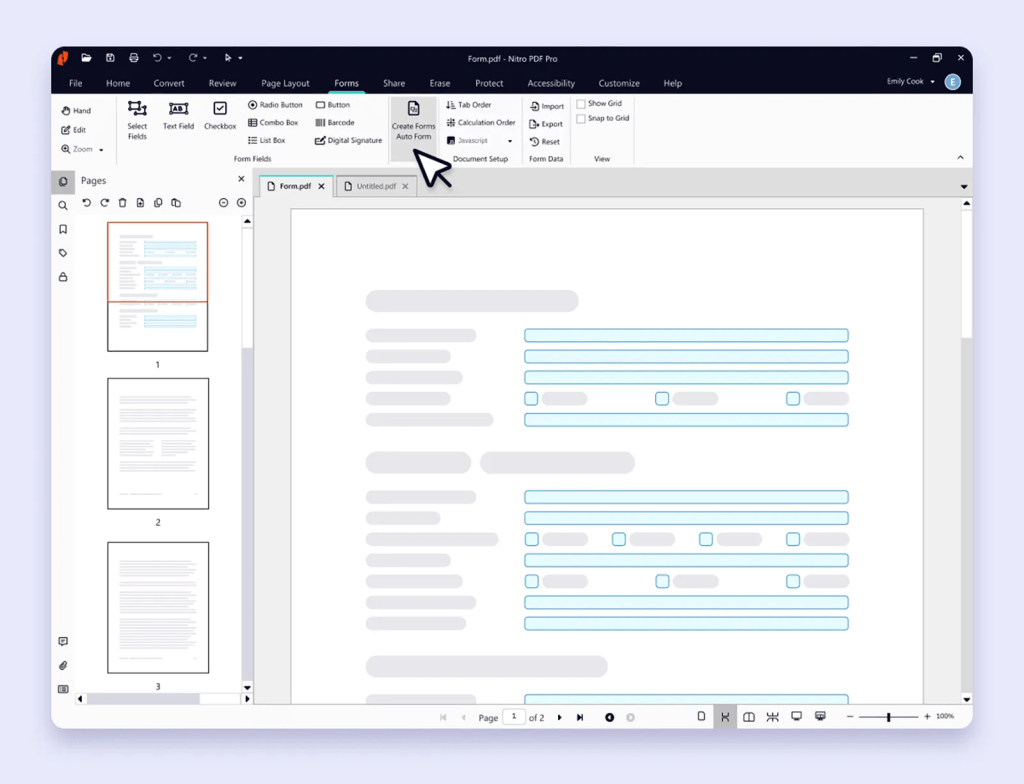
  • Form Create: Converts static documents into fillable forms
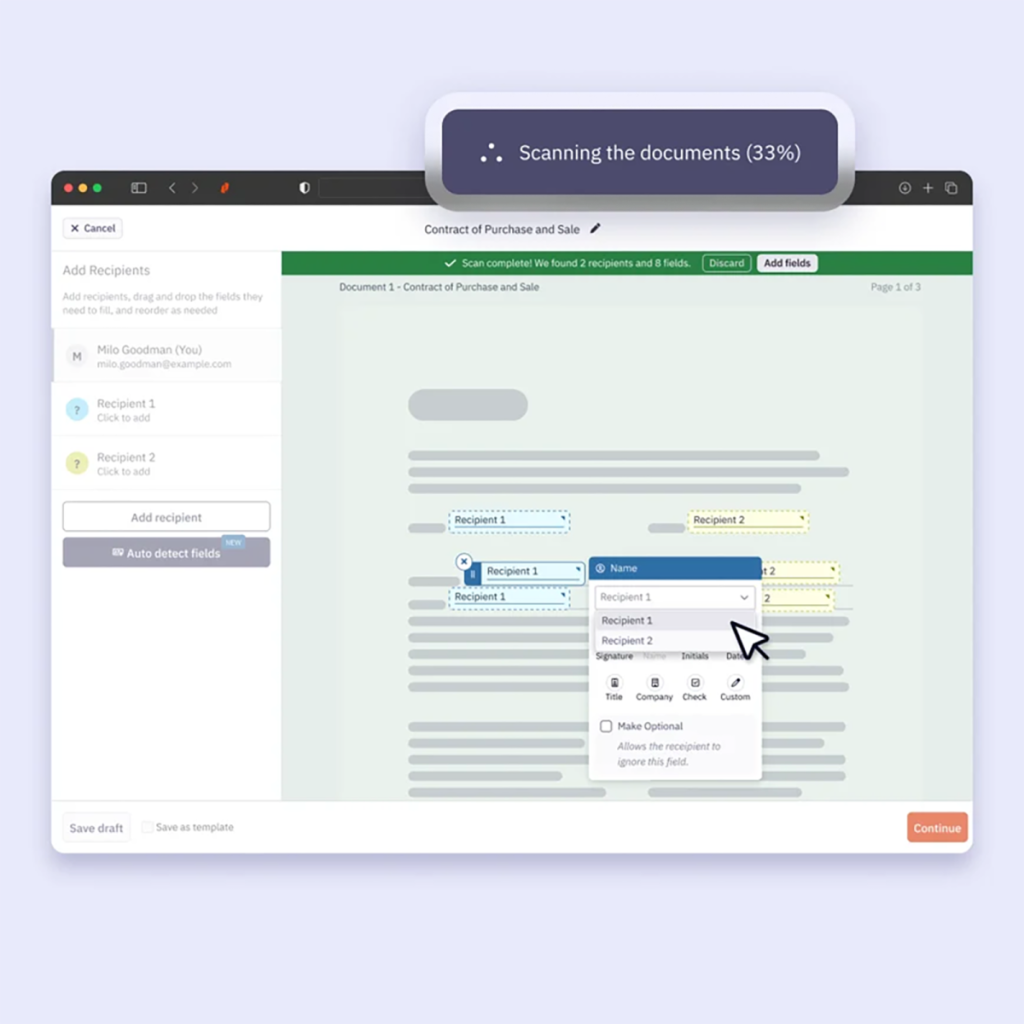
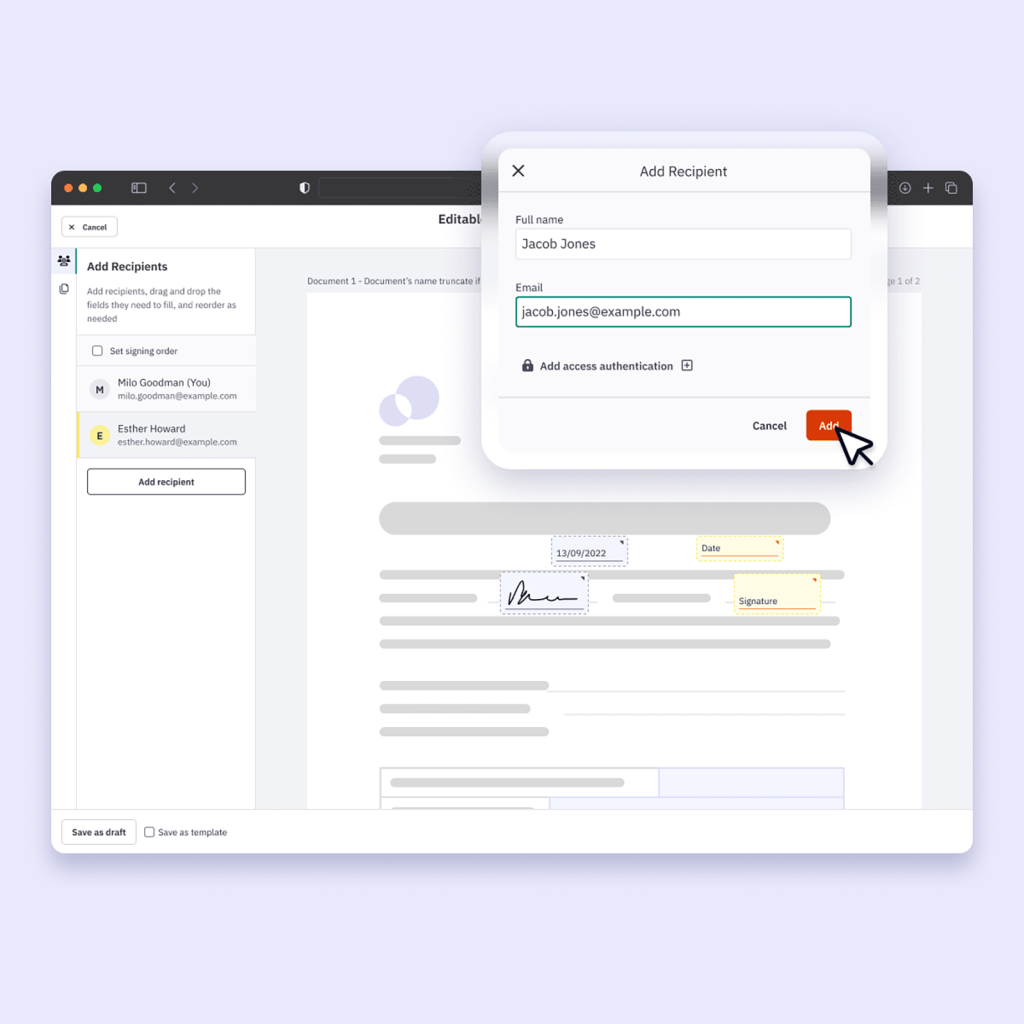
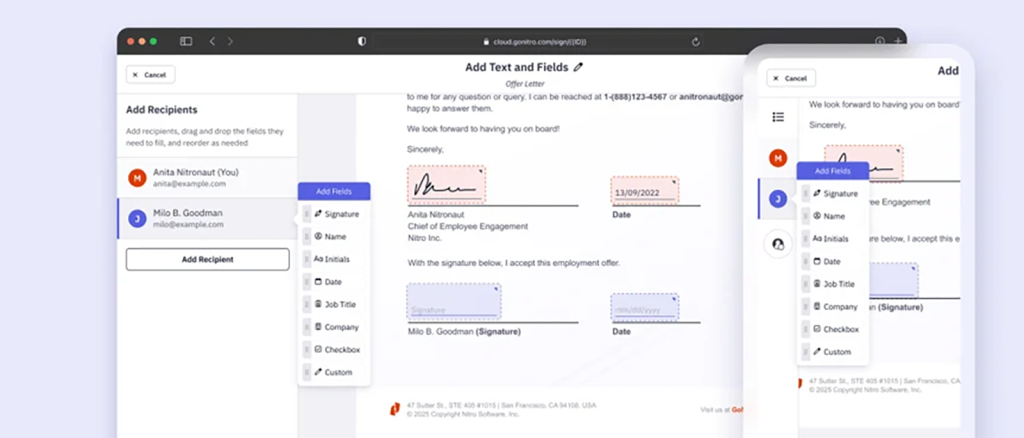
  • Field Detection: Automatically places signature and input fields for document workflows

All Nitro AI-powered solutions include enterprise-grade security and compliance that safeguards sensitive data throughout the document lifecycle. Visit the Nitro Trust Center to learn more.

Functional AI is setting the standard for document workflow automation
Using Functional AI to Automate Document Workflows - image 3

Nitro

Our research is clear: When AI provides specific, measurable benefits to your document workflows, the results are high adoption, time savings, and measurable ROI.

If you want to transform and automate your document workflows, Nitro’s functional AI solutions are a top choice for high-volume document processing, consistent, rules-based automation, and reduced reliance on manual work.

Discover Nitro’s AI workflow tools.

Manual vs. AI-powered PDF redaction: protecting sensitive data in 2026

Research shows that humans play a role in 60% of breaches that expose sensitive data. That “role” often involves an employee falling for a phishing scam or using PASSWORD for their login credentials, but data exposure can also be a result of how your business redacts sensitive and personally identifiable information (PII) in your documents.  

Historically, manual, “black-box” redaction was considered best-practice, but this approach only obscures data, it doesn’t permanently remove it. 

As regulations governing data security get stricter and AI-powered redaction solutions become more accessible, organizations—especially those in highly regulated industries—are re-evaluating their PDF redaction solutions.

How manual PDF redaction is different from AI-powered PDF redaction

The primary difference between manual and AI-powered PDF redaction is who (or what) you rely on to do the heavy lifting.

Manual redaction defined

Manual redaction is a human-driven process where individuals visually scan text, select content, and apply black boxes or remove the text before sharing or storing the file.

Manual redaction is only as effective as the reviewer, which makes outcomes highly variable, especially under time pressure or high document volume.

AI-powered redaction defined

AI-powered redaction uses machine learning and natural language processing (NLP) to automatically detect and remove sensitive information from documents. The system is trained to recognize patterns, language cues, and contextual signals in PDFs as well as scanned images, handwritten notes, text-heavy documents, metadata, and embedded scripts.

For example, Nitro Smart Redact can identify structured data, like Social Security numbers and bank accounts in a payroll document, as well as unstructured, free-form data, like “in April 2022, Sarah was diagnosed with cardiovascular disease.”

How to choose the right redaction solution for your organization

Manual vs. AI-Powered PDF Redaction - image 2

Nitro

Manual redaction may work for small organizations that handle a low volume of documents. But for most businesses, an AI-powered PDF redaction solution that will scale as your needs change is a smart investment.

Here are six factors to consider when evaluating AI-powered redaction solutions:

Document volume and size: Look for a solution that can handle your current document load and scale to meet future demand without slowing down processing times or requiring additional manual effort.

Data type: YourPDF redaction tool must be able to accurately identify a wide range of sensitive information—from PII to financial data.

Data location: The solution should detect sensitive data in visible and hidden layers, like metadata, embedded text, annotations, comments, form fields, and image-based content.

Compliance requirements: Choose a solution that supports compliance with your industry’s regulatory obligations, such as GDPR, HIPAA, or other data protection standards.

Integration with existing systems: Pick a PDF redaction tool that integrates with your existing document management systems, cloud storage, and workflows to maintain productivity and reduce the need for additional tools.

Data security and AI training policies: Verify how the redaction solution handles your data. Look for clear policies that protect sensitive information, prevent data reuse, and keep your content private and secure.

Why Nitro is a top choice for AI-powered PDF redaction

Manual vs. AI-Powered PDF Redaction - image 3

Nitro

Nitro Smart Redact is an AI-powered PDF redaction solution that balances speed and accuracy with control and security, allowing teams to redact sensitive information quickly while maintaining full oversight and compliance.

  • Detects over 30 categories of regulated PII in seconds
  • Uses advanced NLP to identify unstructured PII that manual or pattern-based methods miss
  • Finds and redacts PII in scanned documents, image files, and handwritten notes
  • Gives users the ability to manually add, adjust, or remove redactions
  • Integrates with existing tools, including Microsoft 365, Salesforce, and cloud storage
  • Processes documents in secure, temporary sessions 
  • Permanently removes hidden data, including metadata and embedded scripts
  • Never uses your documents to train or improve external AI models

The best solution? AI-powered PDF redaction, but keep people in the loop

The most effective way to identify and permanently remove sensitive data from PDFs is a solution that uses AI to quickly find information hidden deep in documents and humans to manually review and adjust results for accuracy. 

Speak with a Nitro team member to learn how Nitro’s AI-driven Smart Redact technology provides a faster, safer way to prepare documents for secure sharing.

Professional PDF solutions for teams: scale without breaking your budget

Why do so many PDF editing and eSignature tools fail to scale across teams? Three persistent problems stand out:

  • Unpredictable pricing that becomes more expensive as usage increases
  • Limited access to advanced PDF features
  • Difficulty automating document workflows across teams

The good news is that even teams that process a high volume of documents can reduce their costs and get more value from their PDF solutions by selecting solutions with built-in AI, predictable pricing, flexible licensing, and scalable, automated document workflows.

In this article, we’ll cover:

  • Why you’re paying too much for too few features
  • How AI makes PDF editing, eSigning, and redaction tools accessible to everyone on your team
  • What to look for in a scalable, cost-efficient PDF solution

Why many incumbent PDF tools are expensive and inefficient at scale

Many PDF tools were designed for individuals or small teams rather than scaling teams. As organizations expand usage, these tools become harder to manage, more expensive to maintain, and less effective at supporting high-volume document workflows.

Here are three ways PDF tools can impact your budget and your team’s productivity:

Unpredictable pricing increases total cost of ownership

If your PDF solutions rely on per-user licensing, feature-based tiers, or usage caps that trigger additional fees, as demand for the tool increases, your costs become harder to forecast and control.

Limited access to features reduces productivity

When full PDF editing functionality is restricted to a small group of licensed users, other team members start looking for (often unsanctioned) workarounds or waste time waiting to complete basic tasks like editing, converting, or compressing documents.

Rigid licensing leads to over- and under-provisioning

Legacy licensing models rarely align with how teams actually work. As a result, organizations often over-purchase licenses to avoid bottlenecks or under-provision and create access constraints.

How AI makes PDF tools more scalable (and more affordable)

Professional PDF Solutions for Teams - image 2

Nitro

AI-powered PDF tools improve scalability by automating repetitive tasks, simplifying complex workflows, and making advanced features accessible to all users.

Automated document workflows reduce manual effort

These tools automate tasks like table and data extraction, form processing, and file conversion, allowing teams to process higher document volumes without increasing headcount.

Natural language document interaction removes complexity

Natural language processing (NLP) lets business users edit, summarize, or extract information from PDFs using simple prompts. This eliminates the need for specialized expertise and reduces reliance on a small group of advanced users.

Intelligent data recognition and redaction improves efficiency and security

Advanced AI tools can identify, extract, and redact sensitive information from structured and unstructured data sources. This speeds up document review and compliance workflows while reducing the risk of human error.

How Nitro’s PDF solutions reduce cost and increase scalability with AI

Nitro’s AI-powered PDF solutions are designed to solve the cost and scalability challenges tools like Adobe Acrobat create.

Key benefits of Nitro’s AI-driven PDF solutions

  • Predictable pricing models: WithNitro’s flexible pricing plans there are no overerages, no forced bundles, and no per-seat penalties.
  • Flexible licensing: Nitro’s licensing models are designed to match how people actually use PDF tools, so it’s easier to give everyone the access they need without paying for unused capacity.
  • Built-in AI: Every Nitro plan includes AI tools, so your whole team gets AI-powered document capabilities without increasing cost or training requirements.
  • Administrative control: The Nitro Admin Portal lets IT provision users, reassign licenses, and manage feature and AI access by department in real time, so entitlements move as fast as the business does.
  • Expert support: Whether you’re a five-person team or a global enterprise, our dedicated support specialists are available 24/7—from deployment planning to daily troubleshooting.
  • Enterprise-grade security and compliance: Built-in protections such as encryption, access controls, and audit trails help safeguard sensitive data throughout the document lifecycle. Visit the Nitro Trust Center to learn more.
  • Proven customer satisfaction: Nitro has a 95%+ customer satisfaction rate and was selected as a TechRadar #1 PDF Editor for Businesses. 

Professional PDF tools don’t have to blow your budget

Professional PDF Solutions for Teams - image 3

Nitro

You don’t have to choose between affordable PDF tools and scalability. Nitro’s AI-powered PDF tools give you cost control and the features you need. Replacing your legacy PDF tools with Nitro solutions that are designed for high-volume document workflows, your team can reduce costs, improve productivity, and expand access to essential tools without adding complexity.

Let the Nitro team show you why 67% of the Fortune 500 trust our AI-powered PDF editing, eSign, and redaction solutions. See plans and pricing or get in touch with sales today.

Docusign alternatives for teams: what to look for (and what to avoid)

Choose Nitro Sign for predictable pricing & fewer surprises

Docusign may be the most widely used eSignature platform, but many teams run into the same issue as they scale—the more documents they send, the harder it is to predict what they’ll actually pay. The risk of high overage costs paired with complex pricing structure is driving teams to look for an alternative to Docusign in 2026.

This buyer’s guide breaks down why those challenges matter, what to look for in an eSignature solution, and how leading Docusign alternatives—like Nitro Sign—compare for teams that send a high volume of documents but want simpler pricing and fewer surprises.

Docusign Alternatives for Teams - image 2

Nitro

Why some teams are looking for alternatives to Docusign

Three trends drive teams to look beyond Docusign:

  • Bills that increase unpredictably as usage grows
  • Difficulty understanding what features are included vs. which are paid add-ons
  • Pricing models that don’t scale well with high document volume

Here’s a more detailed look at each of these challenges.

Docusign bills become unpredictable as usage grows

Many organizations encounter unexpected costs as usage increases. Envelope limits, counting methods, and per-transaction pricing can quickly turn a straightforward Docusign subscription into an unpredictable expense.

Impacts may include:

  • Budget overruns tied directly to business growth
  • Paying for documents that are sent but never completed
  • Difficulty forecasting total cost at scale

Docusign pricing doesn’t clearly indicate which features are included

As platforms expand into broader “agreement management” offerings, pricing and packaging become harder to navigate.

Common issues include:

  • Paying for features that aren’t widely used across the business
  • Add-ons or higher tiers required for AI-enabled capabilities
  • More complex setup, onboarding, and contract evaluation

Docusign pricing models don’t scale as volume increases

For teams that process a high volume of documents, how usage is counted matters as much as price. Counting envelopes when sent, rather than when completed, accelerates usage limits and increases costs.

This often leads to:

  • Rising costs as document volume grows
  • Paying for incomplete or abandoned agreements
  • Misalignment between pricing and actual business value

What to Look for in a Docusign Alternative

When evaluating alternatives to Docusign, focus on eSignature solutions that offer these four capabilities:

Pricing that scales with your usage

Look for pricing models that:

  • Don’t penalize you for sending more documents
  • Scale efficiently as adoption increases
  • Are based on completed agreements where possible

Transparent licensing and contract terms

Choose platforms where:

  • Pricing is easy to understand upfront
  • Key features—such as SSO, support, and analytics—are included
  • Renewal terms are clear and unambiguous

The right level of functionality (not just the most features)

Your eSignature platform should match how your team actually works—whether that’s simple document signing or more complex workflows.

Security and compliance you can trust

Any alternative must meet eSignature security standards, including:

  • Secure document handling and encryption
  • Audit trails for tracking activity
  • Compliance with relevant regulations and standards
Docusign Alternatives for Teams - image 3

Nitro

Docusign alternatives for teams in 2026

SolutionOverviewStrengthsPricing Considerations
Nitro SigneSignature platform focused on simplicity and cost controlPredictable pricing, counts only completed agreements, key features like SSO and support included as standardTransparent cost structures without overage surprises
Adobe Acrobat SignPart of the Adobe ecosystemStrong feature setCan inherit similar complexity and cost challenges as other Adobe products
Dropbox SignStraightforward eSignature solutionSimple setup and user-friendly interfaceBest suited for smaller teams, but may lack scalability for high-volume use
PandaDocCombines eSignature with document creation and sales workflowsStrong for sales-driven organizationsPricing can increase as features and usage expand
Foxit eSigneSignature solution within the Foxit ecosystemLightweight, flexible deploymentMay require evaluation for enterprise-scale needs

 How to choose the right Docusign alternative for your organization

Here are five specific factors to consider when evaluating alternatives to Docusign:

  • How does the platform charge for usage?
  • How predictable are costs as your volume grows?
  • Are essential features included, or sold separately?
  • Does the platform match how your team actually uses eSignature today?
  • How easy is it to scale across teams without increasing complexity?

Nitro Sign offers a full suite of eSigning features at a lower price than Docusign, plus:

  • Only completed agreements count
  • Twice as many envelopes allowed per user
  • SSO, support, and analytics are included without add-on fees
  • Pricing is designed for high volumes and predictable costs
  • No penalties for exceeding usage limits
Docusign Alternatives for Teams - image 4

Nitro

Curious why teams that want to control costs without sacrificing features or security choose Nitro Sign a top alternative to Docusign?

Speak with one of our eSignature experts or sign up for a free trial of Nitro Sign.

Nitro Smart Redact: the complete guide to automated AI redaction

Get Smart Redact and Protect Sensitive Data

Too many businesses in highly regulated industries—such as healthcare, government, legal services, and insurance—still rely on manual, “black-box” redaction workflows.

This approach may obscure sensitive information, but it doesn’t permanently remove it, which can lead to compliance violations, potential litigation, or regulatory fines.

Nitro Smart Redact is an AI-powered solution that removes sensitive data from documents with permanent, untraceable redactions. It combines automated PII detection to surface regulated data along with manual controls for sensitive business information, allowing teams to flag content, automatically redact documents, and manually customize reviews that need human oversight.

In this guide we explore how Smart Redact:

  • Simplifies permanent, irreversible redaction
  • Identifies sensitive structured and unstructured data
  • Provides enterprise-grade security
  • Reduces turnaround times with automation
  • Minimizes human error

How is Smart Redact different from other automated AI redaction solutions?

Pattern-based matching tools, like those used in Adobe Acrobat, use predefined formats and keyword matching to locate sensitive data. This approach often misses information in free-form text, like “John lives on Main Street” or “her social ends in 5678.” Smart Redact catches it because it understands context.

AI-only platforms—like Redactable—offer automation, but they require teams to maintain a separate redaction tool. That means two subscriptions, two interfaces, and double the work.

Nitro Smart Redact does things differently, with built-in features that support the full document lifecycle all in one place:

  • Instantly detects over 30 categories of regulated Personally Identifiable Information (PII)
  • Uses advanced natural language processing (NLP) to detect unstructured PII that manual or basic pattern searches miss
  • Automatically finds and redacts sensitive PII from scanned documents, image files, and handwriting
  • Groups suggested redaction by category and quality-tests them for precision
  • Provides total visibility and complete control to instantly add, adjust, or remove redactions
  • Integrates with the tools your team already uses, including Microsoft 365, Salesforce, and cloud storage
  • Manages AI documents in a temporary session with no storage or data retention
  • Removes visible and hidden data, like metadata and scripts
Nitro Smart Redact: The Complete Guide to Automated AI Redaction - image 1

Nitro

Does Smart Redact provide enterprise-grade security and compliance?

Absolutely. Smart Redact has security built into every layer to support companies operating under strict regulatory oversight:

  • Processes documents in temporary sessions
  • Encrypts files in transit and at rest
  • Deletes document data after processing
  • Never uses content for generative AI training
  • Identifies and removes hidden metadata, annotations, and scripts
  • Adheres to international security standards: ISO 27001, SOC 2, HIPAA, and the EU-U.S. Data Privacy Framework

Visit the Trust Center to learn more about Nitro’s commitment to responsible AI development and data privacy.

Why is Smart Redact the best automated AI redaction solution for regulated industries?

Nitro Smart Redact is built on the same trusted Nitro infrastructure that powers the document workflows of over 67% of Fortune 500 firms.

Legal

Legal teams use Smart Redact to maintain privilege, meet discovery deadlines, and reduce manual review time by:

  • Using NLP to find PII buried in extensive legal documents
  • Automatically identifying sensitive data, even in scanned documents or images
  • Validating redactions with confidence scoring
  • Supporting manual edits when required

Government

Public sector organizations rely on Smart Redact to balance information transparency with data protection by:

  • Automating detection of over 30 PII categories
  • Using NLP to understand context, not just patterns
  • Grouping results by category and confidence level to quickly isolate high-risk items
  • Providing manual override tools and real-time previews

Healthcare

Smart Redact helps healthcare professionals protect patient privacy without disrupting care by:

  • Automating de-identification of direct identifiers like names, addresses, and dates of birth
  • Permanently and irreversibly redacting Safe Harbor elements, such as full dates of treatment and precise geography
  • Integrating OCR to redact structured and unstructured content, including handwritten notes and image files

Insurance

Smart Redact helps insurance teams act quickly while maintaining visibility and control of sensitive data by:

  • Automatically identifying and redacting account numbers, birthdates, and contact information
  • Centralizing litigation preparation, internal reviews, and regulatory reporting
  • Accelerating processing time and reducing risk

AI-powered redaction is changing how we handle sensitive information

Nitro Smart Redact: The Complete Guide to Automated AI Redaction - image 2

Nitro

From legal confidentiality to sunshine laws to HIPAA compliance, Smart Redact is built for accurate, fast, and secure data redaction. By combining AI automation, NLP, OCR, and manual control, Smart Redact helps businesses in highly regulated industries avoid compliance violations, regulatory fines, or litigation.

Learn how Nitro’s AI-driven Smart Redact technology provides a faster, safer way to prepare documents for secure sharing, or contact a Nitro expert to get started.

Adobe Acrobat alternatives for teams in 2026

Try Nitro PDF today

If your team is re-evaluating Adobe Acrobat’s place in your 2026 tech stack, the question isn’t just what the software can do, but whether it aligns with your evolving budget and productivity goals.

Including Acrobat in your stack is becoming increasingly expensive and difficult to manage due to:

  • Frequent price increases
  • Overlapping licenses that add overhead
  • Underutilized features that waste resources

As a result, the conversation is shifting away from “How do we navigate rising costs, complexity, and AI compliance requirements?” to, simply, “Is there a better alternative to Adobe Acrobat?

In this guide, we break down:

  • How to stop overpaying for licenses that aren’t being used
  • How to select a PDF editing solution that does exactly what you need it to do
  • Why Nitro PDF is emerging as a leading choice for organizations focused on experience, value, and scalability for IT and procurement-led buying decisions
Adobe Acrobat Alternatives for Teams in 2026 - image 1

Nitro

Why teams are looking for Adobe Acrobat alternatives in 2026

For organizations that use Adobe Acrobat, frustrations tend to build over time—and they usually come down to the same three things:

Rising costs that keep climbing

What starts as a manageable per-seat subscription becomes harder to justify as Adobe raises prices and layers in paid add-ons. The AI tools, advanced features, and admin tools that should be standard all require extra cost or higher priced plans.

Licenses that are hard to manage

Adding or removing users, adjusting seat counts, or untangling Adobe from a broader Creative Cloud agreement is rarely straightforward. The result is overspend on unused seats and a licensing structure that doesn’t flex with the business.

Tools that take time to master

Adobe has its own unique UI, meaning new users need training. This inevitably extends onboarding and impacts productivity when teams grow or employees leave.

Adobe Acrobat alternatives for teams in 2026

SolutionOverviewStrengthsPricing Considerations
Nitro PDFComplete PDF and eSign suite with a powerful admin portal and built-in AIPredictable pricing, integrated PDF editing and eSign capabilities, AI-driven redactionReduces cost variability and eliminates overage-driven spend
Adobe Acrobat ProPopular, comprehensive PDF editing solutionDeep integration within the Adobe ecosystemTiered, per-user pricing with add-ons increases cost unpredictability
Foxit PDF EditorLightweight, flexible alternative to AcrobatFast performance, broad feature coverage for general business useAdd-ons and scaling usage can introduce cost variability
PDFelementUser-friendly, focused on accessibility and ease of useSolid core editing and annotation capabilities, good for smaller teamsMay lack enterprise-level governance, scalability, and standardization
Kofax Power PDFBusiness-focused, strong document control and automation capabilitiesAdvanced document automation, conversion tools, and security and compliance features  Implementation complexity and configuration requirements can impact total cost of ownership

Why Nitro PDF is the smart alternative to Adobe Acrobat

Adobe Acrobat Alternatives for Teams in 2026 - image 2

Nitro

Nitro PDF eliminates the high costs, confusing licensing, and forced bundling often associated with Adobe Acrobat:

Transparent pricing without overage surprises

Nitro addresses one of the biggest Acrobat pain points—cost unpredictability—with clearer, more controllable pricing structures that often save businesses up to 30% compared to Adobe.

Simplified licensing and reduced vendor sprawl

By combining PDF and eSignature capabilities with AI intelligence in every plan, Nitro makes it easy to provision users, reassign licenses, and control feature access by department with no minimum seat commitments, reducing the need for multiple vendors and minimizing license sprawl.

Intuitive interface that accelerates time to value

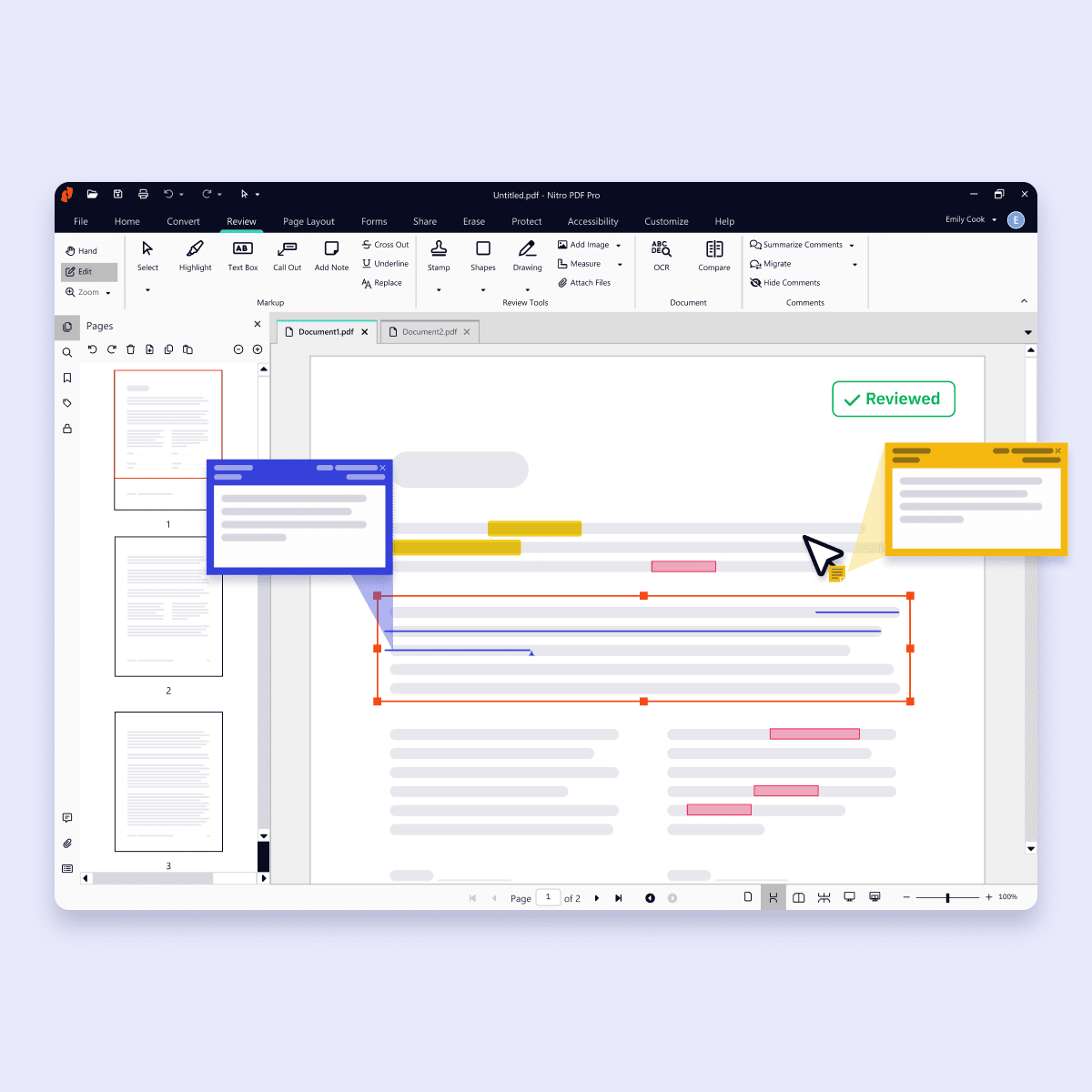
Nitro PDF’s user-friendly interface mirrors the Microsoft Office ribbon UI and Apple toolbar, providing an intuitive experience for both Windows and Mac users.

Strong governance/data privacy

Nitro meets internationally recognized data protection standards and certifications, including ISO 27001, SOC 2, HIPAA, and the EU–U.S. Data Privacy Framework. Visit the Nitro Trust Center to learn more.

Administrative control and expert support included

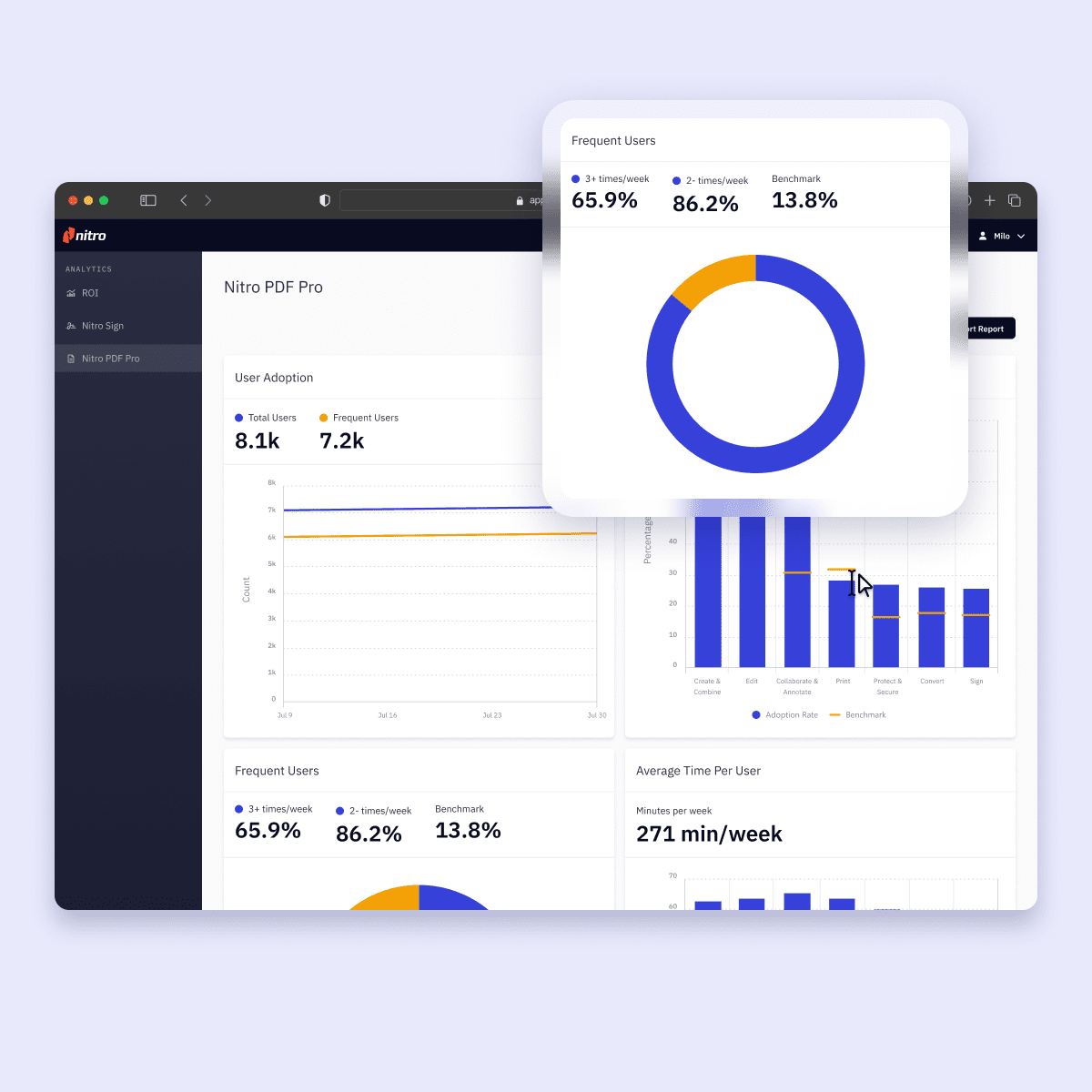
With powerful analytics, admin tools, and 24/7 expert support included in every plan, you can track ROI, turn document data into actionable insights, and manage licenses, users, and services with no separate admin console fees required.

Adobe Acrobat Alternatives for Teams in 2026 - image 3

Nitro

Proven customer satisfaction

With Nitro’s 95% customer satisfaction rate and distinction as a TechRadar #1 PDF Editor for Businesses, we’re proud to be the trusted choice for 67% of the Fortune 500.

How to choose the right Adobe Acrobat alternative for 2026 and beyond

If your team is looking for an alternative to Adobe Acrobat in 2026, Nitro PDF can help you balance PDF editing capabilities with long-term affordability and ease of growth. To discover how Nitro PDF’s straightforward licensing, simplified tech stack, and AI-powered automation can lower costs, boost workflow efficiency, and provide greater control over how documents move through your businessspeak with one of our PDF experts or sign up for a free trial of Nitro PDF.

Earnings from SAP, ServiceNow, and IBM challenge the SaaSpocalypse narrative

The first wave of quarterly earnings from major enterprise software vendors suggests that while AI is beginning to reshape enterprise technology spending, it has yet to produce the sharp decline in software demand that some industry observers have dubbed the “SaaSpocalypse.”

The latest results (Q2) from ServiceNow, SAP, and IBM, read against several prior quarters, showed continued growth in cloud and software businesses, though IBM reported that some software transactions slipped as customers prioritized spending on AI infrastructure instead.

Executives at all three companies said enterprises continue to invest in core software platforms while embedding AI capabilities into those environments.

SAP addressed the debate directly during its earnings call.

“While there has been… massive noise around the alleged SaaS apocalypse over the last quarters, the underlying trajectory of our business remains fully intact,” CFO Dominik Asam said, citing continued growth in SAP’s cloud backlog.

Enterprise software demand continues

ServiceNow’s subscription revenue growth has risen for five straight quarters, from a low of 19% in early 2025 to 23% in constant currency in the quarter reported July 22, according to the company’s earnings releases.

Current remaining performance obligations grew 21.5%, AI annual contract value exceeded $1 billion for the first time, and the company’s renewal rate held at 98%, executives said during the company’s earnings call.

Similarly, SAP reported 24% cloud revenue growth, 26% growth in current cloud backlog and 27% growth in Cloud ERP Suite revenue. Its cloud revenue has remained in a narrow band of 25% to 27% growth at constant currency for four straight quarters. SAP’s CEO Christian Klein said AI and SAP Business Data Cloud were included in more than 90% of the company’s 50 largest customer deals during the quarter, while Asam said SaaS and platform-as-a-service revenue continued to grow “far above the overall market.”

IBM’s software revenue growth, however, decelerated the sharpest of the three, slowing to 5% after peaking at 14% in the fourth quarter of 2025. That softness traced to one product line: Transaction Processing revenue, the license-based software tied to IBM’s Z mainframe line, fell during the quarter, while Data revenue grew 19% and Hybrid Cloud, which includes Red Hat, grew 11%, the company said in its Q2 results statement.

“The vast majority of our software business, about 80% of that revenue, is recurring in nature and delivered healthy growth in the quarter, reflecting the demand for our offerings and giving us confidence in our growth opportunity,” IBM CEO Arvind Krishna said during the earnings analyst call.

The earnings also showed increasing adoption of AI capabilities within existing enterprise software platforms.

ServiceNow said the number of customers with agentic AI in production increased ninefold over the past nine months. Its CEO Bill McDermott said the percentage of renewal customers purchasing agentic AI for the first time doubled both sequentially and year over year.

“When will customer deployment of AI mark an inflection point for ServiceNow’s growth? Here’s the answer. It already has,” McDermott said during the analyst call.

SAP said customer demand for its autonomous enterprise strategy expanded following its Sapphire conference, while beta programs for Business AI Platform and Joule Work were oversubscribed shortly after launch.

The earnings, however, do not necessarily mean enterprise software consumption is unchanged, according to George Brocklehurst, managing vice president at Gartner.

“The market should not confuse stable SaaS revenue with stable SaaS business models,” Brocklehurst said. “Agentic AI changes how value is consumed, and that transition can begin well before it becomes visible in aggregate revenue numbers.”

AI changes enterprise buying patterns

IBM’s earnings offered an early indication of how AI infrastructure investments are beginning to influence enterprise purchasing decisions.

The company’s chief financial officer Jim Kavanaugh said some customers redirected spending toward servers, storage and memory to secure AI infrastructure, delaying enterprise licence agreements that are typically treated as capital expenditure. Subscription and consumption-based software, which customers generally classify as operating expenditure, continued to perform well, he said during the call.

Krishna said IBM expects long-term enterprise value to shift toward software that orchestrates AI models, governs enterprise data and manages AI deployments across hybrid environments rather than toward foundation models themselves.

Sanchit Vir Gogia, founder and chief analyst at Greyhound Research, said IBM’s quarter illustrates changing technology spending priorities rather than a broad decline in enterprise software demand.

“Infrastructure spending is growing several times faster, yet software expenditure keeps rising,” Gogia said. “The sharper reallocation is happening inside the application estate itself. Strategic systems of record are being protected. Duplicate copilots, marginal point tools and unused licences are being challenged.”

Gogia said traditional SaaS metrics such as backlog and renewal rates should be interpreted alongside measures of AI adoption and software utilization because they reflect contractual commitments rather than how enterprises ultimately consume software.

“Strong backlog proves commitment rather than fresh demand, and a 98% renewal rate does not reveal what was conceded to win it,” he said. “The decisive measure is no longer how many people log into software; it is how much governed work the software completes.”

Brocklehurst said the industry’s transition is likely to unfold over several years rather than through a sudden collapse in enterprise software demand.

“The ‘SaaSpocalypse’ will not begin when enterprises stop buying software,” he said. “It will begin when enterprises stop paying for access and start paying for execution.”

Fake malware-signing service Fox Tempest dismantled by Microsoft

Microsoft says it dismantled a malware-signing-as-a-service (MSaaS) called Fox Tempest, which helped cybercriminals make malware appear legitimate.

The service let customers submit malicious files to be digitally signed with short-lived Microsoft-issued certificates, making the malware look legitimate and more likely to bypass security checks.

Fox Tempest’s service was built around a customer-facing signing workflow where cybercriminals could upload malicious binaries to a portal, have them signed with certificates valid for only 72 hours, and then receive files that appeared to come from a trusted software source.

Microsoft explicitly says this approach allowed malware to evade security controls and bypass defenses that would otherwise flag suspicious unsigned code. Many security tools treat signed binaries as more trustworthy than unsigned ones, especially in environments that rely on allow-lists and publisher reputation. Fox Tempest abused that assumption by using fraudulently obtained certificates to make malware blend in as legitimate software, increasing the likelihood of execution and successful delivery.

A trusted-looking certificate can help malware get past initial scrutiny, especially when paired with social engineering, paid ads, SEO poisoning, or fake download pages. In this campaign, the signing layer helped malicious installers masquerade as products like AnyDesk, Teams, PuTTY, and Webex, which is exactly the kind of abuse that can slip through control frameworks built around reputation and trust.

The fraudulent certificates were used to spread ransomware and infostealers. The effects of these malware campaigns were broad, with attacks affecting healthcare, education, government, and financial services across multiple countries.

How to stay safe

Microsoft’s disclosure shows how cybercrime has evolved beyond “malware authors” into a service economy where one group specializes in producing trust and others monetize it.

For defenders, the strongest lesson is not to treat code signing as a standalone security control. 

For consumers:

  • Remember to only download software from the official vendor site, the Microsoft Store, or another source you already trust. Avoid download buttons on links sent via social media posts, direct messages or email.
  • Be skeptical of “sponsored” search results and advertisements for popular apps.
  • Use an up-to-date, real-time anti-malware solution that looks for malicious behavior rather than just signatures.
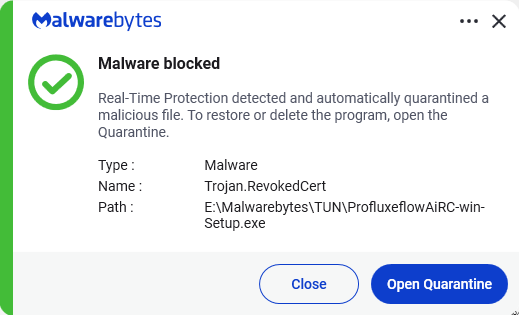
Malwarebytes detects Trojan.RevokedCert


We don’t just report on threats—we remove them

Cybersecurity risks should never spread beyond a headline. Keep threats off your devices by downloading Malwarebytes today.

We Need a Shared Responsibility Model for AI

Over the past 6-8 months, researchers at my company discovered vulnerabilities across multiple AI tools that allowed external bad actors to steal data, exploit AI browsers, or poison the core memories of AI systems. As we responsibly disclosed these flaws, we found that AI vendors almost universally told us, “It’s not our problem.” In their..

The post We Need a Shared Responsibility Model for AI appeared first on Security Boulevard.

B2B Authentication Provider Comparison: Features, Pricing & SSO Support (2026)

This comprehensive guide compares the leading B2B authentication providers in 2026, including Auth0, Okta, SSOJet, MojoAuth, FusionAuth, and Keycloak.

The article explores enterprise SSO, SCIM provisioning, pricing models, developer experience, and authentication protocols such as SAML, OAuth, and OpenID Connect. It also includes feature comparisons, real-world SaaS use cases, pricing analysis, and future identity trends like passkeys and zero-trust security.

The post B2B Authentication Provider Comparison: Features, Pricing & SSO Support (2026) appeared first on Security Boulevard.

❌