X says attackers may be targeting accounts because its X Money payments service is now more widely available.
The company is investigating a wave of unsolicited password-reset emails sent to users. While their arrival alongside the wider X Money rollout has fueled account-takeover concerns, X says it has found no evidence of a breach or successful account takeovers so far.
X users began reporting unexpected password-reset emails and codes on September 1. In a public post, X product engineer Mridul Singhai said:
“Attackers appear to believe that, now that @XMoney is widely available, they can gain unauthorized access to accounts.”
Singhai said X was actively investigating, apologized for the repeated emails, and added that the company had found “no evidence of any breaches.”
X Money gives eligible US users access to financial services within X, including interest-bearing accounts, a Visa debit card, and peer-to-peer payments. Cross River Bank provides the banking infrastructure behind the service.
This could make some X accounts more attractive targets, particularly accounts with payment access, high follower counts, business use, or valuable social-engineering potential.
The activity itself appears consistent with attackers submitting password-reset requests in bulk against X accounts. Requesting a password reset is not the same as resetting a password, however, and neither automatically means that an account has been taken over. X’s recovery process requires access to the email address or phone number associated with the account before someone can complete the reset.
There is no evidence that anyone has accessed X Money accounts or funds. Nor has X confirmed that X Money caused the password-reset activity. The timing is notable, but it does not prove a technical connection between the two.
Earlier this year, we saw a flood of Instagram password-reset emails, showing that similar activity can happen on platforms without payment services.
It could be a cover for something more serious. Even if an attacker cannot complete a reset, large volumes of legitimate-looking reset messages can provide useful cover for scams.
Reset flooding can also be a nuisance tactic. Repeated messages may pressure someone into changing their password unnecessarily, obscure more important security notifications, or encourage them to disable security controls in an attempt to stop the alerts.
How to stay safe
If you receive an X password-reset email that you did not request:
Do not click links or enter codes from unexpected messages. Open the X app or type x.com into your browser yourself if you want to inspect or change account settings.
Do not share reset codes or two-factor authentication codes. Support staff, advertisers, and “security teams” will not contact you unexpectedly to ask for them.
Turn on password-reset protection. X says this setting requires additional account information, such as an email address or phone number, before it will send a reset link or code. It is available under Settings and privacy > Account > Security > Password reset protection.
Use two-factor authentication, preferably an authenticator app or security key where available. This adds another verification step if someone obtains or guesses your password.
Use a unique, strong password. If you use your X password anywhere else, change it through X’s settings, not through a link in an email.
Watch for signs of an actual account takeover. These include unfamiliar posts, direct messages, profile changes, login alerts, or unknown apps connected to your account.
Stay alert for phishing. The strongest immediate consumer risk may not be a flaw in X itself, but phishing that imitates the reset process. A fake message can look especially convincing when genuine reset emails are arriving around the same time.
Use protection. An up-to-date, real-time anti-malware solution with web protection can warn you about malicious and fraudulent sites.
If you’re unsure whether a message is real, use Malwarebytes Scam Guard to check it and get advice about what to do next.
Scammers don’t need to hack you. They just need you to click once.
In a tech support scam, criminals pretend to work for a trusted technology or security company. They claim there is a problem with your device, software, subscription, or account, then try to persuade you to pay them, share personal information, or give them remote access to your computer.
These scams used to rely mainly on browser locks and fake virus warnings. Now, scammers use many more ways to reach people, including websites and platforms they trust.
Once someone makes contact, the scammers may demand payment, ask for personal information, or try to persuade them to install remote access software.
Beware of someone wanting to connect to your computer remotely. One of a tech support scammer’s most powerful weapons is the ability to connect remotely to a victim’s computer. If you allow this, the scammer may gain access to all of your files, folders, and the information they contain.
Tech support scams impersonating Malwarebytes
Tech support scams affect Malwarebytes directly because scammers often impersonate trusted security companies, as in the example below.
You can tell it’s not the real Malwarebytes when:
They use a name other than Malwarebytes. Malwarebytes does not outsource its support. We have our own Support team and do not authorize third parties to provide support using our name, logo, or any other intellectual property.
They can’t or won’t accept payment by credit card. Malwarebytes uses a credit card processor for all transactions. Credit card processors screen the companies they work with for risks such as fraud and abuse. Credit cards also offer consumer fraud protections, so it is a red flag if a company tries to steer you toward another payment method.
They make unsolicited support calls. Malwarebytes does not do this. Tech support scammers may buy personal information from data brokers that have identified people as potentially vulnerable targets. But how would a legitimate company know that you have a problem with your computer—or even that you own one? If someone calls out of the blue claiming that your computer has a problem, hang up.
What to do if you’ve been scammed
If you’ve fallen victim to a tech support scam, here are a few steps you can take:
Have you already paid? Contact your credit card company or bank and let them know what’s happened. You may also need to file a complaint with the FTC or contact your local law enforcement agency, depending on your region.
Did you share your password with the scammer? Change it on every account that uses the same password. Consider using a password manager and enabling two-factor authentication (2FA) on important accounts.
Scan your system. If scammers have accessed your computer, they may have installed a backdoor that allows them to return later. Malwarebytes can remove backdoors and other software left behind by scammers.
Keep an eye out for unexpected payments. Look for suspicious charges or payments on your credit cards and bank accounts so you can dispute them quickly and prevent further losses.
Be wary of suspicious emails and text messages. Scammers may now see you as a potential target and try other methods to defraud you.
How Malwarebytes is fighting tech support scams
Malwarebytes researchers actively fight tech support scams in the US and overseas. They work closely with the Federal Trade Commission (FTC), providing technical evidence to help shut down tech support scammers and educating internet users about the latest tactics and how to protect themselves.
Scammers are becoming more strategic about where they target people.
Nine in ten toll scams—the fake unpaid-toll messages that threaten fines or license suspension—arrive by email or text, while roughly six in ten romance scams show up first on social media. That’s no coincidence. Rather than blasting the same message everywhere, criminals are tailoring different scams to the platforms where they’re most likely to succeed.
This finding comes from Malwarebytes’ own threat research systems and draws on global data between April 15 and July 14, 2026. The research reveals the various ways scammers are adapting their tactics and provides new insights about where they show up, when they strike, and which brands they impersonate.
Here’s a look at the key takeaways.
Every scam has a preferred platform
You’re far more likely to receive a fake giveaway scam via a social media feed than you are by email or text. On the other hand, half of all IRS scams will come via a phone call. Malwarebytes measured more than 20 different types of scams, ranging from tech support and refund scams to sextortion and scareware, and found that each one favors a specific platform.
Intuitively, the platforms favored often match the content of a scam—job scams mostly arrive through typical work channels like email, romance scams mostly arrive through social media where meeting strangers is least questioned, and tech support scams mostly arrive through the phone. The channel can also shape how the scam feels: A DM can feel personal, while a phone call creates pressure to respond in the moment. And prior research shows that scammers often repeat what works, which might explain why they keep doing what they’ve been doing so far.
The web still wins
Despite the rise of social media and messaging apps, scams are reaching us through the web more than any other platform, followed by email and SMS.
No surprise that the web is the most popular doorway. Malwarebytes blocks around 500,000 phishing websites a day.
MrBeast beats Trump
He’s already the most popular YouTuber in the world, famous for his online antics and extreme stunts, but Malwarebytes data shows that “MrBeast” can now add “most impersonated person” to his resume, handily beating Elon Musk and Donald Trump (numbers two and three, respectively).
MrBeast, whose real name is Jimmy Donaldson, is the go-to favorite for scammers looking to piggyback on his fame by using his likeness in some 30% of impersonation scams, ranging from crypto giveaways to transfer fee swindles. Familiar faces lower the public’s guard and make scam messages feel more credible, which is why they work so well. So, the next time MrBeast shows up in your feed asking you to send cash as part of a verification process, watch out.
12:00 pm ET is the “golden hour” for scammers targeting Americans
If you’re on the East Coast in America, lunchtime is also scamming time. Malwarebytes data shows that high noon is the golden hour for scam texts, and it’s roughly 874% busier than the quietest time, which is 1:00 am ET.
Scam texts peak on Fridays
The rate of scam texts hitting your phone builds throughout the week. From a low on Sunday, they increase steadily in frequency and hit their peak on Fridays. So by the time you’re leaving work and preparing for the weekend, you’re also getting hit with roughly 50% more fraudulent text messages than you were when the week began. The data doesn’t tell us why, but it does suggest scammers are deliberately timing their campaigns rather than sending messages at random.
Big brands are big business for scammers
The world’s biggest brands are also some of the most useful to scammers. They’re instantly recognizable, used by hundreds of millions of people, and already part of our everyday lives, making them a natural fit for everything from fake offers to bogus account alerts. Based on reports from Malwarebytes users, the five most impersonated brands are:
Google
Microsoft
Apple
Roblox
Amazon
According to Malwarebytes users, Google’s brand name was abused at least twice as often as Amazon.
Gaming is becoming a bigger target
Scammers are increasingly targeting gaming communities. According to data collected by Malwarebytes Scam Guard, about half of all gaming scams can lead to a financial hit of $1,000 or more, what we term a “high-severity risk.” The most impersonated gaming sites were Roblox, Steam, Discord, and Minecraft. Roblox saw a 15% spike in scam activity from mid-June to mid-July, while Steam saw a 19% spike over the same period.
How to spot and stop scams
The data points to a scam economy that’s becoming more specialized. Rather than relying on one-size-fits-all campaigns, criminals are tailoring scams to the platforms we use every day, from email and text messages to gaming communities and social media. The tactics may change, but the goal stays the same: to earn your trust long enough to steal your money or your information. Knowing how those tactics vary from platform to platform makes them easier to recognize, and easier to avoid.
In general:
Do not click links or call phone numbers in unsolicited emails, text messages, or social media DMs.
When in doubt, check the legitimacy of the message by going directly to the company’s official website and asking about it through official channels. Don’t follow sponsored search results to get there—these can be scams.
Do not give out personal details, PINs, passwords, payment information, or verification codes during an unsolicited call. Legitimate companies will not ask for passwords or verification codes over the phone. Hang up and call back through the organization’s official phone number.
Use a browser extension that blocks scam and phishing sites, such as Malwarebytes Browser Guard. It can flag a fake storefront before you land on it, including ones it hasn’t seen before.
Install a mobile security product like Malwarebytes Mobile Security that filters out scam and spam text messages.
Check if a message is legitimate. Malwarebytes Scam Guard can check a message, phone number, or link against its expansive threat intelligence database to determine if it is malicious or safe. It then provides information on red flags and any next steps you should take. Scam Guard flags approximately one in five analyzed sessions as high-risk—situations that could result in significant financial losses ($1,000 or more) or personal harm.
Methodology
The data in this report comes from Malwarebytes proprietary threat research systems, collected between April 15 and July 14, 2026. All data is anonymized and reflects what Malwarebytes is able to observe through its own infrastructure.
This report is also available to read in PDF format.
The site we examined this week looks like a GTA 6 fan countdown site but offers to sell a leaked copy of the game. It loads a wallet drainer the moment you arrive: code designed to steal cryptocurrency and other assets from connected wallets. Choose to pay with cryptocurrency, and the drainer asks you to connect a wallet. It can target assets across several blockchain networks.
What the page looks like
The disguise works because much of the page uses accurate-looking information. There is a live countdown to November 19, a map of Leonida, and a grid of release facts and gameplay tiles. The release details match Rockstar’s own announcements: GTA 6 is scheduled for November 19 on PlayStation 5 and Xbox Series X|S, and Rockstar has not announced a PC version.
Two offers sit among that accurate material. One sells a leaked copy for $50. The other offers the same thing for cryptocurrency: 1 SOL (worth about $102 at the time of writing).
The page then tells visitors that every other site offering leaked material is a scam and this one is the only safe place to buy. Warning visitors about other scammers is a common technique designed to reassure anyone who is already suspicious.
The site also contradicts itself in ways anyone can check. Its footer states that the page offers no purchase, download, or payment of any kind, directly beneath two payment buttons. The signup box is headed “Get notified. Not scammed.” The facts grid says the game is console-only, while the FAQ promises a PC download after purchase, and claims no price has been confirmed, months after Rockstar opened pre-orders in June.
The writing splits in two as well. The countdown and map sections are clean copy. The sales copy contains multiple errors, including a misspelled “download” and a reference to GTA IV rather than VI. Our reading is that a legitimate-looking fan template was reused and the sales pitch added by someone else who did not proofread it.
What happens when you connect a wallet
There are two pieces of code here, and they are very different.
The first is written into the page and targets a Solana wallet. It does not charge the advertised price. Instead, it checks the wallet’s balance, leaves a small amount to cover the transaction fee, and prepares to transfer everything else to the attacker. The advertised price plays no part in the calculation.
The second is a separate script of around 2.4 MB, and it is far more capable. It includes a legitimate, widely used tool for connecting websites to cryptocurrency wallets, allowing it to work with many wallets rather than just one. Added to that tool is malicious code that inventories the connected wallet, calculates what its assets are worth, reports the details to the attacker, and retrieves transactions for the victim to approve.
The script is configured to target wallets across seven blockchain networks: Ethereum, Polygon, BNB Smart Chain, Avalanche, Arbitrum, Base, and Fantom. It recognizes major stablecoins on those networks and can request several kinds of access. Depending on what the victim approves, it could transfer cryptocurrency immediately or gain permission to move tokens and entire NFT collections later.
A transfer takes assets immediately. An approval can give the attacker access to them later. This script supports both.
It checks where you are first
Before asking the visitor to connect a wallet, the script downloads its settings from the operator’s server. If a particular setting is enabled, it uses the visitor’s IP address to identify their country and checks it against a fixed list: Armenia, Azerbaijan, Belarus, Kazakhstan, Kyrgyzstan, Moldova, Russia, Tajikistan, Turkmenistan, and Uzbekistan.
Visitors from those countries see “This website is unavailable in your region” and are redirected to a blank page. Everyone else continues.
The setting that controls this country-blocking feature is named CIS_Protection in the code.
Excluding this group of countries is a long-standing convention in some criminal tooling, usually interpreted as an attempt to avoid local law enforcement. We would not draw conclusions about who is behind this from a country list alone. What it shows is that whoever built the tool made a deliberate decision about who they were willing to rob and wrote that decision into a settings file.
It works out what your wallet is worth
The script profiles visitors before asking them to approve anything. It checks their holdings across different blockchains, calculates their total value, and sends the details to the operator. These include the wallet’s estimated dollar value, its tokens and NFTs, the visitor’s IP address and country, and how many times the wallet has connected.
The script is also designed to make analysis more difficult. It can detect the automated browsers used by security scanners, suppress messages that would normally appear in the browser’s developer console, interfere with developer tools, and conceal its server addresses inside the code.
Several details suggest that the drainer is rented rather than homemade. The Solana address written into the webpage does not appear in the larger script. Instead, the script downloads an operator ID and settings from a remote server, which also prepares the transactions shown to victims. This resembles a hosted service used by multiple customers, although we cannot identify the product. It also allows the destination of stolen funds to be changed without altering the website.
The fake GTA 6 sites we investigated in June asked victims to send a fixed payment, limiting the immediate loss to that payment. This site can try to take everything in the connected wallet. Depending on what the victim approves, the attacker could either transfer the wallet’s current balance immediately or gain permission to take tokens and NFTs later.
What to look for before you approve anything
Simply connecting your wallet does not allow the site to take anything. The danger comes when you approve the transaction or permission request that follows.
That approval screen is an important last line of defense. The Phantom crypto wallet, for instance, says that it simulates every transaction before you sign and shows a plain-language preview of what will happen, including a warning if something looks suspicious. Other reputable wallets do the same, but they cannot protect you if you approve a request without reading it.
Check the wallet’s approval screen for two warning signs. First, reject any transaction that would transfer all or nearly all of your balance instead of the price you expected to pay. Second, reject any request to approve, allow, or grant access to your tokens or NFTs. That could let the attacker move those assets later, and a shop selling a game has no reason to request such permission.
How to protect yourself
Nobody is selling a playable copy of GTA 6 yet. Rockstar is selling pre-orders for a November 19 release. Any site offering a leaked, early, or playable copy is not an authorized seller.
Treat a wallet connection request on a game site as a stop sign. Legitimate GTA 6 purchases are available through Rockstar’s authorized stores and retailers. Rockstar does not ask buyers to connect a cryptocurrency wallet or send cryptocurrency to a wallet address.
Read the approval screen every time, and reject anything that moves close to your entire balance or asks for ongoing access.
Don’t let the accurate parts vouch for the rest. A correct release date and real artwork cost an attacker nothing.
Keep large balances out of the wallet you browse with.
Block the pages before they load.Malwarebytes Browser Guard is free and blocks scam and malicious sites while you browse.
What to do if you connected a wallet
Review and revoke any permissions granted through the site. These permissions may allow the attacker to take assets later, even if nothing has been stolen yet.
Disconnect the site from your wallet to end the current connection. This does not cancel any permissions you have already granted.
Check the wallet’s full contents, including tokens and NFTs on every chain you use.
If funds have been taken or you entered your recovery phrase, move anything of value that remains to a newly created wallet.
Report the receiving address to your wallet provider and a public scam-reporting service. This may help providers identify the address and warn other users.
Be wary of anyone offering to recover stolen cryptocurrency for a fee. This is often a second scam aimed at the same victim.
A completed transfer cannot be reversed. The code we analyzed does not request or expose the wallet’s recovery phrase, so connecting to the site alone doesn’t compromise that phrase. If you entered it anywhere during the process, treat that as a separate compromise and move your remaining assets to a newly created wallet. Any permissions you granted remain active until you revoke them.
Remember
The lure has not changed since June. It’s still a promise to play GTA 6 before Rockstar releases it, and that promise is still impossible to keep.
What has changed is what sits behind it. One approach charged a price. Another stole passwords. This one asks for approval to access wallets using a tool built to be rented, reconfigured, and pointed at whatever people are excited about next.
GTA 6 is scheduled to arrive on November 19, 2026, through the same stores gamers already use. No unauthorized playable copy before launch should be treated as legitimate.
To subscribe to my monthly email newsletter, you have to enter your information on the webpage, and then reply to an automatically generated email. This is, of course, to prevent people from subscribing addresses other than their own.
Starting last weekend, I have been receiving a lot of individual responses to those emails. Always one line:
Thank you for the positive impact your emails have had on my life.
Your emails are a game-changer.
Your emails are a constant reminder of why I subscribed.
Your emails rock.
Thank you for the time and effort you put into creating these informative emails.
Thank you for the passion and enthusiasm you infuse into your email content.
Your emails consistently exceed my expectations. Thank you for the exceptional value!
I responded to the first few, because sometimes I do get these nice emails from readers and I hadn’t yet realized it was all fake. But so many, and all at once—this is obviously AI. And obviously a scam, except I can’t figure out what the scam is.
All Gmail. None of the addresses has actually subscribed to Crypto-Gram. They could; whoever is sending the emails could easily have confirmed the subscription.
My first thought was pig butchering—wanting me to respond and turn this into a conversation—but no one has responded to any of my responses. Anyone have any idea?
Recently, we found a listing on BuzzFeed from someone pretending to be Malwarebytes Support. It reminded us why we need to be cautious about content on platforms where anyone can create an entry.
Based on the phone number, we suspect the people behind this listing are trying to draw callers into a tech support scam. The scammer may use social engineering to persuade victims to grant remote access to their devices.
This is not Malwarebytes’ phone number
At first glance, this kind of lure can look convincing. It borrows the familiarity of a well-known publication, uses a recognizable security brand, and may appear in an ad placement or search result where people expect to find legitimate information.
But the combination of a trusted platform and a trusted brand does not make something trustworthy.
The phone number in the listing has also been used in similar scams impersonating McAfee and Norton.
Scammers do not always need to build a convincing website from scratch. They can use platforms that let people create listings, ads, storefronts, pages, reviews, or posts, relying on the platform’s reputation to do part of the work for them.
How scammers borrow a platform’s credibility
The whole point of online marketplaces and social media is to make it easy for people to create posts and listings.
Someone wants to sell an old camera, a handcrafted item, a digital product, or perhaps offer a service. They create an account, fill out a form, add a few photos, write a description, and make their listing visible to a huge audience.
You can imagine how attractive this is to scammers.
Our own research found that 47% of people encountered scams on social media at least once a week, while 36% encountered them on buying-and-selling platforms.
A fake listing can borrow credibility from:
The platform’s familiar design
Its domain name and security certificate
The assumption that listings have been reviewed
Brand names and logos used without permission
Ratings, reviews, or sales claims that look legitimate at first glance
The scammer does not need to persuade victims that an unfamiliar domain is safe. They only need them to believe that content hosted by a marketplace, classified site, social-media platform, advertising network, or review site is safe.
People are rightly cautious when they land on a random website with an odd name. But they may lower their guard when they see a familiar marketplace or media brand in the browser address bar.
Many marketplace scams are straightforward. A seller advertises a product that does not exist, sends a counterfeit item, or tries to persuade the buyer to pay outside the platform.
From listing to scam
But some listings are only the beginning of the scam.
A listing might advertise:
Antimalware software or a “lifetime” security subscription
Device-cleaning or PC-repair services
Account-recovery help
Printer, router, smart-TV, or smartphone support
A low-cost or free trial that requires victims to call a number
A product description containing a “support” phone number or an external link
The product or service being advertised is irrelevant. The real purpose is to get victims to call a number, visit another website, install remote-access software, or hand over payment details.
How to stay safe
Large platforms do try to remove fraudulent listings. They use automated detection, seller controls, user reports, brand-protection programs, and moderation teams.
But platforms operating at scale face a difficult problem: legitimate users can create an enormous number of listings, posts, ads, and product pages in a short time. Review systems can miss malicious content, particularly when scammers change names, images, wording, accounts, phone numbers, and links faster than moderators can respond.
Users therefore need to take precautions:
Be suspicious of listings offering security software, technical support, account recovery, or device repair at an unusually low price.
Treat unexpected phone numbers in ads, listings, product images, comments, and pop-ups as untrusted, especially when they appear in an unrelated category. Our example appeared in the “Quizzes” section of BuzzFeed.
Do not assume a listing is genuine because it appears on a large, familiar platform.
Before engaging, check the seller’s history, reviews, contact details, and return information, bearing in mind that these can also be manipulated.
Avoid sellers who pressure you to continue the conversation off-platform.
Never allow an unsolicited “support agent” to access your computer remotely.
Do not pay with gift cards, cryptocurrency, wire transfers, or payment apps. Use a payment method that offers purchase protection and may allow you to dispute an unauthorized or fraudulent charge.
Type the company’s official website address into your browser, use its official app, or rely on a saved bookmark. Verify any support number through one of these official channels.
Report suspicious listings to the hosting platform and to the impersonated brand.
If you have already called a scammer or granted remote access:
Disconnect the device from the internet
Remove remote-access software
Change important passwords from a known-clean device
Contact your bank or card provider if any payment details were shared
The rule of thumb is simple: a trusted platform can host untrusted content. Scammers thrive on borrowed credibility.
Pro tip: Use Malwarebytes Scam Guard to help you figure out whether something is a scam and what to do next.
Our Support team is available 24/7 to help with anything from quick questions to complex issues. Visit help.malwarebytes.com to contact us directly or search our knowledge base.
Something feel off? Check it before you click.
Malwarebytes Scam Guard helps you analyze suspicious links, texts, and screenshots instantly.
iPhone users are being targeted in a new tech support scam, using a fake Apple Pay notification to trick users.
Tech support scams that use fake warnings to push victims into calling a phone number have been around for years, but this page has been designed specifically for phones.
Instead of a desktop warning claiming your computer has a virus, the scam imitates familiar iPhone features in an attempt to scam you.
What happens
A page opens on your phone and appears to show Apple Pay processing a $657 App Store payment. A spinner turns. “Face ID · verifying identity” appears beneath the amount. There is a transaction ID, a padlock, and all the visual cues of a payment in progress.
A few seconds later, the story changes.
You get an alert saying your Apple ID is locked because of an unrecognized sign-in. A phone number appears under the instruction to call Apple Support immediately. When you open the transaction details, the payment is marked “Completed.” Then your phone begins speaking an alert about the unauthorized charge.
It’s all completely made up.
The page we analyzed contains no real Apple Pay transaction and no biometric verification. Instead, it uses hardcoded payment details, browser-generated speech, fake security warnings, and aggressive navigation tricks to get the victim to call the scammer.
The “Face ID” check isn’t real
The first screen is designed to make it look as though the phone itself is authorizing a payment.
In this sample, “Face ID · verifying identity” is simply an HTML element displayed beside an icon. There is no Apple Pay request and no biometric-authentication call behind it.
Apple Pay can legitimately be used on websites, but a genuine payment begins when the merchant requests it. The system then immediately displays a payment sheet for the user to review and authenticate, as Apple’s guidelines specify.
Nothing like that happens here. The scam page has simply drawn its own imitation.
The “Processing payment” spinner is equally cosmetic. The entire splash screen disappears on a timer after 2.8 seconds, regardless of anything the user does.
The receipt is fake, and the code is the same for everyone
The next screen is dressed up as a transaction receipt. It contains an amount, masked card digits, an authorization code, a transaction ID, and a green “Completed” status.
Most of those values never change.
That’s because the page hardcodes the amount as $657.00, the transaction ID as AP-2026-08-03-14:32, and the authorization code as AUTH-8F3A2B1C. Every visitor is shown the same values.
The date, however, is generated dynamically.
JavaScript calls new Date() and formats it with toLocaleString(), meaning the receipt uses the current date, time, and timezone from the victim’s device.
That creates an obvious contradiction. The fixed transaction ID contains 2026-08-03, while the date field shows the time and date when the victim happens to open the page.
A genuine transaction doesn’t rewrite its transaction date every time somebody looks at it.
The “voice alert” is generated by the browser
Once the victim opens the transaction details, the page attempts to speak:
“Unauthorized charge of six hundred fifty seven dollars from your Apple ID. Please call support immediately.”
There is no recorded Apple message behind it.
The JavaScript creates a SpeechSynthesisUtterance and sends it to window.speechSynthesis, the browser’s built-in Web Speech API to read the warning aloud.
Using a text-to-speech voice already available on the victim’s own device is a clever social-engineering touch. The warning may sound more like part of the phone itself than audio playing from a random website.
The page tries to make leaving difficult
One interesting part of this scam is the code surrounding the exit routes.
The page adds a new browser-history entry and listens for popstate, allowing it to react when a victim tries to navigate backward. It then displays a warning claiming that closing the page could expose the victim’s payments and banking information.
If the victim accepts the prompt to call support, the code navigates to a tel: URL containing the scam number. If they cancel that particular prompt, another warning appears and another history entry is added.
The page also registers handlers for beforeunload, pagehide, the context menu, an edge-swipe gesture, and common keyboard navigation shortcuts. On iOS, its pagehide handler even makes a delayed attempt to navigate directly to the telephone number.
These tricks can make the page persistent and annoying, but they don’t lock the browser or device. Modern browsers restrict what websites can do during navigation. For example, beforeunload isn’t reliably triggered on mobile, generally requires prior user interaction, and can only produce a generic browser-controlled confirmation.
In other words, the code tries several ways to stop you leaving or get you to call, but it can’t take control of the browser itself.
The phone call is the real objective
The $657 charge is bait to get you on the phone.
The support number appears prominently on the page, the red “Verify now” button points to it, and the fake security prompts repeatedly offer to dial it.
This is a well-established tech support scam tactic. The FTC warns that scammers use bogus charge notices to get victims to call, then may request remote access or pressure them into sending money through gift cards, bank transfers, cryptocurrency, or payment apps.
Apple also warns that scammers may claim someone has broken into your Apple account or made unauthorized Apple Pay charges, using urgency to stop you from contacting Apple independently.
What to do if you see a page like this
There is a simple clue worth remembering:
A security pop-up that manufactures an emergency and tells you to call the phone number displayed on the screen should be treated as a scam.
If an Apple Pay–like interface appears inside a website, remember that visual resemblance proves nothing. A site can freely mimic buttons, locks, logos, transaction IDs, and even animated spinners. What matters is whether a genuine Apple Pay payment sheet has actually been invoked.
In this case, it hasn’t. The important part of this scam is not the fake $657 payment. It is the urgency built around it to get the victim onto a call.
Don’t tap OK, Call, or Verify. Anything you tap on the screen will either call the number or bring up another warning.
Don’t dial the number, and don’t call it back later to complain or to check.
Close the tab using your browser’s tab switcher. On iPhone or Android, open the tab switcher and swipe the tab away. Once the tab is closed, the scam page can no longer keep you there or try to make the call.
If a dialog appears asking whether to leave the site, choose Leave. Web pages can ask you to stay, but they cannot stop you from leaving.
If in doubt, check your real purchase history. Open the App Store or Settings on your device and review your Apple purchase history. If there’s no $657 charge there, there was never a charge.
If you already called and gave someone remote access to your device, take action immediately:
Disconnect from the internet
Uninstall any remote access software they had you install
Change your Apple ID password and your bank passwords from a different device
Contact your bank about any payments you sent.
Check if something is a scam
If a number like this one is on your screen or already in your call history, check it before you do anything else. Malwarebytes Scam Number Check is a free way to see whether a number has been linked to scam activity. Just put the number in and we’ll tell you if it’s likely to be a scam.
Got a screenshot or URL of a suspected scam? Upload it to Scam Guard—built in to Malwarebytes Mobile Security—and you’ll get a verdict and safety tips in seconds.
OpenAI disrupted a social engineering group from Cambodia that used ChatGPT. Its scope is impressive:
The network simultaneously conducted multiple types of scams, often blending elements from different schemes. For instance, operators used dating personas to build trust before introducing fraudulent investment opportunities involving cryptocurrencies and spot gold trading. Other users engaged in lengthy romantic conversations with targets using fictitious identities, posed as representatives of online gambling platforms offering fake bonuses and winnings, or impersonated law enforcement agencies to tell targets they needed to pay fines for committing serious criminal offenses.
Although the narratives varied, users across the network consistently displayed the same underlying pattern of deceptive behavior. For example, they created and operated fake dating profiles, fictitious investment experts, and fraudulent law enforcement personas. They also generated images of forged documents, including passports, legal notices, stock-purchase confirmations, and gambling platform interfaces.
INTERPOL’s Operation Jackal IV made 58 arrests and exposed global networks laundering money from scams, fraud and sextortion.
INTERPOL announced that Operation Jackal IV, running from November 2025 to June 2026, led to 58 arrests and identified 263 suspects tied to West African organized crime networks, groups like Black Axe that are responsible for a huge share of the world’s romance scams, crypto fraud, and business email compromise (BEC) schemes.
“Operation Jackal IV (November 2025 – June 2026) aimed to disrupt money laundering, identify high-value targets, seize assets, and support arrests and prosecution.” Interpol announced. “The operation, which brought together 22 countries from six continents, is a response to the escalating global threat posed by West African criminal networks – such as the Black Axe and other similar groups. These groups are responsible for a significant share of the world’s cyber-enabled financial fraud, typically through romance scams, cryptocurrency and investment scams or business email compromise fraud, as well as other serious and violent crimes.”
The goal wasn’t to chase individual scammers. Investigators followed the money behind the scams: shell companies, mule accounts and criminal services that help move and hide stolen funds. Tomonobu Kaya of INTERPOL’s Financial Crime and Anti-Corruption Centre explained the approach: By following illicit financial flows across borders, we are attacking the very lifeblood of organized crime.
Argentina turned up one of the operation’s biggest finds. Investigators identified 196 individuals connected to a crime-as-a-service network suspected of supplying website domains and laundering support specifically for West African criminal groups, resulting in 17 arrests. INTERPOL sent an Operational Support Team to help analyze seized data and map out the wider network of suspects, the kind of cross-border analytical work that individual national police forces usually can’t pull off on their own.
South African authorities raided seven locations in Johannesburg linked to a group running romance and investment scams against retirees in English-speaking countries.
The syndicate assigned members to specific roles, such as “conversion” and “retention” agents. The operation led to 39 arrests, $2.67 million seized and 257 bank accounts frozen, the largest number of arrests in the operation.
Italy’s case shows how much damage a single laundering account can absorb. One individual was tied to a pan-European laundering network moving money through shell companies and remittance services, and investigators traced €845,000 laundered through a single account across 560 separate transactions using 20 different financial instruments. That’s not a careless operator; that’s someone who understood exactly how to fragment a large sum into a pattern designed to look unremarkable at every individual step.
Romania’s case was the biggest by dollar value, and arguably the most brutal in its simplicity. A call center ran a fake investment scheme promising big returns on stocks and crypto, funneling victims’ money into wallets the operators controlled, and by the time authorities dismantled it, the estimated theft and laundering total had climbed to around €143 million globally. Eleven arrests and roughly €379,000 in cash and crypto seized, plus six properties and several luxury watches, is a real result, but it’s a fraction of what actually got stolen.
“Beyond individual cases, Operation Jackal IV also enabled the analysis of critical and emerging trends, including a rise in West African organized crime groups using sextortion to target minors, with victims as young as 14. Offenders typically contact minors via social media, build trust and coerce them into sharing explicit images or videos.” concludes INTERPOL. “They then threaten to distribute this material to the victim’s contacts unless a ransom is paid.”
The report’s darkest finding sits outside any single country’s arrest count. INTERPOL flagged a rising trend of these same criminal networks using sextortion against minors as young as 14, building trust through social media before coercing victims into sharing explicit images and then threatening to distribute that material unless a ransom gets paid. Some of these groups were even observed buying crime-as-a-service support through the dark web specifically to outsource pieces of that operation, treating exploitation infrastructure as just another service line alongside laundering and fraud.
That’s the uncomfortable throughline connecting every case here: these aren’t scattered opportunists, they’re networks running organized business models with specialized roles, outsourced services, and financial engineering sophisticated enough to move hundreds of millions across borders. Twenty-two countries coordinating for eight months produced real numbers, real arrests, real frozen accounts. It also produced a fairly clear picture of how much more organized this side of cybercrime has become, and how much further there is to go.
From several independent reports, we’ve seen evidence of scammers using fake Android “interview” apps to target job seekers on the Indeed platform.
Indeed is one of the world’s largest employment websites, giving scammers access to a huge pool of potential victims, especially in a competitive job market.
What we found
A user in the UK posted on our forums after being instructed by a supposed employer on Indeed to install an “Interview App.”
A user in Brasil submitted an anonymized report after receiving similar instructions to install an APK named MyInterview from a link shared during a job interview.
Meanwhile, Reddit users discussed a “Indeed Interview” app that allegedly completely compromised one user’s phone.
The victim who installed the MyInterview APK said their phone began closing apps by itself after installation. They also shared a screenshot showing MyInterview listed under Android’s downloaded Accessibility services.
Common lures used by the scammers include:
“Complete your interview by installing the Indeed app.”
“Update your Indeed application.”
“Identity verification required.”
“Download our recruitment portal.”
“Salary agreement available after app installation.”
An analysis by Malwarebytes Android Malware Researcher Nazeeh Sulaiman showed that these Android apps impersonate Indeed’s login page before creating a VPN connection after an applicant enters an email address. Static analysis identified the apps as Trojan.Droppers, capable of installing additional untrusted apps.
At the time of writing, the final payload was spyware, although we initially expected a banking Trojan. Once the malware is granted the Accessibility permission, it effectively takes over the device. The interesting thing here is that it can prevent users from uninstalling the malicious app. When the user taps Uninstall in Android Settings, the malware simply forces the screen back, preventing removal.
How it works
Scammers advertise fake job openings on Indeed and lure applicants into installing a fake Android app that impersonates Indeed and present itself as an interview tool.
After confirming their application, job seekers receive instructions like these:
In this example the job seeker is instructed by a “recruitment firm” to download and install the app, connect to the VPN, create an account, and enter an invitation code. They are then told to keep the app open while waiting for confirmation.
This malicious app is not affiliated with Indeed. The company’s official Android app, Indeed Job Search, is distributed through Google Play, not through an APK supplied in a recruitment message or an unfamiliar interview website.
The interview process on Indeed does not require applicants to install a separate app, confirmed by an Indeed spokesperson:
“Interviewing through Indeed’s platform happens entirely in a browser and never requires downloading a special app. Any message asking a job seeker to download an app to participate in an interview is not legitimate. We encourage job seekers to avoid clicking links or downloading files from any message directing them to do so.”
It’s worth pointing out that the dropper is not necessarily the final payload. It’s an initial-stage app intended to install another malicious or unwanted app onto the device, often after bypassing a victim’s caution with a seemingly legitimate pretext. Even if the fake Indeed app does not visibly steal data itself, it can serve as a delivery mechanism for more dangerous malware.
A VPN connection is perfectly legitimate in many situations, but there is no obvious reason for an interview app to create one immediately after an applicant supplies an email address.
In a malicious workflow, a VPN can give an app substantial influence over the device’s network traffic. It may allow attackers to route communications through systems they control, hide what the app is doing, or support later stages of the attack. The VPN behavior alone does not prove that traffic was intercepted or modified, but combined with brand impersonation and dropper functionality, it is a serious warning sign.
The fake app’s presence in Accessibility settings is also concerning. Accessibility services can view screen content and perform actions of behalf of the user, making them attractive to malware developers. In the screenshot supplied to us, MyInterview was disabled, so there is no evidence the service was active on that device. Nevertheless, its presence as a downloaded Accessibility service is relevant to the overall risk assessment.
How to stay safe
A job interview should not require you to sideload an Android app, enable a VPN connection, or install software from an unknown source.
In this campaign, the supposed interview app is simply the lure: it impersonates Indeed, establishes a suspicious network connection, and is designed to deliver additional malware.
Before using any recruitment platform, make sure you understand its hiring process and be suspicious of requests that deviates from it or move you to another platform.
Don’t install apps just because someone tell you to, especially if you have to especially if you have to install them outside Google Play.
Verify job offers through independent channels. In some of the reported cases, the companies either did not exist or not have offices in the cities where they claimed to be hiring.
The Indeed spokesperson added:
“Job seekers are at the heart of everything we do, and their safety and trust are a top priority. We are aware of scams involving individuals instructing job seekers to download an app to complete a virtual interview. These are in no way affiliated with Indeed, and we strongly condemn bad actors who exploit the trust job seekers place in our platform and brand.
For more on how to verify a legitimate Indeed app and spot the warning signs of a fake one, visit our Help Center.”
Phishing pages don’t need to be sophisticated. They just need to look convincing enough to make you trust them.
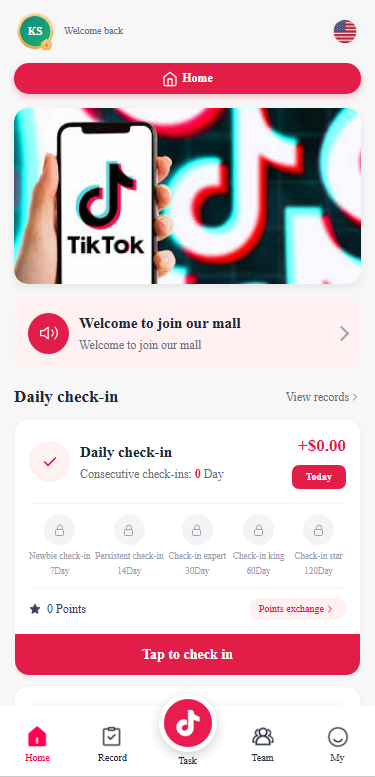
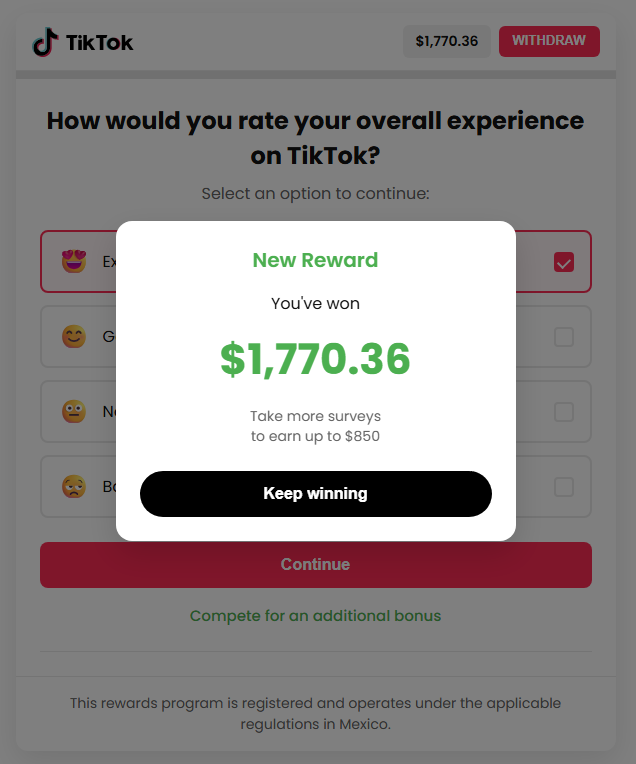
TikTok phishing often starts with an email or message designed to make you think you need to act on your account. It might claim your account has been suspended, reported, or hit with a copyright violation, or tell you that you’re eligible for verification.
The link might take you directly to a page made to look like TikTok’s login screen. If you enter your information, it can be sent straight to the scammers, including your phone number or email, password, and potentially a one-time authentication code.
With access to your account, scammers could impersonate you, target your contacts, or try to use the same password to break into your other accounts.
What to do if you get a suspicious TikTok message
If you get an unexpected email or message telling you to log in to TikTok, don’t use the link it provides. Open the real TikTok app or go directly to tiktok.com instead and check your account there.
If you’ve already entered your login information on a suspicious page, change your TikTok password immediately and check for any devices or login activity you don’t recognize.
Fake warnings and verification offers
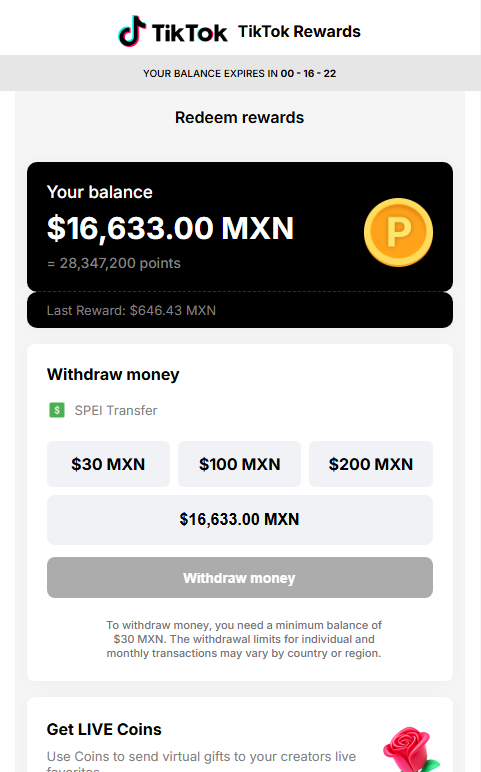
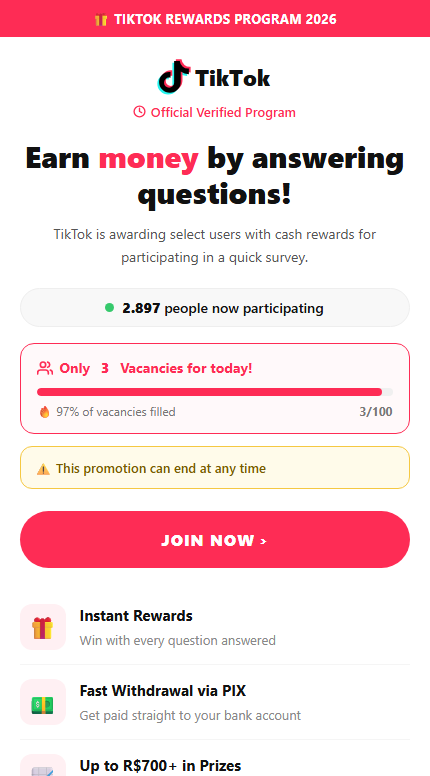
Not every TikTok phishing link leads directly to a fake login screen. Some try to scare you with claims that your account has been suspended or reported, or that you’ve received a copyright or community-guidelines strike that needs “resolving.” Others offer something you might want, such as a verified badge, creator payout, or brand deal.
For example, a fake TikTok Verification Center might congratulate you on your performance and tell you that you’re eligible for a verified badge:
Another fake verification page asks for account information as part of a supposed verification request:
Whether the message threatens you with a problem or promises you a reward, the aim is the same: to persuade you to interact with a fake TikTok page and hand over information.
Why these TikTok scams work
Fake TikTok pages can look convincing because copying the appearance of a real website is relatively easy. But the story that gets you there is just as important.
Suspension and copyright warnings create urgency. Verification and monetization offers create an incentive. Both give you a reason to act quickly instead of stopping to check where the link has actually taken you.
How to protect your TikTok account
Don’t use links in unexpected emails or messages asking you to log in to TikTok. Open the TikTok app or go directly to tiktok.com instead
Treat any message about a suspension, strike, or verification eligibility as unverified until you’ve confirmed it inside the TikTok app itself
Check the address bar before entering your login information. Make sure you’re actually on tiktok.com—a fake page can look almost identical to the real thing
Use a password manager where possible. It won’t auto-fill your TikTok password on a different domain, which is a useful warning sign
Turn on two-factor authentication (2FA) on your real TikTok account so a stolen password alone isn’t enough to get in
If you’ve already entered your login information on a page like this, change your TikTok password immediately and check for any login activity or devices you don’t recognize
GTA 6 footage really has leaked online, and Rockstar has an official Extended Look coming to Netflix on August 27. But cybercriminals are exploiting the hype with fake Rockstar sites that lead visitors to password-stealing malware.
We identified a network of sites appearing in searches for a GTA 6 demo and impersonating Rockstar Games. One Google result advertises an “Official Download,” but visitors who follow the sites’ “Play Now” links can instead end up downloading gta6_installer.exe.
The sites are particularly convincing because they copy Rockstar’s genuine promotion for its August 27 extended look at GTA 6. But the executable they deliver isn’t a demo, game, or video. It’s an information stealer designed to take passwords stored in browsers, cookies, and authenticated sessions. And because stolen browser sessions can sometimes be reused without going through the normal login process, even two-factor authentication (2FA) may not be enough to stop them.
One of the fake GTA 6 demo websites impersonating Rockstar Games
There is no GTA 6 demo
Rockstar has not announced or released a demo of Grand Theft Auto VI.
The game is scheduled for release on November 19, 2026, for PlayStation 5 and Xbox Series X|S. Rockstar has not announced a PC version.
Rockstar has announced an extended look at GTA 6 for August 27, premiering on Netflix before appearing on its YouTube channel later that day. That’s something to watch, not a playable demo or game download.
The scam sites copy this genuine announcement while using “Play Now” buttons that can lead visitors to the malicious executable.
The site copies Rockstar’s genuine Extended Look promo, but adds a fake “Play Now” button
In other words, there is no legitimate GTA 6 demo or PC build to download. This isn’t the first fake GTA 6 offer we’ve seen. Earlier this year, scammers were charging people hundreds of dollars for fake GTA 6 early access.
The file size should also immediately raise suspicion. The executable delivered by these sites is just 1.1 MB. That is nowhere near enough to contain a modern AAA game. In fact, the screenshot we took of one of the websites is larger than the file it was offering.
The supposed GTA 6 installer is just 1.1 MB
The leak created the opening
On August 18, new GTA 6 gameplay footage and what appears to be a complete map of Leonida, the game’s setting, began circulating online. A person or group calling itself Cyberleek claimed responsibility.
Rockstar and Take-Two responded with takedowns, with Take-Two filing DMCA subpoenas seeking records from Microsoft and Discord that could help identify whoever is behind the leaks.
The malicious gta6_installer.exe sample was first spotted on August 19, just one day after the first Cyberleek material began circulating.
Apparently genuine unauthorized GTA 6 material was already circulating, giving people searching for leaked footage, maps, or unofficial builds reason to believe there might be more out there.
But genuine leaks weren’t the only thing competing for that attention. Leaked clips carried promotional material for a cryptocurrency token associated with Cyberleek, while Cyberleek’s website solicited cryptocurrency donations and offered paid advertising placements in future GTA 6 videos. AI-generated and recycled footage was also being presented on social media as fresh leaks.
One of the fake GTA 6 sites appearing in Google search results alongside legitimate GTA 6 coverage
This isn’t the first time GTA 6 has been caught up in a major leak. In 2022, Rockstar confirmed that an attacker had stolen and published development footage of the game.
Leaks create exactly the kind of environment malware operators can exploit: huge demand for unofficial material, mixed with fakes, promotions, scams, and genuine leaks that can all be made to look remarkably similar.
The fake GTA 6 demo is another part of that ecosystem, but one designed to steal passwords and logged-in browser sessions.
What the file actually does
The installer belongs to the Vidar family, a well-established infostealer we’ve seen in other recent malware campaigns that is sold as a service to cybercriminals. Malwarebytes detects this sample, and blocks the websites and network infrastructure associated with the campaign.
Vidar is designed to steal the information browsers remember for you. That could give attackers access to accounts including your email, social media, gaming, and shopping accounts.
In this sample, it went looking for:
Saved passwords and login details
Session cookies
Browsing and download history
Autofill and other saved browser profile data
Credentials stored by FTP clients
Our analysis showed 19 browser targets, including Chrome, Edge, Firefox, Brave, Opera, and Vivaldi. It also searched Thunderbird profile directories and targeted Perplexity’s Comet browser and the WebView2 browser embedded inside Roblox Studio.
The behavior report showed no persistence mechanism designed to make the malware survive a reboot. We observed no startup entry, scheduled task, or installed service that would relaunch it automatically.
But an infostealer doesn’t need to remain on your computer to cause lasting damage. Once passwords or session tokens have been stolen, attackers can continue trying to use them after the malware itself is gone.
That is one reason an infection can be easy to miss. In our analysis, it produced no visible user-facing window and installed nothing that a user would normally notice. From the victim’s perspective, the supposed GTA 6 installer may simply appear to do nothing.
Why changing your password might not be enough
If you use a password manager and unique passwords, you might assume there is little useful information for a stealer to take directly from your browser.
Session cookies change that.
When you sign in to a website, the site gives your browser a session token that tells it you have already authenticated. That is why you do not have to enter your password every time you open another page.
If an attacker steals a usable session token, they may be able to reuse that authenticated session without going through the normal login process again.
That matters for 2FA too. 2FA protects the login process, but a stolen session was created after that login had already succeeded. Depending on the service and its security controls, an attacker may therefore be able to reuse the session without being asked for your password or 2FA again.
This is why changing your password after a stealer infection may not be enough by itself. A password change does not necessarily invalidate every existing session.
You should also use the service’s option to sign out everywhere, revoke active sessions, or remove unfamiliar devices.
How to protect yourself
Check it’s official. Do not assume an unofficial “demo,” beta, early build, or leaked version is legitimate just because a game has not launched yet. Check the publisher’s official website and store pages first.
Use official download sources. Download games and demos only from official sources such as Steam, the Epic Games Store, PlayStation Store, Xbox, or the publisher’s own website.
Check the file size. A one-megabyte executable cannot contain a modern AAA game.
Don’t trust search results. Attackers can buy advertisements and optimize malicious pages for exactly the terms people search during major news events.
Don’t trust appearances. Official artwork, logos, screenshots, and page layouts are easy to copy.
Be careful with leaked material. By definition, there is no official distribution channel to tell you which download is genuine. If what you want is GTA 6 footage, Rockstar’s official Extended Look arrives on August 27.
Block malicious sites. Malwarebytes Browser Guard blocks malicious pages like these before they load, helping stop the attack before a download ever reaches your computer.
What to do if you ran it
If you downloaded and ran a supposed GTA 6 demo installer, assume credentials and active browser sessions on that computer may have been compromised.
Work through the following steps:
Scan the affected computer with Malwarebytes or another trusted security product and remove anything it detects.
Use a clean device to change important passwords, starting with your primary email account, followed by banking, payment services, and accounts tied to your identity.
Sign out of active sessions everywhere you can. Look for options such as “sign out everywhere,” “log out of all devices,” or “active sessions.” This is what deals with stolen session cookies and tokens.
Check your accounts for changes you did not make, including new email forwarding rules, recovery addresses, phone numbers, authorised applications, and unfamiliar devices.
Enable two-factor authentication on accounts that don’t already have it.
Monitor important accounts closely for unusual activity over the following weeks.
Check gaming accounts as well. Steam, Epic, and similar accounts can contain saved payment methods, valuable inventories, and access to other services.
Technical details
It uses your own browser to unlock your data
Browsers increasingly use stronger encryption and application-level protections for saved passwords and cookies. In particular, Chromium-based browsers have made it harder for unrelated software to simply copy a database and decrypt everything directly.
This sample uses a different approach.
During our analysis, it launched the actual Chrome, Edge, and Firefox executables installed on the system. It started them in headless mode, disabled logging, and pointed each one at a temporary user-data directory.
In other words, it was not launching a fake browser. It was using legitimate browser binaries already trusted by the system.
The point is to work through a browser process that can access its own protected data rather than trying to defeat those protections from the outside.
Afterward, the malware issued commands to delete the temporary browser directories it had created.
The protection has not necessarily been broken. It has been approached through software that is already allowed to use it.
That is an important distinction, because browser-level encryption makes credential theft harder, but it cannot make running an unknown executable safe.
The delivery address can come from a social media profile
Vidar has a well-documented habit of using what researchers call dead-drop resolvers.
Instead of relying only on a command-and-control address permanently embedded in the malware, Vidar variants can retrieve the current destination from attacker-controlled profiles hosted on legitimate services such as Telegram and Steam.
This makes the infrastructure easier to rotate: operators can update a profile instead of rebuilding and redistributing the malware.
The activity we observed is consistent with that pattern.
The sample contained profile URLs for Telegram, Pinterest, and Steam Community, and network connections to all three services were observed during analysis.
It also communicated with attacker infrastructure. Most notably, it sent multipart POST requests to ses.1001gacor.org.
The sample also established a TLS connection to ket.sm188daftar.mom.
The important point is that traffic to a legitimate service such as Telegram, Pinterest, or Steam can blend in with ordinary network activity. Blocking one malicious server is also less useful when the malware has another place it can check for updated infrastructure.
A wave of websites is offering to check whether your antivirus is working. They call themselves SysScan, carry Microsoft branding, and all reach the same conclusion: Your computer has serious problems, and the cause is the antivirus software you installed.
Windows, they claim, no longer supports third-party antivirus. Uninstall it immediately.
That is false, and it is the first step in a refund scam designed to get victims onto the phone, remove their security software, and ultimately hand over personal, banking, and remote-access information.
We found eleven of these sites on a single host. Although the names vary, the sites work in essentially the same way: Run a convincing-looking but fake security scan, tell the victim their antivirus is causing problems, collect their information, and prepare them for a supposed refund call.
What to know if you see one of these scans
A website cannot run a real security scan. It can only read basic browser data like your operating system, screen size, and approximate location—not check for malware, memory issues, or missing security patches.
Microsoft still supports third-party antivirus software, and legitimate refunds never require you to uninstall security tools or install remote-access software.
If a site tells you to do any of that, close it immediately.
Technical analysis
The scan reads real data and draws invented conclusions
Part of what makes the scam convincing is that the page does measure some real things.
It reads information that a browser legitimately exposes—your user agent, screen dimensions, device memory, processor count, permission states, network information, available web features, and some page performance timings. That allows the results to appear specific to your machine.
But the security conclusions aren’t connected to those measurements.
Fifty of the findings are fixed text written into the page, grouped in blocks that the developer labelled as fake checks.
Among them are claims that your browser sandbox is compromised, kernel page-table isolation is inactive, your memory is vulnerable to Rowhammer, no Trusted Platform Module was found, WebRTC is leaking your local IP address, and your processor is thermally throttled.
A web page cannot determine those things.
One finding even reports how many days behind your security patches are, using a random number generated whenever that check runs. Run the scan again and you get a different answer.
Even checks that use genuine information are twisted into warnings. An encrypted connection becomes a downgrade risk. Cookies enabled is a warning; cookies disabled is a failure. Ordinary features found in modern browsers are flagged as ways to identify you.
Our fully updated test browser was reported as possibly outdated.
Most tellingly, the score is constrained in the code to between 13 and 30 out of 100. It cannot report anything above 30, regardless of the computer being tested.
Passing is not a possible outcome.
Why the scam tells you to uninstall your antivirus
Telling someone to remove their antivirus is the most consequential thing these pages do, and it serves the scammers in two ways.
First, it removes software that could interfere with what comes next, including remote-access software and anything installed during the session.
Second, it tells the scammers which security product the victim uses.
The site records which antivirus was removed from a list of 28 named products, plus an Other option. Enterprise security software also appears on the list, suggesting the scam is also prepared for people using work computers.
The claim is made more believable by distorting something that is true. Windows includes its own antivirus protection, Microsoft Defender Antivirus. When a compatible third-party antivirus product is installed, Defender can move into a passive state because the other product is providing protection.
That does not mean Windows no longer supports third-party antivirus.
The form appears built for the scammer, not the victim
After the scan, the site presents a customer information form.
It collects a name, address, phone numbers, email address, refund amount and reason, bank name, cryptocurrency username, antivirus product, and the ID and password for a remote-access session. Users can choose from 30 different remote-access tools.
It also requires an Agent ID, Agent Name, and Company.
Those fields strongly suggest the form is designed to be filled in by an operator during a call, potentially while they can see the victim’s screen. The code does not prove who types the information, but there is little reason for agent details to appear on a form intended solely for a customer.
One field even asks whether explicit content is involved. Embarrassment and shame can be powerful tools for scammers because victims may become less willing to discuss what happened with a partner, family member, or bank.
When the form is submitted, the browser bundles the customer, agent, remote-access, antivirus, and banking details into a single message and sends it directly to Telegram’s bot API.
There is no application backend involved, making the sites cheap to host and easy to abandon when they attract attention.
It also exposes another lie. The site states in several places that no data is sent and nothing is collected. Even before the form is submitted, it contacts external IP and geolocation services. Once the form is submitted, the information entered is sent to a Telegram group chat.
Then comes the supposed refund call
After submitting the form, the victim is sent to a page saying a refund manager will call within three to five minutes.
The page plays a looping video of a man in an office and prevents the victim from pausing it, switching it to full screen, or opening the right-click menu.
.kadence-column455177_36c2bb-be{max-width:700px;margin-left:auto;margin-right:auto;}.wp-block-kadence-column.kb-section-dir-horizontal:not(.kb-section-md-dir-vertical)>.kt-inside-inner-col>.kadence-column455177_36c2bb-be{-webkit-flex:0 1 700px;flex:0 1 700px;max-width:unset;margin-left:unset;margin-right:unset;}.kadence-column455177_36c2bb-be > .kt-inside-inner-col,.kadence-column455177_36c2bb-be > .kt-inside-inner-col:before{border-top-left-radius:0px;border-top-right-radius:0px;border-bottom-right-radius:0px;border-bottom-left-radius:0px;}.kadence-column455177_36c2bb-be > .kt-inside-inner-col{column-gap:var(--global-kb-gap-sm, 1rem);}.kadence-column455177_36c2bb-be > .kt-inside-inner-col{flex-direction:column;}.kadence-column455177_36c2bb-be > .kt-inside-inner-col > .aligncenter{width:100%;}.kadence-column455177_36c2bb-be > .kt-inside-inner-col:before{opacity:0.3;}.kadence-column455177_36c2bb-be{position:relative;}@media all and (min-width: 1025px){.wp-block-kadence-column.kb-section-dir-horizontal>.kt-inside-inner-col>.kadence-column455177_36c2bb-be{-webkit-flex:0 1 700px;flex:0 1 700px;max-width:unset;margin-left:unset;margin-right:unset;}}@media all and (max-width: 1024px){.kadence-column455177_36c2bb-be > .kt-inside-inner-col{flex-direction:column;justify-content:center;}}@media all and (max-width: 767px){.wp-block-kadence-column.kb-section-sm-dir-vertical:not(.kb-section-sm-dir-horizontal):not(.kb-section-sm-dir-specificity)>.kt-inside-inner-col>.kadence-column455177_36c2bb-be{max-width:700px;-webkit-flex:1;flex:1;margin-left:auto;margin-right:auto;}.kadence-column455177_36c2bb-be > .kt-inside-inner-col{flex-direction:column;justify-content:center;}}
.kadence-column455177_e97529-df > .kt-inside-inner-col{padding-top:var(--global-kb-spacing-xs, 1rem);padding-right:var(--global-kb-spacing-xs, 1rem);padding-bottom:var(--global-kb-spacing-xs, 1rem);padding-left:var(--global-kb-spacing-xs, 1rem);}.kadence-column455177_e97529-df > .kt-inside-inner-col,.kadence-column455177_e97529-df > .kt-inside-inner-col:before{border-top-left-radius:0px;border-top-right-radius:0px;border-bottom-right-radius:0px;border-bottom-left-radius:0px;}.kadence-column455177_e97529-df > .kt-inside-inner-col{column-gap:var(--global-kb-gap-sm, 1rem);}.kadence-column455177_e97529-df > .kt-inside-inner-col{flex-direction:column;}.kadence-column455177_e97529-df > .kt-inside-inner-col > .aligncenter{width:100%;}.kadence-column455177_e97529-df > .kt-inside-inner-col{background-color:#f8f4f4;}.kadence-column455177_e97529-df > .kt-inside-inner-col:before{opacity:0.3;}.kadence-column455177_e97529-df{position:relative;}@media all and (max-width: 1024px){.kadence-column455177_e97529-df > .kt-inside-inner-col{flex-direction:column;justify-content:center;}}@media all and (max-width: 767px){.kadence-column455177_e97529-df > .kt-inside-inner-col{flex-direction:column;justify-content:center;}}
TRANSCRIPT ========== Thank you for completing the form. Your request has been successfully received and is now being reviewed. A refund manager will be contacting you shortly to verify your information and assist with the next steps. Please remain available to answer your phone. We appreciate your patience. Please keep your phone nearby and be prepared to answer the call so we can process your request as quickly as possible. Thank you for choosing our services.
The apparent purpose is to keep the victim on the page while contact is arranged and reassure them that an official process is underway.
Whether the caller is a different scammer is not something the code can tell us, but the structure creates a clear handover point.
By the time anyone starts asking about bank details, the victim has already seen a Microsoft-branded security scan, been told their computer has serious problems, removed their antivirus, and entered information into what appears to be an official refund process.
The site shows signs of AI-generated code
The video on the waiting page is synthetic, and the clip is zoomed and cropped inside its frame.
The code points in a similar direction. It is heavily commented in the explanatory, self-narrating style often produced by AI coding tools, including notes explaining why the scan is deliberately paced and why spoken lines use a terse security-console tone.
Some comments describe the deception directly. Eight blocks of invented findings are labelled as fake, while around 20 checks that read genuine values are described as exaggerated.
One comment near the top of the file even states that no data leaves the device, a few hundred lines before the function that sends the form to Telegram.
Source code cannot prove how it was created. But the fraud-specific elements—including the US bank list, agent identifiers, and explicit-content field—appear to have been fitted into a broader scanner template.
How to spot a fake computer security scan
There are several warning signs that give scams like this away:
A website claims to find deep problems with your computer. A web page can see some information your browser provides, but it cannot inspect things such as your firmware settings, antivirus status, memory vulnerabilities, or exact Windows patch level.
Every result is bad. A diagnostic that cannot produce a passing result isn’t really diagnosing anything.
You’re told to uninstall your antivirus. Microsoft continues to support third-party security software on Windows.
You’re asked to install remote-access software. Legitimate refunds do not require someone to take control of your computer.
You’re asked for banking or cryptocurrency information. A legitimate company should not need remote access or cryptocurrency to process a refund.
The page relies on a familiar logo. A Microsoft or Apple logo on a website does not mean the company operates it. These sites can switch branding depending on the operating system they detect.
If this has already happened
If you’ve installed remote-access software or allowed someone to control your computer, disconnect the computer from the internet and remove the remote-access tool.
Reinstall the antivirus software you were told to remove, update it, and run a full scan.
If you gave the scammers banking information or allowed them to access your online banking, contact your bank immediately using a phone number you look up yourself. Tell them you may have been targeted by a refund scam.
Change your email and banking passwords from a different, trusted device.
If money was taken, report the scam to the Federal Trade Commission (FTC) at reportfraud.ftc.gov and the FBI’s Internet Crime Complaint Center (IC3) at ic3.gov.
And don’t let embarrassment stop you from telling your bank or someone you trust what happened. Creating that embarrassment can be part of the scam because it makes victims less likely to ask for help. Acting quickly gives you the best chance of limiting any loss.
Scammers are creating fake crypto wallet-checking sites that promise to tell you whether a wallet is linked to suspicious activity. Instead, they try to trick you into giving them access to your crypto.
What real AML checking looks like
AML stands for anti-money laundering. These are rules that require banks and other regulated businesses to screen customers for ties to crime. It’s designed to prevent cybercriminals from hiding or moving illegally obtained money.
In the crypto world, this usually means checking whether a wallet address has links to hacks, scams, sanctioned entities, or other suspicious activity based on its transaction history.
For a basic wallet check, the service only needs the wallet’s public address. You don’t need to connect your wallet, approve anything, or sign a transaction. It’s just a lookup.
If an AML checker asks you to connect your wallet rather than simply enter its public address, treat that as a warning sign.
How the scam works
These sites look professional. Many pretend to be the legitimate service, AMLBot, or use names such as “AML Check,” copying the logo, layout, and language of legitimate wallet-screening services.
Fake AMLBot siteReal AMLBot site
You’re invited to choose your cryptocurrency, click Check Wallet, and connect your wallet to get your results.
Connecting a wallet by itself isn’t enough to steal your crypto. It reveals your public wallet address, which the scammers use to create a transaction specifically for your wallet. That transaction is then sent to your wallet for you to approve.
The site is designed to get the victim to approve a transaction generated by the scammers. You should never approve a transaction you don’t understand or weren’t expecting.
A fake AML Check site
Another fake AML Check site
A fake AMLBot site
Once the site knows your public address, it can also see the assets associated with it and tailor the scam accordingly.
One version we reviewed makes the process look like a genuine security check. A progress bar displays messages such as “Checking wallet history…” and “Verifying compliance…”
Partway through, the site shows a fake error claiming the wallet needs a small top-up to “cover the fee” before the check can finish. Clicking Retry plays the same progress animation again before producing a reassuring “Clean, Low Risk” result and offering a report to download, regardless of whether a genuine check took place.
The progress bars, error messages, and final result are all designed to make the process feel legitimate.
Why the scam works
People using an AML checker are already trying to protect themselves. The scam takes advantage of that caution by making each step look like part of a normal security check.
The fake progress bar suggests that something is being analyzed. The supposed fee makes the interruption seem plausible. And the “Clean, Low Risk” result makes it appear that the check worked.
We’ve also seen the same basic design and process appear under several different names and logos, suggesting the same scam template is being reused and rebranded.
What to do if you connected a wallet
What you need to do depends on what happened.
If you only connected your wallet: Disconnect the suspicious site from your wallet. Simply connecting shouldn’t give the site permission to move your crypto.
If you approved access to your tokens: Check your wallet for token permissions you don’t recognize and revoke them. Your wallet provider may have an approval checker that shows which apps or smart contracts have permission to access your tokens.
If you confirmed a transaction or signed something you didn’t understand: Check your recent wallet activity. If you think your assets may be at risk, move your remaining funds to a new wallet.
If you entered your recovery phrase or private key: Treat the wallet as compromised and move your assets to a new wallet with a new recovery phrase.
If you downloaded something from the site: Don’t open it. Delete it and run a malware scan.
If you’ve already lost money: Be wary of anyone who contacts you offering to recover it for a fee. Recovery scams commonly target people who have already had crypto stolen.
Crypto transactions generally can’t be reversed once they’re confirmed, so acting quickly matters if you’ve approved something suspicious.
How to spot a fake AML checker
Before using a wallet-checking service, check the website address carefully, especially if you reached it through an ad, social media post, message, or search result.
Be particularly cautious if an AML checker asks you to connect your wallet, approve unexpected access to your tokens, confirm a transaction, send crypto to complete a check, or share your recovery phrase or private key.
A basic wallet screening only needs the public wallet address. It shouldn’t require access to your crypto.
Pro tip: Malwarebytes Browser Guard can block known scam, phishing, and malicious websites before you interact with them.
Most wrong-number texts are harmless. Some are the first step in a carefully planned scam. By replying, you may be confirming that your number is active and that you’re willing to engage with strangers, making you a more valuable target for future fraud. Here’s why a polite response can be worth money to cybercriminals.
The politeness trap
Sunday night. You’re on the couch, half-watching Netflix, when your phone buzzes.
“Hey! Are we still on for dinner tomorrow? Don’t forget the wine ”
You don’t recognize the number. You glance at it for two seconds, then type what most polite people would:
“Sorry, I think you have the wrong number!”
You put your phone down. Go back to Netflix, and forget about it within five minutes.
On the other end, though, your reply has just told the sender something valuable. Not because of a technical exploit or an invisible cyber-attack, but because you just proved you’re the kind of person who responds to strangers politely.
According to cybercrime intelligence reports, responsive phone numbers are worth significantly more than inactive ones. With a single reply, you’ve entered a global criminal ecosystem run by transnational syndicates that, according to analysts, moves tens of billions of dollars.
What your reply told them
Let’s be clear: the “wrong number” text is not a phishing link. It’s not malware. In many cases, it’s not even the scam itself. It’s a personality test.
The scammers already have your number. They may have bought it in bulk from a data breach for a fraction of a cent per record. They already know the message was delivered because their SMS gateway received no delivery failure. Text messages remain one of the most effective ways to reach people, with exceptionally high open rates and most being read within minutes. That’s one reason scammers prefer SMS to email.
What they don’t know is whether you’re worth spending more time on. Your reply told them three useful things:
You’re responsive. You saw the message and felt compelled to reply. This immediately places you in their top 15–20% most active numbers category.
You’re polite. You didn’t ignore it and didn’t respond aggressively. You wanted to help a stranger. Scammers deliberately exploit that instinct to be polite and helpful.
You reply quickly. The time between their message and your reply can reveal how closely you monitor your phone, help estimate your timezone, and indicate how likely you are to respond to future messages.
The two paths your number takes
From this moment, your story splits. Both paths described below play out across millions of phones worldwide.
Scenario A: The slow burn
Within minutes of your reply, another message arrives in response to yours:
“Oh no, I’m so sorry! But honestly, you seem like a really kind person. It’s rare to find polite people these days. I’m Sarah, by the way.”
Some people stop the conversation there. Others reply out of curiosity or because they’re simply being friendly. A few messages later, you’re in a conversation.
In some large scam operations, those early exchanges may be handled by AI (Artificial Intelligence) using open-source language models such as Llama or Mistral. That allows scammers to hold thousands of conversations at once and focus their time on the people who seem most likely to keep talking.
While keeping you engaged, the AI assigns you a real-time vulnerability score based on your response time and message length. If your score crosses a certain threshold, a human operator takes over. They read the conversation, learn your name, your job, and your communication style, then continue as though nothing has changed.
Within two or three weeks, this person has become a friend. They text you good morning, ask about your day, and send photos stolen from real social media profiles.
Around week three, they casually mention an investment:
“I’ve been making really good money on an investment platform lately. Almost $4,000 last month. It’s crazy.”
If you show interest, they’ll send you a link to a fake trading platform with a convincing design. You might deposit $500 to test it. The next day, your dashboard shows a fake gain of $1,800, so you invest more. A week later, the platform disappears, along with your money, and the person who texted you every day.
According to the FBI’s Internet Crime Complaint Center (IC3), investment fraud generated more than $4.5 billion in reported losses in a single year. To be clear: while most wrong-number texts never reach this stage, victims who fall for so-called “pig butchering” scams (long-term romance/financial scams) suffer catastrophic average losses ranging between $70,000 and $75,000 per person.
Scenario B: The silent recycling
In this scenario, you replied “wrong number” and never heard from them again. You think you dodged the scam, but instead your number was simply moved to a different category: “Active, responsive, polite, but not susceptible to the wrong-number hook.”
That profile still has enormous commercial value. Your number is added to a cleaned database and sold or reused for a different campaign.
A week later you receive a text from another number:
“Hi! I saw your profile on LinkedIn. We have an opportunity that’s a perfect fit for your background.”
Or:
“Your package couldn’t be delivered, update your address by clicking here.”
Or a fake alert from your bank warning of “suspicious activity.”
You’ll probably never connect these messages to the wrong-number text you received the week before. They’re different topics and different senders. But they may all be part of the same criminal ecosystem. The first message was simply a way to sort potential targets. Everything that follows is the actual attack.
The most common hooks
If you’ve received one of these messages (or something very similar), you’re not alone. These are some of the most common opening lines used in wrong-number scams, tested on millions of people and optimized to maximize response rate:
The friend who doesn’t exist:
“Hey! See you tonight at 6? Don’t be late ”
“Are you still free tomorrow?”
“Did you send those files to the office?”
“Hey Marco, are we still on for dinner tonight?”
The concerned neighbor:
“Sorry to bother you, I’ve noticed your dog sometimes runs into my yard.”
“I found a phone number on the dog tag, is this yours?”
“Hi, your package was delivered to my address by mistake.”
The professional mix-up:
“Hi, I tried to reach you about the delivery but you didn’t answer.”
“The shipment arrived at your address, can you confirm?”
“This is Mike from the office, did you get my earlier message?”
The family emergency:
“Do you know Sarah? There’s been an emergency.”
“Is this [common name]’s number? Something happened.”
The recruiter:
“Hi! I came across your profile, we have an incredible opportunity.”
“Hey, I’m reaching out about a position that matches your background perfectly.”
If you’ve received one of these messages, it doesn’t automatically mean it’s a scam. People genuinely do text the wrong number sometimes. But if the conversation quickly moves to making small talk, asking personal questions, or encouraging you to keep chatting, stop replying.
These messages aren’t usually sent by a lone cybercriminal. They’re part of a highly organized criminal industry with its own market dynamics and global supply chains.
In January 2026, Cambodian and Chinese authorities arrested Chen Zhi, president of Prince Holding Group, accusing him of running a network of scam compounds across Southeast Asia where thousands of trafficked people were forced to manage these conversations. Those operations relied on underground marketplaces where criminals could buy everything they needed, from phone lists and stolen identities to AI tools and fake investment websites.
The scale is staggering. Blockchain analytics firm Elliptic estimates the Huione Guarantee underground marketplace processed more than $134 billion in transactions. Separately, researchers at the University of Texas at Austin estimate that pig-butchering scams stole more than $75 billion in cryptocurrency over four years.
The scam funnel: Costs and revenue
To understand why this ecosystem is so huge, look at the math. Sending hundreds of thousands of text messages costs very little. Even if only a tiny fraction of people reply, and an even smaller number eventually send money, the profits can far outweigh the costs.
Look at this illustrative model of a campaign sending 100,000 SMS messages:
The figures in this model aren’t arbitrary. They combine observed pricing from underground marketplaces such as Russian Market and BidenCash with average victim losses reported by law enforcement agencies, including the FBI’s Internet Crime Complaint Center (IC3).
Even allowing for variation between campaigns, the economics are compelling. A single campaign can cost less than $1,000 to run while generating more than $200,000 in revenue, representing a potential return on investment (ROI) of 90x to 200x.
Those same economics are reflected in underground marketplaces, where verified, enriched contact details command significantly higher prices than raw data. In our previous investigation into underground marketplaces, we found that a typical stolen personal record sold for around 95 cents. The more criminals learn about a potential victim, the more valuable that person’s data becomes.
That’s a 4,000% value increase generated by a single polite reply.
From there, scammers can enrich that record with publicly available information such as your name, employer, social media profiles, and estimated demographics using automated open-source intelligence (OSINT) techniques.
The more complete the profile becomes, the more valuable it is. Researchers monitoring underground marketplaces have found that enriched, pre-profiled contacts command premium prices because they’re more likely to become victims of high-value pig-butchering scams that generate billions of dollars in illicit revenue each year.
How do they know who you are?
Before that text reaches your phone, your number may already have passed through automated script pipelines capable of cross-referencing tens of thousands of records in minutes.
Acquisition: Your number is pulled from historical data breaches, such as the Facebook leak affecting 533 million users, Twitter/X data leaks, or massive aggregated databases like Naz.api, and the Mother of All Breaches (MOAB), a collection of more than 26 billion records compiled from thousands of previous breaches.
Automated scraping: Software queries public sources to check whether your number is linked to an active WhatsApp account, collect your profile information and picture and match the number to public LinkedIn, Instagram, and Facebook profiles.
Data broker integration: Scammers exploit the same commercial data services used by marketing companies to associate a phone number with estimated age, address, and income bracket.
The result is a psychographic and commercial profile that helps scammers choose the most convincing approach. If your social media shows you have a dog, you might receive the neighbor hook: “Your dog keeps getting into my yard.” If you recently changed jobs on LinkedIn, the fake headhunter hook activates.
The human factor: Modern slavery
There’s one aspect of these scams that’s often overlooked: many of the people sending the messages are victims themselves.
In its August 9, 2023 policy report, the United Nations Office on Drugs and Crime (UNODC) described a human rights crisis tied to forced criminality in Southeast Asia. It estimates at least 120,000 people in Myanmar and tens of thousands in Cambodia are being held in fortified mega-compounds run by criminal syndicates.
Many were lured by fake job adverts promising legitimate work in digital marketing or customer service. Once they cross the border, their passports are confiscated. They were stripped of freedom and forced, under the threat of violence, to spend up to 16 hours a day managing dozens of scam conversations. Those who failed to meet financial targets were often beaten, isolated, or sold to other compounds.
When you reply to one of these messages, you’re interacting with a system designed to simultaneously exploit your financial availability and the enslavement of another human being.
Breaking the chain
You can’t erase your number from dark web databases: that damage may have done years ago. But you can make your profile far less valuable to scammers.
Make yourself harder to profile: Review the privacy settings on any messaging apps and social media platforms that use your phone number. Limit who can see information such as your profile photo, status, last seen, and phone number. The less information scammers can gather automatically, the harder it is to build a detailed profile about you. On WhatsApp, for example, you can set Profile Photo, About, Status, and Last Seen to My Contacts. On Telegram, set Phone Number to Nobody.
Report before you block: Blocking protects only you. Reporting protects everyone. When you use WhatsApp’s Report and Block function, the last five messages in the chat are sent to Meta’s security teams. If enough people report the same number, it may be permanently banned, destroying the entire active campaign on that line.
The golden rule: If you receive an unexpected message from an unknown number, the safest response is no response at all. Don’t reply, don’t explain yourself, and don’t worry about seeming impolite. If it’s a genuine wrong number, the sender will usually realise their mistake and move on. If it’s a scam, you’ve denied the criminals exactly what they wanted: proof that your number is active and that you’re willing to engage.
Something feel off? Check it before you click.
Malwarebytes Scam Guard helps you analyze suspicious links, texts, and screenshots instantly.
TikTok-branded “rewards” pages are promising users cash for checking in every day, completing small tasks, and earning points. Those points supposedly convert into real money, and the balances look enormous. A countdown timer usually warns that your balance is about to expire. But when you try to withdraw it, there’s always something else you need to do first.
If you just want the short version
TikTok does have a legitimate Creator Rewards Program, but it doesn’t work like the sites we’re talking about here. Creator Rewards is for eligible creators in certain countries who meet specific requirements. They earn rewards for eligible original videos, not for checking in every day or completing tasks on a separate rewards website.
If you find a TikTok-branded site offering large cash rewards for check-ins, referrals, or simple tasks, don’t assume it’s legitimate just because TikTok has its own rewards program.
You can end up chasing a payout that was never coming, handing over personal or banking details, or installing an unwanted app.
Fake TikTok rewards sites
Fake TikTok rewards sites
Fake TikTok rewards sites
Fake TikTok rewards sites
Fake TikTok rewards sites
How these pages typically work
Most versions of this scam are built to look like a mobile shopping or loyalty app. There’s a TikTok logo, a “welcome back” greeting, a daily check-in tracker, and tabs for tasks, referrals, and your profile. At first glance, it can easily look like an official rewards program connected to TikTok.
When you tap through to the “redeem” screen, the numbers can show a cash balance in the thousands, converted from a huge pile of points, along with a countdown warning that your balance is about to expire. The minimum withdrawal is usually low enough to make cashing out look easy.
It isn’t.
Sites like this tend to introduce one more requirement every time you get close to actually withdrawing the cash. Refer more friends, watch more videos, complete a sponsored offer through an affiliate network, or download a separate app to “verify” your identity.
The app download may be the real goal, particularly if the operator gets paid for generating installs. The app could also be adware or other unwanted software.
Big numbers don’t mean real money
Nothing on these pages reflects a real ledger. A balance on the screen doesn’t mean there’s money waiting for you.
On a fake rewards site, the points, cash balance, and countdown can simply be numbers generated by the site itself, with no connection to TikTok’s actual systems.
The operator simply invents a sum that feels too good to walk away from.
So who is making money?
These sites tend to make money the same way most ad-funnel scams do: through affiliate and CPA (cost-per-action) programs.
CPA means the site operator can get paid when you do something, such as clicking an ad, signing up for a service, or installing an app. So even if you never receive the promised reward, your clicks, sign-ups, and downloads can still make money for someone else.
Why it’s easy to get pulled in
A daily check-in streak creates a small sense of investment. Walking away means giving up your streak and the money you think you’ve already earned.
Then there’s the big balance sitting on the screen and a countdown telling you it’ll disappear if you don’t act soon. Together, they give you plenty of reasons to keep going and very little time to question whether any of it is real.
What to do if you find one
Don’t enter banking details, card numbers, or ID information unless you’ve confirmed you’re using an official TikTok service.
If you were prompted to download an app outside TikTok itself, don’t install it. If you already have, uninstall it and run a security scan on your device.
Don’t refer friends or family to keep a streak going or unlock a withdrawal. You’d just be pulling them into the same funnel.
Check rewards in TikTok itself. TikTok’s Creator Rewards Program is for eligible creators and is managed through TikTok. If a separate website claims you can earn TikTok cash rewards through check-ins or simple tasks, don’t assume it’s part of the same program.
Reward-mill scams like this aren’t unique to TikTok. The same check-in-and-cash-out formula appears with other brand names too. The name may change, but the trick is much the same: Keep you clicking with the promise that your money is just one more task away.
Something feel off? Check it before you click.
Malwarebytes Scam Guard helps you analyze suspicious links, texts, and screenshots instantly.

 Entrar
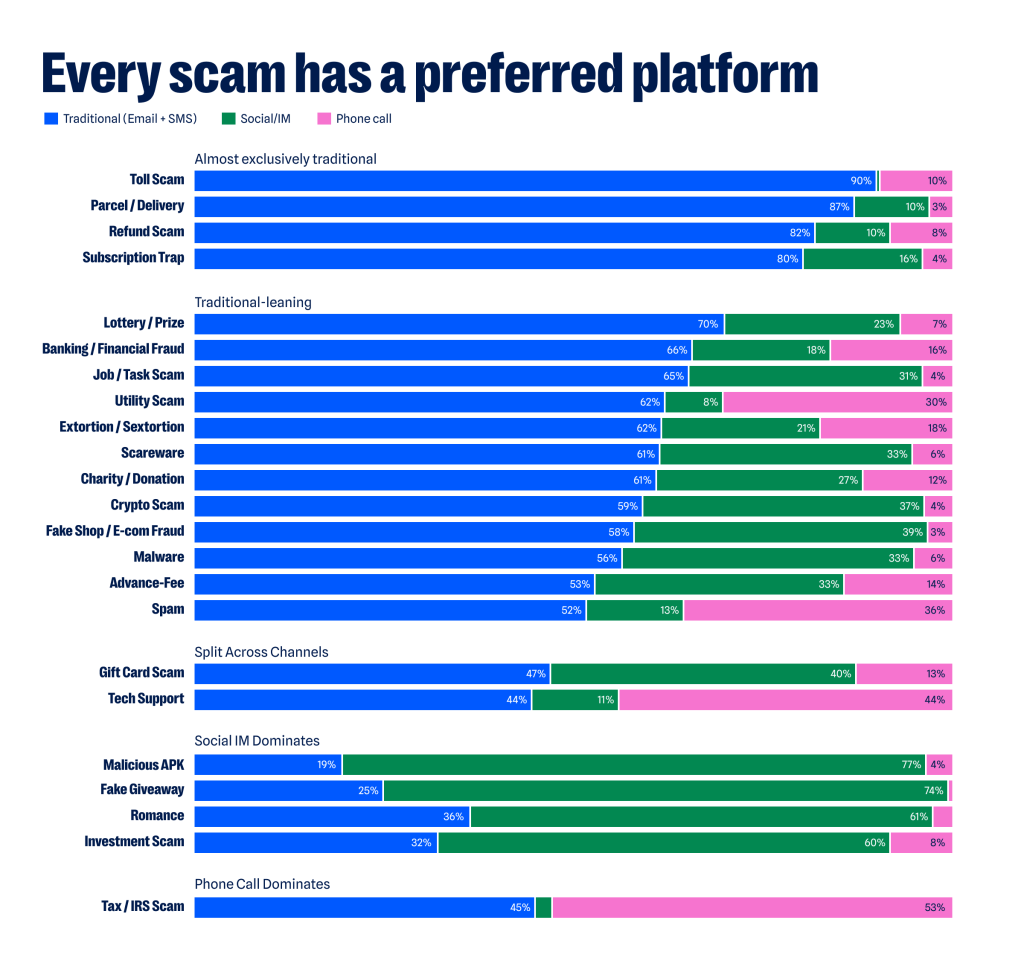
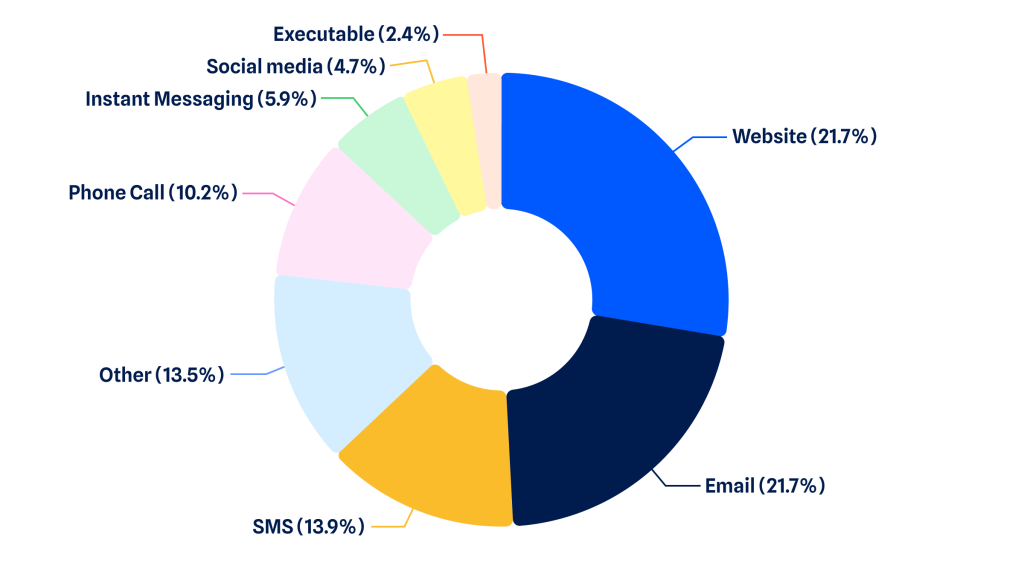
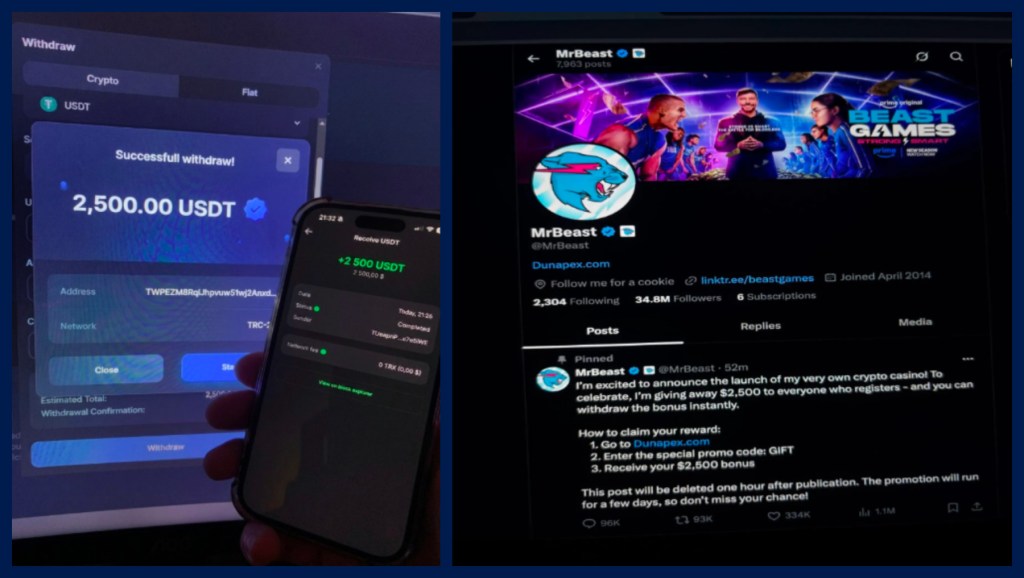
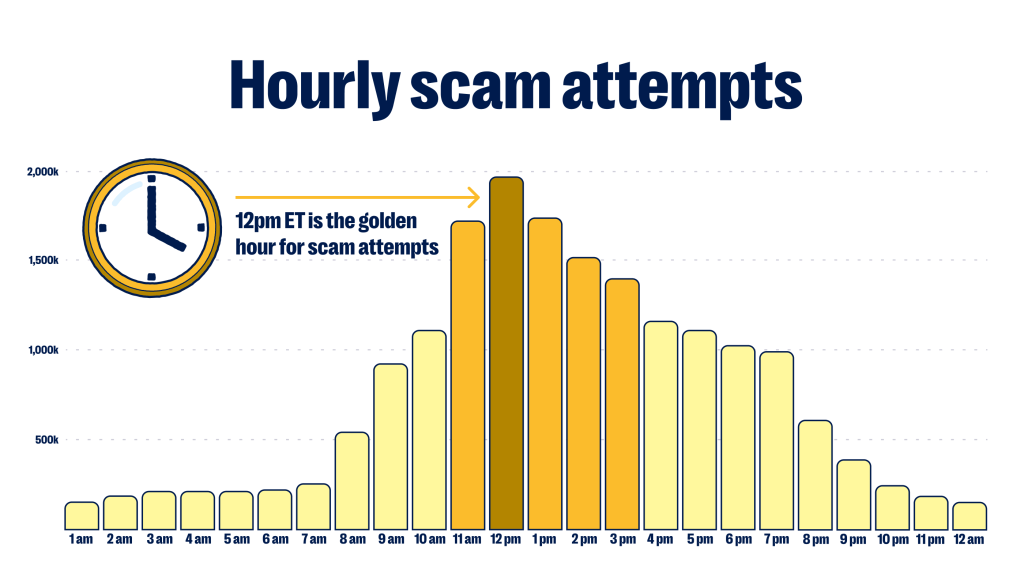
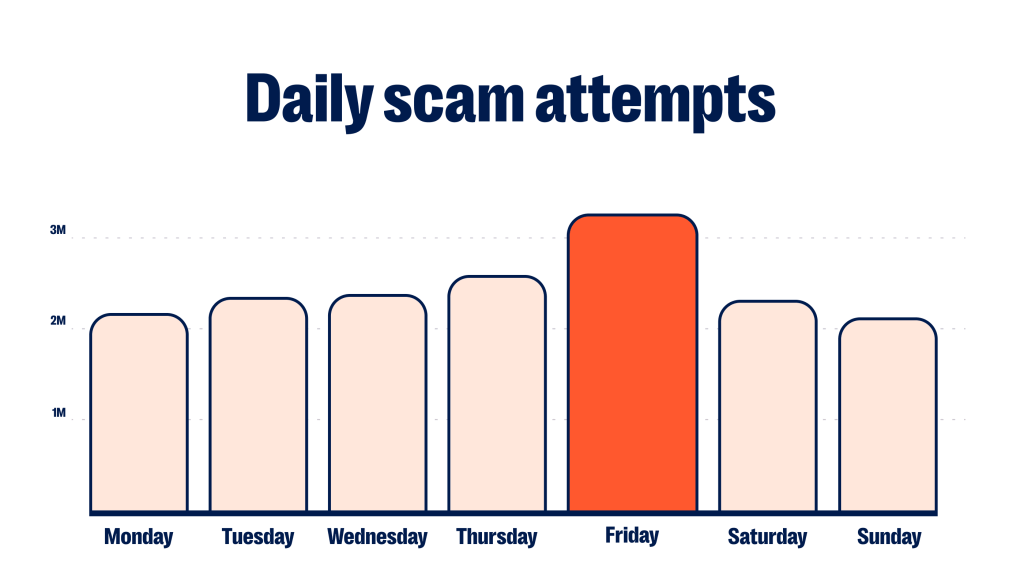

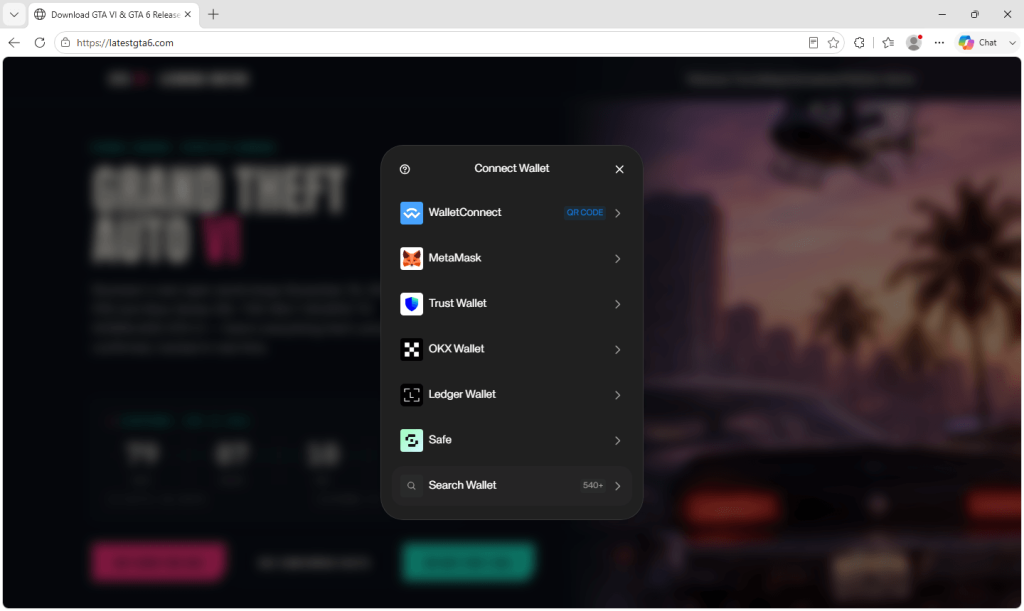
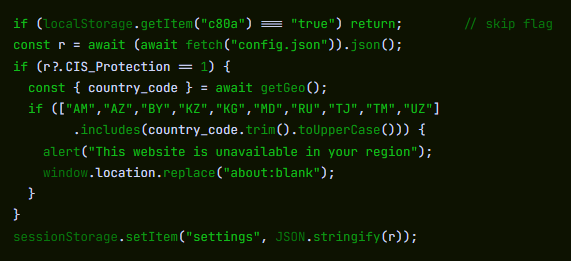
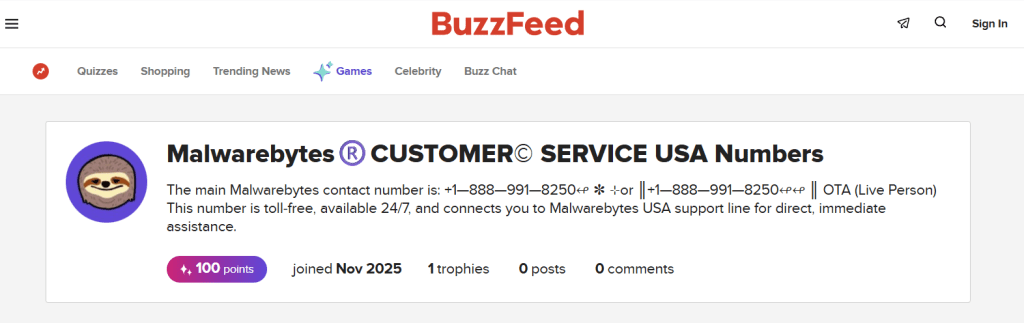
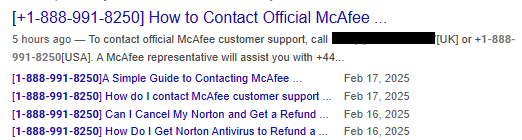
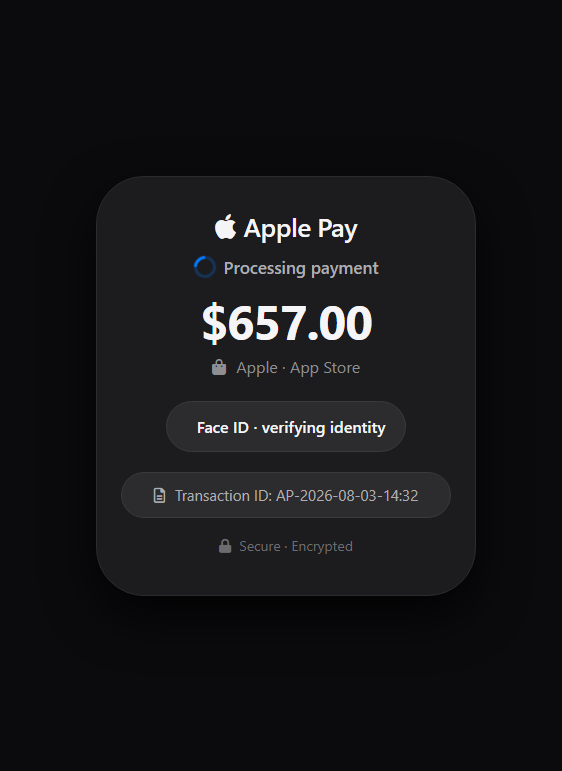
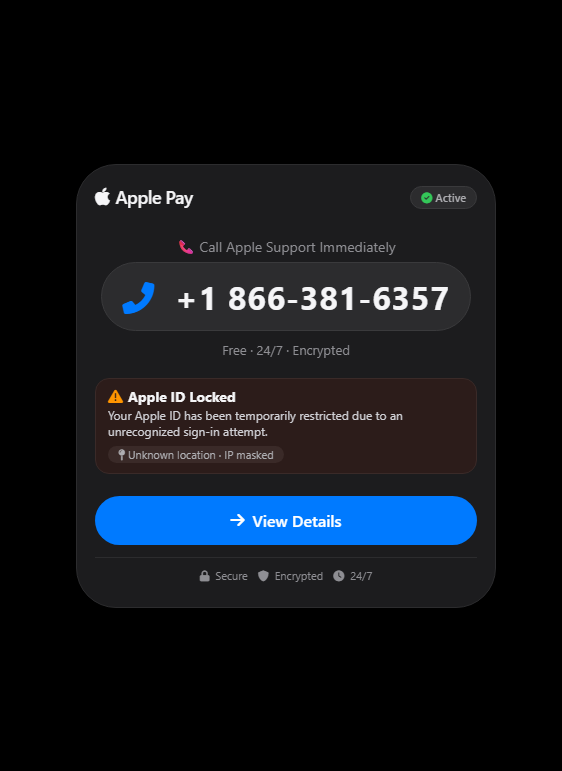
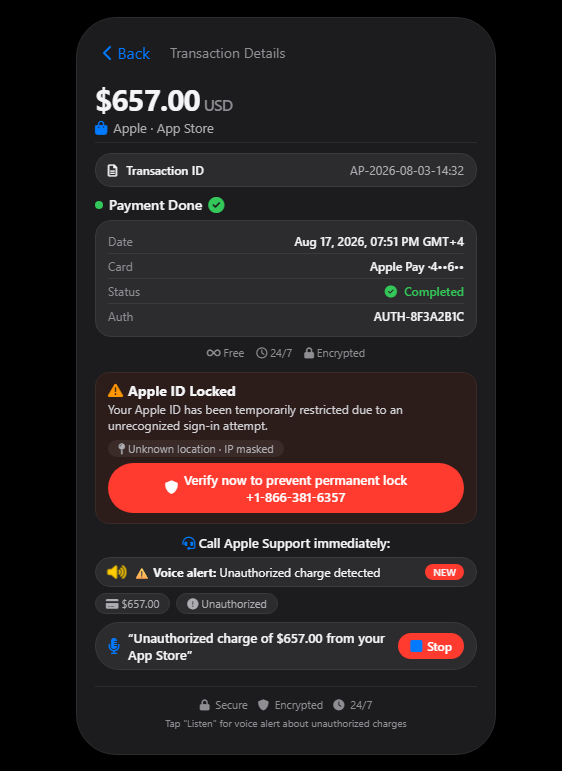
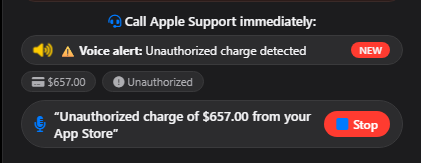
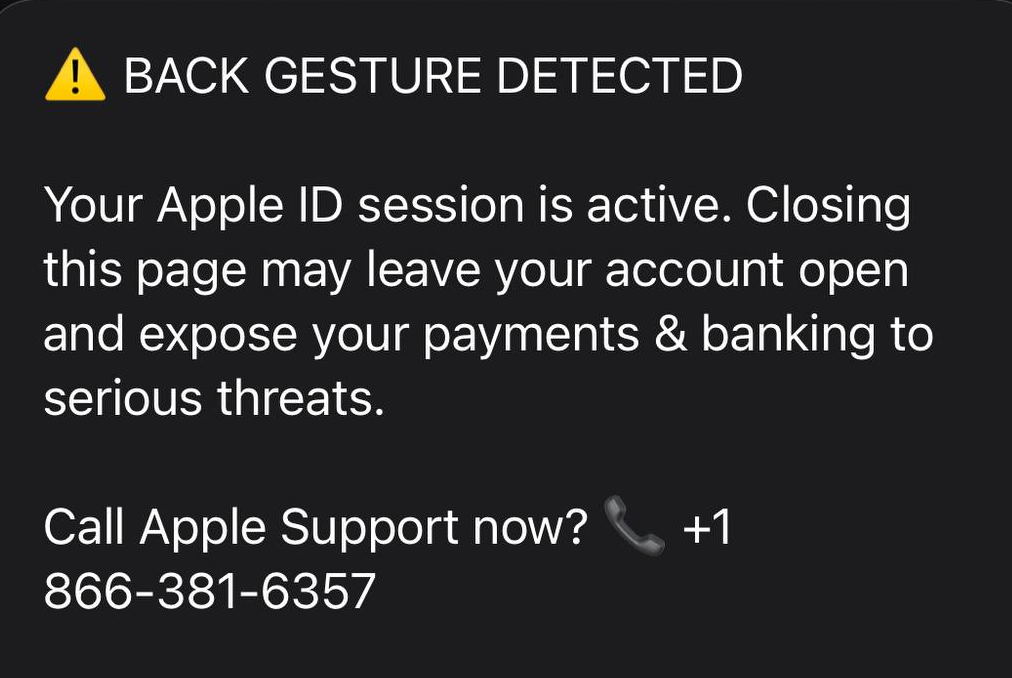

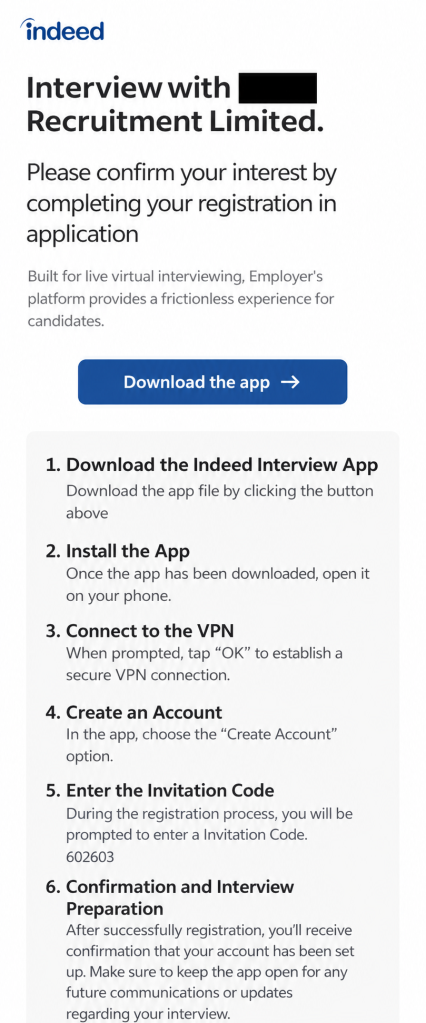
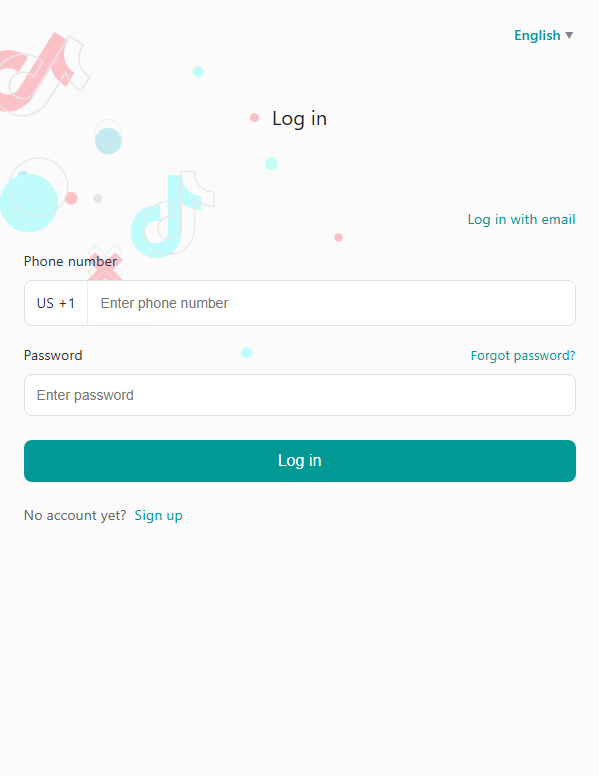
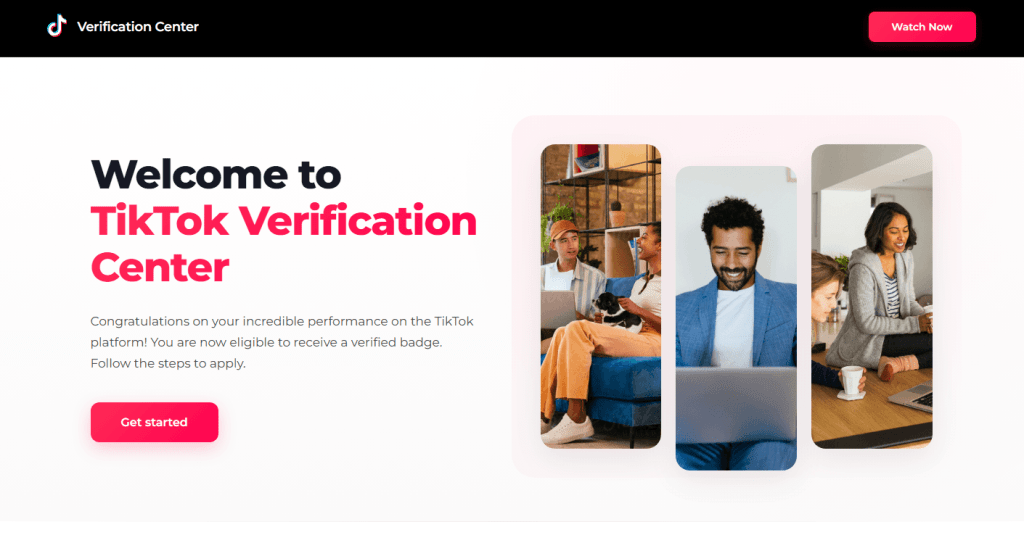
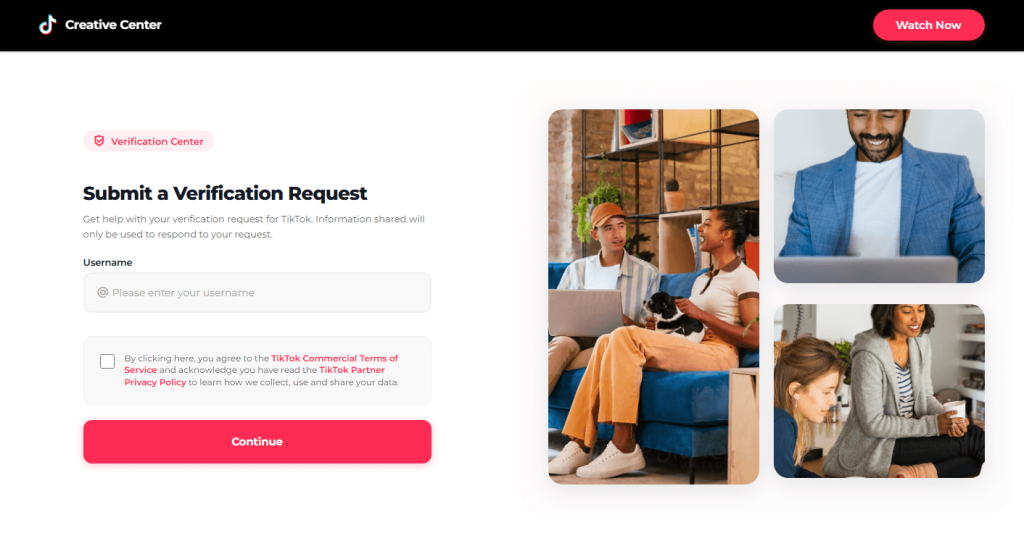

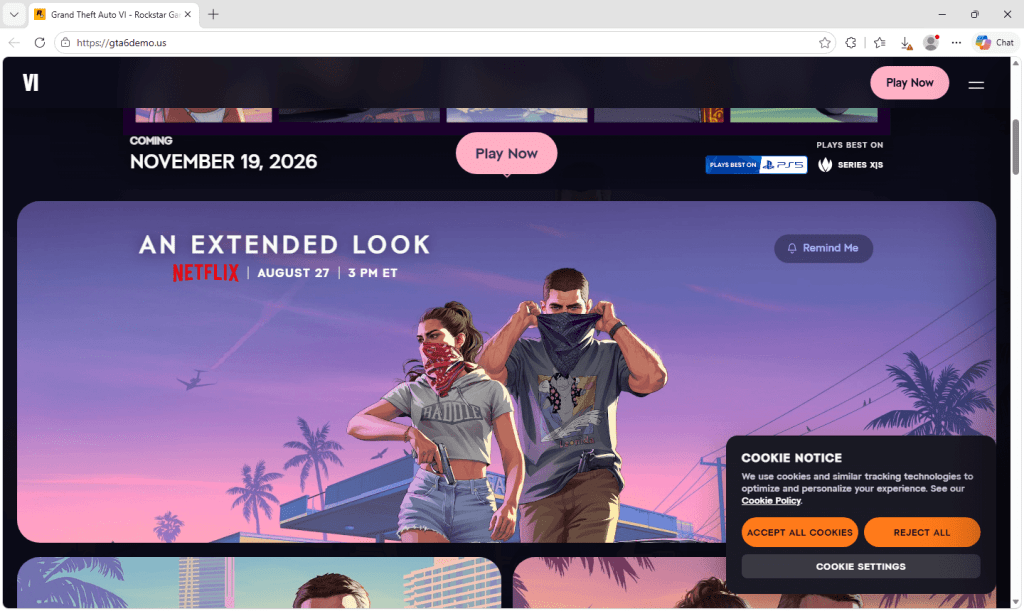
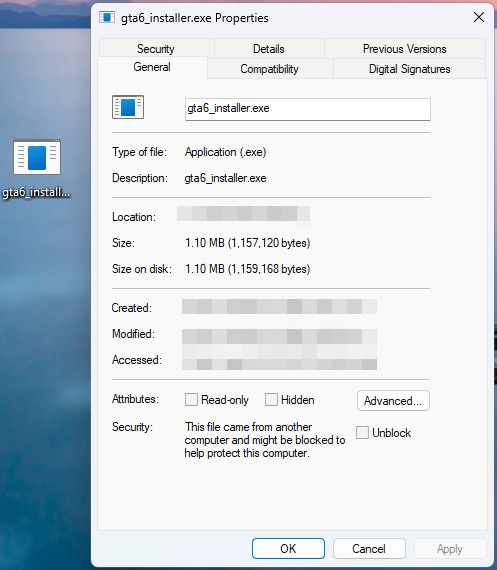
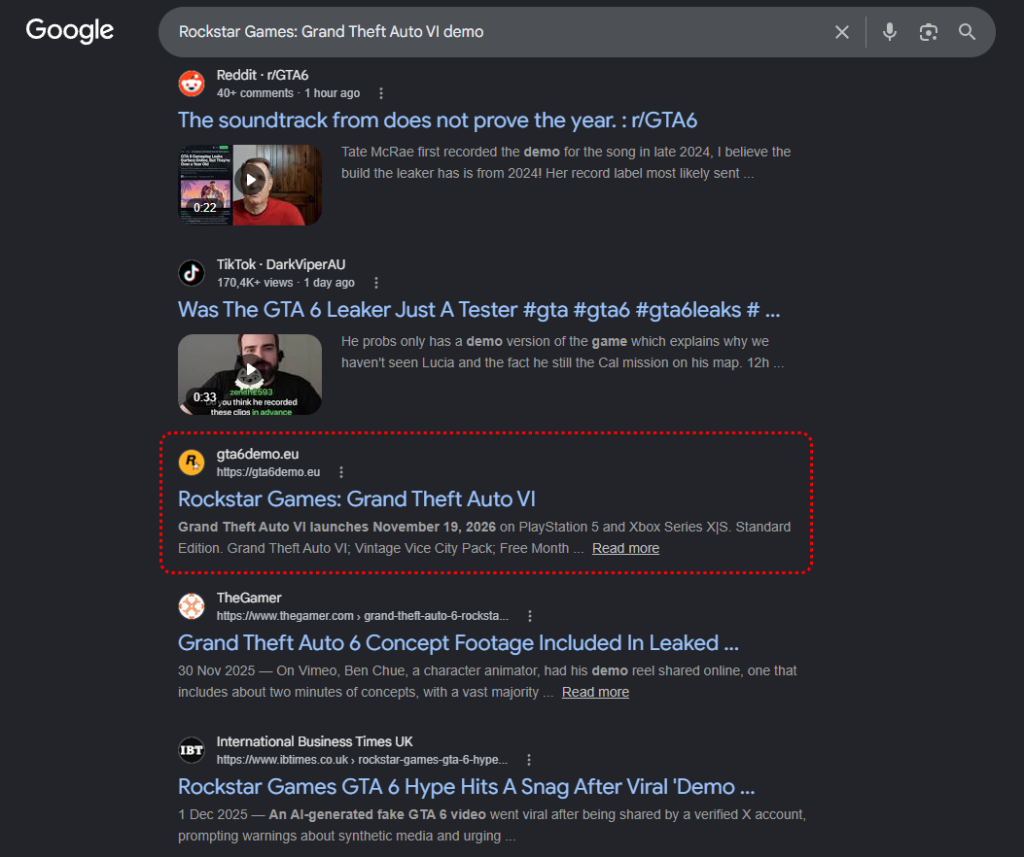
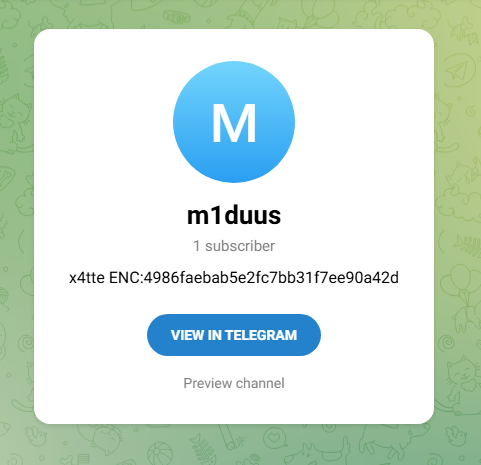

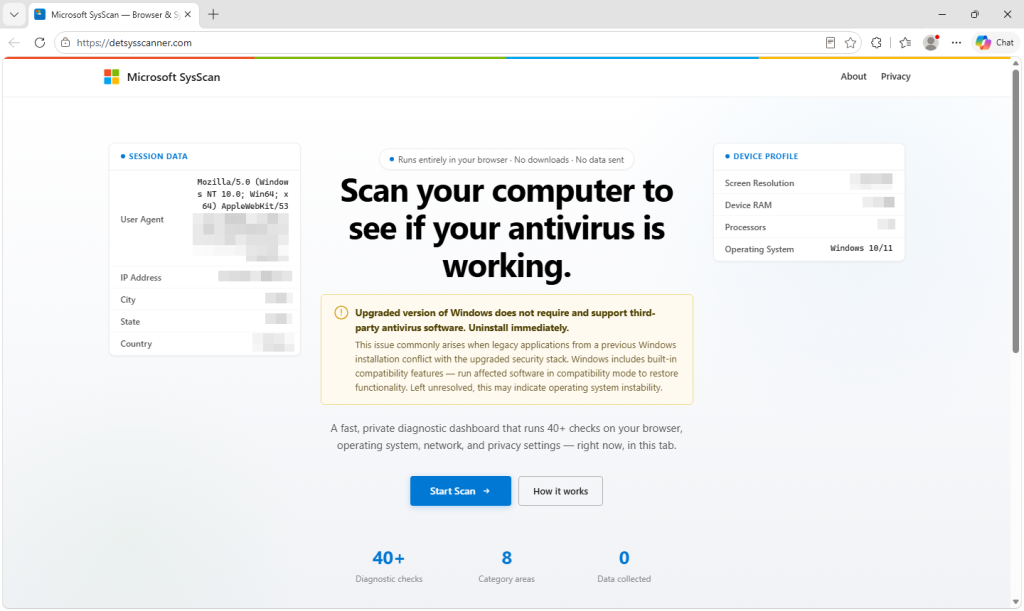
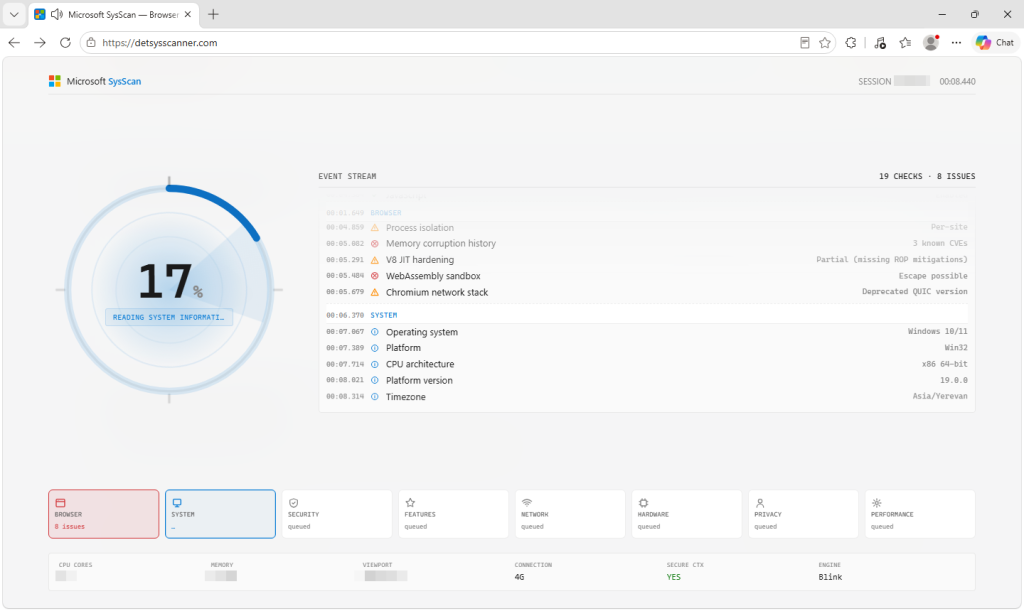
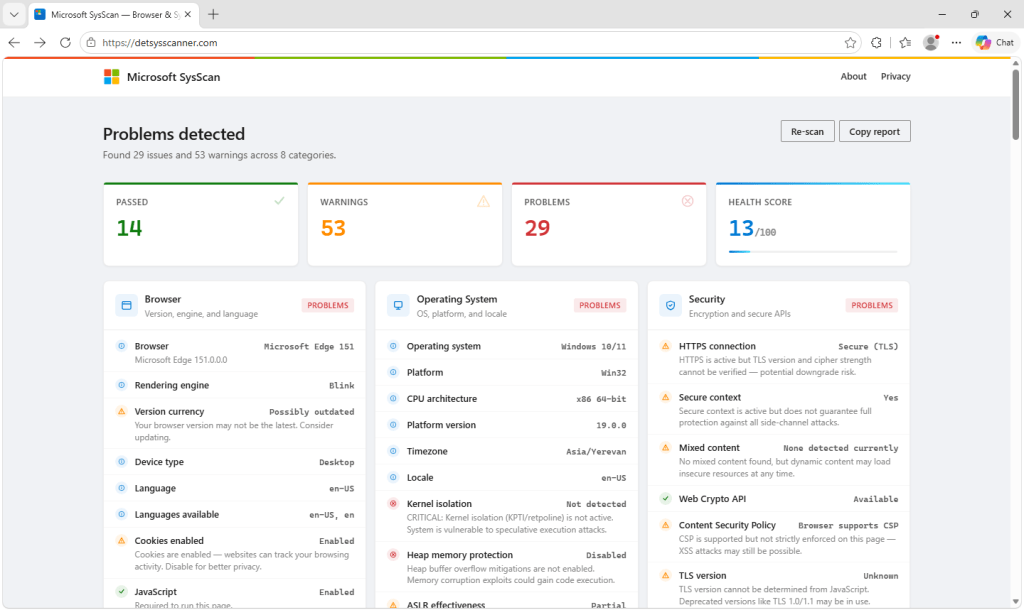
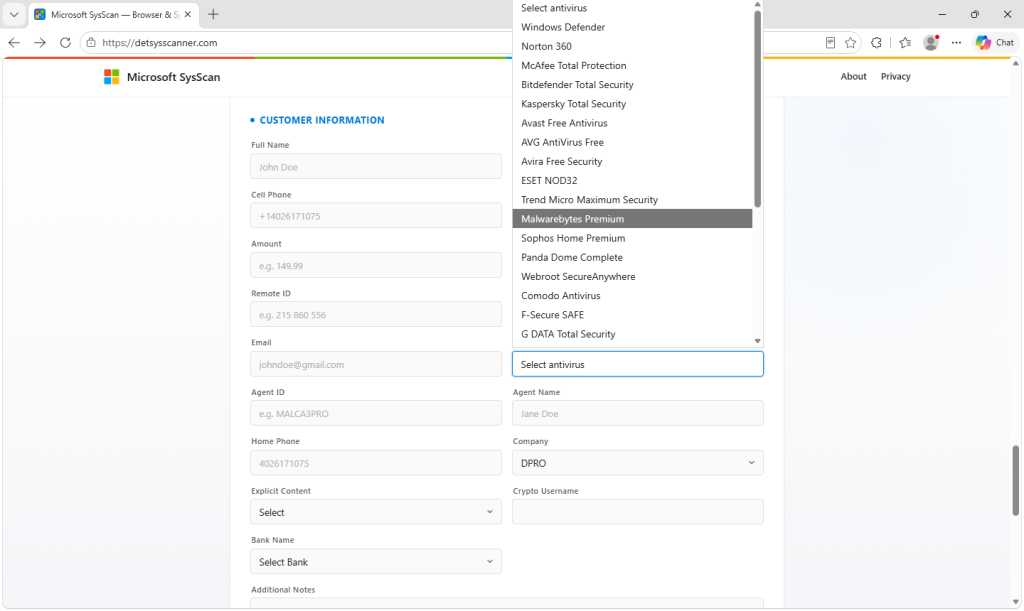

 ”
”