Visualização de leitura

WordPress Plugin Flaw Exposes 5 Million Sites to SQL Injection Attacks

A high-severity vulnerability in the All-in-One WP Migration and Backup plugin could allow unauthenticated attackers to take over vulnerable WordPress sites. The flaw, tracked as CVE-2026-19949, affects more than 5 million active installations and has been fixed in version 7.110.

The issue was reported to Wordfence on August 14, 2026, by security researcher Jack Taylor through the Wordfence Bug Bounty Program. Taylor received a $5,761 bounty for discovering the vulnerability, which received a CVSS score of 8.8.

All-in-One WP Migration and Backup is widely used to export, import, restore, and migrate WordPress sites. It creates .wpress archive files containing website files and database data.

The vulnerable versions, up to and including 7.109, contain an unauthenticated second-order SQL injection flaw in the archive restore process.

Unlike a typical SQL injection attack, the malicious SQL code is not executed immediately. An attacker can first place a specially crafted payload in a WordPress site through the core trackback feature. Trackbacks can be submitted without logging in when a public post accepts pings.

WordPress All-in-One WP Migration Plugin Flaw

The attacker submits malicious trackback data with a carefully prepared blog name and URL. WordPress stores that data in the comments table. At this stage, the payload remains inactive and appears to be ordinary comment-related data.

The attack becomes dangerous when a site administrator exports the website using the plugin and later restores it. During restoration, All-in-One WP Migration rewrites URLs and database table prefixes in SQL statements before importing them.

According to a Wordfence report, a flaw in the plugin’s regular expression handling of backslashes and quoted strings can cause the stored payload to escape its intended SQL string boundary.

As a result, attacker-controlled content can become executable SQL during the database restore process. The injected SQL can retrieve the plugin’s ai1wm_secret_key, a secret value used to protect the plugin’s unauthenticated import action.

Wordfence Firewall ( Source :wordfence)
Wordfence Firewall (Source: Wordfence)

The attacker can then leak this secret key into an approved comment and retrieve it through the site’s public WordPress REST API. With the secret key, the attacker may access the plugin’s import process and upload a malicious .wpress archive.

A crafted archive could include a malicious must-use WordPress plugin. Since must-use plugins load automatically, the malicious code can execute when a visitor or administrator opens a page.

This can grant the attacker remote code execution on the server and enable a full site compromise, including deploying a webshell, stealing data, or installing additional malware.

The exploit requires an administrator to perform an export followed by an import after the malicious trackbacks have been planted. Although this adds an interaction requirement, backup and restore operations are routine tasks for many WordPress administrators.

Wordfence deployed a firewall rule for Premium, Care, and Response users on August 16, 2026. Free Wordfence users are scheduled to receive the protection on September 15, 2026. ServMask acknowledged the report on August 17 and released version 7.110 on August 20.

Website owners using All-in-One WP Migration and Backup should update immediately, turn off unnecessary trackbacks, review suspicious comments, and verify that no unauthorized plugins or administrator accounts have been added.

Learn 7 Metric-Gated AI SOC Deployment Phases – Download Free AI SOC Deployment Playbook 2026.

The post WordPress Plugin Flaw Exposes 5 Million Sites to SQL Injection Attacks appeared first on Cyber Security News.

WordPress Plugin Flaw Lets Attackers Turn SQL Injection Into Complete Site Takeover

A high-severity vulnerability affecting over 5 million active WordPress installations could allow unauthenticated attackers to exploit stored SQL injection vulnerabilities, leading to remote code execution and complete website takeover. This issue, tracked as CVE-2026-19949, impacts the widely used All-in-One WP Migration and Backup plugin developed by ServMask. Wordfence has rated the vulnerability 8.8 out of […]

The post WordPress Plugin Flaw Lets Attackers Turn SQL Injection Into Complete Site Takeover appeared first on GBHackers Security | #1 Globally Trusted Cyber Security News Platform.

WordPress Is Using AI to Find Security Flaws Before Hackers Can Exploit Them

WordPress has launched a new security effort that uses artificial intelligence to identify vulnerabilities in its core software before attackers can abuse them.

The initiative comes as the project receives an increasing number of security reports, driven in part by rapid improvements in AI tools for code analysis and vulnerability research. Over the past year, WordPress said incoming vulnerability reports have increased substantially across its ecosystem.

AI models are making it easier for security researchers to inspect large codebases, trace potentially unsafe data flows, and flag risky programming patterns that could otherwise be missed during manual reviews.

The increase in reports is positive for WordPress security, but it also creates a major operational challenge. Every submission must be reviewed, reproduced, validated, prioritized, fixed, tested, and released.

WordPress Using AI to Find Security Flaws

A report may identify a real vulnerability, a configuration-specific issue, a duplicate finding, or a false positive. The WordPress security team must separate urgent flaws from lower-risk issues while ensuring that security patches do not break millions of websites.

The project discussed the issue during its security team meeting at WordCamp US and has now introduced the Core Security Initiative.

The program is built around three priorities: improving the security release process, reducing the backlog of open reports, and using AI-assisted tools to discover vulnerabilities earlier.

The first area focuses on making security releases more predictable. WordPress plans to strengthen automation and end-to-end testing around security updates so fixes can be delivered reliably.

Better testing is especially important for a platform with a large ecosystem of themes, plugins, hosting environments, and custom deployments. A patch must close the vulnerability without causing unexpected failures for site owners.

The second priority is reducing the queue of unresolved reports and known issues. WordPress is adding team members and volunteers to help review findings, confirm impact, and move valid issues through the remediation process. The stated goal is to reduce the number of open security findings to zero.

The third pillar, described as “Crush vulnerabilities with AI,” is the most notable part of the effort. WordPress intends to use AI-assisted scanning and analysis tools to proactively identify security weaknesses rather than waiting for an external researcher or attacker to discover them first.

These tools can help reviewers search for patterns linked to cross-site scripting, privilege escalation, insecure file handling, server-side request forgery, and other common web application risks. However, AI will not replace human security researchers.

Automated tools can identify suspicious code, but expert reviewers are still needed to verify whether a flaw is exploitable, determine its severity, create a safe patch, and test the fix.

WordPress said its AI work will complement, not replace, responsible disclosure reports from the security community. Recent WordPress releases show why faster discovery matters.

Version 7.0.3 addressed multiple security issues, including cross-site scripting, privilege escalation, server-side request forgery, information disclosure, and CSS injection flaws.

Version 7.0.4 later fixed an authenticated remote code execution issue involving malicious file uploads on sites using Imagick and Ghostscript.

WordPress core vulnerability researchers are encouraged to continue reporting findings through the project’s HackerOne program and to follow its reporting guidelines.

For website administrators, the message remains simple: apply WordPress security updates promptly, maintain tested backups, and keep plugins and themes up to date.

Prevent incidents due to slow investigations. Power your Tier 1 with threat intelligence from 15K SOCs: Integrate TI Lookup in your SOC

The post WordPress Is Using AI to Find Security Flaws Before Hackers Can Exploit Them appeared first on Cyber Security News.

Critical GiveWP Flaw Lets Attackers Run Commands on WordPress Servers

A critical GiveWP flaw lets unauthenticated attackers execute server commands. Version 4.16.7.2 fixes the PHP object injection chain.

A critical vulnerability in GiveWP, one of the most widely used WordPress plugins for online donations and fundraising, can let an unauthenticated attacker execute commands on the server. Patchstack disclosed the flaw on August 28, after researcher Udin Chan reported it on July 28, and GiveWP fixed it in version 4.16.7.2 released on August 27.

The issue, tracked as CVE-2026-82222 (CVSS score of 10.0), affects GiveWP versions through 4.16.7.1. An attacker doesn’t need an account or user interaction to exploit the underlying vulnerability.

“In versions 4.16.7.1 and below, GiveWP contains an unauthenticated PHP Object Injection vulnerability that can be chained into full remote code execution. On 4.16.5.1 and below a default installation is enough to exploit: it ships with an active manual (Test Donation) gateway and an active offline gateway, and only needs one published donation form.” reads the report published by PatchStack. “No Test Mode, open registration, debug mode, or administrator action is required.”

That description sounds severe because it is. The problem isn’t one isolated coding mistake. Patchstack found a chain involving unsafe handling of serialized PHP objects, a donation workflow that can carry attacker-controlled data into storage, and classes already included in GiveWP that can turn the injected object into command execution.

GiveWP is designed for nonprofits and other organizations that collect donations through WordPress. The plugin handles donation forms, payment gateways, donor information and reporting, so a server running it can hold data that attackers would have plenty of reasons to target.

The root cause of the problem is a helper that GiveWP created to make PHP’s unserialize() safer. It uses PHP’s allowed_classes => false option, which looks like a sensible defense at first glance.

There’s a catch. PHP doesn’t simply throw the serialized object away. Instead, it converts the object into an __PHP_Incomplete_Class placeholder while keeping the original class name and properties.

When GiveWP later serializes that placeholder again, those original object details go back into the serialized data. The application has effectively carried the attacker’s payload forward instead of removing it.

That distinction matters because the malicious object eventually reaches another part of GiveWP that reads the stored data without the same restriction. At that point, PHP can recreate the original object and the rest of the attack chain can continue.

The donation process gives the attacker a way to move that malicious data into GiveWP’s session storage. Patchstack found that the application reads donor information from the user’s account and sends the fields through the supposedly safe unserialization helper.

The attacker-controlled data can therefore survive the first check and reach the wp_give_sessions table. A later request reads the session and processes the serialized object again, this time without the protection that was supposed to stop it.

This is a classic example of why serialization bugs can be difficult to contain. Checking data at one point doesn’t help much if the application later stores that data and processes it differently somewhere else.

The object injection alone doesn’t automatically mean arbitrary command execution. An attacker also needs a gadget chain, meaning existing application code that can be manipulated to turn the injected object into a dangerous operation.

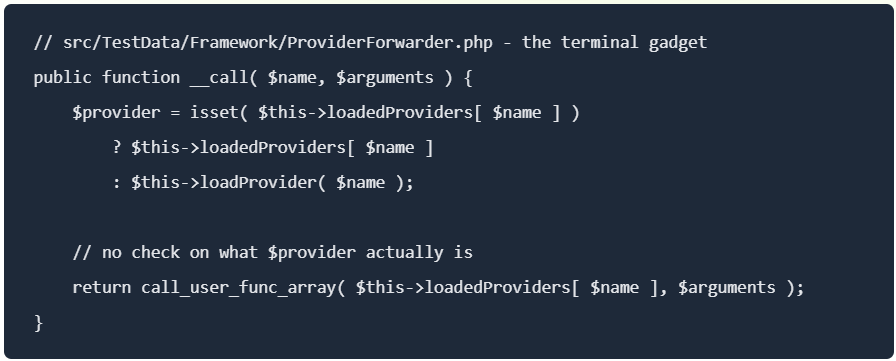
Patchstack found that GiveWP ships code that provides exactly that missing piece. The chain involves the TCPDF library and GiveWP’s own Give\TestData classes, eventually reaching a function call controlled by properties inside the injected object.

“Because loadedProviders is just an array property carried inside the injected object, the attacker sets it to any callable they like.” continues the report. “Pointing it at system() executes an arbitrary OS command as the web server user.”

That means the attacker can turn control of the object into control of what function the application calls. In the vulnerable code, that can lead to execution of an operating system command with the privileges of the web server.

At that point, this stops being a data-handling problem and becomes a server compromise problem. If the WordPress process has access to sensitive files, databases or other internal resources, the impact can extend well beyond the GiveWP plugin itself.

GiveWP’s registration feature ignores WordPress’s users_can_register setting, allowing attackers to create accounts even when registration is disabled. Version 4.16.6 added a nonce check, but attackers can still obtain and reuse the nonce on sites with the public registration shortcode.

Patchstack says versions 4.16.5.1 and earlier are directly exploitable on default installations. Versions 4.16.6–4.16.7.1 reduce the attack surface but leave the underlying flaw exploitable through legacy forms. Version 4.16.7.2 fully fixes the issue.

GiveWP 4.16.7.2 takes a broader approach to fixing the RCE. It blocks serialized data before storage, limits where stored data can be deserialized, hardens the vulnerable gadget and sanitizes donor and billing metadata. It also scans existing database records and removes serialized objects that could contain malicious payloads.

This cleanup matters because updating the code alone cannot remove data already stored by an attacker. Patchstack also found that the earlier 4.16.6 fix could preserve malicious serialized data after detecting __PHP_Incomplete_Class; 4.16.7.2 rejects it instead.

Administrators should update to 4.16.7.2 or later, review logs and signs of compromise, and check older or imported donation forms. The separate registration issue remains unresolved, but Patchstack treats it as an access-control problem rather than part of the patched RCE chain.

Follow me on Twitter: @securityaffairs and Facebook and Mastodon

Pierluigi Paganini

(SecurityAffairs – hacking, GiveWP)

Critical WordPress Plugin Flaw Allows Unauthenticated Administrator Account Takeover

A critical authentication bypass vulnerability has been identified in the WPMU DEV Dashboard WordPress plugin, which could allow unauthenticated attackers to gain administrator-level access to vulnerable sites configured with Hub Single Sign-On (SSO). This vulnerability, tracked as CVE-2026-76581, has a CVSS score of 9.8 and affects WPMU DEV Dashboard versions 5.0.1 and earlier. The plugin […]

The post Critical WordPress Plugin Flaw Allows Unauthenticated Administrator Account Takeover appeared first on GBHackers Security | #1 Globally Trusted Cyber Security News Platform.

Two CVSS 9.8 Auth Bypasses in miniOrange SAML WordPress Plugin Were Exploited Before Any Database Even Listed the Paid Editions as Vulnerable

Two CVSS 9.8 miniOrange SAML WordPress plugin auth bypasses were exploited while paid editions never appeared in any vulnerability database. Manual patch required.

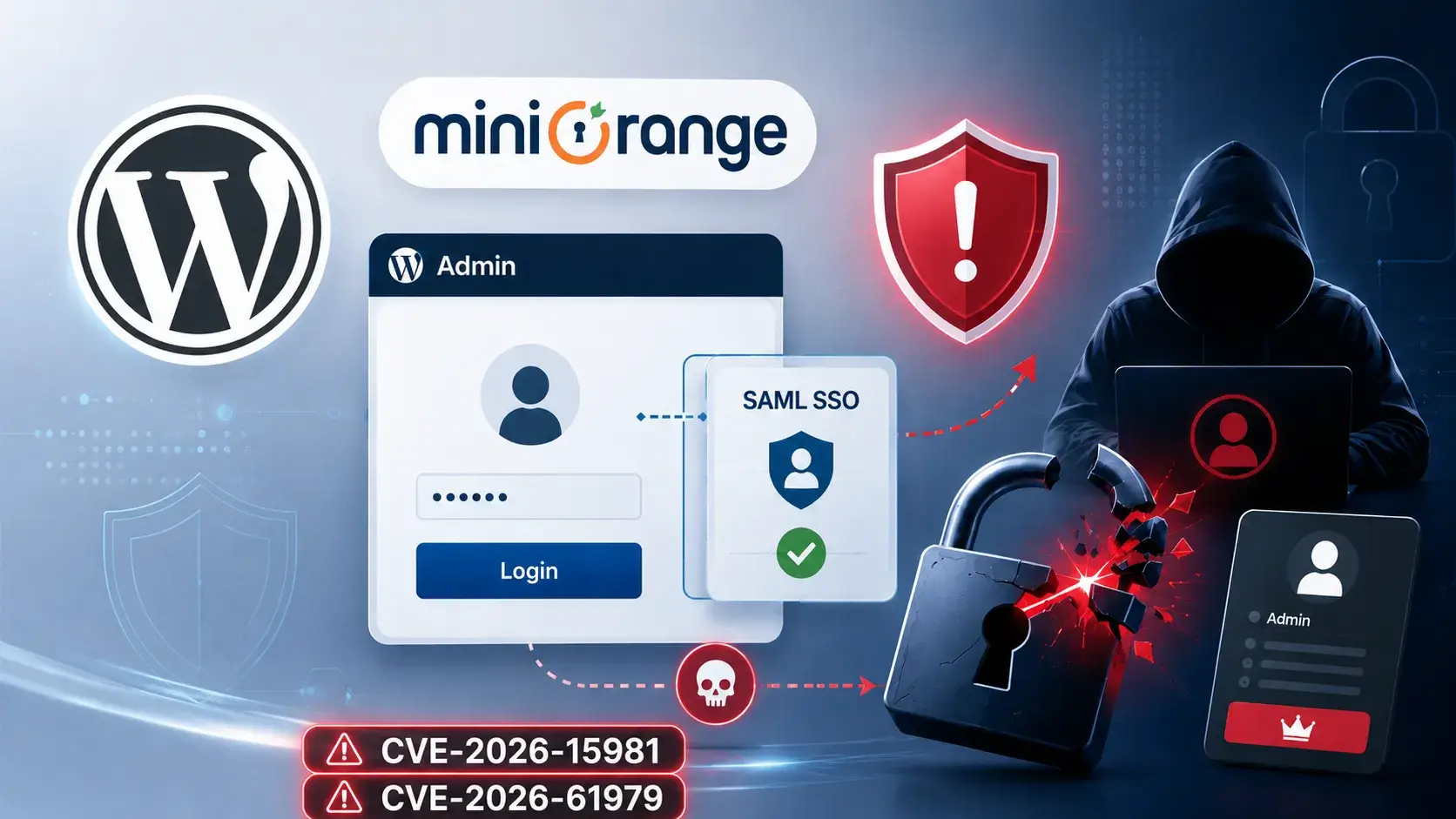
Two critical authentication bypass vulnerabilities in the miniOrange SAML 2.0 Single Sign On WordPress plugin, both rated CVSS 9.8, are under active exploitation.

Both CVE-2026-61979 and CVE-2026-15981 allow an unauthenticated attacker to forge a SAML authentication response and arrive in /wp-admin as any existing user, including administrators. The bugs are independent and both have been confirmed exploited in the wild.

CVE-2026-61979 is an algorithm confusion flaw. The plugin trusts the incoming SAML response to declare its own signature algorithm. An attacker sets that algorithm to HMAC-SHA1, which causes the plugin to use the identity provider’s RSA public key as the HMAC secret. The RSA public key is, by definition, public. That’s the whole attack: fetch the key from the metadata endpoint, sign your own forged assertion with it, and the plugin verifies it as genuine.

CVE-2026-15981 is a PHP bug caused by incorrectly handling different types of values. The openssl_verify() function can return three results: 1 when a signature is valid, 0 when it is invalid, and -1 when OpenSSL encounters an error.

The plugin treated the result like a simple true-or-false value. In PHP, -1 counts as true. An attacker can send a specially crafted signature that causes an OpenSSL error, making the function return -1. The plugin then treats it as a valid signature and allows the attacker to log in.

It is a basic coding mistake, but particularly serious because the plugin handles authentication for WordPress admin accounts.

The technical root cause is interesting. What happened around the bugs afterward is more interesting. The miniOrange SAML plugin ships under one WordPress slug, miniorange-saml-20-single-sign-on, but that one listing actually contains seven completely separate product editions, each with its own independent version numbering. Free runs from 3.x to 5.x. Premium runs 11.x to 13.x. Standard runs 15.x to 17.x. VIP editions start at 32.x and 35.x. No two editions share a version range.

When the public advisories were written, they covered only the Free edition, which is the one anyone can download from WordPress.org. The fix for the Free edition landed at 5.4.5.

“While that record is correct, when you apply it to the slug, every paid install carries a higher version number than 5.4.5, so every paid install reads as already patched.” reads Patchstack analysis. “Therefore, any WordPress site that was running a vulnerable version like 16.1.9 reported it as patched, along with every other (13.x, 20.x, 26.x, 32.x, and 35.x) vulnerable version.”

Every database, scanner, and dashboard in the WordPress security ecosystem was telling paid-edition administrators their sites were safe when the exploitable code was still running on their servers.

The update prompt problem makes it worse. Sites running a vulnerable Standard edition 16.x see no available updates in their WordPress admin panel because the fix is on the 17.x line, and WordPress’s built-in update mechanism doesn’t offer cross-line jumps automatically. The path from vulnerable to patched requires a manual plugin upload, which site owners can’t do if they don’t know they’re affected, and every system they rely on was telling them they weren’t.

“There was no advisory to read and no vulnerability database entry flagged the paid edition for these vulnerabilities. The plugin reported itself as fully up to date. In other words, every signal that normally warns of a problem suggested that everything was fine.” continues the report. “So, how did DigitalOcean catch the exploit? It had nothing to do with plugins or versions. An anomalous WordPress administrator session attempt appeared from outside their trusted network and was blocked. The attacker had already used the bypass to obtain a WordPress admin session cookie, but was stalled because the admin panel operations themselves sat restricted behind the trusted network. “

DigitalOcean, the team that found all of this, caught the exploit not through any of those systems but through a network anomaly: an authenticated WordPress administrator session arriving from outside their trusted network perimeter. The attacker had already used one of the auth bypasses to generate a valid admin session cookie. The cookie worked. The session was blocked because the admin panel itself was restricted to trusted network ranges. Defense in depth, doing exactly what it exists to do, on a system where every other detection layer had already failed.

DigitalOcean then traced both bugs to specific lines of code in the plugin and its bundled XML security library, confirmed the affected version ranges across all seven paid editions (which miniOrange had not published anywhere), wrote two narrowly scoped hotfixes to buy time, and handed the full analysis to Patchstack for publication. Patchstack worked with miniOrange to get the complete edition and version matrix, then updated its database with all seven affected ranges, the first time any public database held that information.

Attackers are actively scanning miniOrange SSO endpoints from six IP addresses in Belgium, Nigeria, the U.S. and Germany. The activity appears opportunistic, with attackers checking websites that use the plugin without first identifying the specific version or edition.

That makes the silent patch especially concerning. Attackers can probe systems without knowing what version they run, while website owners may not realize whether their plugin has received the fix.

“Vulnerability databases are only as good as the version data vendors publish publicly. When a vendor runs seven independently numbered editions under one slug and patches six of them without a public advisory, the entire ecosystem downstream of them goes blind at once: databases, scanners, dashboards, and the site admins relying on all three.” concludes the report.

For anyone running this plugin, the full version table per edition is in the Patchstack article. The short version: find your edition, compare your version against the patched column, and expect to do the upgrade as a manual upload rather than through the WordPress dashboard. If you can’t update immediately, two narrowly scoped hotfixes covering both CVEs are published there alongside the IPs to check in your logs for prior exploitation attempts. Check the passkey and admin account list while you’re in there.

Follow me on Twitter: @securityaffairs and Facebook and Mastodon

Pierluigi Paganini

(SecurityAffairs – hacking, miniOrange SAML WordPress Plugin)

WordPress Plugin Vulnerability Exposes 400,000 Sites to Account Takeover Attacks

A critical vulnerability in the TranslatePress WordPress plugin could allow unauthenticated attackers to hijack administrator accounts and fully compromise affected websites.

The flaw, tracked as CVE-2026-19632, affects TranslatePress versions up to 3.3.1 and has been fixed in version 3.3.2. TranslatePress is a multilingual WordPress plugin with more than 400,000 active installations.

Wordfence assigned the vulnerability a CVSS score of 9.8, classifying it as critical. Security researcher momopon1415 responsibly reported the issue through the Wordfence Bug Bounty Program and received a $975 reward.

The vulnerability stems from the way TranslatePress processes password reset emails and saves translatable strings. The plugin can translate outgoing WordPress emails by intercepting the wp_mail() function.

When an administrator requests a password reset, WordPress generates an email containing a reset URL with a plaintext reset key and login parameters.

Under specific conditions, TranslatePress stores this sensitive reset URL in a secondary-language translation dictionary table. Automatic string saving must be enabled, which is the default setting.

In addition, the targeted administrator’s profile language must be configured to use a published secondary language rather than the website’s default language.

Researchers found that attackers could retrieve these saved dictionary entries through the plugin’s publicly accessible trp_get_translations_regular AJAX action.

The endpoint accepts attacker-supplied string identifiers and returns matching translation records. This could enable an unauthenticated attacker to enumerate translation data and locate a stored password reset URL.

TranslatePress WordPress Plugin Vulnerability

An attacker who knows an administrator’s username or email address could trigger a password reset request, extract the exposed reset link from the translation dictionary, set a new password, and log in as the administrator. Successful exploitation would give the attacker complete control over the WordPress site.

With administrator access, threat actors could create new privileged accounts, install malicious plugins or backdoored themes, alter website content, steal sensitive information, or use the compromised site to distribute malware.

Wordfence Firewall (Source : wordfence )
Wordfence Firewall (Source: Wordfence)

The issue therefore poses a serious risk to businesses, publishers, e-commerce stores, and organizations that use TranslatePress.
The flaw does not affect every TranslatePress deployment in the same way.

The password reset URL is only exposed when the targeted administrator uses a published secondary-language profile locale. Administrators whose accounts use the site’s default language do not have their password reset emails processed through the affected secondary-language translation workflow.

Wordfence received the report on August 11, 2026, disclosed the issue to TranslatePress developer Cozmoslabs on August 12, and confirmed that the vendor released TranslatePress version 3.3.2 on August 13.

Site owners should immediately update TranslatePress to version 3.3.2 or later. Administrators should also enable two-factor authentication or passkeys, limit administrator accounts, review user activity, and inspect installed plugins and themes for unauthorized changes.

Prevent incidents due to slow investigations. Power your Tier 1 with threat intelligence from 15K SOCs: Integrate TI Lookup in your SOC

The post WordPress Plugin Vulnerability Exposes 400,000 Sites to Account Takeover Attacks appeared first on Cyber Security News.
Critical miniOrange SAML SSO Flaws Let Attackers Take Over WordPress Admin Accounts

Two critical vulnerabilities have been identified in the miniOrange SAML 2.0 Single Sign-On WordPress plugin, which could allow unauthenticated attackers to forge SAML assertions and log in as any existing user, including site administrators. These vulnerabilities, tracked as CVE-2026-61979 and CVE-2026-15981, carry a CVSS score of 9.8. Research conducted by DigitalOcean’s security team and later […]

The post Critical miniOrange SAML SSO Flaws Let Attackers Take Over WordPress Admin Accounts appeared first on GBHackers Security | #1 Globally Trusted Cyber Security News Platform.

WordPress Plugin Vulnerability Exposes 100,000 Sites to Complete Site Takeover Attacks

A critical vulnerability tracked as CVE-2026-19598 in the Everest Forms WordPress plugin has exposed more than 100,000 websites to complete site takeover attacks.

The flaw has a CVSS severity score of 9.8. It can allow unauthenticated attackers to upload malicious files, execute code remotely, and potentially gain full control of affected WordPress sites.

The vulnerability detailed by Wordfence affects Everest Forms versions before 3.0.9.5. It exists in the plugin’s file-upload handling logic, specifically in the EVF_Form_Fields_Upload class.

Insufficient validation of file types and paths can enable attackers to upload arbitrary files, including PHP scripts that the web server may execute.

WordPress Plugin Vulnerability Exposed

An attacker does not need a valid WordPress account to exploit the issue. By targeting a vulnerable form-upload feature with specially crafted requests, a threat actor could place a malicious PHP web shell on the server.

A web shell provides attackers with a remote interface to run commands, browse files, steal databases, modify site content, or install additional malware.

Wordfence Firewall blocks successful exploitation (source : wordfence )

Wordfence Firewall blocks successful exploitation (source: Wordfence)

The impact can extend beyond defacing a website. Attackers with remote code execution can access the WordPress configuration file, extract database credentials, create administrator accounts, modify themes and plugins, and insert malicious JavaScript into visitor-facing pages.

This can turn a compromised website into a platform for phishing, malware delivery, SEO spam, credential theft, or attacks against site visitors.

The issue may also enable arbitrary file deletion. Attackers could remove important WordPress files, including wp-config.php, which stores database connection details.

Deleting this file may place a WordPress instance into installation mode, creating another path for attackers to connect the site to an attacker-controlled database and take ownership of the environment, reads the Wordfence report.

Website administrators should immediately update Everest Forms to version 3.0.9.5 or later. Sites that cannot be patched quickly should temporarily turn off the plugin, especially if it uses public file-upload forms.

Administrators should also investigate for signs of compromise. Security teams should review WordPress administrator accounts for unauthorized users, inspect upload directories for recently created PHP files, and examine web logs for suspicious requests targeting Everest Forms upload endpoints.

Newly modified plugin or theme files, obfuscated PHP code, unknown scheduled tasks, and unexpected outbound connections should be treated as potential indicators of compromise.

If compromise is suspected, organizations should rotate WordPress, database, hosting-panel, FTP, SSH, and API credentials. They should restore affected files from a known-good backup, remove unauthorized administrator accounts, and perform a full review of plugins, themes, scheduled jobs, and server-side persistence mechanisms.

Prevent incidents due to slow investigations. Power your Tier 1 with threat intelligence from 15K SOCs: Integrate TI Lookup in your SOC

The post WordPress Plugin Vulnerability Exposes 100,000 Sites to Complete Site Takeover Attacks appeared first on Cyber Security News.
Critical WordPress Pods Flaw Lets Unauthenticated Attackers Gain Admin Access

A critical vulnerability has been identified in the widely used Pods WordPress plugin, which could allow unauthenticated attackers to take complete control of affected websites by escalating privileges to the administrator level. This vulnerability, tracked as CVE-2026-19598, carries a CVSS score of 9.8 and affects Pods – Custom Content Types and Fields versions up to […]

The post Critical WordPress Pods Flaw Lets Unauthenticated Attackers Gain Admin Access appeared first on GBHackers Security | #1 Globally Trusted Cyber Security News Platform.

Critical WordPress Plugin Vulnerability Exposes Sites to RCE Attacks

A critical security flaw in the Elementor Pro WordPress plugin could allow unauthenticated attackers to upload malicious PHP files and execute code on vulnerable servers.

Tracked as CVE-2026-32475, the vulnerability affects Elementor Pro versions up to and including 4.2.1 and is fixed in version 4.2.2.

Elementor Pro is a premium extension for the Elementor page builder. Its Forms widget lets website owners create contact, job application, support, and document-submission forms. The vulnerable feature is the File Upload field that allows visitors to attach files.

The flaw exists because the plugin handles file validation and file storage in separate loops. Under normal conditions, Elementor Pro checks uploaded file extensions against an allowlist and a blocklist. Dangerous extensions such as .php, .phtml, .asp, and .exe should be rejected.

WordPress Plugin Vulnerability

However, the two loops treat empty upload entries differently. An attacker can submit multiple file parts for a single upload field, placing an empty file entry first and a malicious PHP file afterward.

The validation routine stops when it encounters the empty entry, meaning it never checks the PHP file. The file-processing routine skips the empty entry and continues saving the subsequent malicious file.

As a result, an attacker may be able to place a PHP payload inside the public Elementor forms upload directory. If the uploaded file is accessed via a browser, the web server could execute it, granting the attacker remote code execution with the web server’s permissions.

The attack does not require a WordPress account, credentials, or administrator interaction. The primary requirement is a publicly available Elementor Pro Form widget that includes a File Upload field.

Elementor stated that the multiple file upload option must also be enabled, and that option is disabled by default. Affected administrators should immediately update Elementor Pro to version 4.2.2 or later.

The updated release aligns file validation and processing behavior and adds stronger validation closer to the file-moving process. Updating alone is not enough for sites that may be exposed.

The issue was discovered by security researcher Tin Pham, also known as TF1T, and reported through Patchstack. Patchstack published mitigation rules for its customers while Elementor prepared and released the security update on August 19, 2026.

Administrators should inspect the wp-content/uploads/elementor/forms/ directory for unexpected PHP files or other executable content. Any suspicious files should be treated as possible indicators of compromise and investigated before removal.

Website owners should also review public upload forms, turn off unnecessary file-upload functionality, restrict accepted file types, and prevent PHP execution in WordPress upload directories.

Although no active exploitation had been publicly observed at the time of reporting, the flaw’s unauthenticated nature makes rapid patching essential.

Prevent incidents due to slow investigations. Power your Tier 1 with threat intelligence from 15K SOCs: Integrate TI Lookup in your SOC

The post Critical WordPress Plugin Vulnerability Exposes Sites to RCE Attacks appeared first on Cyber Security News.

StopAndProtect Turns 2,000 Hacked WordPress Sites Into a Criminal Network

StopAndProtect turned nearly 2,000 hacked WordPress sites into a criminal network for malware delivery, data theft, surveillance and ransomware.

Check Point Research uncovered a cybercrime operation, dubbed StopAndProtect, that has turned thousands of hacked WordPress websites into a shared platform for malware delivery, data theft, surveillance and ransomware. The operation is a good reminder that a compromised website isn’t just a problem for its owner. It can become part of someone else’s attack infrastructure.

“StopAndProtect is a newly identified operation that combines file encryption with data theft. The criminals abuse thousands of hacked WordPress websites as their infrastructure – using them to spread the malware, control infected machines, and store stolen documents, screenshots, and activity logs (records created by malware to track its actions, progress, or status during execution).” reads the report published by Check Point.

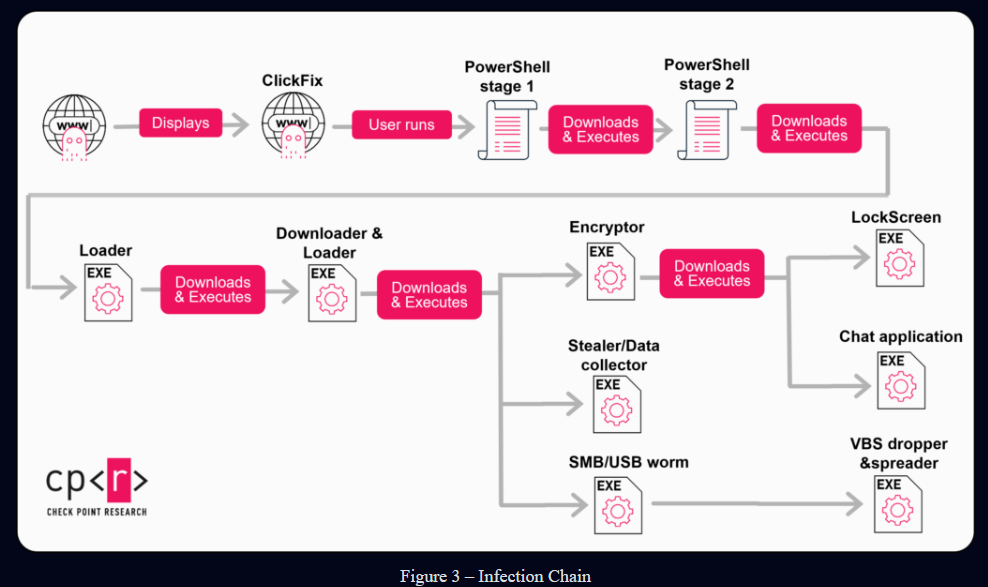
Researchers first identified the campaign in May 2026. The operation starts with a fake CAPTCHA based on the ClickFix technique: visitors are told to prove they’re human, but the instructions actually push them into copying and running a PowerShell command. From there, the infection unfolds through several downloaders and loaders before deploying different malware components.

StopAndProtect uses a toolkit of different malware rather than a single strain. Its components can encrypt files, steal documents, lock screens and even provide attackers with a chat channel to communicate with victims.

That last point is important because StopAndProtect doesn’t always behave like traditional ransomware. In many cases, the operators first collect file lists and then choose specific files to steal. Encryption or screen locking may come later, depending on what the attackers find and what they want to do with the victim.research.

The criminals used compromised WordPress sites for several jobs at once. The sites hosted malware stages, delivered commands, received logs and stored stolen files. Check Point discovered this because one of the servers exposed a directory listing through a PHP script, revealing more files, logs and open folders than the operators probably intended.

The campaign appears to have reached close to 2,000 compromised WordPress domains. Many of the sites were running old versions of WordPress or outdated plugins, and one site examined by researchers was still using a 2021 version with almost 40 known weaknesses, including SQL injection, authentication bypasses and arbitrary file upload issues.

“In one scenario, we suspect that the malware operator infected themselves and accidentally uploaded some of their desktop files to the collection server. This archive contains the source code of an automation tool for managing injected payloads at scale on compromised WordPress sites.” continues the report. “It also contains a few text files listing close to 2,000 compromised WordPress domains, giving us a hint about the size of the operation.” continues the report.

The infection chain is straightforward enough to understand, even if it becomes more complex after the first step. A visitor sees a fake CAPTCHA, follows the instructions, runs PowerShell, and downloads further stages written in .NET. The malware can then encrypt files, spread through SMB shares and USB devices, steal credentials, capture screenshots, collect selected documents or show a ransom message.

“We first noticed a ransomware family called StopAndProtect in the middle of May 2026. Further analysis of the infrastructure reveals that the infection chain starts with a ClickFix social-engineering technique, which prompts victims to execute a PowerShell command. This leads to two stages of additional downloaders and loaders written in .NET, followed by several main functional components, such as ransomware, SMB/USB worm, LockScreen, VBS spreader, chat utility and credential stealer.” continues the report. “Although the name StopAndProtect was originally given to the ransomware component, we decided to call the whole operation StopAndProtect, as it does not deploy ransomware on all its victims. In many cases, the attackers silently exfiltrate lists of files and later specific files from the infected machines.”

The operators also built tools to manage the infected websites at scale. Check Point found an automation utility that could upload and delete files, enable or disable fake CAPTCHA pages, change redirects and manage additional payloads across the compromised sites. It was written with Visual Basic 6, a technology old enough to have a pension plan, but apparently still useful when the job is mass-managing hacked servers.

The campaign also collected a remarkable amount of victim information. From mid-May to the end of July 2026, researchers found more than 700 archives containing stolen files, passwords, wallet information, screenshots and activity logs. One exposed directory held more than 20,000 screenshot files, while the researchers collected roughly 31,000 screenshots during the monitoring period.

Some of the captured images showed victims’ desktops, browser activity, antivirus windows, ransom messages and lists of encrypted files. The malware could also monitor WhatsApp activity, search for a contact name and capture the person’s details, including a phone number. That moves the campaign well beyond file encryption: it becomes a surveillance operation with a ransomware component attached.research.

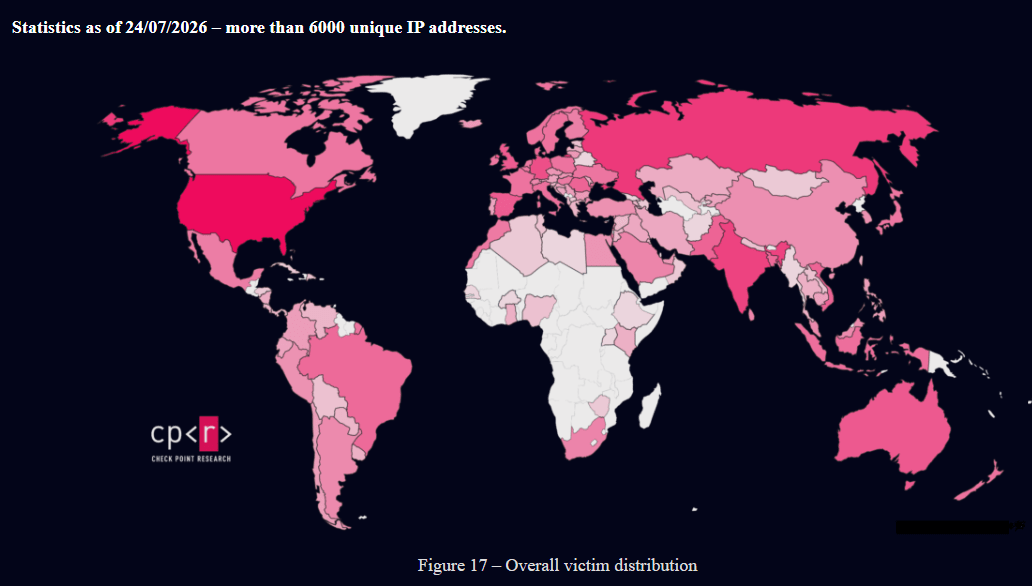
Check Point counted more than 6,000 unique IP addresses associated with the campaign by 24 July 2026. The largest groups came from the United States, Russia and India, although IP location does not necessarily identify the victims’ real location or the operators behind the operation.

StopAndProtect

The WordPress side of the story is familiar. Sites are compromised because owners don’t update the core platform, plugins or themes, or because administrative accounts are protected badly. Once attackers obtain access, they can install hidden must-use plugins that load automatically and create file-upload functions capable of accepting PHP files, which may lead to remote code execution.

For website owners, the basic response is still the right one: update WordPress and every plugin, remove anything unsupported, protect administrator accounts with strong passwords and multi-factor authentication, review installed plugins and check for unexpected PHP files or unfamiliar administrator accounts. Web server logs, outbound connections and recent file changes deserve particular attention if a site may have been compromised.

For visitors, the warning is more specific. A CAPTCHA should not ask someone to open PowerShell, paste a command into a terminal or disable security controls. If a webpage tells you to leave the browser and run instructions on your computer, close it. The CAPTCHA isn’t testing whether you’re human. It’s testing whether you’ll do the attacker’s work for them.

Follow me on Twitter: @securityaffairs and Facebook and Mastodon

Pierluigi Paganini

(SecurityAffairs – hacking, WordPress)

Critical WordPress Plugin Vulnerability Exposes 600,000 Sites to File Upload Attacks

A critical security flaw in the Forminator Forms WordPress plugin could allow unauthenticated attackers to upload malicious PHP files, potentially enabling them to take full control of vulnerable websites.

The issue, tracked as CVE-2026-15748, affects Forminator Forms versions 1.56.1 and earlier and carries a CVSS severity score of 9.8.

Forminator Forms is a widely used drag-and-drop plugin for building contact, payment, poll, quiz, and file-upload forms. With more than 600,000 active installations, the vulnerability poses a significant risk to WordPress administrators who have not yet applied the available update.

WordPress Plugin Vulnerability

The flaw was reported through the Wordfence bug bounty program by security researcher daroo, who received a $2,048 reward for the discovery.

Wordfence validated the report on July 14, 2026, disclosed the issue to the Forminator development team on the same day, and the vendor released a fix in Forminator Forms version 1.56.2 on July 31, 2026.

The flaw in Forminator’s file-upload handling lets attackers inject a forged upload configuration through the Select field in vulnerable published forms.

During processing, Forminator accepts attacker-controlled values such as the upload field name, field type, and file-handling settings. The malicious request can then cause the plugin to treat the forged data as a legitimate upload configuration.

The attack also bypasses the plugin’s dangerous file-extension filtering. Forminator attempts to block PHP and other executable file types using a blocklist.

However, the filtering uses exact matching against file-extension keys. Researchers found that an attacker could use the pattern ph(p) instead of the blocked php extension.

WordPress still interprets ph(p) as matching a .php file extension, while Forminator’s blocklist fails to remove it. By combining the forged configuration with a MIME type such as text/x-php, an attacker may upload a PHP payload that passes validation checks.

Uploaded files are normally placed in a directory protected by an .htaccess rule that prevents PHP execution. However, sites that use a custom file-upload storage location may not receive that protection under certain conditions.

If the uploaded PHP file is stored in an executable web-accessible path, an attacker could directly access it and run arbitrary commands on the server.

Successful exploitation could lead to remote code execution, webshell deployment, theft of WordPress credentials, database access, malware installation, or complete site compromise. Site owners should immediately update Forminator Forms to version 1.56.2 or later.

Administrators should also review existing form configurations, inspect upload directories for suspicious PHP files, and verify that uploaded files cannot execute as server-side code.

 Strengthen Your SOC by Accelerating Threat Detection & Rapid Investigations. -> Integrate ANY.RUN With Your SOC Now.

The post Critical WordPress Plugin Vulnerability Exposes 600,000 Sites to File Upload Attacks appeared first on Cyber Security News.

WordPress Supply Chain Attack Exploits BdThemes Plugins to Create Rogue Admin Accounts and Install Webshells

A supply chain compromise affecting multiple BdThemes WordPress plugins has allowed attackers to hijack administrator sessions, create unauthorized admin accounts, and deploy persistent web shells, without modifying the plugin source code or requiring a plugin update. Wordfence Threat Intelligence reported being notified of the incident on August 7, 2026. The affected plugins, distributed through the […]

The post WordPress Supply Chain Attack Exploits BdThemes Plugins to Create Rogue Admin Accounts and Install Webshells appeared first on GBHackers Security | #1 Globally Trusted Cyber Security News Platform.

WordPress XSS2Shell Flaw Turns Simple Login Bug Into Full Server Takeover

WordPress XSS2Shell flaw enables admin takeover and remote code execution. Users should update to patched versions.

Researchers at Pwn just published a report on a vulnerability chain they’re calling XSS2Shell, and the entry point is quite simple: type a username that doesn’t exist, and WordPress echoes it back with a tiny formatting flaw baked into how two different sanitizers read the same string.

The bug lives in the login page’s error message. When someone submits a username that isn’t registered, WordPress builds an error using that submitted text, after running it through a function meant to strip out any HTML tags. That stripping function relies on PHP’s built-in strip_tags(), which only recognizes a tag if the opening bracket is immediately followed by a letter, no space in between.

That’s the whole crack in the wall. A payload like < area id=ajaxurl>, with a space right after the bracket, sails straight through strip_tags() untouched, because PHP’s parser doesn’t see it as a tag at all. But by the time that string reaches WordPress’s separate sanitizer, wp_kses_post(), a completely different parser that does tolerate that whitespace, it gets interpreted as a legitimate <area> element and rendered as real, live HTML.

“When JavaScript evaluates an identifier that has no binding in the current scope chain, the runtime eventually reaches the window object. The HTML specification (section 7.3.3) defines that the window object exposes “named properties”: any HTML element in the document with an id attribute becomes accessible as window.<id>.” reads the report. “The injected <area id="ajaxurl"> is now the value that the runtime returns for window.ajaxurl.”

From there the researchers found something already sitting on the login page that would interact with injected elements automatically, no click required from a victim. WordPress loads a script meant for the profile page, user-profile.js, on the login page too, purely because the login page also handles password resets. That script watches for a password-reset button and auto-clicks it, and thanks to the injected DOM elements, it finds one that isn’t supposed to exist.

The click event triggers a chain that eventually resolves an undefined JavaScript variable, ajaxurl, using a browser quirk: any HTML element with a matching id attribute automatically becomes accessible as a property on the window object.

The injected <area> element becomes the value assigned by the browser to window.ajaxurl, allowing the attacker to control how the script handles the request.

That’s DOM clobbering, and it’s the pivot that turns a rendering quirk into an actual network request originating from WordPress’s own script.

That request lands on WordPress’s REST API with parameters that trick it into responding as JSONP, wrapping the reply in a callback function name the attacker controls. Because that callback field accepts dots as well as letters, it isn’t limited to calling a single global function, it can walk a full property chain across browser windows. The researchers reused a technique first published in 2022 to turn that into a cross-window click, one that fires inside an actual logged-in administrator’s session rather than the attacker’s own.

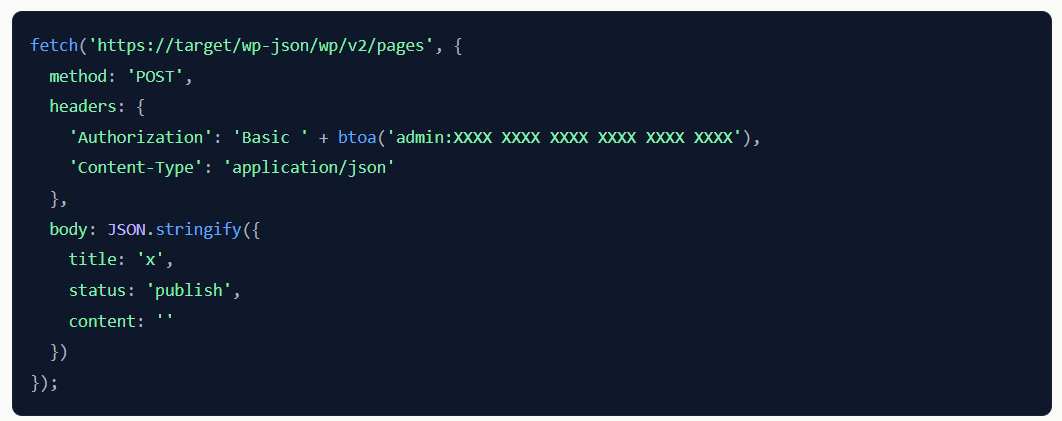
Getting from there to full server compromise takes a specific, orchestrated sequence: open a hidden window, navigate the admin’s browser to WordPress’s own application-password approval screen, then trigger the cross-window click on the approve button using the admin’s real session cookies and nonces. That hands the attacker a valid Application Password for the admin account, which WordPress’s REST API happily accepts over HTTP Basic auth from any origin.

“Application Passwords authenticate REST API requests via HTTP Basic auth. WordPress’s REST CORS implementation reflects the requesting origin and permits Authorization and Content-Type headers. The attacker’s page can now make authenticated cross-origin API calls:

” continues the report. “Single-site WordPress administrators have the unfiltered_html capability by default. The script tags survive into the published page exactly as submitted.”

From there it’s a short hop to publishing a page containing attacker JavaScript, since single-site administrators have unrestricted HTML permissions by default, and using that script to upload and execute a plugin containing arbitrary PHP.

The researchers’ proof of concept ended with a plugin file returning a JSON response confirming code execution as the web server user, then cleaned up every trace: the application password revoked, the published page deleted, the plugin directory removed. Nothing persisted, but the point had already been made. This chain works pre-authentication, needs zero user interaction beyond visiting a link, and reliably ends in remote code execution on a stock WordPress install.

“Our proof used a minimal PHP file that wrote a JSON marker and returned a custom header:” concludes the report.”After verification, the PoC went sent WordPress cleaned up after itself: the Application Password was revoked, the published page was deleted, and the plugin directory was removed. Nothing persisted.”

WordPress moved fast once notified. The researchers reported the chain on July 27, and WordPress shipped version 7.0.3 on August 6, backporting the fix all the way to WordPress 4.7 to cover every still-maintained branch. If you’re running WordPress and haven’t updated yet, this isn’t a “get to it next sprint” patch, it’s a “do it before you finish reading this sentence” patch, given how little an attacker actually needs to pull the whole chain off.

Follow me on Twitter: @securityaffairs and Facebook and Mastodon

Pierluigi Paganini

(SecurityAffairs – hacking, XSS2Shell)

❌