Visualização de leitura

Malicious Firefox add-ons caught stealing cryptowallet seed phrases and browser credentials

Every time you add an extension or plugin to your browser, there's a risk that you might be doing more than managing your cryptocurrency wallet, generating passwords, taking notes, or tracking sports results. There's a chance that you have just handed a complete stranger access to your savings. Read more in my article on the Hot for Security blog.

Adobe Acrobat Chrome extension bug enabled silent WhatsApp data theft

Adobe patched CVE-2026-48294, a flaw in Adobe Acrobat Chrome extension that could let attackers steal WhatsApp Web chats by luring users to a webpage.

Guardio Labs researcher Shaked Biner disclosed HermeticReader, a vulnerability chain in the Adobe Acrobat Chrome extension that allowed any attacker-controlled webpage to silently steal a visitor’s WhatsApp chats, contacts, profile name, and message previews in plain text. The extension sits on roughly 329 million browsers. No malware, no phished password, no compromised session cookie — just visiting the wrong page was enough.

“Read the prerequisites list of this exploit chain and the discomfort sets in: no malware is installed, no password is phished, no session cookie is touched. There is no zero-day in WhatsApp.” reads the report published by Guardio Labs. “The attacker needs no Adobe account and no foothold on the machine. Only for the victim to visit a simple attacker-controlled static page.”

The attack chains three separate flaws in the extension’s internal messaging system. None of them are dramatic on their own. Together they hand an attacker full DOM control over an open WhatsApp Web tab.

The first flaw is that the extension’s web-accessible resource pages, frame.html, searchWidget.html, and others, can be embedded as hidden iframes by any website. Those pages parse a JSON blob directly from their URL query string and relay it to the extension’s service worker as a message.

“Because that script runs inside chrome-extension://efaidn…/, the service worker sees its message as coming from a trusted internal source. The extension’s own identity becomes the attacker’s mask. The page can set any fields on the message , typekeyvalue, anything else.” continues the report. “Two fields are not free: panel_op has to be set to "load-frictionless" so that frame.js takes the relay code path at all, and main_op is overwritten to "relay_to_content" on the way out.”

The service worker’s message listener never checks the sender. Its storage writer has no allowlist on what can be written. Any page can write any key into the extension’s local storage in zero clicks.

That storage write matters because of the third flaw: Adobe’s Hermes engine, the component that handles WhatsApp Web integration, activates based on a feature flag read from local storage. Write the right key – floodgate-add = "dc-cv-hermes" – and Hermes arms immediately. With Hermes running, the attacker controls a command dispatcher inside WhatsApp’s tab that can inject HTML, invoke methods on any DOM node, submit forms, and relay messages back to the service worker. One of those commands, APPEND_HTML_TO_TARGET, can replace WhatsApp’s login QR code with an attacker-controlled one, meaning anyone who scans it to link a new device pairs the attacker’s session instead.

The data exfiltration technique is what makes the research genuinely clever.

“We never asked the extension to read anything. We asked WhatsApp to submit itself to us – and it did.” states the report.

The attack injects a POST form into WhatsApp’s DOM, then uses the ELEMENT_OPERATION command to physically move WhatsApp’s entire body node into the form’s option element. Because an option element with no value attribute submits its text content, and because WhatsApp’s content security policy contains no form-action directive, submitting the form sends the entire rendered page, chat list, contact names, message text, to the attacker’s server. WhatsApp does the exfiltration itself.

Guardio found this within hours of Adobe shipping version 26.5.2.1 on June 3, using a custom agentic AI system that unpacked and analyzed the extension’s 344 obfuscated JavaScript files, mapped code diffs against previously analyzed flows, and worked through a 138-case service-worker message dispatcher.

“The Agentic AI Research harness is not only a clever and innovative way to research – it already became mandatory! From a new version release trigger, the work is shared: The agent unpacks the bundle, beautifies 344 obfuscated JavaScript files, finds the code diffs and maps them against already mapped and analyzed flows, continues to map a 138-case service-worker message dispatcher, and so much more.” states Guardio Labs. “At this time, we’ve steered the analysis toward what is actually reachable and worth proving, cleared dead ends, and presented plausible ideas and attack vectors to pursue. That combination is what collapsed the time line into hours instead of days, weeks or even months.”

Adobe’s response matched the speed: acknowledged, patched, and shipped within the same weekend the report arrived. CVE-2026-48294 was issued days later.

The structural lesson here isn’t about any single clever trick. Twelve individually unremarkable shortcuts in message passing, storage handling, feature flags, and host matching composed into a chain that reached 329 million browsers. The era in which a high-install extension could rely on nobody looking at the plumbing closely is ending, for defenders and attackers alike.

Follow me on Twitter: @securityaffairs and Facebook and Mastodon

Pierluigi Paganini

(SecurityAffairs – hacking, Adobe Acrobat)

StegoAd: How 119 Fake Browser Extensions Stole Credentials and Ran Ad Fraud for Two Years

Microsoft shut down the StegoAd campaign, which used 119 malicious Edge extensions, hit 2.6M installs, and ran undetected for two years.

Microsoft just shut down one of the more technically clever malicious extension campaigns it’s ever documented. The operation, named StegoAd, ran 119 extensions on the Edge Add-ons store, racked up roughly 2.6 million installs, and stayed alive for at least two years. The threat actor behind it has been active since 2021.

“Over the past several years, the Microsoft Edge Extensions Security team has tracked a persistent threat actor operating one of the most technically sophisticated malicious browser extension campaigns we have encountered.” reads the report published by Microsoft. “We call it StegoAd, a name combining steganography and ad injection, the two pillars of the campaign’s methodology.”

The extensions looked completely normal. Ad blockers, VPNs, translators, video downloaders, they all worked. They earned positive reviews. The malicious payload didn’t activate until days after installation, which is exactly how the campaign survived multiple detection sweeps.

The name comes from steganography, the practice of hiding data inside ordinary files. This actor hid executable JavaScript inside PNG icon files, then WebP images, then WOFF2 font files. Static scanners saw valid images. What actually ran was a multi-stage attack suite.

“This encoding technique stores JavaScript payload characters as high Unicode codepoints, values in the CJK Unified Ideograph and Private Use Area ranges that overlap with character ranges defined in WOFF2 font files.” continues the report. “To a scanner, it looks like Asian text or font metadata. To the decoder, it’s an executable JavaScript”

The earliest technique appended JavaScript code after the IEND marker at the end of a PNG file. The image rendered perfectly in any viewer. The extension’s own background script read the icon as raw text, found a custom marker string, pulled out everything after it, and executed it. No suspicious domain calls. No obvious obfuscation in the JavaScript source. Standard scanners found nothing.

When PNG detection improved, the actor moved to WebP containers. Same idea, different format, less scrutiny from security tools at the time. After that came WOFF2 font files, where payload characters were stored as high Unicode codepoints in glyph ranges that look like Asian text or font metadata to any scanner that doesn’t decode them.

The most recent variant, spotted in March 2026, disguised a PNG file as a configuration file called setting.conf. The extension fetched it, searched for the marker_vpn_settings, and decoded a Base64 payload split into segments by a ///// delimiter. Calling it a settings file was a nice touch.

The extension stayed dormant for three to five and a half days after installation. Some variants only activated in 10% of sessions on top of that. If you opened DevTools to inspect the extension, a flag called dipFlgDev was set and the dormancy period extended indefinitely. The payload would never fire while an analyst was watching.

The command-and-control server added another layer. It only served real payloads to requests that passed a fingerprint check built from the extension’s own runtime ID, plus the correct User-Agent. Researchers probing the C2 directly got an empty decoy response. The full payloads Microsoft analyzed were intercepted from controlled infected instances, not retrieved by querying the server.

The polymorphic framework, called orderArray, ran across 66 extensions with over 15 naming variants. Every instance had the same four-component structure: an encoded payload object, a seed generator using the extension’s runtime ID, a regex decoder, and a double-Base64 extractor. Variable and function names changed completely across each variant, which defeated fixed-pattern detection rules.

Ad fraud was the visible layer. The extensions injected ads, replaced existing Google AdSense and Amazon ad slots with the actor’s own (capped at six replacements per page to avoid suspicion), and hijacked affiliate commissions on Amazon across more than 20 country-specific stores, plus eBay, AliExpress, Taobao, and JD.com.

Underneath that was a full remote code execution backdoor. The C2 server could push arbitrary JavaScript to any victim’s browser and have it execute within 10 milliseconds. Every extension in the campaign received the same payload modules, meaning all 2.6 million users were exposed to the complete attack surface, not just the ad fraud piece.

The credential theft module targeted Google sign-in pages. It captured the password, waited for the 2FA prompt, captured that code too, and sent both to mitarchive.info via double-Base64 encoding. A separate module hit WordPress admin login pages and attached a SimilarWeb link to each stolen credential so the operator could sort stolen sites by traffic value before deciding what to do with them.

Seven Google Analytics tracking IDs served as the campaign’s telemetry infrastructure. The operator tracked active installs, geographic distribution, merchant click counts, per-ad-replacement performance, and extension version numbers, all through Google’s own dashboard. Hosting telemetry on Google infrastructure meant those beacons blended in completely with normal web traffic.

Two GA4 beacons were served through GitHub Pages. The operator was running what amounts to a professional analytics setup for a criminal campaign, on free hosting, using Google’s tools.

The campaign migrated from Manifest V2 to Manifest V3 as browser platforms tightened restrictions. Where MV2 allowed real-time JavaScript interception of HTTP responses, MV3 requires static declarative rules. The actor solved this by fetching those rules dynamically from the C2 server and installing them into the browser’s declarativeNetRequest API every 15 days. The result was the same header-stripping capability through a more constrained interface.

Each time a wave of extensions was removed, the actor responded within weeks. The C2 domains shifted, encryption schemes changed, and new steganographic formats appeared. Microsoft’s analysis describes a clear detect-and-adapt pattern across eight major milestones from March 2024 through April 2026.

Microsoft has not named the threat actor. Koi Security has linked the credential exfiltration domain mitarchive.info to DarkSpectre, a Chinese operation previously connected to the ShadyPanda and GhostPoster campaigns. StegoAd shares the icon steganography method with GhostPoster and even reuses some extension names, including “Ads Block Ultimate.”

The full list of 119 extension IDs is in Microsoft’s technical report. Open edge://extensions and check your installed add-ons against it. If anything matches, treat the browser as compromised: change your Google password, review recent sign-in activity at myaccount.google.com/security, and check WordPress and Amazon accounts for anything you didn’t do.

“Hardware security keys hold up against this kind of 2FA interception in a way that SMS codes and authenticator apps do not. If you’re still using SMS for 2FA on accounts that matter, this campaign is a reasonable argument for upgrading.” concludes the report. “The StegoAd campaign demonstrates clear technical evolution over 2+ years, with the actor consistently adapting to detection pressure” concludes the report. “The progression also reveals strategic priorities: the actor invests heavily in payload concealment (steganography variants evolved four times) while keeping the monetization logic largely stable. This asymmetry suggests the actor views detection of evasion, not feature development as the primary operational constraint.”

Follow me on Twitter: @securityaffairs and Facebook and Mastodon

Pierluigi Paganini

(SecurityAffairs – hacking, StegoAd)

Malware steals Chrome session cookies to take over your accounts

An email attachment leads to the installation of a malicious Chrome extension. Researchers say it is part of a Windows backdoor delivered via a phishing email. The malware abuses Chrome Native Messaging to move control from the browser into the host system. Its most notable trick isn’t the phishing lure itself, but the way it uses legitimate browser and Windows features to run PowerShell and collect data while staying inside expected workflows.

The attack starts with an email attachment disguised as a PDF. The file uses the misleading extension .pfd.js to look like a PDF document, but it’s actually an obfuscated JavaScript file that drops additional files into the temporary folder and starts the rest of the infection chain.

As part of that chain, a PowerShell script prepares a Chrome extension and changes Chrome policy settings so that the extension can be installed. The malware makes the installation appear to be an administrator-controlled deployment rather than a normal extension installation.

Once active, the extension and its native companion collect browser cookies, open tabs, URLs, language settings, and fingerprinting data. The operators also use the setup as a remote command channel, sending instructions that can launch PowerShell and enumerate the contents of the C: drive.

With the stolen authenticated session cookies, the attackers can hijack active browser sessions rather than just stealing passwords, which is more useful to them as it lets them access accounts already logged in on the victim’s browser, bypassing multi-factor authentication (MFA).

The most interesting aspect of the attack is its abuse of Chrome Native Messaging as a bridge between the browser sandbox and the operating system. Chrome allows extensions to communicate with a registered native host, and the attackers weaponized that legitimate feature to make the extension a controller for local code execution. The extension doesn’t launch PowerShell directly. Instead, it sends messages to the native host, which then launches or interacts with PowerShell on the host system.

How to stay safe

The first line of defense against attacks of this kind is to avoid opening email attachments unless you can verify the sender. In addition:

  • Always check the real file extension instead of relying on the displayed filename.
  • Use an up-to-date, real-time anti-malware solution to detect and block malicious activity.
  • Check the installed Chrome extensions on your device and remove any you don’t recognize or no longer use.
  • To be extra cautious, sign out of important accounts when you’re finished. That invalidates your session, so even if someone has stolen your session cookie, they won’t be able to use it to access your account.
  • Regularly check the login history for important accounts. Many online services let you see which devices have signed in, when, and from where.

IOCs

Attachment:

Fattura-2819889242.pfd.js (displayed as Fattura-26189991026.pdf)

Malicious files:

client_124578.exe
d3d11.dll

Chrome extension:

Name: Cloud vn105rkj64
ID: gghagmhimhgfeajfdmjkgmmehbokmglg

Domain:

ext2[.]info

This is blocked by Malwarebytes Browser Guard, our free browser extension that blocks ads, trackers, malware, and more.

Browser Guard blocks ext2[.]info

We don’t just report on threats—we remove them

Cybersecurity risks should never spread beyond a headline. Keep threats off your devices by downloading Malwarebytes today.

GitHub Confirms Cyberattack Targeting Thousands of Internal Repositories

GitHub cyberattack

GitHub confirmed that attackers associated with TeamPCP gained unauthorized access to thousands of the company’s internal code repositories after compromising an employee’s device through a malicious VS Code extension. Despite the scale of the GitHub cyberattack, the Microsoft-owned platform said there is currently no evidence that customer repositories or enterprise data were affected.  The cyberattack on GitHub marks the latest operation linked to TeamPCP, a cybercriminal group that has rapidly expanded its activity through coordinated attacks on developer-focused platforms and cloud infrastructure.  

Decoding the GitHub Cyberattack 

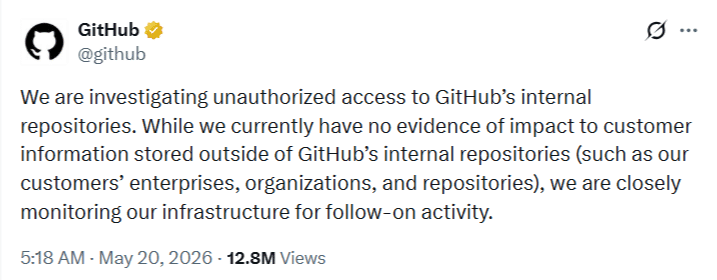
GitHub publicly acknowledged the incident on Wednesday after TeamPCP allegedly advertised stolen source code on a cybercrime forum. According to the company, the attackers attempted to extort the platform by offering the stolen code for sale at $50,000 and threatening to leak it publicly if no buyer emerged.  [caption id="attachment_112192" align="alignnone" width="717"]GitHub Cyberattack Details Image Source: X[/caption] In a statement shared on X, formerly Twitter, GitHub said:  “We are investigating unauthorized access to GitHub’s internal repositories. While we currently have no evidence of impact to customer information stored outside of GitHub’s internal repositories (such as our customers’ enterprises, organizations, and repositories), we are closely monitoring our infrastructure for follow-on activity.”  The company further stated:  “If any impact is discovered, we will notify customers via established incident response and notification channels.”  GitHub said the breach originated after an employee’s system was infected through a poisoned VS Code extension. The company described the incident as “detected and contained,” emphasizing that the compromise was restricted to internal repositories and did not extend to customer-owned data.  As part of its response to the GitHub cyberattack, the company rotated critical credentials on the same day the breach was discovered, prioritizing the most sensitive secrets first. GitHub also acknowledged that TeamPCP’s claim of stealing around 3,800 repositories was “directionally consistent” with the company’s own internal assessment regarding the scope of the intrusion.  The platform hosts code for more than 100 million developers globally, making the cyberattack on GitHub particularly significant within the software development and cybersecurity communities. GitHub said it plans to release a more detailed report once the investigation is complete. 

TeamPCP’s Growing Role in Cloud-Focused Cybercrime 

Cybersecurity researchers at Cyble have identified TeamPCP as a cloud-focused cybercriminal operation that emerged as a large-scale exploitation platform in late 2025. The group is also tracked under several aliases, including DeadCatx3, PCPcat, PersyPCP, and ShellForce.  [caption id="" align="alignnone" width="936"]TeamPCP Image Source: X[/caption] Unlike threat actors that depend heavily on zero-day vulnerabilities, TeamPCP has reportedly built its operations around automation and the exploitation of known weaknesses and cloud misconfigurations. Researchers say the group combines these methods into a scalable and largely self-propagating attack framework.  Beginning in late 2025, TeamPCP launched extensive scanning campaigns targeting exposed Docker APIs, Kubernetes control planes, Ray dashboards, and Redis services. Once access is achieved, compromised systems are integrated into a distributed infrastructure used for proxying internet traffic, performing additional scans, hosting command-and-control infrastructure, deploying ransomware, and conducting unauthorized cryptomining operations. 

Operational Structure Behind the Cyberattack on GitHub 

The operational model used by TeamPCP differs from many conventional cybercriminal campaigns because it prioritizes cloud-native environments over traditional end-user devices. Instead of relying primarily on phishing campaigns against individual users, the group focuses on exposed administrative services and container orchestration platforms.  Researchers observed that TeamPCP attack chains commonly begin with automated internet-wide scanning for externally accessible services that either lack authentication or are improperly secured. This allows the group to scale attacks rapidly across large numbers of organizations without relying on highly customized exploitation techniques.  The GitHub cyberattack appears consistent with the group’s broader strategy of targeting software development environments and cloud infrastructure that can provide access to sensitive operational resources. 

Countries and Industries Impacted by TeamPCP 

Security researchers said TeamPCP activity has been observed across multiple countries, including the United Arab Emirates, Canada, South Korea, Serbia, the United States, and Vietnam. Researchers noted that the group’s targeting pattern appears opportunistic rather than politically motivated, with attacks primarily focused on exposed infrastructure.  Industries affected by TeamPCP operations include Banking, Financial Services, and Insurance (BFSI), consumer goods, and professional services organizations. These sectors often depend heavily on scalable cloud-based systems and internet-facing services, making them vulnerable to automated scanning campaigns, cloud misconfiguration abuse, ransomware deployment, and cryptomining activities. 

That AI Extension Helping You Write Emails? It’s Reading Them First

Unit 42 uncovers high-risk AI browser extensions. Disguised as productivity tools, they steal data, intercept prompts, and exfiltrate passwords. Protect your browser.

The post That AI Extension Helping You Write Emails? It’s Reading Them First appeared first on Unit 42.

Fake TikTok Downloaders on Chrome and Edge Spying on 130,000 Users

Over 130,000 users are at risk from fake TikTok downloader extensions on Chrome and Microsoft Edge. Researchers discovered these malicious tools use device fingerprinting to spy on users and steal sensitive browser data.
❌