Note The September 2026 Dark Web Breach Incident Trend Report focuses on data breach cases and the sale of initial access credentials posted on the deep web and dark web forums. The report explicitly states that the accuracy of some of its content cannot be fully verified due to the nature of the sources. Major […]
Learn how the LLM-generated PhantomRaven information stealer targets developers. The PhantomRaven information stealer uses npm to hijack CI/CD secrets.
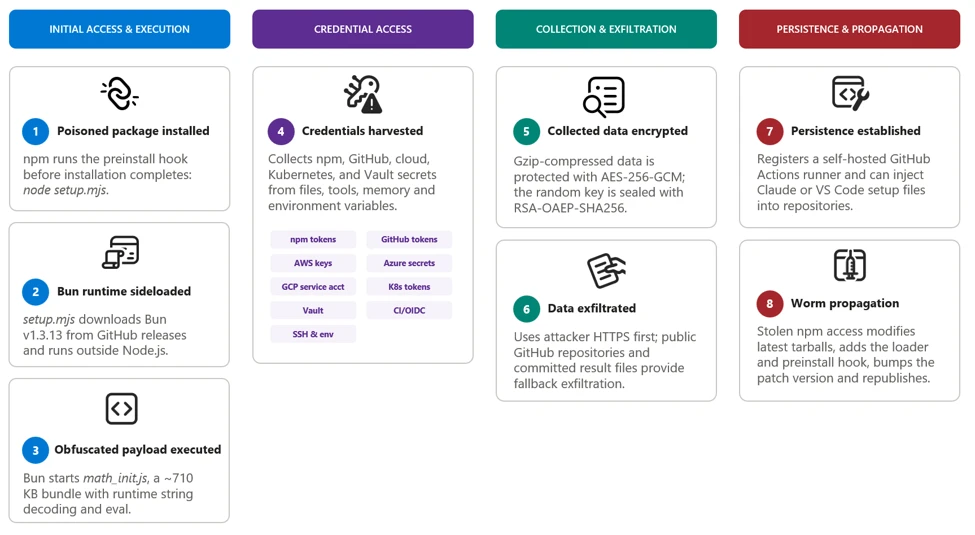
Microsoft Threat Intelligence identified a large-scale npm supply chain attack affecting more than 400 packages across multiple unrelated publishers, including packages associated with major enterprise software ecosystems such as keyv, flat-cache, cache-manager, and others. The malicious releases contain a Mini Shai-Hulud variant, a self-propagating credential-stealing worm delivered through a large, heavily obfuscated Bun-based JavaScript payload. The malware typically executes automatically through an npm preinstall lifecycle hook before package installation completes.
Once executed, the malware searches developer workstations and continuous integration and continuous delivery (CI/CD) environments for npm, GitHub, cloud, and infrastructure credentials. It uses recovered identities to authenticate to npm, GitHub, Amazon Web Services (AWS), Kubernetes, and HashiCorp Vault, enabling it to enumerate packages, repositories, workflow secrets, cloud parameters, and secret-store values. Collected data is encrypted and transmitted through an attacker-controlled HTTPS endpoint, with GitHub repositories serving as a fallback exfiltration channel.
The payload’s most significant capability is automated propagation. After obtaining an npm publishing token, it enumerates packages available to the compromised identity, downloads their latest tarballs, inserts the malware and setup loader, adds a preinstall hook, increments the patch version, and republishes the modified packages. The malware can also use stolen GitHub credentials to inject Claude and Visual Studio Code configuration files into repositories, establishing persistence and creating an additional developer-to-developer infection path.
In this blog, we’re sharing our analysis of this supply chain attack, along with protection, detection, amd hunting guidance. Organizations that installed an affected package with lifecycle scripts enabled should treat the associated developer workstation or build runner as potentially compromised. Investigations should prioritize credentials accessible to the affected identity, unauthorized npm releases, unexpected repository or workflow modifications, suspicious cloud and secret-store access, and artifacts produced by affected build systems. Organizations should revoke and rotate exposed credentials from a known-clean environment and rebuild affected systems and downstream artifacts from trusted sources.
Attack chain overview
The campaign appeared as a rapid sequence of unauthorized patch releases across more than 400 npm packages maintained by otherwise unrelated publishers. Many malicious versions had no corresponding source-code commit, pull request, tag, or legitimate release, indicating that the attackers modified and published package tarballs directly rather than compromising each public source repository.
Affected releases typically added a preinstall lifecycle script that launched a malicious file, setup.mjs, contained within the package, which launched the large, obfuscated Bun JavaScript bundle included in the package. Because npm runs preinstall scripts before installation completes, the payload could execute on developer workstations and build runners before application tests or conventional security checks began.
After execution, the malware performs the following actions:
Determines whether it is running on a developer workstation or in a CI/CD environment. On workstations, it detaches itself to continue after installation; on CI/CD systems, it remains in the active job to access workflow secrets, runner credentials, and OpenID Connect (OIDC) publishing permissions. Both paths could support further package or repository propagation when suitable credentials are found.
Collects credentials from local files, environment variables, command-line tools, and GitHub Actions runner memory.
Authenticates to npm, GitHub, AWS, Kubernetes, and HashiCorp Vault to enumerate additional accessible resources and secrets.
Encrypts and exfiltrates collected data through an HTTPS channel, using GitHub repositories as a fallback.
Uses recovered npm publishing access to modify and republish additional packages.
Uses GitHub credentials to inject files into Claude and Visual Studio Code configurations across repository branches for persistence.
The payload’s package-propagation routine downloads each publisher’s latest release, inserts itself, increments the patch version, and publishes the resulting archive. This mechanism can rapidly transform one compromised npm identity into many malicious package releases.
Figure 1. Attack chain.
0. Initial publisher access
Evidence points towards stolen maintainer credentials as the attack vector for initial compromise. Later propagation used stolen npm publishing tokens and, in targeted workflows, GitHub Actions OIDC publishing access.
1. Payload startup and background execution
The malicious npm package uses a lifecycle hook to launch its bundle.
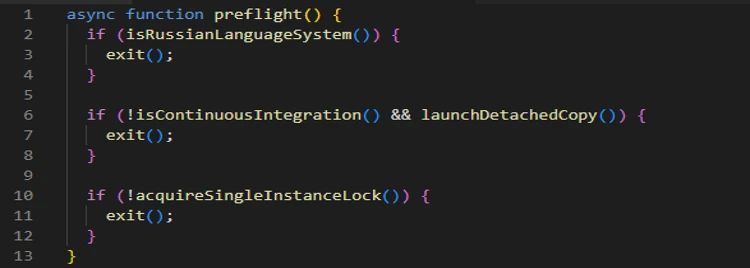
During preflight, the payload checks the environment, exits on Russian-language systems, avoids duplicate instances, and starts a detached copy in the background on developer systems.
Figure 2. Platform identification and execution.
In CI environments, the payload remains attached so it can access credentials available to the active build job.
2. Initial credential discovery
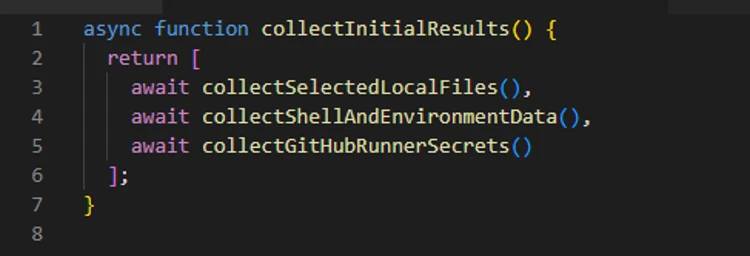
The payload first collects information that is immediately available from the local system, shell, and GitHub Actions runner.
Figure 3. Credential discovery.
The shell collector attempts to obtain the GitHub CLI token and captures the values of all process environment variables. The filesystem collector searches credential files, shell histories, cloud configuration, Secure Shell (SSH) keys, and other sensitive locations.
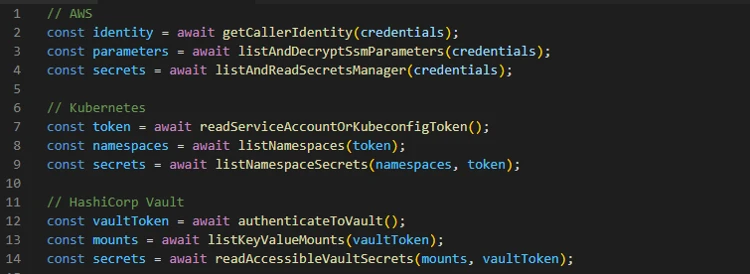
3. Cloud and secret store enumeration
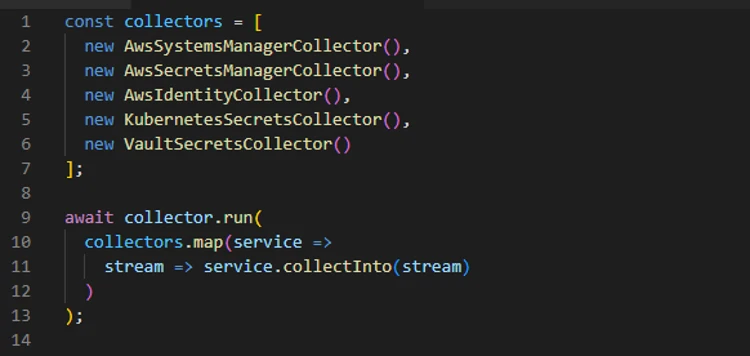
The recovered code then creates dedicated collectors for cloud and infrastructure services.
Figure 4. Credential enumeration.
These modules do not merely scan files for token patterns; they use available credentials to call service APIs, verify access, and retrieve additional secrets permitted to those identities.
The following snippet shows the authentication attempt made using the found credentials:
Figure 5. Credential validation.
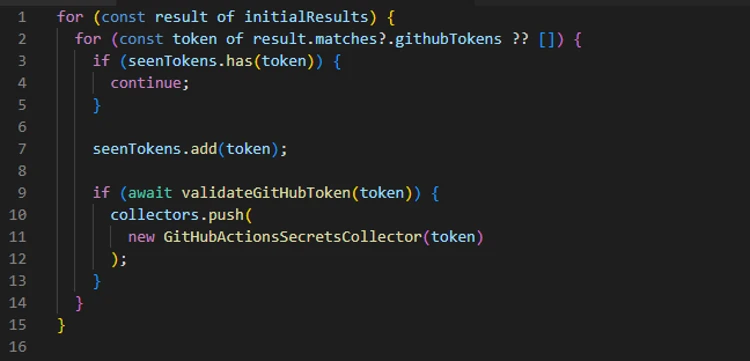
4. GitHub credential theft and enumeration
Discovered GitHub tokens are validated before being used for additional collection or repository access.
Figure 6. GitHub credential collector.
The payload checks token scopes, enumerates writable repositories, and identifies repositories where workflow execution could expose additional secrets.
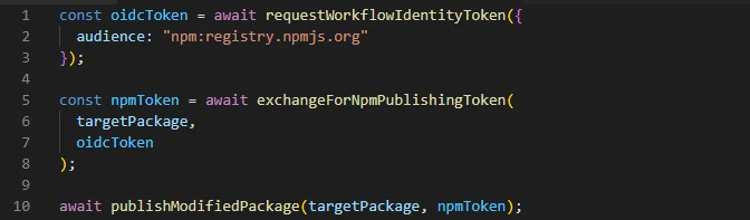
6. GitHub Actions OIDC abuse
The payload also contains a targeted publishing path for GitHub Actions workflows configured as npm trusted publishers.
Figure 7. Re-publishing package using GitHub OIDC token.
Packages published through this route can carry valid provenance because the publication originates from a legitimate workflow identity.
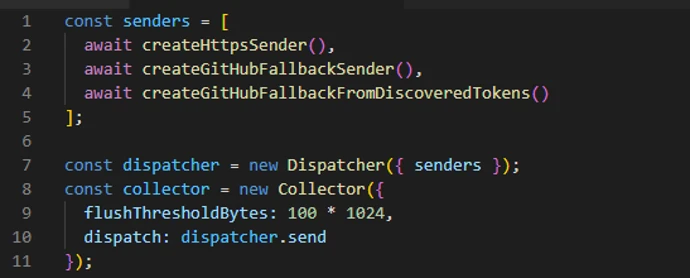
7. Exfiltration and fallback
Collected results are serialized as JSON, gzip-compressed, and encrypted with a randomly generated AES-256-GCM using a randomly generated 32-byte key and 12-byte initialization vector (IV). The AES key is then encrypted with the attacker’s RSA public key using RSA-OAEP-SHA256.
The payload first attempts delivery through an attacker-controlled dynamic HTTPS endpoint. The active domain can change through on-chain contract (0xE1f2395ee43e45A1556EC6438a88c31B83493103, selector 0x53ed5143) or, as a fallback, from a cryptographically verified signed GitHub commit (Signed fallback marker: thebeautifulmarchoftime). If that channel is unavailable, it creates a public GitHub repository with the description Shai-Hulud: Here We Go Again.
Encrypted results are committed as files such as: results-<timestamp>-<counter>.json.
At the time of analysis, the live contract returns npm-cache[.]com. Earlier candidates include pypi-get[.]com and js-mirror[.]com.
Figure 8. Exfiltrating stolen information.
In one fallback path, a stolen GitHub token is added separately using double Base64 encoding. This token field is encoded, not encrypted.
8. Repository persistence and secondary spread
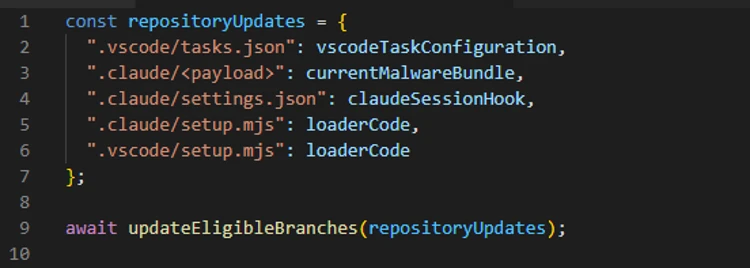
The payload can use stolen GitHub credentials to inject the malware and supporting setup files into eligible repository branches. The recovered code targets Claude and Visual Studio Code configuration paths, including .claude/settings.json, .claude/setup.mjs, .vscode/tasks.json, and .vscode/setup.mjs.
These changes create a secondary infection route: future Claude or Visual Studio Code activity can restart the payload even after the original npm installation has completed. In a conditional GitHub fallback path, the payload also attempts to install a token-monitor component that maintains credential access and contains a destructive handler if the monitored token is revoked.
Figure 9. Injecting the malicious code into development ecosystems.
9. Worm behavior: Package modification and publication
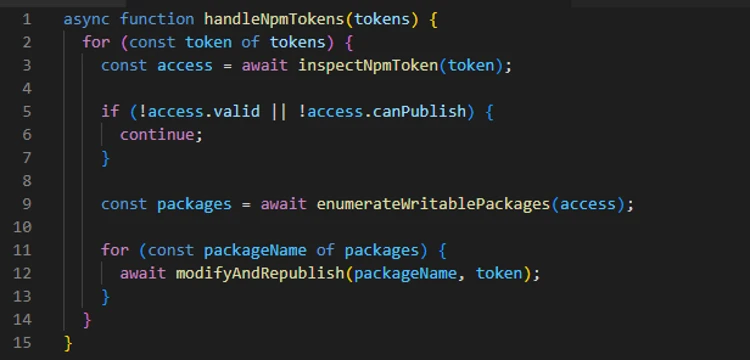
The npm tokens found in collected data are checked for package-write permission and two-factor authentication (2FA)-bypass capability.
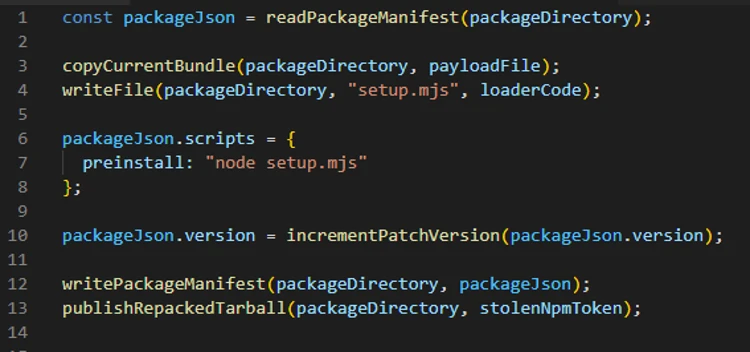
Figure 10. Republishing the package using stolen NPM token.Figure 11. Malicious update to existing package and republishing.
The propagation routine downloads a package’s latest tarball, copies the current malware bundle into it, adds a loader, and replaces its lifecycle scripts. This creates the worm-like propagation pattern: one stolen token can produce malicious patch releases across every package available to that publisher. This also explains why malicious releases frequently appeared as an otherwise ordinary patch-version increment without corresponding source commits or pull requests.
Mitigation and protection guidance
Microsoft recommends the following mitigations to reduce the impact of this threat.
Review dependency trees, lockfiles, artifact repositories, and CI caches for the five compromised versions, including transitive references.
Pin known-good package versions.
Purge npm and yarn caches on affected developer endpoints and build hosts, especially if the compromised tarballs were written into shared CI caches.
Rotate credentials and secrets from a clean host if a build system or workstation imported a compromised version, because second-stage execution can expose tokens and compromise build integrity.
Ensure that Microsoft Defender Antivirus cloud-delivered protection, Microsoft Defender for Endpoint telemetry, Microsoft Defender for Containers, and Microsoft Defender XDR investigation workflows are enabled across developer and CI assets.
Organizations that produce software artifacts should also review their own release hardening because this incident appears consistent with CI/CD pipeline abuse through GitHub Actions OIDC publishing. Defenders should review token scopes, workflow approvals, protected environments, release provenance, and anomaly detection around automated package publication. Supply chain response cannot stop at host triage; it must also include verification that the release process itself has not been subverted.
After remediation, validate recovery deliberately. Rebuild affected projects from a known-good dependency baseline, confirm that compromised hashes are absent from package caches and artifact stores, and review endpoint telemetry for any lingering NodeJS directory artifacts such as Math_Symbol.js, Math_init.js, or names similar to math_<guid>.js, or suspicious node child processes. For development organizations that share base images or golden build runners, rebuild those images as well so future jobs do not silently inherit poisoned caches or post-compromise persistence.
Microsoft Defender XDR customers can refer to the list of applicable detections below. Microsoft Defender XDR coordinates detection, prevention, investigation, and response across endpoints, identities, email, and apps to provide integrated protection against attacks like the threat discussed in this blog.
Tactic
Observed activity
Microsoft Defender coverage
Initial access / Execution
Malicious files embedded in compromised npm packages execute the embedded payload automatically through a malicious preinstall lifecycle hook.
Microsoft Defender Antivirus – Trojan:NPM/ShaiLoader.BY – Trojan:NPM/MalBun.A – Trojan:NPM/ShaiWorm.DAY!MTB
Microsoft Defender for Endpoint – Suspicious Node.js process behavior – Suspicious Node.js script execution
Execution / Defense evasion
The preinstall loader launches a heavily obfuscated Bun-based JavaScript payload designed to hinder analysis and evade Node.js-focused monitoring.
Microsoft Defender Antivirus – Behavior:Linux/SuspBunActivity.A – Behavior:Win32/SuspBunActivity.A
Microsoft Defender for Endpoint – Suspicious usage of Bun runtime – Suspicious installation of Bun runtime – Suspicious Node.js process behavior – Suspicious script execution via Bun – Suspicious Node.js script execution
Microsoft Defender for Cloud – Suspicious npm supply-chain compromise activity detected
Credential access / Collection
The malware searches developer workstations and CI/CD environments for npm, GitHub, cloud, Kubernetes, and secrets.
Microsoft Defender for Endpoint – Credential access attempt – Suspicious cloud credential access – Enumeration of files with sensitive data – Suspicious access of sensitive files
Microsoft Defender for Cloud – Sha1-Hulud Campaign Detected: Possible command injection to exfiltrate credentials
Advanced hunting queries
Microsoft Defender XDR customers can run the following advanced hunting queries to find related activity in their networks:
Execution of the preinstall script
DeviceProcessEvents
    | where Timestamp > ago(3d)
    | where FileName in~ ("node", "node.exe")
    | where ProcessCommandLine in~ ("node setup.mjs", "node  setup.mjs")

CloudProcessEvents
    | where Timestamp > ago(3d)
    | where FileName in~ ("node", "node.exe")
    | where ProcessCommandLine in~ ("node setup.mjs", "node  setup.mjs")
Execution of second-stage JavaScript using Bun runtime
DeviceProcessEvents
    | where Timestamp > ago(3d)
    | where InitiatingProcessFileName in~ ("node", "node.exe")
    | where InitiatingProcessCommandLine in~ ("node setup.mjs", "node  setup.mjs")
    | where FileName in~ ("bun", "bun.exe")
    | where FolderPath contains "bun-dl-" or ProcessCommandLine has "node_modules"
Malicious JavaScript from malicious packages
DeviceFileEvents
| where Timestamp > ago(3d)
| where SHA256 in~ ("9fc2570b7cef51c1b8df116d144d11ff4096357be7d2c4c6367cfc2509cf1bcc", "fd3ca4007b225fdf8de7af4345a19179d5efa8c4bb9205f88cda806e5684b1eb", "54dc7ea54a1317cca0e890a2770630cf7fa6c97813e0cb9d2caa93012b350668")
Credential access by malicious JavaScript
DeviceProcessEvents
   | where Timestamp > ago(3d)
   | where ProcessCommandLine has_any ('gh auth token', 'gcloud config config-helper', 'az account get-access-token', "azd auth token")
   | where InitiatingProcessFileName in~ ("bun", "bun.exe")
   | where InitiatingProcessFolderPath contains "bun-dl-" or InitiatingProcessCommandLine has "node_modules"
Microsoft Security Copilot
Security Copilot customers can use the standalone experience to create their own prompts or run prebuilt promptbooks to automate investigation and response tasks related to this threat. Useful promptbooks for this activity include Incident investigation, Microsoft User analysis, Threat actor profile, Threat Intelligence 360 report based on MDTI intelligence, and Vulnerability impact assessment. Some promptbooks require access to Microsoft Defender XDR, Microsoft Sentinel, or related Microsoft security plugins.
For this campaign, Security Copilot can help analysts summarize affected devices, pivot from the package hashes to endpoint evidence, identify hosts that communicated with the IPFS path or C2 infrastructure, and build remediation actions such as cache purge, credential rotation, and containment sequencing for impacted developer systems and build runners.
Threat intelligence reports
Microsoft customers can use Microsoft Defender XDR Threat analytics and related Microsoft threat intelligence reporting to stay current on the malicious activity, indicators, detection coverage, and recommended response actions associated with this compromise. These reports provide investigation context, protection guidance, and updated intelligence that security teams can use to prevent, mitigate, or respond to related activity in customer environments.
As with other active supply-chain investigations, defenders should monitor for updated intelligence on package status, additional affected versions, infrastructure changes, and newly surfaced post-compromise tradecraft. Microsoft will continue to incorporate validated indicators and detections into Microsoft security products as the investigation evolves.
To hear stories and insights from the Microsoft Threat Intelligence community about the ever-evolving threat landscape, listen to the Microsoft Threat Intelligence podcast.
Review our documentation to learn more about our real-time protection capabilities and see how to enable them within your organization.
Shai-Hulud npm worm spreads through Keyv and hundreds of packages with 2 billion monthly downloads, stealing npm, GitHub, cloud and CI credentials in real time.
On July 14, 2026, Microsoft Threat Intelligence identified a coordinated supply chain compromise of the @asyncapi npm organization, a widely used set of packages for the AsyncAPI specification and code generation. Five package versions across four package names were republished within roughly ninety minutes, each carrying the same maliciously injected loader: @asyncapi/specs (in both the 6.11.2-alpha.1 prerelease and 6.11.2 stable release), @asyncapi/generator@3.3.1, @asyncapi/generator-components@0.7.1, and @asyncapi/generator-helpers@1.1.1.
Because @asyncapi/specs is a transitive dependency of numerous AsyncAPI tooling packages, this attack affected developer workstations, CI/CD pipelines, container builds, or production services that resolved and imported the affected versions during the exposure window. Unlike the more common postinstall-hook supply-chain pattern, this campaign executes at module-load (import/require) time. When any consuming build or application imports a poisoned package, the injected block runs immediately. Because the trigger is an import rather than an install script, the common npm install –ignore-scripts mitigation does not neutralize it. The second stage decrypts and evaluates a Miasma modular runtime with active command and control (C2), persistence, and decentralized fallback channels. Although disabled in this instance, credential-harvesting, propagation, and additional high-risk modules could be enabled through persistence.
Microsoft Defender Antivirus detects and blocks malicious artifacts as Trojan:JS/MiasmStealer.SC and Trojan:Script/Supychain.A. Microsoft Defender for Endpoint provides behavioral coverage for the suspicious detached Node.js process spawn, IPFS retrieval, and persistence activity. Organizations should immediately remove all five affected versions, purge npm and Yarn caches, hunt for sync.js under the NodeJS masquerade directories, block outbound connections to 85.137.53[.]71 on ports 8080, 8081, and 8091, and rotate all credentials accessible from any environment that imported the compromised packages. Detailed hunting queries, indicators of compromise, and mitigation guidance are provided in the succeeding sections.
Attack chain overview
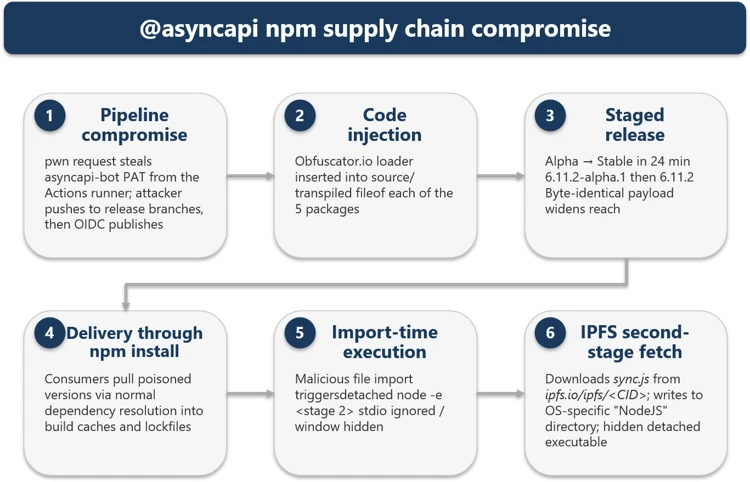
Figure 1. End-to-end attack chain from CI/CD pipeline compromise through import-time execution to IPFS second-stage fetch, with C2 infrastructure and affected packages.
The compromise originated from a pwn request against asyncapi/generator. A misconfigured GitHub Actions workflow (pull_request_target) executed attacker-controlled pull-request (PR) code, exposed the asyncapi-bot personal access token (PAT), and enabled unauthorized pushes to auto-publish branches. The legitimate GitHub Actions OpenID Connect (OIDC) release workflows then published the poisoned packages under the automated identity npm-oidc-no-reply@github[.]com, producing artifacts with valid provenance signatures built from unauthorized source commits.
The campaign progressed through six phases, shown in Figure 1:
Pipeline compromise. The attacker exploited a vulnerable GitHub Actions workflow to steal a privileged bot token.
Code injection. Heavily obfuscated loaders were inserted into one source file per package.
Staged release. An alpha prerelease was followed by a stable release 24 minutes later, with a byte-identical payload, expanding blast radius.
Delivery. Consumers pulled poisoned versions through normal npm and Yarn dependency resolution; –ignore-scripts was not effective.
Import-time execution. require() or import triggered the malicious main(), which spawned a hidden detached child process.
IPFS second-stage fetch. The child downloaded sync.js from IPFS and wrote it to an OS-specific “NodeJS” masquerade directory.
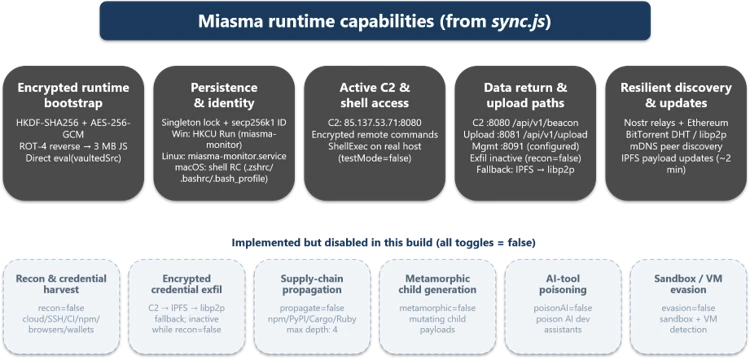
The Miasma runtime provided encrypted bootstrap, persistence, C2 communication, data return paths, and resilient discovery via Nostr, Ethereum, BitTorrent DHT, libp2p, and IPFS. Six additional capability modules (credential harvest, encrypted exfiltration, supply-chain propagation, metamorphic generation, AI-tool poisoning, and sandbox evasion) were implemented but disabled in this build.
Time (UTC)
Observed event
~07:10
@asyncapi/generator@3.3.1, @asyncapi/generator-components@0.7.1, and @asyncapi/generator-helpers@1.1.1 republished with the injected loader.
08:06:20
@asyncapi/specs@6.11.2-alpha.1 published with the malicious importer prepended to index.js.
08:30:09
@asyncapi/specs@6.11.2 stable published with a byte-identical payload, widening downstream reach.
08:49:22
First observed downstream fetch of the stable 6.11.2 tarball into a Yarn cache during dependency installation.
How the attack started: GitHub Actions pwn request
The attack chain began with a malicious pull request targeting the asyncapi/generator repository’s docs-preview automation. Opened as PR #2155, it carried the attacker-controlled commit 47be388, timestamped 05:08:58 UTC on July 14. The associated Docs Preview (Netlify) workflow started at 05:11:05 UTC.. Although the PR and source fork were later removed, the workflow record remains available.
The pull request PR #2155 targeted manual-netlify-preview.yml, which combined two unsafe choices: it used pull_request_target, placing the job in the base repository’s security context, and it checked out the pull request’s untrusted head commit. The run had a broadly privileged GITHUB_TOKEN, checkout credentials persisted in the local Git configuration until post-job cleanup (the default behavior of actions/checkout), and steps that referenced repository secrets.
The submitted MDX contained code was designed to retrieve JavaScript from rentry[.]co/elzotebo999 and evaluate the response. The public log confirms that the malicious commit was processed by the privileged workflow, but it does not show whether the rentry[.]co web request succeeded or whether a credential was stolen. Later push records identify asyncapi-bot as the authenticated actor. Together, these records establish that the vulnerable workflow ran before the bot-authenticated pushes, but they do not establish how the credential was obtained.
The underlying workflow weakness had been identified before the compromise. On April 29, a proof-of-concept examined whether untrusted pull-request content could be executed in the privileged docs-preview workflow. A May 17 proposal then sought to separate untrusted build activity from steps that received repository secrets and was still under review when the incident occurred.
Trusted publishing became the delivery mechanism
Once the attacker could push commits as asyncapi-bot, there was no need to compromise npm or construct a separate publishing channel. The attacker could ride the project’s normal release path and let its trusted pipeline do the distribution. Commit 3eab3ec carries a timestamp of 06:58:42 UTC, while a surviving push-triggered workflow started at 07:05:42 UTC. Its message, “fix: test release workflow on next”, matched the release workflow’s commit-message condition. The legitimate release-with-changesets.yml workflow then published three poisoned packages at approximately 07:10 UTC.
A closely linked compromise subsequently affected asyncapi/spec-json-schemas. The malicious lineage first triggered workflows on alpha between 07:56 and 08:04 UTC. The same malicious commit was later pushed to master at approximately 08:14 UTC, followed by a child commit at 08:28 UTC. The legitimate if-nodejs-release.yml workflow published @asyncapi/specs@6.11.2-alpha.1 at 08:06 UTC and @asyncapi/specs@6.11.2 at 08:30 UTC.
All five malicious versions were published through npm trusted publishing using GitHub OIDC and carried valid provenance attestations. The attestations accurately identified the legitimate repositories, commits, and workflows that created the packages, even though the triggering commits were unauthorized.
Figure 2. Miasma runtime capabilities recovered from sync.js, including active modules and implemented-but-disabled modules.
The payload operates in multiple stages, each designed to increase evasion and ensure resilient execution. Stage 0 establishes stealth by declaring no npm lifecycle hooks. Stage 1 executes the loader at require-time and spawns a hidden child process. Stage 1b deobfuscates the IPFS fetch logic and downloads sync.js. Stage 2 decrypts the ~8.2 MB encrypted bundle through three cryptographic layers. Stage 3 initializes the full Miasma modular runtime with C2, persistence, and decentralized fallback channels.
Stage 0: No lifecycle hooks declared
The absence of lifecycle hooks is a deliberate evasion choice. Security tooling that focuses on preinstall/postinstall auditing will not flag these packages. All affected packages declared no preinstall, install, or postinstall hooks in package.json. This bypassed hook-focused scanners and left import-time execution as the real trigger path.
Stage 1: Import-time loader
The loader executes the moment any application imports the compromised module; no user action beyond dependency resolution is required. The attacker placed the same bootstrap pattern in each package’s exported entry path, so normal application startup would trigger execution automatically.
The inner payload reveals hard-coded IPFS content identifiers and OS-aware drop logic. This intermediate stage reconstructs the transport routine at runtime, so the larger second stage never appears in cleartext in the published package.
Package set
IPFS CID
specs
Qmet4fhsAaWMBUxNDfREHwgiyDeSWy4YSYs9wiKUW5jGyf
generator-family
QmQobZSp1wRPrpSEQ56qnyq7ecZh5Bg5k1fnjt4SUwwHb9
const FILE_URL = 'hxxps://ipfs[.]io/ipfs/';
 const FILE_NAME = 'sync.js';
 function getTargetDirectory() {
   if (process.platform === 'win32') return '%LOCALAPPDATA%\NodeJS';
   if (process.platform === 'darwin') return '~/Library/Application Support/NodeJS';
   if (process.platform === 'linux') return '~/.local/share/NodeJS';
   return '~/.config/NodeJS';
 }
Stage 2: Encrypted payload (sync.js)
Despite appearing cryptographically sophisticated, the entire decryption chain uses static embedded key material, meaning the runtime can be recovered offline without execution. The layered design primarily increases analyst effort; every secret required to unwrap the bundle ships inside the loader.
sync.js is ~8.2 MB; all key material is static and embedded.
HKDF-SHA256 uses master string rt-vault-master-key-32b-aaaaaaaa and info string rt-file-key.
AES-256-GCM uses IV = first 12 bytes and auth tag = last 16 bytes of the blob.
The decrypted string is ROT-94de-rotated and then executed with eval().
Stage 3: Miasma runtime
The runtime is a command framework identified as M-RED-TEAM v6.4 with campaign configuration miasma-train-p1. In this build’s configuration, persistence and C2 are active, but data collection and propagation modules remain dormant. The runtime supports traditional remote access trojan (RAT) commands, including directory listing, file retrieval, file upload, remote shell execution, proxying, and data exfiltration. Persistence is installed through platform-specific mechanisms: a Windows HKCU Run key (miasma-monitor), a Linux systemd user unit (miasma-monitor.service), and macOS shell RC injection (.zshrc, .bashrc, or .bash_profile).
Recovered identifiers: M-RED-TEAM v6.4, miasma-train-p1, and miasma-test-org.
Persistence: Win HKCU Run value miasma-monitor, Linux miasma-monitor.service, and macOS user-space shell/launch persistence.
Fallback channels include Nostr, Ethereum, BitTorrent DHT, libp2p, and IPFS.
Disabled in the analyzed build: recon, propagation, AI-poisoning, metamorphic generation, and evasion.
Credential harvesting (disabled in this build)
The framework contains broad credential-access code targeting secrets across major platforms that a developer or continuous integration and continuous delivery (CI/CD) system might access, including browser-saved passwords from multiple browsers.
The framework targets over 100 environment variable names across source control (GITHUB_TOKEN, GITLAB_TOKEN), npm (NPM_TOKEN, NODE_AUTH_TOKEN), AWS (AWS_ACCESS_KEY, AWS_SECRET_ACCESS_KEY), Azure (AZURE_CLIENT_SECRET), GCP (GCLOUD_SERVICE_KEY), container/Kubernetes (DOCKER_TOKEN, K8S_AUTH_TOKEN), secrets managers (DOPPLER_TOKEN, VAULT_TOKEN), and AI platforms (ANTHROPIC_API_KEY, OPENAI_API_KEY).
Credential files targeted from disk include .npmrc (npm tokens), .aws/credentials (AWS keys), kubeconfig (Kubernetes API), id_rsa/id_ed25519 (SSH keys), .vault-token (HashiCorp Vault), .netrc (Git/HTTPS auth), .docker/config.json (Docker registry), and google_credentials.json (GCP service accounts). When a GITHUB_TOKEN is available, the framework can enumerate accessible repositories and CI/CD context through GitHub APIs.
Mitigation and protection guidance
Review dependency trees, lockfiles, artifact repositories, and CI caches for the five compromised versions, including transitive references.
Pin known-good versions: @asyncapi/specs 6.11.1 or earlier, @asyncapi/generator 3.3.0, @asyncapi/generator-components 0.7.0, and @asyncapi/generator-helpers 1.1.0.
Do not rely on npm install –ignore-scripts as a mitigation; this campaign executes when the module is imported, not through a lifecycle hook.
Purge npm and yarn caches on affected developer endpoints and build hosts, especially if the compromised tarballs were written into shared CI caches.
Hunt for sync.js and the NodeJS masquerade directory on endpoints, and investigate any detached Node.js execution that references the IPFS CID or the sync.js file name.
Block or alert on retrieval of the specific IPFS CID and monitor for network connections to 85.137.53[.]71 on ports 8080, 8081, and 8091.
Rotate credentials and secrets from a clean host if a build system or workstation imported a compromised version, because second-stage execution can expose tokens and build integrity.
Ensure that Microsoft Defender Antivirus cloud-delivered protection, Microsoft Defender for Endpoint telemetry, and Microsoft Defender XDR investigation workflows are enabled across developer and CI assets.
Organizations that do not rely on IPFS for business operations can reduce their attack surface by blocking public IPFS gateways (ipfs.io, dweb.link, cloudflare-ipfs.com, and others) at the network perimeter. This proactive measure removes an increasingly common payload delivery channel used in supply chain campaigns without affecting standard development workflows.
Organizations that produce software artifacts should also review their own release hardening. Because this incident appears consistent with CI/CD pipeline abuse through GitHub Actions OIDC publishing, defenders should review token scopes, workflow approvals, protected environments, release provenance, and anomaly detection around automated package publication. Supply chain response cannot stop at host triage; it must also include verification that the release process itself has not been subverted.
After remediation, validate recovery deliberately. Rebuild affected projects from a known-good dependency baseline, confirm that compromised hashes are absent from package caches and artifact stores, and review endpoint telemetry for any lingering sync.js, NodeJS directory artifacts, or suspicious node child processes. For development organizations that share base images or golden build runners, rebuild those images as well so future jobs do not silently inherit poisoned caches or post-compromise persistence.
Microsoft Defender XDR customers can refer to the list of applicable detections below. Microsoft Defender XDR coordinates detection, prevention, investigation, and response across endpoints, identities, email, and apps to provide integrated protection against attacks like the threat discussed in this blog.
Tactic
Observed activity
Microsoft Defender coverage
Initial access / Execution
Compromised packages published though GitHub Actions OIDC trusted publishing
Microsoft Defender Antivirus – Trojan:Script/Supychain.A – Trojan:JS/MiasmStealer.SC – Trojan:JS/SpawnLoader.MKV!MTB
Microsoft Defender for Endpoint – Suspicious Node.js process behavior – Suspicious Node.js script execution
Execution / Defense evasion
Module import triggers obfuscated main(), which spawns a hidden detached node
Microsoft Defender Antivirus – Trojan:JS/VaultLoader.MJZ!MTB
Microsoft Defender for Endpoint – Suspicious Node.js process behavior – Suspicious Node.js script execution
Persistence
OS-specific persistence installed
Microsoft Defender for Endpoint – Anomaly detected in ASEP registry – Suspicious modification of shell profile – Suspicious Linux service created
Advanced hunting queries
Microsoft Defender XDR customers can run the following advanced hunting queries to find related activity in their networks:
Persistence drop and detached spawn
// Query 1: sync.js dropped under a NodeJS directory or related detached execution
 union isfuzzy=true
 (
 DeviceProcessEvents
 | where Timestamp > ago(30d)
 | where (ProcessCommandLine has "sync.js" and ProcessCommandLine contains_cs "NodeJS")
     or ProcessCommandLine has "Qmet4fhsAaWMBUxNDfREHwgiyDeSWy4YSYs9wiKUW5jGyf"
 | project Timestamp, DeviceName, Evidence = ProcessCommandLine, Initiator = InitiatingProcessCommandLine, EventType = "Process"
 ),
 (
 DeviceFileEvents
 | where Timestamp > ago(30d)
 | where FileName == "sync.js" and FolderPath contains_cs "NodeJS"
 | project Timestamp, DeviceName, Evidence = strcat(FolderPath, "\\", FileName), Initiator = InitiatingProcessFileName, EventType = "File"
 )
IPFS CID retrieval
// Query 2: outbound retrieval of the IPFS second stage
DeviceNetworkEvents
| where Timestamp > ago(30d)
| where RemoteUrl has "ipfs.io"
| where RemoteUrl has "Qmet4fhsAaWMBUxNDfREHwgiyDeSWy4YSYs9wiKUW5jGyf"
| project Timestamp, DeviceName, RemoteUrl, RemoteIP, InitiatingProcessFileName
Poisoned package artifacts in caches
// Query 3: presence of a poisoned tarball in caches
DeviceFileEvents
| where Timestamp > ago(30d)
| where SHA256 in (
    "d425e4583cc6185d41e95c45eda00550045a5d1919b9a012236a4520d009dbd7",
    "9b2e65db653ca8575c9b10eefb9a80c6006404812c2ec212bf5675e3c690233b",
    "bfaeb987faa6de2b5a5eb63b1233d055215b09b0349a9394f2175fd7cdf385e4",
    "082d733db0687dcd768104972b065d4b58cb1e6043688c6c20fa3702337f36ab",
    "34014776d3d3ff11bc4439b02fd7ac0f02a887eb3a052eeafff236e2f6db8ad1")
| project Timestamp, DeviceName, FolderPath, FileName, InitiatingProcessFileName
Suspicious Node.js execution
DeviceProcessEvents
| where Timestamp > ago(3d)
| where FileName in~ ("node", "node.exe")
| where ProcessCommandLine has "node.exe -e \"const _0x5af5e1" or ProcessCommandLine has "node -e \"const _0x5af5e1"
| project Timestamp, DeviceName, FileName, FolderPath, ProcessCommandLine, InitiatingProcessFileName, InitiatingProcessFolderPath
Microsoft Security Copilot
Security Copilot customers can use the standalone experience to create their own prompts or run prebuilt promptbooks to automate investigation and response tasks related to this threat. Useful promptbooks for this activity include Incident investigation, Microsoft User analysis, Threat actor profile, Threat Intelligence 360 report based on MDTI intelligence, and Vulnerability impact assessment. Some promptbooks require access to Microsoft Defender XDR, Microsoft Sentinel, or related Microsoft security plugins.
For this campaign, Security Copilot can help analysts summarize affected devices, pivot from the package hashes to endpoint evidence, identify hosts that communicated with the IPFS path or C2 infrastructure, and build remediation actions such as cache purge, credential rotation, and containment sequencing for impacted developer systems and build runners.
Threat intelligence reports
Microsoft customers can use Microsoft Defender XDR Threat analytics and related Microsoft threat intelligence reporting to stay current on the malicious activity, indicators, detection coverage, and recommended response actions associated with this compromise. These reports provide investigation context, protection guidance, and updated intelligence that security teams can use to prevent, mitigate, or respond to related activity in customer environments.
As with other active supply-chain investigations, defenders should monitor for updated intelligence on package status, additional affected versions, infrastructure changes, and newly surfaced post-compromise tradecraft. Microsoft will continue to incorporate validated indicators and detections into Microsoft security products as the investigation evolves.
To hear stories and insights from the Microsoft Threat Intelligence community about the ever-evolving threat landscape, listen to the Microsoft Threat Intelligence podcast.
Review our documentation to learn more about our real-time protection capabilities and see how to enable them within your organization.
Upwind links compromised AsyncAPI npm packages to a coordinated supply chain attack spanning repositories, publishing pipelines, and developer systems at risk.
Note The June 2026 Dark Web Threat Actor Trend Report focuses on trends among threat actors—including hacktivists—operating on the deep web and dark web. It is noted that the accuracy of some information could not be verified. Major Issues In Malaysia, a series of website defacement and compromise incidents targeting local development agencies and public […]
JFrog warns of malicious npm packages that mimic PostCSS tooling, drop a Windows RAT, and target Chrome-stored passwords through a staged infection setup route.
Notes the May 2026 Dark Web Threat Actor Trend Report summarizes the trends of threat actors and hacktivists operating on the deep web and dark web. some statements are not factually verifiable. Major Issues hacktivist activity targeting the South Korean Region was concentrated. some hacktivist groups claimed DDoS attacks against the website of the South […]
Notes the May 2026 Dark Web Issue Trend Report summarizes the Major Issues that occurred on the deep web and dark web. it stated that due to the nature of the sources, some of the information cannot be fully verified for factual accuracy. Major Issues Hasan’s BreachForums experienced a moderator split, with HasanBroker being ousted […]
A malicious campaign by North Korean state actors saw a malicious npm package dependency slipped into a crypto trading agent by an AI coding agent, according to a new report by ReversingLabs. The incident highlights a troubling new frontier in software supply chain attacks: hackers targeting developers...and the AI tools writing their code.
The open source ecosystem continues to face organized, adaptive supply chain threats that spread through compromised credentials and malicious package lifecycle scripts. The most recent example is the multi-wave Shai-Hulud campaign.
While individual incidents differ in their mechanics and speed, the pattern is consistent: Adversaries learn quickly, target maintainer workflows, and exploit trust boundaries in publication pipelines.
This post distills durable lessons and actions to help maintainers and organizations harden their systems and prepare for the next campaign, not just respond to the last one. We also share more about what’s next on the npm security roadmap over the next two quarters.
Recent Shai-Hulud Campaigns
Shai-Hulud is a coordinated, multi-wave campaign targeting the JavaScript supply chain and evolved from opportunistic compromises to engineered, targeted attacks.
The first wave focused on abusing compromised maintainer accounts. It injected malicious post install scripts to slip malicious code into packages, exfiltrate secrets, and self-replicate, demonstrating how quickly a single foothold can ripple across dependencies.
The second wave, referred to as Shai-Hulud 2.0, escalated the threat: Its ability to self-replicate and spread via compromised credentials was updated to enable cross-victim credential exposure. The second wave also introduced endpoint command and control via self-hosted runner registration, harvesting a wider range of secrets to fuel further propagation, and destructive functionality. This wave added a focus on CI environments, changing its behavior when it detects it is running in this context and including privilege escalation techniques targeted to certain build agents. It also used a multi-stage payload that was harder to detect than the previous wave payload. The shortened timeline between variants signals an organized adversary studying community defenses and rapidly iterating around them.
Rather than isolated breaches, the Shai-Hulud campaigns target trust boundaries in maintainer workflows and CI publication pipelines, with a focus on credential harvesting and install-time execution. The defining characteristics we see across waves include:
Credential-adjacent compromise: Attackers gain initial footholds via compromised credentials or OAuth tokens, then pivot to collect additional secrets (npm tokens, CI tokens, cloud credentials) to expand reach. This enables reuse across organizations and future waves without a single point of failure.
Install-time execution with obfuscation: Malicious post-install or lifecycle scripts are injected into packages (or dependency chains) and only reveal behavior at runtime. Payloads are often conditionally activated (e.g., environment checks, org scopes) and exfiltrate data using techniques tailored to the environment it is running in.
Targeting trusted namespaces and internal package names: The campaign affected popular and trusted packages, and the worm published infected packages with existing package names. The second wave also patched the version number of the package to make the infected packages look like legitimate updates and blend in with normal maintainer activity.
Rapid iteration and engineering around defenses: Short intervals between variants and deliberate changes to bypass previous mitigations indicate an organized campaign mindset. The goal is durable access and scalable spread, not one-off opportunism.
Review blind spots in publication pipelines: Differences between source and published artifacts, lifecycle scripts, and build-time transformations create gaps where injected behavior can land without notice if teams lack artifact validation or staged approvals.
Recent waves in this pattern reinforce that defenders should harden publication models and credential flows proactively, rather than tailoring mitigations to any single variant.
What’s Next for npm
We’re accelerating our security roadmap to address the evolving threat landscape. Moving forward, our immediate focus is on adding support for:
Bulk OIDC onboarding: Streamlined tooling to help organizations migrate hundreds of packages to trusted publishing at scale.
Expanded OIDC provider support: Adding support for additional CI providers beyond GitHub Actions and GitLab.
Staged publishing: A new publication model that gives maintainers a review period before packages go live, with MFA-verified approval from package owners. This empowers teams to catch unintended changes before they reach downstream users—a capability the community has been requesting for years.
Together, these investments give maintainers stronger, more flexible tools to secure their packages at every stage of the publication process.
Advice for GitHub and npm users and maintainers
Malware like Shai-Hulud often spreads by adding malicious code to npm packages. The malicious code is executed as part of the installation of the package so that any npm user who installs the package is compromised. The malware scavenges the local system for tokens, which it can then use to continue propagating. Since npm packages often have many dependencies, by adding malware to one package, the attacker can indirectly infect many other packages. And by hoarding some of the scavenged tokens rather than using them immediately, the attacker can launch a new campaign weeks or months after the initial compromise.
In the “References” section below, we have included links to longer articles with analysis of recent campaigns and advice on how to stay secure, so we won’t rehash all of that information here. Instead, here is a short summary of our top recommendations:
Advice for everyone
Enable phishing-resistant MFA on all your accounts, particularly for GitHub package managers like npm, PyPI, RubyGems, or NuGet, and also any accounts that could be leveraged for account takeover or phishing, like email and social media accounts.
Audit and revoke access for unused GitHub/OAuth apps.
Use a sandbox, such as GitHub Codespaces or a virtual machine or container, for development work. This limits the access of any malware that you accidentally run.
Advice for maintainers
Enable branch protection so that malicious updates cannot be pushed directly to your main branch, even if the attacker has access to a valid token.
Use npm trusted publishing instead of tokens. Trusted publishing is also available for other package managers such as PyPI, RubyGems, and NuGet.
Monitor package artifacts and validate published tarballs/bundles against source (e.g., SRI or artifact build attestations).
Note that the above advice is preventative. If you believe you are a victim of an attack and need help securing your GitHub or npm account, please contact GitHub Support.
Open source software is the bedrock of the modern software industry. Its collaborative nature and vast ecosystem empower developers worldwide, driving efficiency and progress at an unprecedented scale. This scale also presents unique vulnerabilities that are continually tested and under attack by malicious actors, making the security of open source a critical concern for all.
Transparency is central to maintaining community trust. Today, we’re sharing details of recent npm registry incidents, the actions we took towards remediation, and how we’re continuing to invest in npm security.
Recent attacks on the open source ecosystem
The software industry has faced a recent surge in damaging account takeovers on package registries, including npm. These ongoing attacks have allowed malicious actors to gain unauthorized access to maintainer accounts and subsequently distribute malicious software through well-known, trusted packages.
On September 14, 2025, we were notified of the Shai-Hulud attack, a self-replicating worm that infiltrated the npm ecosystem via compromised maintainer accounts by injecting malicious post-install scripts into popular JavaScript packages. By combining self-replication with the capability to steal multiple types of secrets (and not just npm tokens), this worm could have enabled an endless stream of attacks had it not been for timely action from GitHub and open source maintainers.
In direct response to this incident, GitHub has taken swift and decisive action including:
Immediate removal of 500+ compromised packages from the npm registry to prevent further propagation of malicious software.
npm blocking the upload of new packages containing the malware’s IoCs (Indicators of Compromise), cutting off the self-replicating pattern.
Such breaches erode trust in the open source ecosystem and pose a direct threat to the integrity and security of the entire software supply chain. They also highlight why raising the bar on authentication and secure publishing practices is essential to strengthening the npm ecosystem against future attacks.
npm’s roadmap for hardening package publication
GitHub is committed to investigating these threats and mitigating the risks that they pose to the open source community. To address token abuse and self-replicating malware, we will be changing authentication and publishing options in the near future to only include:
Limit granular tokens with publishing permissions to a shorter expiration.
Set publishing access to disallow tokens by default, encouraging usage of trusted publishers or 2FA enforced local publishing.
Remove the option to bypass 2FA for local package publishing.
Expand eligible providers for trusted publishing.
We recognize that some of the security changes we are making may require updates to your workflows. We are going to roll these changes out gradually to ensure we minimize disruption while strengthening the security posture of npm. We’re committed to supporting you through this transition and will provide future updates with clear timelines, documentation, migration guides, and support channels.
Strengthening the ecosystem with trusted publishing
Trusted publishing is a recommended security capability by the OpenSSF Securing Software Repositories Working Group as it removes the need to securely manage an API token in the build system. It was pioneered by PyPI in April 2023 as a way to get API tokens out of build pipelines. Since then, trusted publishing has been added to RubyGems (December 2023), crates.io (July 2025), npm (also July 2025), and most recently NuGet (September 2025), as well as other package repositories.
When npm released support for trusted publishing, it was our intention to let adoption of this new feature grow organically. However, attackers have shown us that they are not waiting. We strongly encourage projects to adopt trusted publishing as soon as possible, for all supported package managers.
Actions that npm maintainers can take today
These efforts, from GitHub and the broader software community, underscore our global commitment to fortifying the security of the software supply chain. The security of the ecosystem is a shared responsibility, and we’re grateful for the vigilance and collaboration of the open source community.
Here are the actions npm maintainers can take now:
True resilience requires the active participation and vigilance of everyone in the software industry. By adopting robust security practices, leveraging available tools, and contributing to these collective efforts, we can collectively build a more secure and trustworthy open source ecosystem for all.

 Entrar