The theft of FBI employee data by hacking group ShinyHunters, and the subsequent shutdown of the FBI’s Peoplesoft-based jobs portal, is causing concern for enterprise users of the Oracle product, with analysts recommending extreme measures in response.
Law enforcement has made some progress in its pursuit of the cyber criminals involved, but there has still been no official word from either the FBI or Oracle about Peoplesoft’s alleged involvement.
On Saturday, Reuters reported that a suspected member of ShinyHunters had been arrested in Jordan and has been cooperating with law enforcement to help identify other member of the group. The arrest comes a week after the arrest of another suspected ShinyHunters member by the Dutch National Police. In a video about that arrest, an FBI official warned gang members that arrests have a way of changing who is willing to talk, concluding, “You know how to find us, and we know how to find you.” Before the arrests, the gang told The Register it had discovered a new PeopleSoft zero-day hole and leveraged it to break into an FBI system, stealing information on all FBI employees. The FBI has since confirmed the breach without providing details.
Oracle did not respond to a request for comment on the alleged new vulnerability.
Significant risk exposure for enterprises
Analysts and consultants played up the risk exposure from the potentially new vulnerability even as they sharply played down the implications of the arrest.
Frank Dickson, principal analyst at Dickson Research, recommended that PeopleSoft users take immediate action.
“If it is a new flaw, the patch is necessary but not sufficient. PeopleSoft customers should pull the Environment Management Hub and the Integration Broker off the public internet,” he said. “Doing so does not break normal user sessions.”
He also encouraged users to quickly implement many of the recommendations from Google unit Mandiant’s report late last month on PeopleSoft security issues, especially “hunting for the web shells and outbound traffic Mandiant describes.”
“For PeopleSoft shops, the to-do list is short,” Dickson said. “Apply Oracle’s patch. Disable or remove the Environment Management Hub if you do not use it. Search your logs for encoded variants of the PSEMHUB path, not just the literal string. If you find a web shell, treat the server as compromised and rotate every credential it could read.”
This is a dangerous situation, he said: “An unpatched PeopleSoft flaw is a Sword of Damocles over every PeopleSoft shop
But despite the extreme risk, even after the patch was released, rather than applying it, some organizations have opted for other mitigations. “Many organizations chose to block the vulnerable endpoint with web application firewall rules rather than patch,” Dickson said. “The attackers walked past those rules by changing a single character in the web address, writing ‘%50’ in place of the letter ‘P.’”
Could signal a bigger problem
However, IDC Research Director Philip Harris encouraged CISOs to view the FBI’s confirmation of its breach with caution, given the attack vector was not revealed.
“ShinyHunters says it used a second, previously undocumented PeopleSoft preauth RCE zero-day, distinct from the CVE-2026-35273 flaw exploited in the earlier campaign,” he said. Yet, he pointed out, “no CVE has been assigned to it, it has not appeared on CISA’s Known Exploited Vulnerabilities catalog and Oracle has not commented on it. Every outlet covering this is explicit that the zero-day claim comes only from the threat actor, not from independent forensic confirmation or from Oracle. That distinction matters.”
But if the hole is as the group has suggested, Harris said it signals a much bigger problem.
“Assuming it is real, this would mean PeopleSoft has a second critical, unpatched preauth RCE in the same window as CVE-2026-35273, a pattern of recurring critical exposure rather than one isolated bug,” he said. “ShinyHunters’ own claim that they are already using it against other, unnamed Fortune 500 targets would mean every PeopleSoft customer is currently exposed to an unpatchable, undisclosed flaw with no vendor guidance to act on, a meaningfully worse position than the WAF-bypass story, since there is no mitigation to attempt while waiting on Oracle to confirm something it has not acknowledged.”
Jeff Valdes, a director at consulting firm Acceligence, added that Oracle’s silence is unwarranted.
“I think customers reasonably want more communication from the vendor,” he said. “They want to understand whether Oracle’s original guidance remains sufficient, whether there are additional mitigations customers should implement, whether Oracle is seeing anything through its own support organization that changes the risk picture, and whether there are configurations or architectural choices that materially increase exposure. Those are operational security questions that can be addressed without discussing attribution, arrests, investigative techniques or anything else that might interfere with an FBI investigation.”
AI could accelerate vulnerability discovery, shrinking the pool of exploits governments rely on while speeding up the race between attackers and defenders.
In July 2026, Kaspersky experts detected a new attack by the Head Mare group. Previously, we classified them as hacktivists, but now we define them as an APT group due to the sophistication of their TTPs and the absence of destructive activity (encryption, wiping) in the targeted infrastructures. In this latest campaign, the attackers exploited a chain of vulnerabilities in the TrueConf video conferencing server and replaced the original TrueConf client installers with infected versions that installed the PhantomCore malware on the system.
An investigation of the compromised server revealed that the attackers used a combination of two new vulnerabilities (assigned the internal identifiers KLCERT-26-057 and KLCERT-26-058), allowing them to execute arbitrary code with the highest privileges.
The attack occurs in several stages:
The attackers connect to the TrueConf server without prior authorization via port 4307/TCP, which, according to the product documentation, is open by default. The attack targets TrueConf servers running versions 5.3.X through 5.3.9, 5.4.X through 5.4.9, and 5.5.X through 5.5.5.
Once connected, attackers call a server function to transmit a malicious script and execute it on the server. The vulnerability that allows this stage of the attack to be carried out has been assigned the internal identifier KLCERT-26-057.
The received script runs on the TrueConf server in an isolated environment. By default, operating system functions are not accessible in this environment, which should limit the capabilities of the executed code.
To escape the isolated environment, attackers exploit a second vulnerability, assigned the internal identifier KLCERT-26-058. Exploiting this vulnerability allows them to bypass the restrictions of the isolated environment and proceed to execute commands in the context of the operating system.
Once the environment’s restrictions are bypassed, attackers gain the ability to execute arbitrary code on the server with the privileges of the NT AUTHORITY\SYSTEM account.
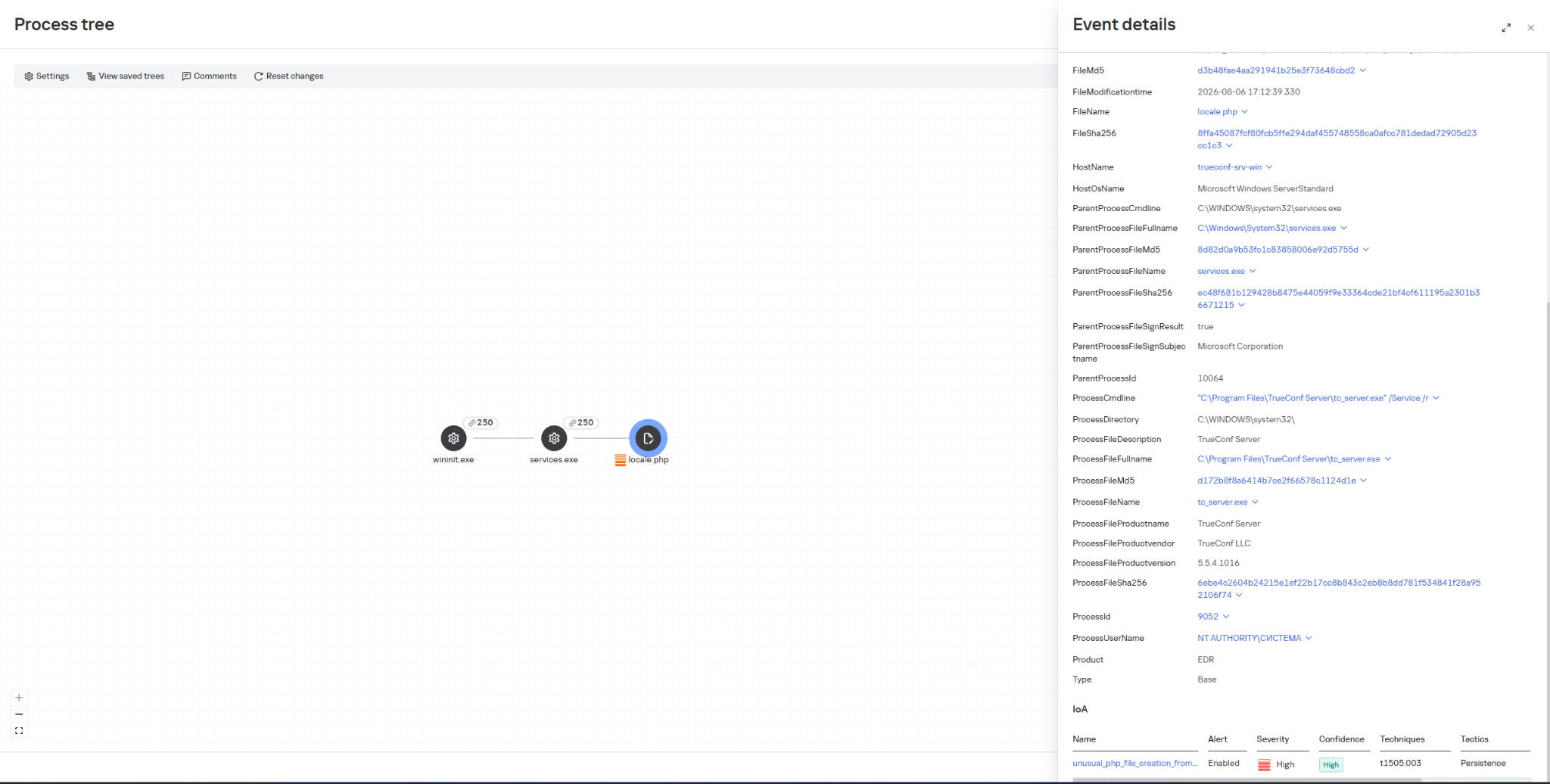
Once they have gained elevated privileges, attackers replace the file …\public\js\locale.php with a web shell, which can be used for subsequent remote control of the compromised server.
This web shell was used for the following activities:
collecting data on the IT infrastructure;
gaining privileged access to the TrueConf database;
replacing the original TrueConf Client distribution with an infected version containing the PhantomCore backdoor.
The vulnerabilities exploited by the attackers were patched by the vendor in the latest TrueConf Server updates (versions 5.3.9, 5.4.9, and 5.5.5). These updates were released on June 18, 2026.
The PhantomCore backdoor was successfully detected by Kaspersky solutions.
To automatically launch the malware after the system boots, a registry key is created: HKEY_CURRENT_USER\Software\Classes\CLSID\{0340F119-A598-4ed9-B0AC-6F6A12D3E755}\InprocServer32, with the value set to the path to the malicious program’s file.
Using a web shell, in addition to PhantomCore, the attackers load a backdoor that we have named PhantomGraph, consisting of two modules:
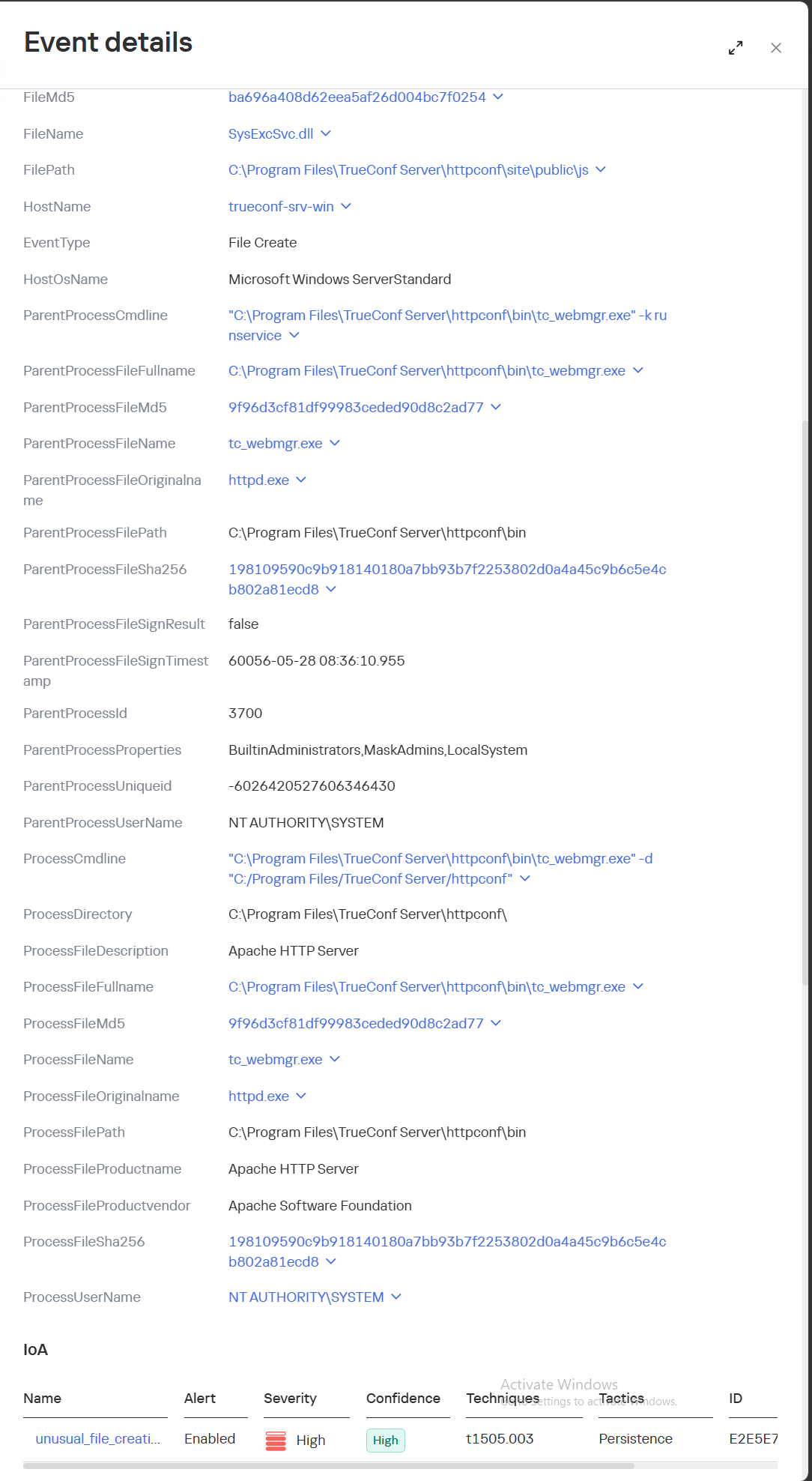
SysExcSvc.dll is responsible for receiving commands from the attackers and transmitting the results of their execution. The attackers used an account on Microsoft OneDrive cloud storage as their command-and-control (C2) server.
SysReadSvc.dll reads the command transmitted by the first module, executes it, and saves the execution result.
To establish persistence on the system, the attackers execute a Base64-encoded PowerShell command that installs SysExcSvc.dll and SysReadSvc.dll as Windows services. We believe the attackers deliberately split this malicious command into two components to make it harder to detect using EDR tools. Additionally, the program’s code partially matches that of PhantomCore, indicating that it belongs to Head Mare’s arsenal.
We also managed to identify the commands executed by the attackers when connecting to the backdoor. The SysReadSvc module executes commands using a BATCH file. Example of execution:
In addition, we discovered several commands that did not work due to the attackers’ typos and encoding issues.
We are observing several active Head Mare campaigns targeting Russian organizations across various industries: instrument manufacturing, electronics, transportation, energy,
IT, and software development. The attackers distribute their backdoors using various methods, including phishing, exploiting public web servers, or through a subcontractor.
We recommend that all organizations using TrueConf software install the latest server version (versions 5.3.9, 5.4.9, and 5.5.5) in accordance with the vendor’s recommendations.
We also recommend verifying that the client distributions downloaded from the TrueConf server used by your organization have a valid TrueConf digital signature and have not been tampered with. The malicious distributions we detected did not have a valid digital signature. You can also verify authenticity on the vendor’s website.
Important: Even if your organization does not use a TrueConf server, your employees may connect to compromised TrueConf servers belonging to business partners to participate in online meetings and download infected installation packages.
Specifically, activity involving the replacement of the legitimate file …\public\js\locale.php with a web shell, as well as the deletion of entries from TrueConf event logs, is detected by the rule unusual_php_file_creation_from_trueconf_process.
Downloading a file containing the PhantomCore backdoor via the replaced legitimate file …\public\js\locale.php is detected by KEDR Expert with the rule unusual_file_creation_from_trueconf.
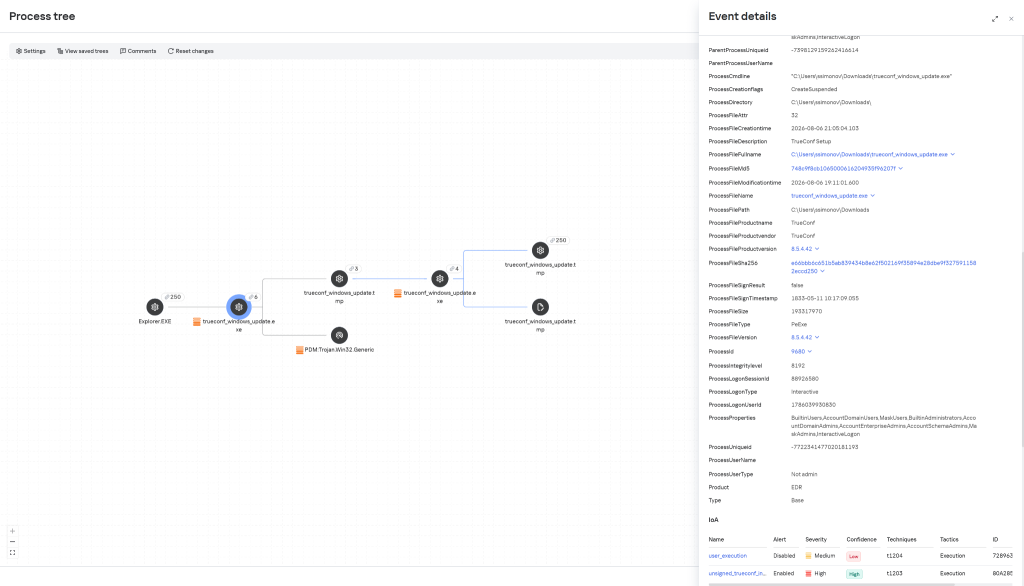
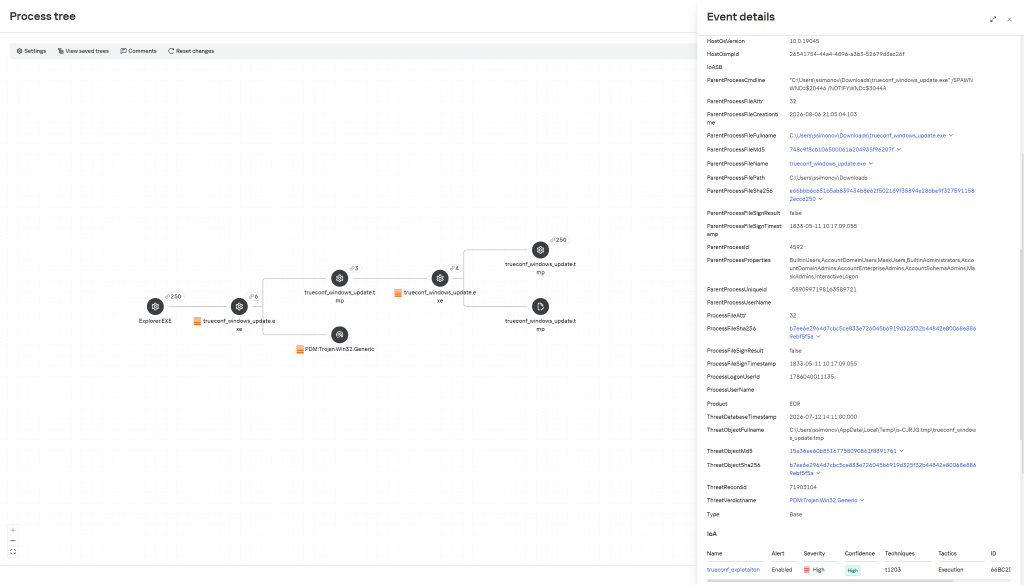
Activity related to the installation of an infected TrueConf client installer containing the PhantomCore backdoor is detected by KEDR Expert using the unsigned_trueconf_installer rule.
Creation of suspicious files by TrueConf Server processes.
Execution of a TrueConf Client installer file that lacks a software developer’s signature.
Suspicious process chains associated with TrueConf Client executables and TrueConf Client update executables.
Registration of suspicious libraries in the HKEY_CURRENT_USER\Software\Classes\CLSID\ registry key.
Actions related to retrieving information about the lsass.exe process.
Memory dump creation for the lsass.exe process using the comsvcs.dll library.
Accessing the memory of the lsass.exe process.
Creating tunnels using the ssh process.
To protect companies using our Kaspersky SIEM system, a general set of rules is available in the product repository that allows detection of the following techniques:
Creation of suspicious files in the C:\Windows\System32\inetsrv\* directory: R405_07_File write to IIS native modules folder or OWA via WriteData.
Creating a memory dump of the lsass.exe process using the comsvcs.dll library: R233_04_Process memory dump via comsvcs.dll.
Accessing the memory of the lsass.exe process: R262_Suspicious access to the LSASS process.
We also recommend paying attention to the following events when developing your own detection rules or conducting threat hunting:
Registration of suspicious libraries in the registry key \Software\Classes\CLSID\{0340F119-A598-4ed9-B0AC-6F6A12D3E755}\InprocServer32:
(DeviceEventClassID = '4657' OR DeviceEventClassID = '13')
AND FileName like '%\Software\Classes\CLSID\{0340F119-A598-4ed9-B0AC-6F6A12D3E755}%' AND DeviceCustomString6 = 'InprocServer32'
Creating the SysExcSvc and SysReadSvc services to run executables from temporary directories in the background via cmd:
DeviceEventClassID = '4697'
AND (DestinationServiceName = 'SysExcSvc' OR DestinationServiceName = 'SysReadSvc')
AND match (FileName, '.*cmd\s+\/c.*temp\\cmd_cmd_.*\.bat.*')
Creation of suspicious processes originating from the TrueConf update process (trueconf_windows_update.exe)
(DeviceEventClassID = '4688' OR DeviceEventClassID = '1')
AND SourceProcessName LIKE '%\trueconf_windows_update.exe'
For the detection rules to work correctly, ensure that events from Windows systems are received in full, including Security events 4688, 4663, 4657, and 4697 and Sysmon events 1, 7, 11, and 13.
ExifTool is a widely adopted utility for reading and writing metadata in image, PDF, audio, and video files. It is available both as a standalone command-line application and as a library that can be embedded in other software. In this article, we break down CVE-2026-3102, an ExifTool vulnerability discovered by Kaspersky’s Global Research and Analysis Team (GReAT) in February 2026 and patched by the developers within the same month. Affecting macOS systems with ExifTool version 13.49 and earlier, this flaw could let an attacker run arbitrary commands by hiding instructions inside an image file’s metadata.
This investigation originated from revisiting an n-day vulnerability I first examined years ago: CVE-2021-22204. That flaw exploited weak regex-based sanitization before feeding user input into an eval sink. By auditing adjacent input validation routines across ExifTool codebase for similar oversights, I discovered CVE-2026-3102. Successful exploitation of CVE-2026-3102 enables an attacker to execute arbitrary shell commands with the privileges of the user invoking ExifTool, potentially leading to full system compromise.
Technical details
Disclaimer
Exploiting CVE-2026-3102 requires the -n (also known as -printConv) flag and outputs machine-readable data without additional processing.
Tracing the vulnerable sink
Taint analysis (aka tainted data analysis) allows for the detection of “dirty” data that reaches dangerous locations without validation. In this context, a “sink” is a point or function in a program where data or a parameter marked as “tainted” or originating from an untrusted source (e.g., user input) can affect the program’s behavior. In ExifTool, these functions are eval and system, both of which are capable of executing system commands. While CVE-2021-22204 exploited an eval function as a sink, this vulnerability (CVE-2026-3102) targets the system function. Knowing the vulnerable sink, we needed to trace how user-controlled data reaches it. Below, we break down the details.
Finding an unsanitized date value
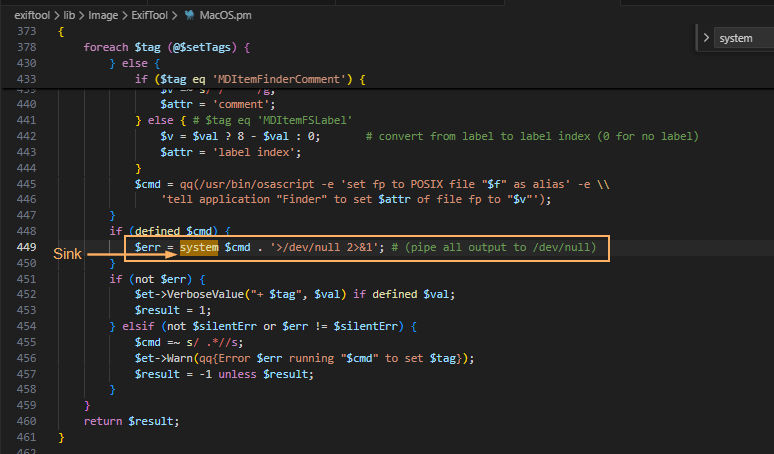
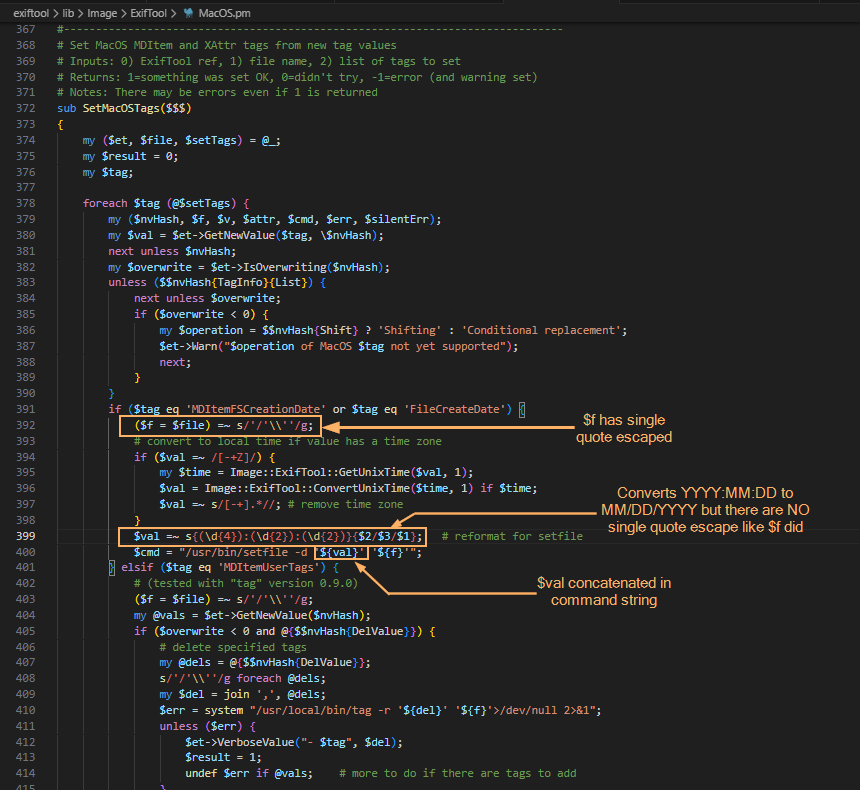
The screenshot above shows where the system() sink resides within the SetMacOSTags function. Tracing backward from system(), we identified the $cmd variable as the source of the executed command. This variable is assembled from three inputs: $file (properly sanitized), $setTags (processed iteratively), and $val (user-controlled and, crucially, left unsanitized in the vulnerable branch).
In ExifTool, a tag is a named metadata field. When parsing an image, the utility extracts date and time values from standard EXIF records or macOS filesystem attributes. To handle file creation dates on macOS, ExifTool relies on the Spotlight system attribute MDItemFSCreationDate. Within the program code, this attribute maps to the internal alias $FileCreateDate. These two identifiers govern how the file creation date is stored and applied.
This creates a critical link to the vulnerability: when parsing an image, ExifTool iterates through the discovered tags. The current tag’s name is assigned to the $tag variable, while its text content (e.g., a date string) is assigned to $val. The vulnerable code path is triggered only when $tag matches MDItemFSCreationDate or $FileCreateDate. At this point, the tag’s content flows into $val and is passed to the SetMacOSTags function. As shown in the screenshot below, the filename parameter is properly escaped, but the date value ($val) is not. Because the date is extracted directly from file metadata, an attacker can inject quotes into this field. This breaks the command structure and allows the payload to execute via the system() sink.
The following screenshots show some of the tags that can be modified. With the vulnerable parameter identified, the next challenge was delivery: how to place our payload into FileCreateDate without triggering early validation? We found the answer in the official documentation.
Planning the payload delivery
Let’s refer to the documentation to understand how ExifTool handles tag operations and identify a legitimate feature that can be repurposed for exploitation. Specifically, we need to find a way to deliver our payload into the vulnerable FileCreateDate parameter. When looking for macOS-related tags as well as FileCreateDate, we can find the following information:
To write or delete metadata, tag values are assigned using –TAG=[VALUE], and/or the -geotag, -csv= or -json=
To copy or move metadata, the -tagsFromFile feature is used.
To trigger the vulnerability, we need to copy a string (date format: MM/DD/YYYY) using the -tagsFromFile feature, as this operation invokes the SetMacOSTags function where the unsanitized $val parameter reaches the system() sink.
Why copy instead of writing directly? Because the vulnerable code path (SetMacOSTags) is only triggered when metadata is copied into FileCreateDate — not when it is written directly. By using -tagsFromFile, we can prepare a “source” tag (e.g., DateTimeOriginal) that accepts arbitrary values and copy that value into FileCreateDate, thereby invoking the vulnerable function with our controlled input.
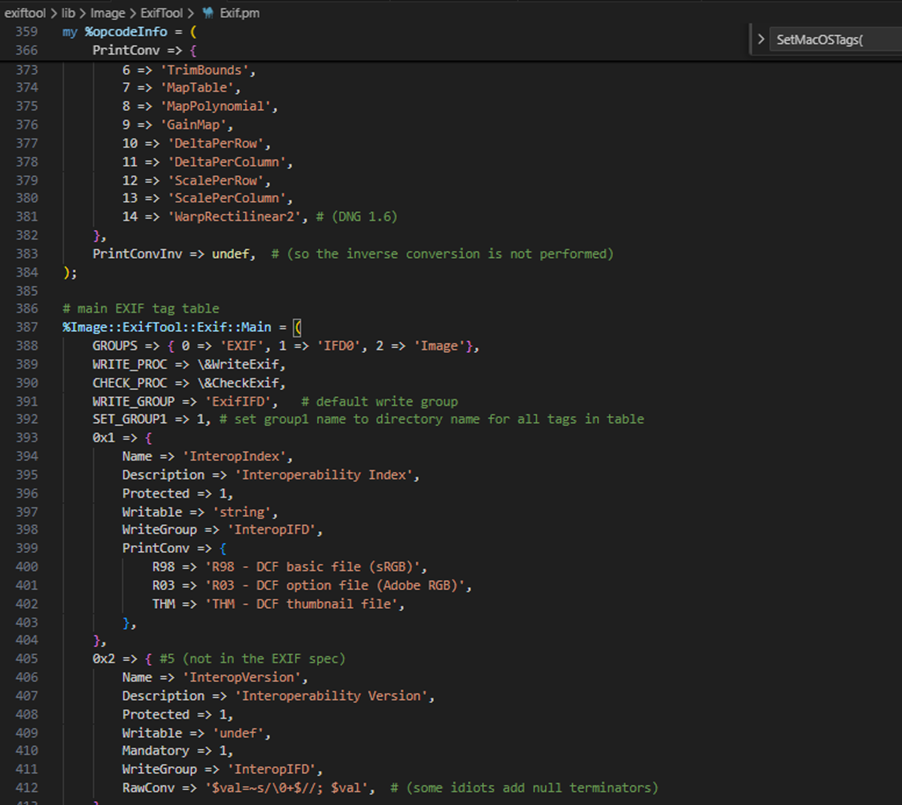
Furthermore, we want to introduce single quotes (since they are not being escaped in $val). For starters, we can look for date-time tag and copy via -tagsFromFile by searching the EXIF tag table. Direct assignment to FileCreateDate is heavily validated, so we looked for a source tag that accepts raw values and can be copied into the target field. The following snippet shows the beginning of said table.
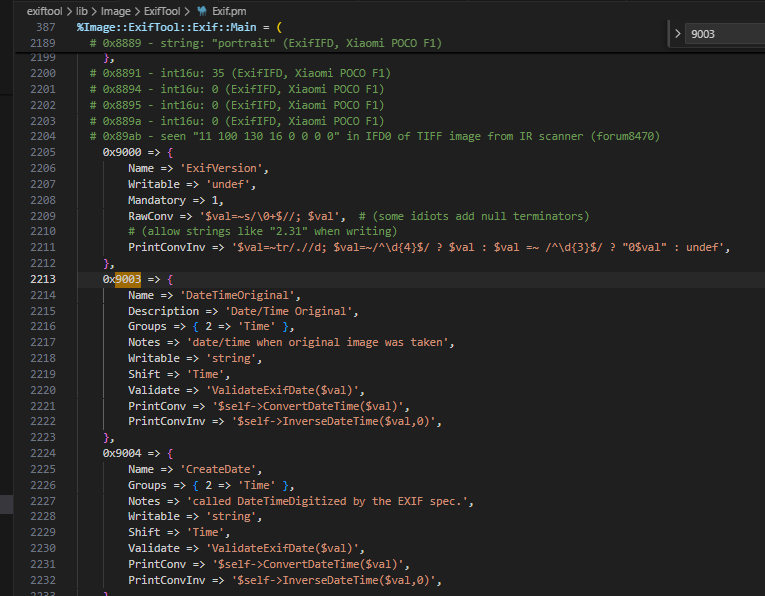
When doing the analysis, I made use of DateTimeOriginal though I believe you can also use CreateDate which is 0x9004 (see the following screenshot). Initial attempts to inject malformed dates failed: ExifTool’s built-in filter rejected the input. To bypass this, we examined how the tool handles raw metadata.
Bypassing the filter
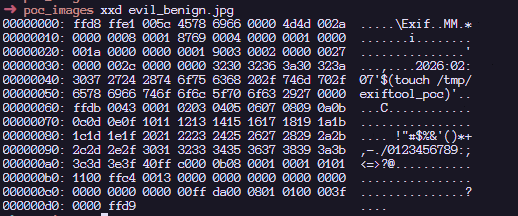
To confirm that the PrintConvInv filter rejects invalid dates when written directly, I ran the following command, where evil_benign.jpg is a normal JPG with an invalid date time format. We are greeted with the error message: Invalid date/time. This requires the time as well. The next screenshot confirms that direct exploitation fails: ExifTool’s date validation detects the malformed input and rejects the change, activating the internal PrintConvInv filter.
That said, it is possible to ignore the formatting and use the -n flag which accepts raw values instead of human-readable value. The -n flag skips the PrintConvInv conversion step, which is exactly where input sanitization occurs. This confirmed we could park unsanitized data in a source tag. The final step was to trigger the vulnerable code path by copying that data into FileCreateDate. This means we should now be able to modify the DateTimeOriginal tag with the invalid date time format with an -n flag. Examining the EXIF metadata tag, we can confirm that we can store a raw value without a proper human readable format that ExifTool accepts:
Triggering the exploit
To inject commands, we have to revisit the single quote injection into this datetime related tag.
The following screenshot shows that we have successfully set the datetime metadata with the single quote. With the payload safely stored in a source tag, the next step was to copy it into FileCreateDate, triggering the vulnerable system() call.
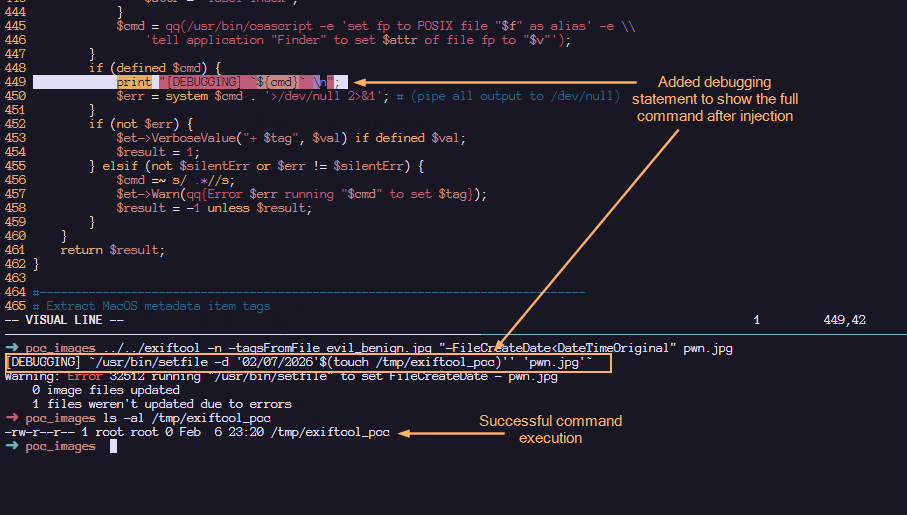
The next step now is to copy the datetime tag to a file which invokes SetMacOSTags. According to the documentation, this is how we can copy the data from the SRC tag to the FileCreateDate tag as seen in the SetMacOSTags with the -tagsFromFile feature.
Here, we confirm that the payload has been executed! Note that when copying tags in MacOS (Darwin), the /usr/bin/setfile command is used. To view the full $cmd value before the injection, I have added the debugging statement to displaying the actual command that is executed within the system function.
Upon injection, we can see that our command gets executed via command substitution. The single quotes that we added helped to make the entire command syntactically valid. The following shows a more detailed labelling and their roles in making this command line injection successful:
Such an image can appear completely benign and easily find its way into a newsroom or any organization that processes photos on macOS using ExifTool. Once processed, an attacker could silently deploy a Trojan for covert data exfiltration, drop additional malware, or use the compromised machine as a foothold to expand the attack within the victim’s network.
Patch analysis
After verifying successful exploitation, we examined how the maintainer addressed the flaw in version 13.50. In the vulnerable version of ExifTool, commands were sanitized before being concatenated together. This means that it is possible to concatenate single quotes which led to the exploitation. However, by abstracting the system call into a dedicated wrapper and requiring a list of arguments instead of concatenated string, the fix removes the need for any manual escaping altogether.
1. Replacing string form to argument list form:
#### BEFORE
$cmd = "/usr/bin/setfile -d '${val}' '${f}'";
system $cmd;

#### AFTER
system('/usr/bin/setfile', '-d', $val, $file);
2. Create new System() wrapper. In version 13.49, the output is piped to /dev/null . To maintain that logic, the wrapper would temporarily redirect STDOUT/STDERR to /dev/null and restore them after the call.
# Call system command, redirecting all I/O to /dev/null
# Inputs: system arguments
# Returns: system return code
sub System
{
    open(my $oldout, ">&STDOUT");
    open(my $olderr, ">&STDERR");
    open(STDOUT, '>', '/dev/null');
    open(STDERR, '>', '/dev/null');
    my $result = system(@_);
    open(STDOUT, ">&", $oldout);
    open(STDERR, ">&", $olderr);
    return $result;
}
How to protect against ExifTool vulnerability
It’s critical to ensure that all photo processing workflows are using the updated version. You should verify that all asset management platforms, photo organization apps, and any bulk image processing scripts running on Macs are calling ExifTool version 13.50 or later, and don’t contain an embedded older copy of the ExifTool library.
ExifTool, like any software, may contain additional vulnerabilities of this class. To harden defenses, I recommend using Kaspersky Open Source Software Threats Data Feed for continuous monitoring of open-source components in your software supply chain, and Kaspersky for macOS as comprehensive endpoint protection. Additionally, isolate processing of untrusted files on dedicated machines or virtual environments with strictly limited network and storage access. If you work with freelancers, contractors, or allow BYOD, enforce a policy that only devices with an active macOS security solution can access your corporate network.
Conclusions
CVE-2026-3102 highlights the risks of inconsistent input sanitization in tools that bridge high-level metadata parsing with platform-specific utilities. While exploitation requires explicit flag usage (-n) and is restricted to macOS, the vulnerability underscores the danger of manual escaping routines in evolving codebases. The transition to list-form system execution provides a robust, architecture-level fix that eliminates shell interpretation risks entirely. This case reinforces a core security principle: replacing fragile string concatenation with secure, list-based API calls remains the most reliable mitigation against command injection.
A expansão internacional do grupo de cibercriminosos conhecido como Scattered Spider acendeu um sinal de alerta entre empresas latino-americanas. Especialistas em segurança apontam que, embora não haja registros confirmados de ataques desse grupo no Brasil ou vizinhos até o momento, seu alcance global e métodos sofisticados representam um risco iminente para organizações na região.
Com táticas de engenharia social elaboradas e capacidade de driblar defesas tradicionais, o Scattered Spider tem mirado grandes empresas em diversos países. “A questão não é mais ‘se’ seremos atacados, mas de ‘quando’ e ‘como’, afirma Felipe Guimarães, Chief Information Security Officer da Solo Iron. “As táticas empregadas pelo grupo exploram fragilidades universais, presentes em empresas em todo o mundo – o que inclui as empresas latino-americanas”, pondera o especialista.
Um dos maiores riscos é que os setores visados pelo Scattered Spider no exterior também são pilares econômicos na América Latina. O grupo historicamente focou suas ações em empresas de telecomunicações, terceirização de processos de negócios (BPO) e grandes empresas de tecnologia – indústrias que possuem ampla presença na região. Nos últimos tempos, foi observado um aumento de interesse do grupo pelo setor financeiro global, o que inclui bancos e instituições presentes no Brasil e países vizinhos.
“Isso significa que companhias latino-americanas, seja diretamente ou através de filiais e parceiras, podem entrar na mira à medida que o Scattered Spider amplia seu raio de atuação. Mesmo empresas que não operam internacionalmente devem se precaver, pois os criminosos podem enxergar organizações locais como pontes de entrada para fornecedores ou clientes globais, ou simplesmente como alvos lucrativos por si sós, caso identifiquem falhas de segurança exploráveis”, pontua Guimarães.
Na mira das agências de inteligência
Relatórios do FBI e da Agência de Segurança Cibernética e de Infraestrutura (CISA) dos EUA descrevem o Scattered Spider como “especialista em engenharia social”, empregando diversas técnicas para roubar credenciais e burlar autenticações.
Entre os métodos documentados estão phishing por e-mail e SMS (smishing), ataques de vishing (ligações telefônicas fraudulentas) em que os criminosos se passam por equipe de TI da própria empresa, e até esquemas elaborados de SIM swap – quando convencem operadoras de telefonia a transferir o número de celular de uma vítima para um chip sob controle deles. Essas táticas permitem interceptar códigos de autenticação multifator (MFA) enviados via SMS ou aplicativos, dando aos invasores as chaves para acessar sistemas internos.
Ainda segundo o especialista, o modelo de ataque do Scattered Spider pode inspirar quadrilhas locais. “As táticas de engenharia social eficazes tendem a se espalhar rapidamente nos submundos virtuais. Mesmo que o próprio grupo original não atue diretamente na América Latina, outros agentes maliciosos regionais podem adotar técnicas semelhantes – como push bombing de MFA ou golpes contra centrais de atendimento – ao verem o sucesso obtido lá fora”, explica Guimarães.
Alguns incidentes recentes no cenário latino-americano já envolveram vetores parecidos, como uso de ferramentas legítimas em ataques e exploração de credenciais vazadas, o que reforça a necessidade de vigilância. Em 2024, por exemplo, houve casos de gangues de ransomware operando na região que abusaram de softwares legítimos e brechas em procedimentos internos de empresas, aplicando práticas muito similares ao do Scattered Spider.
Estratégias de mitigação
Diante da crescente ameaça representada por grupos como o Scattered Spider, Guimarães recomenda a adoção de estratégias com foco especial em fortalecer métodos avançados de autenticação multifator (MFA), preferencialmente resistentes a phishing, como chaves físicas de segurança ou soluções baseadas em certificados digitais. Técnicas como MFA com validação numérica e a restrição do uso de SMS para autenticação são essenciais para reduzir o risco de engenharia social e ataques por fadiga de notificações, muito usados pelo grupo.
Além disso, a adoção de uma abordagem mais robusta em relação à gestão de identidades e acessos (IAM) é uma estratégia muito importante na contenção desse tipo de ameaça. “As identidades digitais estão se tornando uma nova superfície de ataque; por isso, é fundamental que as empresas implementem políticas rígidas de gestão de identidades, controle granular de acessos e monitoramento contínuo das atividades dos usuários”, destaca.
“Também é muito importante o controle rigoroso sobre ferramentas de acesso remoto e a implantação de monitoramento avançado. É recomendável que as organizações restrinjam o uso dessas ferramentas por meio de listas autorizadas e adotem sistemas robustos como EDR e DLP para identificar rapidamente atividades suspeitas”, finaliza o especialista.

 Entrar